
You don't always need a gateway
If you only need to unlock when you're physically near the door — home use, not Airbnb, not remote property management — a Bluetooth-only setup requires no gateway. Gateways add cost, an additional device to manage, and a dependency on your internet connection. Only add one if remote access is genuinely part of your use case.
A gateway (also called a bridge or hub) is a small powered device that sits between your smart lock and your home network. The lock communicates with the gateway via Bluetooth. The gateway connects to your router via WiFi or Ethernet, bridging the lock to the internet. Once connected, you can operate the lock via the manufacturer's app from anywhere in the world, receive push notifications for entry events, and manage user access remotely.
The gateway also enables cloud-stored audit trails — a timestamped log of every lock and unlock event accessible from the app. Without a gateway, lock event logs are stored locally on the lock and can only be retrieved by physically connecting via Bluetooth.
TTLock-Platform Gateway Series — G2 Through G5
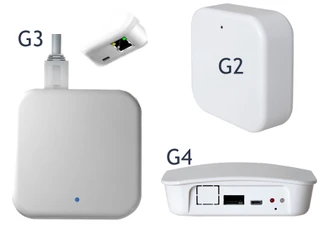
The G-series gateways are the most widely used smart lock gateways in Australia, all operating on the TTLock platform. The G2 is sold under the Lockton E-Series badge; G3, G4, and G5 are sold under McGrath. All four interoperate on the same TTLock cloud and app regardless of which brand name is on the housing. Each model suits a different application — read carefully, as the connectivity types differ significantly. Full gateway comparison blog →

G2 Gateway (Lockton E-Series)
Simple WiFi control — homes, Airbnb, small offices
2.4GHz WiFi only
USB-C powered
Connectivity
2.4GHz WiFi only. Will not connect to a 5GHz-only network. If your router merges bands under one SSID, you may need to separate them — see the WiFi Band section below.

What it enables
Remote lock/unlock · Create and revoke PINs, cards, mobile keys · Real-time access logs · Push notifications

Best for
Lockton E-Series smart locks (ELEV36, ELEV64, Cadell52) and other TTLock-compatible locks · Single home · Airbnb/short-stay accommodation · Small offices · First-time smart lock users wanting simple plug-and-play setup

Reality check
Entry-level option. Works well for small setups but relies entirely on WiFi stability. Not suited to larger or mission-critical sites.

G3 Gateway
Commercial PoE reliability — no WiFi required
Ethernet / PoE only
No WiFi
Connectivity
Ethernet only (RJ45). No WiFi at all. A single Ethernet cable provides both data and power via PoE — no power adaptor required. Significantly more stable than WiFi in commercial installations.
What it enables
Remote lock/unlock · Cloud audit trail · TTLock app integration · Mesh-capable for redundancy · Enterprise-grade reliability
Best for
Commercial buildings · Offices and warehouses · Schools and medical facilities · IT-managed network environments where WiFi is restricted or unreliable
Reality check
The most reliable gateway for structured networks. If WiFi is restricted, unreliable, or controlled by IT, the G3 is the correct choice. Requires Ethernet cabling — not suitable for plug-and-play installs.
G4 Gateway
4G SIM backup — stays online when the internet fails
2.4GHz WiFi
+ 4G SIM fallback
Up to 100 locks
Connectivity
2.4GHz WiFi primary, with a 4G SIM card slot for mobile network fallback. If local internet drops, the G4 stays online via the mobile network — maintaining remote access, logs, and code management. WiFi portion is 2.4GHz only.
What it enables
All G2 features plus: 4G SIM failover · Supports up to 100 locks · Mesh-capable · Remote management worldwide even without local internet · Compact: 70×70×26mm
Best for
Remote or holiday homes with unreliable NBN · Construction sites · Properties where access must never fail · High-risk or critical access points requiring genuine redundancy
Reality check
The 4G SIM requires a mobile data plan — an ongoing cost. Worth it for remote properties where NBN reliability cannot be guaranteed. WiFi portion still 2.4GHz only — same band-steering consideration as G2.
G5 Gateway
Dual-band WiFi — fastest, most flexible, eliminates band-steering problems
2.4GHz + 5GHz dual-band
Up to 100 locks
USB-C powered
Connectivity
Dual-band WiFi: 2.4GHz AND 5GHz. The G5 is the only gateway in the series that supports both bands. This eliminates the band-steering problem entirely — it will connect to your router regardless of how the bands are configured. Recommended range: 8–10 metres per lock.
What it enables
Remote lock/unlock · Full cloud audit trail · Supports up to 100 locks · Multi-admin support · Mesh networking · Faster response times in congested 5GHz environments
Best for
Modern homes and apartments · Hotels and short-stay complexes · Large smart lock deployments · Sites with 5GHz networks · Anyone who's had trouble connecting a G2 due to band steering
Reality check
The most capable and flexible gateway in the series. If your network supports 5GHz, the G5 is the best all-round performer. Priced above the G2 but worth it for larger or more complex installations.
| Gateway | Brand Ecosystem | Key Notes |
|---|
| Yale Connect Plus Hub 2 |
Yale locks only |
Integrates with Yale app, Apple HomeKit, and Google Home. Best gateway for Yale product family users — including the Yale Luna Pro+ with facial recognition. See Chapter 15 — Yale Home platform → |
| Igloohome WiFi Bridge |
Igloohome locks |
Optional add-on — not required for algoPIN or Airbnb Connect to work. Adds real-time remote access, cloud audit trail, and battery monitoring. algoPIN guest codes still function offline even when the Bridge is connected — the offline fallback is always in place. See Chapter 15 — Igloohome platform overview → |
| TTLock Gateway |
TTLock-based locks (Lockton, McGrath, Austyle, various brands) |
TTLock is an OEM platform used by several brand labels. The gateway works across all TTLock-based products regardless of the brand name on the lock. Platform used by PMS integrations (Hospitable, Uplisting, RemoteLock etc.) — see Chapter 07 — PMS integration → · Chapter 15 — TTLock platform overview → |
Browse all gateways and WiFi bridges in stock →
WiFi Band Requirements — The Band-Steering Problem
G2 and G4 gateways require 2.4GHz WiFi — this catches most people out
The G2 and G4 operate on 2.4GHz only. The G3 uses Ethernet and has no WiFi requirement. The G5 supports both 2.4GHz and 5GHz — see below.
Modern routers commonly merge 2.4GHz and 5GHz under a single network name (SSID) using "band steering." A G2 or G4 gateway attempts to connect but may be steered to the 5GHz band it cannot use — resulting in connection failure or intermittent dropout that's difficult to diagnose without knowing this.
The fix: Log into your router admin panel and give the 2.4GHz band its own dedicated SSID (e.g. "HomeNetwork_2.4"). Connect the gateway to this 2.4GHz-only network. If you're unsure how, call your ISP or router manufacturer — it's a two-minute change once you know where to look.
→
Full WiFi dropout troubleshooting guide → ·
FAQ: Why does my lock keep dropping off WiFi? →
The G5 solves this entirely — dual-band means no SSID splitting required
The
McGrath G5 supports both 2.4GHz and 5GHz. It will connect to your router regardless of how the bands are configured — no need to split SSIDs, no band-steering problem. If you're planning a new installation and have any doubt about your router configuration, the G5 removes one of the most common gateway setup headaches entirely. It also performs better in dense network environments (apartments, hotels) where the 2.4GHz band may be congested with competing devices.
2.4GHz vs 5GHz in brief: 2.4GHz has better range and wall penetration but lower speeds and more interference from neighbouring devices. 5GHz is faster with lower latency but shorter range. For a small gateway device bridging a lock to a router nearby, the speed difference is irrelevant — what matters is stability of connection. The G5's dual-band support means it can use whichever band the router offers without issue.
Most gateway dropouts are Bluetooth failures — not WiFi failures
When a connected smart lock drops offline, the instinct is to blame WiFi. In our experience, the majority of dropout cases are actually Bluetooth communication failures between the lock and the bridge — not the bridge's WiFi connection to the router. Bluetooth range is significantly shorter than WiFi range, and common Australian construction materials (brick, concrete, metal doors) degrade it significantly. If your lock is dropping out: move the bridge closer to the lock first. Relocating the bridge within 5–8 metres of the lock resolves the vast majority of support cases without any other changes required.
The gateway must satisfy two requirements simultaneously: within Bluetooth range of the lock, and within WiFi (or Ethernet) range of your router. In most homes, a power point in the hallway near the front door satisfies both — but Bluetooth range to the lock is the harder constraint to meet.
- Bluetooth range to lock — this is the most critical placement factor: The connection between the lock and the gateway is Bluetooth, not WiFi. Bluetooth range is significantly shorter than WiFi — aim for 5–8 metres maximum, with line of sight preferred. Obstructions that cause most dropout problems: brick walls, metal doors, concrete floors, and electrical interference zones (meter boxes, switchboards). The vast majority of gateway support calls we receive are Bluetooth range issues, not WiFi issues. If your gateway is dropping out, move it closer to the lock before adjusting anything else.
- WiFi range to router: Standard home WiFi comfortably covers 15–25 metres through walls. For large homes with the router at the opposite end from the front door, a WiFi mesh node or extender positioned between the router and the door extends coverage to the gateway.
- Power source: All current WiFi gateway models are wall-plug powered (USB-C or Micro USB). Select a power point that will not be accidentally switched off — avoid switched outlets near light switches.
- Line of sight is strongly preferred for Bluetooth: Standard timber-framed walls are acceptable but reduce range. Concrete and brick significantly degrade Bluetooth signal. Metal doors can block it almost entirely. If you cannot achieve line of sight, keep the distance as short as possible — 3–4 metres through a brick wall is more reliable than 7–8 metres.
- G3 Ethernet placement: Position the G3 near an Ethernet port. The PoE cable provides both data and power — no separate power outlet needed near the lock.
What Happens When the Internet Goes Down
When your internet connection drops, the gateway cannot reach the manufacturer's cloud servers — remote access and push notifications stop working. This is expected, not a fault. Your local access methods remain completely unaffected:
- Fingerprint continues to work — validated locally on the lock
- PIN codes continue to work — validated locally on the lock
- RFID cards continue to work — validated locally on the lock
- Bluetooth app continues to work within Bluetooth range — no internet required for local Bluetooth
- Physical key override always works — mechanical, no electronics involved
- algoPIN codes (Igloohome) always work — validated by the lock's internal algorithm, not the internet
Remote unlock, push notifications, and issuing new codes via app stop until internet is restored. For Airbnb properties specifically: ensure guest PINs are issued and communicated before they arrive — never rely on being able to create and push codes in real time during a stay.
G2 vs G3 vs G4 vs G5 Gateways: Full Comparison
Every connectivity spec compared side by side — which gateway suits your number of locks, your network type, and your budget.

Why Smart Locks Drop Off WiFi — Causes and Real Fixes
Dropout causes diagnosed: band steering, Bluetooth range, router placement. Practical fixes that actually work.
Using TTLock for Airbnb: How Automation Really Works
How gateways enable PMS automation — Hospitable, Uplisting, RemoteLock — for multi-property Airbnb operators.
TTLock Tips, Tricks and Hidden Features
Gateway selection, band-steering fixes, clock calibration, and advanced passcode management for TTLock platform users.

Chapter 14 — TTLock Platform Guide
The full TTLock platform context — passcode types, gateway selection, PMS integration, and honest security disclosure.

Chapter 07 — Airbnb & Short-Stay Rentals
algoPIN vs gateway for Airbnb, Igloohome vs TTLock/McGrath, and how gateways fit the short-stay rental workflow.

Chapter 15 — Smart Lock App Platforms Guide
How TTLock, Igloohome, Yale Home, and Carbine Connect compare across architecture, data sovereignty, and use-case fit.
Airbnb Smart Locks: Do You Really Need WiFi?
The complete offline vs connected decision guide — Igloohome algoPIN vs gateway for Australian Airbnb hosts.
 Not sure which gateway you need?
Tell us how many doors, how many properties, and whether you need PMS integration or 4G backup — we'll recommend the right gateway for your situation.

 Get a Recommendation
 (07) 5601 1867