Yale Network Modules: Door Module, Zigbee & Z-Wave Explained
Posted by Jim Noort on 15th Sep 2024

All Assure network modules share the same physical connector. Here’s what each current option does, what’s changed with Z-Wave, and how to choose the right one today.
Yale’s Assure Lock series is designed around a modular connectivity system. The lock itself provides keypad and Bluetooth access locally, but connecting it to a smart home ecosystem — for remote control, automations, and voice assistant integration — requires a network module.
Three module options are current in Australia today: the standard Yale Home Module (included), the Zigbee Module (sold separately), and the Z-Wave 700 Module (sold separately). The older green Z-Wave 500 module has been discontinued and withdrawn from sale — but Z-Wave itself hasn’t gone anywhere. Yale has replaced it with an upgraded 700-series module in the same black housing, and it’s in stock now. This guide covers:
- What each current module does and which protocol it uses
- Whether the modules are physically interchangeable, and which locks they fit
- What happened to the old green Z-Wave module, and what to buy if you need a replacement
- When you need a module at all, and when the Yale Connect Plus Hub 2 is the better answer
For the broader gateway and connectivity picture, see Chapter 08 — Smart Lock Gateway Comparison in the Smart Lock Buyer’s Guide.
This guide was reviewed and updated in August 2026.
The Three Modules — What Each One Does

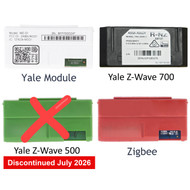
Every module covered in this guide is a genuine Yale (ASSA ABLOY) accessory, designed to plug into the same socket on the back of a compatible Assure Lock, above the battery compartment. The colour coding is intentional — white for the standard Yale Home Module, red for Zigbee, black for the current Z-Wave 700 module. The older green Z-Wave 500 module is discontinued — see below.
- Included with every current Australian Yale Assure lock
- Provides basic connectivity for the Yale Home App via Bluetooth, plus DoorSense and Apple HomeKit at the lock
- No separate hub required for local access
- Does not add Z-Wave or Zigbee capability
- Sufficient for users who only need local and Bluetooth control — view the Yale Home Module
- Connects the lock to any Zigbee-compatible smart home hub
- Enables remote access, automations, and voice control via your hub
- Works with: Samsung SmartThings, Amazon Echo (Zigbee-capable models), Hubitat, Home Assistant, and others
- Uses the open Zigbee standard (IEEE 802.15.4, 2.4 GHz)
- Sold separately — one of two current third-party module paths for Assure locks — view at Terry’s
- Connects the lock to a Z-Wave-compatible hub or alarm system — Samsung SmartThings, Ring Alarm, Alarm.com and other Z-Wave Plus v2 certified hubs
- Uses the Z-Wave 700 (Z-Wave Plus v2) standard at 919.8 MHz and 921.4 MHz — the confirmed AU/NZ frequency pair, printed on the module itself
- Mandatory S2 (AES-128) encryption and QR-code SmartStart provisioning — both new with this generation
- Direct replacement for the discontinued green Z-Wave 500 module, and backward-compatible with an existing 500-series Z-Wave mesh
- Sold separately — the current Z-Wave path for Assure locks — view at Terry’s


Terry’s photographed a genuine Australian YRD-ZWM-2 unit for this guide — the label on the back confirms the model, the R-NZ regulatory mark, and both AU/NZ Z-Wave frequencies (919.8 MHz & 921.4 MHz).
Same black housing, same connector, same module bay as the module it replaces.
Are They Interchangeable?
Yes — physically. Every Assure network module, including the discontinued Z-Wave 500 module, uses the same edge-connector form factor and slots into the same socket on a compatible lock. Removing the existing module and pressing in a new one is a matter of minutes. No tools required — though the lock’s batteries must be removed before swapping the module, and refitted afterwards.

 Always confirm compatibility with your specific lock model before ordering. Both the Zigbee module and the Z-Wave 700 module are confirmed compatible with the Yale Assure Lock series stocked at Terry’s — the YRD226 keyed deadbolt, YRD256 key-free deadbolt, and YRL226 keyed lever, each in Satin Chrome or Matt Black. YRD426 and YRD446 are named on Yale’s published international compatibility list but do not currently have a live Australian listing. Not all Yale lock models use this module system — the Yale Unity Entrance Lock range, for example, uses the Yale Connect Plus Hub 2 for remote access rather than a plug-in module. If in doubt, check your lock’s product page or ask our team before ordering.
Zigbee vs Z-Wave — How They Differ
Zigbee and Z-Wave are both mesh networking protocols for smart home devices — but they are entirely separate ecosystems. A Zigbee hub cannot communicate with Z-Wave devices, and vice versa. Both are current, in-stock module options for Assure locks — the right one depends on which ecosystem your hub or alarm panel already runs.
| Zigbee (Red module) | Z-Wave 700 (Black module — current) | |
|---|---|---|
| Availability (AU) | Current — sold separately, in stock | Current — sold separately, in stock. Direct replacement for the discontinued green 500-series module |
| Standard type | Open (IEEE 802.15.4) — anyone can build with it | Closed (Z-Wave Plus v2, ITU-T G.9959) — licensed, manufacturer-certified. Mandatory S2 (AES-128) encryption on this generation |
| Frequency | 2.4 GHz (shared with WiFi and Bluetooth) | Sub-GHz — 919.8 MHz & 921.4 MHz in Australia (dual-channel) — less interference |
| Provisioning | Standard pairing through your hub’s app | SmartStart — scan the module’s QR code in a SmartStart-capable hub app before fitting; no manual inclusion mode needed |
| Network | Mesh — devices relay signals for each other | Mesh — devices relay signals for each other |
| Compatible hubs (AU) | Samsung SmartThings, Amazon Echo (Zigbee-capable models), Hubitat, Home Assistant (with Zigbee coordinator), Philips Hue Bridge (limited) | Samsung SmartThings, Ring Alarm, Alarm.com, ADT, Hubitat, Homey, Home Assistant (with Z-Wave stick), most Z-Wave certified alarm panels. Backward-compatible with an existing 500-series Z-Wave mesh |
| Voice assistants | Alexa, Google Assistant (via compatible hub) | Alexa, Google Assistant (via compatible hub) |

What Happened to the Z-Wave Module?
Yale withdrew the original Z-Wave 500 Module (green, YRD-ZWM-1) from sale in Australia in July 2026. Existing modules already installed keep working — this was never a recall or a remote shutdown of installed hardware. What changed is the answer to what do I buy new: Yale has replaced it with the Z-Wave 700 Module (black, YRD-ZWM-2), a straight generational upgrade on the 700-series Z-Wave Plus v2 platform, in stock now.
The 700-series module brings a genuine upgrade over the 500-series it replaces — Yale cites 46% greater wireless range and 20% better battery efficiency, along with mandatory S2 (AES-128) encryption where the previous generation made S2 optional, and QR-code SmartStart provisioning for faster setup. It slots into the same module bay as the old module and is backward-compatible with an existing 500-series Z-Wave mesh, so it doesn’t force an upgrade of the rest of your network.
For reference, the correct Z-Wave frequency pair for Australia and New Zealand is 919.8 MHz and 921.4 MHz (AS/NZS 4268), printed directly on the module’s own regulatory label — Terry’s photographed a genuine Australian unit to confirm this. If you’re buying a Z-Wave hub second-hand or from overseas to pair with a Yale module, confirm it supports this frequency pair — a hub built for the US or European Z-Wave band (908.4 MHz / 868.4 MHz) will not communicate with an AU-frequency module.

Do You Actually Need a Module?
Not necessarily. What you need depends on how you want to control the lock remotely.
Buy the matching module — Zigbee or the current Z-Wave 700 module, both sold separately and in stock. The hub provides remote access, automations, voice commands, and real-time notifications; the module is the bridge between the lock and the hub.
The Yale Connect Plus Hub 2 is a WiFi bridge designed specifically for the Yale/Lockwood range. It connects directly to your home router and gives you remote access via the Yale Home App — no Zigbee or Z-Wave ecosystem required. This is the standard solution for the Yale Unity Entrance Lock range.
The lock works fully without any add-on module for keypad and Bluetooth access. The included Yale Home Module supports the Yale Home App locally. If remote access is not a requirement, you need nothing additional.
Modules require a compatible hub to function — the module alone does not provide remote access. Both the Zigbee and Z-Wave 700 modules are radio transmitters. Without a matching hub to receive and route their signal, they add nothing to the lock’s capabilities. The hub (Samsung SmartThings, Ring Alarm, Amazon Echo, etc.) is a separate purchase. For a detailed gateway comparison, see Chapter 08 — Smart Lock Gateway Comparison. For troubleshooting WiFi connectivity on the Connect Plus Hub 2, see Why Smart Locks Sometimes Drop Off WiFi.Frequently Asked Questions
 Are the Yale Home Module, Zigbee Module and Z-Wave Module interchangeable?
Yes, physically. Every Assure network module — including the discontinued green Z-Wave 500 module — shares the same edge-connector form factor and slots into the same socket on a compatible Yale Assure lock. You can swap between them without tools, though the lock’s batteries must come out first. Each module connects to a different smart home ecosystem, so while the hardware is interchangeable, the hub you need changes depending on which module is installed. The current lineup is the Home Module (included), and the Zigbee and Z-Wave 700 modules, both sold separately.
What is the difference between Zigbee and Z-Wave for Yale smart locks?
Zigbee uses an open standard (IEEE 802.15.4) operating at 2.4 GHz and is supported by a wide range of hubs including Samsung SmartThings, Amazon Echo and Hubitat. Z-Wave uses a closed, licensed standard operating on 919.8 MHz and 921.4 MHz in Australia, a sub-GHz band with better wall penetration and less interference from WiFi. Both protocols are current, in-stock module options for Yale Assure locks — the current Z-Wave module is the 700-series (black), which adds mandatory S2 encryption and SmartStart provisioning over the module it replaced. Both require a compatible hub — the module alone does not provide remote access.
Which Yale locks are compatible with the Zigbee and Z-Wave network modules?
Both modules are confirmed compatible with the Yale Assure Lock series stocked at Terry’s — the YRD226 keyed deadbolt, YRD256 key-free deadbolt, and YRL226 keyed lever, each in Satin Chrome or Matt Black. YRD426 and YRD446 are named on Yale’s published international compatibility list but do not currently have a live Australian listing. Not all Yale locks use this module system — the Yale Unity Entrance Lock range, for example, uses the Yale Connect Plus Hub 2 for remote connectivity rather than a plug-in module. Always confirm compatibility with your specific model before purchasing.
Do I need a module if I already have a Yale Connect Plus Hub 2?
No. The Yale Connect Plus Hub 2 is a WiFi bridge that provides remote access via the Yale Home App without requiring a Zigbee or Z-Wave module. If your lock is compatible with the Connect Plus Hub 2, you do not need a separate network module for remote access. The Zigbee and Z-Wave modules are for users who want to integrate their Yale lock into an existing third-party smart home ecosystem instead.
My existing green Z-Wave module has failed — what do I replace it with?
The Yale Z-Wave 500 Module (green, YRD-ZWM-1) is discontinued and no longer available new. The direct replacement is the Yale Z-Wave 700 Module (black, YRD-ZWM-2) — it fits the same module bay in the same host locks, and is backward-compatible with an existing 500-series Z-Wave mesh, so the rest of your Z-Wave network does not need to change. Remove the old module, remove and refit the lock’s batteries, seat the new one, and re-pair it with your hub as a new device.
Can I switch from Z-Wave to Zigbee, or the other way around?
Yes. Because every Assure module shares the same physical form factor, you can remove one module and press in another, provided your lock model supports it. No tools are required, but the lock’s batteries must be removed first. You will need to pair the lock with your new hub after swapping — a Z-Wave hub and a Zigbee hub are not interchangeable, so check compatibility with your existing or planned smart home system before committing either way.
Not Sure Which Module Your Lock Needs?
Tell us your lock model and smart home hub and we’ll confirm the right module — or whether the Yale Connect Plus Hub 2 is the better answer for your setup.
Ask an ExpertVisit Australia’s leading Smart Lock showroom and workshop:
Gold Coast Smart Locks
9/2 Prosper Crescent
Burleigh Heads, QLD
See working models, compare gateways, and get real advice before you commit.