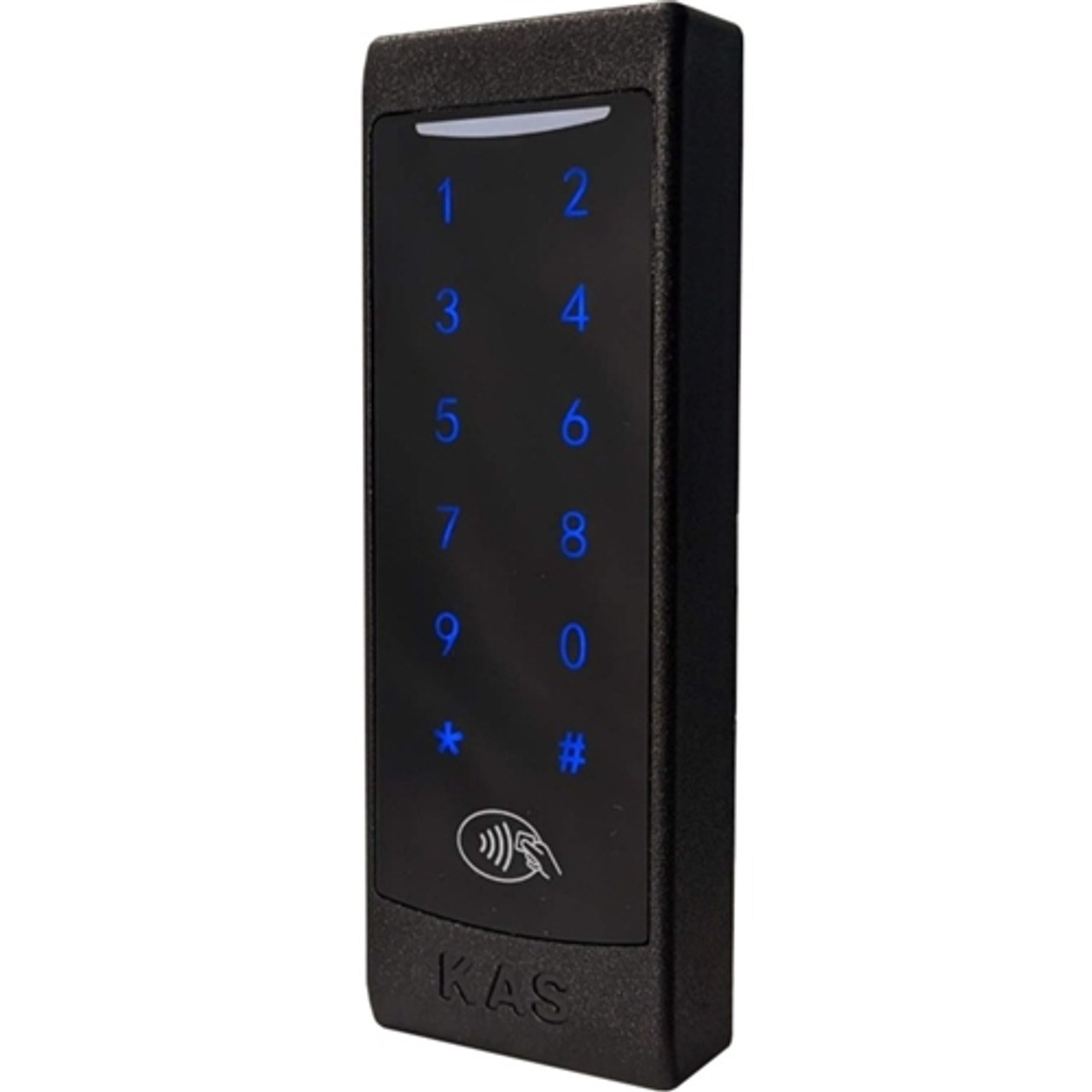



KAS NEO Cloud ACR2 Lock-S Reader with Keypad
The KAS NEO Cloud ACR2 Lock-S Reader with Keypad is a hardwired, multi-credential access-control reader designed for hotels, apartments, gyms, and commercial sites requiring flexible credential support and structured access management. Unlike battery-powered smart locks, this reader is mains-powered (12-24 V) and integrates directly with door hardware via solid-state NO/NC relays — making it suited to electric-strike, electromagnetic lock, and broader access-control wiring configurations.
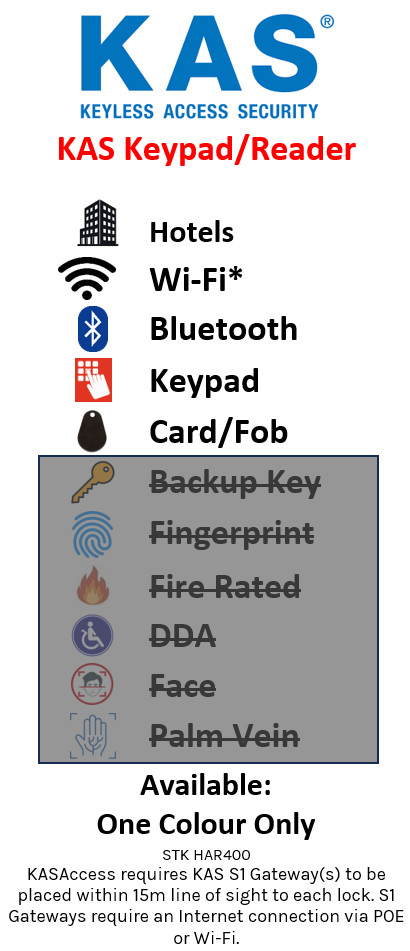
The ACR2 supports RFID/Fob, PIN code, and Bluetooth entry and operates across three management pathways: Stand Alone for simple local management, KAS Access for cloud-based remote management, and Lock-S for PC-based in-house credential control without cloud dependency. The same reader platform can be deployed in a simple local setup or as part of a broader managed access network — with gateway-enabled online features available when a KAS S1 Gateway is in range.
The reader is resin-encased for waterproof outdoor suitability, includes a tamper switch, supports Wiegand 37 for optional external keypad integration, and provides event map functionality for user-defined notifications and alarm conditions. A separate power supply is required and is not included.

The same NEO ACR2 reader platform can be deployed in a simple standalone site or as part of broader KAS Access (cloud) or Lock-S (PC-based offline) managed access systems. Many local programming codes are shared with the KAS NEO lock body, making mixed-platform deployments straightforward. See Which Smart Lock Platform Is Right for You? — Commercial for a platform comparison.

KAS states that the power supply is not supplied with the HAR400 series reader and must be provided separately. The reader requires a 12-24 V DC supply. Maximum cable run between power supply and reader is 50 m (Cat-5 or Cat-6 cable). Ensure the power supply and cabling arrangement is sized for the reader and any connected door hardware.



 Key Features
- Supports RFID/Fob, PIN code, and Bluetooth entry
- Hardwired operation — 12-24 V DC supply (not included)
- Solid-state NO/NC relays for secure door hardware switching
- Tamper switch included — generates alert on physical tampering
- Switch monitor via RS/dry contact
- Resin-encased electronics — fully waterproof and suitable for direct outdoor rain exposure
- Wiegand 37 support for optional external keypad integration
- Event map functionality for user-defined notifications and alarm conditions
- Three management pathways: Stand Alone, KAS Access (cloud), and Lock-S (PC-based offline)
- Stand Alone mode — local PIN and RFID programming without cloud setup
- KAS Access — cloud-based remote and in-house management
- Lock-S — PC software management for in-house credential control, no internet required for routine operation
- Shared NEO programming logic — most local codes shared with the KAS NEO lock body
- Supports single-opening and dual-opening (dual-credential) modes
- Free passage mode — enable locally after a valid opening; card can cancel it
- Up to 100 PIN users and 100 RFID users in local management mode (user IDs 00-99)
- Maintenance-friendly connector design
- Maximum 50 m cable run from power supply to reader unit
- Online features require the optional KAS S1 Gateway in range
Access Methods


 Suitable Uses
- Hotel and motel guest-room doors requiring hardwired reader integration with electric strike or mag lock
- Common doors in apartment buildings — stairwells, car parks, amenity areas
- Commercial tenancy access control — staff doors, server rooms, restricted areas
- Gym and member-access facilities requiring timed, multi-user credential management
- Sites needing outdoor-rated reader hardware exposed to direct rain
- Mixed deployments alongside the KAS NEO lock body within the same platform family
- Any application requiring dual-credential (RFID + PIN match) for higher access assurance
 Available Finish Options
 Gunmetal Champagne
(This Product)
HAR400
Finish selection does not affect functionality, compliance, or performance.
 KAS NEO Cloud Lock Range
Full Specifications
Gateway and Online Features
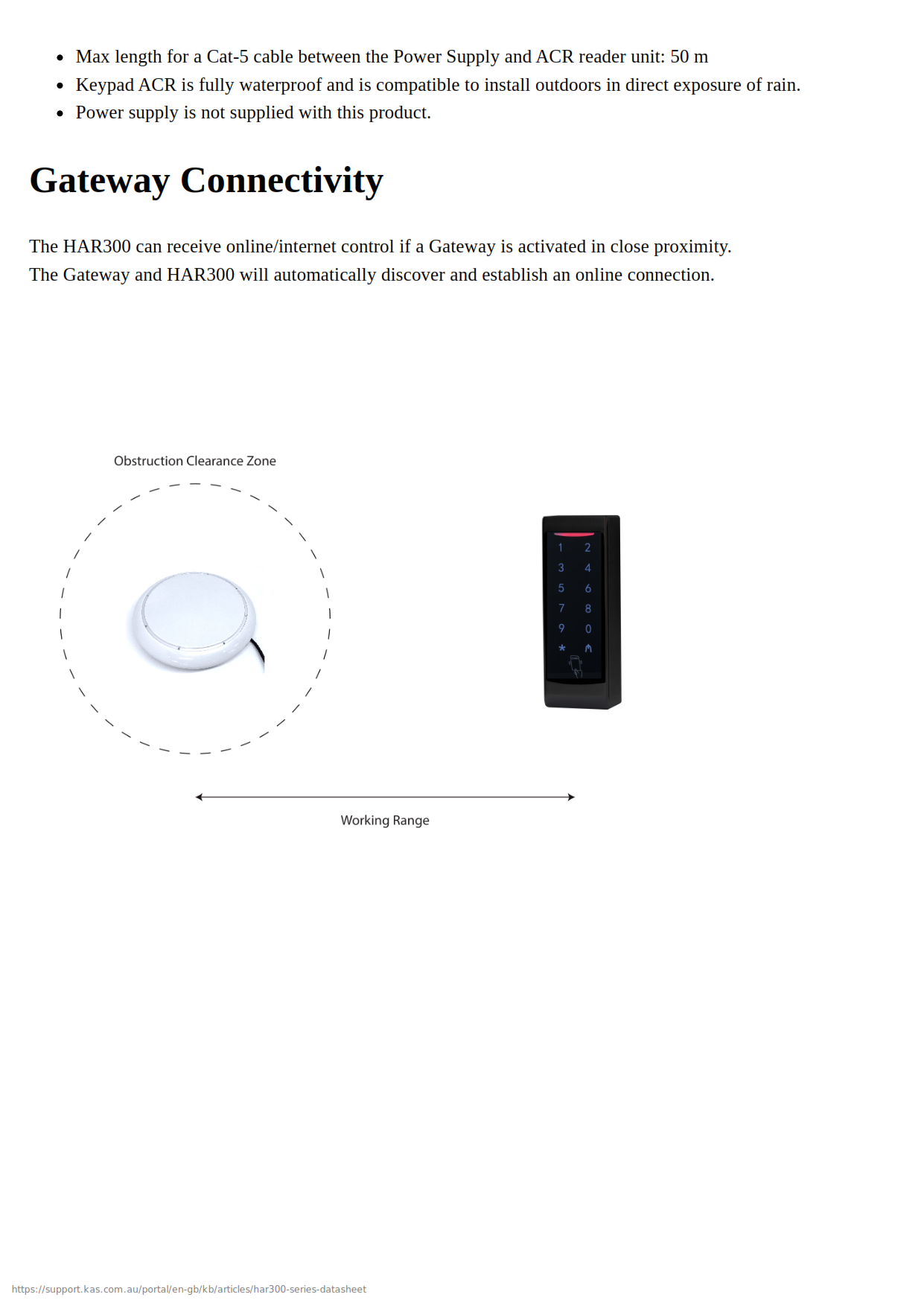
KAS states the ACR2 reader can receive online control when an activated KAS S1 Gateway is in close proximity. Remote and internet-based features — including web-console credential management and real-time monitoring — depend on gateway visibility and signal path, not just the reader hardware itself. Without a gateway, the reader operates in local mode only. See What a Gateway Does and Other Gateway Systems in the Gateway Comparison Guide for context on how gateway-based access control works.
Core lock operation using RFID, PIN, and proximity Bluetooth credentials continues without internet connectivity. Only remote management and real-time monitoring features require an active gateway and internet connection. See What Happens When the Internet Goes Down.
 Accessories and Compatible Products
 Frequently Asked Questions
Yes. KAS states the shared NEO/ACR platform supports local management functions including local PIN and RFID programming without requiring cloud setup for basic operation. Stand Alone mode allows up to 100 PIN and 100 RFID users managed locally.
The keypad locks out for 1 minute after 3 incorrect PIN attempts. KAS states this feature cannot be disabled.

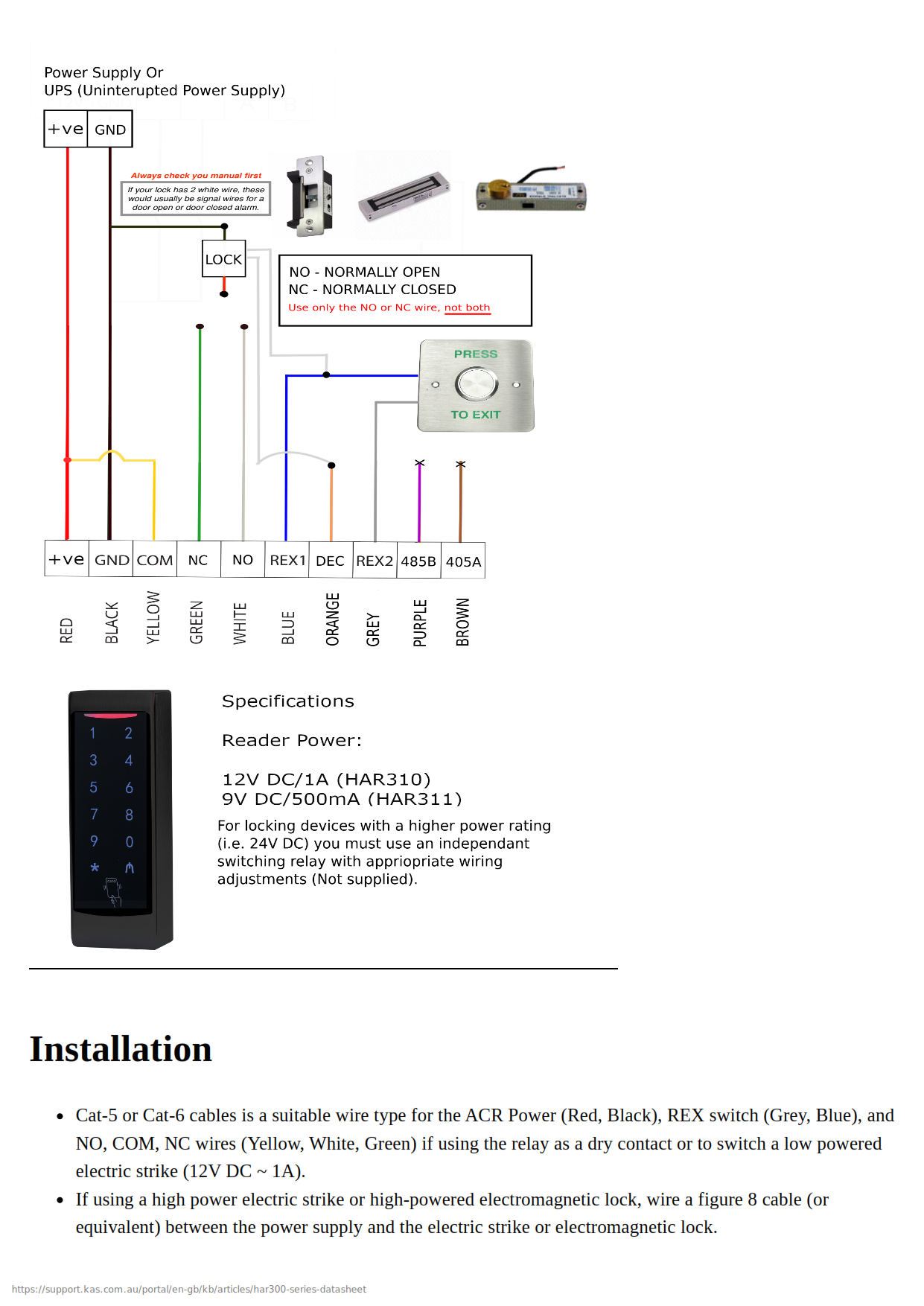
Yes, but wiring method matters. KAS states the relay can be used as a dry contact or to switch a low-powered electric strike. Higher-powered strikes or electromagnetic locks should be wired with a separate cable and appropriate power arrangement rather than relying on the reader relay alone. Consult a licensed installer for high-powered locking hardware wiring.
Yes. KAS states the keypad ACR is fully waterproof and suitable for direct outdoor rain exposure when installed correctly. Electronics are resin-encased.

KAS's first troubleshooting step is to reset the device using the management-code reset command, then try pairing again. If that fails, KAS also documents a wireless-node reset procedure inside the unit. See Smart Lock Troubleshooting Guide for general diagnostic steps.
Yes. The reader includes a tamper switch that generates an alert event if the unit is physically interfered with. See What Is a Tamper Alert on a Smart Lock? for background on how tamper detection works and what to expect.
Additional Information
KAS notes that many local programming codes are shared between the NEO lock body and the ACR2 reader, apart from ACR-specific customisation functions. This is useful for sites deploying both readers and locks within the same platform family — staff familiar with one device will find the other largely familiar. See KAS NEO Cloud Lock Lock-S Access (HOP310) for the companion lockset.

The reader supports dual-opening logic, which requires matching RFID and PIN credentials for the same user ID before the relay triggers. This is useful for restricted areas where single-credential entry is considered insufficient. Users must hold the same ID across both credential types for dual mode to function correctly.
The ACR2 reader is not a substitute for proper strike or lock power design. KAS lists dry-contact relay outputs and warns that high-powered locking hardware should be wired separately. If wiring an electromagnetic lock or a high-draw electric strike, plan a dedicated power circuit — do not rely on the reader relay alone. See Common Smart Lock Installation Mistakes and consider Terry's Site Survey and Installation Service for complex commercial wiring.
KAS states Cat-5 or Cat-6 cable is suitable for power, request-to-exit, and relay wiring in lower-power applications, with a maximum 50 m run between the power supply and ACR2 reader. Exceeding this run without appropriate power conditioning may cause operational issues.
KAS states the ACR2 can receive online control when an activated gateway is in close proximity. Remote features depend on the gateway being within radio range — placement planning matters. See Gateway Placement Guide for siting advice.
KAS specifically advises removing the clear protective keypad film once the unit is fully commissioned. Leaving it on long-term can make later removal difficult and may affect keypad sensitivity.
Hardwired commercial readers are a long-term infrastructure investment. See How Long Do Digital Door Locks Last? — Installation Quality and The Realities of Electronic Door Locks — What Actually Fails for honest context before specifying. For commercial and institutional projects, Terry's Locksmiths can advise on platform selection — see Commercial and Institutional Smart Lock Brands for how KAS fits in the wider commercial landscape.
Buyers comparing Lock-S, KAS Access (cloud), and standalone operation should read Choosing a Smart Lock Platform before committing to a management pathway. The right choice depends on site size, internet reliability, and whether remote credential management is needed.

KAS Access Video Playlists
KAS provides a YouTube playlist library covering setup, programming, troubleshooting, and system use across the KAS access-control range. Useful for installers and site managers wanting a clearer view of system workflow, credential setup, and day-to-day operation.

KAS products are covered by a 24-month manufacturer's warranty against defects in materials and workmanship.
- Return-to-base repair or replacement (subject to KAS assessment)
- Technical support provided during the warranty period
 KAS NEO Access Control Installation and Specifications
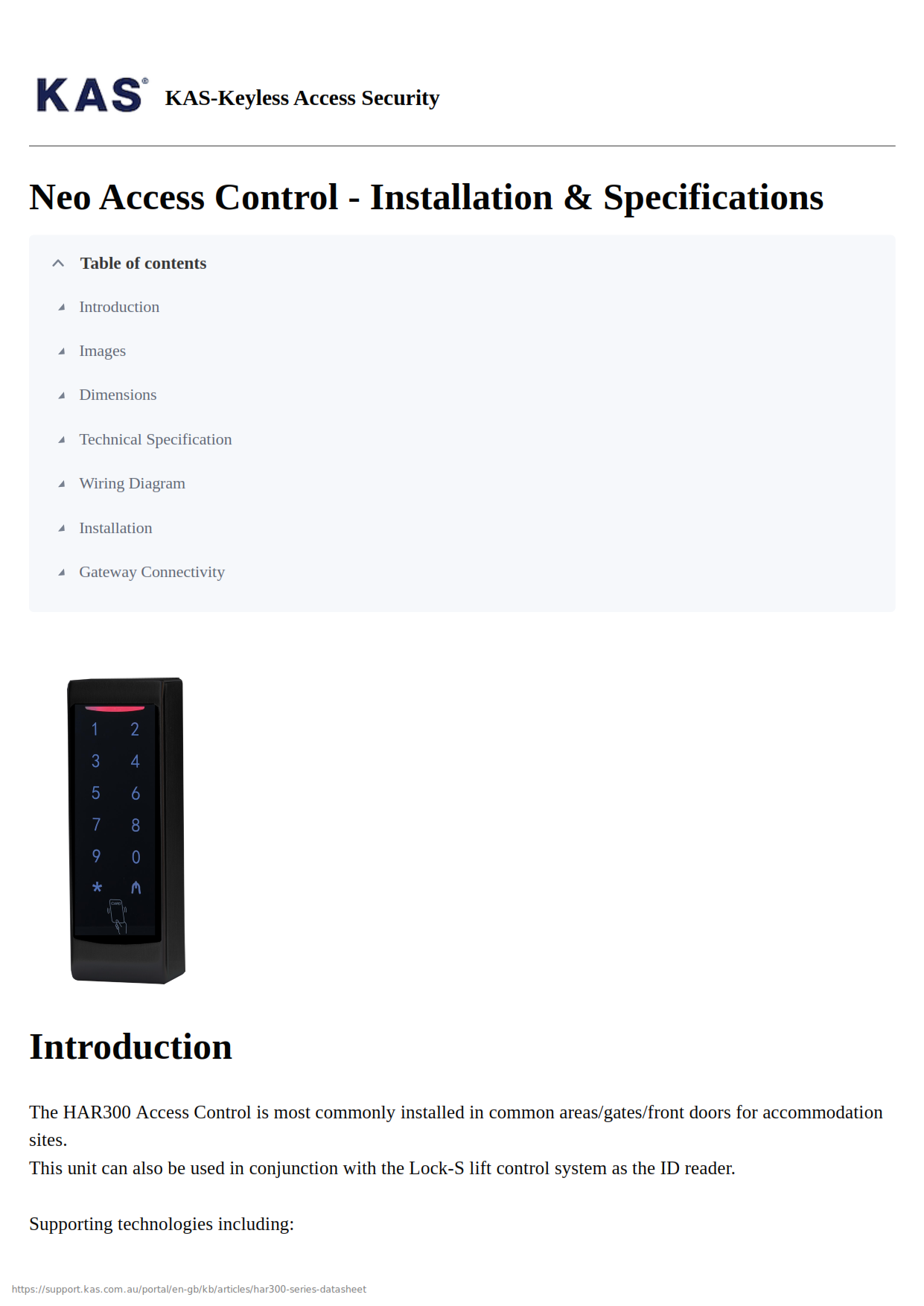
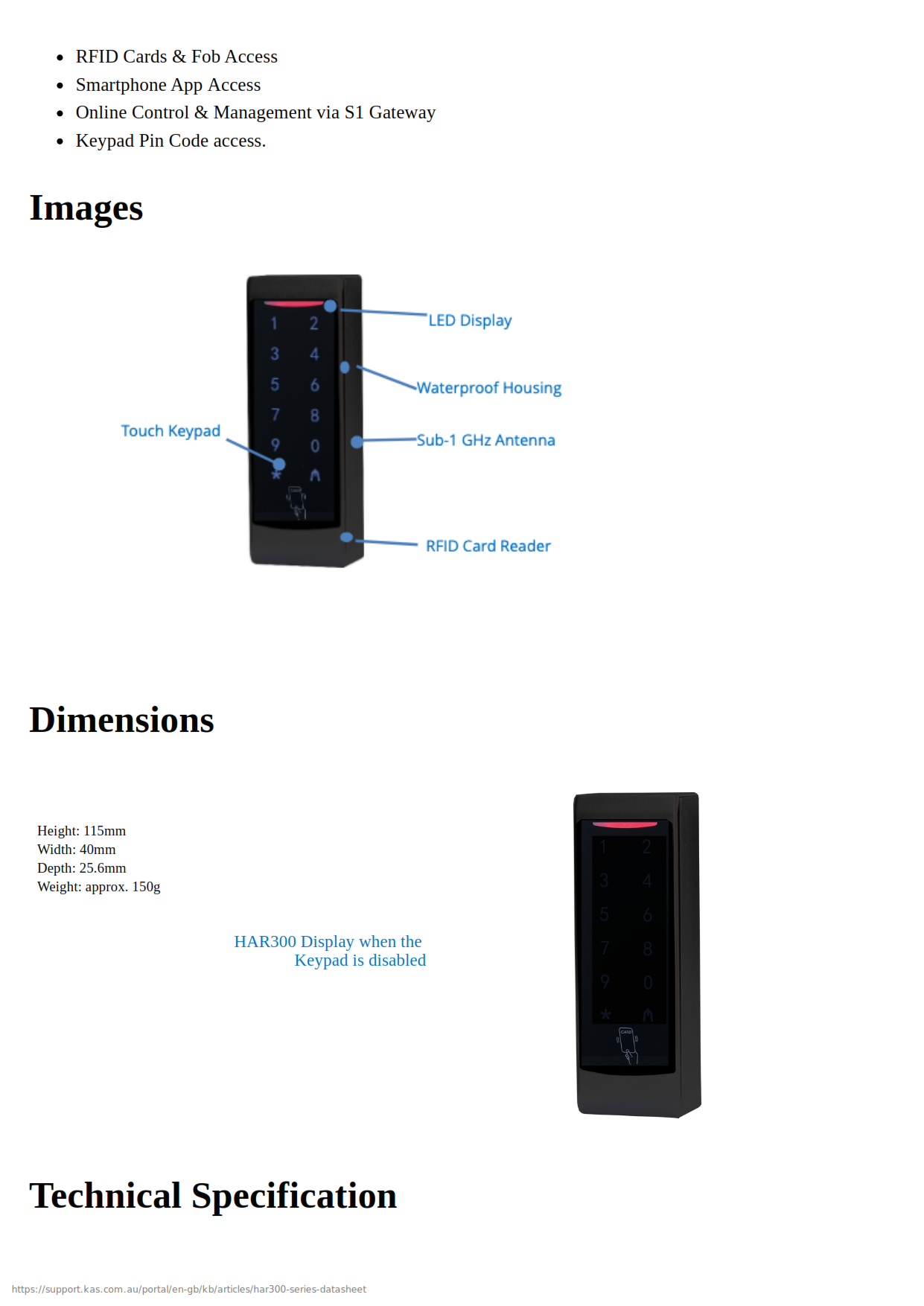
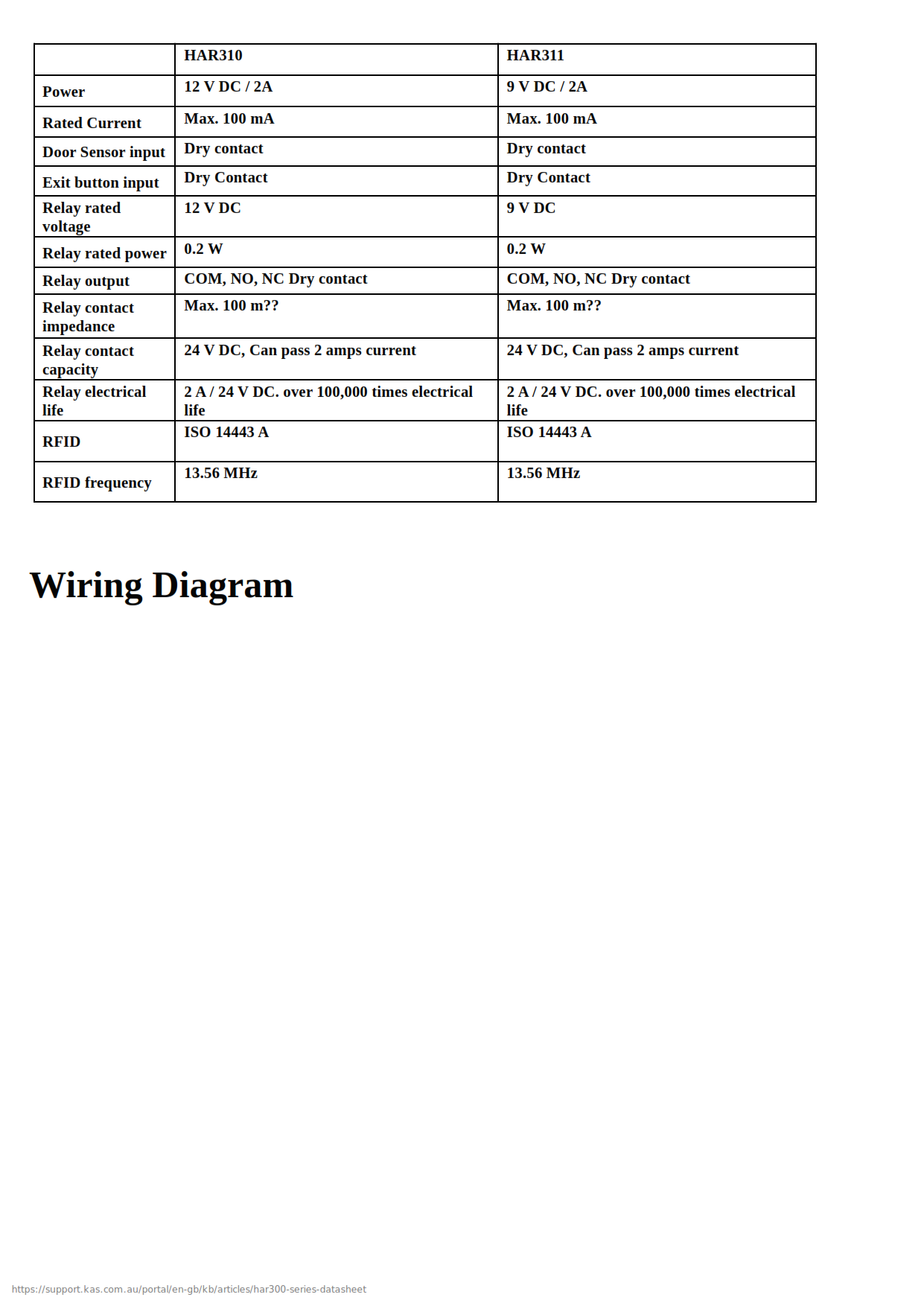
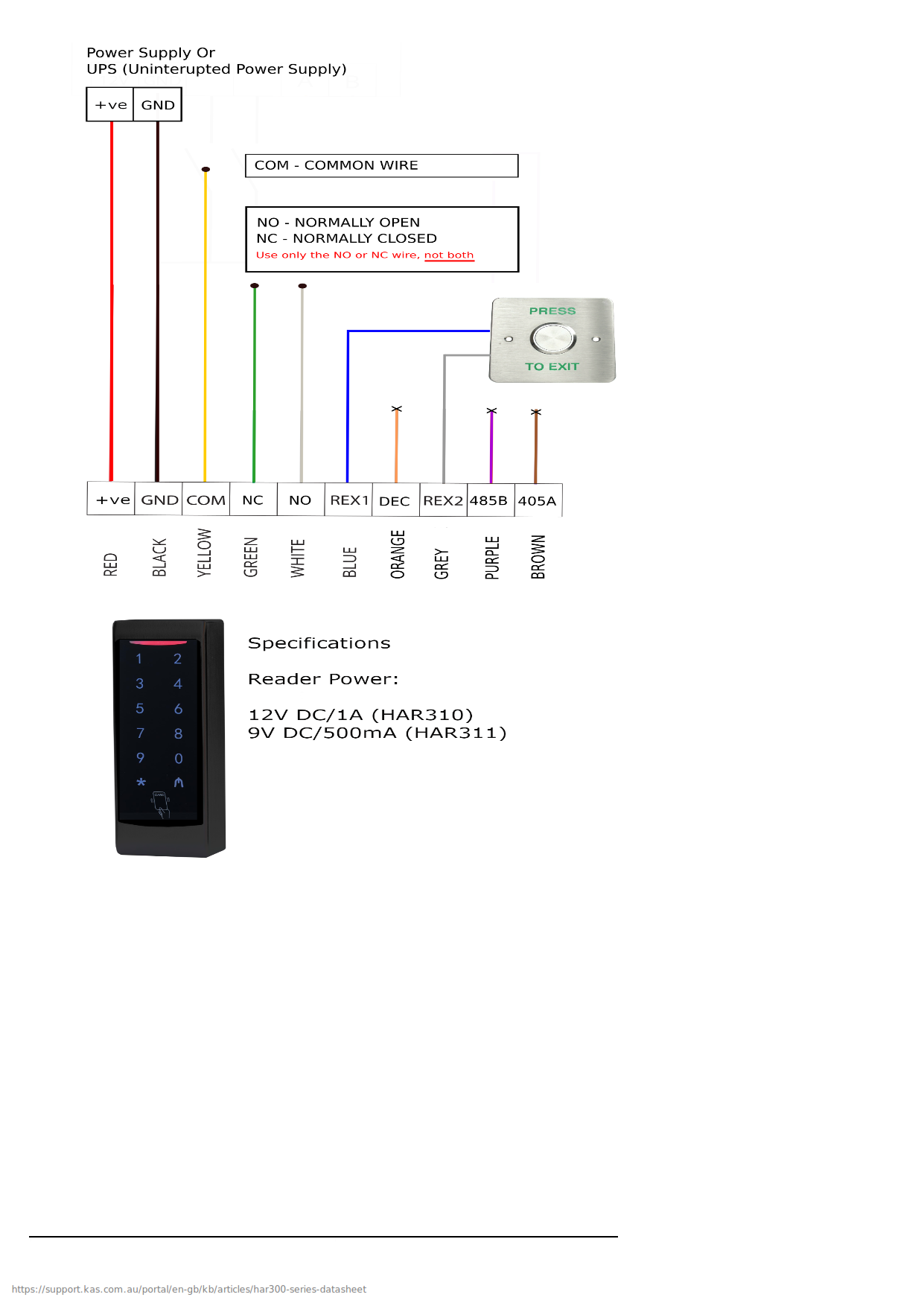
KAS NEO Access Control Installation and Specifications
KAS Warranty Overview
KAS electronic locking products are supplied with a 24-month manufacturer’s warranty covering defects in materials and workmanship under normal operating conditions.
This warranty is a return-to-base manufacturer warranty. Products must be assessed by KAS before repair or replacement is approved.
 Warranty Summary
What the Warranty Covers
- Defects in materials or manufacturing
- Repair or replacement of faulty hardware (subject to KAS assessment)
- Technical support during the warranty period
Common Exclusions
- Labour, removal, reinstallation or service call costs
- Freight costs to return goods to KAS
- Incorrect installation or commissioning
- Misuse, tampering or unauthorised modification
- Environmental exposure including moisture, corrosion or debris
- Network, WiFi or connectivity issues
- Consumables including batteries
- Normal wear and tear
Warranty Claim Process
- Report the fault with supporting details (photos or video recommended)
- Follow troubleshooting guidance provided by KAS
- Obtain return approval before sending product
- Return product for assessment (freight at customer cost)
- Approved claims will be repaired or replaced and returned
During the warranty process, the product may be unavailable. The customer is responsible for maintaining site security and access during this period.
 Australian Consumer Law
This warranty operates in addition to rights available under the Australian Consumer Law. Goods come with guarantees that cannot be excluded. Customers may be entitled to a replacement or refund for a major failure and compensation for reasonably foreseeable loss or damage.
Reference

Confused? Overwhelmed? We get it.
Choosing the right smart lock can be genuinely tricky - door types, backsets, app platforms, compatibility with your existing hardware... there is a lot to consider. We have decades of experience fitting locks of all types, including smart locks, and we are happy to help.
Our expert recommendation service is free. Upload a few photos of your door and describe what you need, and one of our qualified locksmiths will give you a personalised recommendation.
Get Your Free Recommendation →How it works - three easy steps:
1. Upload photos
A few clear shots of your door, lock and frame - inside and out.
2. We assess
Our locksmith reviews your setup and requirements - door type, weather exposure, how you want to use it.
3. You get a recommendation
A personalised recommendation tailored to your door, budget and needs. No pressure, no upsell.
Also useful while you are deciding: