

Vault G5 Gateway for Remote Access & Smart Home Control
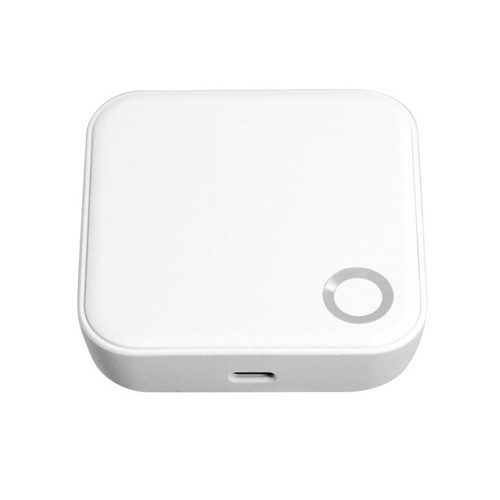
The Vault G5 Gateway is the Wi-Fi bridge that connects compatible Vault smart locks to the internet, unlocking remote management and smart-home functionality through the Vault app.
Without the gateway, compatible Vault locks operate locally through Bluetooth and onboard credentials. With the G5 Gateway installed, supported locks can be managed remotely for functions such as activity review, credential updates, clock calibration, and compatible Alexa or Google Home integration.
The G5 is an accessory device, not a lock. It is intended to extend the capabilities of supported Vault products that already operate locally through the Vault app.

Usually ships in 1 - 2 business days.
 Key Features
- Connects compatible Vault smart locks to your home or site Wi-Fi network.
- Enables remote lock management through the Vault app.
- Supports access-log viewing and remote credential management on compatible locks.
- Enables compatible Alexa and Google Home integration.
- Acts as the bridge between Bluetooth-based Vault locks and internet-based remote control.
 What's in the Box
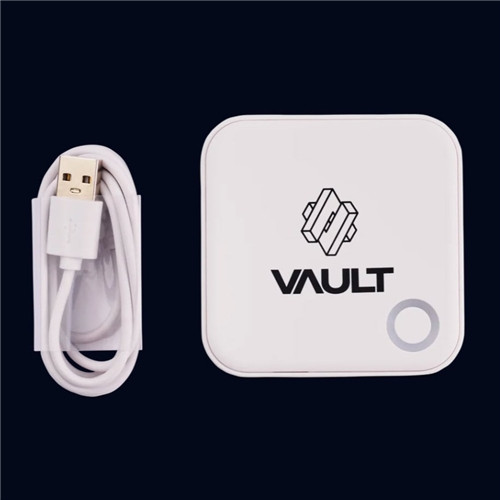
- Vault G5 Gateway
- Digital manual
 Remote Functions
Compatible Vault locks communicate locally through Bluetooth. The G5 Gateway bridges those locks to your Wi-Fi network so remote functions become available through the Vault app.
 Suitable Uses
- Homes requiring remote lock control
- Property managers needing off-site access management
- Holiday rentals or serviced accommodation
- Multi-lock environments using the Vault app
- Users wanting Alexa or Google Home integration on compatible Vault locks
 Specifications
 Frequently Asked Questions
- Do I need a G5 Gateway for my Vault lock to work?
No. Compatible Vault locks can still operate locally via Bluetooth and onboard credentials. The G5 is required only for remote control and internet-based features. - What does the G5 Gateway actually do?
It connects compatible Vault locks to your Wi-Fi network so remote functions can be managed through the Vault app. - Can the G5 enable Alexa or Google Home?
Yes. Compatible locks can integrate with supported Alexa and Google Home setups when paired with the G5 Gateway. - Can I manage passwords remotely with the G5?
Yes. The G5 manual states that compatible locks can have passwords remotely modified or deleted through the gateway connection. - Is the G5 a lock?
No. It is an accessory device that extends the capabilities of compatible Vault smart locks.
 Additional Information
- Accessory Role: The G5 should be treated as a system accessory rather than as a security device on its own.
- Best Use Case: It is most useful where remote lock control, off-site monitoring, or smart-home integration is required.
- Lock Dependency: Final functionality depends on the compatible Vault lock paired with the gateway.
- Bridge Function: The G5 does not replace Bluetooth lock operation; it extends it to the internet.

Vault Smart Locks products purchased in Australia are covered against defects in materials and workmanship under normal use for:
- Electronic components: 2 years

Vault G5 Gateway User Manual
Vault G5 Gateway User Manual
Vault Smart Locks Warranty Overview
Vault Smart Locks products sold in Australia are covered by a manufacturer warranty against defects in materials and workmanship under normal residential and light commercial use.
This overview summarises the structure of Vault warranty coverage. Full terms, exclusions and claim procedures are available via the official Vault warranty policy.
Warranty Periods Summary
What the Warranty Covers
- Defects in materials and workmanship under normal use.
- Repair or replacement of faulty components at manufacturer discretion.
- Assessment of product condition to determine appropriate remedy.
 Common Exclusions
- Incorrect installation or failure to follow installation instructions.
- Misuse, abuse, forced entry damage or tampering.
- Exposure to extreme environmental conditions (water ingress, corrosion, chemicals).
- Normal wear and tear including surface finishes.
- Battery failure or damage caused by battery leakage.
- Use of non-approved accessories or components.
- Labour, removal, reinstallation or freight costs.
 Installation & Usage Requirements
- Installation must follow manufacturer instructions.
- Products must be used within specified door thickness and application limits.
- Regular maintenance and cleaning must be carried out as recommended.
- Smart functions require correct configuration via the Vault app.
 Warranty Claim Process
- Retain proof of purchase.
- Contact the original place of purchase or supplier.
- Provide details of the issue and supporting information.
- Return the product if requested for assessment.
- Outcome may include repair, replacement, or refund depending on assessment.
 Australian Consumer Law
Vault Smart Locks warranties operate in addition to rights available under the Australian Consumer Law. Goods come with guarantees that cannot be excluded. Customers may be entitled to a replacement or refund for a major failure and compensation for reasonably foreseeable loss or damage.
Official Warranty Information
It can be overwhelming with all the choices out there. We can help! We are experts with decades of experience in fitting locks of all types, not just Smart Locks. It is a free service we offer, and with just some photos and a few minutes of your time you can get expert advice and product recommendations tailored precisely to suit your needs.
Click on the image below to begin your expert Smart Lock consultation