
Digital Mechanical Locks - Passage Mode vs Holdback Mode
Posted by Mat Steele on 9th Jul 2026

Both features allow temporary free access — but they do it in very different ways, and one of them is never allowed on a fire door.
Many mechanical digital locks, including some Borg models, offer either passage mode or holdback mode. The terms are often confused because both allow a door or gate to be used without entering a code every time — but they are not the same thing.
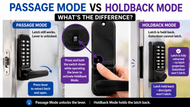
The simple difference: passage mode leaves the latch working but unlocks the handle, while holdback mode holds the latch retracted so the door or gate cannot latch closed.
This guide covers:
- What each function actually does to the lock, mechanically
- When each one earns its keep — and the risks of leaving them on
- The fire door hard exclusion, and what holdback needs to be legal on a pool barrier gate
- Why shared and strata gates usually want neither function
- What the exit-path rules mean for knob versus lever models
If you are new to this style of lock, start with the main guide on how mechanical digital locks work and come back.
The Simple Answer
The latch still works, but the outside lever or knob remains unlocked. Anyone can press the lever or turn the knob to retract the latch and open the door without entering a code.
The latch is held back in the retracted position. The door or gate is not latching at all while holdback is engaged.

What Is Passage Mode?

Passage mode allows the lock to be used freely without entering the code each time. When it is active, the outside lever or knob is no longer locked — anyone can operate the handle, retract the latch, and open the door.
The important point is that the latch itself still works. When the door closes, the latch still engages with the strike and holds the door in the closed position.
Passage mode: the latch keeps working, the lever stays unlocked — press the lever to retract the latch and open.

When Is Passage Mode Useful?
Passage mode suits a door that should remain easy to use for a period of time, while the latch keeps holding it closed:
- Business hours on a staff door
- A storeroom during active use
- A meeting room or office during the day
- A commercial door where access is temporarily open
- A controlled area where the lock is only required after hours
A model such as the Borg BL7701 heavy duty lock with free passage is built exactly for this style of temporary free access on commercial doors.
What Is Holdback Mode?
Holdback mode works differently. Instead of unlocking the handle, holdback holds the latch in the retracted position — the latch is no longer projecting into the strike at all.
In simple terms: the door or gate cannot latch while holdback is engaged. It may close against the frame, but nothing is holding it there.

For Borg’s step-by-step on switching holdback on and off — including which way to turn the handle for your door hand — see how to use holdback on a Borg lock.

When Is Holdback Mode Useful?
Holdback is best treated as a short-term convenience. If you are bringing in shopping, moving bins, carrying tools or walking back and forth through a front gate several times, holdback stops the gate latching every time it closes:
- Bringing shopping through a front gate
- Moving bins in and out
- Carrying tools or materials through a gate
- Temporary access during gardening or maintenance
Used carefully, it is genuinely handy. Left on, it is a problem: the gate may blow open in wind, sit partly open, or look closed without being secured — and shared users forget to turn it off. Treat it as a temporary feature, never a permanent state on a gate that is meant to stay secured.
A model such as the Borg BL2601 marine grade knob lock includes an optional holdback function, and for narrow gate frames the Borg BL2202SC pairs holdback with a 28mm latch. Every Borg lock we carry with holdback is listed in our Borg holdback model list.
Function availability differs even within a series: the Carbine CDL7100-HBSC-HD heavy duty carries holdback, while the CDL7200LL dual-lever model does not. Always check the exact model.
The Key Difference
The most important difference is what happens to the latch.
Passage mode allows the latch to keep working. The lever is unlocked, but the latch still catches into the strike when the door closes.
Holdback mode stops the latch from engaging. The latch is held back, so the door or gate may close against the frame, but it is not actually latched.
Never on a Fire Door
A fire door only does its job when it is closed and latched — the latch is part of what holds the doorset intact against fire and smoke. A latch that is held retracted defeats the door entirely, which is why the manufacturers are blunt about it. Lockwood states it plainly in its DX digital lock catalogue (PDF): "Holdback must not be activated on fire doors."
The same logic applies to every brand's holdback function, not just Lockwood's. If the door is a fire door, holdback is never engaged — full stop. The lock itself must also be fire certified for the doorset: the requirements are covered in which locks are compliant on apartment fire doors and the AS 1905.1 fire doorset standard.

Pool Safety Barrier Gates
Pool barrier gates are not a hard exclusion — they are a setup question. A gate forming part of a pool safety barrier must self-close from any position and self-latch automatically. In a compliant setup, that self-latching duty is performed by a dedicated high-level pool latch such as the D&D MagnaLatch — not by the mechanical digital lock's own latch. The mech-digi lock handles keyed-in access control; the MagnaLatch keeps the barrier legal.
That separation is what makes holdback workable on a pool gate: with a compliant MagnaLatch fitted and doing the self-latching, engaging holdback on the mechanical digital lock does not stop the gate from self-latching. The full pool barrier treatment is in our guide to pool safety barrier gates.
Pool equipment enclosures, pump rooms and access gates that are not part of the safety barrier are a different matter — holdback can be used on those the same as any other gate.
Apartment Blocks and Shared Gates
In an apartment block, strata property, shared entry gate or high-use common area, neither passage mode nor holdback mode is usually ideal. The whole point of a shared access gate is to keep the area controlled — and if one person leaves the lock in a free access mode, everyone has free access:
- Residents may accidentally leave the gate unsecured
- Visitors or trades may forget to turn the function off
- Holdback may stop the gate from latching altogether
- Passage mode may leave the handle unlocked for anyone to use
- The gate no longer provides the access control people expect
Where a shared gate genuinely must stay controlled in both directions, the better instrument is usually a lock with a keypad on each side rather than a free-access mode — see why double-sided locks suit shared gates.
Doors in Required Exit Paths
While choosing between functions, commercial buyers also need to check the door itself — because on some doors the format of the lock is regulated before the functions even come into it.

Passage mode has a natural home on those doors — free egress during business hours with the latch still doing its job. Holdback does not.
Can These Functions Be Disabled?
On some models, yes. Some Borg mechanical digital locks include parts or plugs that disable the passage or holdback function when it is not wanted — useful in managed environments where users should never be able to put the lock into a free access mode.
On Borg locks with a holdback snib on the inside handle, removing holdback means swapping the snib for a holdback snib blank — the steps are in how to remove the holdback function.
Because the exact function varies by model, always check the product listing before ordering.
Which Should You Choose?
Choose a lock with passage mode if you want the latch to keep working while allowing temporary code-free access. Choose a lock with holdback mode if you want the latch held back for short periods, such as bringing shopping through a front gate. For apartment blocks, strata gates, shared entries and areas that should stay locked at all times, avoid or disable both. Which models carry which function is one of the things a curated range gets right — see how the professional range compares.
| Feature | Passage mode | Holdback mode |
|---|---|---|
| What it does | Unlocks the lever or knob for free use | Holds the latch retracted |
| Does the latch still work? | Yes — it still engages when the door closes | No — the latch is held back |
| Best for | Business hours and temporary free access where the door still latches closed | Short-term repeated access where you do not want the gate latching each time |
| Main risk | Left unlocked for longer than intended | The gate or door may not latch at all |
| Hard exclusions | — | Never on a fire door. On a pool barrier gate, only with a compliant self-latching pool latch (e.g. MagnaLatch) fitted |
| Shared gates | Usually not ideal unless carefully managed | Usually not ideal — the gate may not remain latched |
Related Guides
The category explained from the coding chamber out — battery-free keyless entry.
How the two locking formats differ, and which suits your door or gate.
Where the snib is, switching holdback on and off, when to take it out, and which Borg models have it.
Why fire doors have their own rules, and which locks actually comply.
AS 1905.1 fire doorsets, AS 1428.1 accessibility and the lock grading system.
Need Help Choosing the Right Function?
Email a few photos to contact@terrys.team with your name and phone number, and we will recommend a mechanical digital lock with the right function — before you buy.
Ask an Expert- A photo of the door or gate
- A photo of the edge showing the existing latch or lock
- Whether the lock is for a private home, business, apartment block or shared gate
- Whether the door is a fire door, or the gate is part of a pool safety barrier
- Whether you want temporary free access, or the lock secured at all times
This helps us recommend a lock with the right function before you buy.
Disclaimer: This article is general information only. Passage mode and holdback mode vary by lock model and installation. The correct product depends on your door or gate, security requirements, user behaviour and intended application. Always confirm the exact function before purchasing or installing hardware.