




McGrath ULTRA-SECUA Dual Unlock Security Screen Door Smart Lock - Black
At A Glance
 At A Glance
 DISPATCHSame Day Before 11am


 PIN Code
  RFID Card / Tag
  McGrath Locks App
  Remote (Optional Gateway)
  Mechanical Key
  Fingerprint
Not Available
The McGrath ULTRA-SECUA Dual Unlock is a digital smart lock built specifically for hinged aluminium security screen doors, including single-point and rod-based triple-locking designs. It opens with a PIN code, a Mifare RFID card or tag, or a Bluetooth eKey in the McGrath Locks App, with a mechanical key override as backup. Unlike a front-door smart lock, it is engineered around the realities of a screen door: a narrow aluminium stile, multi-point locking bars, and an interior handle that has to stay secure against anyone reaching through damaged mesh. It is one of a small number of smart locks purpose-built for screen doors sold in Australia, from the McGrath Locks range.
The Dual Unlock feature is what separates this model from the standard ULTRA-SECUA. Once the screen door lock is paired over Bluetooth to a compatible McGrath main-door smart lock, unlocking the screen door also unlocks the main door behind it - one credential, one action, two doors. The main door lock has to be within Bluetooth range for the pairing to fire, which on a normal entry it always is. Read what Dual Unlock actually does, what it does not do, and who it suits before you decide between the two models.
The lock is supplied complete with its screen door mortice lock and strike plate, two backup keys and two RFID tags. The external housing is IP66 rated and the black finish carries a 300-hour salt spray result, which matters on the Gold Coast and other coastal installations. The interior unit, which houses the batteries, is not weather rated. Before ordering, measure your screen door clearance and your door thickness - both decide whether this lock fits.
Usually ships same day if ordered before 11am AEST (excludes weekends and Queensland public holidays).

The ULTRA-SECUA is a more involved fit than a standard door smart lock. The spindle has to match the screen door thickness (51 mm spindle for 19-25 mm doors, 57 mm for 25-30 mm), the triangular hub has to be aligned correctly or the lock will not throw, and on triple-locking screens the top and bottom locks may need reversing. Terry's recommends professional installation - see the professional installation notes in our triple-lock guide, the spindle mistake in Chapter 12, and our supply and install service. Not sure what you have on the door? Book a site survey or start with Advice and Installation.

The ULTRA-SECUA suits single-point and multi-point hinged security screen locks, but the rule that decides everything is rods versus cables: rod-based triple-lock kits work; cable-based kits do not. On some existing rod kits the top and bottom locks, including the plastic adaptor, need to be reversed so the kit can be locked from inside by lifting the ULTRA-SECUA interior handle upwards - skip that and the bars will not run. Brand-specific notes cover Whitco, Lockwood and Austral kits - the Austral Elegance needs the MLSPULSAEA rod adaptor. If you cannot tell which kit you have, here is how to identify it. The diagram shows the standard multi-point kit layout.

McGrath's own installation guide is blunt about this: if you program the ULTRA-SECUA manually from the printed keypad codes before it has been added to the app, you cannot add a Bluetooth device afterwards. That means no eKeys, no Dual Unlock pairing and no gateway until the lock is factory reset and started again the right way round. Download the McGrath Locks App, add the lock in the app first, then set your admin and user codes from there. The app also allows a 4-digit admin or user code, where the keypad-only method needs at least 6 digits. The keypad sequences in the guide are for adding codes to a lock that is already in the app, not for first setup. For the platform-level walkthrough see Chapter 14 - the TTLock platform behind the McGrath Locks App and the TTLock app user manual.

The ULTRA-SECUA Dual Unlock is registered in the McGrath Locks App as a Bluetooth Remote for your main door lock. When you unlock the screen door with any credential - PIN, RFID tag, eKey or key - it tells the paired main door lock to unlock as well, so you walk straight through both doors. The main door lock must be a compatible McGrath Locks App smart lock with the Remote function, such as the narrow-stile McGrath A210 Slimline Digital Mortice Lock, and it must be within Bluetooth range of the screen door lock - which on a screen-plus-front-door entry it always is. The standard ULTRA-SECUA does not have this pairing function.
Pairing in the app (about two minutes, both locks already registered): open the main door lock in the McGrath Locks App and go to its Remote menu; tap Add remote, choose Permanent and give it a name such as Screen door; choose R1, then wake the ULTRA-SECUA keypad; on the ULTRA-SECUA keypad enter * 8 1 3 #, your admin code, #, then 1 # and wait for the success prompt; press the plus button on the main door lock's remote screen to finish. McGrath's tip: set the main door lock's Auto Lock delay to 10 seconds or longer so it does not relock before you reach it. The full one-page ULTRA-SECUA Pairing Instructions (PDF) has the screenshots.
Still weighing it up? Read how entry actually works, whether it is always on, which products offer it in Australia and how the McGrath approach differs from Yale's DualDoor on the Yale Unity Security Screen Door Lock.


Most front doors behind a security screen are aluminium with a narrow stile. Our slim-style smart locks for narrow frame doors are designed for exactly that door, and the McGrath ones - the A210, A231 and A236 - share the McGrath Locks App with this screen door lock. Browse the wider security screen smart lock range too.
Access Methods
Four credential types plus a mechanical key. For how each method works and where it fits, see Chapter 03 - Access Methods compared; for the TTLock passcode types behind the McGrath Locks App and the permanent passcode rule that catches people out, see Chapter 14 and our TTLock tips. All of these locks are also in the PIN code, fob / card / RFID, Bluetooth, app enabled and has backup key categories.
 Face / Palm Recognition
 Key Features
- Dual Unlock - pairs over Bluetooth to a compatible McGrath main door lock so one action opens both doors. What it does and what to check before you buy.
- Purpose-designed for hinged aluminium security screen doors, single-point or rod-based triple-locking, on doors 19 to 30 mm thick. Understanding triple lock kits.
- Screen door mortice lock and strike plate supplied - retrofits over most Whitco, Austral, Doric and Lockwood screen door locks. Check the existing hardware on your door first.
- Interior handle secured against reach-through - the inside lever will not operate for anyone poking through damaged mesh.
- Four credentials plus key: PIN (250 users), Mifare RFID (1,000 credentials), Bluetooth 5.0 eKeys (unlimited), optional Wi-Fi remote via gateway, and a mechanical key override.
- Permanent, timed, one-time, custom and recurring PIN codes - the recurring type suits cleaners, carers and short-stay guests.
- Anti-peep PIN scrambling and a 35-second lockout after five wrong attempts, with app-only operation during the lockout.
- Passage mode holds the screen door unlocked when you want free entry - enter a valid code then 123# within five seconds at the keypad, or switch it on in the app. Any valid code or card switches it off again (if it was set in the app, turn it off in the app).
- Reset button disable stops anyone resetting the lock from the interior unit without your say-so.
- Field-changeable handing - loosen one screw, rotate the interior handle 90 degrees, retighten. One SKU covers left and right hand doors.
- Bluetooth as standard; Wi-Fi remote access with an optional McGrath G3, G4 or G5 gateway.
- Full audit trail of who opened the door and when, in the McGrath Locks App.
- IP66-rated external housing and a 300-hour salt spray result on the black finish - the interior battery unit is not weather rated. Why that matters on the coast: coastal environment and lock lifespan.
- Aluminium alloy body with an acrylic keypad screen, tested to 300,000 cycles.
- Two 3V lithium batteries included, rated for roughly three to four years of normal home use.
- Australian Registered Design No. 202014467. Supported by McGrath Locks in Australia through LSC, with warranty claims handled by Terry's.
 What's in the Box
- Exterior lock assembly (keypad, RFID reader, key cylinder, handle)
- Interior lock assembly (handle, battery compartment, slide button)
- Screen door mortice lock and strike plate
- Spindles for 19-25 mm and 25-30 mm doors
- 2 x 3V lithium batteries (fitted)
- 2 x mechanical override keys
- 2 x RFID access tags
- Fixing screws and rubber screw-hole plugs
- Mini security screwdriver
- Drill positioning template
- User and installation guide
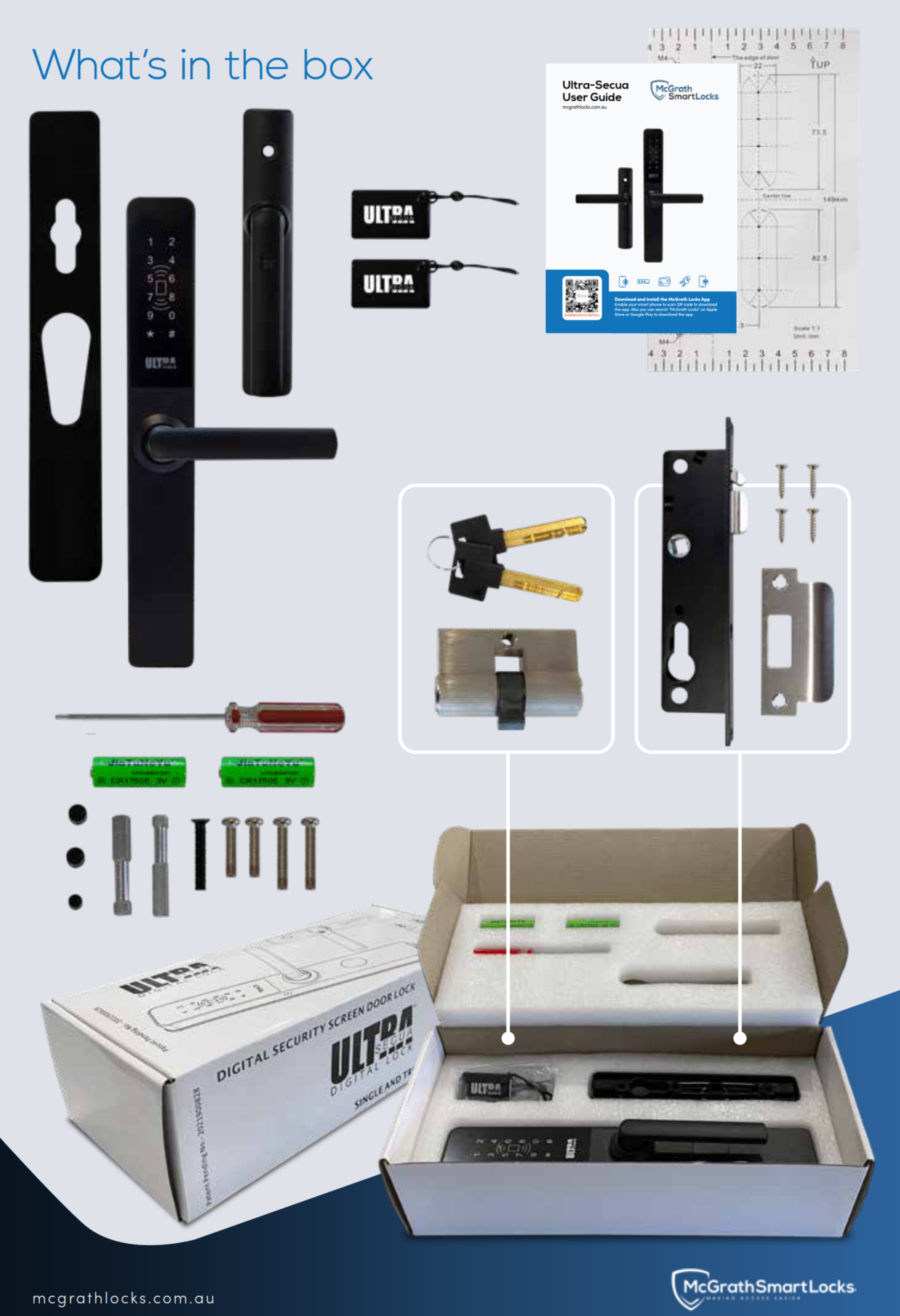
Not included: the main door smart lock the Dual Unlock pairs with, any G3 / G4 / G5 gateway, and the Austral Elegance rod adaptor - all listed under Accessories and Spares.
 Suitable Uses
- Hinged aluminium security screen doors, single-point or rod-based triple-locking - check the door type compatibility matrix.
- Homes with a smart lock (or one planned) on the front door behind the screen, where unlocking two doors every time has become the daily annoyance - pair it with a narrow-stile McGrath main door lock.
- Higher-security entries where stopping reach-through access at the screen is the priority, on a sheltered porch or verandah.
- Retrofit replacement for a worn Whitco, Austral, Doric or Lockwood screen door mortice lock - and the most common mistake to avoid is not checking clearance to the main door.
- Rentals, granny flats and short-stay properties where timed and recurring codes on the screen door remove key handovers - see TTLock for Airbnb with a gateway.
- Carers, cleaners and trades who need their own code or fob for the screen door only, with every entry logged.
- Not suitable for: sliding screen doors (see the sliding door range), cable-based triple lock kits, or fully exposed external pedestrian gates - for a gate the double-sided McGrath Ascot is the right McGrath product. It carries no fire rating and no DDA certification.
 Available Finish Options
 Black
Black
(This Product)
STK MLULSDUBKWM
Finish selection does not affect functionality, compliance, or performance. The ULTRA-SECUA Dual Unlock is made in black only; the black finish is the one McGrath rates to 300 hours neutral salt spray.
 ULTRA-SECUA Range - Standard vs Dual Unlock
Two models, one lock body. Same keypad, same RFID reader, same mortice, same spindles and door range - the only difference is whether the lock can be paired as a Bluetooth Remote to your main door lock. The two models explained.
The other purpose-built screen door smart lock we stock is the Yale Unity Security Screen Door Lock, which achieves its two-door DualDoor function through the Yale Connect Plus Hub 2 rather than lock-to-lock Bluetooth - McGrath vs Yale compared.
 Accessories and Spares
Everything that pairs with, powers, or services the ULTRA-SECUA Dual Unlock, in one table. Spares are listed first, then credentials, then remote access.
Main door partner for Dual Unlock: pair the ULTRA-SECUA Dual Unlock with a McGrath Locks App main door lock that has the Remote function - the narrow-stile McGrath A210 Slimline Digital Mortice Lock is the one we most often fit behind a security screen. Browse all modules and Wi-Fi gateways, all RFID fobs, tags and cards, or the whole McGrath Locks range.
Installation and Compatibility
- Designed for hinged security screen doors. Not for sliding screen doors - talk to Terry's first if that is what you have, or browse the sliding door range.
- Retrofits most screen door mortice locks including Whitco, Austral, Doric and Lockwood. Identify what is on the door now using Chapter 02 - existing hardware; the mortice door prep explanation covers why a mortice lock body matters here.
- Door thickness 19-30 mm. Two spindles are in the box: 8 x 8 x 51 mm for 19-25 mm doors, 8 x 8 x 57 mm for 25-30 mm doors. Fit the wrong one and the lock either binds or does not engage - see the spindle mistake in Chapter 12.
- Three-step fit: install the mortice lock in the door cut-out and the strike plate on the frame; fit the key cylinder and secure it with the supplied screw; mount the exterior and interior assemblies, tighten the fixing screws and press in the rubber plugs. Align the triangular hub before you tighten anything - misalignment is the most common reason a new lock will not throw.
- Check the clearance between the screen door and the main door before ordering. The exterior body is 24 mm deep and the handle projects beyond that; if the two doors sit close together the lock can foul the main door.
- On triple-locking screens the top and bottom locks, including the plastic adaptor, may need to be reversed so the interior handle lifts to lock. Rod kits only - cables vs rods. The brand-specific notes and installation videos show the modifications.
- Dual Unlock pairing needs the main door lock to be a McGrath Locks App lock with the Remote function, in Bluetooth range of the screen door - the A210 behind a screen is the typical pairing. Pair after both locks are installed and registered in the app.
- Deciding whether to do it yourself? When DIY is appropriate and when it is not, or book Terry's installation service.
 Handle Direction Adjustment
One SKU suits left and right hand opening screen doors. Handing is changed on the door with a screwdriver, so there is no handed version to order and no way to buy the wrong one. Work out your handing first with how to determine door handing or Chapter 02 - handing.

To change the handle direction:
- Using a screwdriver, loosen the inside screw on the interior assembly.
- Rotate the interior handle 90 degrees to the left or right as required.
- Retighten the screw firmly.
Confirm handing during installation, before the fixing screws go in. A locksmith sets this as part of the fit - and if the handle ends up the wrong way round it is a two-minute fix, not a return.
 ULTRA-SECUA Dual Unlock - Technical Specifications
 Dimensions

 Battery, Power and Backup Access
- Powered by 2 x 3V lithium batteries, fitted in the box. The lock runs on 4.5V to 8V, so two fresh cells give plenty of headroom. This is the one McGrath lock on 3V lithium rather than AA or AAA - how smart locks are powered.
- Typical life is 36 to 48 months under normal residential use. Remote functions through a gateway draw more than local unlocks, so a gateway-connected lock trends toward the shorter end - battery management on TTLock locks.
- Low battery warning triggers below 4.8V: the lock beeps when it wakes and the McGrath Locks App shows the warning. Change both cells as soon as you see it; keypad and Bluetooth keep working for a while but the margin shrinks - reading a low-battery fault correctly.
- Terry's recommends Duracell replacements. Replace both cells together and never mix old and new. The exact replacement is the McGrath 3V Lithium Battery (MLSP3VLB).
- User codes, cards, eKeys and the Dual Unlock pairing are retained during a battery change - nothing needs re-enrolling.
- If the batteries are ever run flat, the mechanical key override opens the door - keep one of the two keys somewhere sensible, not inside the house. Where to keep the override key and key storage options.
- A power outage at the house does not affect the lock at all; only remote access through a gateway pauses until the router is back - power outages, what actually happens.

The external housing is IP66 rated and the black finish is tested to 300 hours neutral salt spray, which puts it in good standing for a Gold Coast screen door under a porch or verandah roof. Two honest limits: the interior unit is not weather rated and must stay dry, and no battery-operated screen door lock is suited to a fully exposed external pedestrian gate - for that, the double-sided McGrath Ascot is the right product. Read how corrosion grades work, Queensland-specific considerations and what sun and heat do to a lock over time.
Wi-Fi Remote Access (Optional)
The lock has no Wi-Fi of its own. Everything you do at the door - PIN, tag, eKey, Dual Unlock - runs over Bluetooth and works with no internet at all. Add a McGrath gateway and the McGrath Locks App can reach the lock from anywhere: unlock remotely, issue or revoke codes and eKeys without visiting, and read the access log live. What a gateway actually does and Bluetooth-only vs gateway-connected explain the difference in plain terms.
Three gateways suit this lock: the G5 dual-band Wi-Fi gateway (the usual pick for a home router - G5 in Chapter 08), the G4 with a 4G SIM slot for poor fixed internet (G4 in Chapter 08), and the G3 Ethernet / PoE gateway for a cabled connection (G3 in Chapter 08). One gateway serves several McGrath locks in range, so the same unit that covers this screen door can cover the A210 behind it. Full comparison: G2 vs G3 vs G4 vs G5, and the gateways Terry's supplies.
Setup notes: gateways join a 2.4GHz Wi-Fi network (the G5 also handles 5GHz) - if your router merges its bands read band steering and why smart locks drop off Wi-Fi. Bluetooth range from gateway to lock is the critical factor, not Wi-Fi range - gateway placement. If the internet goes down, the door still opens locally - what happens when the internet goes down. Power the gateway from the McGrath 240V dual-USB wall adaptor.
Not sure whether you need one at all? Do you actually need a gateway? Short-stay hosts almost always do - TTLock for Airbnb in Chapter 07. Browse all modules and Wi-Fi gateways.

 App Platform and Data Hosting
 (Android 4.3 / iOS 7.0 and above). The app is managed, supported and distributed locally by McGrath Locks in Australia. Australian-based support staff handle warranty claims, app troubleshooting and platform queries - you are not dealing with an overseas vendor. The underlying cloud infrastructure is provided by TTLock, a globally deployed IoT platform. For what that means in practice see Chapter 14 - TTLock security, Chapter 15 - security and data sovereignty, where each platform hosts its data and TTLock vs Tuya. Comparing platforms before you commit? Which smart lock platform is right for you.
McGrath smart locks are backed by long-established industry partners and supported locally: designed by McGrath Locks in Australia, distributed through LSC, and sold and installed by Terry's Locksmiths on the Gold Coast. That chain matters more than any single feature when you are buying something you expect to live on the door for years. Read why longevity matters, the supply chain, the McGrath range and an installer's perspective. For realistic expectations of any electronic lock, how long digital door locks last.
 Frequently Asked Questions
The pairing is Bluetooth between two locks on the McGrath Locks App - the screen lock is added as a Remote to the main door lock. The main door lock therefore has to be a McGrath Locks App smart lock with the Remote function; the narrow-stile A210 is the one we most often fit behind a screen door. If your main door has a keyed lock or a smart lock from another brand, the Dual Unlock function has nothing to pair with and you should buy the standard ULTRA-SECUA instead - same lock, lower price. Which products offer Dual Unlock in Australia.
It suits hinged aluminium security screen doors from 19 to 30 mm thick, with the right spindle chosen from the two supplied, and replaces most Whitco, Austral, Doric and Lockwood screen door mortice locks. The two things to measure before you order are door thickness and the clearance between the screen and the main door - the exterior body is 24 mm deep plus the handle. Chapter 02 - screen clearance walks through it.
Yes, if the triple lock kit uses rigid rods. Cable-based kits are not compatible - that is the one rule that decides it. Rod kits usually need the top and bottom locks reversed so the interior handle lifts to lock; Whitco usually also needs the striker relocated, Lockwood kits are the most involved and not a DIY job, and Austral Elegance needs the MLSPULSAEA adaptor. If a triple lock is not essential, the single-point alternative is simpler.
No. PIN, RFID, eKeys over Bluetooth and the Dual Unlock pairing all work with no internet and no gateway. A G5, G4 or G3 gateway is only needed if you want to unlock or manage codes from away from the house. Bluetooth vs gateway explains what changes when you add one, and which setup suits you helps you decide.

Neither. The ULTRA-SECUA is a hinged screen door lock - for a sliding screen see the sliding door range and talk to Terry's before ordering anything. On a fully exposed pedestrian gate the interior unit and battery compartment would be out in the weather, which they are not rated for; the double-sided McGrath Ascot is the gate lock in the range - browse smart locks for external gates exposed to rain. For which door types suit which locks, see the compatibility matrix in Chapter 04.
Additional Information
- Installation complexity. This is one of the more involved smart lock fits in the range: spindle selection, hub alignment, and on triple-lock screens the reversal of the top and bottom locks. It is a genuine locksmith job - Terry's supply and install service covers it, and a site survey before purchase removes the guesswork on kit type and clearance.
- Set up in the app before touching the keypad. Manual keypad programming on a lock that has never been added to the app permanently blocks Bluetooth pairing until a factory reset (hold the reset button until the lock asks for the initialisation code, enter 000# - this wipes every code, card and user). Add the lock in the McGrath Locks App first, then everything else follows. The app also lets you set a 4-digit code; the keypad-only path needs 6. Once set up, use the erase code for handovers rather than a full reset.
- Check clearance before ordering. Insufficient gap between the screen and the main door stops the lock body clearing the main door when the screen closes. Measure the projection of your current screen door lock and compare - how to measure screen door clearance; it is the most common mistake we see on screen door smart locks.
- Weather scope. The IP66 rating covers the external housing. The interior unit, which houses the batteries, is not rated and must not get wet - this is a sheltered-entry product, not an exposed-gate one. What IP ratings mean.
- Codes that expire at the wrong time. Timed and one-time codes on the TTLock platform have activation windows and rely on the lock clock. If a valid code fails at the keypad, read the permanent passcode rule and clock calibration before assuming a fault - on a Bluetooth-only install, calibrate the clock manually from the app.

The McGrath ULTRA-SECUA Security Screen Door Smart Lock - Black (STK MLULSBKWM) is the same lock without the main-door pairing. If your main door is keyed, or has a smart lock that is not on the McGrath Locks App, that is the one to buy. Choosing between them: who Dual Unlock is best for.

12-month warranty against defects in materials and workmanship (24-month on ALBION, ASCOT, ASHGROVE, BARDON, GRANGE, HAMILTON, KEDRON, MANLY, SANDGATE, STAFFORD, ULTRA SECUA and WINDSOR models). McGrath Locks will repair, replace, or refund at their discretion. Proof of purchase required for all claims. Returns & Warranty | McGrath Locks Warranty
 Download PDF Resources
McGrath's two-page datasheet for this Dual Unlock model: the full technical specification table, including the Dual Access Mode row, capacities, power figures and operating environment.
One-page guide to pairing the ULTRA-SECUA as a Remote for your main door lock in the McGrath Locks App - the seven steps with app screenshots, the keypad sequence and the Auto Lock timing tip.
Two pages: keypad programming codes, low battery threshold, passage mode, lockout behaviour, reset and demo mode on page one; the exploded diagram, handing adjustment, spindle selection, three-step installation and the triple-lock kit note on page two. Carries the set-up-with-the-app-first warning.
McGrath's six-page brochure for the ULTRA-SECUA range: access methods, security features, dimension diagrams, the technical specification page and what's in the box. Written around the Standard model; the lock body and specifications are shared with this Dual Unlock version.
Single-page parts diagram naming every component of the assembly - useful when talking to Terry's about a spare part.
The 56-page platform manual behind the McGrath Locks App - adding a lock, eKeys, passcode types, card management, gateway setup and transferring a lock. Generic TTLock branding; the McGrath Locks App follows the same menus. Also on our site as the TTLock User Manual page.
McGrath ULTRA-SECUA Dual Unlock - FAQ, Setup and Owner's Guide
Everything below is here to help you buy, fit, pair and live with the ULTRA-SECUA Dual Unlock on a security screen door. For general smart-lock questions see the Smart Lock FAQ (Chapter 13); for measuring and fitting start with the Buyer's Guide; for the platform behind the McGrath Locks App read the TTLock Platform Guide (Chapter 14).
Dual Unlock and Pairing
You present any credential at the ULTRA-SECUA - PIN, tag, eKey or key - and the screen door unlocks as normal. Because the screen lock is registered as a Bluetooth Remote for your main door lock, the main door lock receives the unlock command at the same moment and opens too. You then walk through both doors without doing anything else. If the main door lock is out of Bluetooth range (it will not be on a normal entry) the screen door still opens on its own. How entry actually works.
No. The pairing is one-directional: the screen door lock is the Remote, the main door lock is the target. Unlocking the main door from inside or from the app does not fire the screen door. That is the sensible direction for an entry - you meet the screen first - and it also means the screen door never unlocks unexpectedly because someone opened the front door from inside. What Dual Unlock does not do.
Both locks must already be registered in the McGrath Locks App and you need the ULTRA-SECUA admin code. Open the main door lock in the app and go to its Remote menu; tap Add remote; choose Permanent and name it (Screen door is the obvious choice); choose R1 and wake the ULTRA-SECUA keypad; on the ULTRA-SECUA enter * 8 1 3 #, then your admin code, then #, then 1 #, and wait for the success prompt; finally press the plus button on the main lock's remote screen. Then set the main door's Auto Lock delay to at least 10 seconds so it does not relock before you get to it. The Pairing Instructions PDF has the screenshots.

Most McGrath main door locks relock automatically a few seconds after unlocking. With Dual Unlock the main door opens the moment you present a credential at the screen, but you still have to open the screen door and step across to it. If the main door relocks in 5 seconds you can arrive at a locked door and wonder whether the pairing worked. Ten seconds or longer gives a comfortable walk-through; set it in the main door lock's settings in the app.
The pairing stays in place until you remove the Remote from the main door lock in the app, so day to day it is always on. If you ever want the screen door to open alone - a tradesperson working on the verandah, say - delete the Remote and re-pair later, or give them a code on the screen lock only and lock the main door with its own snib or app while they are there. Is Dual Unlock always enabled?
McGrath pairs the two locks directly over Bluetooth - no hub, no internet, works even if your Wi-Fi is down. Yale's DualDoor on the Unity Security Screen Door Lock is coordinated through the Yale Connect Plus Hub 2, so it needs the hub and a Yale Unity Entrance lock on the main door. Both achieve one action for two doors; the McGrath route suits a McGrath main door lock such as the A210, the Yale route suits a Yale Home household. McGrath vs Yale - which approach suits you, and choosing a platform in Chapter 15.
Access and Credentials
Permanent codes for the household, timed codes with a start and end, one-time codes that expire after a single use, custom codes you type in yourself, and recurring codes that work on set days and hours each week - the last is ideal for a cleaner or carer. Up to 250 users, 4 to 9 digits. Codes made in the app can be 4 digits; codes made at the keypad must be at least 6. Each code type has its own activation window on the TTLock platform - activation windows by passcode type and the weekly cleaner example. The full list of TTLock passcode types is in Chapter 14.
If someone is watching, type a few random digits, then your real code, then a few more random digits, and finish with #. The lock finds your code inside the string and opens. It defeats shoulder-surfing without you needing to remember anything extra. Pair it with two-factor verification in the app if you want a second layer.
Five wrong attempts locks the keypad for 35 seconds. During that window the keypad and card reader are ignored and only the McGrath Locks App can open the lock - so if it is you with a fat finger, wait it out or open with the app. It is a deterrent to guessing, not a permanent lockout, and it does not affect the mechanical key.

13.56 MHz Mifare credentials (S50 / S70 type), up to 1,000 of them, each permanent, timed or recurring. Two tags come in the box; add the McGrath ISO card, key fob, adjustable wristband or adhesive sticker, or browse every RFID fob, tag and card we stock. Enrol a card in the app while standing at the lock - how RFID credentials work. Lost a card? Delete it in the app and it stops working immediately.
An eKey is a Bluetooth credential you send to someone's phone from the McGrath Locks App. They install the app, accept the eKey and can unlock when they are at the door. eKeys can be permanent, timed, one-time or recurring, there is no limit on how many you issue, and you can revoke one from anywhere the moment it is no longer wanted. Guests do not need to be near you to receive one. eKeys in Chapter 14; for holiday lets see TTLock for Airbnb without Wi-Fi.

At the keypad, enter a valid code and then press 1 2 3 # within five seconds; the lock stays unlocked until any valid code or card is presented. Or switch passage mode on in the app - if you enable it there, turn it off there too. Handy while you are unloading the car or hosting. Remember that passage mode on the screen door does not change the main door lock.
A 42 mm-wide body sitting on an aluminium screen stile has no room for a reliable sensor, and a screen door in a Queensland summer is a hard place for fingerprints anyway - heat, sun and wet hands. McGrath put the biometrics on the main door locks instead: the A231 and A236 carry fingerprint on the same app, and with Dual Unlock one PIN or tag at the screen still opens both doors. Fingerprint access in Chapter 03; browse fingerprint smart locks.
Installation, Door Fit and Triple Locks

Measure the screen door leaf, not the frame. 19 to 25 mm takes the 51 mm spindle; 25 to 30 mm takes the 57 mm spindle. Both are in the box. A spindle that is too short does not engage the interior clutch properly; one that is too long binds the handle. It is one of the three classic installation mistakes. How to measure door thickness.
Four things, in order of likelihood. Demo mode is still on (registering an admin exits it). Passage mode is on (present a valid code or card, or turn it off in the app). The triangular hub is misaligned between the exterior and interior assemblies - loosen the fixing screws, realign, retighten. Or the triple-lock top and bottom locks were not reversed so the bars will not run. Smart lock not locking - quick scan and Chapter 12 troubleshooting.
Look at the linkage running from the central lock to the top and bottom bolts inside the door stile. Rigid metal rods that move as a bar are what the ULTRA-SECUA needs; flexible steel cables in a sleeve mean the kit is not compatible. Whitco and Austral kits are commonly rod-based, Lockwood kits vary, and some newer kits are cable. How to identify your kit, door compatibility and the installation videos. If you cannot tell, book a site survey - it is free.
Only if your screen has an Austral Elegance rod-based triple lock. The MLSPULSAEA adaptor connects the ULTRA-SECUA to that kit's rods. Other rod kits use the plastic adaptor in the box, reversed where needed. Austral kit notes.
No. One SKU covers both hands. Loosen the inside screw, rotate the interior handle 90 degrees, retighten. Do it before the fixing screws go in. How to determine handing and why the US and Australian conventions differ.
A confident DIYer can fit a single-point ULTRA-SECUA on a standard screen door: it is a mortice swap plus two escutcheons, with a drilling template in the box. Triple-lock installations, Lockwood kits in particular, are locksmith work, and getting the hub alignment right is the difference between a lock that works for years and one that jams in a month. Weigh it up with when DIY is appropriate; Terry's installs across the Gold Coast - Advice and Installation.
It can, if the two doors sit close. The exterior body is 24 mm deep and the handle projects further. Measure the gap between the closed screen and the closed main door, compare it with the projection of the lock currently on your screen, and if the new lock is bulkier than the old one, check there is room. How to measure the clearance; the Dual Unlock blog also has a check-your-clearance section because both locks now sit in that gap.
Power and Batteries
Two 3V lithium cells, rated 36 to 48 months in normal home use. The lock beeps on wake-up when they drop below 4.8V and the app shows the warning. Remove the battery cover on the interior unit with the supplied mini security screwdriver, replace both cells with new MLSP3VLB cells (Duracell recommended, never mix old and new), refit the cover. Codes, cards and the pairing are all kept. Monitoring and choosing batteries; power and battery FAQ in Chapter 13.
Use one of the two mechanical keys in the cylinder on the exterior unit, get inside, and change the batteries. Nothing is lost. Keep a key somewhere you can reach from outside the house - a key safe is the usual answer. What happens when a smart lock battery dies.
Both. Remote functions through a gateway and Bluetooth reads are the first things to become unreliable as voltage drops; the keypad keeps going longer. A low-battery warning with a working keypad is exactly the window McGrath intends you to change them in. If the batteries are new and you still see the warning, check the interior cable is not pinched under the cover. Reading a low-battery fault correctly.
Remote Access and Gateways
For a normal home Wi-Fi router, the G5 - it handles both 2.4GHz and 5GHz so band-steering routers do not trip it. If fixed internet is unreliable, the G4 takes a 4G SIM. If you want a cable to the router or a PoE switch, the G3. The older G2 is discontinued; do not buy one second-hand for a new install. Gateway choice and the full comparison table.
Within reliable Bluetooth range of the lock - typically the same room or the room behind the door, not across the house. Wi-Fi range to the router is rarely the problem; Bluetooth range to the lock is. Brick and rendered walls eat Bluetooth quickly. One gateway can serve the screen door lock and the main door lock together. Gateway placement and where to position the gateway.
Nine times out of ten it is a dual-band router steering the gateway between 2.4GHz and 5GHz, or the gateway is at the edge of Bluetooth range to the lock. Split the bands or give the 2.4GHz network its own name, move the gateway closer, and power-cycle it once. Dropout causes, how to improve stability, the hardware fix and Chapter 13 on Wi-Fi drops.

Yes. Every unlock - which code, which card, which eKey, and when - is written to the lock's log. Without a gateway the log syncs to the app the next time your phone is in Bluetooth range; with a gateway it updates live. Useful for short-stay hosts and anyone with carers or cleaners on a schedule. Audit trails in Chapter 07.
App, Setup and Troubleshooting
This is the documented consequence of manual-first programming: once a lock is set up from the printed keypad codes it will not accept a Bluetooth device. Factory reset it - hold the reset button on the interior unit until the lock asks for the initialisation passcode, enter 0 0 0 #, and every code, card and user is wiped - then add it in the McGrath Locks App before doing anything else. Set your admin and user codes from the app afterwards. TTLock app user manual.
Almost never. Timed and recurring codes depend on the lock's clock, and a Bluetooth-only lock only syncs its clock when a phone with the app connects. If nobody has opened it with the app for a while the clock drifts and a scheduled code can fall outside its window. Open the lock once with the app to resync, or calibrate the clock manually. A gateway keeps the clock synced automatically. Clock drift symptoms and how to stop codes expiring.
Leave it off. The toggle is a generic TTLock app setting; McGrath Locks do not have the hardware behind it, and switching it on produces phantom alerts that have nothing to do with anyone touching your door. Why McGrath locks do not support Tamper Alert, and if it is already on, turn it off in three steps. Chapter 13 covers it too: Tamper Alert going off constantly.
Transfer the lock in the app to the new owner's McGrath Locks App account rather than factory resetting it, so the pairing and settings survive. Before you do, wipe your own codes and cards with the erase code so nothing of yours stays live. Transferring or re-adding a lock, before handover and the erase code. The Dual Unlock pairing lives on the main door lock's Remote list, so transfer both locks.
The McGrath Locks App is a McGrath-branded build on the TTLock platform. McGrath Locks in Australia manages, supports and distributes it - warranty, troubleshooting and platform questions are handled here. The cloud infrastructure is TTLock's global IoT platform, and the honest detail on what that means is in local access vs the cloud layer, what to do about it, TTLock vs Tuya on data sovereignty and Chapter 14's honest gaps. Everything you do at the door works locally over Bluetooth whether or not the cloud is reachable.
Suitability and Alternatives
Better than most. The black finish is tested to 300 hours neutral salt spray and the external housing is IP66, which is a strong result for a screen door lock. Keep the interior unit dry (it is not rated), rinse the exterior with fresh water now and then, and expect the finish to outlast the electronics - on any brand. Corrosion grades in Chapter 11, coastal environments and coastal lifespan.

Not in our range. Our digital mechanical locks from Borg, Lockwood and Carbine are built for timber, steel and gate applications with standard door thicknesses and backsets, not the 19-30 mm aluminium stile of a security screen. Mechanical vs smart explains the trade-off if you are curious - and with 3 to 4 years between battery changes the ULTRA-SECUA is close to set-and-forget anyway.
Usually the screen door is yours to change, but check first: some schemes control external appearance, and if your screen sits in a fire-isolated corridor the main door rules are strict. The ULTRA-SECUA has no fire rating and is a screen door product only. The four strata checks in Chapter 04.
The standard ULTRA-SECUA if you do not need main-door pairing. The Yale Unity Security Screen Door Lock if you are a Yale Home household. For the main door behind the screen, the McGrath A210, A231 and A236 slimline locks or the standard-stile NX1. Browse every security screen smart lock or the whole McGrath Locks range; five questions that decide it if you are still torn.
Related Products, Guides and Chapters
Products: ULTRA-SECUA Standard · McGrath A210 · McGrath A231 · McGrath A236 · McGrath NX1 · McGrath Ascot gate lock · McGrath Kedron deadbolt · Yale Unity Screen Door Lock - Matt Black · Yale Unity Screen Door Lock - Silver · MLSP3VLB battery · Austral Elegance adaptor · RFID card · RFID fob · RFID wristband · RFID sticker · G5 gateway · G4 gateway · G3 gateway · Gateway wall adaptor · Torx screwdriver
Categories: Security Screen (Hinged) · Narrow Frame · PIN Code · Fob / Card / RFID · Bluetooth · Has Backup Key · App Enabled · Wi-Fi Capable · Regular Front Door · Modules and Gateways · RFID Fobs, Tags and Cards · Power Accessories · Key Storage · All Smart Locks
Buyer's Guide: Quick Start - door type · Ch 01 What Is a Smart Lock · Ch 02 Measuring Your Door · Ch 03 Access Methods · Ch 04 Door Types · Ch 07 Airbnb and Short Stay · Ch 08 Gateway Comparison · Ch 10 Brand Profiles · Ch 11 Standards and IP Ratings · Ch 12 Installation and Troubleshooting · Ch 13 Smart Lock FAQ · Ch 14 TTLock Platform Guide · Ch 15 App Platforms · Ch 16 Mechanical Digital Locks
Blogs: Dual Unlock Explained · ULTRA-SECUA and Triple Lock Kits · Check Screen Door Clearance · Understanding Door Handing · G2 vs G3 vs G4 vs G5 Gateways · Why Smart Locks Drop Off Wi-Fi · TTLock Tips and Tricks · TTLock User Manual · TTLock vs Tuya · Your Data and China · Which Smart Lock Platform Is Right for You · Tamper Alert - Phantom Alerts Explained · Turn Off Tamper Alert · Mechanical Key Override · The Realities of Electronic Door Locks · How Long Do Digital Door Locks Last · Smart Lock Not Locking - 3 DIY Mistakes · TTLock for Airbnb · Do You Really Need Wi-Fi · Terry's, LSC and McGrath - Long-Term Confidence · Site Survey and Installation Services
What's in the Box - McGrath ULTRA-SECUA Dual Unlock
- Exterior lock assembly - keypad, Mifare RFID reader, key cylinder and handle
- Interior lock assembly - handle, battery compartment and slide button
- Screen door mortice lock and strike plate
- Two spindles - 51 mm for 19-25 mm doors, 57 mm for 25-30 mm doors
- 2 x 3V lithium batteries (fitted)
- 2 x mechanical override keys
- 2 x RFID access tags
- Fixing screws and rubber screw-hole plugs
- Mini security screwdriver (battery cover)
- Drill positioning template
- User and installation guide
The main door smart lock for Dual Unlock pairing (for example the McGrath A210), any G3 / G4 / G5 gateway, the Austral Elegance rod adaptor and extra RFID credentials. The McGrath Locks App is a free download for iOS and Android
. McGrath ULTRA-SECUA - Real Installations
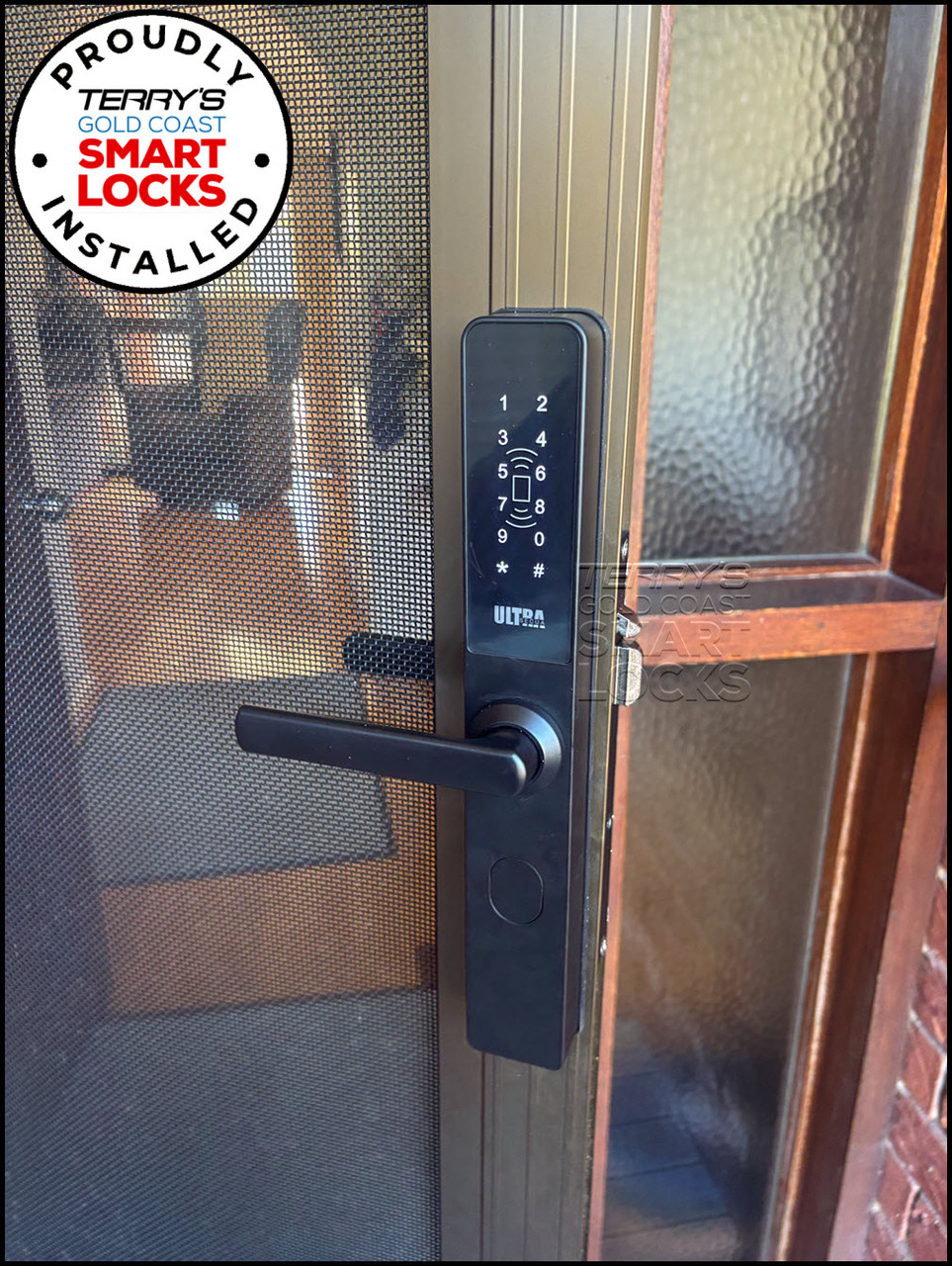
Installations by Terry's Locksmiths and our customers. Thinking about your own? Our installation service.
McGrath ULTRA-SECUA Dual Unlock - Dimensions
McGrath ULTRA-SECUA - Product Brochure
McGrath's six-page ULTRA-SECUA brochure. It is written around the Standard model; the lock body, access methods, security features and technical specification page are shared with the Dual Unlock version on this page. Download it as a PDF, and see the Dual Unlock datasheet for this model's own specification table.


PDF Files - McGrath ULTRA-SECUA Dual Unlock (STK MLULSDUBKWM)
Two pages: cover and the full technical specification table for this Dual Unlock model - hardware, enrolment and verification, lock functions including Dual Access Mode, power and operating environment.
One page: the seven-step Dual Unlock pairing process in the McGrath Locks App with screenshots, the ULTRA-SECUA keypad sequence and the Auto Lock timing tip for the main door lock.
Two pages: user guide (keypad programming codes, passage mode, lockout, low battery, reset and demo mode, the set-up-with-the-app-first warning) and installation guide (exploded diagram, handing, spindle selection, three-step fit, multi-point kit and triple-lock note).
Six pages: the ULTRA-SECUA range brochure - access methods, security features, dimension diagrams, technical specifications and box contents. Also shown page by page in the Brochure tab.
One page: every component of the assembly named, from the exterior front cover and PCBA to the spindle, clutch, battery bracket and cover. Also shown in the Exploded View tab.
Fifty-six pages: the platform manual behind the McGrath Locks App - registration, adding a lock, eKeys, passcode types, card management, gateway setup and transferring a lock. Generic TTLock branding, same menus. Read the highlights in Chapter 14.
McGrath ULTRA-SECUA - Component Exploded View

McGrath Locks Warranty
Warranty Summary
How to Make a Claim
- Contact Terry's Tradies Pty Ltd and its associated websites, trading names, and subsidiaries (the place of purchase) within the applicable warranty period.
- Supply your proof of original purchase - a receipt or tax invoice is required.
- Provide a clear description of the fault and your contact details.
- You may be asked to return the product for assessment before a remedy is determined.
- McGrath Locks will, at their discretion, repair the product, replace it with the same or an equivalent model, or provide a refund of the purchase price.
 Exclusions
This warranty does not cover:
- Normal wear and tear
- Products that have been disassembled
- Damage caused by improper handling, incorrect installation, misuse, abuse, neglect, modification, or accident
- Installation by unlicensed persons (including non-licensed locksmiths or technicians)
- Products not used in accordance with the supplied instructions
- Cosmetic damage that does not affect functionality
- Labour or installation costs related to the removal or reinstallation of products
- Exposure to conditions outside normal environmental use
- Work completed before warranty approval
- Damage caused by battery leakage, battery failure, or force majeure
Our goods come with guarantees that cannot be excluded under the Australian Consumer Law. You are entitled to a replacement or refund for a major failure and compensation for any other reasonably foreseeable loss or damage. You are also entitled to have the goods repaired or replaced if they fail to be of acceptable quality and the failure does not amount to a major failure. This warranty is provided in addition to your rights and remedies under the Australian Consumer Law.

Confused? Overwhelmed? We get it.
Choosing the right smart lock can be genuinely tricky - door types, backsets, app platforms, compatibility with your existing hardware... there is a lot to consider. We have decades of experience fitting locks of all types, including smart locks, and we are happy to help.
Our expert recommendation service is free. Upload a few photos of your door and describe what you need, and one of our qualified locksmiths will give you a personalised recommendation.
Get Your Free Recommendation →How it works - three easy steps:
1. Upload photos
A few clear shots of your door, lock and frame - inside and out.
2. We assess
Our locksmith reviews your setup and requirements - door type, weather exposure, how you want to use it.
3. You get a recommendation
A personalised recommendation tailored to your door, budget and needs. No pressure, no upsell.
Also useful while you are deciding:


