Mechanical Key Override on Smart Locks
Posted by Jim Noort on 24th Jun 2026

Most smart locks include a mechanical key override — a physical cylinder that operates the bolt independently of electronics, batteries, or credentials. Not every model has one, which is why knowing the difference matters. Most owners never use it. Many don’t know where it is. Some discover it for the first time when they’re already locked out.
This guide covers everything Terry’s locksmiths want you to know before that moment arrives.
- What the key override actually is and how it fits into the smart lock’s authentication stack
- Where the keyhole is hidden (it’s rarely obvious)
- What to do when the battery dies before you use the key
- Which smart locks don’t have a key override — and why that matters
- How to store your override key outside the house without hiding it under the doormat
- The Secure Lock interaction — one more gotcha to know about
What Is the Mechanical Key Override?
A smart lock replaces the thumbturn or key cylinder on one side of your door with an electronic motor and credential reader — but the underlying bolt mechanism stays mechanical. The mechanical layer of the lock (the deadbolt, latch, or mortice) is unchanged. The key override cylinder connects directly to that same bolt mechanism and operates it without any electronic involvement at all.
In the four-layer authentication stack — Primary (PIN/fingerprint/RFID), Secondary (app/Bluetooth), Remote (WiFi/gateway), and Override — the mechanical key is Layer 4: the last line of defence that works regardless of what the other three layers are doing.
 What the override cylinder does
- Operates the bolt mechanically — no battery, no electronics, no app required
- Works when the battery is completely flat
- Works when the keypad is damaged or unresponsive
- Works when you’ve forgotten every credential (PIN, card, phone)
- Is unaffected by firmware failures, app outages, or gateway dropouts

Where Is the Keyhole? (It’s Often Hidden)
Manufacturers deliberately conceal the override keyhole on most modern smart locks. The reasoning is aesthetic — a visible keyhole on a “keyless” lock looks contradictory — but the result is that owners often can’t find the override when they need it. Terry’s sees this regularly on callouts.
 Common hiding spots by lock format
Push-pull levers (most common residential format): Look at the base of the exterior panel. Most models have a small sliding or flip cover — often rubber-plugged or snapped flush — that conceals the cylinder. Run your thumbnail along the bottom edge if you can’t see a seam.
Deadbolts: Often underneath the keypad, behind a rubber plug or a pull-off cap. On some models it’s integrated into the face of the unit below the PIN pad, disguised as part of the housing.
Mortice-format locks: The cylinder is typically visible on the exterior escutcheon plate, but the key slot itself may have a cover that flips or rotates open. If there’s a decorative surround, the cover often looks identical to the rest of the plate.
Retrofit locks (e.g. Igloohome Retrofit): No external keyhole — the Retrofit Lock drives the existing Euro cylinder thumbturn from inside. The key override is the original key for your cylinder, used from outside in the normal way.

A Gainsborough smart lock showing both backup features at once: the override key cylinder (top) and the 9V emergency power port with its cover flipped open (bottom). Both are recessed flush with the panel and not visible at a glance.

The Yale override keyhole sits at the very base of the lever panel — completely invisible from normal standing height. The zoom callout shows how small and flush the cylinder opening is. Most owners walk past it daily without knowing it’s there.

What to Do When the Battery Dies
A depleted battery kills all electronic functions — keypad, fingerprint, Bluetooth, app, remote — but the key override cylinder is entirely independent. Here’s the sequence to follow. For a realistic picture of how quickly smart lock batteries deplete in real-world conditions, see battery life — the truth, not the marketing version.
 Step 0 — You should have been warned first
Most smart locks will alert you well before the battery reaches critical levels — this is one area where the technology genuinely earns its keep. Depending on the model you may get:
- An audible alert from the lock itself — a series of beeps or a different tone when you unlock, signalling low power
- A flashing LED on the keypad or panel — often a red or amber light distinct from the normal unlock indicator
- A push notification to your phone — TTLock-platform locks (McGrath, Lockton) and Igloohome both send app alerts when battery drops below a threshold
- Both — many locks combine an on-device alert with an app notification
Most locks give around 200 operations after the first low-battery alert before power fails entirely. That is a generous window — the problem is always the same: the warning was dismissed or forgotten. If your lock has app notifications enabled, do not ignore them. If you’re managing a rental property, check the battery level in the app weekly rather than waiting for the alert.
Option 1 — Emergency jump-start (preferred first step)
Before going straight for the key, try the emergency power method. Some smart locks provide one of two jump-start options — check your model’s manual to confirm which applies:
- 9V battery contact points — two small metal terminals at the base of the exterior panel (usually near the keyhole cover). Press a standard 9V battery squarely across both terminals and hold it in place. The keypad or display will briefly activate — enter your PIN while holding the battery to get in. This works on most McGrath, Lockton, and similar TTLock-platform locks.
- USB-C emergency port — plug in a phone charger or power bank. The lock powers up and allows PIN or app entry. Common on Igloohome Deadbolt Go and some Carbine models.
The jump-start is preferable because it avoids the need to have the key physically on your person and means you can get in using a PIN you already know.
 Option 2 — Mechanical key override
Locate the keyhole (see above), insert the override key, and turn. The bolt operates exactly as it would with a conventional lock. Once inside, replace the batteries immediately before using the electronic functions again.
Smart Locks That Don’t Have a Key Override
Not every smart lock includes a mechanical key cylinder. For some formats and applications, no override is by design. Understanding which locks fall into this category — and what the tradeoffs are — is important before you buy.
 Smart padlocks without a cylinder — it’s a balancing act
A number of smart padlocks — including the Igloohome Smart Bluetooth Padlock 2 — are intentionally designed without a key cylinder. This is a deliberate product choice, not a shortcut. On the plus side: there are no keys to manage or lose, the shackle cannot be picked or bumped through a keyhole, and the rechargeable lithium battery lasts many months per charge. These are genuinely good reasons to choose a keyless padlock for the right application. The tradeoff is that if the battery fails completely and you can’t access the USB-C port for a jump-start, the only option is a locksmith or cutting the shackle. For gates, sheds, and non-critical access points this is an acceptable tradeoff. For a main entry door, it is not. See the no key override section of our smart padlock guide for which padlocks are affected and how to decide.
The security tradeoff
A lock without a keyhole cannot be picked through the cylinder. Some buyers consider this an advantage for high-security applications. For a main entry door, Terry’s position is clear: the risk of being locked out by a failed battery outweighs the marginal pick-resistance benefit of no cylinder. On a secondary or non-critical door, the calculus is different.

Storing the Override Key — Outside the House
Here’s a mistake Terry’s sees constantly: the override key is sitting on a hook inside the house. That’s useless if you need it to get in because the battery is dead and you’re standing on the wrong side of the door.

Smart outside storage options
There are three sensible approaches:
- Trusted neighbour or family member — the simplest and most reliable. If you have a trusted person within reasonable distance, a key with them is the lowest-friction backup imaginable.
- Key hider in the garden — disguised containers that blend into landscaping or building features. See the product showcase below.
- Key safe on an external wall — a combination or smart key safe mounted to the building exterior. More visible than a key hider but harder to lose and more weatherproof. See our guide to mechanical key safe best practice for a full comparison.
Key Hiders: Smarter Than Under the Doormat
A key hider is a disguised container that stores a key outdoors, hidden in plain sight. The three below are the options we stock — each suited to a different environment and concealment style. None require installation. None are visible as key storage to a casual observer.

Luli Rock Key Hider
A hollow synthetic rock with a realistic granite-effect finish. Sits naturally among garden beds, pebbles, or path edges. Twist the base open to access the key compartment. The most convincing natural camouflage of the three — at a glance it’s indistinguishable from a real garden stone.
Best for: gardens with existing rocks, gravel paths, or landscaped entries. The larger surface area makes it look unremarkable in a garden setting.
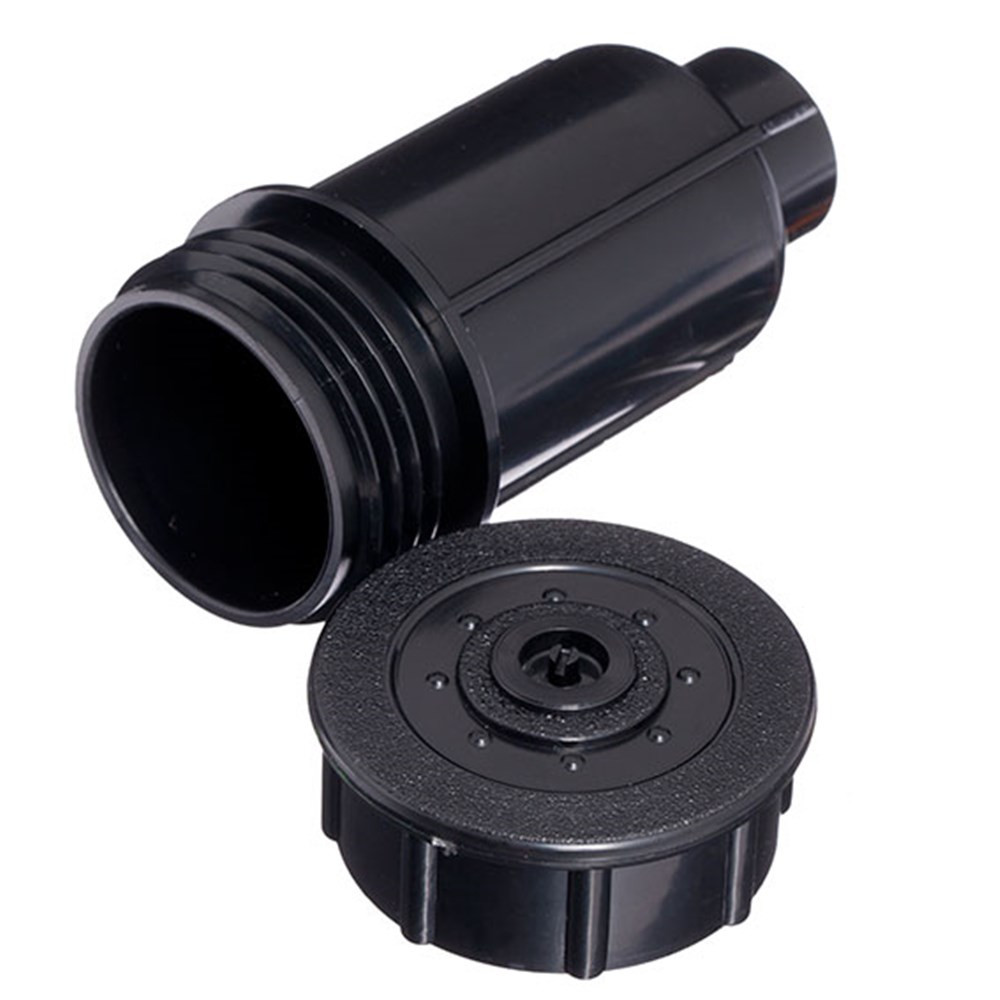
Luli Sprinkler Key Hider
A fake garden sprinkler head that sits flush with the lawn or garden bed. The top unscrews to reveal the key compartment. In any yard with real irrigation, a sprinkler head is completely invisible in plain sight.
Best for: lawns, garden beds, or any property with irrigation or sprinkler systems. Works less well on paved or hard-surface entries with no soil.

Surf Magnetic Key Hider (Large)
A strong-magnet case that attaches to any metal surface — the underside of a vehicle, a metal gate post, a steel fence rail, or behind a hitch receiver. Large format fits most standard keys. Black and flat-profiled, it disappears against any dark metal surface.
Best for: units, apartments, or properties with no garden — attach to a vehicle or metal building element. Also practical for tradespeople who need a property key accessible from their vehicle.
The Secure Lock Interaction: One More Gotcha
Secure Lock (also called the internal privacy snib) is a feature on many smart locks that allows someone inside to lock the door against all external entry — PINs, RFID cards, fingerprints, app, and remote unlock are all disabled while Secure Lock is engaged.
Key override is NOT disabled by Secure Lock
This is the important part: the mechanical key override is not disabled by Secure Lock. Even when Secure Lock is engaged and every digital credential fails, the physical key will still turn the cylinder.
This also means the admin cannot remotely override Secure Lock via the app — but the physical key will always work. For the full picture of what Secure Lock does and doesn’t disable, see our dedicated guide to the perils of the internal snib.
Frequently Asked Questions
 Can someone pick the lock through the override cylinder?
In theory, yes — as with any keyed cylinder. In practice, the risk is no greater than with a conventional lock, and most smart lock cylinders are reasonable quality. If pick-resistance is a priority, ask about upgrading to a high-security cylinder (such as a Mul-T-Lock or similar) at installation time. Terry’s can advise on cylinder upgrades for specific lock models.
Can I rekey the override cylinder to match my other locks?
On many smart locks, yes — the override cylinder uses a standard format (euro profile on most push-pull lever formats) and can be rekeyed or swapped by a locksmith. This is worth doing at installation if you want the override key to be on the same ring as your other house keys. Ask Terry’s at the time of install.
My override key doesn’t seem to work — what’s happening?
Three common causes: (1) the door is deadlocked from inside using Secure Lock — the key will still turn the cylinder but the deadlatch or additional bolt may prevent the door opening; (2) the cylinder cover was never removed and the key is being inserted at the wrong angle; (3) on some models, the key must be inserted fully before turning — partial insertion won’t engage. If none of these apply, call Terry’s. Do not force the cylinder.
I lost the override keys that came with the lock — can I get replacements?
Yes. Most smart lock cylinders use standard key profiles and can be duplicated from a working key, or the cylinder can be rekeyed and new keys cut. If all keys are lost, a locksmith can usually replace or rekey the cylinder without removing the lock. Contact Terry’s for this service.
Related Guides
The authentication stack, mechanical layer, deadbolt vs latch, and how smart locks actually work.
What Secure Lock disables, what it doesn’t, and the real-world lockout risks — especially for Airbnb.
Battery life, coastal conditions, door alignment, and what actually fails — the honest version.
Padlock roundup including the no-key-override issue and IP ratings for outdoor Queensland use.
Heavy-duty external key storage options — relay attack risk, best practice, and product spotlight.
Filter our full range to show only smart locks that include a mechanical override cylinder.
Not Sure Which Lock Is Right for Your Door?
Terry’s can advise on override cylinder options, rekey at installation, and recommend the right lock for your door type and access requirements.
Ask an ExpertVisit Australia’s leading Smart Lock showroom and workshop:
Gold Coast Smart Locks
9/2 Prosper Crescent
Burleigh Heads, QLD
See working models, compare gateways, and get real advice before you commit.