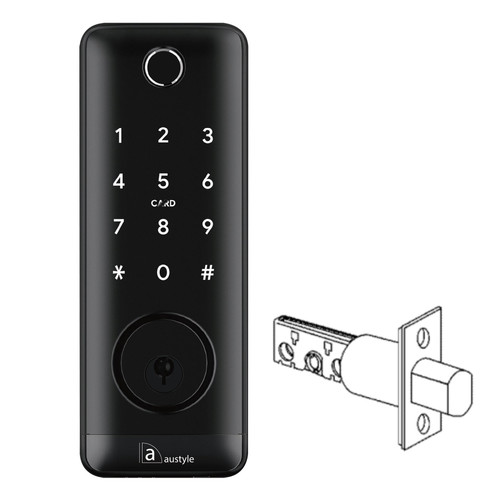
Austyle 59410 Smart Lever Latch Set with Built-in WiFi - Matt Black
 At A Glance
-
 DISPATCHSame-Day before 11am AEST
  LOCK TYPESmart Lever Latch Set
 FINISHMatt Black
 IN THE BOXLever Set, Latch, 3 Cards, 2 Keys
 WARRANTY1 Year
 BUILT-IN WIFINo Gateway Needed
 VOICE CONTROLGoogle & Alexa
 FINGERPRINTOptional Module
 RFID CARDSUp to 200 (3 Incl.)
- PIN CODESUp to 150
 PRIVACY LOCKInterior Button
 AUTO-LOCKApp Configurable
 PASSAGE MODEHands-Free (App)
 POWER4 x AA + USB Backup
 BACKUP KEYMechanical Override
 WEATHERIP55 (External Module)
 SALT SPRAY TESTED200 Hours
 CYCLE RATING250,000 Cycles
 DOOR THICKNESS35-65mm
 BACKSET60-70mm Adjustable
 HANDINGReversible L/R
 RETROFITFits Existing Mortice Doors
 WANT CHEAPER?See 59405 - No WiFi
PIN Code  App (Bluetooth) WiFi Remote Fingerprint RFID Card Mech. Key
The Austyle 59410 is a smart digital lever latch set that retrofits onto an existing Australian mortice door without a new lock body. It combines five everyday access methods - Bluetooth app, PIN code, RFID card, optional fingerprint and mechanical key - with built-in 2.4GHz WiFi for remote access straight through the TTLock app, with no separate gateway required. That is the one difference that sets the 59410 apart from the 59405, 59406 and 59407, which all need the 59419 WiFi gateway hub before any remote feature works.
The lock is managed through the TTLock app (iOS 
 ) and supports voice control through Google Assistant and Amazon Alexa once it is on your WiFi - again with no gateway. Access can be managed remotely from anywhere: add and remove users, set timed, one-time and recurring codes, share e-Keys, and review access records. For a plain-English overview of the platform, see our TTLock platform guide.
The interior back panel carries an electronic privacy lock button that places the lock in a secure state, blocking exterior electronic access until the administrator app or the mechanical key releases it. The lock body is rated IP55, tested to 250,000 operating cycles and 200 hours of salt-spray durability (per manufacturer specification), suits door thicknesses from 35-65mm, and includes two square shafts (60mm and 80mm) for different door depths. Fingerprint is an optional module - confirm availability at the time of ordering.
Usually ships same day if ordered before 11am AEST (excludes weekends and Queensland public holidays).
BluetoothWiFi (built-in)PIN CodeRFID CardFingerprint*Mech. Key4 x AA* Fingerprint is an optional module - confirm availability at time of ordering.
Wi-Fi is built into the 59410, so remote unlock, access notifications and app control all work over your home Wi-Fi with nothing extra to add. There is no need to buy a separate Wi-Fi gateway the way the Bluetooth-only 59405, 59406 and 59407 need the 59419 gateway for.
 Key Features
- Five access methods: Bluetooth app, PIN code, RFID card, fingerprint (optional module) and mechanical key override - see how each credential type works in our smart lock access methods guide.
- Built-in 2.4GHz WiFi - remote access through the TTLock app with no separate gateway, plus voice control via Google Assistant and Amazon Alexa when connected.
- Retrofits onto an existing Australian mortice door - no new lock body required.
- Electronic privacy lock button on the interior panel - secures the door from inside so the exterior keypad, card, app and WiFi cannot unlock it; only the administrator app or mechanical key can release it.
- Full TTLock app management (iOS ) - add and remove users, set timed, one-time and recurring codes, share e-Keys and review access records.
- Auto-lock and passage (hands-free) mode - both configurable in the TTLock app.
- IP55 rated for the external module - weather resistant for a sheltered external door.
- Tested to 250,000 operating cycles and 200 hours of salt-spray durability (per manufacturer specification).
- USB emergency power input - connect a power bank if the batteries are flat, then unlock with any electronic credential.
- Credential capacity: up to 200 fingerprints, 150 passwords and 200 RFID cards.
- Anti-peeping virtual passcode - enter random digits before or after your real PIN, then press #.
- Stainless steel panel and aluminium-alloy handle; weight 2.5kg; handle direction reversible for left or right opening doors.
- Suits door thicknesses 35-65mm; two square shafts (60mm and 80mm) supplied.
Access Methods
For a plain-English guide to how each credential type works, see our smart lock access methods comparison.
 Face Recognition
 Palm Recognition
 What's in the Box
- 1 x Front panel (external keypad and lever assembly)
- 1 x Back panel (internal lever assembly with privacy lock button)
- 1 x Latch body
- 3 x RFID IC cards
- 2 x Mechanical keys
- 2 x Waterproof rubber plates
- 1 x Strike and strike box
- 1 x Square shaft 60mm
- 1 x Square shaft 80mm
- 1 x U-clip
- 1 x User manual
- Fixing hardware: screw stubs, mortice screws (timber and aluminium sets), panel screws and assorted M5 fixing screws
 Suitable Uses
- Retrofitting smart access onto an existing residential door without replacing the mortice lock body.
- Sheltered residential entry, rear and internal doors on timber or aluminium construction - see the regular front door category.
- Homes that want remote access from anywhere without buying a gateway - the 59410's built-in WiFi handles this directly.
- Smart home setups that need voice control via Google Assistant or Amazon Alexa without a separate hub.
- Short-stay rental and Airbnb doors using timed PIN codes and e-Key sharing through the TTLock app - see our guide to using TTLock for Airbnb in Australia and property management integration.
- Households that value a keypad or app entry with the reassurance of an included mechanical backup key.
Available Finish Options
-
 Matt Black
(This Product)
STK 59410
Finish selection does not affect functionality, compliance or performance.
 Accessories
Browse more RFID fobs, tags and cards.
 Full Specifications
 Dimensions

Battery, Power & Backup Access
- Powered by 4 x AA alkaline batteries (6V total) - not included. Alkaline only; lithium and rechargeable batteries are not supported.
- Low battery alarm sounds below 4.8V, with an app notification and an onboard indicator. Replace all four batteries at the same time - see our TTLock battery management guide.
- USB emergency power input - connect an external power bank when the batteries are fully flat, then use any electronic credential to unlock.
- Mechanical key override gives physical backup access at all times, including when the privacy lock is active. Keep at least one key accessible outside the door - here is what to do if the battery dies.
Built-in WiFi & Remote Access
Unlike the 59405, 59406 and 59407, which need the 59419 gateway for any remote feature, the 59410 has built-in 2.4GHz WiFi. The lock connects directly to your home WiFi network and talks to the TTLock cloud with no extra hardware. Remote unlock from anywhere, access history, timed PIN management and voice control via Google Assistant and Amazon Alexa are all available once the lock is connected. For how this compares with the gateway approach, see our Bluetooth vs gateway explainer.
Power-saving mode and remote unlock: the 59410's WiFi has a power-saving setting in the TTLock app. With power-saving off, the lock stays connected to WiFi at all times so you can unlock it remotely whenever you like. With power-saving on, the lock only connects when it has something to report, which saves battery but means it cannot be opened remotely - it still uploads records and takes local unlocks. Choose the setting that matches how you use remote access.
Important - 2.4GHz only: the built-in WiFi supports 2.4GHz only and will not join a 5GHz network. Many modern routers use band steering, which can stop the lock connecting. If you have trouble, see our guide to band steering and smart lock WiFi setup and our blog on why smart locks drop off WiFi - the same band-steering principles apply whether the WiFi is built in or in a gateway.
If the WiFi connection is lost (router offline or power outage), the lock keeps working fully on its onboard methods - PIN code, RFID card, Bluetooth app (within approximately 5m), fingerprint (if fitted) and mechanical key. See our guide on how smart locks behave when the internet is down.
Electronic Privacy Lock

 Frequently Asked Questions
No. The 59410 has built-in 2.4GHz WiFi and connects directly to your home router - no gateway hardware is required. Remote unlock, access history, timed PIN codes and voice control all work without the 59419. This is the main reason to choose the 59410 over the 59405 or 59406, which need the gateway. See our Bluetooth vs gateway explainer.
No. Fingerprint is an optional module on the 59410 - it must be confirmed as available and selected when you order. If you need fingerprint access, confirm with Terry's before purchasing. All other access methods (Bluetooth, WiFi, PIN, RFID, mechanical key) are standard.

No. The 59410 retrofits onto an existing mortice door - it includes a latch body but no mortice lock body, so the lever set connects to the mortice already in the door. If your door has no existing mortice, you will need to supply a separate compatible mortice - ask our team which body suits your door. Check your door preparation with our guide to measuring mortice lever hardware first.
Yes. The handle direction is reversible on both the front and rear panels for left or right opening doors, following the user manual. If you are unsure of your door direction, see our guide to determining door handing in Australia.
Press and hold the reset button on the interior back panel for 5 seconds until the lock prompts for the initialisation passcode, then enter 000# on the keypad. All stored users, codes and credentials are cleared and you re-link the lock to your TTLock account from scratch. See the Austyle Factory Reset SOP (PDF) for the full procedure and our TTLock user manual reference for app guidance.
 Additional Information
The built-in WiFi joins 2.4GHz networks only. Dual-band routers that use automatic band steering may push the lock to 5GHz and stop it connecting. If setup fails, separate your 2.4GHz and 5GHz networks in the router and connect the lock to the 2.4GHz band. See our blog on why smart locks drop off WiFi and the smart lock FAQ on WiFi dropouts.
IP55 applies to the external (outside) module, which is tested against water spray from any direction and dust. The internal module houses the battery compartment and is for interior use only. Do not install in prolonged direct rain or sun - position under an eave or in a sheltered spot. Not suitable for gate installation. See our guide to IP ratings.
Use good-quality alkaline AA batteries (4 x AA, 6V total). Lithium and rechargeable batteries are not supported. The built-in WiFi draws more power than a Bluetooth-only lock, so replace the batteries promptly when the low battery alarm sounds. See our TTLock battery management guide.
The first TTLock account to add the lock becomes the administrator. If you are transferring administration or recommissioning a used lock, factory reset it before setup. For a full app walkthrough see our TTLock user manual reference, and for how the platform handles data and security see Chapter 15 and the TTLock security notes.

This lock is not rated for gate installation and the Austyle warranty excludes gate use. For gate-suitable options, ask Terry's team for a recommendation or browse our full smart lock range.
Warranty
1-year mechanical and 1-year electronic warranty on residential installations, provided by Austyle Architectural Hardware. Proof of purchase required for all claims. Batteries, water ingress from inside the door, and damage caused by incorrect installation or use outside stated specifications are not covered. Returns & Warranty
 Download PDF Resources
Full 59410 user manual - dimensions, packing list, specifications, installation steps, TTLock pairing, 2.4GHz WiFi setup, credential management and factory reset.
Austyle H3 latch product brochure - access methods, headline specifications and the 250,000-cycle and 200-hour salt-spray durability figures.
Step-by-step procedure to reset an Austyle digital lock to factory settings (5-second reset hold, then 000# initialisation) before re-commissioning.
Austyle 59410 - FAQ, Setup and Owner's Guide
Everything a buyer, installer or owner tends to ask about the 59410, in one place. For questions across the whole category see our Smart Lock FAQ, and for the bigger picture start at the Smart Lock Buyer's Guide.
Built-in WiFi and Remote Access
No - and that is the whole point of this model. The 59410 has built-in 2.4GHz WiFi, so remote unlock, notifications and app control run straight over your home network. The Bluetooth-only 59405, 59406, 59407 and 59409 need the 59419 gateway to do the same job. If you want the background, our gateway guide explains what a gateway actually does.
Almost always because of the 2.4GHz requirement. The 59410 only joins 2.4GHz networks; it cannot see a 5GHz one. Many routers broadcast both bands under one name and "band steer" the lock onto 5GHz. Split the bands (or make a dedicated 2.4GHz network) and connect the lock to that. Our band-steering explainer, the blog on why smart locks drop off WiFi and the FAQ on WiFi dropouts all walk through the fix.
The TTLock app has a WiFi power-saving setting for the lock. With it off, the lock stays connected to WiFi all the time, so you can unlock remotely whenever you want - at the cost of some battery life. With it on, the lock only wakes and connects when it has something to report, which saves battery but means it will not open remotely (it still uploads records and takes local unlocks). If remote unlock from work or holiday matters to you, leave power-saving off. See the local vs remote access explainer.
Yes. WiFi only carries the remote features. If your router is offline or the power is out, the lock keeps working on all of its local methods - PIN, RFID card, Bluetooth app within about 5m, fingerprint if fitted, and the mechanical key. Our guide on what happens when the internet is down has the detail.
Access Methods and Credentials
Up to 150 passwords, 200 RFID cards and 200 fingerprints. PIN codes can be permanent, timed, one-time or recurring, and each credential can be added or removed from the app. For how the different credential types compare, see the access methods comparison.
Fingerprint is an optional module on the 59410 - it is not fitted as standard, so confirm availability when you order if you need it. When fitted it stores up to 200 prints. Our fingerprint guide covers enrolment and how biometric readers behave with wet or worn fingers, and you can browse other fingerprint smart locks if it is essential.

Yes. Through the TTLock app you can issue timed, one-time and recurring PIN codes, or share an e-Key to someone's phone, and revoke either at any time. The six TTLock passcode types cover most access patterns. For short-stay hosts, the app also links to management platforms - see PMS integration and our blog on using TTLock for Airbnb.

Three RFID cards come in the box, and the lock holds up to 200. Add more with the 59418 card-format fobs or the 59417 adhesive stickers, both confirmed compatible. More options are in the RFID fobs, tags and cards category. How RFID access works is explained in Chapter 03.
It lets you hide your real PIN in a longer string. Enter any random digits before or after your actual code, then press #, and the lock ignores the extras and reads the valid code inside - so anyone watching over your shoulder cannot tell which digits count. It is handy on a busy or overlooked doorway.
Power and Batteries
Four AA alkaline batteries (6V total), not included. Use alkaline only - lithium and rechargeable batteries are not supported. Because the built-in WiFi draws more power than a Bluetooth-only lock, expect to change them more often, especially with power-saving mode off. Our battery management tips help stretch the life.
Two backups. There is a USB emergency power input - hold a power bank to it and unlock with any electronic credential - and the mechanical key always works, including when the privacy lock is on. Keep one key accessible off-site or with someone you trust. Our blog on key override when the battery dies covers good practice.
Yes. The lock sounds a low-battery alarm below 4.8V and sends an app notification, with an onboard indicator as well. Replace all four batteries together when it triggers, rather than mixing old and new.
Installation and Door Fit
Only if your door doesn't already have one. The 59410 includes a latch body but no mortice lock body - it retrofits to the mortice already in the door. If you are starting from bare, you will need to supply a compatible mortice - ask our team which body suits your door. Check what you have with our guide to measuring mortice lever hardware.
It suits 35-65mm doors, with 60mm and 80mm square shafts supplied so the handles seat correctly on thinner or thicker doors. The latch backset is adjustable 60-70mm. If you are unsure how to measure, our guide to backset and door thickness walks you through it.
It fits either. The handle direction reverses on both panels, so one lock covers left and right opening doors. If you are not sure which way your door is handed, our guide to determining door handing makes it simple.

If you are handy and your door already has a compatible mortice, the 59410 is a retrofit that many owners install themselves following the manual. If you would rather have it done, or your door needs preparation, our team can help - see advice and installation or our installation and troubleshooting guide.
Privacy, Security and Notifications
Press the interior button and the door is secured from inside: the keypad, card reader, app and WiFi remote all stop working from outside. Only the administrator app or the mechanical key releases it. It suits bedrooms, bathrooms and any time you are home and want the door locked to outsiders. Read how a privacy snib interacts with digital credentials in our blog on the internal snib and secure lock, including the administrator override.

On this TTLock-based lock the app's Tamper Alert toggle is a legacy item that produces phantom alerts rather than real warnings, so we recommend leaving it off. It is not a supported feature of the 59410. If you are seeing repeated notifications, our smart lock FAQ on phantom Tamper Alerts explains what is happening and how to switch it off.
TTLock is the same platform used across many Australian smart locks. Every published vulnerability needs Bluetooth proximity to the lock, and the 59410's local methods keep working regardless. For the full picture, see the TTLock security and CVE disclosure, the platform overview in Chapter 15, and the cross-platform data sovereignty comparison.
Setup and Everyday Use
Press and hold the reset button on the interior back panel for about 5 seconds until it prompts for the initialisation passcode, then enter 000#. That clears every stored user, code and credential, and you set the lock up again from scratch in the app. The Austyle Factory Reset SOP sets out the full five-step procedure.

Download TTLock (iOS
), create an account, and add the lock over Bluetooth while standing next to it - the first account to add it becomes the administrator. Then connect it to your 2.4GHz WiFi for remote features. Our TTLock user manual reference and the TTLock platform guide walk through it step by step.
Yes - once the lock is on WiFi you can link Google Assistant or Amazon Alexa for voice status and control, with no gateway required. Voice control depends on the WiFi connection, so if the network drops you fall back to the lock's local methods. The built-in WiFi section above has the detail.
Suitability and Comparison
No. The 59410 is a residential door lock, not a gate lock, and the warranty excludes gate use. The IP55 rating covers the external module against spray and dust, but the lock should sit under an eave or in a sheltered spot rather than in constant sun or rain. Our IP ratings guide explains what IP55 does and does not promise.
The 59410 is the only Austyle lever with WiFi built in, so it is the one to pick if remote access matters and you would rather not buy a gateway. The 59405 (latch, mortice not included) and 59406 (entrance set with mortice) are the Bluetooth versions that add remote via the 59419; the 59407 suits aluminium doors; the 59413 and 89413 add a C4 master-key-compatible mechanical key; and the 59409 is the matching deadbolt.

It can be. The TTLock app issues timed codes for each booking and logs entries, and the built-in WiFi means you can manage it remotely without a gateway. For the automation side and the honest limits of TTLock for Airbnb, read our short-stay chapter and the TTLock for Airbnb blog.
Related products, guides and chapters
Austyle lever and deadbolt range: 59405 Lever Latch Set · 59406 Lever Entrance Set · 59407 Aluminium-Door Entrance Set · 59409 Smart Deadbolt · 59413 C4 Key-In-Lever (Black) · 89413 C4 Key-In-Lever (Silver White)
Accessories: 59418 RFID Fobs · 59417 RFID Stickers · 59419 WiFi Gateway Hub
Browse by feature: WiFi smart locks · Bluetooth smart locks · PIN code smart locks · Card / fob access · Has backup key · All smart locks
Guides and chapters: Ch 03 Access Methods · Ch 08 Gateways & Band Steering · Ch 14 TTLock Platform · Ch 15 App Platforms · Ch 13 Smart Lock FAQ · Ch 02 Measuring Your Door · Ch 07 Airbnb & Short-Stay
What's in the Box - Austyle 59410

- 1 x Front panel (external keypad and lever assembly)
- 1 x Back panel (internal lever assembly with privacy lock button)
- 1 x Latch body
- 3 x RFID IC cards
- 2 x Mechanical keys
- 2 x Waterproof rubber plates
- 1 x Strike and strike box
- 1 x Square shaft 60mm
- 1 x Square shaft 80mm
- 1 x U-clip
- 1 x User manual
- Fixing hardware: screw stubs, mortice screws (timber and aluminium sets), panel screws and assorted M5 fixing screws
Austyle 59410 - Real Installations


Austyle 59410 - Dimensions
Austyle 59410 - Instruction Manual


PDF Files - Austyle 59410
Full 59410 user manual - dimensions, packing list, specifications, installation steps, TTLock pairing, 2.4GHz WiFi setup, credential management and factory reset.
Austyle H3 latch product brochure - access methods, headline specifications and the 250,000-cycle and 200-hour salt-spray durability figures.
Step-by-step procedure to reset an Austyle digital lock to factory settings (5-second reset hold, then 000# initialisation) before re-commissioning.
Austyle Warranty
Warranty Summary
How to Make a Claim
- Retain your proof of purchase - you will need it to make a warranty claim.
- Complete the warranty card supplied in the box (product name, model number, purchase date, store name, receipt number) and keep it in a safe place.
- Contact Terry's Tradies Pty Ltd at your original place of purchase in the first instance.
- If directed to contact Austyle directly:
Email: info@austyle.com.au
Phone: +61 3 9553 3599
Warranty Registration
No online registration is required. Complete and retain the physical warranty card included in the box along with your proof of purchase.
 Exclusions - What This Warranty Does Not Cover
- Commercial installations - this lock is rated for residential use only
- Damage caused by water entering from the inside of the door (the exterior is rated IP55; internal water ingress is not covered)
- Installation on tongue-and-groove doors, where water can penetrate through the groove
- Installation on gates
- Prolonged direct exposure to sunlight or rain - the lock must be positioned under an eave or in a sheltered area
- Damage caused by use of lithium or rechargeable batteries - only high-quality alkaline AA batteries (4 x AA) are supported
- Damage resulting from incorrect installation, misuse, or failure to follow the installation instructions
- Normal wear and consumable items, including batteries
Important Notes

Confused? Overwhelmed? We get it.
Choosing the right smart lock can be genuinely tricky - door types, backsets, app platforms, compatibility with your existing hardware... there is a lot to consider. We have decades of experience fitting locks of all types, including smart locks, and we are happy to help.
Our expert recommendation service is free. Upload a few photos of your door and describe what you need, and one of our qualified locksmiths will give you a personalised recommendation.
Get Your Free Recommendation →How it works - three easy steps:
1. Upload photos
A few clear shots of your door, lock and frame - inside and out.
2. We assess
Our locksmith reviews your setup and requirements - door type, weather exposure, how you want to use it.
3. You get a recommendation
A personalised recommendation tailored to your door, budget and needs. No pressure, no upsell.
Also useful while you are deciding: