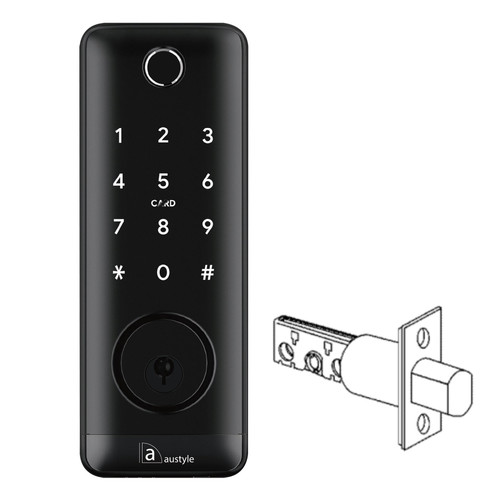


Austyle 59409 Smart Digital Deadbolt - Bluetooth, Fingerprint, PIN, RFID & Key - Matt Black
At A Glance
 At A Glance
 DISPATCHUsually Same Day (before 11am AEST)





 Fingerprint
 PIN Code
 RFID Card
 Bluetooth
 Mechanical Key
 WiFi (Gateway)
The Austyle 59409 is a multi-credential smart deadbolt for retrofit installation on an existing single-cylinder deadbolt preparation. It supports five access methods - fingerprint, PIN code, RFID card, Bluetooth app and mechanical key - and runs on the TTLock platform (iOS and Android). The adjustable bolt suits either a 60mm or 70mm bolt throw, set at installation to match the existing door preparation. The 59409 fits door thicknesses from 35mm to 55mm.
The exterior panel houses a touchscreen keypad and fingerprint reader. The interior panel carries the battery compartment, a manual deadbolt knob for locking from inside, and an electronic privacy lock button that places the lock in a secure state - only the administrator app or mechanical key can override a privacy-locked door. Remote access features - including off-site unlock, access history, and voice control via Google Assistant and Amazon Alexa - require pairing with the Austyle 59419 WiFi Gateway Hub (sold separately). The 59409 has no built-in WiFi. Understand the difference between Bluetooth-only and gateway-connected operation before ordering.
The 59409 is a deadbolt-only product - it includes no lever handle or latch. It is suitable for installation alongside an existing lever or knob set, or as a standalone smart deadbolt where a lever is not required. The handing direction must be set via an L/R switch on the interior printed circuit board before fitting. Confirm your door handing before installation. It suits timber and aluminium doors with an existing 54mm deadbolt hole preparation and a 60mm backset.
Usually ships same day if ordered before 11am AEST (excludes weekends and Queensland public holidays).
 Key Features
- Five access methods: fingerprint, PIN code, RFID card, Bluetooth app, and mechanical key override.
- Adjustable bolt throw - configure to 60mm or 70mm at installation to match the existing door preparation.
- Credential capacity: up to 200 fingerprints, 150 PIN codes, and 200 RFID cards.
- Passcode types include permanent, timed, single-use, recurring, and custom - see TTLock passcode types.
- Anti-peeping virtual passcode entry - enter random digits before or after your real PIN, then press #.
- TTLock app management (iOS

 ) - user management, e-Key sharing, access records, auto-lock configuration.
 - Electronic privacy lock on the interior panel - when active, only the administrator app or mechanical key can unlock from the exterior.
- Remote WiFi access via the 59419 WiFi Gateway Hub (sold separately) - enables voice control via Google Assistant
 and Amazon Alexa
  when connected.
 - Auto-lock function with configurable delay via the TTLock app.
- IP55 weather rating on the external module - suitable for external doors installed under an eave or in a sheltered position.
- 200,000 operating cycles and 200-hour salt spray tested (per manufacturer specification - see the Full Specifications note).
- USB emergency power port - connect a power bank when batteries are depleted, then unlock with any electronic credential.
- Handing field-configurable via an L/R PCB switch on the back panel - set before installation.
- Retrofit-compatible with existing 54mm deadbolt preparations on timber and aluminium doors.
- Aluminium alloy construction, Matt Black finish. Weight: 1.5kg. Suits doors 35 to 55mm thick.
Access Methods
For a plain-English guide to how each credential type works, see our smart lock access methods guide.
 Face Recognition
 Palm Recognition
Browse more smart locks by how they open: Bluetooth, fingerprint, PIN code, RFID card, or with a backup key.
 What's in the Box

- 1 x Exterior front panel (touchscreen keypad and fingerprint reader)
- 1 x Interior back panel (battery compartment, deadbolt knob, and privacy lock button)
- 1 x Tubular bolt mortise (adjustable 60mm or 70mm throw)
- 3 x RFID swipe cards
- 2 x Mechanical keys
- 2 x Waterproof rubber gaskets
- 1 x Strike and strike box
- 1 x User manual
- Timber door mortise screws (M4 x 20mm)
- Aluminium door mortise screws (M5 x 10mm)
- Back panel fixing screws (M4 x 10mm)
- Screw stubs and machine screws (M4 x 30mm, M4 x 40mm, M4 x 50mm)
 Suitable Uses
- Retrofit installation replacing an existing single-cylinder deadbolt on timber or aluminium doors with a 54mm hole preparation and 60mm backset. Use our guide to measuring your lock backset to confirm before ordering.
- Residential front and rear entry doors requiring smart keyless deadbolt access alongside an existing lever or knob set.
- Doors where a smart deadbolt-only upgrade is preferred without replacing existing lever hardware.
- Installations where a compact, lower-profile exterior panel is needed (169mm x 63mm).
- Short-stay rental and Airbnb installations using timed PIN codes and e-Key sharing via the TTLock app - see our guides to using TTLock for Airbnb in Australia, whether you really need WiFi for a rental, and property management system integration (via the 59419 gateway hub for remote management).
 Available Finish Options
 Matt Black
(This Product)
STK 59409
Finish selection does not affect functionality, compliance, or performance.
 Austyle Smart Lock Range - Form Factor Comparison
 Austyle Smart Lock Accessories
 Full Specifications
 Dimensions


 Battery, Power and Backup Access
- Powered by 4 x AA alkaline batteries (6V total) - not included. High-quality alkaline batteries only; rechargeable and lithium batteries are not supported.
- Low battery alarm activates below 4.8V. Replace all four batteries at the same time.
- USB emergency power port on the exterior panel allows temporary operation from an external power bank when batteries are fully depleted - connect the power bank, then use any electronic credential to unlock.
- Mechanical key override provides physical backup access at all times, including when the privacy lock is active. Keep at least one key stored in a secure location outside the door - see our guide to what to do when the battery dies. For battery care tips, see our TTLock battery management guide.
Remote App Access (Optional - WiFi Gateway Required)
The 59409 has no built-in WiFi. Remote access features - including off-site unlock, access history, timed PIN code management, and voice control via Google Assistant and Amazon Alexa - require pairing the lock with the Austyle 59419 WiFi Gateway Hub (sold separately). The hub connects to your 2.4GHz home WiFi and bridges the lock to the TTLock cloud. For guidance on whether a gateway is right for your situation, see our smart lock gateway guide, or browse all WiFi-capable smart locks.
Important - 2.4GHz only: The gateway requires a 2.4GHz WiFi network. Many modern routers use band steering that may push devices onto 5GHz, causing connection failure. If you experience connectivity issues, see our guide to band steering and smart lock WiFi setup and our blog on why smart locks drop off WiFi.
Without a gateway, the 59409 operates fully as a standalone unit using fingerprint, PIN code, RFID card, Bluetooth app (within approximately 5m), and mechanical key. If you need built-in WiFi without a separate gateway, see the Austyle 59410 Latching Smart Lock, which includes built-in 2.4GHz WiFi.
 Frequently Asked Questions
The 59409 suits doors with a 54mm main hole, a 60mm backset, and a 15mm secondary cable hole positioned 68mm above the main hole centre. The cable hole may need to be drilled if it does not already exist. Most standard single-cylinder deadbolt preparations in Australia use a 54mm hole at 60mm backset, so a retrofit install is straightforward. Confirm your measurements with our guide to measuring your lock backset before ordering.

Remove the battery cover on the interior back panel before fitting. The printed circuit board has a small switch labelled L (left) and R (right) - set this to match your door's opening direction. See our guide to understanding door handing in Australia if you are unsure. Incorrect handing will prevent the bolt from operating correctly.
No. The 59409 is a deadbolt-only product. It is designed for installation either as a standalone smart deadbolt or alongside an existing lever or knob set. If your door requires a combined smart lever and deadbolt in a single kit, see the 59406 Lever Entrance Set, which includes both a lever and the 49429 entrance mortice. For the lever-only option, see the 59405 Lever Latch Set.
First confirm the batteries are correctly installed and have sufficient charge - reversed polarity and depleted batteries are the most common cause of an unresponsive display. If batteries are correct, remove the back panel and verify the connecting cable between the front and back panels is fully seated. Confirm the spindle is horizontal and the bolt is in the retracted position. See our guide on common smart lock installation mistakes and Chapter 12 installation troubleshooting.
Long-press the reset button on the back of the front panel for approximately 3 seconds, then enter 000# on the keypad. Two short beeps confirm a successful reset. All stored fingerprints, PIN codes, RFID cards, and TTLock account pairings are erased. Re-add the lock to your TTLock account from scratch after resetting. See the Austyle Factory Reset SOP and our TTLock user manual reference for broader app guidance.
 Additional Information
The spindle must be kept horizontal and the bolt must be in the retracted (pulled in) position before fitting the front panel. Both conditions must be met simultaneously. Incorrect spindle orientation is a common cause of the bolt failing to throw or retract after installation. Confirm both before connecting the front and back panels. See our blog on common smart lock installation mistakes and Chapter 12 troubleshooting.

The interior back panel includes a privacy lock button. When activated, this places the lock in a secure state from inside - the exterior keypad, fingerprint reader, RFID reader, and Bluetooth app cannot unlock the door until privacy mode is cleared. Only the administrator app (when within Bluetooth range or connected via gateway) or the mechanical key override can defeat the privacy lock. Understand how this interacts with other interior knob behaviour by reading our blog on secure lock and the internal snib on smart locks.

IP55 means the external module is tested against water spray from any direction and dust ingress. The internal module - which houses the battery compartment and electronics - is for interior use only and is not weather rated. The lock must not be installed in prolonged direct rain or sunlight - position it under an eave or in a sheltered area. No warranty is provided for water entering from inside the door. Not suitable for gate installation. See our guide to IP ratings.
Only high-quality alkaline AA batteries (4 x AA, 6V total) are supported. Rechargeable and lithium batteries are not compatible and may void warranty. Reduced fingerprint accuracy or intermittent response often occurs due to low battery voltage before the low battery alarm activates - check battery condition first when troubleshooting access issues. See our TTLock battery management guide.
The first TTLock account to add this lock becomes the administrator. All other users receive access via e-Key sharing or credentials issued by the administrator. If transferring the lock to a new owner, perform a factory reset before the new administrator sets up the lock. For a full TTLock app walkthrough, see our TTLock user manual reference. For a deeper look at the TTLock platform, including data hosting and security, see Chapter 15.

This lock is not rated for gate installation. The Austyle warranty explicitly excludes gate use. For gate-suitable smart lock options, ask Terry's team for a recommendation via our advice and installation page.
 Warranty
1-year mechanical and 1-year electronic warranty on residential installations, provided by Austyle Architectural Hardware. Proof of purchase required for all claims. Batteries, water ingress from inside the door, and damage caused by incorrect installation or use outside stated specifications are not covered. Returns & Warranty
 Download PDF Resources
Marketing brochure for the 59409 smart deadbolt - access methods, app unlock records, panel dimensions and the 60/70mm adjustable deadbolt at a glance.
The full Austyle-branded user and installation manual - door preparation, left/right handing, eight-step fitting, the specification table, TTLock app setup, gateway pairing and the FAQ section.
Step-by-step standard operating procedure for resetting Austyle digital locks, including the 59409, to factory settings.
The full Austyle digital smart lock range (edition V.05/26) - the 59409 deadbolt alongside the lever and entry sets, the RFID accessories and the 59419 WiFi gateway.
Austyle 59409 - FAQ, Setup and Owner's Guide
Everything buyers, installers and owners ask about the Austyle 59409 smart digital deadbolt. For general smart-lock questions, see the Smart Lock FAQ (Chapter 13) and the full Smart Lock Buyer's Guide.
Fit, Doors and Installation
It fits doors 35mm to 55mm thick with a 54mm main deadbolt hole at a 60mm backset, plus a 15mm cable hole 68mm above the main hole centre (drill the cable hole if it is not already there). Most standard Australian single-cylinder deadbolt preparations match this, so it usually retrofits without a new door. Confirm with our guides to measuring your backset and measuring your door (Chapter 02).
No - it is a deadbolt only, with no lever handle or latch. Fit it alongside your existing lever or knob set, or as a standalone smart deadbolt. If you want a combined smart lever and deadbolt in one kit, choose the 59406 Lever Entrance Set (includes the 49429 mortice); for lever-only, the 59405 Lever Latch Set.

The 59409 is field-set for either hand. Before fitting, remove the interior battery cover and set the small L/R switch on the printed circuit board to match your door's opening direction. Setting it wrong stops the bolt operating correctly. If you are unsure which hand your door is, see understanding door handing in Australia.
Yes - the 59409 is a DIY-friendly eight-step retrofit if your door already has the 54mm preparation. Keep the spindle horizontal and the bolt retracted before joining the panels (the most common cause of a bolt that will not throw). If you would prefer a professional fit, Terry's offers installation - see our advice and installation page. Common pitfalls are covered in 3 common DIY installation mistakes and Chapter 12 troubleshooting.
Access and Credentials
Up to 200 fingerprints, 150 PIN codes and 200 RFID cards, plus unlimited e-Keys shared through the TTLock app. That is enough for a large household, a share house or a short-stay rental. See how each method works in the access methods guide (Chapter 03).
PINs can be permanent, timed (valid between set dates), single-use, recurring (for example weekdays only) or custom. The anti-peeping feature lets you type random digits before or after your real code and finish with #, so anyone watching cannot read your PIN. Full detail is in TTLock passcode types and TTLock tips and tricks.

Three RFID swipe cards are included and up to 200 can be registered through the app. For extra or replacement credentials, add the 59418 RFID Easy Unlock Fob (pack of 3) or the 59417 RFID Easy Unlock Sticker (pack of 3), or browse all RFID cards, fobs and tags.
Yes. Issue a timed PIN or share an e-Key through the TTLock app for a set window, then let it expire or revoke it - no need to change everyone's code. With the 59419 gateway you can do this remotely and see who came and went. See e-Key sharing.
Remote Access and Gateway
No. The 59409 has no built-in WiFi. For off-site unlock, access history and voice control you add the Austyle 59419 WiFi Gateway Hub (sold separately), which bridges the lock to your 2.4GHz network. If you would rather have WiFi built in, the Austyle 59410 is the only Austyle lock with it on board. Compare the two approaches in Bluetooth vs gateway.
Everything at the door: fingerprint, PIN code, RFID card, mechanical key, and the TTLock app over Bluetooth when you are within about 5m. You only need the gateway for remote (off-site) control, live access history and voice assistants. Many owners run the lock standalone - see what a gateway does.
Yes, once paired with the 59419 gateway. Voice control (Amazon Alexa and Google Assistant) and remote unlock are gateway features - they are not available on the lock by itself. The gateway needs a 2.4GHz network; if your router uses band steering, see band steering and setup and why smart locks drop off WiFi.
Yes. Timed PINs and e-Keys let each guest have their own code for the length of their stay, and the 59419 gateway adds remote management and property-management-system integration. Read using TTLock for Airbnb in Australia, do you really need WiFi for a rental, and the Airbnb chapter (Chapter 07).
Power and Batteries
Four AA alkaline batteries (6V total), which are not included. Use good-quality alkaline cells only - rechargeable and lithium batteries are not supported. A low-battery alarm sounds below 4.8V; replace all four at once. If the fingerprint reader becomes unreliable, check the batteries first, as voltage often drops before the alarm. See our battery management guide.
You have two backups. Connect a USB power bank to the emergency port on the exterior panel and unlock with any electronic credential, or use one of the two supplied mechanical keys. Keep a key somewhere accessible outside the door. See what to do when the battery dies.
Security, Privacy and Setup
Pressing the interior privacy button puts the lock in a secure state - the outside keypad, fingerprint reader, RFID reader and Bluetooth app will not open the door until privacy is cleared. Only the administrator app (in Bluetooth range or via the gateway) or the mechanical key can override it. Understand the trade-offs, especially for rentals, in secure lock and the internal snib explained.

Long-press the reset button on the back of the front panel for about 3 seconds, then enter 000# - two beeps confirm the reset, and all fingerprints, codes, cards and app pairings are erased. Always reset before a new owner sets up the lock, so the first TTLock account to add it becomes the administrator. The full procedure is in the Austyle Factory Reset SOP and the TTLock user manual.
Weather and Suitability
The external module is IP55 rated - tested against water spray from any direction and dust - but the internal module is for interior use only and is not weather rated. Install it under an eave or in a sheltered spot, not in prolonged direct rain or sun. It is not rated for gate use, and the Austyle warranty excludes gates. More on ratings in the Australian standards and IP ratings chapter.

The manufacturer quotes a 200-hour salt spray tested figure for the finish (a laboratory cabinet test, not a warranty for coastal service). As with any smart lock in a salt-air environment, mount it in the most sheltered position available and wipe the exterior down periodically. For an exposed beachfront door, ask Terry's for a recommendation through our advice and installation page.
Related Products, Guides and Chapters
The Austyle smart lock range: 59405 Lever Latch Set · 59406 Lever Entrance Set · 59407 Narrow Lever Set · 59410 Latching Smart Lock (built-in WiFi) · 59413 C4 Key-In Lever Set (Black) · 89413 C4 Key-In Lever Set (Silver White).
Accessories: 59419 WiFi Gateway Hub · 59418 RFID Fob (pack of 3) · 59417 RFID Sticker (pack of 3).
Browse by category: Bluetooth smart locks · Fingerprint smart locks · PIN code smart locks · RFID card smart locks · Locks with a backup key · Front-door smart locks · Gateways and modules.
Buyer's Guide chapters: 02 Measuring Your Door · 03 Access Methods · 07 Airbnb and Short-Stay · 08 Gateway Comparison · 11 Australian Standards and IP · 12 Installation and Troubleshooting · 13 Smart Lock FAQ · 14 TTLock Platform Guide · 15 App Platforms.
Helpful blogs: What is bolt throw? · Measuring your backset · Door handing in Australia · Mechanical key override · The internal snib explained · TTLock tips and tricks · 3 common install mistakes · TTLock user manual.
What's in the Box - Austyle 59409
- 1 x Exterior front panel (touchscreen keypad and fingerprint reader)
- 1 x Interior back panel (battery compartment, deadbolt knob, and privacy lock button)
- 1 x Tubular bolt mortise (adjustable 60mm or 70mm throw)
- 3 x RFID swipe cards
- 2 x Mechanical keys
- 2 x Waterproof rubber gaskets
- 1 x Strike and strike box
- 1 x User manual
- Timber door mortise screws (M4 x 20mm)
- Aluminium door mortise screws (M5 x 10mm)
- Back panel fixing screws (M4 x 10mm)
- Screw stubs and machine screws (M4 x 30mm, M4 x 40mm, M4 x 50mm)
Austyle 59409 - Dimensions
Austyle 59409 - Product Brochure


PDF Files - Austyle 59409
Marketing brochure for the 59409 smart deadbolt - access methods, app unlock records, panel dimensions and the 60/70mm adjustable deadbolt at a glance.
The full Austyle-branded user and installation manual - door preparation, left/right handing, eight-step fitting, the specification table, TTLock app setup, gateway pairing and the FAQ section.
Step-by-step standard operating procedure for resetting Austyle digital locks, including the 59409, to factory settings.
The full Austyle digital smart lock range (edition V.05/26) - the 59409 deadbolt alongside the lever and entry sets, the RFID accessories and the 59419 WiFi gateway.
Austyle Warranty
Warranty Summary
How to Make a Claim
- Retain your proof of purchase - you will need it to make a warranty claim.
- Complete the warranty card supplied in the box (product name, model number, purchase date, store name, receipt number) and keep it in a safe place.
- Contact Terry's Tradies Pty Ltd at your original place of purchase in the first instance.
- If directed to contact Austyle directly:
Email: info@austyle.com.au
Phone: +61 3 9553 3599
Warranty Registration
No online registration is required. Complete and retain the physical warranty card included in the box along with your proof of purchase.
 Exclusions - What This Warranty Does Not Cover
- Commercial installations - this lock is rated for residential use only
- Damage caused by water entering from the inside of the door (the exterior is rated IP55; internal water ingress is not covered)
- Installation on tongue-and-groove doors, where water can penetrate through the groove
- Installation on gates
- Prolonged direct exposure to sunlight or rain - the lock must be positioned under an eave or in a sheltered area
- Damage caused by use of lithium or rechargeable batteries - only high-quality alkaline AA batteries (4 x AA) are supported
- Damage resulting from incorrect installation, misuse, or failure to follow the installation instructions
- Normal wear and consumable items, including batteries
Important Notes

Confused? Overwhelmed? We get it.
Choosing the right smart lock can be genuinely tricky - door types, backsets, app platforms, compatibility with your existing hardware... there is a lot to consider. We have decades of experience fitting locks of all types, including smart locks, and we are happy to help.
Our expert recommendation service is free. Upload a few photos of your door and describe what you need, and one of our qualified locksmiths will give you a personalised recommendation.
Get Your Free Recommendation →How it works - three easy steps:
1. Upload photos
A few clear shots of your door, lock and frame - inside and out.
2. We assess
Our locksmith reviews your setup and requirements - door type, weather exposure, how you want to use it.
3. You get a recommendation
A personalised recommendation tailored to your door, budget and needs. No pressure, no upsell.
Also useful while you are deciding: