



FORGE K5 Fingerprint Outdoor Smart Key Safe - IP65, Card, Tuya App
At A Glance
 At A Glance
 DISPATCHUsually Ships in 24 Hours
 Fingerprint
 PIN Code
 IC Card
 Tuya App
(Bluetooth)
 Remote
(Add Gateway)
 Manual Key
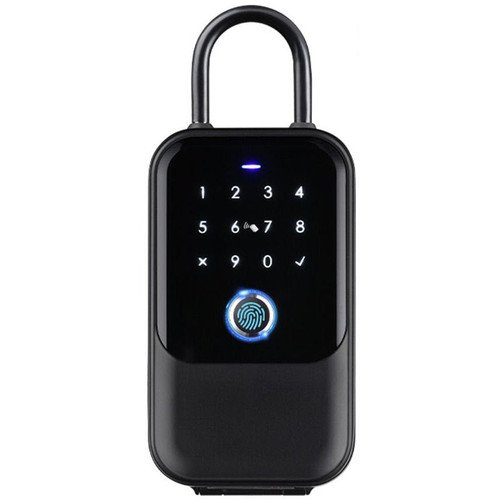
The FORGE K5 Fingerprint Outdoor Smart Key Safe (FESMTLKK5BA) is a weatherproof key box for handing over keys without being there. It opens with a fingerprint, a passcode on its touch keypad, an IC card, the Tuya app or a manual key - up to 200 users across fingerprints, passcodes and cards - and its cast aluminium alloy housing is rated IP65.
Mount it on a wall with the screws and plugs supplied, or hang it from a door handle, gate or railing on its removable shackle. It talks to the Tuya app over Bluetooth 5.0; for remote control, add the optional FORGE Tuya gateway. It runs on 4 x AAA batteries for about 7,000 unlocks or 10-12 months, with a USB-C emergency port.
For the TTLock version of the idea, see the FORGE KS1B key safe. Made in China for FORGE, an Australian brand based in Ringwood, Victoria. Backed by a 2-year manufacturer warranty.
Usually ships in 24 hours.

Owned by FORGE Electrical (Australia) · Manufactured in China. Our independent FORGE brand profile sets out how the range compares with the other brands we stock.
Access Methods
Until the box is configured, any fingerprint opens it and the default code is 123456 - add your administrator in the app as soon as the batteries are in.


 Tuya App - Bluetooth

The K5 connects to the free Tuya app on your phone over Bluetooth (BLE 5.0) . Download the Tuya Smart or Smart Life app (manual page 10), then add the key safe from Add Device - the app scans for it and you activate it (manual page 11). Keep your phone beside the box while you add it.
Over Bluetooth the app works when your phone is near the lock - what a lock can do without Wi-Fi. Remote control and remote unlock need a gateway, sold separately (manual page 14). The FORGE Zigbee 3.0 and Bluetooth gateway is the gateway for the FORGE Tuya Bluetooth locks; the Bluetooth pairing guide shows how a Tuya gateway is added to the app and then picks up a Bluetooth lock. What a gateway does is explained in Chapter 08.
Which platform suits you is set out in our TTLock vs Tuya comparison and which smart lock platform is right for you. For on-demand remote unlock and scheduling from one app, compare a TTLock model with a gateway.
 Using the Key Safe
- To open - lift the protection cover, then use your fingerprint, passcode or card; the front shell opens to the key compartment (manual page 8).
- To lock - close the front panel; it locks about 5 seconds after unlocking (manual page 14).
- Inside - the key compartment is 20 mm deep; the battery box and reset button sit behind the front shell.
- The shackle - to hang the box, fit the shackle and lock it in place; to take it off, push the unhook button up firmly (manual page 9).
- The manual key - remove the silicone plug, insert the key, turn clockwise and pull the panel open. Do not keep the keys inside the box (manual page 8).

A key safe on the outside of a house is a common place to leave a car key. If the car has keyless entry, its fob can be read through a key box - keep it in a signal-blocking pouch inside the safe. See the relay attack risk and the RFID signal-blocking wallet.
 Key Features
- Smart key safe for handing over keys without meeting - fingerprint, passcode, IC card, the Tuya app and a manual key; up to 200 users combined.
- IP65 cast aluminium alloy housing with a tempered glass touch keypad and a protective rain cover.
- Wall mount with the wood screws and expansion plugs supplied, or hang it from a handle, gate or railing on the removable shackle.
- Fingerprint, PIN code and card entry; two IC cards and two manual keys in the box.
- Bluetooth 5.0 to the Tuya app, with the FORGE Tuya gateway add-on for remote control.
- Locks itself about 5 seconds after unlocking.
- 4 x AAA batteries for about 7,000 unlocks or 10-12 months; USB-C port to power it from a power bank if they run flat.
- One of our key storage products.
 What's in the Box
- Key box x1
- Shackle x1
- Manual keys x2
- IC cards x2
- USB-C cable x1
- User manual x1
- Wood screws x4 (4 x 30 mm)
- Expansion plugs x4 (6 x 30 mm)
Batteries are not listed - the K5 takes 4 x AAA alkaline cells only. The gateway is sold separately.
 Suitable Uses
- Short-stay rentals - send a guest a code from the app and keep a record of every opening (managing several properties; the key box option).
- Real estate agents and property managers - codes or cards for trades, cleaners and tenants.
- A spare house key for family, carers or a dog walker - with a fingerprint for the regulars.
- Holiday homes and beach houses - a key box with a code instead of a combination dial (how a key lock box works).
- Cash, jewellery or valuables - it is a key box, not a safe.
- Car keys with keyless entry, unless kept in a signal-blocking pouch (relay attack risk).
- Bulky key bunches or fobs deeper than the 20 mm compartment.
- Remote unlocking without a gateway - over Bluetooth the app works at the box only.
 Available Finish Options
 Black
(This Product)
STK FESMTLKK5BA
The K5 comes in black.
 FORGE Smart Key Safes


This product is the bold row. The K5 runs on the Tuya app and adds a card reader and manual keys; the KS1B runs on TTLock and has no key. More key boxes are in key storage.
 Accessories and Spares


Both Tuya gateways bridge the K5 to Wi-Fi for remote use - choose the IR model if you also want appliance control. Both are optional add-ons at checkout. Other gateways are in our modules and Wi-Fi gateways range, and more key boxes in key storage.
 Battery and Emergency Power
The K5 runs on 4 x AAA alkaline batteries - they are rated at about 7,000 unlocks or 10-12 months; use alkaline AAA cells only (manual page 14). Fit them in the battery box behind the front shell (manual page 8). If they run flat, connect a power bank to the USB-C port under the box and open it normally, or use the manual key. More on what really affects battery life and power and battery FAQs.

 Weather Rating - IP65
The K5 is rated IP65 - dust-tight and protected against water jets - with a cast aluminium alloy housing and a protective cover over the keypad. Working range: -22 to 55 degrees C, 10-95% humidity. Close the protective cover after use and refit the rubber plugs in any holes you are not using. On the coast, rinse salt off now and then - keeping a key box working on the coast and IP ratings explained.

 FORGE K5 - Technical Specifications
 Dimensions


If you need to store a large bunch of keys or a bulky car fob, send us its size and we will check it fits the 20 mm compartment.
 Installation
Decide how you will use the K5 before fitting the batteries: on a wall, or hanging on its shackle. The installation section of the manual covers both.

- Brick wall: poke out the hole plugs, use the key box as the template, drill 6 mm x 40 mm, fit the expansion plugs and screw it on (manual page 6).
- Timber: pilot-drill 2 mm x 40 mm and screw it on (manual page 7).
- Hanging: refit the rubber plug, fit the batteries, then fit and lock the shackle (manual page 9).
- Fit 4 x AAA alkaline batteries, test a fingerprint or the code, then test the manual key - and keep the keys outside the box (manual page 8).
- Add the K5 to the app straight away - until it is configured, any fingerprint opens it.
- Terry's offers installation across the Gold Coast.
Where to put a key box, and other ways to use one, are covered in how a key lock box works and other uses. For a Bluetooth key safe alongside smart padlocks, see the Bluetooth key safe.
 Frequently Asked Questions
Add a passcode for them in the Tuya app and send it - or give them a card. They enter it on the keypad, open the cover and take the key.
No - it works over Bluetooth at the box. A Wi-Fi gateway is needed only for remote control; the optional FORGE Tuya gateway covers that.
Plug a power bank into the USB-C port under the box and open it normally, or use one of the two manual keys - kept somewhere other than the box.
Yes - fit the removable shackle and hang it from a handle, gate or railing.
Yes - it is rated IP65, with a protective cover over the keypad.
Additional Information
- Configure it straight away. Until then any fingerprint opens it and the default code is 123456.
- Keep the manual keys outside the box - they are your way in if the batteries run flat.
- Use alkaline AAA batteries only.
- Check your key bunch fits - the compartment is 20 mm deep.
- Car keys with keyless entry belong in a signal-blocking pouch inside the box (relay attack risk).
 Warranty
2-year FORGE warranty from the date of delivery - covers defects in materials and workmanship under normal use. Excludes improper installation or maintenance, misuse, accident, normal wear and tear (including fading or dulling of finishes) and water damage beyond the product's rated IP protection. Proof of purchase required for all claims. Returns & Warranty | FORGE warranty terms
 Download PDF Resources
14-page manual (Version 1.0) - packing list, the system specifications, factory reset, wall and hanging installation, batteries and tests, Tuya app setup, adding and deleting fingerprints, passcodes and cards, resetting from the app and troubleshooting.
Two-page sheet for adding a Tuya gateway to the app and then attaching a Bluetooth lock to it - the steps for remote use with a gateway. No gateway model is named; the steps are generic.
FORGE K5 Fingerprint Outdoor Smart Key Safe - FAQ, Setup and Owner's Guide
Everything below is here to help you choose, fit, set up and live with the FORGE K5. For general smart lock questions see our Smart Lock FAQ (Chapter 13), and for measuring and fitting the Buyer's Guide.
Using the Key Safe
Lift the protection cover, then use your fingerprint, passcode or card; the front shell opens to the key compartment.
Yes - about 5 seconds after unlocking; close the front panel (manual page 14).
The compartment is 20 mm deep; the box is 77.5 x 138 x 45 mm. Send us the size of your keys or fob and we will check.
Push the unhook button up firmly and lift the shackle out (manual page 9).
Codes, Cards and Fingerprints
In the Tuya app, add a user passcode - the app generates a random code (manual page 12).
In the app choose to add a card, then tap the card on the card area of the keypad (manual page 12).
Press the finger firmly on the reader several times when prompted, moving it slightly each time. Avoid wet fingers.
Up to 200 - fingerprints, passcodes and cards combined.
Remote Use and the Gateway
Only for remote control - a Wi-Fi gateway is needed for that, sold separately. The FORGE Zigbee 3.0 and Bluetooth gateway is the gateway for the FORGE Tuya Bluetooth locks.
Near the box - Bluetooth is a short-range link. See what a lock can do without Wi-Fi.
Remove the device in the app ('Disconnect and Wipe Data'), then add it on the new phone (manual page 13).
Platform and Data
The K5 uses the Tuya app over Bluetooth. Remote control goes through a gateway on your home Wi-Fi, sold separately. Tuya is a Chinese company headquartered in Hangzhou with regional data centres; Tuya provisions Australian accounts to its Central Europe data centre, and there is no Australian data centre. Day-to-day use over Bluetooth at the door does not need the cloud. For the platform-by-platform picture see where each smart lock platform hosts its data, and for how Tuya compares with TTLock data sovereignty in our TTLock vs Tuya comparison.
Power and Batteries
About 7,000 unlocks or 10-12 months on 4 x AAA alkaline cells.
Plug a power bank into the USB-C port and open it normally, or use a manual key.
Reset and Troubleshooting
Hold the reset button behind the front shell for 5 seconds with a pin under 2.5 mm, enter 000 when prompted, and it returns to the default 123456 (manual page 4).
It has not been configured yet. Add it to the app and register your administrator - then only enrolled fingerprints work.
Related Products, Guides and Chapters
Related FORGE products: FORGE KS1B key safe · Zigbee 3.0 + Bluetooth gateway · Key storage
Buyer's Guide chapters: Ch 07 Short-Stay Rentals · Ch 08 Gateways · Ch 10 FORGE profile · Ch 11 IP ratings
Helpful blog reading: Surf Key Lock Box · Airbnb - the key box option · Bluetooth key safe · Your Data and China
What's in the Box - FORGE K5 Fingerprint Outdoor Smart Key Safe

- Key box x1
- Shackle x1
- Manual keys x2
- IC cards x2
- USB-C cable x1
- User manual x1
- Wood screws x4 (4 x 30 mm)
- Expansion plugs x4 (6 x 30 mm)
FORGE K5 Fingerprint Outdoor Smart Key Safe - Dimensions
FORGE K5 Fingerprint Outdoor Smart Key Safe - User Manual
The manual for the K5 (Version 1.0, Tuya BLE Pro), page by page. All 14 pages are shown. Prefer the PDF? Download the manual.


PDF Files - FORGE K5 Fingerprint Outdoor Smart Key Safe
14-page manual (Version 1.0) - packing list, the system specifications, factory reset, wall and hanging installation, batteries and tests, Tuya app setup, adding and deleting fingerprints, passcodes and cards, resetting from the app and troubleshooting.
Two-page sheet for adding a Tuya gateway to the app and then attaching a Bluetooth lock to it - the steps for remote use with a gateway. No gateway model is named; the steps are generic.
 FORGE K5 Fingerprint Outdoor Smart Key Safe - Product Gallery


FORGE Warranty
FORGE Electrical products sold by Terry's Tradies Pty Ltd and its associated websites, trading names, and subsidiaries are covered by FORGE's 2-year warranty against defects. All warranty claims are lodged with us, and we liaise with FORGE on your behalf.
Warranty Summary
How to Make a Claim
- Notify us in writing within the 2-year warranty period, including your proof of purchase and a description of the fault.
- We will assess your claim with FORGE and advise the next steps. The product may need to be returned for assessment.
- Where the defect is covered, FORGE will repair or replace the product or faulty part at no charge.
 Exclusions
The FORGE warranty does not cover:
- Improper installation, maintenance or operation, including not following FORGE's product specifications or instructions
- Normal wear and tear
- Misuse, abuse, negligence or accident
- Modification by anyone other than FORGE Electrical
- External causes such as natural disasters
- Damage from excessive rain, water ingress, flooding or other liquid exposure beyond the product's rated IP protection level
- Cosmetic ageing of outdoor finishes - light colour fading, surface dulling or minor oxidation from UV exposure, humidity and temperature changes
IP ratings on FORGE outdoor locks are intended for general outdoor conditions - rain, sun and dust. They do not guarantee performance under extreme exposure such as driving rain, hailstorms, constant salt spray, flooding or immersion.
Important Notes
In unusually harsh or exposed locations, FORGE strongly recommends fitting a rain cover or protective hood over the lock to shield it from direct weather and driving rain. If your product has been exposed to water, contact us for support.
Our goods come with guarantees that cannot be excluded under the Australian Consumer Law. You are entitled to a replacement or refund for a major failure and compensation for any other reasonably foreseeable loss or damage. You are also entitled to have the goods repaired or replaced if the goods fail to be of acceptable quality and the failure does not amount to a major failure.
The FORGE warranty is in addition to these rights.

Confused? Overwhelmed? We get it.
Choosing the right smart lock can be genuinely tricky - door types, backsets, app platforms, compatibility with your existing hardware... there is a lot to consider. We have decades of experience fitting locks of all types, including smart locks, and we are happy to help.
Our expert recommendation service is free. Upload a few photos of your door and describe what you need, and one of our qualified locksmiths will give you a personalised recommendation.
Get Your Free Recommendation →How it works - three easy steps:
1. Upload photos
A few clear shots of your door, lock and frame - inside and out.
2. We assess
Our locksmith reviews your setup and requirements - door type, weather exposure, how you want to use it.
3. You get a recommendation
A personalised recommendation tailored to your door, budget and needs. No pressure, no upsell.
Also useful while you are deciding: