

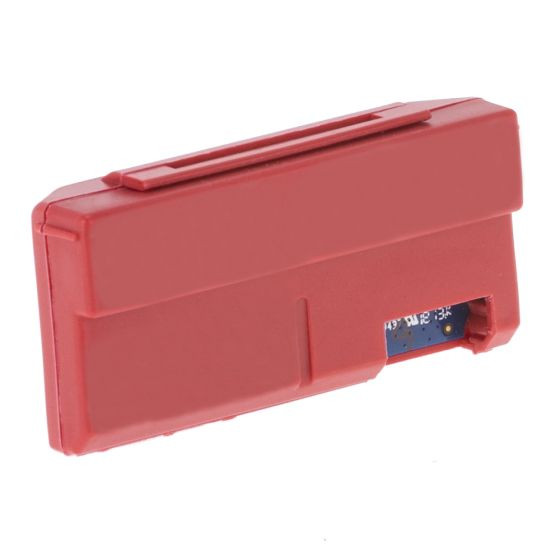


Yale Zigbee Network Module - Third-Party Smart Home Control for Assure Locks - Red
The Yale Zigbee Network Module (part number YRD-ZBM-1) slots into a Yale Assure series lock and puts it on a third-party Zigbee smart home system instead of Yale's own app. Once enrolled, the lock is controlled from whatever platform runs your house - Samsung SmartThings being the usual choice in Australia - alongside your lights, sensors and everything else.
Zigbee is a low-power mesh protocol built for home automation. Every mains-powered Zigbee device on the network relays for its neighbours, so coverage improves as the network grows rather than depending on one Wi-Fi access point reaching the front door. For a battery lock that has to stay responsive for a year on a set of AAs, the low power draw matters.
This is an ecosystem decision, not an accessory purchase. The module occupies the same single bay as the Yale Home Module, so fitting one means the other comes out. Choose this module to run the lock from a Zigbee hub; choose the Home Module to run it from the Yale Home app. A compatible Zigbee hub is required and sold separately.

Usually ships same day if ordered before 11am AEST (excludes Queensland public holidays).
 Key Features
- Puts an Assure lock on your existing smart home system. The lock joins the same Zigbee network as your other devices and is controlled from that platform's app, not from a separate lock app.
- Mesh networking. Every mains-powered Zigbee device relays for the others, so coverage extends as the network grows. That suits larger homes and front doors sitting a long way from the router.
- Low power draw. Zigbee is designed for battery devices, so the lock stays responsive without the current a Wi-Fi radio would demand.
- Off the Wi-Fi network entirely. A busy or congested home Wi-Fi network cannot slow the lock down, because the lock is not on it.
- Automation, not just remote control. Once the lock is a device on your hub it can take part in routines - lights on when the door unlocks, alarm arming when it locks.
- Fits inside the lock. Seats in the module bay behind the interior battery cover. No visible hardware on the door and no drilling.
- Colour-coded for identification. Yale finishes the Zigbee module in red so it can be told apart at a glance from other modules in the same bay.
- Three-year Yale electronic warranty. Backed by ASSA ABLOY Australia and handled locally by Terry's.
 Which Module Do You Need
An Assure lock has one module bay. Two different modules fit it, they do completely different jobs, and you cannot have both. The question that decides it is simple: do you want the lock in Yale's app, or in your smart home platform?
 What's in the Box
- Yale Zigbee Network Module (YRD-ZBM-1), Red

No lock, no Zigbee hub and no door sensor. The module needs a Yale Assure series lock to fit into and a compatible third-party Zigbee hub to enrol with, both sold separately. Unlike the Yale Home Module, no DoorSense sensor is supplied.
 Suitable Uses
- Homes already running a Zigbee platform where the front door is the last thing not on the system.
- Automation routines that involve the lock - lights, alarms or scenes triggered by locking and unlocking.
- Larger homes where Wi-Fi struggles at the front door, since the Zigbee mesh relays through mains-powered devices along the way.
- Owners who prefer one app for the whole house rather than a separate app per brand.
- Congested Wi-Fi networks where taking a device off the 2.4GHz band is a benefit in itself.
- Replacing a lost or faulty Zigbee module in an Assure lock already enrolled on a hub.

This module is for the Yale Assure series only, and only where a compatible Zigbee hub is already in place. It will not fit the Yale Unity Entrance, the Unity Slim or another brand's lock. It is not a hub and provides nothing on its own. It also gives you no Yale Home app, no Apple HomeKit and no DoorSense - if you want those, you want the Yale Home Module instead.
 Available Finish Options
 Red
Red
(This Product)
STK YRD-ZBM-1
Finish selection does not affect functionality, compliance, or performance. The colour is an identification aid rather than a decorative choice - the module is concealed inside the lock once fitted.
 Compatible Smart Home Systems
Yale publishes the following systems as compatible with an Assure lock fitted with this module. That list is written for Yale's global market, so the Australian position is set out alongside it.
 Yale Gateways and Modules
 Installation
The module seats in the bay at the top of the battery compartment, on the inside of the lock. Fit the lock and set the master PIN code first, following the instructions packed with the lock, then add the module.


- 1. Install your hub's app on your phone, and make sure the hub itself is set up and online first.
- 2. Fit the lock and create the master PIN code, following the instructions packed with the lock. Do this before the module goes in.
- 3. Remove the battery cover and the batteries.
- 4. Insert the module, then refit the batteries and the battery cover.
- 5. Enrol the lock from your hub's app. The enrolment steps belong to your platform, not to Yale, so follow that app's process for adding a Zigbee device.
The bay holds a single module. Fitting this one means removing the Yale Home Module, and with it the Yale Home app, Apple HomeKit and DoorSense. Keep the module you take out - swapping back is simply the same job in reverse.
 Full Specifications
 Frequently Asked Questions
You need a hub. This module is a radio, not a controller - it lets the lock speak Zigbee, but something has to be listening. A compatible Zigbee hub is required and is sold separately. Without one the module does nothing.
Choose this one if you already run a Zigbee smart home and want the lock inside it. Choose the Yale Home Module if you want the lock to work simply on its own in Yale's app, with DoorSense and Apple HomeKit. They share one bay, so it is genuinely either/or - the comparison table above sets both out side by side.

No. The Connect Plus Hub 2 is Yale's own gateway and it works with the Yale Home Module. Fitting the Zigbee module takes the lock out of the Yale Home ecosystem entirely, and your Zigbee hub takes over that role.

Three practical reasons. Zigbee is built for low power, so a battery lock stays responsive without the drain a Wi-Fi radio adds. It forms a mesh, so every mains-powered Zigbee device on the way to the door extends the range rather than competing for one access point. And the lock is off your Wi-Fi entirely, so a congested home network cannot slow it down.
No. Yale's published compatibility list is written for its global market and includes Xfinity Home, which is a United States service not offered in Australia. In practice the Australian choice is Samsung SmartThings, or an Amazon Echo device that carries a built-in Zigbee hub. If your platform is not on the list, ask us before ordering.
Additional Information
- Confirm the hub before you buy the module. Zigbee compatibility is decided by the hub's software, not by the lock, and Yale itself notes that features vary between platforms. A hub that pairs the lock but exposes only lock and unlock is a common and disappointing outcome - ask what your platform actually surfaces.
- You give up DoorSense by choosing Zigbee. The door position sensor comes with the Yale Home Module and has no equivalent here. If auto-lock safety matters to you, weigh that before switching ecosystems.
- Keep the module you remove. Current Australian Assure locks ship with a Home Module in the box. Swapping to Zigbee does not consume it, and going back later is the same ten-minute job in reverse.
- Commission the lock first, module second. Yale's own sequence is deliberate: fit the lock, set the master PIN, then add the module and enrol. Enrolling a lock that was never fully commissioned is the most common reason a module appears faulty when it is not.
- Think about platform lifespan, not just today's features. Tying a lock to a third-party ecosystem means its future depends on that platform's decisions as much as Yale's. Our note on platform lifespan and Chapter 15 on choosing a platform are both worth reading first.
 Warranty
Genuine Yale products bought new in Australia from authorised retailers are covered against defects in materials and workmanship for:
- Mechanical parts: 10 years
- Electrical and electronic components: 3 years (batteries excluded)
- Keys: 12 months
 PDF Downloads
Yale Smart Locks Catalogue (PDF)
Yale Home App Guide (PDF)
Yale Home App Quick Start Guide (PDF)
Yale Zigbee Network Module - Zigbee, Hubs and Setup Guide
Everything below is specific to the Yale Zigbee Network Module and the Assure locks it fits. For how gateways and hubs work generally, see Chapter 08 - Gateway Comparison, and for platform choice Chapter 15.
Understanding Zigbee
A wireless protocol built specifically for home automation. It uses low-energy radio to control household devices - lighting, sensors, thermostats, blinds, garage doors and locks - and it forms a mesh, meaning each mains-powered device relays messages for its neighbours rather than every device talking directly to a router. A Zigbee network is reached through a hub, which acts as both the controller and the bridge to the internet, so you can operate it from a phone, tablet, computer or smart speaker.
Because front doors are usually the furthest point in the house from the router, often through a couple of brick walls. On Wi-Fi that is a single hop and it either works or it does not. On a Zigbee mesh, every mains-powered device between the hub and the door - a smart plug, a bulb, a sensor - passes the message along. Adding devices makes the network better rather than busier.
It is a different exposure rather than a simple upgrade. A Zigbee lock is not reachable from your home Wi-Fi network at all, so the common attack routes against Wi-Fi devices do not apply to it. What it does mean is that the security of the whole arrangement now depends on your hub and its vendor as much as on Yale. Choose the hub as carefully as you chose the lock.
Choosing between the modules
Because the Assure lock has a single module bay, physically sized for one. It is not a limitation Yale could have designed around cheaply - the bay sits in the space above the battery carrier. The practical effect is that the module choice is an ecosystem choice, made once, and reversible only by swapping the hardware.
The Yale Home app, Apple HomeKit, and DoorSense door position sensing. You also lose the ability to use the Connect Plus Hub 2, since that is Yale's own gateway for its own module. What you gain is the lock appearing as a device in the system that already runs your house. Whether that is a good trade depends entirely on whether you have such a system.
Yes, and it costs nothing but ten minutes. Battery cover off, swap the module, cover on, re-enrol. Keep whichever module you take out - a current Australian Assure lock ships with a Home Module in the box, and that one becomes your way back.
Setup and troubleshooting
Hub online first, then the lock fitted and its master PIN created, then the module in, then enrol from the hub's app. Skipping the master PIN step is the single most common reason a lock refuses to join a network - the lock is not fully commissioned, so it has nothing to enrol.
Check three things in order. Is the hub genuinely within range of the door, or is it two rooms and a brick wall away with nothing in between to relay? Was the master PIN created before the module went in? And does your hub's app actually list Yale locks as supported devices, rather than just supporting Zigbee generally? Broader symptom-to-fix guidance is in Chapter 12.
They keep working exactly as before. The module changes how the lock is controlled remotely, not how it is used at the door. The keypad, the master PIN and the mechanical key override are all properties of the lock and are unaffected by which module is fitted.
Related products, guides and chapters
The other module: Yale Home Module with Door Sensor - same bay, Yale Home app, DoorSense and Apple HomeKit.
Host locks (Yale Assure range): Assure Keyed Deadbolt Satin Chrome | Assure Keyed Deadbolt Matt Black | Assure Keyed Lever Matt Black | Assure Keyed Lever Satin Chrome | Assure SL Deadbolt Satin Chrome | Assure SL Deadbolt Matt Black.
Yale's own gateway: Connect Plus Hub 2 - for the Yale Home Module, not for this one.
Other Yale smart locks: Unity Entrance Matt Black | Unity Slim | ByYou Pro | Kyra Pro.
Buyer's Guide chapters: Ch 03 - Access Methods | Ch 08 - Gateways | Ch 10 - Brand Profiles | Ch 13 - Smart Lock FAQ | Ch 15 - App Platforms.
Related reading: Yale Network Modules Explained | Why Smart Locks Drop Off Wi-Fi | Which App Platform Is Right for You | Yale Smart Locks in Australia: An Honest Assessment.
Yale Zigbee Network Module - PDF Resources
The Yale Home App Guide and Quick Start Guide cover Yale's app-connected range and are provided here as reference for the wider Yale line. This module deliberately takes the lock out of the Yale Home app and onto a third-party Zigbee platform, so your setup, user management and automation instructions all come from your hub's own app instead. The Smart Locks Catalogue is the useful one here, for the Assure range this module fits.
No Cyber Security Declaration has been issued to us for this module. Where one exists for a Yale product we publish it on the page; if you need the declaration for a compliance file, ask us and we will request it from ASSA ABLOY Australia. Full lock detail for the host locks is on the Yale Assure product pages.
Yale Warranty
Yale branded products are manufactured and warranted in Australia by ASSA ABLOY Australia Pty Ltd. Coverage is tiered by component type - mechanical parts, electrical and electronic components, and keys each carry their own warranty period. The summary below sets out each period, what is excluded, and how to make a claim through Gold Coast Smart Locks.
This warranty applies to genuine Yale products purchased new in Australia from ASSA ABLOY or its authorised resellers. It operates in addition to your rights under the Australian Consumer Law.
Warranty Summary
How to Make a Claim
For full returns and warranty claim procedures, visit our Returns & Warranty page - this is kept up to date and is the authoritative reference for current claim steps.
- Keep your proof of original purchase (invoice or receipt).
- Contact Gold Coast Smart Locks - operated by Terry's Tradies Pty Ltd and its associated websites, trading names, and subsidiaries - as your authorised retailer, and follow the steps on our Returns & Warranty page.
- Return the product securely packed to protect it in transit, together with your proof of purchase and your name, address, email and phone number.
- ASSA ABLOY assesses the claim. Where the warranty applies, they will (at their option) repair the product, replace it with the same or closest equivalent Yale product, or refund the price you paid.
Claims made directly to ASSA ABLOY require a Case Number from their Customer Service Department before goods are returned - products sent back without a Case Number may not be accepted. Costs of returning a product are the customer's responsibility.
 What Is Not Covered
- Normal wear and tear.
- Misuse, abuse, accident, or use outside Yale's published technical specifications.
- Improper maintenance or neglect, or failure to follow ASSA ABLOY's care and maintenance recommendations.
- Use of batteries other than those specified; batteries themselves are not covered.
- Unauthorised alteration, modification or repair by anyone other than ASSA ABLOY authorised personnel.
- Custom orders made to components or specifications supplied by someone other than ASSA ABLOY.
- Goods that were not new when purchased, second-hand goods, or products not originally sold in Australia through ASSA ABLOY or an authorised reseller.
- Products with brands, marks, plates, numbers or other ASSA ABLOY information defaced or removed.
- Use of substitute, replacement or non-genuine ASSA ABLOY parts or cylinders.
- Corrosive exposure, including vapours, chemicals, abrasive compounds, contamination, pollution, coastal air, salt spray and high humidity.
- Removal, refitment or replacement of products, and any associated charges.
Important Notes
Batteries are consumable and are not covered. Cosmetic finishes and appearance are excluded. Stainless steel resists staining but is not stain-proof - tea staining is a natural process and is not covered where cleaning and maintenance guidelines have not been followed.
Damage from salt spray, coastal air, high humidity and other corrosives is excluded. In Gold Coast and coastal locations, choose a suitable finish and follow the care and maintenance guidance to protect your hardware and preserve your cover.
Your Rights Under the Australian Consumer Law
This manufacturer's warranty is in addition to other rights and remedies you may have under the law. Our goods come with guarantees that cannot be excluded under the Australian Consumer Law. You are entitled to a replacement or refund for a major failure and to compensation for any other reasonably foreseeable loss or damage. You are also entitled to have the goods repaired or replaced if they fail to be of acceptable quality and the failure does not amount to a major failure.
Further Information
Returns & Warranty - goldcoastsmartlocks.com.au
Download the Yale Warranty (PDF)
Official Yale warranty terms - yalehome.com.au
Manufacturer: ASSA ABLOY Australia Pty Ltd, 235 Huntingdale Road, Oakleigh VIC 3166. Tel: 1300WARRANTY. Email: 1300warranty@assaabloy.com
It can be overwhelming with all the choices out there. We can help! We are experts with decades of experience in fitting locks of all types, not just Smart Locks. It is a free service we offer, and with just some photos and a few minutes of your time you can get expert advice and product recommendations tailored precisely to suit your needs.
Click on the image below to begin your expert Smart Lock consultation


