


Zanda Stealth Smart Deadbolt - 60mm Backset
At A Glance
 At A Glance
 DISPATCHSame Day Before 11am

 REAL INSTALLS6 Terry's Gold Coast Fits - Gallery Tab
 TTLock App
  PIN Code
  RFID Card
  Fingerprint
(Optional Module)
 Mechanical Key
  Remote (Optional Bridge)
The Zanda Stealth Smart Deadbolt (Product Code: 1320) is a Bluetooth-enabled digital deadbolt designed for residential timber and aluminium doors. It provides five access methods - Bluetooth app, PIN code, RFID card, fingerprint (optional configuration), and mechanical key override - and is managed through the TTLock mobile app on iOS and Android.
 To learn how the platform handles passcodes, e-keys and gateways, see Chapter 14 - the TTLock Platform Guide, and for how TTLock sits against the other platforms we sell, the TTLock profile in Chapter 15. It is the deadbolt member of the Zanda Stealth range and one of the Bluetooth smart locks we stock with a mechanical backup key.
The lock operates as a standalone Bluetooth device for local access control - see what a TTLock lock does without Wi-Fi. Remote access, access history review, and credential management from any location are available when the lock is paired with a compatible Zanda Wi-Fi gateway (sold separately) - the Zanda Stealth Electronic Lock Gateway / Wi-Fi Bridge. Without a gateway, the lock operates fully via its onboard access methods. What a gateway actually does is explained in Chapter 08, and Bluetooth versus gateway control in Chapter 14.
The Stealth deadbolt is supplied in five finishes - Matt Black, Brushed Nickel, Graphite Nickel, Satin Brass and Ember Bronze - and is designed to be used in conjunction with a separate pull handle or passage set on the door. The external module is rated IP66 for weather resistance (IP ratings explained) and the lock is covered by the Zanda warranty - 5 years mechanical and 2 years on the finish for Electronic Locks (see the Warranty section below). It suits a regular front door with one side facing the weather and is a natural fit for short-stay and Airbnb properties that want timed PIN codes.
Usually ships same day if ordered before 11am AEST (excludes weekends and Queensland public holidays).
This listing is the deadbolt on its own - Bluetooth control, PIN, RFID card and mechanical key at the door. Not sure you need a gateway at all? Start with do you need a gateway? and which setup suits you. Add the Zanda Stealth Electronic Lock Gateway / Wi-Fi Bridge (STK 1330.-, sold separately) to lock, unlock, issue passcodes and read the unlock log from anywhere with an internet connection - browse every option in modules and Wi-Fi gateways, or read how to pick the right gateway and TTLock gateway selection first.

The Stealth deadbolt is a security bolt only - it does not incorporate a latch or a door-operating handle. Pair it with a separate pull handle, lever passage set or knob set so the door can be pulled closed and opened day to day; the deadbolt provides the security bolt and the handle hardware operates the latch (if fitted). If your door already has a handle, identify it with Chapter 02 - existing hardware and check the cylindrical / tubular layout the bolt will sit above. If you would rather have the handle and the smart lock in one unit, the Stealth Longplate 60mm Mortice or Stealth Longplate 60mm Tubular Latch sisters are complete lever sets.


If this model isn't the right fit for your door or application, we stock a broader range of digital smart deadbolts suited to different door constructions, backsets, and installation requirements - why a deadbolt at all and what a deadbolt is are worth two minutes first. Comparable stocked deadbolts include the McGrath X3, McGrath Ashgrove, McGrath Kedron, Carbine CEL2-BT, Igloohome Deadbolt Go and Yale Assure Keyed.
View all smart deadbolt options
Access Methods and Smart Features
*Fingerprint is an optional module on the 1320 - confirm inclusion before ordering. Wi-Fi remote access requires the Zanda Stealth Wi-Fi Bridge (sold separately). Compare every credential type side by side in Chapter 03 - access methods compared, or browse our PIN code, fob / card / RFID and fingerprint smart lock categories.
 Face Recognition
 Palm Recognition
 Key Features
- Five access methods: Bluetooth app, PIN code, RFID card, fingerprint (optional), and mechanical key override - the full authentication stack on one deadbolt.
- Managed via the TTLock app (iOS and Android) for credential management, access logs, timed codes, and e-key sharing - how TTLock e-keys work and the permanent passcode rule every owner should know.
- Remote access and monitoring available when paired with a compatible Zanda Wi-Fi gateway (sold separately) - the Stealth Wi-Fi Bridge; see what a gateway does.
- Auto-lock function configurable via the TTLock app - set delay time between unlocking and automatic re-locking.
- Passage mode available for situations requiring the bolt to remain retracted.
- IP66 rated (external / outside module) - suitable for external doors exposed to weather; the internal module houses the batteries and is for interior use only. IP ratings explained; on the coast read the realities of coastal installs.
- Credential capacity: up to 200 fingerprints, 150 passwords, and 200 RFID cards.
- PIN code lockout after five incorrect consecutive entries (keyboard locks for 5 minutes).
- Password types: permanent, time-limited, one-time, recurring, and custom - the six TTLock passcode types and cyclic passcodes for cleaners.
- e-Key sharing via the TTLock app - issue time-limited digital access to other users. Ideal for Airbnb and short-stay - see using TTLock for Airbnb.
- 60mm fixed backset; suits door thicknesses of 35-55mm - how to measure backset and door thickness.
- Compatible with timber and aluminium door constructions - see the door type compatibility matrix.
- Available in five finishes: Matt Black, Brushed Nickel, Graphite Nickel, Satin Brass and Ember Bronze.
- Backed by the Zanda warranty - 5 years mechanical, 2 years finish (Electronic Locks) - see Warranty.
 What's in the Box
- 1 x front panel (external keypad assembly)
- 1 x back panel (internal thumb turn assembly)
- 1 x mortice deadbolt
- 3 x RFID IC cards
- 2 x mechanical keys
- 2 x waterproof rubber plates
- 1 x strike and strike box
- 1 x user manual
- Fixing hardware: screw stubs, back panel screws, mortice screws (timber and aluminium sets), and assorted fixing screws
Note: Batteries (4 x AA) are not included - which batteries to buy. A pull handle or passage set is required on the door - the deadbolt is not designed to be the sole operating hardware on the door leaf. The Wi-Fi bridge is sold separately.
 Suitable Uses
- Residential front and rear entry doors (timber or aluminium construction) - check the door type compatibility matrix first.
- Doors requiring a standalone smart deadbolt alongside a separate pull handle or passage set - identify what is on the door now.
- Applications requiring multiple access credential types on a single door - browse all app-enabled smart locks.
- External doors requiring IP66 weather-rated locking hardware on the outside face - Queensland considerations and coastal lifespan notes.
- Short-term rental properties requiring time-limited PIN code access (see Chapter 07 - Airbnb & Short-Stay and using TTLock for Airbnb); which platform suits Airbnb is a good pre-read.
- Applications where remote access management is required via the optional gateway - see Wi-Fi capable smart locks and multi-property management.
- Apartment and unit entry doors where a secondary deadbolt is wanted above an existing latch - but not fire doors: this lock carries no fire rating, so read the one-penetration principle and strata checks before drilling.
 Available Finish Options
 Matt Black
STK 1320.BLK Brushed Nickel
STK 1320.BN Graphite Nickel
STK 1320.GN Satin Brass
STK 1320.SB Ember Bronze
STK 1320.EB
Finish selection does not affect functionality, compliance, or performance. All five finishes are variants on this one listing - choose the finish at checkout.
 Zanda Stealth Smart Range - Item Code Family
The Stealth deadbolt sits within a small family of TTLock-platform Zanda smart locks. They share the same app, credential types and optional Wi-Fi gateway, but differ mechanically in body style, backset and installation method. Use the table to find the right configuration for your door - and see Chapter 02 - Measuring Your Door if backset, thickness or handing is a live decision. The two spare bodies at the foot of the table suit the longplate models only, not this deadbolt.
This product (bold row) is the deadbolt-only configuration. Not sure whether a bolt or a lever set is the right format? The Quick Start Guide bolt-type decision and what bolt throw means both help.
 Accessories & Spares
Everything a 1320 owner may need to buy alongside or after the lock. Zanda does not list a spare front panel, spare keypad, spare back panel or spare deadbolt body for the 1320, so none appears here - if a part fails, contact Terry's and the claim runs through the Zanda warranty (5 years mechanical, 2 years finish).
The Zanda 1153.SS mortice body and 1132.SS tubular latch are spare bodies for the Stealth longplate models (1326 / 1327) - they do not fit this deadbolt. Every accessory we sell is under smart lock accessories.
 Battery, Power & Backup Access
- Powered by 4 x AA batteries - not included; install before commissioning the lock. Which batteries to buy.
- Batteries are installed in the internal (back panel) battery compartment; slide the battery cover upward to open.
- Low battery alerts are provided through the TTLock app and via the lock's onboard indicators - the low-battery diagnostic and power and battery FAQs.
- Mechanical key override provides physical backup entry if batteries are depleted or electronic access methods fail - what happens when the battery dies and where the keyhole is.
- Note: the spec sheet acknowledges that this lock has relatively high standby power consumption - use quality alkaline batteries for optimal battery life. What really affects battery life.
Remote App Access (Optional - Gateway Required)
The Stealth deadbolt communicates via Bluetooth. Within Bluetooth range, the TTLock app (iOS and Android) provides full lock management including unlocking, credential management, and access log review. Remote access from outside Bluetooth range requires pairing with a compatible Zanda Wi-Fi gateway (sold separately). Once the gateway is connected to your home Wi-Fi network, the lock can be managed from anywhere with an internet connection. The matching bridge is the Zanda Stealth Electronic Lock Gateway / Wi-Fi Bridge. For how a gateway changes what a smart lock can do, see Chapter 08 - Gateway Comparison; for 2.4GHz-only bridges and routers that merge bands, read band steering and band steering explained; and if your bridge keeps dropping off Wi-Fi, our guide on why smart locks drop off Wi-Fi covers the common fixes and what still works when the internet is down.
Without a gateway, the lock operates fully as a standalone unit using onboard access methods: Bluetooth (in proximity), PIN code, RFID card, fingerprint (if fitted), and mechanical key - Bluetooth versus gateway control sets out exactly what each mode gives you. TTLock is the same platform used by our McGrath, Lockton and Austyle ranges - what TTLock is and how TTLock handles security.
 Zanda Stealth Smart Deadbolt 1320 - Technical Specifications
 Dimensions
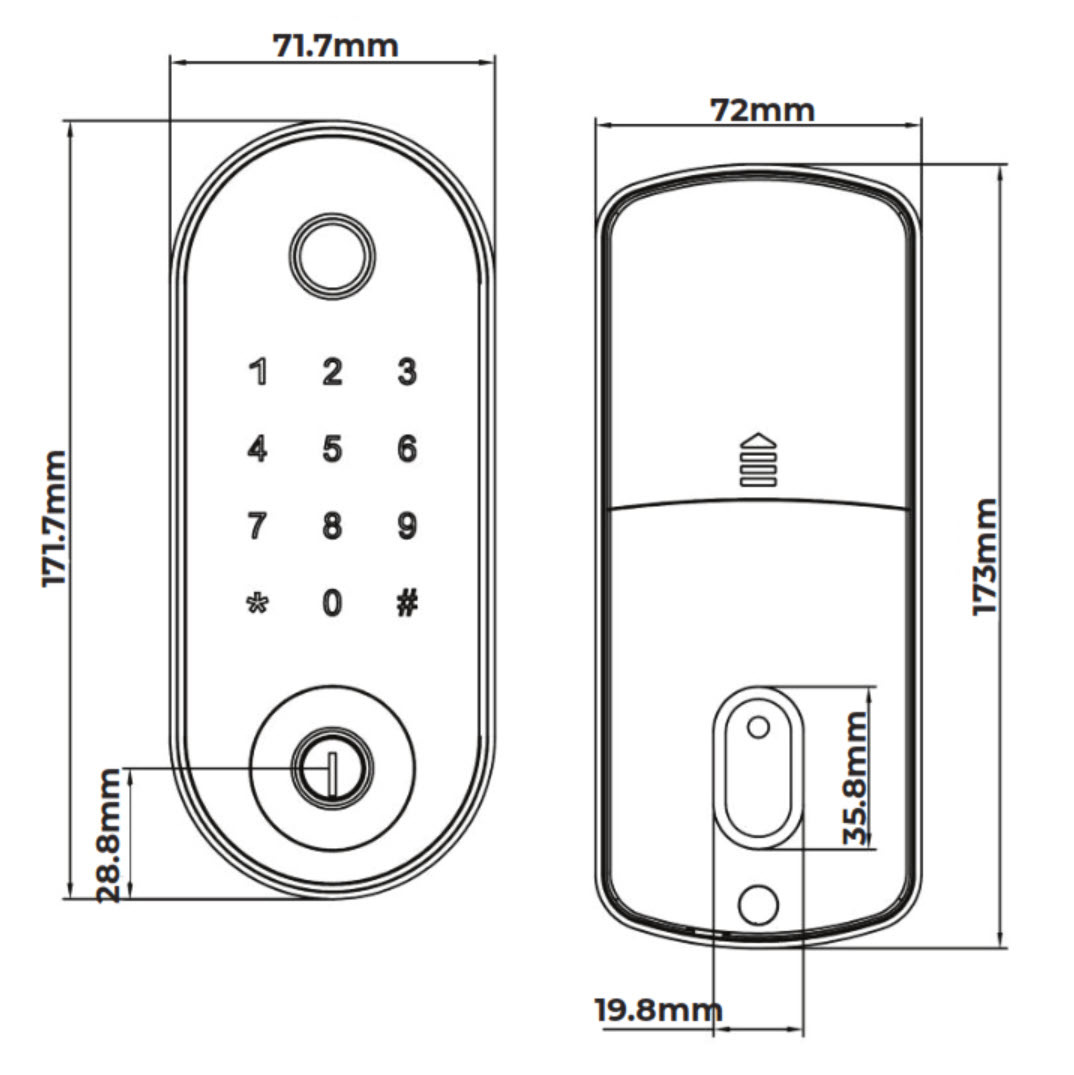
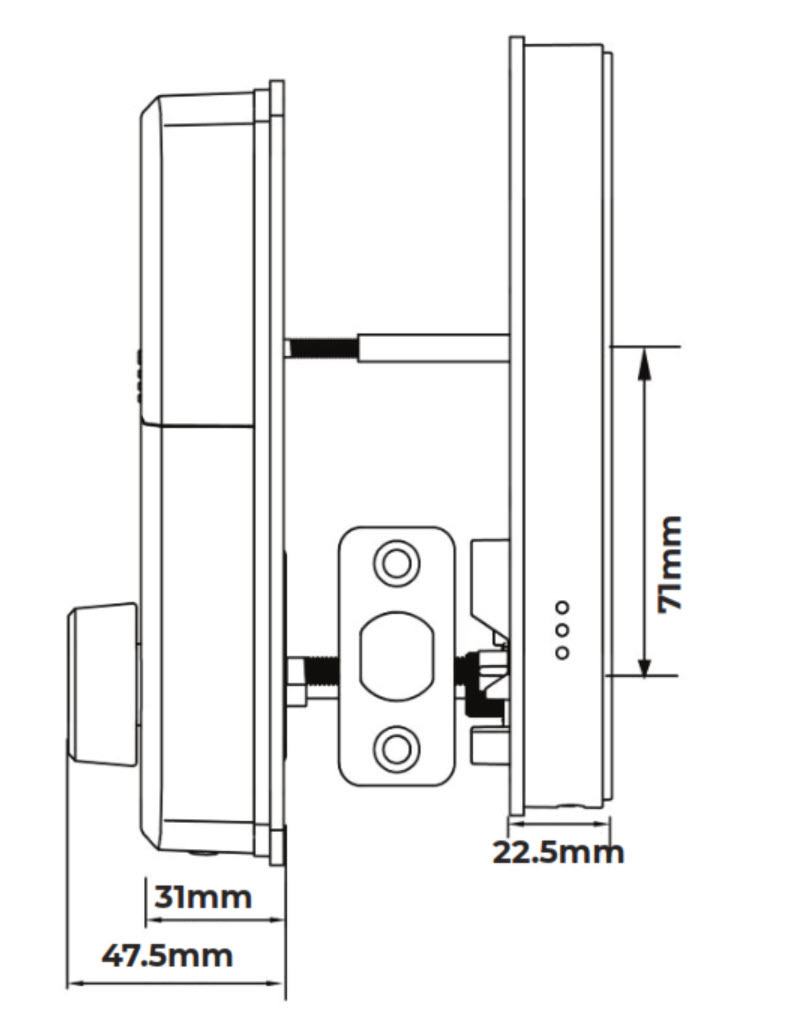
Installation and Handing

- Determine the door handing first. The 1320 is supplied for left and right handing - the handing switch is located on the back panel and must be set to 'L' or 'R' to match the door before installation, and the spindle must be kept horizontal during installation. If the lock is positioned on the right side of the door when viewed from outside, it is left-handed. Chapter 02 - handing and what happens if you get the handing wrong walk through it.
- Confirm the 60mm backset and a 35-55mm door before drilling - the wrong backset and strike misalignment are the two most common reasons a new deadbolt will not throw cleanly.
- Use the correct mortice screws for the door material: M4 for timber, M5 for aluminium. Fit a waterproof rubber plate on both faces to seal around the mounting points.
- Decide whether to DIY or use an installer; Terry's offers installation across the Gold Coast and advice and installation - and if it will not lock after fitting, run through the three common DIY mistakes.
- Install the 4 x AA batteries, then pair the lock in the TTLock app over Bluetooth and change the default password (123456) straight away - the TTLock app user manual covers the pairing steps.
 Frequently Asked Questions
No. The lock communicates via Bluetooth. Remote access requires the compatible Zanda Stealth Wi-Fi gateway connected to your home network, which bridges the lock to the TTLock app for control from anywhere. Chapter 08 explains what a gateway adds, this guide helps you decide whether you need one at all, and here is what a TTLock lock does without Wi-Fi.
Fingerprint is listed as an optional feature on the 1320. Confirm with Terry's at time of ordering whether the fingerprint sensor module is included in the specific unit you are purchasing. For how each credential type compares, see Chapter 03 - fingerprint access, and browse every fingerprint smart lock we stock if biometrics are a must-have.

Auto Lock lets you set a time delay between when the deadbolt is unlocked and when it automatically re-engages. It is configured through the TTLock app, so the door re-locks without manually throwing the bolt. More TTLock behaviour is covered in our TTLock tips and tricks and Chapter 14.
If the wrong password is entered five times consecutively, the keypad locks out for 5 minutes. The door can still be opened during this period using other access methods such as an RFID card, fingerprint (if fitted), or mechanical key - why a key override matters. See how PIN access works and the TTLock passcode types.
Yes. The lock is suitable for both timber and aluminium door construction. The kit includes separate mortice screws for each door type (M4 for timber, M5 for aluminium) and a waterproof rubber plate on both faces to seal around the mounting points. Check the stile is wide enough for the 71.7mm front panel with Chapter 02 - stile width; if it is not, the 35mm-backset Stealth Longplate is the narrow-stile member of the range. For door-type matching, see Chapter 04 - Door Type Compatibility.
Additional Information
The Stealth deadbolt is a security bolt only - it does not incorporate a latch or door operating handle. A separate pull handle, lever passage set, or knob set must be fitted to the door for day-to-day operation. The deadbolt provides the security bolt function; the handle hardware operates the latch (if fitted separately). Background: what a deadbolt is, deadlatch versus deadbolt and why bolt throw matters.

The 1320 is available in left and right handing. The handing switch is located on the back panel and must be set to 'L' or 'R' to match the door before installation. The spindle must be kept horizontal during installation. If the lock is positioned on the right side of the door when viewed from outside, it is left-handed. Confirm handing before drilling - our guide to determining door handing, the four handing combinations and Chapter 02 - handing walk through it.

IP66 confirms the external (outside) module has been tested for complete protection against dust ingress and resistance to powerful water jets from any direction. This makes the Stealth deadbolt suitable for external door applications including exposed or weather-affected entry doors. The internal module - which houses the battery compartment and other electronics - is for interior use only and is not weather rated. IP66 does not mean fully submersible - avoid direct immersion. See Chapter 11 - IP ratings explained, and for how coastal conditions affect any electronic lock, the realities of electronic door locks and how long digital locks last on the coast.
All new Zanda Stealth locks ship with a default TTLock password of 123456. This should be changed immediately after installation. The lock is added to the TTLock app via Bluetooth - Bluetooth must be enabled on your phone during the pairing process. Step-by-step setup instructions are included in the user manual (see the TTLock app user manual), and Chapter 14 is the full platform reference. Selling or handing over the property later? Read how to transfer a TTLock lock and the before-handover checklist.
For reliable fingerprint registration, ensure fingers are clean and dry before enrolling. Dirty or oily fingers will reduce recognition accuracy. Each fingerprint can be assigned a start and end time for time-limited access. If the fingerprint sensor is unresponsive, it should still emit a beep when pressed - if it does not, check the wire connection between the front and back panels. More on fingerprint access and the three-angle enrolment technique.
 Warranty
Genuine Zanda products bought new in Australia are covered against defects in materials and workmanship under normal residential use for:
- Mechanical parts: 5 years
- Finish: 2 years (tarnish, discolouration or corrosion from an original defect)
 Download PDF Resources
10-page combined spec sheet and user manual for the 1320 deadbolt - overview, dimensions and packing list, specifications, handing and installation diagrams, TTLock app setup, passwords and e-key sharing, cards and fingerprints, gateway pairing, and troubleshooting FAQs.
Zanda's 3-page warranty terms - the product warranty table (Electronic Locks 5 years mechanical / 2 years finish), exclusions, claims process and finish care and maintenance.
Zanda Stealth Smart Deadbolt 1320 - FAQ, Setup and Owner's Guide
Everything below is here to help you buy, install, set up and live with your Zanda Stealth Smart Deadbolt. For general smart-lock questions see our Smart Lock FAQ (Chapter 13), for the app itself see the TTLock Platform Guide (Chapter 14), and for measuring and fitting see the Buyer's Guide - Measuring Your Door.
Choosing the Right Stealth Model
Buy the 1320 deadbolt when the door already has a handle you want to keep, or when you want a bolt-format lock fitted above an existing latch. Buy a Stealth Longplate when you want the handle and the smart lock in one unit: the 1326 (60mm mortice), the 1327 (60mm tubular latch) or the narrow-stile 1325 (35mm mortice). All four share the TTLock app, the same credential types and the same Wi-Fi bridge. The Quick Start Guide bolt-type decision and Chapter 02 on longplate hardware help you decide.

The 1320 is a Bluetooth TTLock deadbolt with PIN, RFID card, optional fingerprint and a mechanical key, in five finishes, on a fixed 60mm backset. Alternatives on our shelves: the McGrath X3 (TTLock, 60/70mm adjustable bolt), the McGrath Ashgrove (raised buttons with Braille) and McGrath Kedron (fingerprint, tempered glass) on the same TTLock platform; the Carbine CEL2-BT on the Carbine Connect app; the Yale Assure Keyed on Yale Home with Apple HomeKit; the Igloohome Deadbolt Go with algoPIN for Airbnb; the Hafele DL4000 touchscreen; and the Vault Nexus with 3D face recognition. Want to spend less and skip the app entirely? The Yale Libi Digital Deadbolt is PIN-and-key only. Browse the full deadbolt range and read the five questions that pick a platform.

It is a bolt-format lock: a mortice deadbolt case sits in the door edge at a 60mm backset and the front and back panels bolt through the door either side. It has no latch - so the door needs its own handle set to pull it closed. What a deadbolt is, mortice deadbolts and deadlatch versus deadbolt explain the formats.

No fire rating is published for the 1320, so we do not recommend it for a fire door - a second penetration through a fire door needs a certified lock and body-corporate sign-off. Read the one-penetration principle and strata checks, then browse our fire door smart locks instead.
Access, Passcodes and Credentials
Permanent, time-limited (start and end date), one-time, recurring (for example a cleaner every Tuesday) and custom codes, all created in the TTLock app - up to 150 stored on the lock. The six TTLock passcode types explains each; the activation-window table and why codes seem to expire save a lot of confusion; and cyclic passcodes are the trick for regular contractors.
Yes for most passcode types - the TTLock app generates codes using the lock's clock, so a timed or one-time code can be created and texted to a guest while you are nowhere near the door, as long as the code type does not require the lock to be online. The exception is custom codes and instant remote changes, which need the Wi-Fi bridge. What a TTLock lock does without Wi-Fi and Bluetooth versus gateway control set out the split. Keep the lock's clock calibrated - clock calibration - or timed codes drift.
An e-key is a digital key issued to another TTLock user's app - they unlock over Bluetooth with their phone, and you can give it a time window or revoke it. A passcode is a number typed on the keypad by anyone you tell it to. TTLock e-keys covers permissions and admin rights.
The lock stores up to 200 IC cards and ships with three. Additional cards must match the 1320's reader, so ask Terry's to confirm the compatible card type before ordering from our RFID fobs, tags and cards range - we do not assume cross-brand compatibility. Cards are enrolled in the TTLock app; how TTLock handles cards and fobs and Chapter 03 on RFID explain the process.
Clean, dry fingers, and enrol with the three-angle technique so the sensor learns the edges of the print. Enrol a second finger as backup. If the sensor gives no beep at all when pressed, check the ribbon connection between front and back panels before assuming a fault. More fingerprint tips and how fingerprint readers work. Remember fingerprint is an optional module on the 1320 - confirm it is fitted to your unit.
Two mechanical keys are supplied and the cylinder sits on the external panel - where the keyhole is. Use it if the batteries are flat and you have no other way in, or if the electronics fail. Why a key override matters, what happens when the battery dies and where to keep the spare key are the three things to read. Every lock we sell with a backup key is in has backup key.

Five wrong PIN entries in a row lock the keypad for five minutes; it clears itself. In the meantime use a card, fingerprint (if fitted), the TTLock app over Bluetooth, or the mechanical key. This is a normal anti-guessing feature, not a fault. How PIN access works.
Locking, Auto-Lock and Passage Mode
In the TTLock app open the lock, go to Settings and set the Auto Lock delay - the bolt re-throws automatically after that many seconds. Set it to off if you prefer to lock manually from the app, the inside thumb turn or the outside panel. TTLock tips and tricks and Chapter 14 cover the settings screens.
Passage mode keeps the bolt retracted so the door opens freely without a credential - useful while moving in, during a party, or for a tradesperson on site. Switch it off again afterwards or the door is not secured. Because the 1320 is a bolt-only lock, the door still latches on its own handle set while passage mode is on.

Yes. Every unlock by app, PIN, card, fingerprint or key is logged and viewable in the TTLock app. Over Bluetooth the log syncs when your phone is next in range; with the Wi-Fi bridge it updates in real time from anywhere. Why audit trails matter for rentals and TTLock attendance management.

Yes - the internal back panel carries a thumb turn that retracts the bolt regardless of what the electronics are doing, so the door can always be opened from inside. Egress relies on the separate handle set opening the latch as normal.
Remote Access, Gateway and Wi-Fi
The matching accessory is the Zanda Stealth Electronic Lock Gateway / Wi-Fi Bridge (STK 1330.-) - a 2.4GHz Wi-Fi bridge that sits within Bluetooth range of the lock and connects it to the TTLock cloud. One bridge can serve the whole Stealth range on a property. Can other TTLock gateways be used across brands? is worth reading before buying a different make; Chapter 08 gateway selection and the TTLock gateway-choice note give the general rules. Browse all gateways and bridges.
Within reliable Bluetooth range of the lock (a few metres through one wall is a safe rule), plugged into a power point, and within good range of your 2.4GHz Wi-Fi. Gateway placement tips and TTLock gateway placement cover brick walls, garages and long hallways.
Usually a router that merges 2.4GHz and 5GHz under one name (band steering), weak signal at the plug point, or a power-saving router setting. Band steering explained, the dropout causes, how to improve stability and power cycling are the fixes in order; the Chapter 13 Wi-Fi FAQ is the short version.
Everything at the door: PIN codes, cards, fingerprint, the mechanical key and Bluetooth control from a phone in range. Only remote functions pause until the connection returns. What works when the internet is down.
Zanda does not list voice-assistant integration for the Stealth range, so we do not claim it. If voice control matters, compare platforms in Chapter 15 - choosing a platform and the four platforms compared; the Yale Assure Keyed deadbolt supports Apple HomeKit at the lock.
Power and Batteries
Four AA alkaline cells (not supplied) in the internal back panel. Zanda notes the lock's standby consumption is relatively high, so quality alkaline cells matter and rechargeable cells are not recommended - which batteries to buy, battery management and what really affects battery life.
The TTLock app shows battery level and warns you, and the lock's onboard indicators signal low power. Change all four cells at once. If the app shows a good reading but the lock behaves as if flat, run the low-battery diagnostic. Power and battery FAQs has more.
Use one of the two mechanical keys from outside, or the thumb turn from inside, then replace the batteries. What happens when the battery dies and power outages.
Fit, Doors and Installation

60mm, fixed - the bolt centre sits 60mm from the door edge and cannot be changed. Measure before you order: how to measure backset, standard Australian sizes and why backset matters more on smart locks. If you need 60 or 70mm on one lock, the McGrath X3 has an adjustable bolt.

35mm to 55mm using the supplied fixing screws. Thinner or thicker doors are outside the published range - measure first with Chapter 02 - door thickness and door preparation.
One unit suits both hands: a switch on the back panel is set to L or R before installation, and the spindle is kept horizontal while fitting. Viewed from outside, a lock on the right-hand side of the door is left-handed. How to determine door handing, which products require handing and Chapter 02 - handing.
Aluminium is fine - M5 mortice screws for aluminium are in the box, alongside M4 for timber. The front panel is 71.7mm wide, so check the stile width first. If the stile is too narrow, the Stealth Longplate 35mm is the narrow-stile member of the range, and our narrow frame door category lists every slim option. The door-type compatibility matrix covers timber, aluminium and glass.
A competent DIYer with the spec sheet and manual (PDF), a drill and a chisel can - the Brochure tab shows the handing and installation diagrams. Decide with Chapter 12 - when to DIY; the three faults we see most are in DIY mistake 1, mistake 2 and mistake 3. Terry's installs across the Gold Coast - advice and installation and site surveys - and you can see six real 1320 installs in the Installation Gallery tab.
Nine times out of ten the strike box is misaligned with the bolt or the door has dropped. Work through strike misalignment, door alignment and the Chapter 12 troubleshooting list; if it persists, still stuck? tells you what to check before calling us.
Weather, Coast and Durability
The external module is IP66 - dust-tight and resistant to powerful water jets - so an exposed entry door is fine. The internal module is not weather rated, so the lock is not suitable where the inside face is also exposed (an outdoor gate). For gates see our external gate category. IP ratings explained.

Salt air is hard on every electronic lock. Rinse the external panel with fresh water occasionally, keep the keyway lubricated with a dry lubricant, and expect finishes to weather faster than inland. The realities of coastal installs, coastal lifespan and Queensland considerations. Zanda excludes salty and extreme environments from the warranty and requires the finish to be cleaned at least every two months near the coast - see the Warranty section.

Installation quality and environment matter more than brand. Realistic expectations, installation quality and why a smart lock is not set-and-forget.
App, Platform and Security
TTLock is the global smart-lock platform behind the Zanda Stealth range, and also behind our McGrath, Lockton and Austyle locks. You download the TTLock app from the App Store or Google Play. What is TTLock?, TTLock versus Tuya and the TTLock profile in Chapter 15.
Read Chapter 14 - TTLock security for the full disclosure of known vulnerabilities and how they were handled, and security and data residency at a glance. Zanda has not published an Australian Cyber Security Act declaration for the Stealth range, so we do not claim one - what the Australian smart device security law requires.

Install four AA batteries, download the TTLock app, register, enable Bluetooth on your phone, tap + Add Lock and touch the keypad to wake it, then change the default password (123456). The TTLock app user manual and pages 6 to 8 of the spec sheet (Brochure tab) show every screen. Set your first permanent passcode correctly.
Transfer the lock to the new owner's TTLock account rather than deleting it - how to transfer a TTLock lock and the before-handover checklist. Delete or expire every old passcode, e-key and card first.
Yes - with the Wi-Fi bridge, TTLock integrates with property-management platforms so a guest code is created for each booking. Which PMS platforms work with TTLock, how the automation works with a gateway, PMS integration and the two approaches to Airbnb access. Without a gateway you can still create timed codes manually - the with-and-without-Wi-Fi comparison.
Warranty and Support
Five years on mechanical parts and two years on the finish - the Electronic Locks tier of the Zanda warranty - against defects in materials and workmanship under normal residential use. It is parts-only, excludes battery damage and salty or extreme environments, and requires the finish to be maintained; full terms are in the Zanda Warranty (PDF). Keep your proof of purchase. Terry's handles claims locally - see the Warranty section and Returns & Warranty. This sits alongside your Australian Consumer Law rights.
Zanda does not list spare front panels, keypads, back panels or deadbolt bodies for the 1320, so we cannot sell one as a part - a fault is handled through the warranty. The only Zanda Stealth spares in our catalogue are the 1153.SS mortice body and 1132.SS tubular latch, which suit the longplate models (1326 / 1327), not this deadbolt. Browse our other smart lock accessories for universal parts.
Related Products, Guides and Chapters
This lock and its range: Stealth Smart Deadbolt 1320 (this product) · Stealth Longplate 35mm Mortice (1325) · Stealth Longplate 60mm Mortice (1326) · Stealth Longplate 60mm Tubular Latch (1327) · Stealth Wi-Fi Bridge (1330.-) · 1153.SS Mortice Body (spare, 1326) · 1132.SS Tubular Latch (spare, 1327) · All Zanda
Other smart deadbolts we stock: McGrath X3 · McGrath Ashgrove · McGrath Kedron · Carbine CEL2-BT Deadbolt · Yale Assure Keyed · Igloohome Deadbolt Go · Hafele DL4000 · Vault Nexus · Austyle 59409 · Auslock T13B · Yale Libi Digital Deadbolt (cheaper, no app) · every smart deadbolt
Categories: All Smart Locks · Bluetooth · PIN Code · Fob / Card / RFID · Fingerprint · Has Backup Key · App Enabled · WiFi (via gateway) · Regular Front Door · Gateways and Bridges · RFID Cards and Fobs · Smart Lock Accessories
Buyer's Guide chapters: Ch 01 What Is a Smart Lock · Ch 02 Measuring Your Door · Ch 03 Access Methods · Ch 04 Door Types · Ch 07 Airbnb and Short-Stay · Ch 08 Gateways · Ch 11 Standards and IP · Ch 12 Installation and Troubleshooting · Ch 13 Smart Lock FAQ · Ch 14 TTLock Platform Guide · Ch 15 App Platforms
Helpful blog reading: TTLock Tips, Tricks and Hidden Features · TTLock User Manual · G2 vs G3 vs G4 vs G5 Gateways · Using TTLock for Airbnb · Do You Really Need Wi-Fi? · Why Smart Locks Drop Off Wi-Fi · Understanding Door Handing · Measuring Your Lock Backset · What Is Bolt Throw? · Secondary Locks and the One-Penetration Principle · Mechanical Key Override on Smart Locks · The Realities of Electronic Door Locks · How Long Do Digital Door Locks Last? · 3 Common DIY Installation Mistakes · Which Smart Lock Platform Is Right for You? · TTLock vs Tuya · Digital Door Locks: The Smarter Way · Site Survey and Installation Services
What's in the Box - Zanda Stealth Smart Deadbolt 1320
- 1 x front panel (external keypad assembly)
- 1 x back panel (internal thumb turn assembly)
- 1 x mortice deadbolt
- 3 x RFID IC cards
- 2 x mechanical keys
- 2 x waterproof rubber plates
- 1 x strike and strike box
- 1 x user manual
- 1 x screw stub (M4x40mm)
- 4 x back panel fixing screws (M4x10mm)
- 4 x mortice screws for timber doors (M4x20mm)
- 4 x mortice screws for aluminium doors (M5x10mm)
- Assorted fixing screws (M4x30, M4x40, M6x50, M6x65)
Zanda Stealth Smart Deadbolt 1320 - Real Installations


Zanda Stealth Smart Deadbolt 1320 - Dimensions
Zanda Stealth Smart Deadbolt 1320 - Spec Sheet & User Manual


PDF Files - Zanda Stealth Smart Deadbolt 1320
10-page combined spec sheet and user manual - overview, dimensions and packing list, specifications, handing and installation, TTLock app setup, passwords and e-keys, cards and fingerprints, gateway pairing, troubleshooting. The same pages are shown as images in the Brochure tab.
Zanda's 3-page warranty terms - the product warranty table (Electronic Locks 5 years mechanical / 2 years finish), exclusions, claims through Terry's as reseller, and finish care and maintenance.
Zanda Warranty
Zanda Architectural products carry a limited warranty against defects in material or workmanship under normal use during the warranty period. During the warranty period, Zanda Architectural will repair or replace the product (or the defective parts) at no charge, using new or refurbished replacement parts. Warranty periods vary by product range and by component (mechanical and finish), so please check the row that matches your product below.
Warranty Summary
* Warranty periods run from the proven date of purchase and apply only when the product is properly installed and subjected to no more than fair wear and tear. See the exclusions and important notes below for full conditions.
How to Make a Claim
Zanda's warranty process starts with the reseller you purchased from. As your place of purchase, we handle the claim for you:
- Contact Terry's Tradies Pty Ltd and its associated websites, trading names, and subsidiaries (the place of purchase) with your proof of purchase and the date the product was purchased.
- Provide a clear description of the fault, along with the product range and model.
- We complete the necessary claim forms and process the claim with Zanda Architectural on your behalf. You may be asked to return the product for assessment.
- If the product is found to be defective under the warranty terms, Zanda will repair or replace it at no charge, using new or refurbished parts.
 Exclusions
A warranty claim cannot be accepted for damage unless it resulted from a defect in Zanda's materials and workmanship. The following are expressly excluded:
- Surface damage occurring after purchase and not caused by defects in materials and workmanship.
- Misuse, neglect or accidental damage.
- Failure to maintain and care for the product.
- Defects or damage caused by using the product for a purpose other than that for which it was designed, such as commercial use.
- Defects or damage caused by improper installation.
- Damage caused by batteries.
- Modification and/or alteration to the product.
- Discolouration and scratches to finishes through normal use and ageing.
- Replacement of batteries.
- Normal wear and tear.
This guarantee does not extend to labour costs, freight, personal loss, death or injury, or economic, consequential or property damage of any kind. The warranty also excludes extreme environments where heat, weather and salty conditions are prevalent, and does not cover products that have not been properly maintained.
Important Notes
The products covered by this warranty are designed for residential use only - any other use (including commercial use) voids the warranty. This is a parts-only warranty: it does not cover labour costs for product removal and reinstallation.
Proper maintenance, care, cleaning and polishing in accordance with Zanda's instructions are essential to retain a product's finish - particularly soft finishes or finishes that naturally age, such as Brushed Nickel, Satin Chrome, Polished Brass, Graphite Nickel, Matt Chrome, Unlacquered Brass, Matt Brass, Rumbled Brass, Roman Brass, Natural Bronze, Oil Rubbed, Satin Brass, Brushed Bronze, Antique Bronze, Buffed Bronze, Matt Antique Bronze, Venetian Bronze and Powdercoat. These finishes are subject to deterioration, corrosion and oxidation from conditions such as salt deposits, scratches from sharp objects, paint thinners and caustic agents. For care of stainless steel products, see the ASSDA guidance on preventing coastal corrosion and tea staining.
This is a limited, express warranty and is provided in addition to your rights under the Australian Consumer Law. Our goods come with guarantees that cannot be excluded under the Australian Consumer Law. You are entitled to a replacement or refund for a major failure and compensation for any other reasonably foreseeable loss or damage. You are also entitled to have the goods repaired or replaced if the goods fail to be of acceptable quality and the failure does not amount to a major failure. Nothing in this express warranty limits or restricts any other statutory right or remedy available to you.

Confused? Overwhelmed? We get it.
Choosing the right smart lock can be genuinely tricky - door types, backsets, app platforms, compatibility with your existing hardware... there is a lot to consider. We have decades of experience fitting locks of all types, including smart locks, and we are happy to help.
Our expert recommendation service is free. Upload a few photos of your door and describe what you need, and one of our qualified locksmiths will give you a personalised recommendation.
Get Your Free Recommendation →How it works - three easy steps:
1. Upload photos
A few clear shots of your door, lock and frame - inside and out.
2. We assess
Our locksmith reviews your setup and requirements - door type, weather exposure, how you want to use it.
3. You get a recommendation
A personalised recommendation tailored to your door, budget and needs. No pressure, no upsell.
Also useful while you are deciding:


