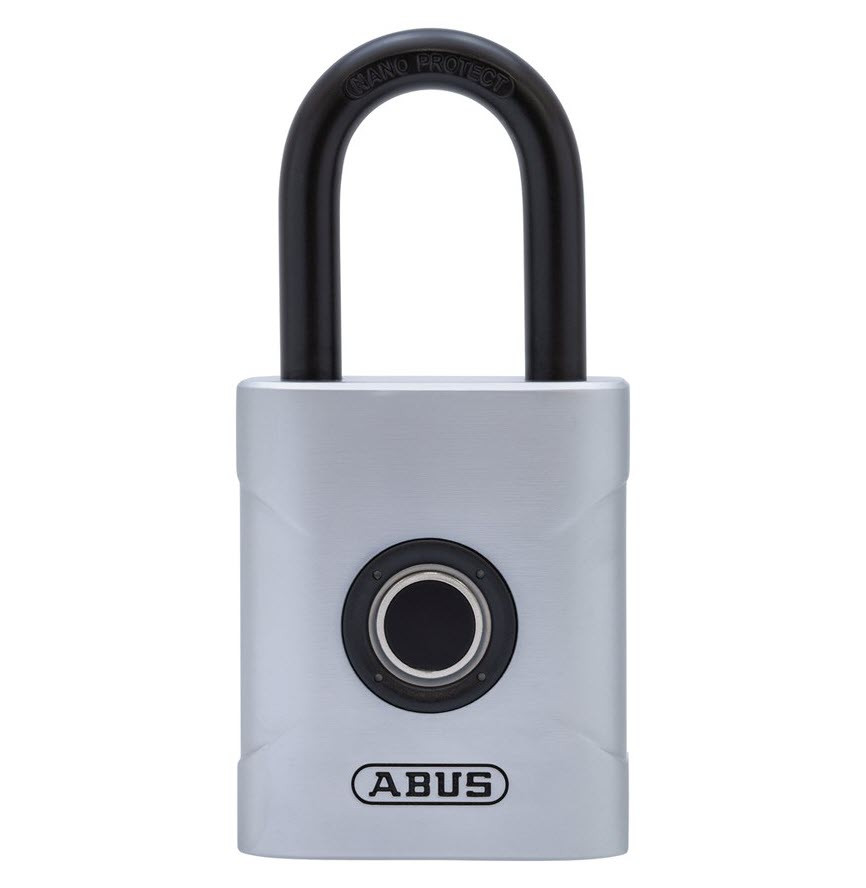


ABUS Touch 57/50 Fingerprint Padlock - Weather Resistant
The ABUS Touch 57/50 opens on a fingerprint. There is no key, no PIN and no app - an enrolled finger goes on the sensor and the shackle releases in under a fifth of a second. What makes it useful to a household or a work crew, rather than to one person, is the way it handles more than one user: the lock stores up to 20 fingerprints, and the first two you enrol become administrators.
Administrators are the only fingers that can add a new print or wipe the lock back to empty. Everyone enrolled after them is a user - they can open the padlock and nothing else. That one distinction is what turns a biometric padlock into something you can genuinely share. A shed four people use. A gym locker two of the family open. A site box where the foreman decides who gets in. A storage cage at a club where members come and go but nobody can re-programme the lock.
Enrolment happens on the padlock itself, with no tools and nothing to pair. Hold a finger on the sensor for about three seconds and release, then present that same finger at least ten more times in slightly different positions - flat, on the tip, rolled left, rolled right - until the LED confirms it. Deleting every stored print is an administrator-only job: hold an administrator finger for six to ten seconds and confirm with the same finger.
Power is a single CR2 3 V lithium cell. There is no mechanical key override on this padlock, so ABUS has made the flat-battery behaviour fail safe rather than fail shut: as the cell runs down the lock sounds an S.O.S. pattern after each opening, and after a few of those warnings it stops closing altogether rather than lock you out of something you would have no way back into.

ABUS is blunt about it. The lock can be used outside, but they recommend indoors or somewhere sheltered from direct weather. Extended periods of heavy rain, and salt water in particular, can damage the electronics, spoil the way it works and stop the lock opening at all. Their own advice is to treat it the way you treat your phone. There is no IP rating on this product and no ingress classification of any kind - "Weather Resistant" in the name is a catalogue descriptor, not a tested figure, and we are not going to pretend otherwise. If the padlock has to live fully exposed on a gate, a pool fence or anything within reach of the sea air, buy something built and rated for it instead - the Master Lock 4401LHEC Enterprise Outdoor Bluetooth Padlock, or the ASSA ABLOY Aperio P100B-100, which carries an IP66 rating. It is worth reading what an IP rating actually covers and what Queensland conditions do to hardware before you decide.
 Key Features
- Fingerprint only. No key cylinder, no PIN pad, no Bluetooth and no app - the sensor is the whole interface. See the rest of our fingerprint locks, or read how biometrics compare with the other credential types in Chapter 3 of the Buyer's Guide and in the blog's rundown of the four technology types in our padlock range.
- Up to 20 fingerprints. Enough for a family, a work crew or a club committee without anybody carrying a key.
- The first two fingers enrolled are administrators. Everyone after them is a user. Only an administrator finger can add another print or delete the lot - which is what makes shared use manageable rather than chaotic.
- Enrolment on the lock, no tools. About a three-second hold, then at least ten reads of the same finger in different positions. The LED tells you when the finger is fully stored.
- Fast, accurate reading. A 508 DPI sensor, recognition in under 200 milliseconds, a false rejection rate of around 5 % and a false acceptance rate below 0.002 %.
- One CR2 3 V lithium cell. Externally replaceable, and your stored fingerprints survive the change - there is no re-programming afterwards.
- Fails safe, not shut. On a low battery the lock sounds an S.O.S. pattern after opening, then after a few warnings refuses to close at all, so it cannot strand your property behind a dead lock.
- Rated to work from -10 °C to +50 °C. Comfortably inside anything south-east Queensland will throw at it, weather exposure aside.
 Administrators, Users and Enrolling a Fingerprint
Out of the box - and again after a reset - the padlock opens on any touch of the sensor. It stays that way until the first finger is enrolled, so the first thing to do is claim it. The first two fingers you store become the administrators; everything after that is an ordinary user.
There is no way to delete one user without deleting all of them - removing somebody's access means clearing the lock and re-enrolling everyone who should still have it.
Storing the first fingerprint (this finger becomes administrator 1)
- Place the finger on the sensor and hold it there for roughly three seconds, then release. The lock answers with a three-tone then single-tone sequence.
- Present the same finger at least ten more times, moving it each time - flat, on the tip, rolled to the right, rolled to the left. The point is to give the sensor the whole fingertip, not the same patch ten times over.
- Watch the LED. Blue means the read was stored, red means it was not. Green means that finger now has all ten prints recorded and is finished. If you do not get green, keep presenting the finger.
Adding another fingerprint (administrator only)
- Place an administrator finger on the sensor for about three seconds and release, and wait for the three-tone then single-tone sequence.
- Present the new finger at least ten times, displaced each time, exactly as above.
- Confirm with the administrator finger.
Deleting every stored fingerprint (administrator only)
- Hold an administrator finger on the sensor for six to ten seconds - noticeably longer than a normal enrolment hold - and wait for the three-tone then single-tone sequence, then release.
- Confirm with the administrator finger and allow the lock a short moment to process.
- A single confirming tone means every stored print is gone and the padlock is back to opening on any touch.

Enrol at least two fingers, and if you are the only user, enrol every finger you have - there is no key to fall back on. Write down which fingers are stored and keep the note somewhere sensible; six months later nobody remembers. Keep the sensor clean, dry and free of grease, and the finger too. Cuts, abrasions, very dry skin, moisture and hand cream all change a fingertip enough to slow recognition down, and you may need two or three attempts. One thing worth knowing before you need it: while the battery is low you can still open the lock, but you cannot save or delete fingerprints. Change the cell first, then make your changes. There is more on enrolment technique and wet-finger failure modes in Chapter 3, Fingerprint and Biometric access.

This is ABUS's own restriction and it is worth repeating in plain language. Do not fit this padlock to anything that has to be opened in a hurry or under stress - medicine or defibrillator cabinets, emergency doors, chains across an escape route, firearm storage. Panic makes fingers sweat, and a sweaty finger may not read. A product that opens 999 times out of a thousand is fine on a shed and completely wrong on a cabinet somebody has to open while their hands are shaking.
 What's in the Box
- ABUS Touch 57/50 fingerprint padlock
- Multilingual user booklet covering battery fitting, enrolment, deletion, technical data, conformity and warranty
Whether a CR2 cell ships in the box is not something we can confirm from the paperwork - check your packaging. Either way it is worth having a spare: CR2 is a common camera cell and every hardware shop and camera counter carries it. ABUS asks for a quality brand-name cell, naming Varta and Panasonic as examples.
 Suitable Uses
- Sheds, garages and home workshops shared by several people, under cover. Compare the rest of the range on our smart padlocks page.
- Gym, school, club and staff lockers, where issuing and recovering keys is the real cost.
- Tool chests, site boxes and plant cages under a roof, with the supervisor holding an administrator finger and the crew enrolled as users.
- Storage cages, garage cupboards and internal roller-door latches in units and apartment blocks.
- Caravan, boat and trailer lockers that live under cover between trips - not ones permanently exposed to spray.
- Households that keep losing, copying or lending keys. Everybody carries a finger; nobody carries a key.
- Any situation where you want to hand access to someone and take it away again without changing a lock - though note that revoking one person means clearing the lock and re-enrolling the rest.
Not the right lock for: anything permanently exposed to heavy rain or salt air; anything that must be opened under stress or in an emergency; and anything where you need a guaranteed way in if the battery goes flat and nobody noticed the warnings. If you are weighing the formats up, the blog walks through which smart padlock suits which job, and what actually makes a padlock "smart" is a good place to start if this is your first one.
 Available Finish Options
 Black
Black
(This Product)
STK 5750C
Finish selection does not affect functionality, compliance, or performance.
 ABUS Electronic Padlocks - Item Code Family
This product (bold row) is the fingerprint model. The two EVEROX One models are the app-driven side of the same shelf - same idea, different credential. None of the three has a mechanical key override. We have written all three up against the rest of the market in our smart padlock guide, where the ABUS Touch 57/50 has its own section.
 Full Specifications
There is no IP rating row on this table because there is no IP rating on this product. Shackle diameter and shackle clearance are not stated in the documentation we hold either - if those measurements decide whether this padlock fits your hasp, ring us before you order and we will measure one. More on what the ratings mean is in Chapter 11, IP Ratings and Ingress Protection, and on corrosion in the same chapter's corrosion-resistance section.
 Dimensions
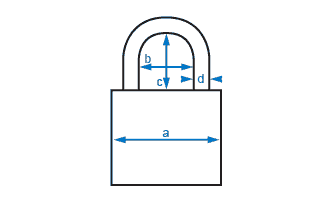
ABUS padlock measurement guide - it shows where each padlock measurement is taken (body width, shackle diameter, and the horizontal and vertical clearance inside the shackle), which is what you need when you are checking a hasp. The Touch 57/50 is a 50 mm body. Shackle diameter and clearance figures are not published in the documentation we hold for this model, so we are not going to guess at them - ring us with your hasp opening and we will measure a lock and tell you whether it goes on.
 Battery & Power
- One CR2 3 V lithium cell, 850 mAh. ABUS asks for a quality brand-name battery and names Varta and Panasonic as the sort of thing they mean.
- ABUS does not quote a service life in months or in openings, so we are not going to invent one. What we can tell you is how it warns you, which matters more.
- Low battery: after you open the lock it sounds an S.O.S. - three short tones, three long, three short. That is the signal to change the cell.
- After a few of those warnings the padlock will not close. This is deliberate and it is the right design on a lock with no key override: it would rather stay open than shut on a dying battery and leave you with no way in.
- Changing the cell does not wipe anything. Your fingerprints stay stored and there is no re-programming to do afterwards.
- While the battery is low you can still open the lock, but you cannot save a new fingerprint or delete the stored ones. Change the cell first.
- The battery is a lithium cell: keep it away from children, watch the polarity, do not short the terminals, and do not pierce, heat or dismantle it. Replace a flat cell promptly rather than leaving it in the lock.
Every electronic padlock buyer asks it and most product pages dodge it. Here is the straight answer: there is no key, no PIN and no external power point on this lock, so if you ignore every S.O.S. warning and the cell dies completely while the shackle is closed, you are looking at a cut-off. What stops that happening in practice is the refusal to close - the lock takes itself out of service before it can trap anything. Keep a spare CR2 in the drawer and change it the first time you hear the S.O.S. There is broader reading on this in what to do when the battery dies, in battery life, the truth rather than the marketing version, and in Chapter 13's power and battery section. Chapter 1 also covers how electronic locks are powered in general.
 Frequently Asked Questions
Up to 20 fingers. The first two you enrol are administrators and everybody after them is a user. Only an administrator finger can add a new print or delete the stored ones - a user can open the lock and nothing more. If you are the only person using it, ABUS suggests enrolling every finger you have, because there is no other way in. The full step-by-step is further up the page under Administrators, Users and Enrolling a Fingerprint.

No, neither. There is no key cylinder in the body and no keypad - the fingerprint sensor is the only way this padlock opens. That is a deliberate design choice and it cuts both ways: nothing to pick, nothing to bump, no key to copy or lose, but also no fallback. Read the "no key override" issue for Gold Coast buyers and smart locks that don't have a key override before you commit - they are honest about the trade-off.
The lock tells you, then it protects you. After each opening on a low cell it sounds an S.O.S. - three short tones, three long, three short. Ignore that for long enough and it stops closing altogether, which means it cannot lock shut on a dying battery. Change the CR2 cell when you first hear the warning; your fingerprints stay stored through the change and nothing needs re-programming. One catch worth knowing: while the battery is low you cannot enrol or delete fingerprints, only open. More on flat-battery planning in what to do when the battery dies and in Chapter 13.
We would rather you did not, and so would ABUS. Their guidance is to use it indoors or somewhere it is not directly exposed to weather; long spells of heavy rain, and salt water especially, damage the electronics and can stop the lock opening. It carries no IP rating. A carport, a shed, a covered storage cage, a locker room - fine. A beachfront gate or an unsheltered pool fence - buy a padlock built for it, such as the Master Lock 4401LHEC Enterprise Outdoor Bluetooth Padlock. Our own coastal experience is written up in coastal environments, Gold Coast specific and why coastal Queensland is not gentle on hardware.
Sometimes, and less reliably. The sensor is a precision component and both it and the fingertip need to be clean, dry and free of grease. Moisture, dust, hand cream, very dry skin, a fresh cut or an abrasion all change the print enough that you may need two or three goes. That is what the roughly 5 % false rejection rate looks like in real life - not a failure, just a re-present. The practical answer is to enrol more than one finger per person, and to enrol fingers from both hands if you work with your hands. Chapter 3 on fingerprint access goes through the failure modes properly, and the five questions to answer before you buy is a good sanity check.
Additional Information
ABUS recommends at least two, and every finger if you are the sole user. It costs you five minutes once and it covers the day you turn up with a bandage, a blister or a hand full of grease. Remember the first two fingers you store are the administrators, so think about whose fingers those should be before you start rather than after. Write down what is enrolled and where the note lives.
Medicine cabinets, defibrillator cabinets, emergency doors, chains across an escape route, firearm storage. ABUS names these specifically and the reason is simple: panic makes fingers sweat and a sweaty finger may not read. This is the one hard prohibition on the product, and it is not a legal disclaimer - it is a real failure mode at exactly the wrong moment.
Worth saying twice because the name invites the wrong assumption. There is no IP figure on this padlock and no ingress classification, and the only environmental instruction that comes with it is a restriction, not a permission: keep it out of direct weather, avoid prolonged sunlight, and keep it well away from salt water. Sheltered outdoor mounting is reasonable; full exposure is not. If you want to understand what a real rating would look like, Chapter 11's IP ratings section explains the scale, the corrosion-resistance grade covers salt air, and the Queensland-specific section is the one to read if the lock is going anywhere near the water.

Then look at the ABUS EVEROX One 61/50, which is the same idea on the same 50 mm body class but opens from the ABUS One app over Bluetooth, or the EVEROX One 61/45 if you need the narrower body. Outside ABUS, the Igloohome Smart Bluetooth Padlock 2 adds offline PIN codes, which is the one thing a fingerprint cannot do - you cannot send somebody a fingerprint over the phone. A fingerprint wins when the people are in front of you; a code wins when they are not.

Your fingerprints live on the lock, not in a cloud, which is the good news. It also means the responsibility for clearing them is yours: hold an administrator finger for six to ten seconds, confirm, and the padlock goes back to opening on any touch. Do that before the lock leaves your hands. At end of life the cell comes out and goes to battery recycling separately from the lock body. ABUS sits in the commercial and access-control end of the market - there is a short profile of them in Chapter 10's commercial and institutional specialists if you have not bought the brand before.
 Warranty
ABUS products are backed by a manufacturer's warranty covering defects in materials and workmanship. Warranty periods vary by product - contact us or refer to your product packaging for the period that applies to your model. All warranties are supported under the Australian Consumer Law. Proof of purchase required for all claims. Returns & Warranty | ABUS warranty & returns information
The warranty covers material and manufacturing defects only, with repair or replacement at ABUS's discretion. It does not cover damage from outside influences, improper use, normal wear, or from not following the instructions - which is another reason the sheltered-use guidance above is worth taking seriously. A claim needs the product, the original dated receipt and a short written description of the fault.
 Download PDF Resources
The pocket booklet that ships with the lock. Battery fitting, the safety and use-environment warnings, the administrator and user rules, the enrolment, add-a-print and delete-all procedures with their tone and LED signals, the low-battery S.O.S., the technical data table, the EU and UK conformity declarations, disposal and the warranty terms.
ABUS Touch 57/50 - FAQ, Setup and Owner's Guide
Everything an owner of this padlock tends to ask, in the order they usually ask it. If your question is broader than this one product, Chapter 13 of our Buyer's Guide is the general smart lock FAQ, and Chapter 3 covers the credential types.
How This Padlock Works
You put an enrolled finger on the sensor and the lock releases - recognition takes under 200 milliseconds. There is no key, no PIN, no card and no phone involved. The sensor reads at 508 DPI and everything is stored on the padlock itself, so it works with no internet, no signal and no app on anybody's phone. Compare the credential types side by side in Chapter 3's comparison table.
It opens on any touch. Straight out of the packaging - and again after a full reset - the padlock has nothing stored, so the sensor releases it for anyone. That is not a fault, it is the blank state. It stops the moment you enrol the first finger, which is why the first thing to do is fit the battery and claim the lock as administrator 1.
ABUS quotes a false rejection rate of about 5 % and a false acceptance rate below 0.002 %. In plain terms: roughly one read in twenty will make you present the finger again, and the chance of a stranger's finger opening it is vanishingly small. The rejection number is the one that shapes daily use, and it is why enrolling several fingers per person is worth the five minutes.

None of the three. There is no Bluetooth radio, no app and no cloud account attached to this padlock, so nothing to set up, nothing to subscribe to and nothing to be locked out of if a service shuts down. Your fingerprint data never leaves the lock. The trade-off is that you cannot manage it remotely or send somebody access while you are away - for that you want a Bluetooth or PIN padlock instead. The four technology types in our range lays the options out.
Administrators and Users
The first two enrolled, automatically. There is no setting to choose, no switch to flip and no way to promote a user later - it is simply the order you store them in. Decide before you start. On a family shed that usually means one finger from each adult; on a site box it means the supervisor's index finger and a second finger of theirs as the backup, so the crew's access does not depend on one fingertip having a good day.
A user can open the padlock. That is the whole of it. An administrator can open it, enrol another finger, and delete every stored print. There is no partial permission, no time-limited user and no schedule - those belong to app-driven locks. If you need audit trails, time windows or codes you can text somebody, this is the wrong product and our smart padlock range has better fits.
You cannot remove one. The only deletion this lock offers is all of them. To revoke one person you hold an administrator finger for six to ten seconds, confirm, wipe the lock, then re-enrol everybody who should still have access - starting with the two administrator fingers, because the first two you store take those roles again. It is five minutes of work, and it is worth knowing before you hand access to somebody you are not sure about.
No, and on a shared lock they usually should not. Two adults in a household, or a supervisor and a second-in-charge on a site, means nobody is stuck waiting for one person to come back and enrol a new user. The lock does not care whose hands they are - it only knows the first two prints stored.
Enrolling, Adding and Deleting Fingerprints
Because one read of one patch of skin is not a fingerprint - it is a snapshot. Ten displaced reads build a picture of the whole fingertip, so the lock still recognises you when you present the finger slightly rolled, slightly high, or at an angle because your hands are full. Move the finger deliberately between reads: flat, on the tip, rolled right, rolled left. It is the difference between a lock that opens first go every time and one that annoys you daily.
Blue on the LED means that read was stored. Red means it was not - present the finger again. Green means the finger now has all ten prints recorded and is finished; if you never see green, keep going, because that finger is not fully enrolled yet. On the audible side, a three-tone burst followed by a single tone is the lock acknowledging that you have started a procedure, and a single tone at the end of a deletion confirms every print is gone.
An administrator finger starts it. Hold the administrator finger on the sensor for about three seconds and release, wait for the three-tone then single-tone acknowledgement, have the new person present their finger at least ten times displaced, then confirm with the administrator finger again. The new person is a user - they will be able to open the lock and nothing more.
No. On a low cell the padlock will still open for an enrolled finger, but it will not let you save a new print or delete the stored ones. If you sit down to re-organise who has access and nothing takes, check the battery before you assume the lock has failed - change the CR2 cell first, then make your changes.
Battery and Power
One CR2 3 V lithium cell, 850 mAh - the same cell a lot of film cameras used, available anywhere. ABUS does not quote a life figure in months or in openings and we are not going to make one up. Use a quality brand-name cell (they name Varta and Panasonic as examples), change it when the lock starts sounding its S.O.S., and keep a spare. Our piece on battery life is honest about why manufacturer figures and real life rarely match.
No. The stored prints survive both the low-battery period and the battery change itself, and there is nothing to re-programme afterwards - fit the new cell, check the polarity, close it up and carry on. This catches people out because plenty of cheaper biometric locks do lose their enrolments; this one does not.
This is the question the lock is designed around. There is no key override, so the honest answer is that a completely dead cell on a closed shackle is a cut-off job. What prevents that in practice is the refusal to close: after a few S.O.S. warnings the padlock will not lock at all, so it takes itself out of service before it can trap anything. It fails safe rather than fails shut - which on a lock with no backup is the right call. Read what to do when the battery dies and smart locks that don't have a key override for the wider picture, and Chapter 1 on the authentication stack if you want to think about primary and backup access properly.
Outdoors, Weather and Gold Coast Conditions
Less than the name suggests, and we would rather tell you now than after you have bought it. This padlock carries no IP rating and no ingress classification. ABUS's own written guidance is that although the lock can be used outside, they recommend indoors or somewhere sheltered from direct weather, because extended heavy rain and especially salt water can damage the electronics, spoil the function and prevent the lock opening. Their comparison is a mobile phone - it survives a shower, it does not survive a winter on a fence post. Treat "weather resistant" as a description of the housing, not a tested rating. Chapter 11 explains what a genuine rating looks like.

Yes, and this is the one we see most on the Gold Coast. Salt water is named specifically as a thing that damages the electronics in this lock, and salt air does its work slowly on anything within a few streets of the surf. If the padlock is going on a beachfront gate, a jetty box, a boat locker or a pool gate in the salt spray zone, choose hardware built for it instead. Coastal environments, Gold Coast specific and why coastal Queensland is not gentle are both worth ten minutes, and Chapter 11's corrosion-resistance grade explains how the testing works.
The lock is rated to operate between -10 °C and +50 °C, which covers anything Queensland produces, and to be stored between +10 °C and +25 °C. Prolonged direct sunlight is the one to avoid - a black body baking on a north-facing wall all summer is harder on electronics and on a lithium cell than the temperature figures alone suggest. Under an eave, inside a shed or on a shaded wall is kinder to it. Chapter 11's Queensland section covers UV, heat and humidity together.
Moisture in the electronics, corrosion on contacts, a cell left flat for months, and a sensor that has never been wiped. Three of those four are avoidable with a sheltered mounting position and a cloth. What actually fails, the real-world causes goes through it, and a realistic lifespan expectation is a useful reality check before you spend.
Where This Lock Should Not Be Used
Because of what a panicking hand does. Stress makes fingers sweat, and a wet fingertip is exactly the condition a capacitive fingerprint sensor reads worst. ABUS names medicine cabinets, defibrillator cabinets, emergency doors, chains and weapons storage specifically. A roughly 5 % rejection rate is a shrug on a shed door and unacceptable on something a person has to open in thirty seconds with shaking hands. Use a mechanical lock, or a key in a break-glass unit, on anything in that category.
Not as the main access control on one. There is no audit trail, no time-limited access, no way to revoke one person without wiping the lock, and no remote management - all of which a busy site eventually needs. It does good work as a secondary lock on a tool cage or a store within a site. If you need managed access across a site, look at the ASSA ABLOY SMARTair i-gate, or read the enterprise and infrastructure padlock section of our padlock guide.
Choosing Between This and the Alternatives
Fingerprint if the people who need access are physically in front of you and you want zero admin: no phones, no pairing, no app updates, nothing to go flat in somebody's pocket. Bluetooth if you need to grant or withdraw access remotely, or keep a record of who opened what. The ABUS equivalents are the EVEROX One 61/50 and the EVEROX One 61/45, both on the ABUS One app.

Then a fingerprint is the wrong credential - you cannot email one. A PIN padlock is what you want. The Igloohome Smart Bluetooth Padlock 2 generates offline codes you can send by text, which is the standard answer for tradies, cleaners and short-stay guests. Browse the full smart padlock range if you are comparing.

A shrouded shackle is the usual step up, because it gives bolt croppers far less to bite on. The Master Lock 6400SHENT Pro Series with shrouded shackle is the one we point people at. For managed access with a proper ingress rating on top, the ASSA ABLOY Aperio P100B-100 is IP66 and RFID-plus-Bluetooth, and the SMARTair i-gate steps up again to card-based site access at IP68.
The Touch 57/50 is a 50 mm body. The shackle diameter and the clearance inside the shackle are not published in the documentation we hold for this model, and we are not going to quote numbers we cannot source - a figure that is wrong by two millimetres wastes your trip. Measure the internal opening of your hasp, staple or chain link, ring us with it, and we will measure a lock against it and tell you straight whether it goes on.
Against the attacks a padlock normally faces, the biometric part is the strong end: nothing to pick, nothing to bump, no key to copy, and a false acceptance rate below 0.002 %. As with any padlock, the weak point is usually not the lock - it is the hasp, the staple, the chain or the thing they are screwed to. Spend the same care on what you are locking it to. Chapter 13's security section is a good general answer to "is this really secure?".
Related Products, Guides and Chapters
The rest of the ABUS range is on the ABUS brand page. The two Bluetooth siblings are the EVEROX One 61/50 and the EVEROX One 61/45.
Categories: Smart Padlocks · Fingerprint and biometric locks.
Alternatives worth comparing: Igloohome Smart Bluetooth Padlock 2 (offline PIN codes) · Master Lock 4401LHEC Enterprise Outdoor Bluetooth Padlock (built for exposure) · Master Lock 6400SHENT shrouded shackle · ASSA ABLOY Aperio P100B-100 · ASSA ABLOY SMARTair i-gate.
Blog reading: the ABUS Touch 57/50 section of our smart padlock guide · which smart padlock suits you · five questions to answer before you buy · smart locks without a key override · what actually fails on electronic locks.
Buyer's Guide chapters: Ch 03 - Fingerprint and biometric access · Ch 11 - IP ratings · Ch 13 - Power and battery · Ch 10 - Who ABUS are.
Still not sure? Book a free site survey and we will look at the actual gate, shed or locker, or ask our team for a recommendation.
ABUS Touch 57/50 - Dimensions
ABUS Touch 57 - User Manual Pages
This is the pocket booklet that ships in the box, scanned page by page. The original is a twelve-language booklet, so most of these images are printed spreads carrying two booklet pages side by side, and the page numbers printed in the corners do not run in sequence. The English section runs from image 4 through to the left-hand side of image 9. The lock is called "Touch 57" on the cover and "Touch 2.0 57" in the conformity declarations - same product. Note the booklet never names a body size, so it covers the Touch 57 family rather than the 57/50 specifically.


PDF Files - ABUS Touch 57/50 Fingerprint Padlock
The booklet supplied with the padlock. Covers fitting the CR2 cell, the safety and use-environment warnings, the 20-fingerprint limit with the first two fingers as administrators, the enrolment, add-a-print and delete-all procedures with their tone and LED signals, the low-battery S.O.S. and the refusal to close, the technical data table, the EU and UK conformity declarations, disposal, and the warranty terms. A multilingual booklet - the English section starts part way in.
ABUS Warranty
ABUS products sold by Terry's Tradies Pty Ltd and its associated websites, trading names, and subsidiaries are backed by a manufacturer's warranty covering defects in materials and workmanship, together with your rights under the Australian Consumer Law (ACL). Warranty periods vary by product line - refer to your product packaging or contact us at the time of purchase for the period that applies to your specific model.
Warranty Summary
 How to Make a Warranty Claim
- Contact Terry's Tradies Pty Ltd at your original place of purchase first - all warranty claims must be directed to the retailer where the product was purchased.
Phone: 07 5601 1867
Visit: U9/2 Prosper Crescent, Burleigh Heads QLD 4220 - Have your proof of purchase ready (receipt or order confirmation).
- If the fault is not immediately visible in person, provide clear photos showing the defect so the item can be assessed before a Return Merchandise Authorisation (RMA) is approved.
- Do not return the item before receiving RMA approval - items returned without approval may be sent back to you at your cost.
- Once approved, you will receive return instructions. If the item is confirmed faulty, a prepaid return freight label will be provided to cover return shipping costs.
 What the Warranty Does Not Cover
- Normal wear and tear
- Damage caused by misuse, abuse, or improper installation
- Damage caused by neglect or failure to follow product instructions
- Products not purchased from an authorised retailer
Warranty claims must be lodged with the retailer where the product was originally purchased. ABUS products purchased from another retailer or website cannot be returned to Terry's Tradies Pty Ltd and its associated websites, trading names, and subsidiaries for warranty assessment.
1 Review Hide Reviews Show Reviews
-
Padlock all good
Yes yeh yeh pretty happy with this!

Confused? Overwhelmed? We get it.
Choosing the right smart lock can be genuinely tricky - door types, backsets, app platforms, compatibility with your existing hardware... there is a lot to consider. We have decades of experience fitting locks of all types, including smart locks, and we are happy to help.
Our expert recommendation service is free. Upload a few photos of your door and describe what you need, and one of our qualified locksmiths will give you a personalised recommendation.
Get Your Free Recommendation →How it works - three easy steps:
1. Upload photos
A few clear shots of your door, lock and frame - inside and out.
2. We assess
Our locksmith reviews your setup and requirements - door type, weather exposure, how you want to use it.
3. You get a recommendation
A personalised recommendation tailored to your door, budget and needs. No pressure, no upsell.
Also useful while you are deciding: