ASSA ABLOY SMARTair i-gate Electronic Padlock - Wireless Online + Openow, MIFARE, IP68
At A Glance
 At A Glance
 DISPATCHUsually Ships In 3 Business Days

 MIFARE Card / Tag
  Openow Phone Key
  TESA SMARTair App
  PIN Code
Not Available
 Key Override
Not Available
 Fingerprint
Not Available
The ASSA ABLOY SMARTair i-gate Electronic Padlock (SNZBP2XI) is a battery-powered electronic padlock for gates, cages, closets and cabinets - the openings where an escutcheon, cylinder or wall reader cannot be fitted. It is a complete locking device: the reader, control unit, battery and electromechanical clutch are built into a sealed IP68 padlock with a stainless steel shackle, so it needs no drilling and no wiring.
This version reads MIFARE Classic and Ultralight credentials and opens with Openow phone keys over Bluetooth LE. It runs in the top SMARTair tier, Wireless Online + Openow: the factory-fitted Wireless + Openow module links the padlock to TS1000 through SMARTair hubs, so new users, cancelled credentials and changed access rights reach it straight away and events come back in real time. ASSA ABLOY rates each hub for up to 30 doors within a 30-metre range, and if communication fails the padlock keeps working offline on the latest information it holds (SMARTair System Information Guide).
Users open it by presenting a credential to the reader at the bottom of the padlock and turning it within about four seconds of the blue LED. It is managed in SMARTair TS1000 alongside the platform's escutcheons, knob cylinders and wall readers (SMARTair Product Overview), and it is one of four i-gate padlocks we list - see the item code family, or browse our other smart padlocks.
Usually ships in 3 business days.

ASSA ABLOY designed the i-gate for external gates, closets and cabinets - any opening where it is impossible to install an escutcheon, cylinder or wall reader - and rates it for medium to high traffic (i-gate datasheet). On a door that can take one, a SMARTair i-max Wireless Online + Openow escutcheon or Wireless Online + Openow knob cylinder is the usual choice, and automated doors and barriers take a SMARTair i-Reader R4N Wide wall reader. The escutcheon and cylinder read HID iCLASS, so phone keys cross but MIFARE cards do not.
 Key Features
- Complete battery-powered smart padlock for SMARTair - reader module, control unit, battery module and electromechanical clutch in one sealed unit, with no drilling and no wiring.
- Integrated MIFARE RFID reader for 13.56 MHz MIFARE Classic and Ultralight cards, tags and fobs; the reader wakes as a credential approaches and reads at 1-2 cm.
- Openow phone keys built in - the Wireless + Openow module is fitted at the factory, so users open the padlock with a virtual key in the Openow app over Bluetooth LE.
- SMARTair Wireless Online + Openow management - real-time control through SMARTair communication hubs, with events reported to TS1000 as they happen.
- Works with the TESA SMARTair app, which ASSA ABLOY lists for wireless systems only.
- Emergency lockdown can be added to a Wireless Online site with the TS1000 Lockdown Upgrade.
- IP68 rated and resistant to extreme weather, provided the padlock hangs vertically with the shackle up and closed - see Outdoor Use and Weather Protection.
- Stainless steel shackle and a double security locking mechanism, protected by a black rubber cover.
- EN 15684 Class 6 durability; RCM and R-NZ marked.
- Up to 3,000 users and the last 1,200 events in non-volatile memory, with 30 time zones of five periods each and a 365-day calendar.
- Operating modes for standard, double-user and accessibility (ADA) opening, plus a high-traffic option for an unlimited number of users.
- One CR2 3V lithium battery - approx. 60,000 cycles or up to 2 years standby; low battery is signalled by the LED and reported to the software.
- No mechanical key override - on low battery the emergency opening is made with the SMARTair portable programmer on its 3-pin cable.
- Upgradeable firmware - one firmware per system and reader technology, changed with the programming device.
- Suitable for medium to high traffic sites - see Suitable Uses.
 Features and Specifications Overview
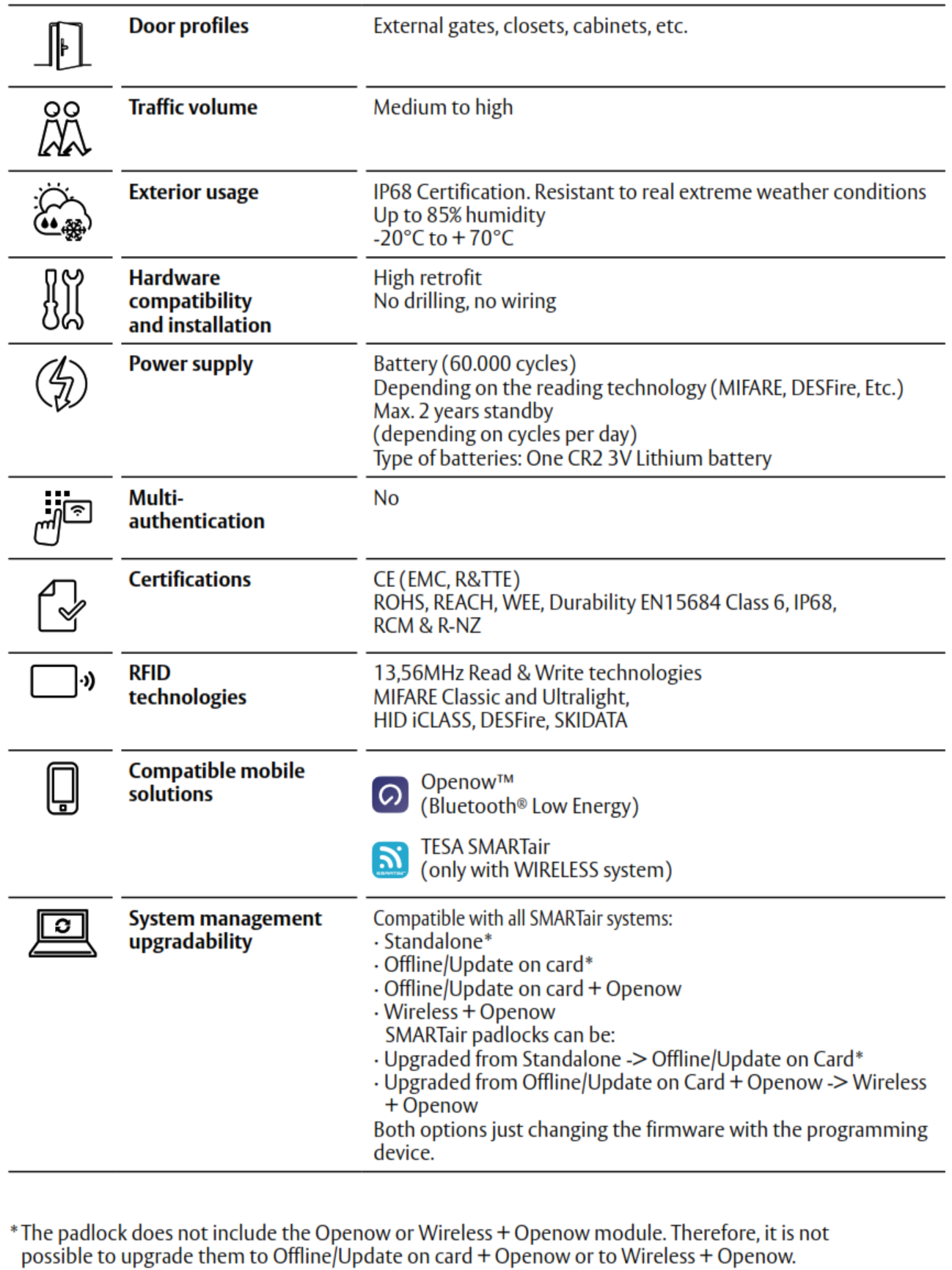
Access Methods
How users open this padlock, and what it does not do. Chapter 03 compares every method side by side.
The Openow app is free for users on iOS and Android 
 and phone keys are sent from TS1000. Browse other card and fob access, Bluetooth and app-enabled locks, or our smart padlocks.
 What's In The Box
- SMARTair i-gate electronic padlock - the padlock with its stainless steel shackle and electromechanical clutch, the reader knob (reader module, control unit and battery module) and the black protective cover
- Factory-fitted Wireless + Openow module (real-time Wireless Online management, Openow phone keys over Bluetooth LE and the TESA SMARTair app)
- One CR2 3V lithium battery
- Programming connection (3-pin) for the SMARTair portable programmer
- Installation and operation instructions
Not included: RFID credentials, the encoder, the portable programmer, the Openow licence and the TS1000 software licence, and the SMARTair hubs this tier needs. Openow phone keys are issued over the air.
 Suitable Uses and Typical Installations
ASSA ABLOY built the i-gate for external gates, closets and cabinets - openings where an escutcheon, cylinder or wall reader cannot be fitted - at medium to high traffic (i-gate datasheet). It needs no drilling and no wiring, so it suits retrofit and temporary sites. Typical installations:
- Construction site security gates and temporary security fencing.
- Industrial infrastructure compounds and plant rooms.
- Utilities and energy facilities, including water infrastructure.
- Data centre equipment cages.
- Medical, hospital and pharmaceutical storage cabinets.
- Commercial plant rooms and building service cupboards.
- University and campus maintenance areas.
- Remote infrastructure and storage areas that need credential-based padlock access.
- Sites with frequent permission changes - contractors, shift work, new starters and leavers - where changes should reach the padlock straight away and hubs can be placed within range (SMARTair fit guidance).
- Mixed SMARTair sites - the padlock sits alongside escutcheons, knob cylinders and wall readers in the same TS1000 system, and tiers can be combined on one site (system architecture).
- External gates exposed to the weather - see our External Gate Exposed to Rain category and Outdoor Use and Weather Protection.

- Doors that can take an escutcheon, knob cylinder or wall reader - use a SMARTair i-max Wireless Online + Openow escutcheon, Wireless Online + Openow knob cylinder or i-Reader R4N Wide wall reader instead.
- Sites that need PIN entry or two-factor opening - the i-gate has no keypad.
- Sites that want a mechanical key backup - there is no key override, so plan for the portable programmer.
- Hanging the padlock sideways, or leaving it open outdoors - the weather sealing only holds when it hangs vertically with the shackle up and closed.
- Openings outside hub coverage - plan the hubs first (up to 30 doors within 30 m per hub), or choose the Update-on-Card + Openow version, SNBBP2XI, which needs no hubs.
 Outdoor Use and Weather Protection
The SMARTair i-gate electronic padlock is designed for outdoor environments and carries an IP68 rating; ASSA ABLOY describes it as resistant to real extreme weather conditions, from -20 to +70 degrees C and up to 85 percent humidity (i-gate datasheet). The sealed electronic module and the protective rubber cover keep dust and moisture away from the internal components, which suits gates, infrastructure enclosures, cages and external equipment storage.
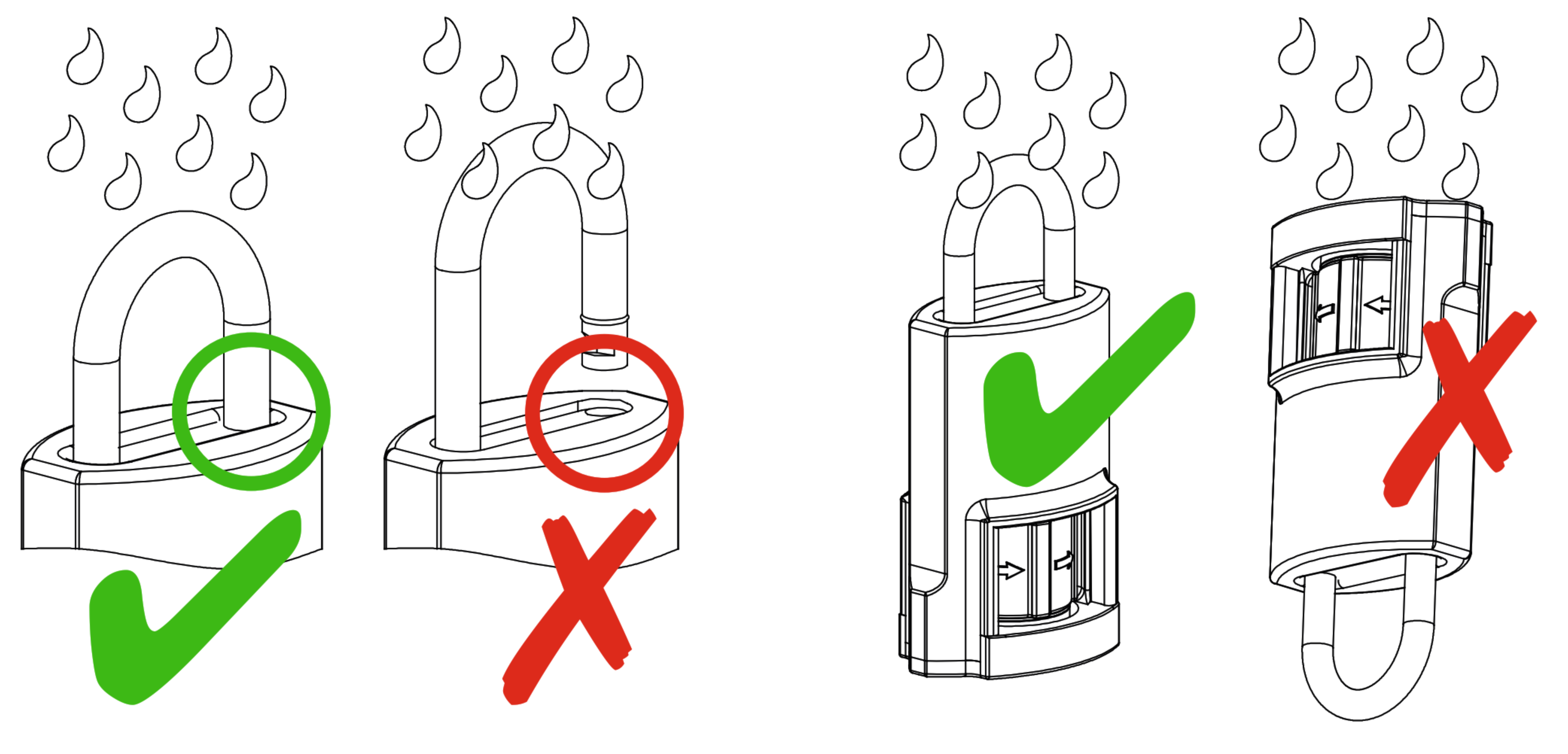
- Install the padlock vertically with the shackle facing upwards.
- Weather protection holds only while the shackle is fully closed - do not leave the padlock open outdoors.
- Push the shackle in firmly when you close it - that is what seals the padlock correctly.
 Available Finish Options
 Black
Black
(This Product)
STK SNZBP2XI
Finish selection does not affect functionality, compliance, or performance.
The i-gate padlock is offered with a black rubber finish: a black protective cover over the padlock, with a stainless steel shackle (i-gate datasheet).
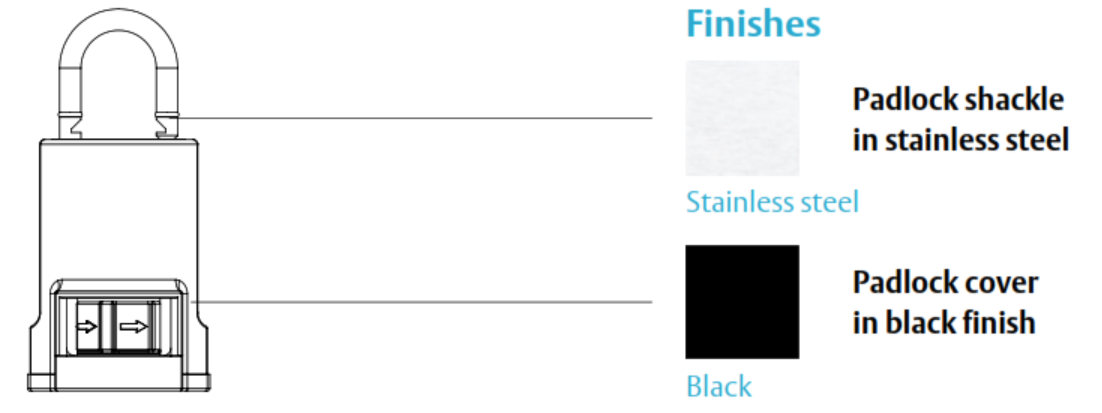
 Item Code Family - SMARTair i-gate Electronic Padlocks
The four i-gate padlocks we list share the same IP68 padlock and differ by management tier (set by the factory-fitted RF module) and reader technology. Choose the tier for how you want to run the site, and the reader to match the cards it already uses.

Both are secure 13.56 MHz RFID credential technologies used in commercial access control, and each i-gate reader is set to one of them. MIFARE is widely used in access control, universities, transport cards and multi-application credential systems. HID iCLASS is HID's own credential platform, typically used in enterprise security systems and facilities that already run HID cards. The reader must match the credential technology of the site's existing cards or fobs - if you are not sure which your site uses, send us a sample card and we will check it before you order. Openow phone keys work on either version.
 System Integration
- Managed by SMARTair TS1000 - Windows client/server software with its own database, which sets up the installation and initialises devices with the portable programmer; Web Manager then gives browser-based management of users, doors, time zones, access rights and events (Product Overview).
- Operates in Pro Wireless Online mode: real-time control, credentials created and cancelled and access rights or time zones changed at any time, email alerts and web client monitoring (Information Guide).
- Real-time Wireless Online control via SMARTair communication hubs - each hub manages up to 30 doors within a 30-metre range.
- If communication fails, functionality is maintained offline with the latest information stored (Information Guide).
- The padlock's calendar updates automatically on the wireless system, and daylight saving changes are automatic (i-gate datasheet).
- The factory Wireless + Openow module carries Openow phone keys and the TESA SMARTair app, which ASSA ABLOY lists for the wireless system only (i-gate datasheet).
- Emergency lockdown can be added to a Wireless Online site with the TS1000 Lockdown Upgrade.
- Openow keys reach phones through TS1000's cloud connection over HTTPS 443 (system architecture).
- Works alongside the rest of SMARTair. Tier- and credential-matched devices for the same site are the i-Reader R4N Slim S4ZR2DSlim and i-Reader R4N Wide S4ZR2PWide wall readers (Wireless Online + Openow, MIFARE); the i-Reader R4N Slim S4BR2Slim3 reads MIFARE on Wireless Online without Openow as listed. The Wireless Online + Openow i-max escutcheons (SNZB43SL1S008DI, SNZB43SL2V648DI, SNZB43SL2V908DI, SNZB47SL1S008DI, SNZB47SL2V648DI, SNZB47SL2V908DI), knob cylinder (SNZB43X030E10MI) and wall reader with keypad (SNZR3KUSSB) read HID iCLASS, so phone keys cross but MIFARE cards do not.

Communication between the padlock and the software is automated and encrypted by SMARTair hubs. Each hub manages up to 30 doors within a 30-metre range, and in case of communication failure the padlock keeps working offline with the latest information stored (Information Guide). Wireless Online is the tier that adds the hub (devices you need; the hub equipment matrix). SMARTair hubs aren't listed on our store - ask us and we will quote them with your padlocks. Gates are often further from the building than doors, so check the distance to the nearest hub first. For how a gateway or hub fits into a smart lock system generally, see what a gateway does.
Update-on-Card + Openow or Wireless Online + Openow?
The i-gate padlocks we list come in two SMARTair management tiers. The padlock and reader are the same; the factory-fitted RF module (Openow, or Wireless + Openow) sets the tier, and the tier decides how changes reach the padlock and how events come back. This padlock's column is in bold.
SMARTair also runs Standalone and Update-on-Card tiers without phone keys; ASSA ABLOY notes that an i-gate built without the Openow module cannot be upgraded to an Openow tier, and the four we list all carry one (i-gate datasheet). Tiers can be combined on one site (Product Overview), and automatic cancellation of lost cards and activation and expiry dates are available on every tier except Standalone (feature comparison). For a full explanation see the SMARTair System Information Guide or the SMARTair Wireless Access Control Product Overview.
 Power Supply and Battery System
- Battery-powered electronic padlock - one CR2 3V lithium battery (i-gate datasheet).
- Battery life: approx. 60,000 cycles, depending on the reading technology, or up to 2 years standby depending on cycles per day.
- Easy battery change: users and events sit in non-volatile memory, and the clock and calendar are held for 5 minutes without a battery.
- Low battery is signalled by the warning LED, and battery status is reported with every event, or once a day when there are none.
- No mechanical key override - emergency opening is performed with the SMARTair programming device.

The i-gate has no mechanical key override. If the battery runs too low to open the padlock, the emergency opening is made with the SMARTair portable programmer connected by its 3-pin cable - ASSA ABLOY lists emergency openings on low battery as one of that connection's jobs (i-gate datasheet). Openow phone keys and the card reader run on the padlock's own battery too, so neither is a fallback. Change the CR2 when the low-battery warning shows, keep the programmer where your site manager can reach it, and see the no-key-override issue on padlocks.
Real-world battery life depends on traffic and conditions - the truth about battery life and power and battery FAQs.
 How to Open the i-gate Padlock
- Present your card or tag to the reader at the bottom of the padlock - it wakes as the credential approaches.
- The blue LED lights to confirm access: turn the padlock to open it within approximately 4 seconds.
- A red LED means the credential is not authorised.
- With a phone key, open the Openow app, press the padlock and hold the phone to the lock (Openow User Guide; February 2019, so screens may differ from today's app).
- To lock it, push the shackle in firmly - that is what seals the padlock correctly.
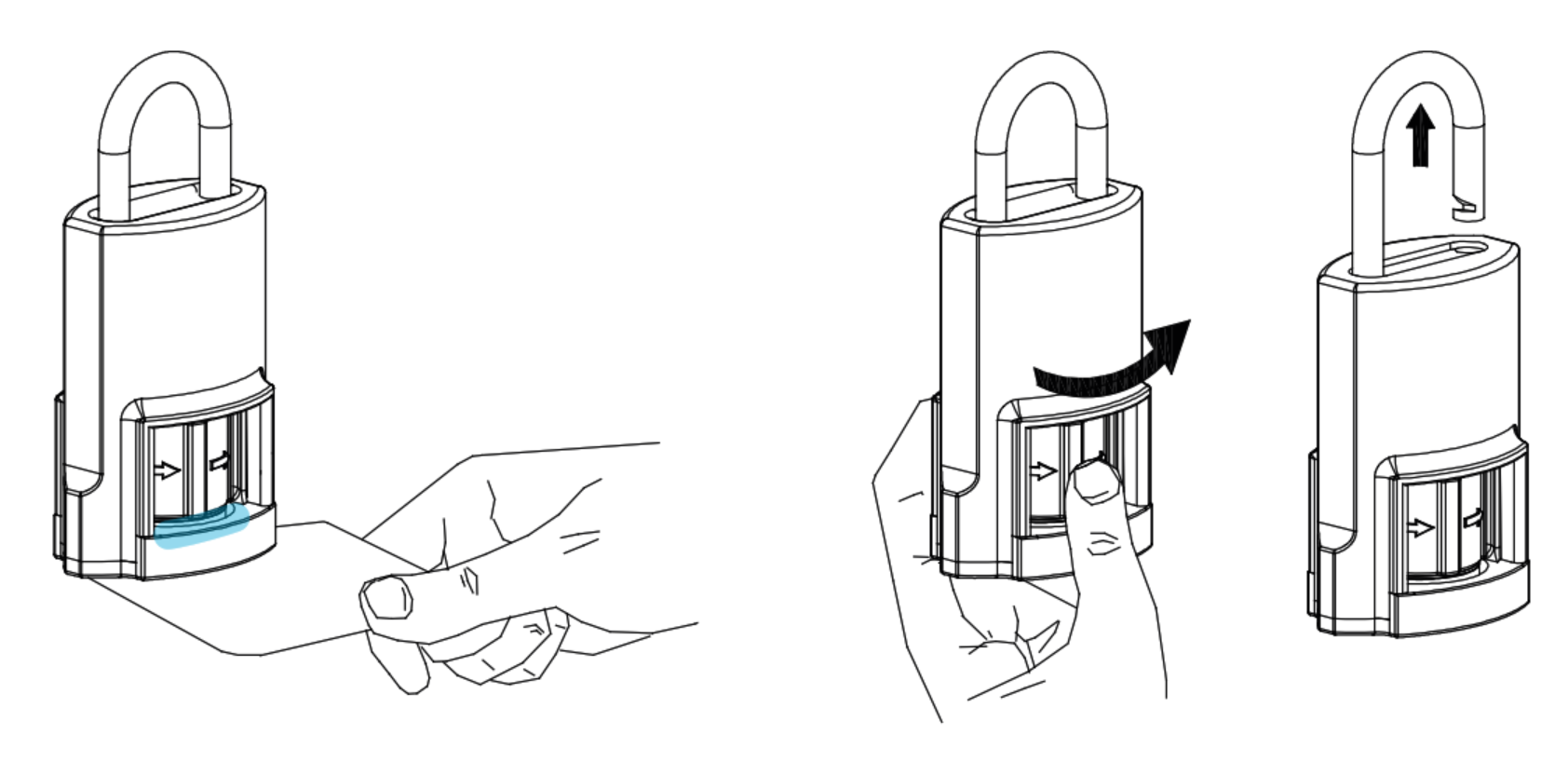
 Full Specifications
Technical data from the i-gate datasheet, which covers every i-gate reader option; battery cycles vary with the reading technology.
 Dimensions
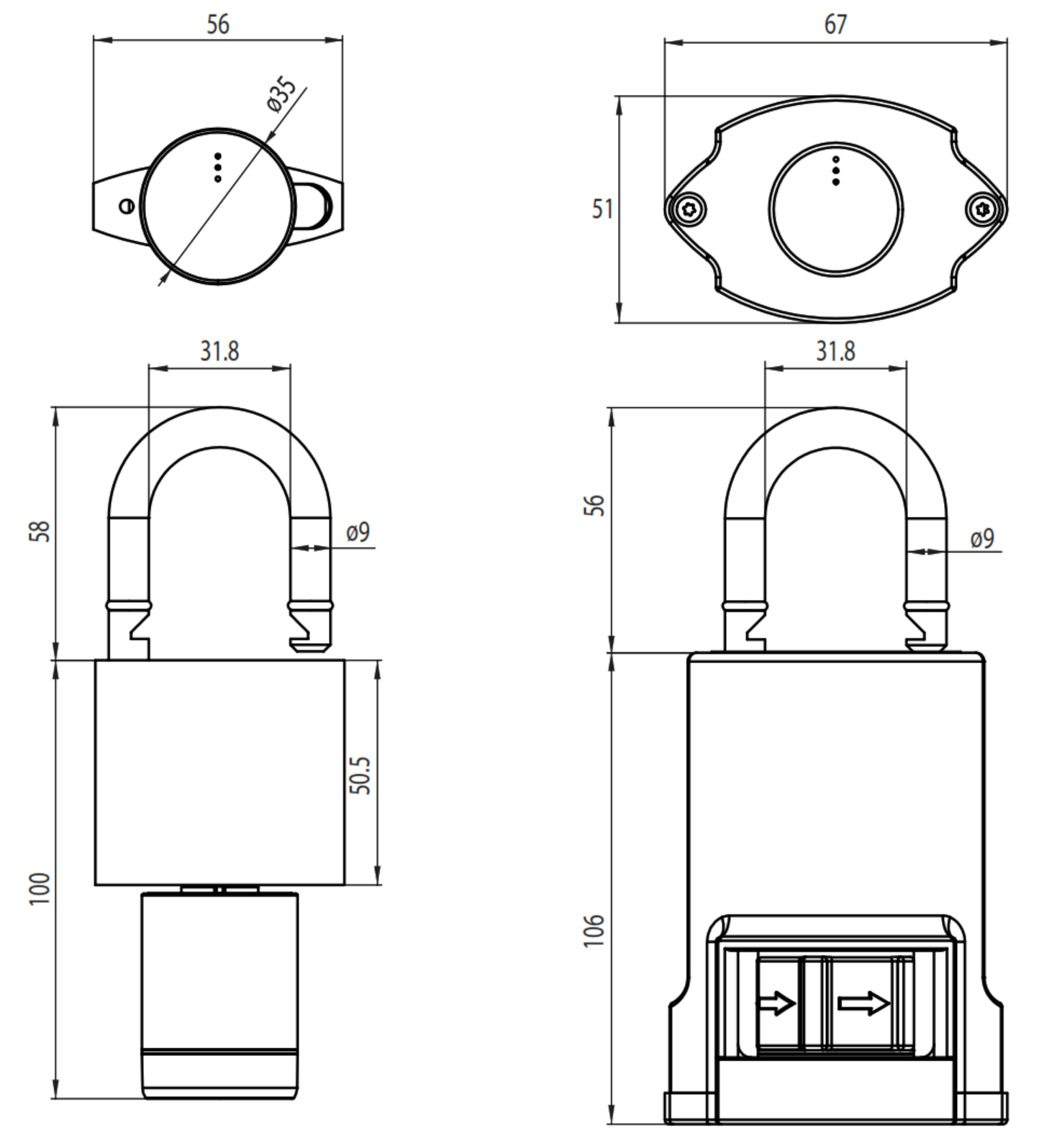
Related SMARTair Products and Guides
- Other i-gate padlocks. This is the Wireless Online + Openow (MIFARE) padlock. If real-time control is not required, the Update-on-Card + Openow (MIFARE) version is lower-cost and needs no hubs; iCLASS equivalents are the UOC + Openow (iCLASS) and Wireless + Openow (iCLASS) padlocks. See the full range in the item code family.
- Other SMARTair formats. For doors that can take an escutcheon or cylinder, use a SMARTair i-max Wireless Online + Openow escutcheon or Wireless Online + Openow knob cylinder; for automated doors, turnstiles and barriers use a SMARTair i-Reader R4N Wide wall reader. Tier- and credential-matched devices for the same site are the i-Reader R4N Slim S4ZR2DSlim and i-Reader R4N Wide S4ZR2PWide wall readers (Wireless Online + Openow, MIFARE); the i-Reader R4N Slim S4BR2Slim3 reads MIFARE on Wireless Online without Openow as listed. The Wireless Online + Openow i-max escutcheons (SNZB43SL1S008DI, SNZB43SL2V648DI, SNZB43SL2V908DI, SNZB47SL1S008DI, SNZB47SL2V648DI, SNZB47SL2V908DI), knob cylinder (SNZB43X030E10MI) and wall reader with keypad (SNZR3KUSSB) read HID iCLASS, so phone keys cross but MIFARE cards do not.
- Running the wireless system. Credentials are written with the SMARTair USB encoder, the padlock is initialised with the SMARTair portable programmer, Openow is enabled with an Openow mobile access licence, and emergency lockdown can be added with the TS1000 Lockdown Upgrade. SMARTair hubs are quoted with the job.
- Selecting and specifying. Compare access methods in our access methods chapter, review real-time management in the gateway comparison chapter, check door and opening suitability with the door type guide, review outdoor and standards guidance in the Australian standards chapter, and read about mobile keys in our app platforms chapter. Also useful: installation and troubleshooting, site survey and installation, the realities of electronic door locks, enterprise and infrastructure padlocks and the smart lock buyers guide.
 Frequently Asked Questions
The one that matches the cards your site already uses. This listing reads MIFARE Classic and Ultralight; the HID iCLASS version is SNZBP3XI. Openow phone keys work on both. Not sure what your cards are? Send us a sample and we will check it.
Yes. This is the Wireless Online + Openow tier, and the hub is what links the padlock to TS1000 in real time. Each hub manages up to 30 doors within a 30-metre range (Information Guide), and gates can sit a long way from the building, so we quote hubs after checking the distances. If you don't need live control, the Update-on-Card + Openow version runs without hubs.
The padlock warns first with its low-battery LED and reports battery status to the software. There is no key override, so on low battery the emergency opening is made with the SMARTair portable programmer connected by its 3-pin cable (i-gate datasheet). Phone keys need battery power too, so change the CR2 when the warning shows.
Yes - it is IP68 rated for -20 to +70 degrees C and up to 85 percent humidity. The weather protection only holds when the padlock hangs vertically with the shackle up and the shackle is closed, so never leave it open, and push the shackle in firmly when you lock it. See Outdoor Use and Weather Protection.
Yes. Openow is built in, so users open the padlock with a virtual key in the free Openow app over Bluetooth LE; the site needs the Openow mobile access licence in TS1000. The wireless system also supports the TESA SMARTair app.
 Additional Information
- Dispatch and planning. This padlock usually ships in 3 business days. Order the system items at the same time - credentials, the encoder, the portable programmer and the Openow licence, plus hubs quoted for the site - so the padlock can be commissioned when it arrives.
- Plan the hubs. Each SMARTair hub manages up to 30 doors within a 30-metre range, and gates and compounds are often further from the building than doors, so book a site survey or talk to us before ordering; hubs aren't listed on our store and we quote them with the padlocks.
- Weather sealing depends on how it hangs. IP68 protection holds only with the padlock vertical, shackle up and closed - an open padlock left outdoors is not sealed. See IP ratings for outdoor padlocks.
- No key override. Keep the portable programmer where your site manager can reach it, change the CR2 when the warning shows, and swap it promptly - the clock and calendar are held for 5 minutes without a battery. See the no-key-override issue.
- Data and support. TS1000 keeps the site database on your own server, and Openow keys reach phones through TS1000's cloud connection over HTTPS 443 (Product Overview). For where access platforms keep data, see platforms hosted outside China.
 Warranty
ASSA ABLOY branded products purchased new in Australia from authorised resellers are covered against defects in materials and workmanship for:
- Mechanical components: 10 years
- Electrical and electronic components: 5 years (excluding batteries)
- Cylinders and keys: 3 years
 Download PDF Resources
ASSA ABLOY's 4-page technical sheet for the i-gate - technical data, the reader, control unit and battery modules, operating modes, the Openow and Wireless + Openow modules, dimensions, how to open it, the weatherproofing rules and the finish. It covers every reader option; this listing is the MIFARE version.
The May 2023 technical overview - the four management systems and the equipment each needs, the feature comparison, system architecture, TS1000 and Web Manager, credentials, and the i-gate in the other-devices table on page 10.
The May 2022 benefits guide - the management levels with decision guidance on page 4 (Pro Wireless Online with the hub coverage note, Openow and Update-on-Card), Openow virtual keys and the device range.
The end-user guide to the Openow app (February 2019, so screens may differ from today's app) - download and registration, opening with a phone, the green, orange and red padlock states, managing keys and the security PIN.
SMARTair i-gate Electronic Padlock (SNZBP2XI) - FAQ, Setup and Owner's Guide
Everything below is here to help you choose, set up and run this padlock. For general smart lock questions see our Smart Lock FAQ (Chapter 13), for padlocks in particular our smart padlock guide, and for the wider picture start with the Buyer's Guide.
Choosing This Padlock

It is the Wireless Online + Openow version of the SMARTair i-gate electronic padlock: a complete, battery-powered padlock with a MIFARE Classic and Ultralight reader, Openow phone keys built in, real-time control through SMARTair hubs and TESA SMARTair app support. It suits gates, cages, closets and cabinets where an escutcheon, cylinder or wall reader cannot be fitted, is IP68 rated and needs no drilling or wiring.
Only by management tier and reader. The four we list are SNBBP2XI / SNZBP2XI / SNBBP3XI / SNZBP3XI. In our listings the SNB codes are Update-on-Card + Openow and the SNZ codes Wireless Online + Openow; the P2 codes read MIFARE and the P3 codes HID iCLASS. All four share the same IP68 padlock, stainless steel shackle and CR2 battery; each carries a factory-fitted RF module for Openow phone keys - the Openow module on the SNB codes, the Wireless + Openow module on the SNZ codes. See the Item Code Family table.
When the opening can't take one of those - a gate, a cage, a closet or a cabinet with a hasp or chain. ASSA ABLOY describes the i-gate as the device for any door where it is impossible to install an escutcheon, cylinder or wall reader (i-gate datasheet). On a door that can take one, a SMARTair i-max Wireless Online + Openow escutcheon or Wireless Online + Openow knob cylinder is the usual choice.
Yes. The padlock includes the reader module, battery module and control unit, the electromechanical clutch and the Wireless + Openow module, so nothing else is fitted to the gate. The site still needs the SMARTair system around it: TS1000, the encoder, the portable programmer and the Openow licence, plus hubs on this Wireless Online tier.
Choose Wireless Online when changes must reach the padlock straight away and you want live events and email alerts - and you can place hubs within range. Choose Update-on-Card + Openow when the padlock can refresh as users present their cards at an updater and you'd rather not install hubs (Information Guide). The same reader in the other tier is the SNBBP2XI.

Yes - the SNBBP2XI is the Update-on-Card + Openow version with the same MIFARE reader. It is lower-cost and needs no hubs; changes reach it on users' cards and through Openow instead of in real time.
Match the cards the site already uses. MIFARE is widely used in access control, universities, transport cards and multi-application credential systems; HID iCLASS is HID's own platform, common in enterprise sites that already run HID cards. This listing reads MIFARE Classic and Ultralight; the HID iCLASS version is SNZBP3XI. Phone keys work on both.
Cards, Tags and Credentials
MIFARE Classic and Ultralight 13.56 MHz credentials, encoded for your site with the SMARTair USB encoder. The i-gate's reader technology is set by firmware - one of MIFARE Classic (or Ultralight), HID iCLASS or DESFire at a time - and this listing is the MIFARE version (i-gate datasheet). Browse RFID cards, fobs and tags.
Only if they are MIFARE Classic or Ultralight. An existing card of the right type can often carry SMARTair data too, because SMARTair uses the credential's free memory alongside other services (Product Overview) - send us a sample card and we will check it.
1-2 cm. The reader is at the bottom of the padlock and wakes as a credential approaches, so there is nothing to press first (i-gate datasheet). See how RFID credentials work.
Cancel it in TS1000. On this Wireless Online padlock the cancellation reaches it through the hub straight away. Automatic cancellation of lost cards is a feature of every tier except Standalone (feature comparison).

Yes. The padlock holds 30 time zones with five periods each and a 365-day calendar that recognises weekdays and weekends automatically, with holidays defined in the calendar (i-gate datasheet), and credentials can carry activation and expiry dates (Product Overview).
There is no keypad and no PIN - ASSA ABLOY lists the i-gate with no multi-authentication. What it does offer is a double-user mode, where two authorised users must present their credentials to open it (i-gate datasheet).
Openow Phone Keys
ASSA ABLOY's mobile credential: a virtual key in the Openow app that opens the padlock over Bluetooth LE. Keys are sent, revoked and updated over the air, are end-to-end encrypted, and a cancelled key vanishes from the phone (Information Guide).
The Openow mobile access licence enabled in TS1000, users with the Openow app on their phones, and TS1000's cloud connection, which carries keys to phones over HTTPS 443 (system architecture). The padlock already has the Wireless + Openow module fitted.
They open the Openow app, press the padlock and hold the phone to the lock. Green means opened, orange means the phone could not connect (try again) and red means no access - no rights, a blocked door or outside the time schedule (Openow User Guide; February 2019, so screens may differ from today's app). Then turn the padlock to open it, as with a card.
The free Openow app for iOS and Android
. Users register with their email address, verify it, and the virtual key arrives in the app; one phone can hold keys for several facilities.
Yes. On Openow sites the facility manager can collect door history and trigger email alerts remotely via users' Openow app (Information Guide), and on this Wireless Online padlock events also arrive through the hub in real time.
A second mobile option that ASSA ABLOY lists for the wireless system only, carried by the padlock's factory Wireless + Openow module (i-gate datasheet). The padlock is always opened by turning it by hand, so any app-based release only helps when someone is at the padlock - ask us whether it suits your site.
Wireless Online, Hubs and Real-Time Control
Real-time control. The padlock connects to TS1000 through SMARTair hubs, so you can create and cancel credentials and change access rights or time zones at any time, receive email alerts and monitor the padlock from the web client (Information Guide page 4). On Update-on-Card, changes travel on users' cards and are collected at updaters instead.
ASSA ABLOY rates each hub for up to 30 doors within a 30-metre range (Information Guide). Gates and compounds are often further out than doors, so book a site survey before settling the hub count.
The padlock keeps working. In case of communication failure, functionality is maintained offline with the latest information stored (Information Guide) - users already set up keep opening it on the rights it holds. Our internet-down guide covers the same idea for residential gateways.
Not by itself - the i-gate is always opened by turning it by hand at the padlock. ASSA ABLOY lists the remote TESA SMARTair App for the wireless system (i-gate datasheet), but a release from an app or the software only helps when someone is at the padlock to turn it. For real-time changes, audit and lockdown the hub is what matters.
An upgrade licence that adds emergency lockdown to a Wireless Online site - one of the reasons to choose this tier. See the TS1000 Lockdown Upgrade.
No. It talks to SMARTair hubs, and the hubs link to the TS1000 server (system architecture), so it never joins your Wi-Fi network. For how other brands handle this, see other gateway systems.
Once a year, and on the wireless system it happens automatically; daylight saving changes are automatic on every tier (i-gate datasheet).
Power and Batteries
One CR2 3V lithium battery, rated at approx. 60,000 cycles depending on the reading technology, or up to 2 years standby depending on how many times a day it is used (i-gate datasheet). See the truth about battery life.
The warning LED signals low battery at the padlock, and battery status is reported with every event, or once a day when there are none, so it shows in the software as well.
There is no key override. The SMARTair portable programmer, connected to the padlock by its 3-pin cable, makes the emergency opening on low battery - ASSA ABLOY lists that as one of the connection's jobs (i-gate datasheet). Keep the programmer accessible, and see the no-key-override issue on padlocks.
No. Openow phone keys and cards both rely on the padlock's own battery - the reader, control unit and electromechanical clutch are battery-powered - so neither is a fallback; the portable programmer is.
Users and events stay in non-volatile memory, and the clock and calendar are held for 5 minutes without a battery (i-gate datasheet), so have the new CR2 ready and swap it in one go.
Outdoor Use, Mounting and Opening
Yes - IP68, and ASSA ABLOY describes it as resistant to real extreme weather conditions (i-gate datasheet). The protection holds only when the padlock hangs vertically with the shackle up, and only while the shackle is closed. See IP ratings explained and IP ratings for outdoor padlocks.
Yes. Hang it vertically with the shackle facing up, never leave it open outdoors, and push the shackle in firmly when you close it - that is what seals it correctly (i-gate datasheet).

The IP68 rating covers water and dust, not salt air, and ASSA ABLOY doesn't quote a salt spray figure for the i-gate. Its warranty excludes corrosion, so on the coast keep the cover clean and check the shackle regularly - see coastal environments and what coastal Queensland does to locks.
-20 to +70 degrees C and up to 85 percent humidity (i-gate datasheet). Direct sun is still hard on any electronic lock - see what sunlight and heat do to digital locks.
Present the credential to the reader at the bottom; when the blue LED lights, turn the padlock within about 4 seconds to open it. A red LED means no access. To lock, push the shackle in firmly (i-gate datasheet).
Standard (one authorised credential opens it); Double user (two authorised users must present their credentials); Standard or ADA users, where the clutch time is set from 1 to 15 seconds and ADA users get double; and a high-traffic option for an unlimited number of users, recording the last 1,000 events. Modes can change automatically through the day with state tables in the software (i-gate datasheet).

Stainless steel, 9 mm in diameter, with 31.8 mm between the legs and 56 mm of clear height above the cover; the padlock uses a double security locking mechanism (i-gate datasheet). Check it suits your hasp or chain - see Dimensions.

There is no drilling or wiring, but the padlock has to be initialised with the portable programmer and set up in TS1000, and credentials encoded, before it goes on the gate. Most sites have us do it - see when DIY makes sense, our advice and installation and professional installation.
Software and System Management
TS1000 - Windows client/server software with its own database - sets up the installation and initialises devices with the portable programmer; Web Manager then gives browser-based management of users, doors, time zones, access rights and events, with the server needing a public IP (Product Overview).
The padlocks, the TS1000 software licence, the encoder for cards, the portable programmer for initialising devices, SMARTair hubs for the Wireless Online link and the Openow licence for phone keys (devices you need).
Yes. SMARTair management systems can be combined on one site (system architecture), so a building can run Wireless Online doors where live control matters and Update-on-Card doors elsewhere, all in TS1000. Tier- and credential-matched devices for the same site are the i-Reader R4N Slim S4ZR2DSlim and i-Reader R4N Wide S4ZR2PWide wall readers (Wireless Online + Openow, MIFARE); the i-Reader R4N Slim S4BR2Slim3 reads MIFARE on Wireless Online without Openow as listed. The Wireless Online + Openow i-max escutcheons (SNZB43SL1S008DI, SNZB43SL2V648DI, SNZB43SL2V908DI, SNZB47SL1S008DI, SNZB47SL2V648DI, SNZB47SL2V908DI), knob cylinder (SNZB43X030E10MI) and wall reader with keypad (SNZR3KUSSB) read HID iCLASS, so phone keys cross but MIFARE cards do not.

Up to 3,000 users and the last 1,200 events in non-volatile memory (i-gate datasheet); on this tier events also flow to TS1000 in real time.

TS1000 keeps the site database on your own server, and Openow uses TS1000's cloud connection to reach phones (Product Overview). For how access platforms compare on data hosting, see platforms hosted outside China and security and data sovereignty.
Compliance, Warranty and Ordering

CE (EMC, R&TTE), RoHS, REACH, WEEE, EN 15684 Class 6 for durability, IP68, RCM and R-NZ (i-gate datasheet). See Chapter 11 for what RCM means in Australia.
ASSA ABLOY's Australian warranty - 10 years on mechanical components and 5 years on electrical and electronic components, batteries excluded. The full terms are in the Warranty section.
This padlock usually ships in 3 business days. Order the credentials, licences, programmer and hubs at the same time so the site can be commissioned in one visit.
Yes - the i-gate is part of a managed SMARTair access control system rather than a stand-alone app padlock, which is why it is set up through TS1000 with credentials and licences. See the enterprise and infrastructure padlocks section of our smart padlock guide, and the five questions to settle before you buy.
Related Products, Guides and Chapters
The other i-gate padlocks: SNBBP2XI (Update-on-Card + Openow, MIFARE) · SNBBP3XI (Update-on-Card + Openow, HID iCLASS) · SNZBP3XI (Wireless Online + Openow, HID iCLASS)
Same-platform devices for the same site: S4ZR2DSlim · S4ZR2PWide · S4BR2Slim3 · SNZB43SL1S008DI · SNZB43SL2V648DI · SNZB43SL2V908DI · SNZB47SL1S008DI · SNZB47SL2V648DI · SNZB47SL2V908DI · SNZB43X030E10MI · SNZR3KUSSB
System components: SMARTair Encoder STCED3 · Portable Programmer STCPCC · Openow Licence SNCCLICMOBILE · TS1000 Lockdown SNCCLICLOCKDOWN
Categories: Smart Padlocks · Fob / Card / RFID · Bluetooth · App Enabled · External Gate Exposed to Rain · RFID / Fobs / Tags / Cards
Buyer's Guide chapters: Ch 03 Access Methods · Ch 04 Door Types · Ch 08 Gateways · Ch 10 Brand Profiles · Ch 11 Standards and IP Ratings · Ch 12 Troubleshooting · Ch 13 FAQ · Ch 15 App Platforms
Helpful blog reading: Best Smart Padlocks · The No Key Override Issue · IP Ratings for Outdoor Padlocks · Enterprise and Infrastructure Padlocks · The Realities of Electronic Door Locks · How Long Do Digital Door Locks Last? · Which Platform for Commercial Sites? · Your Data and China · Site Survey and Installation
What's in the Box - SNZBP2XI
- SMARTair i-gate electronic padlock - the padlock with its stainless steel shackle and electromechanical clutch, the reader knob (reader module, control unit and battery module) and the black protective cover
- Factory-fitted Wireless + Openow module (real-time Wireless Online management, Openow phone keys over Bluetooth LE and the TESA SMARTair app)
- One CR2 3V lithium battery
- Programming connection (3-pin) for the SMARTair portable programmer
- Installation and operation instructions
ASSA ABLOY SMARTair i-gate Padlock - Dimensions
PDF Files - SNZBP2XI
ASSA ABLOY's 4-page technical sheet for the i-gate - technical data, the reader, control unit and battery modules, operating modes, the Openow and Wireless + Openow modules, dimensions, how to open it, the weatherproofing rules and the finish. It covers every reader option; this listing is the MIFARE version.
The May 2023 technical overview - the four management systems and the equipment each needs, the feature comparison, system architecture, TS1000 and Web Manager, credentials, and the i-gate in the other-devices table on page 10.
The May 2022 benefits guide - the management levels with decision guidance on page 4 (Pro Wireless Online with the hub coverage note, Openow and Update-on-Card), Openow virtual keys and the device range.
The end-user guide to the Openow app (February 2019, so screens may differ from today's app) - download and registration, opening with a phone, the green, orange and red padlock states, managing keys and the security PIN.
 Accessories - SMARTair System Components
The SMARTair access control platform uses a modular ecosystem of credentials, management devices and integration accessories. These are the ones commonly used with this Wireless Online + Openow i-gate padlock.
SMARTair systems are modular and scalable, and the accessories needed depend on the tiers on your site (Standalone, Update-on-Card, Wireless Online or Openow mobile access). We quote hubs, updaters, licences and credentials to suit each job.
ASSA ABLOY Warranty Overview
ASSA ABLOY branded products sold in Australia are covered by manufacturer warranties issued by ASSA ABLOY Australia Pty Ltd. Warranty coverage varies depending on mechanical components, electronic components, cylinders and finish categories.
This overview summarises the structure of ASSA ABLOY warranty coverage. Full terms, exclusions and claim procedures are set out in the official ASSA ABLOY Warranty document.
 Warranty Periods Summary
Finish & Material Notes
- Stainless steel does not mean stain-free. Tea staining is not covered where cleaning and maintenance guidelines have not been followed.
- Cosmetic, decorative and appearance damage is not covered.
- Battery failure or battery leakage damage is not covered.
What the Warranty Covers
- Defects in material and workmanship within the applicable period.
- Assessment by ASSA ABLOY to determine repair, replacement with the same or closest equivalent product, or refund of purchase price.
- Remedy determined at ASSA ABLOY’s discretion.
 Common Exclusions
- Normal wear and tear.
- Misuse, abuse or installation outside published technical specifications.
- Improper maintenance or neglect.
- Unauthorised modification or repair.
- Use of non-genuine ASSA ABLOY parts or substitute components.
- Exposure to corrosive environments including coastal air, salt spray, chemicals, contamination or high humidity.
- Removal, refitment, freight or labour charges.
- Second-hand or imported products not sold through authorised Australian channels.
Warranty Claim Process
- Retain proof of original purchase.
- Return the product to the original authorised retailer where applicable.
- If claiming directly, obtain a case number before returning goods.
- Securely package returned goods and clearly reference the case number.
- Warranty assessment determines repair, replacement or refund.
 Australian Consumer Law
ASSA ABLOY warranties operate in addition to rights available under the Australian Consumer Law. Goods come with guarantees that cannot be excluded. Customers may be entitled to a replacement or refund for a major failure and compensation for reasonably foreseeable loss or damage.
Where a product fails to meet acceptable quality standards and the failure does not amount to a major failure, the customer is entitled to repair or replacement.
Official Warranty Documents

Confused? Overwhelmed? We get it.
Choosing the right smart lock can be genuinely tricky - door types, backsets, app platforms, compatibility with your existing hardware... there is a lot to consider. We have decades of experience fitting locks of all types, including smart locks, and we are happy to help.
Our expert recommendation service is free. Upload a few photos of your door and describe what you need, and one of our qualified locksmiths will give you a personalised recommendation.
Get Your Free Recommendation →How it works - three easy steps:
1. Upload photos
A few clear shots of your door, lock and frame - inside and out.
2. We assess
Our locksmith reviews your setup and requirements - door type, weather exposure, how you want to use it.
3. You get a recommendation
A personalised recommendation tailored to your door, budget and needs. No pressure, no upsell.
Also useful while you are deciding: