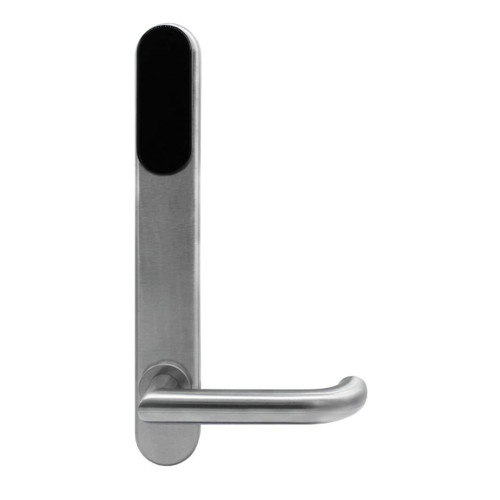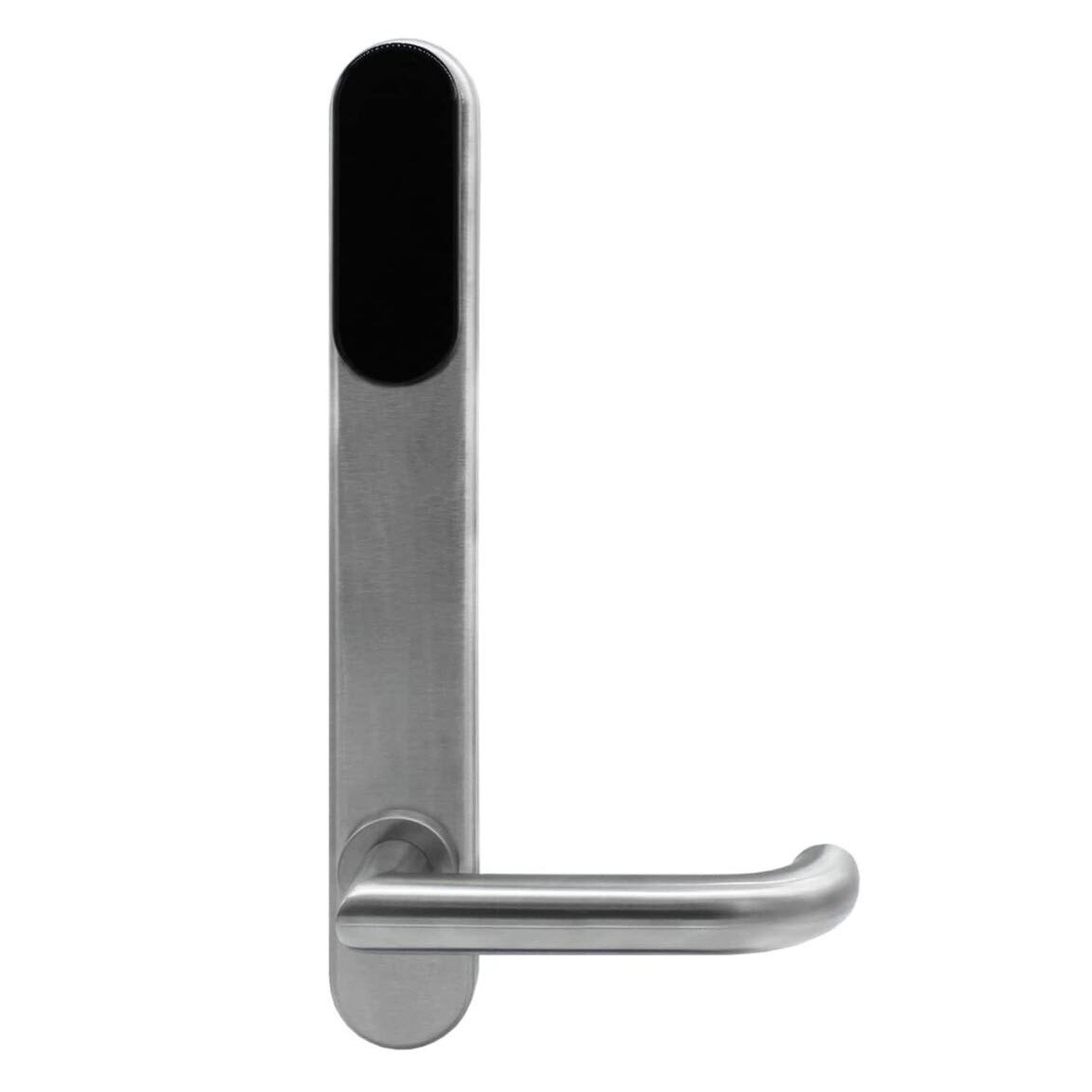


ASSA ABLOY SMARTair i-max Update-on-Card + Openow Escutcheon - HID iCLASS, Standard Mortice, DDA
At A Glance
 At A Glance

 iCLASS Card / Fob
  Openow Phone Key
  Key Override
Not Available
 PIN Code
Not Available
 Fingerprint
Not Available
The ASSA ABLOY SMARTair i-max Update-on-Card + Openow Escutcheon (SNBB43SL1S008DI) is a battery-powered electronic escutcheon that turns a door fitted with a commercial mortice lock into a managed access-control door, with no cabling through the door or the frame. It reads HID iCLASS cards and fobs, opens to Openow phone keys over Bluetooth, and carries a DDA lever handle in the standard-mortice configuration. The mortice lock body is sold separately - see the mortice locks for smart locks range.
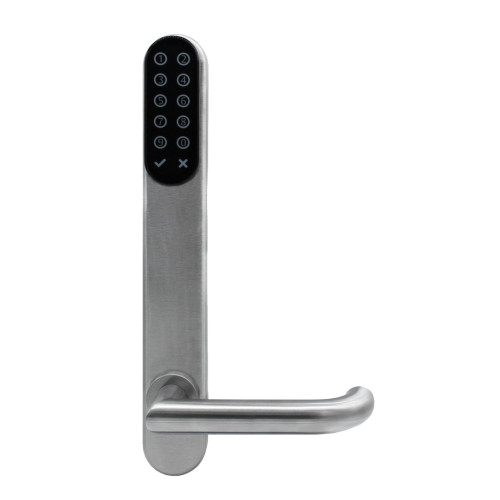
This is the card-only model with no mechanical key override: the escutcheon has no cylinder hole, so a door whose batteries go completely flat is opened with the SMARTair portable programmer rather than a key. If you want a key cylinder as a fallback, the key override version of this escutcheon (SNBB43SL2V648DI) is the same price; if you want on-door PIN entry, see the keypad version (SNBB47SL1S008DI).
Access rights are managed in ASSA ABLOY's TS1000 software. On the Update-on-Card tier a user's card carries their rights and refreshes at an online updater, so the door itself needs no network; Openow adds virtual keys sent to the user's phone. The SMARTair Product Overview compares the four management tiers side by side, and our access methods chapter explains RFID credentials in plain terms.

SMARTair i-max escutcheons are built for medium to high traffic commercial doors - offices, education campuses, healthcare facilities and multi-tenant buildings - and are rated to EN 1906 Grade 4 category of use. SMARTair is one of the commercial access-control brands we support, and our platform guide for commercial sites explains where it fits.
 Disability Compliance (DDA)
- Supplied with a DDA compliant lever handle, suited to users with limited grip strength.
- Accessibility is assessed on the complete door - handle, lock, hardware heights and clearances - so the lever supports an AS 1428.1 doorset rather than certifying one on its own.
- For accessible housing and NDIS projects, see our DDA and accessibility chapter and the NDIS and DDA housing guide.
 Fire Rated
- The SMARTair i-max escutcheon is EN 1634 fire tested - a European fire test of the escutcheon on a test doorset.
- Fire performance belongs to the complete certified doorset: door leaf, frame, hardware and the fire-rated mortice lock inside it. We do not quote an Australian fire resistance level (FRL) for the escutcheon on its own.
- If the door is a fire door, confirm the doorset certification before fitting anything - our guides to fire door core types, AS 1905.1 and fire door types and certification explain what to check.
 Key Features
- SMARTair Update-on-Card access control: rights travel on the user's card and refresh at an online updater, so the door needs no cabling or network.
- Openow phone keys built in - users open the door with a virtual key in the Openow app over Bluetooth LE; the site needs the Openow mobile access licence.
- Integrated HID iCLASS reader for 13.56 MHz cards and fobs - see how RFID credentials work.
- No key cylinder (L1S configuration) - flat-battery opening is by the SMARTair portable programmer; read about locks without a key override.
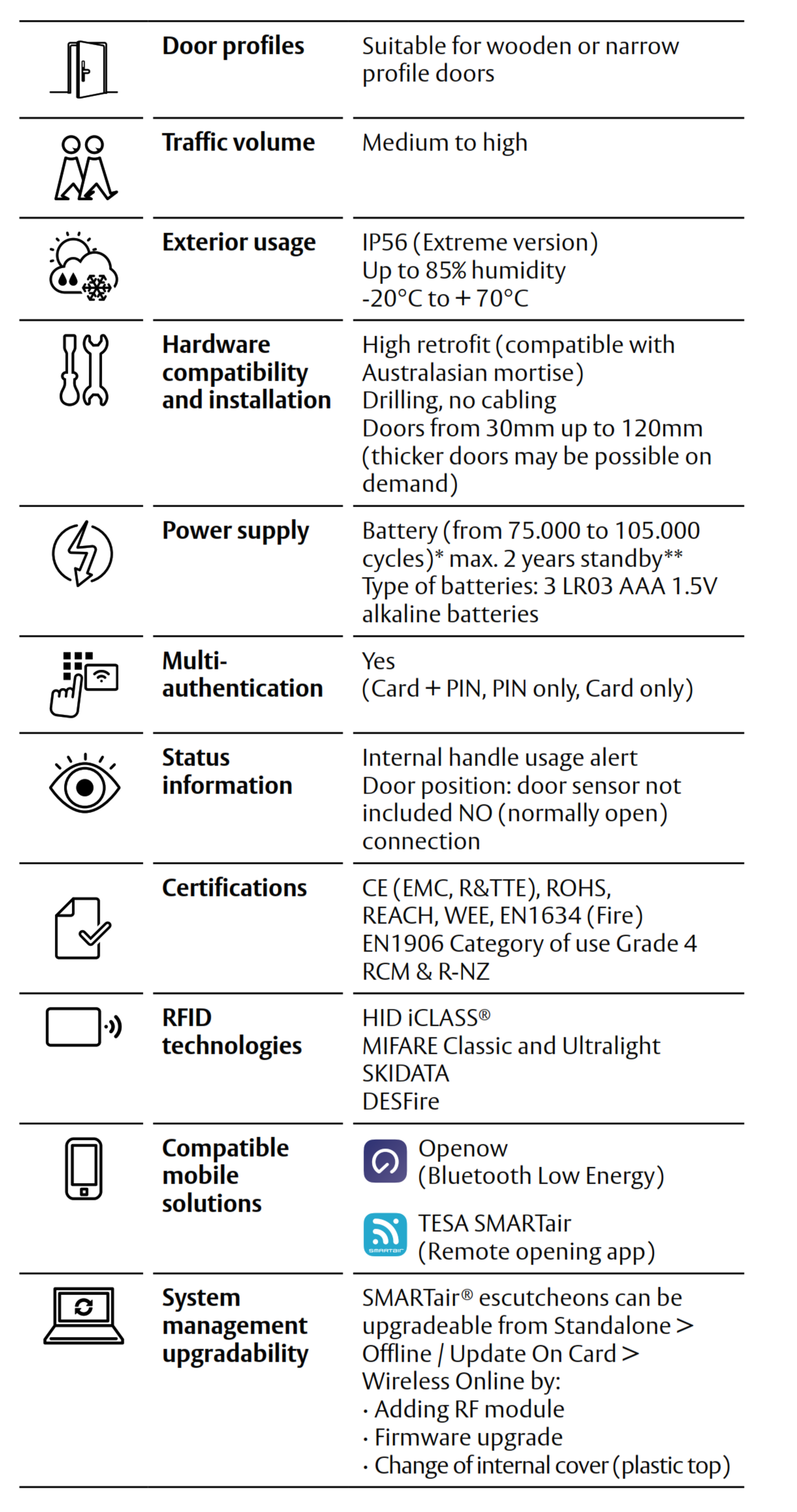
- Battery powered by 3 x AAA LR03 alkaline cells - approx. 75,000 to 105,000 openings or up to 2 years.
- Panic function: the inside handle always opens the door - the electromechanical clutch controls the outside lever only (i-max datasheet).
- DDA compliant lever handle on a standard-mortice (64 mm axis) configuration with a 7.8 mm split spindle.
- Approx. 3,000 users and an audit trail of approx. 1,200 events stored at the door.
- EN 1906 Grade 4 category of use, EN 1634 fire tested, RCM and R-NZ marked for Australia and New Zealand.
- Upgradable platform: the same site can run Standalone, Update-on-Card, Openow and Wireless Online doors together.
 Features Summary

- Wire-free retrofit: the escutcheon fits over a compatible mortice lock and runs on batteries, so a door moves from mechanical keys to electronic access control without cabling through the door or the frame.
- Electronics on the inside: the battery pack and control electronics sit in the inside escutcheon, away from the outside face of the door.
Access Methods
How this escutcheon opens, and which methods a smart lock buyer might expect that it does not use. Browse all card and fob smart locks, Bluetooth smart locks and app-enabled smart locks.
The Openow app is available for iOS and Android 

 What's In The Box
- SMARTair i-max outside escutcheon with integrated HID iCLASS reader
- Inside escutcheon with battery compartment
- DDA compliant lever handle set
- Electromechanical clutch and split spindle
- Mounting plate, fixings and installation screws
- 3 x AAA LR03 alkaline batteries
- Installation instructions
The mortice lock body is not included. Credentials, the USB encoder, the portable programmer, the TS1000 software licence and the Openow licence are ordered to suit your site - see the Accessories and Mortice Options tabs.
Suitable Uses
- Commercial offices, suites and staff areas on hinged doors fitted with a commercial mortice lock.
- Education campuses - classrooms, staff rooms, labs and stores - where access changes each term.
- Healthcare and aged care doors where a DDA lever and managed access both matter.
- Multi-tenant and mixed-use buildings standardising on one credential across escutcheons, cylinders, readers and padlocks.
- Sites that want phone keys for staff and contractors without wiring every door.

- Doors fitted with a tubular latch - the escutcheon needs a mortice lock body.
- Sites that need live door status, remote opening or lockdown - choose the Wireless Online + Openow version.
- Sliding doors - see the SMARTair i-MAX R4N sliding door kit.
- Doors where the outside escutcheon is exposed to the weather - this listing makes no weather-rating claim; ask us before fitting it outdoors.
- Doors where a key must always be able to open the door - choose a key override model.
 Available Finish Options
 Black
Black
(This Product)
STK SNBB43SL1S008DI
Finish selection does not affect functionality, compliance, or performance.
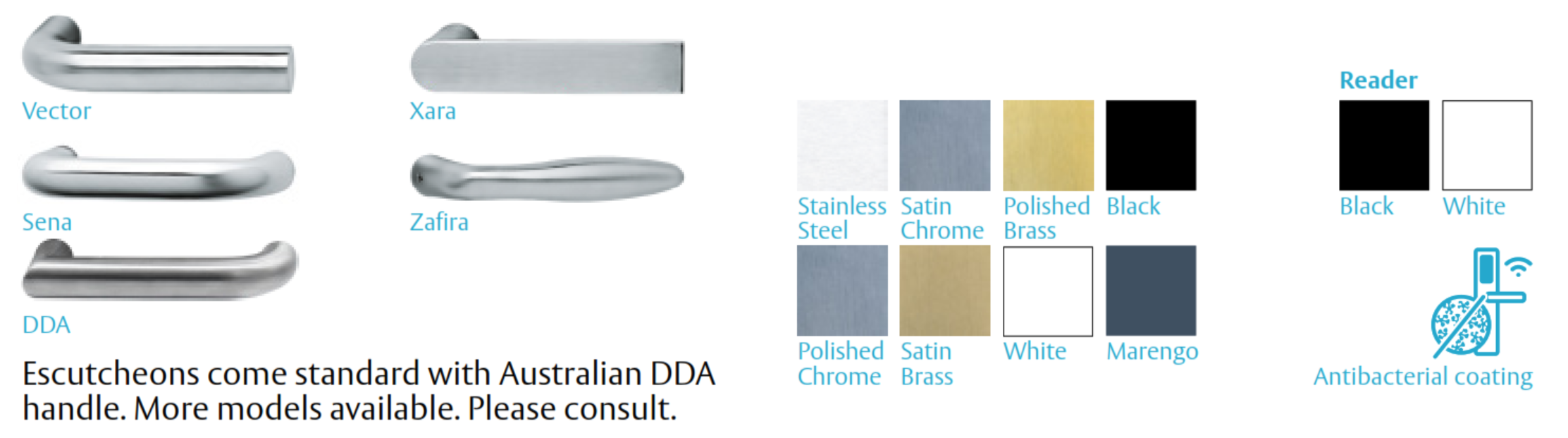
This listing is the black reader. ASSA ABLOY makes the i-max DDA handle in several styles and finishes for different door configurations - the manufacturer overview below shows them. Ask us before ordering if your project needs a different handle style or finish.
 Item Code Family - SMARTair i-max Escutcheons
The i-max escutcheons we list differ by management tier, keypad and key override. All take HID iCLASS credentials and a DDA lever; the narrow-mortice versions are listed on each tier's own pages.
For sliding doors on the same platform, see the i-MAX R4N sliding door kit and its keypad version (MIFARE credentials).
 System Integration
- Managed in TS1000 - ASSA ABLOY's Windows client/server software - with the browser-based Web Manager for day-to-day administration; Web Manager needs a public IP address on the server (Product Overview, page 6).
- This tier needs a software licence and the portable programmer for the doors, plus the USB encoder for cards; Update-on-Card refreshes happen at online updaters (Product Overview, pages 3 and 7).
- Openow phone keys are issued, changed and revoked from the software and delivered over the air to the user's phone - see the Openow mobile access licence.
- Upgradable: the same site can combine Standalone, Update-on-Card, Openow and Wireless Online doors, and move up a tier as it grows (Product Overview, page 5).
- Works on the same credentials as other SMARTair devices - the SMARTair knob cylinder (Update-on-Card + Openow, iCLASS) and the SMARTair i-gate padlock (Update-on-Card + Openow, iCLASS) cover doors and gates an escutcheon cannot.
SMARTair System Architecture
SMARTair runs the same door hardware under four management tiers. Lost or stolen cards are cancelled automatically and users can be given activation and expiry dates on every tier except Standalone, where cancellation is manual.
Tier features are compared on page 4 of the SMARTair Product Overview; the SMARTair System Information Guide explains which tier suits which site. Emergency lockdown (TS1000 Lockdown Upgrade) is a Wireless Online feature only.
 Power Supply and Battery System
- Powered by 3 x AAA LR03 alkaline batteries in the inside escutcheon.
- Approx. 75,000 to 105,000 openings or up to 2 years, whichever comes first.
- The escutcheon warns of low battery before the batteries run out - change all three cells together when it does.
- Battery life is shaped by traffic and environment - see what really affects battery life and our power and battery FAQs.

This L1S model has no cylinder hole. A door whose batteries have gone completely flat is opened with the SMARTair portable programmer connected to the escutcheon. Openow phone keys need battery power too, so they will not open a fully flat unit. Change the batteries when the low-battery warning shows, and keep the programmer where your site manager can reach it. The i-max datasheet lists this programming-cable connection for initialising the escutcheon and for emergency openings on models without a key override. See locks without a key override.
 Full Specifications
Figures from the SMARTair i-max datasheet and the SMARTair Product Overview (page 9, door device comparison).
 Dimensions
 Frequently Asked Questions
No. The escutcheon fits over a commercial mortice lock body, which is ordered separately - see the Lockwood mortice bodies we list to suit SMARTair escutcheons in the Mortice Options tab and the mortice locks for smart locks category. Tubular latches will not work with it.
The escutcheon has Openow built in. The site needs the TS1000 software with the Openow mobile access licence, and each user installs the free Openow app
and registers with their email address. Keys are then sent to their phone over the air.
Only HID iCLASS credentials encoded for your SMARTair site. The reader does not take MIFARE cards, and SMARTair writes its data into the card's free memory, so an existing iCLASS card may be usable alongside other services (Product Overview, page 8). Send us a card to check before you order.
The escutcheon warns of low battery first. This model has no key cylinder, so a fully flat door is opened with the SMARTair portable programmer. Change batteries promptly when warned.

Not on this tier. Openow opens the door from the phone at the door, over Bluetooth. Remote opening, live status and the TS1000 Lockdown Upgrade need the Wireless Online tier with SMARTair hubs - see the Wireless Online + Openow version (SNZB43SL1S008DI).
Additional Information
- Special order. This escutcheon is ordered in for your job, and the lead time shown with the price applies. Plan the rollout around it, and order credentials, the encoder and the programmer at the same time.
- Choosing the tier. Update-on-Card suits sites where access changes on a schedule; Openow adds phone keys; Wireless Online adds live control. If you may want live control later, compare the Wireless Online + Openow version (SNZB43SL1S008DI) now - see Product Overview, page 4.
- Openow and existing cards. ASSA ABLOY's 2017 mobile-app configuration annex warns that encoding app access for a user who already holds a valid card can cancel that card unless copies are activated first. The procedure was written for the older SMARTair app, so talk to us before issuing phone keys to existing card holders (annex, page 5).
- Installation. Door preparation must match the mortice, spindle and escutcheon. The i-max installation template carries no scale statement, so check the printed scale against the hardware before cutting a door. Our advice and installation team and site survey service can take this on.
- Data and support. TS1000 keeps the site database on your own server, and Openow keys reach phones through a cloud connection from TS1000 over HTTPS (Product Overview, pages 5 and 6). Sales, warranty and support are handled by ASSA ABLOY in Australia - see why the ASSA ABLOY platforms differ.
 Warranty
ASSA ABLOY branded products purchased new in Australia from authorised resellers are covered against defects in materials and workmanship for:
- Mechanical components: 10 years
- Electrical and electronic components: 5 years (excluding batteries)
- Cylinders and keys: 3 years
 Download PDF Resources
The i-max family datasheet (Australasian profile): IP56 Extreme exterior option, 3 x AAA battery life, credential technologies, Openow, EN 1634 and EN 1906 Grade 4, door thickness 30-120 mm and RCM / R-NZ.
Single-sheet drilling template for the i-max escutcheon, drawn from a Scandinavian-profile source file with no scale statement - check the printed scale against the hardware, and confirm the drilling pattern with us, before cutting a door.
ASSA ABLOY's May 2023 technical overview: the equipment each tier needs (page 3), the tier feature comparison (page 4), system architecture (page 5), TS1000 and Web Manager (page 6), credentials (page 8) and the door device comparison (page 9).
The May 2022 customer guide to SMARTair: why electronic access control beats keys, the four management levels, Openow virtual keys versus cards and fobs, and the device range.
The two-page end-user guide (February 2019) for the Openow app: download and register, receive a virtual key, open a door, manage keys and set an app PIN. Screens in the current app may differ from this edition.
An April 2017 TS1000 administrator annex for the older SMARTair remote-opening app, written before Openow: enabling mobile apps, adding and verifying users, sending and revoking app access. Read its warning that encoding app access can cancel a user's existing cards.
SMARTair i-max UOC + Openow Escutcheon (SNBB43SL1S008DI) - FAQ, Setup and Owner's Guide
Answers for buyers, installers and site managers, grouped by topic. For general smart lock questions see our Smart Lock FAQ (Chapter 13), and for the full decision path start at the Smart Lock Buyer's Guide.
Choosing This Escutcheon
It is an ASSA ABLOY SMARTair i-max electronic escutcheon on the Update-on-Card + Openow tier - the card-only model with no key cylinder. It fits over a commercial mortice lock on a hinged door, reads HID iCLASS cards and fobs, opens to Openow phone keys over Bluetooth, and runs on batteries, so no cabling is needed through the door or frame.
We list three in this tier. The SNBB43SL1S008DI is card-only with no key cylinder; the SNBB43SL2V648DI is card-only with a key override; the SNBB47SL1S008DI adds a keypad for PIN and card plus PIN, with no key cylinder. All three take HID iCLASS credentials and Openow phone keys and carry a DDA lever on a standard mortice. The full matrix is in the Item Code Family table.
Across the i-max escutcheons we list, the third letter tracks the management tier (A Standalone, C Update-on-Card, B Update-on-Card + Openow, Z Wireless Online + Openow), 43 marks the card-only reader and 47 the keypad reader, SL1S marks a model with no key cylinder and SL2V marks a key override model. Always confirm the full code with us before ordering, because these escutcheons are ordered in for each job.
No. It is the electronic escutcheon set - the outside reader, the inside battery escutcheon and the DDA lever handles. It controls a commercial mortice lock body, which you order separately. See the Mortice Options tab and the mortice locks for smart locks range.

Choose this tier when access changes on a schedule and doors can pick up changes through cards and phones. Choose the Wireless Online + Openow version (SNZB43SL1S008DI) when you need live door status, remote opening or emergency lockdown, and plan for SMARTair hubs. If phone keys are not needed, the Update-on-Card version (SNCB43SL1S008DI) costs less. Page 4 of the SMARTair Product Overview compares the tiers.
Choose this model when you do not want a mechanical key path into the door at all - for example where key control is a problem on a site. If you want a key to open the door when the batteries are flat, choose the key override version (SNBB43SL2V648DI) instead.
Cards, Fobs and PIN Codes
HID iCLASS 13.56 MHz credentials - cards, fobs or tags - encoded for your SMARTair site with the SMARTair USB encoder. SMARTair writes its data into the credential's free memory, so one card can also carry other services such as vending or canteen access (Product Overview, page 8).
This is the iCLASS reader version, so plan on iCLASS credentials. SMARTair devices with MIFARE readers - such as the i-MAX R4N sliding door kit and the i-Reader R4N wall readers - take MIFARE instead, and cards do not cross between the two technologies. If you already hold iCLASS cards, send us one to check before you order. Our RFID credentials guide explains the technologies.
No. The keypad is part of the outside escutcheon, so a card-only model cannot be converted. If a door may need PIN entry, choose the keypad version (SNBB47SL1S008DI) at the start.
Approximately 3,000 users and an audit trail of approximately 1,200 events are held at the door. Check the user count for your site with us if it is close to that figure.
On every SMARTair tier except Standalone, lost or stolen cards are cancelled automatically - there is no need to visit each door (Product Overview, page 4). A lost phone is simpler again: its Openow key is revoked from the software and disappears from the phone.

Yes. TS1000 sets time zones and calendars per user and door, and every tier except Standalone supports activation and expiry dates and times, which suits contractors and temporary staff (Product Overview, page 4; System Information Guide, page 6).
Openow Phone Keys
Openow is ASSA ABLOY's SMARTair mobile access. A user holds a virtual key in the Openow app
and opens the door over Bluetooth LE. Keys are issued, changed and revoked over the air from the software, and a cancelled key disappears from the phone (System Information Guide, page 7).
This escutcheon has Openow built in. The site needs the TS1000 software with the SMARTair Openow mobile access licence, and the doors are set up with the portable programmer (Product Overview, page 3). Each user installs the free Openow app and registers with their email address.
The user opens the Openow app near the door and uses the key shown for that door; the phone talks to the escutcheon over Bluetooth. The Openow User Guide walks through registering, receiving a key, opening a door and setting an app PIN. It is a February 2019 edition, so screens in the current app may look different.
No. On this tier Openow opens the door from the phone at the door, over Bluetooth. Remote opening, live status and the TS1000 Lockdown Upgrade need the Wireless Online tier with SMARTair hubs - see the Wireless Online + Openow version (SNZB43SL1S008DI) and our guide to what a gateway does.
It can. ASSA ABLOY's 2017 mobile-app configuration annex warns that encoding app access for a user who already holds a valid card can cancel that card unless copies are activated first (annex, page 5). That document was written for the older SMARTair app, before Openow, so plan the change with us before rolling phone keys out to existing card holders.

ASSA ABLOY describes Openow virtual credentials as end-to-end encrypted, issued and revoked over the air (System Information Guide, page 7). A user can also set a PIN on the app itself. See our guide to platform security and data.
Power and Batteries
Three AAA LR03 alkaline cells in the inside escutcheon, rated for approximately 75,000 to 105,000 openings or up to 2 years, whichever comes first. Busy doors and cold or damp conditions shorten that - see what really affects battery life.
The escutcheon warns of low battery first. This model has no key cylinder, so a fully flat door is opened with the SMARTair portable programmer connected to the escutcheon by its programming cable - the i-max datasheet lists emergency opening as one of that connection's jobs on models without a key override. Keep the programmer where your site manager can reach it, and change batteries promptly. See locks without a key override.
No. Openow talks to the escutcheon electronics, so a fully flat unit will not respond to a phone any more than to a card. Use the portable programmer.
The batteries sit in the inside escutcheon, on the secure side of the door, so only someone inside can reach them. Changing them is a simple job for a site manager; replace all three cells at the same time.
Installation and Door Fit
A commercial mortice lock body chosen for your door's stile width and backset, matched to this standard-mortice escutcheon. We list four Lockwood ENOHDSS bodies to suit SMARTair escutcheons - see the Mortice Options tab. Send us your door details and we will match the body before you order. Our backset measuring guide shows what to measure.
No. The escutcheon drives the lock through a clutch and split spindle, which needs the lockcase of a mortice lock. A door with a tubular latch needs a mortice body fitted first - see mortice locks compared with latches.

30 to 120 mm, per the i-max datasheet. Measure the leaf at the lock position - our door thickness guide shows how.
No. It runs on batteries and talks to credentials and phones at the door, so there is no cabling through the door, the frame or the ceiling. That is why SMARTair suits retrofits on doors that were never prepared for access control.
Only with care. The i-max installation template carries no scale statement and was drawn from a Scandinavian-profile source, so check the printed scale against the hardware and confirm the drilling pattern with us before cutting a door.

Fitting and commissioning go together: door preparation must match the mortice, spindle and escutcheon, and the door must be initialised from the software with the portable programmer. We recommend a locksmith or access control technician - see our advice and installation service, our site survey service and the installation and troubleshooting chapter.
Software and System Management
TS1000, ASSA ABLOY's Windows client/server software, which keeps its own database. Once TS1000 is set up, the browser-based Web Manager handles day-to-day work - users, doors, time zones, access rights and events - from any device, provided the server has a public IP address (Product Overview, page 6).

Door devices such as this escutcheon, a TS1000 software licence, the USB encoder for cards, the portable programmer (or PC-TO-LOCK) for the doors, online updaters where users refresh their cards, and the Openow licence for phone keys (Product Overview, page 3). We can quote the full set for your site.
Yes. SMARTair tiers can be combined on one site and moved up as the site grows (Product Overview, page 5). The SMARTair knob cylinder (SNBB43X030E10MI) and the i-gate padlock (SNBBP3XI) run on this same tier and iCLASS credentials, covering doors and gates an escutcheon cannot.

The escutcheon stores an audit trail of approximately 1,200 events. On this Openow tier a site manager can collect door history and trigger email alerts remotely through users' Openow app, and events also reach TS1000 when users refresh their cards at an online updater (System Information Guide, page 4). Real-time door status and remote opening need the Wireless Online tier with SMARTair hubs.
Compliance, Safety and Warranty
The i-max escutcheon is EN 1634 fire tested, which is a European test on a test doorset. In Australia, fire performance belongs to the certified doorset - leaf, frame, hardware and the fire-rated mortice inside it - so confirm the doorset certification first. See how to identify a fire door and AS 1905.1.
It is supplied with a DDA compliant lever handle. Accessibility is assessed on the whole door - handle, lock, hardware heights and clearances - under AS 1428.1. For accessible housing and NDIS work, see the NDIS and DDA housing guide.

Yes - from the inside. The i-max has a panic function: the inside handle always opens the door, because the electromechanical clutch controls only the outside lever (i-max datasheet). For exit and escape doors, still choose a compatible mortice body and check your building's egress requirements.

EN 1906 category of use Grade 4 and EN 1634 fire tested, with CE, RoHS, REACH and WEEE, and RCM and R-NZ marking for Australia and New Zealand.
ASSA ABLOY's Australian warranty: 10 years on mechanical components and 5 years on electrical and electronic components, excluding batteries. The full terms are in the Warranty section on this page.
Related Products, Guides and Chapters
This tier: SNBB43SL2V648DI with key override · SNBB47SL1S008DI keypad · SNBB43X030E10MI knob cylinder · SNBBP3XI i-gate padlock
Other tiers: Standalone SNAB43SL2V648DI · Update-on-Card SNCB43SL1S008DI · Wireless Online + Openow SNZB43SL1S008DI · i-MAX R4N sliding door kit · i-MAX R4N sliding door keypad kit
System and accessories: USB encoder · portable programmer · Openow mobile access licence · TS1000 Lockdown Upgrade (Wireless Online) · i-Reader R4N Slim with Openow · i-Reader R4N Wide with Openow
Mortice bodies: Lockwood 3782ENOHDSS · Lockwood 4782ENOHDSS · Lockwood 5782ENOHDSS · Lockwood 6782ENOHDSS · all mortice locks for smart locks
Buyer's Guide: Ch 1 mortice and latch · Ch 2 backset · Ch 3 access methods compared · Ch 4 door types · Ch 5 fire doors · Ch 8 gateways · Ch 9 DDA · Ch 10 commercial brands · Ch 11 standards · Ch 12 installation · Ch 13 security FAQ · Ch 15 choosing a platform
Blog: which platform suits a commercial site · mechanical key override · electronic locks in coastal conditions · fire door types and certification · how long digital locks last · your data and the ASSA ABLOY advantage
What's in the Box - SNBB43SL1S008DI
- SMARTair i-max outside escutcheon with integrated HID iCLASS reader
- Inside escutcheon with battery compartment
- DDA compliant lever handle set
- Electromechanical clutch and split spindle
- Mounting plate, fixings and installation screws
- 3 x AAA LR03 alkaline batteries
- Installation instructions
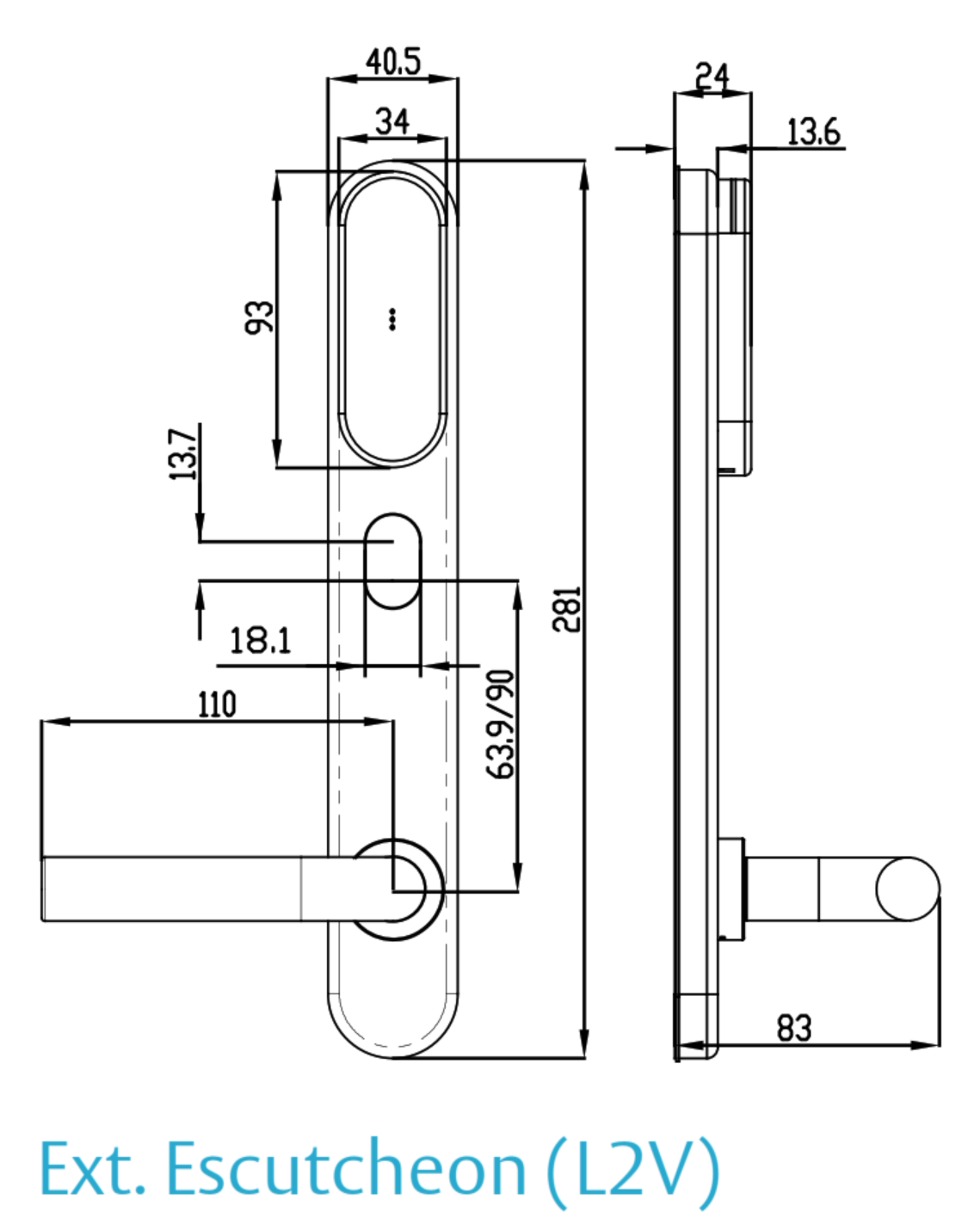
ASSA ABLOY SMARTair i-max Escutcheon - Dimensions
PDF Files - SNBB43SL1S008DI
The i-max family datasheet (Australasian profile): IP56 Extreme exterior option, 3 x AAA battery life, credential technologies, Openow, EN 1634 and EN 1906 Grade 4, door thickness 30-120 mm and RCM / R-NZ.
Single-sheet drilling template for the i-max escutcheon, drawn from a Scandinavian-profile source file with no scale statement - check the printed scale against the hardware, and confirm the drilling pattern with us, before cutting a door.
ASSA ABLOY's May 2023 technical overview: the equipment each tier needs (page 3), the tier feature comparison (page 4), system architecture (page 5), TS1000 and Web Manager (page 6), credentials (page 8) and the door device comparison (page 9).
The May 2022 customer guide to SMARTair: why electronic access control beats keys, the four management levels, Openow virtual keys versus cards and fobs, and the device range.
The two-page end-user guide (February 2019) for the Openow app: download and register, receive a virtual key, open a door, manage keys and set an app PIN. Screens in the current app may differ from this edition.
An April 2017 TS1000 administrator annex for the older SMARTair remote-opening app, written before Openow: enabling mobile apps, adding and verifying users, sending and revoking app access. Read its warning that encoding app access can cancel a user's existing cards.
 Accessories - SMARTair System Components
The escutcheon is one part of a SMARTair system. These are the parts most sites order with it; the Update-on-Card + Openow tier needs the encoder, the programmer, the software licence and the Openow licence.
Mortice lock bodies are in the Mortice Options tab. Equipment per tier is set out on page 3 of the SMARTair Product Overview.
Mortice Options - Lockwood Bodies for SMARTair Escutcheons
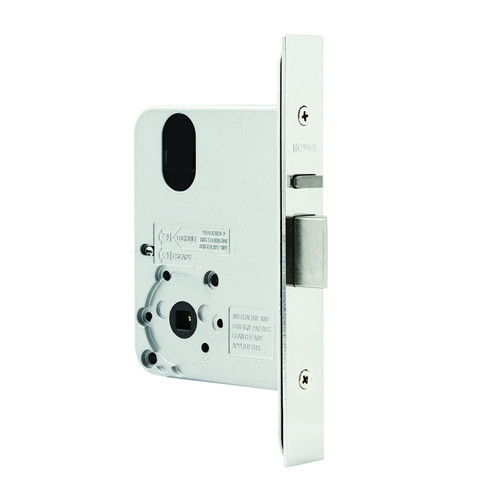
SMARTair i-max escutcheons control the door through an electromechanical clutch and a split spindle, so they need the lockcase and spindle geometry of a commercial mortice lock body. The body is chosen for the door's stile width and backset, and ordered separately.
We list four Lockwood ENOHDSS bodies to suit SMARTair escutcheons:
- Lockwood 3782ENOHDSS - 23 mm backset, to suit SMARTair escutcheons.
- Lockwood 4782ENOHDSS - 25.4 mm backset, to suit SMARTair escutcheons.
- Lockwood 5782ENOHDSS - 30 mm backset (listed as a narrow mortice body), to suit SMARTair escutcheons.
- Lockwood 6782ENOHDSS - 38 mm backset, to suit SMARTair escutcheons.
Send us the door's stile width, backset and thickness and we will match the body to this standard-mortice escutcheon before you order. Our backset measuring guide and mortice lever hardware guide show what to measure.
A tubular latch has no lockcase for the clutch and spindle to work against. Doors with a tubular latch need a mortice body fitted - and the door prepared for it - before a SMARTair escutcheon can go on.
ASSA ABLOY Warranty Overview
ASSA ABLOY branded products sold in Australia are covered by manufacturer warranties issued by ASSA ABLOY Australia Pty Ltd. Warranty coverage varies depending on mechanical components, electronic components, cylinders and finish categories.
This overview summarises the structure of ASSA ABLOY warranty coverage. Full terms, exclusions and claim procedures are set out in the official ASSA ABLOY Warranty document.
 Warranty Periods Summary
Finish & Material Notes
- Stainless steel does not mean stain-free. Tea staining is not covered where cleaning and maintenance guidelines have not been followed.
- Cosmetic, decorative and appearance damage is not covered.
- Battery failure or battery leakage damage is not covered.
What the Warranty Covers
- Defects in material and workmanship within the applicable period.
- Assessment by ASSA ABLOY to determine repair, replacement with the same or closest equivalent product, or refund of purchase price.
- Remedy determined at ASSA ABLOY’s discretion.
 Common Exclusions
- Normal wear and tear.
- Misuse, abuse or installation outside published technical specifications.
- Improper maintenance or neglect.
- Unauthorised modification or repair.
- Use of non-genuine ASSA ABLOY parts or substitute components.
- Exposure to corrosive environments including coastal air, salt spray, chemicals, contamination or high humidity.
- Removal, refitment, freight or labour charges.
- Second-hand or imported products not sold through authorised Australian channels.
Warranty Claim Process
- Retain proof of original purchase.
- Return the product to the original authorised retailer where applicable.
- If claiming directly, obtain a case number before returning goods.
- Securely package returned goods and clearly reference the case number.
- Warranty assessment determines repair, replacement or refund.
 Australian Consumer Law
ASSA ABLOY warranties operate in addition to rights available under the Australian Consumer Law. Goods come with guarantees that cannot be excluded. Customers may be entitled to a replacement or refund for a major failure and compensation for reasonably foreseeable loss or damage.
Where a product fails to meet acceptable quality standards and the failure does not amount to a major failure, the customer is entitled to repair or replacement.
Official Warranty Documents

Confused? Overwhelmed? We get it.
Choosing the right smart lock can be genuinely tricky - door types, backsets, app platforms, compatibility with your existing hardware... there is a lot to consider. We have decades of experience fitting locks of all types, including smart locks, and we are happy to help.
Our expert recommendation service is free. Upload a few photos of your door and describe what you need, and one of our qualified locksmiths will give you a personalised recommendation.
Get Your Free Recommendation →How it works - three easy steps:
1. Upload photos
A few clear shots of your door, lock and frame - inside and out.
2. We assess
Our locksmith reviews your setup and requirements - door type, weather exposure, how you want to use it.
3. You get a recommendation
A personalised recommendation tailored to your door, budget and needs. No pressure, no upsell.
Also useful while you are deciding: