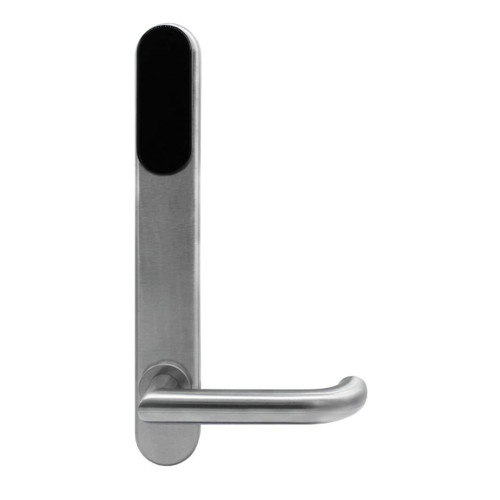
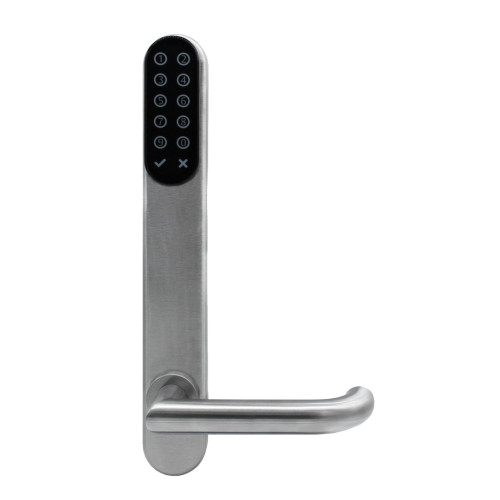
ASSA ABLOY SMARTair i-max Wireless Online + Openow Escutcheon - HID iCLASS, Standard Mortice, DDA, Key Override
At A Glance
 At A Glance
 iCLASS Card / Fob
  PIN Code
Not Available
 Openow Phone Key
  Remote Opening
(Web Manager)
 Key Override
  Fingerprint
Not Available
The ASSA ABLOY SMARTair i-max Wireless Online + Openow Escutcheon (SNZB43SL2V648DI) is a battery-powered electronic escutcheon that turns a standard mortice lock door into a credential-controlled access point on the ASSA ABLOY SMARTair platform. It pairs an integrated HID iCLASS reader with Openow phone keys over Bluetooth LE and a DDA compliant lever handle, and it sits in the top SMARTair management tier - real-time control through SMARTair hubs.
On a Wireless Online site the door talks to the TS1000 access control software through encrypted SMARTair communication hubs, so new users, changed access rights and time zones, and cancelled credentials reach the door straight away, events come back in real time, and a manager can open the door from Web Manager. ASSA ABLOY rates each hub for up to 30 doors within a 30-metre range, and if communication fails the door keeps working offline on the latest information it holds - see the SMARTair System Information Guide and the Product Overview software page. It is the same platform we describe in our commercial brand profiles.
This card-only model for standard mortice doors (64 mm between axes) has a half mechanical key override that takes a Lockwood oval cylinder, supplied separately, so the door can still be opened by key if credentials or batteries fail. The mortice lock body is sold separately - the escutcheon controls the handle through an electromechanical clutch and split spindle, and the Mortice Options tab lists the Lockwood bodies we pair with it. The wider SMARTair ecosystem includes electronic escutcheons, electronic cylinders, cabinet locks, wall readers and mobile credentials, all set out in the SMARTair Wireless Access Control Product Overview.

SMARTair i-max escutcheons are designed for medium to high traffic commercial doors - offices, education campuses, hospitals and healthcare facilities, and commercial buildings. The i-max datasheet rates the i-max for wooden or narrow-profile doors in medium to high traffic. For how this compares with residential smart locks, see which platform suits commercial and office sites.
 Disability Compliance (DDA)
- Supplied with a DDA compliant lever handle - the i-max datasheet lists the DDA handle as standard in Australia.
- Designed to assist accessibility compliance in commercial and public buildings; the lever suits users with limited grip strength.
- Users set up as accessibility (ADA) users get double the standard opening time, which is adjustable from 1 to 15 seconds - useful where someone needs longer to push the door.
- Compliance relates to handle ergonomics only and must be assessed as part of the overall door system - see AS1428.1 in Chapter 11, the DDA and Premises Standards in Chapter 09 and our NDIS and disability housing guide.
 Fire Rated
- SMARTair electronic escutcheons are suitable for installation on fire-rated door assemblies.
- Tested with fire doors in accordance with the EN 1634 fire resistance standard - the European test named on the i-max datasheet.
- Fire performance depends on the certified doorset and a compatible fire-rated lock body - check the door's certification before fitting (fire door core types; how smart lock fire testing works).
- Commonly installed with fire-rated mortice locks such as the Lockwood 4782 series.
 Key Features
- SMARTair Wireless Online access control - the door talks to TS1000 in real time through SMARTair communication hubs, with no door cabling or hardwired door controllers.
- Openow phone keys built in - the escutcheon ships with the WIR (wireless) and BLE (Openow) modules fitted, so users open the door with a virtual key in the Openow app over Bluetooth LE.
- Integrated HID iCLASS RFID reader for 13.56 MHz cards and fobs; the reader wakes as a credential approaches and reads at 2-4 cm.
- Remote door opening from SMARTair Web Manager, listed as a Web Manager function in the Product Overview.
- Emergency lockdown for Wireless Online doors with the TS1000 Lockdown Upgrade.
- Half mechanical key override (L2V, visible) - takes a Lockwood oval cylinder, supplied separately, for emergency access if credentials or batteries fail.
- Panic function: the inside handle always opens the door - the electromechanical clutch controls the outside lever only (i-max datasheet).
- DDA compliant lever handle on a standard mortice (64 mm between axes) with a 7.8 mm split spindle.
- Battery powered by 3 x AAA LR03 alkaline cells - approx. 75,000 to 105,000 cycles or up to 2 years standby.
- Approx. 3,000 users and approx. 1,200 audit events stored at the door, with 30 time zones and a 365-day calendar with holidays.
- EN 1906 Grade 4 category of use, EN 1634 fire tested, RCM and R-NZ marked.
- Suitable for medium to high traffic commercial environments including offices, healthcare facilities and education buildings.
 Features Summary
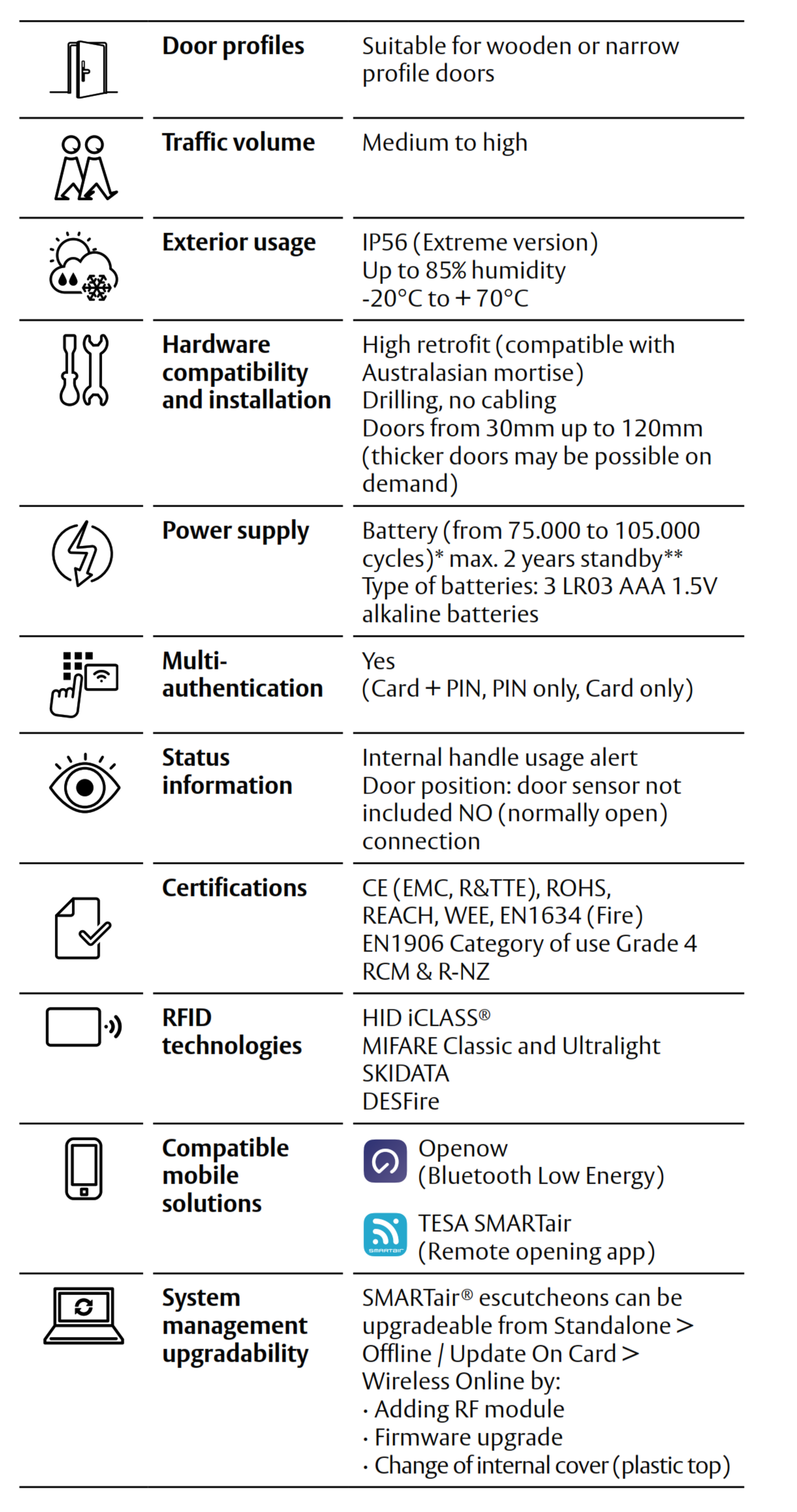

The escutcheon installs directly onto the door using the existing mechanical mortice lock. No wiring or cabling is required, allowing fast upgrades from mechanical keys to electronic access control - Chapter 01 explains what changes and what doesn't.

All electronic components are positioned on the internal side of the door to reduce tampering risk and improve durability. The batteries also sit in the internal escutcheon.
Access Methods
How users open this escutcheon, and what it does not do. Chapter 03 compares every method side by side.
The Openow app is free for users on iOS and Android 
 and phone keys are sent from TS1000. Browse other card and fob access, Bluetooth, app-enabled and backup key locks.
 What's In The Box
- SMARTair i-max external escutcheon with integrated HID iCLASS RFID reader (WIR + BLE modules fitted)
- Internal escutcheon assembly containing the electronics and battery compartment
- DDA compliant lever handle set
- Electromechanical clutch and 7.8 mm split spindle
- Mounting plate and door fixing hardware for standard mortice installations
- Battery holder and 3 x AAA LR03 alkaline batteries
- Key override cylinder preparation (cylinder supplied separately)
- Installation screws and mounting kit
- Installation and commissioning instructions
Not included: the standard mortice lock body (see the Mortice Options tab), SMARTair communication hubs, the TS1000 software licence, the Openow licence, RFID credentials, the encoder and the portable programmer, or the Lockwood oval cylinder. Openow smartphone keys are issued over the air.
 Suitable Uses
- Offices, universities and education campuses, hospitals and healthcare facilities, and other commercial buildings that need live monitoring of their doors - see the door type compatibility matrix.
- Sites with frequent permission changes - shift work, contractors, new starters and leavers - where changes should reach the door straight away (SMARTair fit guidance).
- Sites that want phone keys alongside cards - users carry an Openow key and still hold an iCLASS card.
- Retrofits from mechanical keys on existing mortice lock doors, with no wiring through the door or frame.
- Doors fitted with standard mortice locks, typically timber or steel commercial door systems in offices, education facilities and healthcare buildings - mortice lever and escutcheon doors.
- Fire-rated door assemblies where the certified doorset and a compatible fire-rated mortice allow it - see Fire Rated.
- Accessible doors that need a DDA compliant lever handle - see Disability Compliance.
- Mixed sites running Wireless Online doors alongside Update-on-Card and Standalone doors on one system (system architecture).

- Doors with a tubular latch - the escutcheon needs a commercial mortice lock body.
- Doors outside hub coverage - plan the hubs first (up to 30 doors within 30 m per hub), or choose the Update-on-Card + Openow tier, which needs no hubs.
- Sliding doors - see the i-MAX R4N sliding door kit instead.
- Doors exposed directly to the weather - we don't list an IP rating for this model, so talk to us about an exterior door.
 Available Finish Options
 Black
Black
(This Product)
STK SNZB43SL2V648DI
Finish selection does not affect functionality, compliance, or performance.
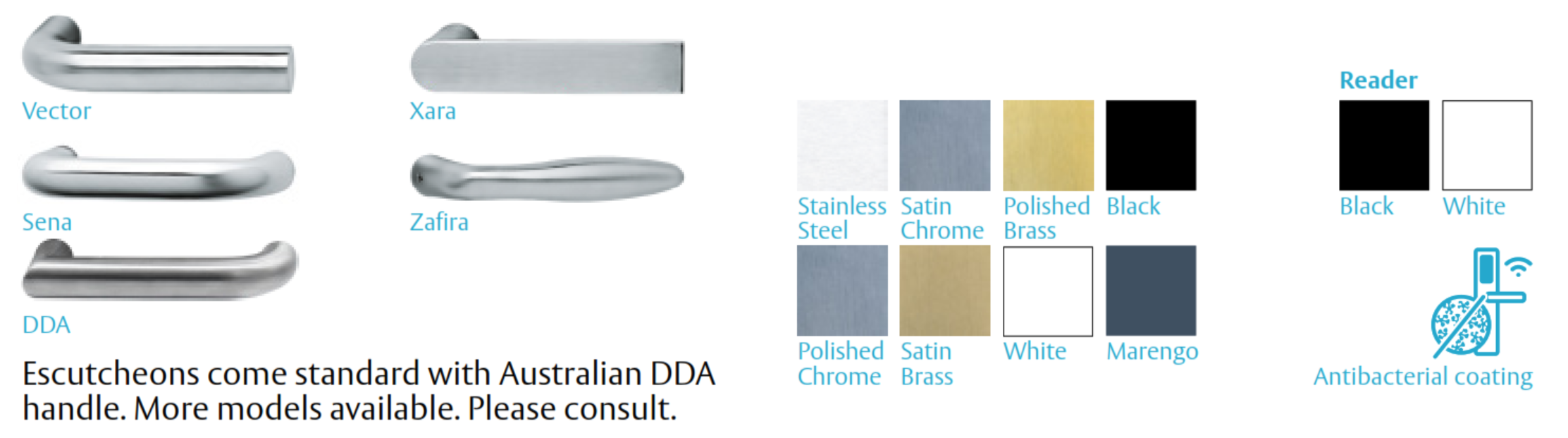
This listing is the black reader with the DDA lever handle. DDA handle finishes: Polished Chrome, Satin Brass, White and Marengo, with an antibacterial coating option; the reader is available in Black or White. The i-max datasheet also lists Vector, Xara, Sena and Zafira handles in Stainless Steel, Satin Chrome, Polished Brass and Black. This is a multi-finish range - confirm the exact finish you need when ordering, and ask us for any handle or finish other than this listing.
 Item Code Family - SMARTair i-max Escutcheons
The six Wireless Online + Openow i-max escutcheons, then this model's counterparts in the lower tiers. Variants differ by management tier, mortice configuration, keypad and key override.
This product is the bold row. Sliding doors take the i-MAX R4N sliding door kit (Update-on-Card, MIFARE); all four Lockwood mortice bodies for these escutcheons are in the mortice locks for smart locks category.
System Integration
- Managed by SMARTair TS1000 access control software (Windows client/server with its own database) and Web Manager, the browser-based client that needs a public IP on the server (Product Overview).
- Operates in Pro Wireless Online mode: real-time control, credentials created and cancelled and access rights or time zones changed at any time, email alerts and web client monitoring (Information Guide).
- Real-time Wireless Online control via SMARTair communication hubs - each hub manages up to 30 doors within a 30-metre range.
- If communication fails, functionality is maintained offline with the latest information stored (Information Guide).
- Includes Openow mobile credential access over Bluetooth Low Energy (WIR + BLE modules fitted, per the i-max datasheet); Openow keys reach phones through TS1000's cloud connection over HTTPS 443 (system architecture).
- Emergency lockdown is added with the TS1000 Lockdown Upgrade on Wireless Online doors.
- Status signalling: internal handle usage alert; door position sensor input (sensor not included, NO contact); battery status reported with every event or once a day; events to TS1000 in real time via the hub.
- Supports integration with other SMARTair electronic devices including escutcheons, wall readers, cylinders and padlocks. Tier- and credential-matched devices for the same site: the SMARTair knob cylinder SNZB43X030E10MI, the i-gate padlock SNZBP3XI and the wireless wall reader with keypad SNZR3KUSSB all read HID iCLASS and carry Openow. The MIFARE Wireless devices - the i-Reader R4N Slim S4BR2Slim3, i-Reader R4N Slim S4ZR2DSlim, i-Reader R4N Wide S4ZR2PWide and i-gate padlock SNZBP2XI - read MIFARE, not this escutcheon's iCLASS cards; the Openow-equipped ones share phone keys, and the R4N Slim S4BR2Slim3 ships without Openow.
Communication between the door and the software is automated and encrypted by SMARTair hubs. Each hub manages up to 30 doors within a 30-metre range, and in case of communication failure the door keeps working offline with the latest information stored (Information Guide). Wireless Online is the tier that adds the hub (devices you need; the hub equipment matrix). SMARTair hubs aren't listed on our store - ask us and we will quote them with your doors. For how a gateway or hub fits into a smart lock system generally, see what a gateway does.
SMARTair System Architecture
The ASSA ABLOY SMARTair platform is a modular wireless access control system designed to scale from simple standalone doors to fully networked building security. The same i-max hardware family runs under four management tiers, set by the software licence and communication modules installed. This escutcheon is the top tier.
SMARTair hardware is designed to be upgradeable: the i-max datasheet describes moving an i-max from Standalone to Update-on-Card to Wireless Online by adding the RF module, a firmware upgrade and a change of internal cover, and tiers can be combined on one site (Product Overview). Automatic cancellation of lost cards and activation and expiry dates are available on every tier except Standalone (feature comparison). For a full explanation of system architecture and upgrade paths see the SMARTair System Information Guide or the SMARTair Wireless Access Control Product Overview.
 Power Supply and Battery System
- Battery powered electronic escutcheon - the batteries sit inside the internal escutcheon.
- Battery type: 3 x AAA LR03 alkaline batteries.
- Expected battery life: approx. 75,000 - 105,000 cycles; typical standby up to 2 years.
- Low battery status is shown by the escutcheon's blue/red warning LED, and battery status is reported with every event or once a day.
- The clock and calendar are held for about 5 minutes without batteries, so change the cells promptly and in one go.
- Mechanical key override allows emergency access when batteries are depleted.
This model has a half mechanical key override (L2V) that takes a Lockwood oval cylinder, supplied separately. If the batteries go completely flat, the key opens the door. Keep the key stored outside the building - where to keep an override key - and still change the batteries when the warning LED shows. See also what to do when the battery dies.
Real-world battery life depends on traffic and door alignment - the truth about battery life and power and battery FAQs.
 Full Specifications
Technical data from the i-max datasheet, which covers the whole i-max range; figures are for this listing's configuration.
 Dimensions
 Frequently Asked Questions
Yes. This is the Wireless Online + Openow tier, and the hub is what links the door to TS1000 in real time. Each hub manages up to 30 doors within a 30-metre range (Information Guide). We quote hubs with your doors. If you don't need live monitoring, the Update-on-Card + Openow version runs without hubs.
Yes - from SMARTair Web Manager, which lists wireless door opening among its functions (Product Overview). Openow phone keys open the door over Bluetooth LE when the user is at the door. The escutcheon has no Wi-Fi radio of its own; the hub carries the link.
No. The SNZB43SL2V648DI is a card-only escutcheon: users open it with HID iCLASS cards or fobs, Openow phone keys, or remotely from Web Manager. For on-door PIN entry choose the keypad version, SNZB47SL2V648DI.
The escutcheon warns first with its low-battery LED. If the batteries are fully depleted, the door can still be opened with the mechanical key override cylinder (a Lockwood oval cylinder, supplied separately). See what to do when the battery dies.
The escutcheon needs a commercial mortice lock body - tubular latches are not suitable. We pair it with the Lockwood 3782ENOHDSS, 4782ENOHDSS, 5782ENOHDSS and 6782ENOHDSS bodies; see the Mortice Options tab, and send us photos of your door if you are unsure.
 Additional Information
- Special order. This escutcheon is ordered in for your job, and the lead time shown with the price applies.
- Plan the hubs. Each SMARTair hub manages up to 30 doors within a 30-metre range. The building's layout decides how many hubs it needs, so book a site survey or talk to us before ordering; hubs aren't listed on our store and we quote them with the doors.
- Openow and existing cards. ASSA ABLOY's 2017 mobile-app configuration annex warns that encoding app access for a user who already holds a valid card can cancel that card as 'old' - activate copies first (section A.3).
- Mortice lock integration. SMARTair escutcheons do not replace the mechanical mortice lock body. The mortice lock continues to provide the latch and mechanical security while the escutcheon electronically controls handle operation via an electromechanical clutch connected to the spindle - Chapter 12 shows why spindle position matters.
- Data and support. TS1000 keeps the site database on your own server, and Openow keys reach phones through TS1000's cloud connection over HTTPS 443 (Product Overview). For where access platforms keep data, see platforms hosted outside China.
 Warranty
ASSA ABLOY branded products purchased new in Australia from authorised resellers are covered against defects in materials and workmanship for:
- Mechanical components: 10 years
- Electrical and electronic components: 5 years (excluding batteries)
- Cylinders and keys: 3 years
 Download PDF Resources
ASSA ABLOY's datasheet for the i-max escutcheon, Australasian profile - technical data, electronics, operating modes, mechanical options, handles and finishes, and certifications for the whole i-max range.
Single-sheet drilling template for the i-max escutcheon. It carries no scale statement, so check the printed scale against a known dimension before marking a door, and talk to us before drilling.
The May 2023 technical overview - the four management systems and the equipment each needs, the feature comparison, system architecture, TS1000 and Web Manager, credentials and the door devices.
The May 2022 benefits guide - the management levels with decision guidance, including Pro Wireless Online and the hub coverage note on page 4, Openow virtual keys and the device range.
The end-user guide to the Openow app (February 2019, so screens may differ from today's app) - download and registration, opening a door, the green, orange and red padlock states, managing keys and the security PIN.
An April 2017 annex written for the older SMARTair App - the TS1000-side set-up for remote-opening app users: enabling the app, adding users, sending access to wireless doors and revoking keys, including the card-cancellation warning at A.3.
SMARTair i-max Wireless Online + Openow Escutcheon (SNZB43SL2V648DI) - FAQ, Setup and Owner's Guide
Everything below is here to help you choose, install, set up and run this escutcheon. For general smart lock questions see our Smart Lock FAQ (Chapter 13), and for the wider picture start with the Buyer's Guide.
Choosing This Escutcheon
It is the card-only i-max escutcheon for standard mortice doors in the Wireless Online + Openow tier - the top SMARTair tier. It reads HID iCLASS cards and fobs, opens by Openow phone key over Bluetooth LE, can be opened remotely from Web Manager, and reports to TS1000 in real time through SMARTair hubs. It has a half mechanical key override for a Lockwood oval cylinder.
Only by keypad, key override and mortice. The six are SNZB43SL1S008DI / SNZB43SL2V648DI / SNZB43SL2V908DI / SNZB47SL1S008DI / SNZB47SL2V648DI / SNZB47SL2V908DI. The 43 codes are card-only and the 47 codes have a keypad; SL1S models have no key override and SL2V models have a half override; 648 and 008 suit standard mortice doors and 908 suits narrow mortice doors (90 mm between axes). All six share the same Wireless Online + Openow electronics.
Read them against the Item Code Family table: the tier letter after SN is A for Standalone, C for Update-on-Card, B for Update-on-Card + Openow and Z for Wireless Online + Openow; 43 is card-only and 47 is keypad; SL1S means no key override and SL2V a half override; 648 is the standard mortice (64 mm between axes) and 908 the narrow mortice (90 mm). The datasheet itself defines L1S, L2V and the 64/90 mm axes.
No. It is the electronic escutcheon set - reader, handles, electronics and batteries. It fits onto a commercial mortice lock body, which is sold separately; the Mortice Options tab lists the Lockwood bodies we pair with it.
Choose Wireless Online when changes must reach the door straight away, you want live events and email alerts, remote opening from Web Manager or emergency lockdown - and you can place hubs within range of the doors. Choose Update-on-Card + Openow when doors can refresh as users present their cards at an updater and you'd rather not install hubs (Information Guide). The same configuration in that tier is the Update-on-Card + Openow escutcheon (SNBB43SL2V648DI).
Yes - the SNZB43SL1S008DI is the L1S version with no cylinder hole. It suits doors where a key override is not wanted, but a fully flat unit then needs the portable programmer to open it.
Order the keypad version, the SNZB47SL2V648DI. The keypad is part of the outside escutcheon, so it is chosen at purchase rather than added later.
Wireless Online, Hubs and Remote Control
Real-time control. Doors connect to TS1000 through SMARTair hubs, so you can create and cancel credentials and change access rights or time zones at any time, receive email alerts and monitor doors from the web client (Information Guide page 4). On Update-on-Card, changes travel on users' cards and are collected at updaters instead.
ASSA ABLOY rates each hub for up to 30 doors within a 30-metre range (Information Guide). The building's layout affects real-world coverage, so book a site survey before settling the hub count.
The door keeps working. In case of communication failure, functionality is maintained offline with the latest information stored (Information Guide) - users already set up keep opening the door on the rights it holds. Our internet-down guide covers the same idea for residential gateways.
Yes. SMARTair Web Manager lists wireless door opening among its functions (Product Overview), so a manager can open this door from a browser through the hub. The i-max also supports the TESA SMARTair remote-opening app (i-max datasheet); ASSA ABLOY's 2017 configuration annex notes that remote-opening app access is limited to the wireless doors selected for that user (section A.3).

An upgrade licence for emergency lockdown on Wireless Online doors - it is one of the reasons to choose this tier. See the TS1000 Lockdown Upgrade.
No. The escutcheon has no Wi-Fi radio; it talks to SMARTair hubs, and the hubs connect to the TS1000 server. That is why the Access Methods table shows Remote Opening via the hub rather than onboard Wi-Fi. For how other brands handle this, see other gateway systems.
No. The escutcheon runs on 3 x AAA batteries and needs no cabling through the door or frame. The hubs are separate devices - ask us about their placement and connection when we quote them.
Cards and Fobs

HID iCLASS 13.56 MHz credentials, encoded for your site with the SMARTair USB encoder. The i-max reader technology is set by firmware - one of MIFARE Classic/Ultralight, HID iCLASS or DESFire at a time - and this listing is the HID iCLASS version (i-max datasheet).
Not MIFARE - this is the iCLASS version, so MIFARE cards do not cross. An existing iCLASS card can often carry SMARTair data too, because SMARTair uses the card's free memory alongside other services (Product Overview); send us a sample card and we will check it.
Standard; Passage; First user, where the door stays open after the first authorised user arrives; and Double user, where two authorised credentials are needed to open. There is also a high-traffic mode for unlimited users and internal handle detection (i-max datasheet).
Approx. 3,000 users and approx. 1,200 events in non-volatile memory, with 30 time zones of five daily periods each and a 365-day calendar with holidays and automatic daylight saving. On this tier events also flow to TS1000 in real time.
Cancel it in TS1000 and, on a Wireless Online door, the cancellation reaches the door through the hub straight away. Automatic cancellation of lost cards is a feature of every tier except Standalone (feature comparison).

Yes. Access rights use time zones and the 365-day calendar, and credentials can carry activation and expiry dates and times (Product Overview).
Openow Phone Keys
ASSA ABLOY's mobile credential: a virtual key in the Openow app that opens the door over Bluetooth LE. Keys are sent, revoked and updated over the air, are end-to-end encrypted, and a cancelled key vanishes from the phone (Information Guide).
The Openow mobile access licence enabled in TS1000, users with the Openow app on their phones, and TS1000's cloud connection, which carries keys to phones over HTTPS 443 (system architecture). This escutcheon already has the BLE module fitted.
They open the Openow app, press the padlock and hold the phone to the lock. Green means opened, orange means the phone could not connect (try again) and red means no access - no rights, a blocked door or outside the time schedule (Openow User Guide; February 2019, so screens may differ from today's app).
The free Openow app for iOS and Android
. Users register with their email address, verify it, and the virtual key arrives in the app; one phone can hold keys for several facilities.
It can. ASSA ABLOY's 2017 configuration annex warns that encoding app access while a user holds a valid card or fob cancels that credential as 'old' - activate copies first (section A.3). The annex was written for the older SMARTair App, so check the step in your TS1000 version.
Yes. On Openow sites the facility manager can collect door history and trigger email alerts remotely via users' Openow app (Information Guide), and on this Wireless Online door events also arrive through the hub in real time.
Power and Batteries
3 x AAA LR03 alkaline cells, rated at approx. 75,000 to 105,000 cycles or up to 2 years standby. Busy doors and poorly aligned doors use more - see door alignment and battery drain.
The escutcheon's blue/red warning LED signals low battery at the door, and battery status is reported with every event or once a day, so it shows up in the software as well.
Use the key override: a Lockwood oval cylinder (supplied separately) in the half override opens the door. Keep the key outside the building - where to keep an override key.
No. Openow phone keys, remote opening and cards all need the escutcheon's own battery power to move the clutch, so none of them will open a fully flat unit. The mechanical key override is the fallback on this model.
The clock and calendar are held for about 5 minutes without batteries (i-max datasheet), so have the new cells ready and swap them in one go.
Installation and Door Fit
A commercial mortice lock body - we pair these escutcheons with the Lockwood 3782ENOHDSS, 4782ENOHDSS, 5782ENOHDSS and 6782ENOHDSS. The right body depends on the door's backset and stile; see the Mortice Options tab and standard backset sizes.
No. Tubular latches do not provide the spindle control or structural lockcase the electronic clutch needs, so the escutcheon must go on a mortice lock.

Doors 30-120 mm thick, with thicker doors possible on demand (i-max datasheet). The datasheet lists spindle lengths for 30-110 mm door widths, so confirm the spindle with us for any door over 110 mm. See measuring door thickness.
64 mm - the standard mortice configuration. The datasheet offers 64 mm or 90 mm between axes; the standard 648 codes are the 64 mm option.

Use the i-max installation template as a guide, but it carries no scale statement - check the printed scale against a known dimension before you mark a door, and talk to us before drilling. A wrong cut on a commercial door is expensive to fix.
A handy installer can fit the hardware, but a SMARTair door also needs initialising with the portable programmer, credentials encoded and hubs placed and commissioned. Most sites have us do it - see when DIY makes sense, our advice and installation and professional installation.
The external escutcheon is not handed. The outside handle freewheels while the door is closed, and the inside handle always opens the door (i-max datasheet).
Software and System Management

TS1000 - Windows client/server software with its own database - sets up the installation and initialises doors with the portable programmer; Web Manager then gives browser-based management of users, doors, time zones, access rights, events and wireless door opening, with the server needing a public IP (Product Overview).
The door devices, the TS1000 software licence, the encoder for cards, the portable programmer for initialising doors, SMARTair hubs for the Wireless Online link and the Openow licence for phone keys (devices you need).
Yes. SMARTair management systems can be combined on one site (system architecture), so a building can run Wireless Online doors where live control matters and Update-on-Card or Standalone doors elsewhere, all in TS1000. Tier- and credential-matched devices for the same site: the SMARTair knob cylinder SNZB43X030E10MI, the i-gate padlock SNZBP3XI and the wireless wall reader with keypad SNZR3KUSSB all read HID iCLASS and carry Openow. The MIFARE Wireless devices - the i-Reader R4N Slim S4BR2Slim3, i-Reader R4N Slim S4ZR2DSlim, i-Reader R4N Wide S4ZR2PWide and i-gate padlock SNZBP2XI - read MIFARE, not this escutcheon's iCLASS cards; the Openow-equipped ones share phone keys, and the R4N Slim S4BR2Slim3 ships without Openow.

On this tier events reach TS1000 through the hub in real time, and the door also stores approx. 1,200 events. Pro Wireless Online also offers email alerts (Information Guide).

TS1000 keeps the site database on your own server, and Openow uses TS1000's cloud connection to reach phones (Product Overview). For how access platforms compare on data hosting, see platforms hosted outside China and security and data sovereignty.
Compliance, Safety and Warranty
SMARTair escutcheons are suitable for fire-rated door assemblies and are EN 1634 fire tested. Fire performance depends on the certified doorset and a compatible fire-rated mortice, such as the Lockwood 4782 series - check the door's certification before fitting (where fire doors are required; fire door compliance summary).
It is supplied with a DDA compliant lever handle, and accessibility (ADA) users can be given double the standard opening time. Compliance covers the handle ergonomics only - the whole door system must be assessed (AS1428.1; who specifies DDA hardware).

Yes - from the inside. The internal escutcheon has a panic function: the inside handle always opens the door, because the electromechanical clutch controls only the outside lever (i-max datasheet). Exit and escape doors still need a compatible mortice body and a check against the building's egress requirements - see doors in required exit paths.

CE (EMC, R&TTE), RoHS, REACH, WEEE, EN 1634 (fire), EN 1906 Grade 4, RCM and R-NZ (i-max datasheet). See Chapter 11 for what RCM means in Australia.

We don't list an IP rating for this model, so talk to us before fitting it to a door exposed to the weather. Queensland heat, humidity and salt air are hard on any electronic lock - see Queensland considerations.
ASSA ABLOY's Australian warranty - 10 years on mechanical components and 5 years on electrical and electronic components, batteries excluded. The full terms are in the Warranty section.

This escutcheon is a special order, ordered in for your job - the lead time shown with the price applies. Plan hubs, mortice bodies and credentials into the same order so the site is ready together.
Related Products, Guides and Chapters
The other Wireless Online + Openow escutcheons: SNZB43SL1S008DI (card) · SNZB43SL2V908DI (card) · SNZB47SL1S008DI (keypad) · SNZB47SL2V648DI (keypad) · SNZB47SL2V908DI (keypad)
This configuration in the lower tiers: SNCB43SL2V648DI (Update-on-Card) · SNBB43SL2V648DI (Update-on-Card + Openow) · SNAB43SL2V648DI (Standalone)
System components: SMARTair Encoder STCED3 · Portable Programmer STCPCC · Openow Licence SNCCLICMOBILE · TS1000 Lockdown SNCCLICLOCKDOWN
Same-platform devices: Knob Cylinder SNZB43X030E10MI · i-gate SNZBP3XI (iCLASS) · Wall Reader SNZR3KUSSB · i-Reader S4BR2Slim3 (MIFARE) · i-Reader S4ZR2DSlim (MIFARE) · i-Reader S4ZR2PWide (MIFARE) · i-gate SNZBP2XI (MIFARE) · S4B42SL2V6480I-SB sliding kit
Mortice lock bodies: 3782ENOHDSS · 4782ENOHDSS · 5782ENOHDSS · 6782ENOHDSS
Buyer's Guide chapters: Ch 02 Measuring Your Door · Ch 03 Access Methods · Ch 04 Door Types · Ch 05 Fire Doors · Ch 08 Gateways · Ch 09 DDA and NDIS · Ch 10 Brand Profiles · Ch 11 Standards · Ch 12 Troubleshooting · Ch 15 App Platforms
Helpful blog reading: Mechanical Key Override on Smart Locks · The Realities of Electronic Door Locks · How Long Do Digital Door Locks Last? · Which Smart Lock Platform Is Right for You? · Your Data and China · Site Survey and Installation · Photos That Help Us Identify Your Lock
What's in the Box - SNZB43SL2V648DI
- SMARTair i-max external escutcheon with integrated HID iCLASS RFID reader (WIR + BLE modules fitted)
- Internal escutcheon assembly containing the electronics and battery compartment
- DDA compliant lever handle set
- Electromechanical clutch and 7.8 mm split spindle
- Mounting plate and door fixing hardware for standard mortice installations
- Battery holder and 3 x AAA LR03 alkaline batteries
- Key override cylinder preparation (cylinder supplied separately)
- Installation screws and mounting kit
- Installation and commissioning instructions
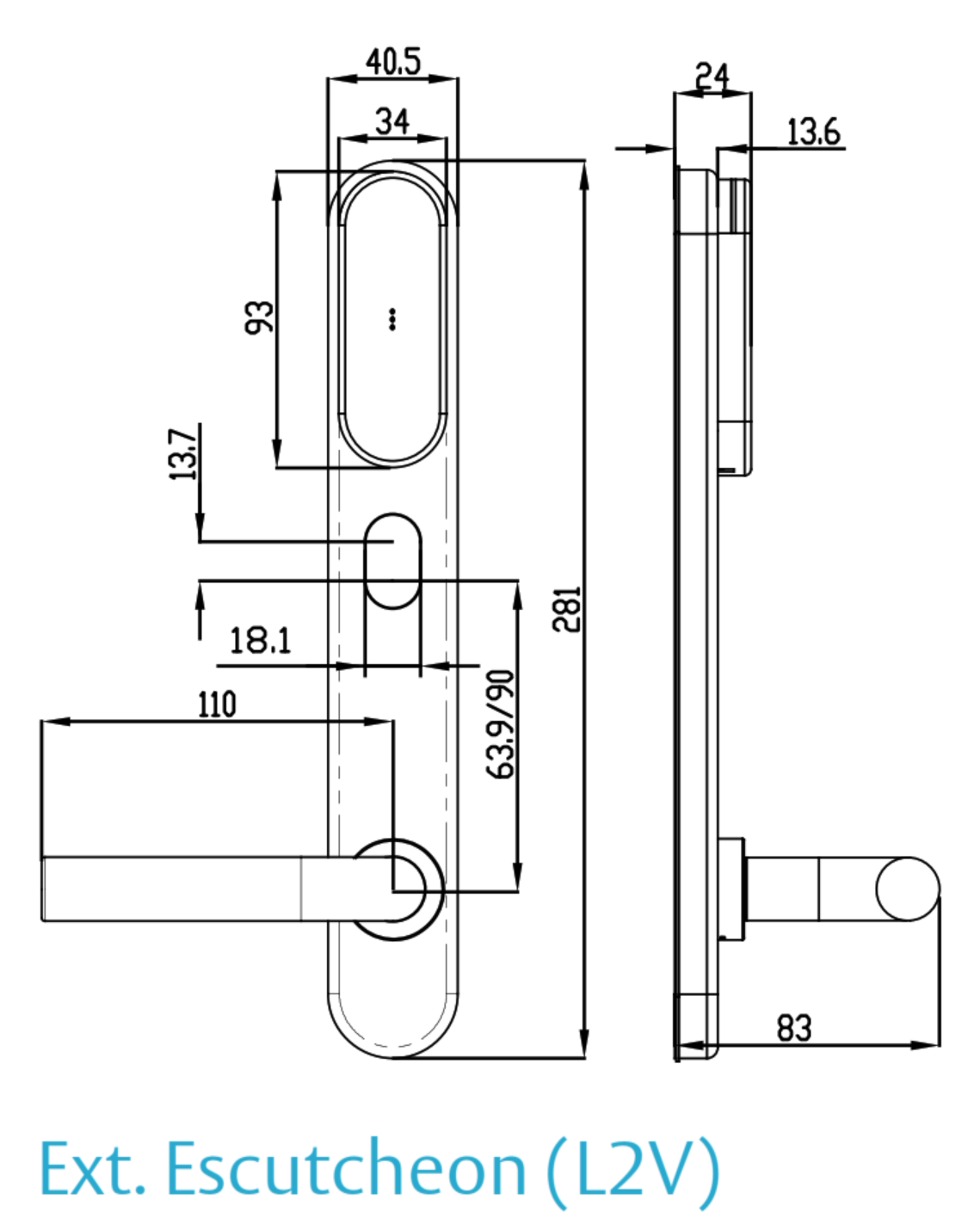
ASSA ABLOY SMARTair i-max Escutcheon - Dimensions
PDF Files - SNZB43SL2V648DI
ASSA ABLOY's datasheet for the i-max escutcheon, Australasian profile - technical data, electronics, operating modes, mechanical options, handles and finishes, and certifications for the whole i-max range.
Single-sheet drilling template for the i-max escutcheon. It carries no scale statement, so check the printed scale against a known dimension before marking a door, and talk to us before drilling.
The May 2023 technical overview - the four management systems and the equipment each needs, the feature comparison, system architecture, TS1000 and Web Manager, credentials and the door devices.
The May 2022 benefits guide - the management levels with decision guidance, including Pro Wireless Online and the hub coverage note on page 4, Openow virtual keys and the device range.
The end-user guide to the Openow app (February 2019, so screens may differ from today's app) - download and registration, opening a door, the green, orange and red padlock states, managing keys and the security PIN.
An April 2017 annex written for the older SMARTair App - the TS1000-side set-up for remote-opening app users: enabling the app, adding users, sending access to wireless doors and revoking keys, including the card-cancellation warning at A.3.
 Accessories - SMARTair System Components
The SMARTair access control platform uses a modular ecosystem of credentials, management devices, lock hardware and integration accessories. These are the ones commonly used with this Wireless Online + Openow escutcheon.
SMARTair systems are modular and scalable, and the accessories needed depend on the tiers on your site (Standalone, Update-on-Card, Wireless Online or Openow mobile access). We quote hubs, licences and credentials to suit each job. Tier- and credential-matched devices for the same site: the SMARTair knob cylinder SNZB43X030E10MI, the i-gate padlock SNZBP3XI and the wireless wall reader with keypad SNZR3KUSSB all read HID iCLASS and carry Openow. The MIFARE Wireless devices - the i-Reader R4N Slim S4BR2Slim3, i-Reader R4N Slim S4ZR2DSlim, i-Reader R4N Wide S4ZR2PWide and i-gate padlock SNZBP2XI - read MIFARE, not this escutcheon's iCLASS cards; the Openow-equipped ones share phone keys, and the R4N Slim S4BR2Slim3 ships without Openow.
Mortice Options - Lockwood Bodies for SMARTair Escutcheons
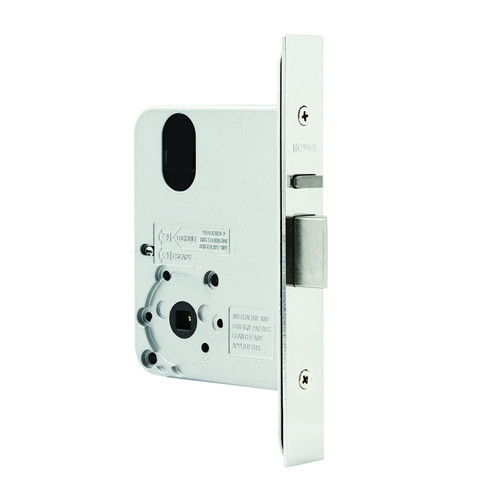
SMARTair electronic escutcheons are designed to operate with commercial mortice lock bodies. The escutcheon controls the door handle through an electromechanical clutch and split spindle system, which requires the internal spindle and lockcase geometry of a mortice lock.
Tubular latches are not suitable for SMARTair escutcheons because they do not provide the required spindle control or structural lockcase needed for electronic clutch operation.
For reliable installation and long-term durability, SMARTair escutcheons are commonly installed with the following commercial mortice locks:
- Lockwood 3782ENOHDSS mortice lock - 23 mm backset - To suit SMARTair escutcheons.
- Lockwood 4782ENOHDSS mortice lock - 25.4 mm backset - To suit SMARTair escutcheons.
- Lockwood 5782ENOHDSS mortice lock - 30 mm narrow backset - Narrow-stile option to suit SMARTair escutcheons.
- Lockwood 6782ENOHDSS mortice lock - 38 mm backset - Standard-width mortice to suit SMARTair escutcheons.
Choosing the correct mortice lock ensures that the SMARTair escutcheon can reliably control the door handle, maintain proper latch engagement, and meet the mechanical durability requirements expected in commercial access control environments. Which body suits the standard mortice (64 mm between axes) configuration is a question of backset and door stile - send us photos of the door, see backset and smart locks, or browse mortice locks for smart locks.
ASSA ABLOY Warranty Overview
ASSA ABLOY branded products sold in Australia are covered by manufacturer warranties issued by ASSA ABLOY Australia Pty Ltd. Warranty coverage varies depending on mechanical components, electronic components, cylinders and finish categories.
This overview summarises the structure of ASSA ABLOY warranty coverage. Full terms, exclusions and claim procedures are set out in the official ASSA ABLOY Warranty document.
 Warranty Periods Summary
Finish & Material Notes
- Stainless steel does not mean stain-free. Tea staining is not covered where cleaning and maintenance guidelines have not been followed.
- Cosmetic, decorative and appearance damage is not covered.
- Battery failure or battery leakage damage is not covered.
What the Warranty Covers
- Defects in material and workmanship within the applicable period.
- Assessment by ASSA ABLOY to determine repair, replacement with the same or closest equivalent product, or refund of purchase price.
- Remedy determined at ASSA ABLOY’s discretion.
 Common Exclusions
- Normal wear and tear.
- Misuse, abuse or installation outside published technical specifications.
- Improper maintenance or neglect.
- Unauthorised modification or repair.
- Use of non-genuine ASSA ABLOY parts or substitute components.
- Exposure to corrosive environments including coastal air, salt spray, chemicals, contamination or high humidity.
- Removal, refitment, freight or labour charges.
- Second-hand or imported products not sold through authorised Australian channels.
Warranty Claim Process
- Retain proof of original purchase.
- Return the product to the original authorised retailer where applicable.
- If claiming directly, obtain a case number before returning goods.
- Securely package returned goods and clearly reference the case number.
- Warranty assessment determines repair, replacement or refund.
 Australian Consumer Law
ASSA ABLOY warranties operate in addition to rights available under the Australian Consumer Law. Goods come with guarantees that cannot be excluded. Customers may be entitled to a replacement or refund for a major failure and compensation for reasonably foreseeable loss or damage.
Where a product fails to meet acceptable quality standards and the failure does not amount to a major failure, the customer is entitled to repair or replacement.
Official Warranty Documents

Confused? Overwhelmed? We get it.
Choosing the right smart lock can be genuinely tricky - door types, backsets, app platforms, compatibility with your existing hardware... there is a lot to consider. We have decades of experience fitting locks of all types, including smart locks, and we are happy to help.
Our expert recommendation service is free. Upload a few photos of your door and describe what you need, and one of our qualified locksmiths will give you a personalised recommendation.
Get Your Free Recommendation →How it works - three easy steps:
1. Upload photos
A few clear shots of your door, lock and frame - inside and out.
2. We assess
Our locksmith reviews your setup and requirements - door type, weather exposure, how you want to use it.
3. You get a recommendation
A personalised recommendation tailored to your door, budget and needs. No pressure, no upsell.
Also useful while you are deciding: