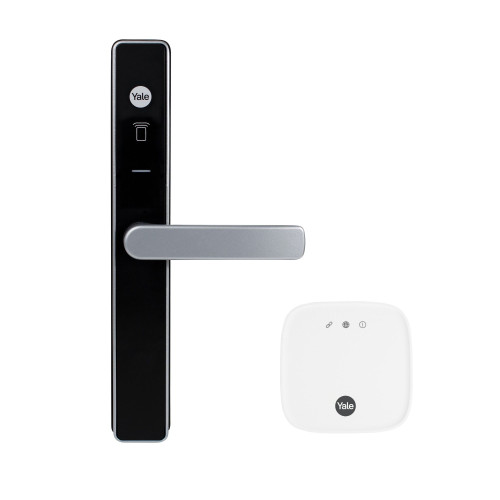
Austyle 59419 WiFi Gateway Hub - White
The Austyle 59419 WiFi Gateway Hub is a plug-in bridge that connects compatible Austyle smart locks to the TTLock app on iOS and Android. Without it, an Austyle smart lock still works perfectly well - it simply works at the door, on its own credentials, over Bluetooth. The hub is what adds the away-from-home half: remote unlock, timed and one-time PIN codes issued while you are elsewhere, access history, and user management from anywhere with an internet connection.
Setup needs no tools and no network knowledge. Plug the hub into a standard power socket, add it in the TTLock app as a G2 (Wi-Fi) gateway, join it to your 2.4GHz network, then pair your lock to it. The full sequence is in Setting Up the Hub below, and it is the same procedure printed in every Austyle installation manual.
One Austyle lock does not need this hub. The 59410 Latching Smart Lock has 2.4GHz WiFi built into the lock itself and joins your network directly. Every other Austyle smart lock in the current range needs the 59419 for remote access - the compatibility table below sets out which is which.

Usually ships same day if ordered before 11am AEST (excludes weekends and Queensland public holidays).
 Key Features
- Adds remote access to a Bluetooth lock. Remote unlock, timed and one-time passcodes, eKeys and access history, all from the TTLock app.
- Plug-in setup, no tools. Mains powered from a standard socket; added in the app as a G2 (Wi-Fi) gateway.
- 2.4GHz WiFi only. 5GHz is not supported. Every Austyle manual states this, and it is the single most common reason a gateway will not join a network - see the band-steering problem.
- Keep it within 10 metres of the lock. The Austyle manuals give this as the working distance between hub and lock. Placement matters more than most buyers expect - see gateway placement.
- Compact 70 x 70 x 25mm body in white, sized to sit at a wall socket without crowding the adjacent outlet.
- Works with every Austyle smart lock except the 59410, which already has WiFi in the lock body.
- Not sure a gateway belongs in your setup at all? Start with what a gateway actually does.
 Do You Need This Hub?
Most Austyle smart locks talk to your phone over Bluetooth at the door, and need this hub only when you want features that work while you are away from the property. If you are still weighing that up, the difference between Bluetooth-only and gateway-connected operation is the thing to read first.
The 59410 is the only Austyle lock with WiFi in the lock body. Its own manual documents the lock joining a 2.4GHz network directly, with power-saving and remote-unlock settings on the lock itself, and never refers to a gateway.
 What's in the Box
- 1 x Austyle 59419 WiFi Gateway Hub (White)

Every Austyle smart lock ships with three RFID tags in the box already. The 59418 RFID fobs and 59417 stick-on RFID discs are top-ups for extra users, not things you need on day one. The stick-on disc is the one exception worth knowing about: it is listed as sold separately in the Austyle packing lists, so it never arrives with a lock.
 Suitable Uses
- Adding remote unlock to any Austyle smart lock other than the 59410.
- Short-stay and rental properties running the 59405, 59406, 59407, 59409, 59413 or 89413, where codes have to be issued and revoked without visiting the door - see how TTLock automation works with a gateway.
- Households that want an access log, or want to let a tradesperson or cleaner in remotely rather than handing over a key.
- Properties where the lock is out of Bluetooth range of where you usually are - an apartment, a granny flat, a rear studio - and the app needs another way to reach it.
- Any lock in our wider app-enabled range on the TTLock platform where remote features are wanted. Confirmed compatibility is with the Austyle range only.

Outdoor or unsheltered locations - this is an indoor plug-in device. It is also not a range extender for your WiFi, and it will not make a lock work that is otherwise faulty or badly installed. If the lock itself is not behaving, start with troubleshooting rather than adding a gateway.
 Available Finish Options
 White
White
(This Product)
STK 59419
Finish selection does not affect functionality, compliance, or performance.
 Setting Up the Hub
The sequence below is the one printed in the Austyle installation manuals for the 59405, 59407 and 59413 and 89413, and in the 59409 user manual. All four give the same steps.
- Add the hub from the first screen of the TTLock app, then choose Gateway.
- Choose the G2 (Wi-Fi) gateway type.
- Plug the hub in. The indicator flashes red, which means it is in pairing mode.
- Name the gateway something you will recognise later - "front door" rather than "gateway 1".
- Select your WiFi network and enter the password. It must be a 2.4GHz network. 5GHz is not supported.
- Check the gateway shows as online under the gateway link on the app's front page.
- In the lock's own settings screen, open Gateway and confirm your named hub appears there, then turn on Remote Unlock.

Keep the hub within 10 metres of the lock. The manuals state it plainly, and it is the figure that decides where the hub goes - not where the nearest spare socket happens to be. The hub reaches the lock over a short-range wireless link, so walls, steel door frames and distance all count against it. If the only socket is too far away, a powerpoint closer to the door is a cheaper fix than a second gateway.
How the Gateway Works
The hub sits between your lock and the internet. The lock talks to the hub over a short-range wireless link; the hub relays that to the TTLock cloud over your WiFi; the cloud talks to the app on your phone. That chain is what makes remote features possible. Without it, the app can only reach the lock when your phone is within Bluetooth range, which the Austyle manuals put at roughly 5 metres and which varies with steel, thick walls and interference.
If the hub loses power or your internet drops, the lock carries on exactly as before. PIN code, RFID card, fingerprint where fitted, Bluetooth at close range and the mechanical key all keep working - only the remote half goes quiet until the hub is back. What happens when the internet goes down covers this in more detail, and the realities of electronic door locks is worth reading before you rely on any remote feature.
For the wider picture - how this class of gateway compares with others, and which gateway suits which property - see our gateway comparison chapter, the TTLock gateway selection guide, and other gateway systems for non-TTLock platforms.
 Austyle Smart Lock Accessories
 Full Specifications
 Frequently Asked Questions

Almost always because the network it is being offered is 5GHz. The hub is 2.4GHz only. Dual-band routers that advertise one network name and steer devices between bands are the usual culprit - the phone is on 5GHz, so that is the band handed to the hub. The fix is to split the bands temporarily, or connect to the 2.4GHz network by name. The band-steering problem explains it properly, and why smart locks drop off WiFi covers the rest.

No. The lock is independent of the hub at all times. Losing hub power or WiFi only takes away the remote features - PIN, RFID, fingerprint where fitted, Bluetooth at the door and the mechanical key all keep working. See what happens when the internet goes down.
Within 10 metres, per the Austyle manuals. That is a working distance through a normal home, not a clear-air figure, so a steel door frame or a masonry wall will eat into it. If the hub keeps dropping the lock, move the hub closer before you change anything else - see gateway placement.

The 59419 runs on the TTLock platform, which McGrath, Lockton and others also use, so in principle it may work with other TTLock locks. Austyle only confirms its own range, and use outside it is not covered by the Austyle warranty. The TTLock hardware ecosystem guide covers cross-brand behaviour.
 Additional Information
If you have two Austyle locks in range of the same socket - a front door and a garage door, say - one hub can bridge both. The limit in practice is the 10-metre working distance, not a device count. Where the doors are at opposite ends of a house, plan on a hub each.

Remote unlock is convenient, not a backup plan. It depends on mains power, your internet and the TTLock cloud, and all three can be down at once. Keep the mechanical key somewhere sensible and know where the keyhole is on your lock - mechanical key override on smart locks is the guide for that.
With the gateway online you get remote unlock, remote passcode management, the access record, and the ability to issue and revoke eKeys and timed passcodes without being at the door. TTLock tips and tricks and the TTLock user manual are the practical references once it is running.
The hub is genuinely a plug-in job, but if the lock is going in at the same time our team can do both. See advice and installation, or ask for a qualified locksmith recommendation.
 Warranty
1-year mechanical and 1-year electronic warranty on residential installations, provided by Austyle Architectural Hardware. Proof of purchase required for all claims. Batteries, water ingress from inside the door, and damage caused by incorrect installation or use outside stated specifications are not covered. Returns & Warranty
 Download PDF Resources
The current Austyle digital range in two spreads. The smart accessories panel names the 59419 alongside the 59417 and 59418 credentials, and the inner spread covers every lock the hub pairs with.
Opens at the remote-unlock section: adding the gateway, choosing G2 (Wi-Fi), the 2.4GHz requirement and the 10-metre working distance.
The same pairing sequence as printed for the 59407 narrow-stile entrance set, including the gateway-online check and the Remote Unlock toggle.
Version 4 of the manual covering both C4 key-in lever finishes, opened at the remote unlock pages.
The deadbolt's own gateway section, covering the light-status key and the WiFi pairing sequence.
Austyle 59419 WiFi Gateway Hub - FAQ, Setup and Owner's Guide
Everything below is drawn from the Austyle installation manuals and our own experience fitting these locks on the Gold Coast. For the wider picture, our Smart Lock FAQ chapter and the Ultimate Smart Lock Buyer's Guide are the places to start.
Do I Need a Gateway at All?
Quite a lot. Every Austyle smart lock works standalone on its keypad, its RFID cards, its fingerprint reader where fitted, and its mechanical key. You can also do everything from the app when you are within Bluetooth range - roughly 5 metres, per the manuals. What you cannot do is anything at all when you are not there. Bluetooth versus gateway operation sets out the split.
Anyone letting people in while away - short-stay hosts, landlords, people with cleaners or carers, households where a child arrives home before a parent. Also anyone who wants an access record. If none of that applies and you are simply unlocking your own front door, the lock alone is enough. What a gateway does is an honest read on this.
Network and Connectivity
Because most modern routers hide it. A single network name covering both bands, with the router deciding which one each device gets, is now the default - and a phone sitting on 5GHz will hand the hub a 5GHz network it cannot use. The pairing simply times out with no useful error. Splitting the bands for five minutes, or picking the 2.4GHz network by name, resolves nearly every case. The band-steering problem is the full explanation.
Work through it in order: distance to the lock first, then distance to the router, then the band. Most drop-outs we see are placement, not the hardware. Why smart locks drop off WiFi and the FAQ chapter on dropouts both cover the practical fixes.
A flashing red light at power-up means the hub is in pairing mode and waiting to be added. Once it is on your network and showing online in the app, it is doing its job. If it never leaves pairing mode, the network step has not completed - go back to the band question above. The TTLock platform overview covers the app side.
Using It Day to Day
Yes, and that is the main reason most people buy the hub. Timed, one-time and recurring passcodes can all be created and revoked remotely once the gateway is online. Without it, a new code has to be set with your phone at the door. The passcode types guide explains which format suits which situation.
It is close to essential for one. Remote code issue and revocation, plus the access record, are what make a turnover work without a key handover. Using TTLock for Airbnb with a gateway covers how far the automation genuinely goes, and the same guide without a gateway is worth reading for the contrast.
They are separate things. The hub is for remote access; RFID is for people who want to tap and go at the door without a code. Three tags come with every Austyle lock, and the 59418 fobs or 59417 stick-on discs add more. The access methods chapter on RFID compares them.
Buying the Right Thing
No. The 59410 has 2.4GHz WiFi in the lock body and joins your network on its own - its manual has a dedicated section for it and never mentions a gateway. Buying the hub alongside a 59410 adds nothing. Every other Austyle lock is the other way round. See the 59410's own remote access section.
It is a 2.4GHz WiFi gateway of the common TTLock type - the same class as the plug-in gateways sold under other TTLock brands. Ethernet, 4G-fallback and dual-band variants exist on the platform for commercial and remote-property situations. Our gateway comparison chapter sets the generations side by side, and other gateway systems covers the non-TTLock platforms.
It is the platform the Austyle range runs on, so with an Austyle lock the question is already answered. If you are still choosing a lock, TTLock versus Tuya and the app platforms chapter are the two to read, and why we recommend what we do sets out our own position.
Related Products, Guides and Chapters
Austyle locks this hub serves: 59405 Lever Latch Set · 59406 Lever Entrance Set · 59407 Digital Lever Entrance Set · 59409 Smart Digital Deadbolt · 59413 C4 Key-In Lever Set · 89413 C4 Key-In Lever Set
Does not need this hub: 59410 Latching Smart Lock with Built-In WiFi
Other Austyle accessories: 59417 RFID Sticker · 59418 RFID Fob · 49429 Entrance Mortice · 49425 Sliding Door Mortice · 49840.V Striker Plate 85mm · 49841.V Striker Plate 125mm
Buyer's Guide: Ch 08 Gateway Comparison · Ch 14 TTLock Platform Guide · Ch 15 App Platforms · Ch 03 WiFi and Remote Access · Ch 13 WiFi Connectivity · Ch 12 Troubleshooting
Browse: Modules and WiFi Gateways · WiFi Smart Locks · All Smart Lock Accessories · All Smart Locks
PDF Files - Austyle 59419 WiFi Gateway Hub
Two spreads covering the whole Austyle digital range. The 59419 appears in the smart accessories panel; the inner spread carries panel sizes, projections and door thickness ranges for every lock the hub pairs with.
Adding the gateway, selecting G2 (Wi-Fi), the 2.4GHz requirement, the 10-metre working distance and the Remote Unlock toggle.
The same sequence printed for the narrow-stile aluminium entrance set, with the gateway-online check on the following page.
Version 4 of the manual, covering both C4 key-in lever finishes in one document, opened at remote unlock.
The deadbolt's gateway section: light status, pairing with the app, selecting the network and entering the password.
Included for contrast. This is the one Austyle lock that connects to WiFi itself, with power-saving and remote-unlock settings on the lock rather than through a gateway.
Austyle's one-page procedure for resetting a digital lock to factory settings - useful if a lock needs to be removed from one account and re-paired to another alongside the gateway.
Austyle Warranty
Warranty Summary
How to Make a Claim
- Retain your proof of purchase - you will need it to make a warranty claim.
- Complete the warranty card supplied in the box (product name, model number, purchase date, store name, receipt number) and keep it in a safe place.
- Contact Terry's Tradies Pty Ltd at your original place of purchase in the first instance.
- If directed to contact Austyle directly:
Email: info@austyle.com.au
Phone: +61 3 9553 3599
Warranty Registration
No online registration is required. Complete and retain the physical warranty card included in the box along with your proof of purchase.
 Exclusions - What This Warranty Does Not Cover
- Commercial installations - this lock is rated for residential use only
- Damage caused by water entering from the inside of the door (the exterior is rated IP55; internal water ingress is not covered)
- Installation on tongue-and-groove doors, where water can penetrate through the groove
- Installation on gates
- Prolonged direct exposure to sunlight or rain - the lock must be positioned under an eave or in a sheltered area
- Damage caused by use of lithium or rechargeable batteries - only high-quality alkaline AA batteries (4 x AA) are supported
- Damage resulting from incorrect installation, misuse, or failure to follow the installation instructions
- Normal wear and consumable items, including batteries
Important Notes

Confused? Overwhelmed? We get it.
Choosing the right smart lock can be genuinely tricky - door types, backsets, app platforms, compatibility with your existing hardware... there is a lot to consider. We have decades of experience fitting locks of all types, including smart locks, and we are happy to help.
Our expert recommendation service is free. Upload a few photos of your door and describe what you need, and one of our qualified locksmiths will give you a personalised recommendation.
Get Your Free Recommendation →How it works - three easy steps:
1. Upload photos
A few clear shots of your door, lock and frame - inside and out.
2. We assess
Our locksmith reviews your setup and requirements - door type, weather exposure, how you want to use it.
3. You get a recommendation
A personalised recommendation tailored to your door, budget and needs. No pressure, no upsell.
Also useful while you are deciding: