


Austyle 59417 RFID Easy Unlock Sticker - Matt Black (Pack of 3)
The Austyle 59417 is a pack of three adhesive RFID discs for Austyle smart locks. Each disc is 27mm across and 1mm thick, and the idea is simple: stick it to something you already carry - the back of a phone or its case, a key fob, a bag tag, a wristband - and that item becomes the key. Hold it to the keypad and the door opens.
It is worth knowing what does and does not come with your lock. Every Austyle smart lock ships with three RFID tags in the box, so most people are not short of credentials on day one. The stick-on disc is the exception: Austyle lists it as sold separately in the packing lists for the 59405 and 59407, so it never arrives with a lock. If you want the stick-on format, this is how you get it.
Each Austyle lock holds up to 200 RFID credentials, so there is no practical limit on how many of these you add. They are passive - no battery, nothing to charge, nothing to replace. For how RFID sits alongside PIN, fingerprint and app unlocking, see RFID in the access methods chapter.

Usually ships same day if ordered before 11am AEST (excludes weekends and Queensland public holidays).
 What is RFID?
RFID stands for radio frequency identification. The disc carries a tiny chip and an aerial but no battery - the lock's keypad powers it briefly through the air when you hold it close, reads its unique number, checks that number against its own list, and opens if it matches. That is the whole mechanism, and it is why these work for years without maintenance.
Practically, it is the fastest way through a door. No code to remember, no phone to unlock, no app to wait for - hold it to the keypad and go. It is the credential people give to children, elderly parents and cleaners precisely because there is nothing to learn. The trade-off is that whoever holds it can open the door, so it behaves like a key rather than like a PIN you can change remotely. The access method comparison sets the options against each other.
Adding one takes about thirty seconds in the TTLock app: open Cards, add a card, choose whether it is permanent, timed or recurring, give it a name you will recognise later, then hold the sticker against the keypad. Naming matters more than it sounds - "Bob" is far easier to revoke in two years than "Card 4".
 Key Features
- Three discs per pack, 27mm in diameter and 1mm thick, in matt black.
- Adhesive backing. Sticks to the back of a phone or case, a key fob, a bag tag, a lanyard - anything the user already carries. Austyle's catalogue describes it as the round stick-on RFID for the back of phones.
- Sold separately - never included with a lock. Confirmed in the Austyle packing lists. The three tags that come with each lock are a different format.
- Passive. No battery, no charging, nothing to replace. It draws its power from the keypad for the fraction of a second it needs.
- Up to 200 RFID credentials per lock, so there is no realistic ceiling on how many you register.
- Works across the whole Austyle smart lock range - see the compatibility list below.
 What's in the Box
- 3 x Austyle 59417 RFID adhesive disc stickers (Matt Black, 27mm diameter)
No lock, keypad, tools or fixings. The credential has to be registered to a lock in the TTLock app before it will open anything.
 Suitable Uses
- Turning a phone or phone case into a door key, which is the format's main appeal - the one thing almost nobody leaves home without.
- Children who are not old enough to be trusted with a code, or old enough to forget one.
- Elderly residents and anyone who finds a keypad awkward - tap and go is far easier than a PIN.
- Adding credentials beyond the three tags that came with the lock, for extra household members, cleaners or carers.
- Replacing a lost tag. Revoke the missing one in the app and register a new sticker - see the FAQ chapter on security.
- Any Austyle lock in our card and fob access range.
 Available Finish Options
 Matt Black
(This Product)
STK 59417
Finish selection does not affect functionality, compliance, or performance.
 Austyle Smart Lock Accessories
 Full Specifications
 Frequently Asked Questions
Every Austyle smart lock ships with three RFID tags already, so you can start using RFID straight away. Buy these if you want the stick-on format specifically, or if you need more credentials than the three in the box. The stick-on disc is the one Austyle format that is never included with a lock.
In the TTLock app open Cards, choose to add a card, decide whether it is permanent, timed or recurring, name it, then hold the sticker against the lock's keypad. Name it after the person rather than a number - it makes revoking it far easier later. The TTLock credentials guide walks through it.

No. It is entirely passive - the keypad powers it through the air for the instant it takes to read. There is nothing to charge and nothing to replace, and it will keep working long after the lock's own batteries have been through several changes.

Delete it in the app and it stops working immediately - that is the main advantage over a metal key. Register a replacement from the pack and carry on. Because a sticker opens the door for whoever holds it, treat it like a key: revoke it as soon as it goes missing rather than waiting to see if it turns up.

Metal directly behind an RFID aerial interferes with the read, so a bare metal phone back or a metal case can weaken or block it. Stick it to the outside of a case rather than between the case and the phone, and test it at the door before committing to the position. On a plastic, leather or silicone case there is no issue.
 Additional Information
The adhesive is a one-shot bond. Wipe the phone case or fob with isopropyl alcohol, let it dry, then press the disc down firmly for a few seconds. A disc applied to a dusty or oily surface will lift at the edge within weeks and then catch on a pocket. Decide the position first and test the read at the door before you commit.
The sticker wins when you want the credential attached to something already in someone's hand: a phone, a case, a walking stick, a school bag. The 59418 card format wins when it should live in a wallet or on a keyring, or when you want to hand it over and take it back - a card is much easier to return than a sticker on someone's phone.

It is convenient, not a fallback. If the lock's batteries are flat the keypad cannot power the disc, so nothing will read. The mechanical key override is the actual backup - know where the keyhole is on your lock and keep a key somewhere sensible. What happens when the battery dies is worth reading once.

Adding an RFID credential is a Bluetooth operation - you have to be beside the lock with your phone, whether or not you have a gateway. A 59419 gateway lets you delete one remotely, which matters if a tag goes missing while you are away, but it will not let you add one from a distance. Bluetooth versus gateway operation sets out the split.
 Warranty
1-year mechanical and 1-year electronic warranty on residential installations, provided by Austyle Architectural Hardware. Proof of purchase required for all claims. Batteries, water ingress from inside the door, and damage caused by incorrect installation or use outside stated specifications are not covered. Returns & Warranty
 Download PDF Resources
The current Austyle digital range. The smart accessories panel names this credential as the round stick-on RFID for the back of phones, alongside the 59418 card and the 59419 gateway.
Opens at the RFID section: adding a card in the app, choosing permanent, timed or recurring, naming it and presenting it to the keypad. The packing list on page 5 is where the self-adhesive disc is listed as sold separately.
The same RFID procedure as printed for the 59407, with the 200-card capacity stated and the three supplied tags noted.
Version 4 of the manual covering both C4 key-in lever finishes, opened at the RFID card pages.
Austyle 59417 RFID Sticker - FAQ and Owner's Guide
RFID is the access method people actually use once the novelty of the app wears off. Our access methods chapter and the Buyer's Guide put it in context.
Choosing and Using the Format
Somewhere the person will always have and will present naturally to a keypad. The back of a phone case is the classic answer. A key fob works well for anyone who still carries keys for the car. For children, a school bag tag or a wristband is more reliable than anything they have to remember to pick up. Avoid anywhere it will be pressed against metal.
Up to 200 RFID credentials, which is the same figure across the whole Austyle range. For a household that is effectively unlimited; even for a small office or a short-stay property it is not a real constraint. Fingerprints are also capped at 200 and passcodes at 150, so RFID is the most generous of the three.
Yes. When you add the card in the app you choose permanent, timed or recurring. Recurring is the useful one for a cleaner - Tuesdays between nine and eleven, say - and it means you are not relying on someone handing a credential back. The credentials section of the TTLock guide covers the options.
Compatibility and Limits
Austyle confirms its own range and nothing else. Other TTLock-platform locks from McGrath, Lockton and others use RFID too, but card compatibility across brands is not something Austyle states, and use outside the confirmed range is not covered by warranty. The TTLock hardware ecosystem guide explains why cross-brand behaviour varies.
Metal directly behind the disc is the main one - a metal phone back, a metal case, a steel key ring pressed flat against it. Water and weather are not a problem; the disc is sealed and passive. If a reliably working sticker suddenly stops, check the lock's batteries before blaming the credential, because a weak keypad cannot power the tag. Troubleshooting covers the sequence.
Related Products, Guides and Chapters
Other credential and accessory options: 59418 RFID Card Fob (Pack of 3) · 59419 WiFi Gateway Hub · 49429 Entrance Mortice · 49425 Sliding Door Mortice · 49840.V Striker Plate 85mm · 49841.V Striker Plate 125mm
Austyle smart locks this opens: 59405 · 59406 · 59407 · 59409 · 59410 · 59413 · 89413
Guides: Ch 03 RFID · Ch 03 Access Method Comparison · Ch 14 TTLock Platform Guide · Ch 13 Practical Use · Mechanical Key Override · TTLock Tips and Tricks
Browse: RFID, Fobs, Tags and Cards · Card and Fob Access Locks · All Smart Lock Accessories · All Smart Locks
Austyle Accessories - Catalogue Page
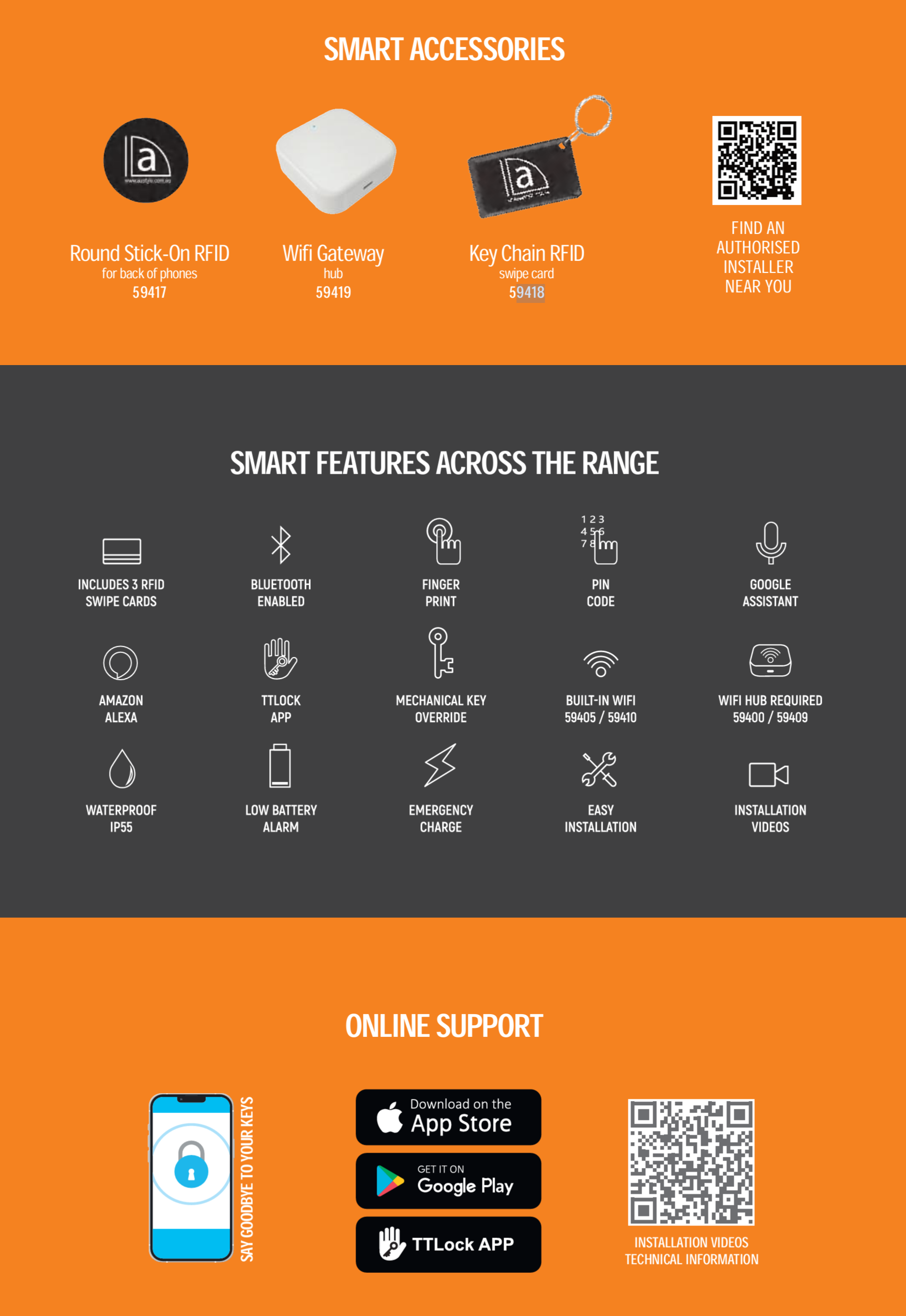
The full range is in the Austyle 2026 Digital Range Catalogue.
PDF Files - Austyle 59417 RFID Sticker
Two spreads covering the Austyle digital range. The smart accessories panel names the round stick-on RFID for the back of phones, the key chain RFID swipe card and the WiFi gateway hub.
The RFID card procedure: adding a card, choosing permanent, timed or recurring, naming it and presenting it to the keypad. Page 5 carries the packing list showing the self-adhesive disc as sold separately.
The same RFID procedure for the 59407, with the 200-card capacity and the three supplied tags stated.
Version 4 of the manual covering both C4 key-in lever finishes, opened at the RFID card pages.
The deadbolt's own card, fingerprint and eKey management section in the TTLock app.
Austyle Warranty
Warranty Summary
 How to Make a Claim
- Retain your proof of purchase - you will need it to make a warranty claim.
- Complete the warranty card supplied in the box (product name, model number, purchase date, store name, receipt number) and keep it in a safe place.
- Contact Terry's Tradies Pty Ltd at your original place of purchase in the first instance.
- If directed to contact Austyle directly:
Email: info@austyle.com.au
Phone: +61 3 9553 3599
Warranty Registration
No online registration is required. Complete and retain the physical warranty card included in the box along with your proof of purchase.
 Exclusions - What This Warranty Does Not Cover
- Commercial installations - this lock is rated for residential use only
- Damage caused by water entering from the inside of the door (the exterior is rated IP55; internal water ingress is not covered)
- Installation on tongue-and-groove doors, where water can penetrate through the groove
- Installation on gates
- Prolonged direct exposure to sunlight or rain - the lock must be positioned under an eave or in a sheltered area
- Damage caused by use of lithium or rechargeable batteries - only high-quality alkaline AA batteries (4 x AA) are supported
- Damage resulting from incorrect installation, misuse, or failure to follow the installation instructions
- Normal wear and consumable items, including batteries
Important Notes

Confused? Overwhelmed? We get it.
Choosing the right smart lock can be genuinely tricky - door types, backsets, app platforms, compatibility with your existing hardware... there is a lot to consider. We have decades of experience fitting locks of all types, including smart locks, and we are happy to help.
Our expert recommendation service is free. Upload a few photos of your door and describe what you need, and one of our qualified locksmiths will give you a personalised recommendation.
Get Your Free Recommendation →How it works - three easy steps:
1. Upload photos
A few clear shots of your door, lock and frame - inside and out.
2. We assess
Our locksmith reviews your setup and requirements - door type, weather exposure, how you want to use it.
3. You get a recommendation
A personalised recommendation tailored to your door, budget and needs. No pressure, no upsell.
Also useful while you are deciding:


