

FORGE G4 Frameless Glass Door Video Doorbell Smart Lock - Face, Palm
At A Glance
 At A Glance
 DISPATCHUsually Ships in 24 Hours



 Face
 Palm Vein
 Fingerprint
 PIN Code
 RFID Card
 Forge Smart (Tuya) App
(Wi-Fi)
 Remote Unlock
(On Request)
 Remote
(Optional)
 Mechanical Key
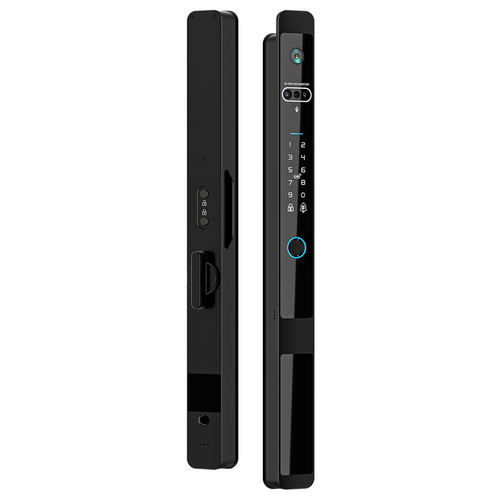
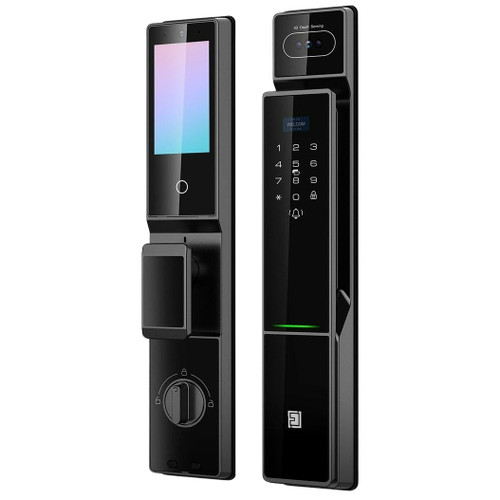
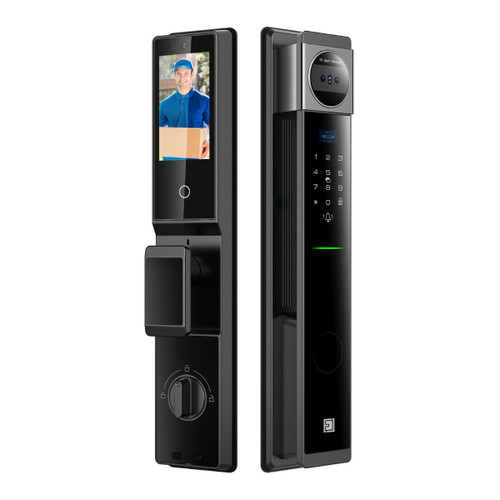
The FORGE G4 Frameless Glass Door Video Doorbell Smart Lock (FEGLG16VDA) clamps onto a frameless glass door with no cut-outs - a main lock on the door and a matching strike unit on the fixed panel or frame. It opens with face recognition, palm vein, a fingerprint, a PIN code, a card, the app or a mechanical key, and its motorised 304 stainless steel latch locks again automatically.
A video doorbell is built into the front panel: a visitor presses the bell, you see and talk to them in the Forge Smart (Tuya) app, and you can unlock from the call. Wi-Fi is built in - no gateway. It suits glass 8-12 mm thick with a 4-15 mm gap, swing or sliding, opening any direction, and there are options for aluminium-framed and timber doors, brackets for glass up to 39 mm and an optional remote.
For the same clamp-on fit without the camera, face or palm, see the FORGE G3. Made in China for FORGE, an Australian brand based in Ringwood, Victoria. Backed by a 2-year manufacturer warranty.
Usually ships in 24 hours.

Owned by FORGE Electrical (Australia) · Manufactured in China. Our independent FORGE brand profile sets out how the range compares with the other brands we stock.
Access Methods
From inside, the turn knob and the lock / unlock button operate the latch. Set the lock up straight away - an administrator password is entered twice on first use.

 Forge Smart (Tuya) App

Set the G4 up in the Forge Smart (Tuya) app, for iOS and Android . On first use, set a 6-14 digit administrator password twice. Then touch to wake, press #, verify as administrator, choose 2 (system settings), 3 (wireless device) and 1 (on) - the 0 flashes and you have 90 seconds to add the lock in the app on a 2.4 GHz network (leaflet page 2).
Wi-Fi is built into the G4, so there is no gateway to buy for remote access. Remote unlock works on request: a visitor presses the bell on the lock, the app receives a video request, and you talk to them and hold to unlock (leaflet page 2). Forge Smart (Tuya) locks do not unlock on demand from off-site, have no scheduled passage mode in the app and no Alexa or Google, and have no API. Online and offline passwords, entry records, notifications and Tuya automations work from the app - see the Forge Smart (Tuya) platform in Chapter 15. Remote video monitoring from the app's main screen, 7-digit temporary passwords and member management run over the same Wi-Fi.
Which platform suits you is set out in our TTLock vs Tuya comparison and which smart lock platform is right for you. For a clamp-on glass lock with a TTLock version and a gateway, see the FORGE G3.
 Key Features
- Clamp-on installation on frameless glass - no holes or cut-outs; the strike unit fits the fixed panel, wall or frame with the latch keep or latch plate supplied.
- Face recognition and palm vein with radar wake-up, fingerprint (up to 200), PIN code, M1 card, the app and a mechanical key.
- Built-in video doorbell with two-way audio - see and talk to a visitor in the app, and unlock from the call.
- Wi-Fi built in on Forge Smart (Tuya) - no gateway; remote unlock answers a bell press.
- Motorised 304 stainless steel latch with a door alignment sensor for automatic locking; adjustable auto-lock and passage modes for business hours.
- Swing and sliding doors, glass-to-glass and glass-to-frame or wall, every opening direction; Parts are made for aluminium-framed and timber doors.
- Aluminium alloy and tempered glass body; up to three allowed time periods per user.
- 2500 mAh 7.4 V lithium battery with a USB-C emergency power port - what happens when the battery dies.
- For frameless glass doors - one of our app-enabled smart locks.
 What's in the Box
- Main lock unit (camera, keypad, fingerprint reader, card area)
- Strike unit with the U-shaped clip
- Latch keep and latch plate
- Installation template and fixings
- Flexible flat (ribbon) cable
- Mechanical keys
- Instruction leaflet
The remote is sold separately.
 Suitable Uses
- Frameless glass office, shopfront, clinic and boardroom doors 8-12 mm thick - swing or sliding (frameless glass door smart locks).
- Glass-to-glass, glass-to-wall and glass-to-frame layouts with a 4-15 mm gap.
- Business entrances that want to see and talk to visitors before letting them in, with face and palm vein for staff.
- Aluminium-framed and timber doors, with the framed-door option chosen at checkout.
- Glass up to 39 mm thick with the optional brackets - tell us your thickness when you order (measuring door thickness).

- Glass thinner than 8 mm, or over 12 mm without the brackets (39 mm maximum).
- Gaps between the door and the fixed panel outside 4-15 mm.
- Doors exposed to the weather - the G4 has no IP rating.
- 5 GHz-only Wi-Fi - the G4 needs a 2.4 GHz network.
- Sites that need on-demand remote unlock, scheduled passage mode in the app or Alexa / Google - choose a TTLock model with a gateway.

 Door Fit - Glass, Gap and Door Type
Choose your door type at checkout. The G4 comes for a Frameless Glass door or an Aluminium Frame / Timber door - choose carefully, as the fixing parts differ. On frameless glass the G4 clamps on with no cut-outs; on a framed door it fits through holes.
- Glass thickness - 8-12 mm as supplied. Brackets are made for doors up to 39 mm thick: tell us your thickness if the glass is over 12 mm so we can get the right parts (measuring door thickness).
- Gap - 4-15 mm between the moving glass door and the fixed panel or frame.
- Layout - swing or sliding; glass-to-glass, glass-to-wall or glass-to-frame; any opening direction. The lock reverses for either hand by turning its U-shaped frame through 180 degrees.
- Framed doors - on a timber or aluminium framed door the lock fits through holes, with the square shaft cut to the door thickness plus 12 mm.
- Not sure? Send us a photo of the door edge, the gap and the fixed panel (helpful photo examples) and we will check the fit with you.

 Available Finish Options
 Matt black
(This Product)
STK FEGLG16VDA
Matt black. The finish is also listed as Brushed Gunmetal / Matt Black - ask us before ordering if you want a particular finish.
 FORGE Frameless Glass Door Smart Locks


This product is the bold row. The H1 and H2 glass handle locks are different products from the FORGE H1 gate lock and the FORGE H2 slimline aluminium lock. See all our frameless glass door smart locks.
 Accessories and Spares


No gateway is needed - Wi-Fi is built in; the two Tuya gateways are optional hubs for the rest of a Tuya setup. Brackets for glass up to 39 mm are ordered with the lock - tell us your glass thickness. Other credentials are in our RFID fobs, tags and cards range.
 Battery and Emergency Power
The G4 runs on a 2500 mAh 7.4 V lithium battery behind the battery cover on the inside unit. We don't have a battery-life figure or the charging method yet - ask us. If the battery goes flat, connect a power bank to the USB-C emergency port on the front panel and open the lock normally, or use the mechanical key. Static power draw is under 350 microamps. More on what really affects battery life and power and battery FAQs.
Weather and Environment - Indoor Glass Doors
The G4 has a working range of -20 to 60 degrees C but no IP rating, and it is made for office and business glass doors. Treat it as an indoor lock (IP ratings explained).
 FORGE G4 - Technical Specifications
Dimensions

Check the glass thickness (8-12 mm, or up to 39 mm with the brackets) and the 4-15 mm gap - see Door Fit above.
 Installation
On frameless glass the G4 needs no drilling: a template locates the strike unit on the fixed panel, the U-shaped clip slides onto the door glass and the main lock fixes over it. The leaflet pages, in the User Manual tab, show each step (leaflet page 1).

- Clean the glass, tape the template on with its centre line on the door post, and stick the template pads close to the gap with nail glue - the template locates the fixed plate.
- Push the U-shaped clip on from the side of the glass door and fix the strike unit with its four screws; twist the cover on after the two fixing screws.
- Handle the flat ribbon cable gently - flip its buckle up no more than 90 degrees, with the metal side of the cable facing down.
- To change hands, loosen the screws holding the front panel, turn the U-shaped frame through 180 degrees and check the dot lines up with the round hole.
- On a framed door, cut the square shaft to the door thickness plus 12 mm. Terry's offers installation across the Gold Coast.
After fitting, set the administrator password straight away, then add faces, palms and fingerprints from User Management.
 Frequently Asked Questions
No - on frameless glass the G4 clamps on with a U-shaped clip and a template-positioned strike unit. Framed timber or aluminium doors are fitted through holes.
A visitor presses the bell and you get a video request in the Forge Smart (Tuya) app - talk to them and hold to unlock. You can also view the camera from the app's main screen.

No - Wi-Fi is built in, so the G4 needs no gateway for remote access; the FORGE Tuya gateways are optional hubs. It needs a 2.4 GHz network.
Up to 39 mm with the optional brackets. Tell us your glass thickness when you order so we can get the right parts.
By default a touch on the panel wakes the face reader; switch to automatic radar wake-up in the settings - the 0.5 m level gives the best recognition.
Additional Information
- Set the administrator straight away. First use asks for a 6-14 digit password, entered twice.
- Measure the glass and the gap first. 8-12 mm glass and a 4-15 mm gap; tell us if your glass is thicker.
- Choose the door type carefully. Frameless glass and framed doors take different parts.
- Use a 2.4 GHz network. 5 GHz is not supported - see band steering.
- Indoors only. The G4 has no IP rating.
 Warranty
2-year FORGE warranty from the date of delivery - covers defects in materials and workmanship under normal use. Excludes improper installation or maintenance, misuse, accident, normal wear and tear (including fading or dulling of finishes) and water damage beyond the product's rated IP protection. Proof of purchase required for all claims. Returns & Warranty | FORGE warranty terms
 Download PDF Resources
Two-page leaflet - specifications and capacities, the panel layout and dimensions, reversing and installing on frameless and framed doors, the keypad menus, face recognition settings, Tuya app pairing, visual remote unlocking, temporary passwords and member management. A large file (about 50 MB).
FORGE G4 Frameless Glass Door Video Doorbell Smart Lock - FAQ, Setup and Owner's Guide
Everything below is here to help you choose, fit, set up and live with the FORGE G4. For general smart lock questions see our Smart Lock FAQ (Chapter 13), and for measuring and fitting the Buyer's Guide.
Choosing a FORGE Glass Door Lock
Both clamp onto frameless glass with no cut-outs. The G4 adds a video doorbell, face recognition and palm vein, runs on a lithium battery and has Wi-Fi built in on Forge Smart (Tuya). The G3 has fingerprint, PIN, card and key, runs on AA batteries and comes in TTLock or TUYA versions.
Glass, Gap and Fitting
8-12 mm as supplied; up to 39 mm with the optional brackets.
4-15 mm between the moving glass door and the fixed glass panel or frame.

Yes - swing or sliding, glass-to-glass or glass-to-wall / frame, any opening direction.
Yes - choose the Aluminium Frame / Timber option at checkout. On a framed door it fits through holes, with the square shaft cut to the door thickness plus 12 mm.
Loosen the front panel screws, turn the U-shaped frame through 180 degrees, check the dot lines up with the round hole and re-tighten - mind the ribbon cable.
Forge Smart (Tuya) App, Video and Wi-Fi
The Forge Smart (Tuya) app. The leaflet's screens show the Tuya Smart app - the same platform under FORGE branding.
It needs a 2.4 GHz network - 5 GHz is not supported - and you have 90 seconds once the 0 flashes. If your router merges its bands, see band steering.
A visitor presses the bell; you get a video request in the app, talk to them and hold the unlock button. It does not unlock on demand without someone at the door.

Yes - remote video monitoring runs from the app's main screen (leaflet page 2).
Yes - create a 7-digit temporary password in the app, with a time window, and share it.
Platform and Data
The G4 runs on the Forge Smart (Tuya) app, with Wi-Fi built in - it joins your 2.4 GHz network directly, with no gateway. Remote unlock answers a bell press at the door. Tuya is a Chinese company headquartered in Hangzhou with regional data centres; Tuya provisions Australian accounts to its Central Europe data centre, and there is no Australian data centre. The region the Forge Smart (Tuya) app uses for Australian accounts is being confirmed. For the platform-by-platform picture see where each smart lock platform hosts its data, and for how Tuya compares with TTLock data sovereignty in our TTLock vs Tuya comparison.
Credentials and Settings
Wake the panel, press #, verify as administrator, then User Management - add an administrator or a normal user and choose 1 for a face or 2 for a palm.
Up to 200 fingerprints; passwords, cards and remotes share up to 1,000 groups.
Yes - each user can have up to three allowed time periods, such as 08:30-11:30.

Yes - auto-lock and passage modes are adjustable; the unlocking hold time is also adjustable (00-99) in the system settings.
Yes - the glass door lock remote is the optional remote for the G4.
Power and Batteries
A 2500 mAh 7.4 V lithium battery. We don't have a battery-life figure - ask us how the pack is charged before you order if that matters.
Connect a power bank to the USB-C emergency port and open it normally, or use the mechanical key.
Related Products, Guides and Chapters
Related FORGE products: FORGE G3 · FORGE H1 glass lock · FORGE H2 glass lock · Glass door lock remote · FORGE D5 video deadbolt
Buyer's Guide chapters: Ch 03 Access Methods · Ch 06 Facial Recognition · Ch 10 FORGE profile · Ch 15 Forge Smart (Tuya)
Helpful blog reading: TTLock vs Tuya · Which Platform - commercial sites · Your Data and China
What's in the Box - FORGE G4 Frameless Glass Door Video Doorbell Smart Lock
- Main lock unit (camera, keypad, fingerprint reader, card area)
- Strike unit with the U-shaped clip
- Latch keep and latch plate
- Installation template and fixings
- Flexible flat (ribbon) cable
- Mechanical keys
- Instruction leaflet
FORGE G4 Frameless Glass Door Video Doorbell Smart Lock - Dimensions
FORGE G4 Frameless Glass Door Video Doorbell Smart Lock - User Manual
The manual for the G4 (instruction leaflet), page by page. These are the five page images of the G4 leaflet - its installation pages are the same artwork as the G3's; the function settings and app pages are in the PDF below. Prefer the PDF? Download the manual.


PDF Files - FORGE G4 Frameless Glass Door Video Doorbell Smart Lock
Two-page leaflet - specifications and capacities, the panel layout and dimensions, reversing and installing on frameless and framed doors, the keypad menus, face recognition settings, Tuya app pairing, visual remote unlocking, temporary passwords and member management. A large file (about 50 MB).
 FORGE G4 Frameless Glass Door Video Doorbell Smart Lock - Product Gallery


FORGE Warranty
FORGE Electrical products sold by Terry's Tradies Pty Ltd and its associated websites, trading names, and subsidiaries are covered by FORGE's 2-year warranty against defects. All warranty claims are lodged with us, and we liaise with FORGE on your behalf.
Warranty Summary
How to Make a Claim
- Notify us in writing within the 2-year warranty period, including your proof of purchase and a description of the fault.
- We will assess your claim with FORGE and advise the next steps. The product may need to be returned for assessment.
- Where the defect is covered, FORGE will repair or replace the product or faulty part at no charge.
 Exclusions
The FORGE warranty does not cover:
- Improper installation, maintenance or operation, including not following FORGE's product specifications or instructions
- Normal wear and tear
- Misuse, abuse, negligence or accident
- Modification by anyone other than FORGE Electrical
- External causes such as natural disasters
- Damage from excessive rain, water ingress, flooding or other liquid exposure beyond the product's rated IP protection level
- Cosmetic ageing of outdoor finishes - light colour fading, surface dulling or minor oxidation from UV exposure, humidity and temperature changes
IP ratings on FORGE outdoor locks are intended for general outdoor conditions - rain, sun and dust. They do not guarantee performance under extreme exposure such as driving rain, hailstorms, constant salt spray, flooding or immersion.
Important Notes
In unusually harsh or exposed locations, FORGE strongly recommends fitting a rain cover or protective hood over the lock to shield it from direct weather and driving rain. If your product has been exposed to water, contact us for support.
Our goods come with guarantees that cannot be excluded under the Australian Consumer Law. You are entitled to a replacement or refund for a major failure and compensation for any other reasonably foreseeable loss or damage. You are also entitled to have the goods repaired or replaced if the goods fail to be of acceptable quality and the failure does not amount to a major failure.
The FORGE warranty is in addition to these rights.

Confused? Overwhelmed? We get it.
Choosing the right smart lock can be genuinely tricky - door types, backsets, app platforms, compatibility with your existing hardware... there is a lot to consider. We have decades of experience fitting locks of all types, including smart locks, and we are happy to help.
Our expert recommendation service is free. Upload a few photos of your door and describe what you need, and one of our qualified locksmiths will give you a personalised recommendation.
Get Your Free Recommendation →How it works - three easy steps:
1. Upload photos
A few clear shots of your door, lock and frame - inside and out.
2. We assess
Our locksmith reviews your setup and requirements - door type, weather exposure, how you want to use it.
3. You get a recommendation
A personalised recommendation tailored to your door, budget and needs. No pressure, no upsell.
Also useful while you are deciding: