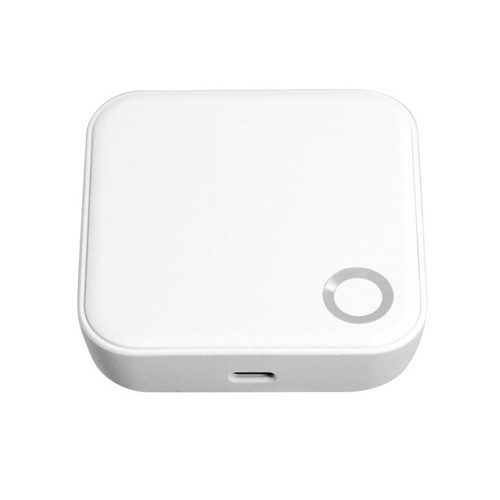


FORGE TTLock G5 Gateway - Bluetooth to Wi-Fi, Dual Band 2.4 and 5 GHz
The FORGE TTLock G5 Gateway (TTGTWG5) connects FORGE's TTLock smart locks - which talk Bluetooth to your phone - to your home or office Wi-Fi. With it plugged in within range of the lock, you can unlock on demand, send and change codes, and check entry records from anywhere in the TTLock app.
It works on 2.4 GHz and 5 GHz Wi-Fi, runs from a USB-C 5 V supply and is a small white box, 70 x 70 x 26 mm. FORGE offers it as the remote-access add-on for its TTLock locks, its KS1B key safe and its cabinet locks - see the list below. Made for FORGE, an Australian brand based in Ringwood, Victoria.

Usually ships in 24 hours.

Owned by FORGE Electrical (Australia) · Manufactured in China. Our independent FORGE brand profile sets out how the range compares with the other brands we stock.
 Key Features
- Bridges FORGE's Bluetooth TTLock locks to Wi-Fi for remote unlock, remote passcode, eKey and card management, and live entry records.
- Dual band - joins a 2.4 GHz or 5 GHz Wi-Fi network.
- Powered from a USB-C 5 V supply (500 mA) - any standard USB power adapter.
- Compact white ABS housing, 70 x 70 x 26 mm, for a shelf or power point near the door.
- Set up in the same TTLock app as your lock - TTLock app user manual.
- One of our modules and Wi-Fi gateways.

 How It Works
A FORGE TTLock lock has no Wi-Fi of its own - it talks Bluetooth to a phone within about 5-10 metres. The G5 sits within Bluetooth range of the lock, connects to your Wi-Fi router, and passes commands between the lock and the TTLock app over the internet.

- Remote unlock - open the door for a visitor or a delivery from anywhere. Remote Unlock has to be switched on for the lock in the app.
- Remote management - send, change and delete passcodes and eKeys, and change or delete cards, without being at the lock.
- Live records - entry records reach the app as they happen, instead of when a phone is next nearby.
- Without it - the lock still works fully at the door with codes, cards, fingerprints and the app over Bluetooth.
More on gateways in Chapter 08 - what a gateway actually does, the G2, G3, G4 and G5 compared and Bluetooth vs gateway in Chapter 14. For short stays, see Airbnb with a gateway.
 Compatible Locks
FORGE offers the G5 as the gateway add-on on each of these TTLock locks in our range:


Not needed for the FORGE A90, which has Wi-Fi built in for its video doorbell and app control. Not for FORGE's Forge Smart (Tuya) locks - they run on a different platform and do not use a TTLock gateway. For another brand's TTLock lock, send us the model before ordering.
 What's in the Box
- FORGE TTLock G5 gateway x1
FORGE lists the gateway only. It is powered over USB-C at 5 V - keep a USB-C cable and a standard USB power adapter handy if one is not included.
 FORGE TTGTWG5 - Specifications
 Setup and Placement
- Add your lock to the TTLock app first, as its administrator.
- Plug the G5 in indoors, within Bluetooth range of the lock - the closer the better, with as few walls between as possible. A lock on an outside gate or wall usually needs the gateway just inside that wall.
- Add the gateway in the TTLock app and connect it to your 2.4 or 5 GHz Wi-Fi network.
- In the lock's settings, switch Remote Unlock on.
- If the lock keeps dropping off, move the gateway closer - gateway placement and the real fixes for Wi-Fi dropouts.
Want it set up for you? Terry's offers installation across the Gold Coast.
 Frequently Asked Questions
Only for remote use. Without it a FORGE TTLock lock works fully at the door, and the app works over Bluetooth within about 5-10 metres - what a TTLock lock can do without Wi-Fi.
No - the G5 is a TTLock gateway. FORGE's Forge Smart locks run on a different platform.
No - the G5 joins either a 2.4 GHz or a 5 GHz network.
Within Bluetooth range - as close as practical, with few walls in between. Metal doors, gates and frames shorten the range.
Check that Remote Unlock is switched on for the lock in the app, and that the gateway shows the lock in range.
Additional Information
- Plug it in near the lock, not near the router. The Bluetooth link to the lock is the short one; Wi-Fi reaches further.
- Keep it powered. Remote access stops while the gateway is unplugged; the lock keeps working at the door.
- Your data. TTLock is run by Sciener, a Chinese company - where each smart lock platform hosts its data.
 Warranty
2-year FORGE warranty from the date of delivery - covers defects in materials and workmanship under normal use. Excludes improper installation or maintenance, misuse, accident, normal wear and tear (including fading or dulling of finishes) and water damage beyond the product's rated IP protection. Proof of purchase required for all claims. Returns & Warranty | FORGE warranty terms
 Download PDF Resources
FORGE's two-page TTLock pairing sheet - download the app, register, and add your lock first; the G5 is then added in the same app.
PDF Files - FORGE TTLock G5 Gateway
FORGE's two-page TTLock pairing sheet - download the app, register, and add your lock first; the G5 is then added in the same app.
FORGE Warranty
FORGE Electrical products sold by Terry's Tradies Pty Ltd and its associated websites, trading names, and subsidiaries are covered by FORGE's 2-year warranty against defects. All warranty claims are lodged with us, and we liaise with FORGE on your behalf.
Warranty Summary
How to Make a Claim
- Notify us in writing within the 2-year warranty period, including your proof of purchase and a description of the fault.
- We will assess your claim with FORGE and advise the next steps. The product may need to be returned for assessment.
- Where the defect is covered, FORGE will repair or replace the product or faulty part at no charge.
 Exclusions
The FORGE warranty does not cover:
- Improper installation, maintenance or operation, including not following FORGE's product specifications or instructions
- Normal wear and tear
- Misuse, abuse, negligence or accident
- Modification by anyone other than FORGE Electrical
- External causes such as natural disasters
- Damage from excessive rain, water ingress, flooding or other liquid exposure beyond the product's rated IP protection level
- Cosmetic ageing of outdoor finishes - light colour fading, surface dulling or minor oxidation from UV exposure, humidity and temperature changes
IP ratings on FORGE outdoor locks are intended for general outdoor conditions - rain, sun and dust. They do not guarantee performance under extreme exposure such as driving rain, hailstorms, constant salt spray, flooding or immersion.
 Important Notes
In unusually harsh or exposed locations, FORGE strongly recommends fitting a rain cover or protective hood over the lock to shield it from direct weather and driving rain. If your product has been exposed to water, contact us for support.
Our goods come with guarantees that cannot be excluded under the Australian Consumer Law. You are entitled to a replacement or refund for a major failure and compensation for any other reasonably foreseeable loss or damage. You are also entitled to have the goods repaired or replaced if the goods fail to be of acceptable quality and the failure does not amount to a major failure.
The FORGE warranty is in addition to these rights.

Confused? Overwhelmed? We get it.
Choosing the right smart lock can be genuinely tricky - door types, backsets, app platforms, compatibility with your existing hardware... there is a lot to consider. We have decades of experience fitting locks of all types, including smart locks, and we are happy to help.
Our expert recommendation service is free. Upload a few photos of your door and describe what you need, and one of our qualified locksmiths will give you a personalised recommendation.
Get Your Free Recommendation →How it works - three easy steps:
1. Upload photos
A few clear shots of your door, lock and frame - inside and out.
2. We assess
Our locksmith reviews your setup and requirements - door type, weather exposure, how you want to use it.
3. You get a recommendation
A personalised recommendation tailored to your door, budget and needs. No pressure, no upsell.
Also useful while you are deciding: