




Lockton E-Series ELEV64 Smart Door Lock - Fingerprint, PIN Code & Mobile App Lever
At A Glance
 At A Glance
 DISPATCHSame Day Before 11am


 Fingerprint
  PIN Code
  TTLOCK App
  Remote (Optional G2)
  Mechanical Key
  RFID / IC Card
Not Listed
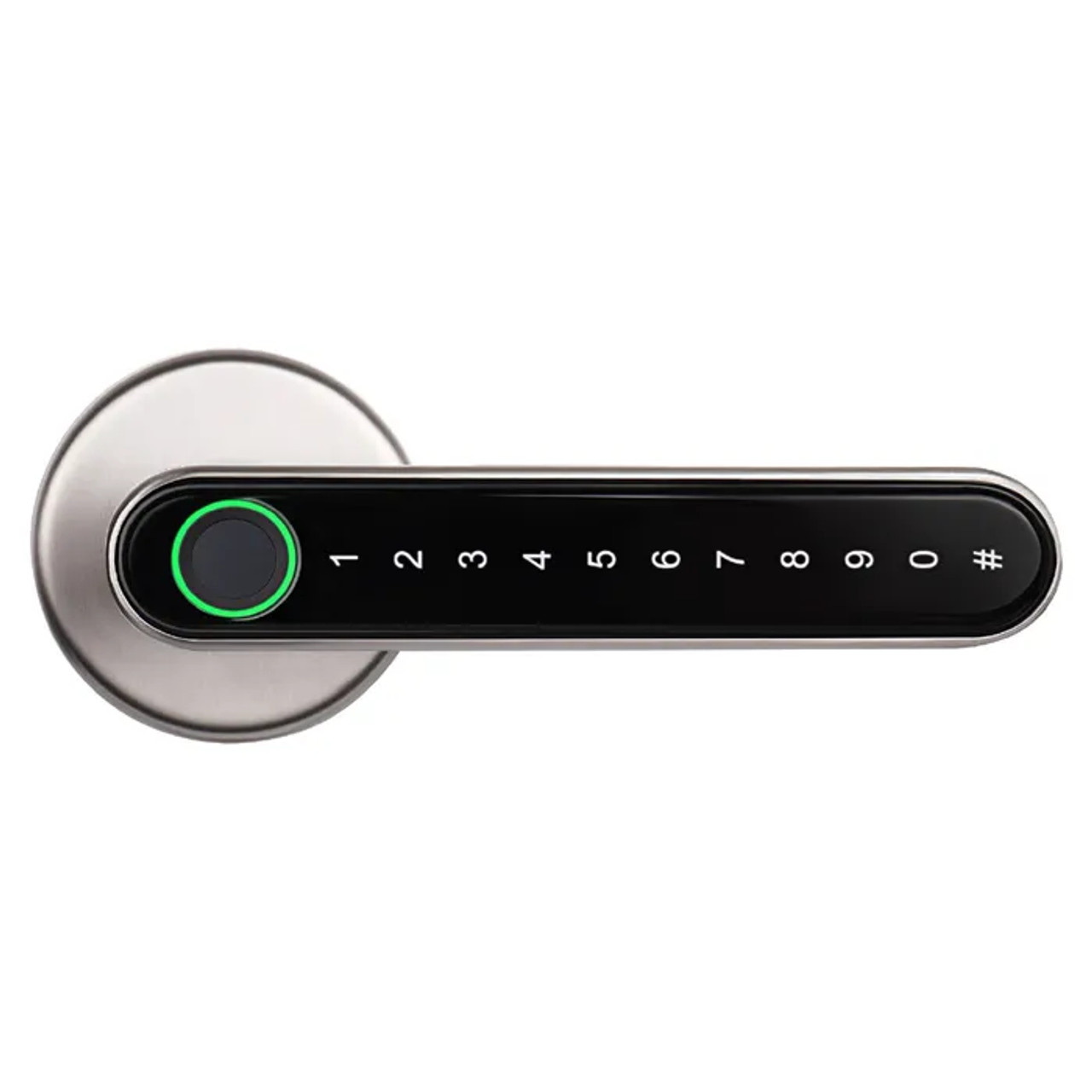
The Lockton E-Series ELEV64 is a keyless smart lever lock for interior residential and office doors. It offers four everyday ways in - fingerprint, digital PIN code, mobile app, and mechanical key override - with the fingerprint sensor built into the lever itself so your thumb naturally reads as you grip the handle.
The lock runs on the TTLOCK app, letting you add and remove users, issue temporary or one-time passcodes, and review access history from your phone. Over Bluetooth this works within range of the door; add the optional Lockton G2 Gateway and you can manage the lock remotely over the internet from anywhere. It stores up to 100 individual user codes and 100 fingerprints.
The ELEV64 is designed to retrofit over most residential and commercial knobsets and leversets, with an adjustable 60/70mm backset latch and a 54mm cross-bore. Where a previous lock has left larger holes or marks, Lockton scar plates are available to cover them for a neat finish. It comes in Black and Silver.
Usually ships same day if ordered before 11am AEST (excludes weekends and Queensland public holidays).

The ELEV64 is suitable for domestic and office applications on interior doors. It is not designed for exterior use exposed to the elements and carries no published IP weather rating. For a fully weather-exposed or pedestrian-gate application, choose a lock rated for it. If you need a fire-rated door lock, see the Lockton Cadell52 fire-rated smart lock instead.
 Key Features
- Four access methods: fingerprint, digital PIN code, mobile app, and mechanical key override.
- Fingerprint sensor built into the lever - positioned to read your thumbprint naturally as you take the handle. For reliable reads, use the three-angle enrolment technique.
- Stores up to 100 individual user codes and 100 fingerprints.
- TTLOCK app management: add and remove users, issue permanent, timed, one-time, custom, or recurring passcodes, and review access logs.
- Passage mode is supported and is switched on and off from the TTLOCK app - useful while a door is in constant use, and turned off again when you want the lock back on duty.
- Optional remote control via the Lockton G2 Gateway (sold separately) for management from anywhere over the internet.
- Retrofits over most residential and commercial knobsets and leversets - adjustable 60/70mm backset latch.
- USB emergency power port provides temporary power to open the door if the batteries are depleted.
- Mechanical key override for guaranteed physical backup entry.
- Step-by-step installation - easy to fit with the supplied template and fixings. If you would rather not drill, Chapter 12 covers when DIY is appropriate and Terry's offers advice and installation across the Gold Coast.
Access Methods
 Face Recognition
 Palm Recognition
 TTLOCK App & Remote Access
The ELEV64 is managed through the TTLOCK app (available on iOS and Android). From the app you can add and remove users, manage fingerprints, issue eKeys and passcodes, review access logs in timeline order, and receive unlock notifications. Passcodes can be permanent, timed, one-time, custom, or recurring - useful for owners, short-stay guests, maintenance visits, family, or cleaners. A recurring code for a weekly cleaner is the classic example.
In its standard form the lock is controlled over Bluetooth, so you need to be within range of the door. To manage the lock remotely over the internet - from another suburb or another country - add the optional Lockton G2 Gateway (G2-GATE), a 2.4GHz Wi-Fi bridge that connects the lock to the internet. For the difference between Bluetooth-only and gateway operation, see Chapter 14 - Bluetooth vs Gateway and what a gateway actually does.
New to the platform? See Chapter 14 - What is TTLock and passcode types, plus our TTLock tips and tricks for day-to-day operation - the 24-hour activation window catches out more new owners than anything else on the platform.
 What's in the Box
- 1 x outside handle (lever with keypad and fingerprint sensor)
- 1 x inside handle
- 1 x adjustable latch (60/70mm backset)
- 1 x strike plate
- 1 x latch box
- 2 x mechanical keys
- 1 x square spindle
- 2 x standoffs
- 2 x long handle screws
- 4 x latch and strike screws
- 1 x hexagon wrench
- 1 x pin (reset tool)
- 1 x instruction manual
Batteries (4 x AAA) are required. See the full contents diagram in the What's In The Box tab above.
 Suitable Uses
- Interior residential entry doors where keyless fingerprint and PIN access is wanted.
- Home office and small commercial interior doors needing multi-user access with an audit trail.
- Short-stay and rental properties issuing timed or one-time codes to guests. For how TTLock automation works for hosts, see using TTLock for Airbnb.
- Retrofitting over an existing knobset or leverset - see Chapter 02 - existing door hardware to check your current setup, and the latch and bolt (cylindrical) diagram for the most common Australian case.
- Households wanting different codes for family, cleaners, and babysitters that can be added or revoked at any time - cyclic passcodes handle the recurring ones.
 Available Finish Options
 Black
Black
STK ELEV64BLK Silver
STK ELEV64SIL
Both finishes are offered on this listing. Finish selection does not affect functionality, compliance, or performance.
 Lockton E-Series Range
 Accessories & Spares
Not sure whether you need a scar plate? See our guide to when a scar plate is needed, the brand-by-brand guide, and the full range of scar and adaptor plates we stock.
 Full Specifications
 Dimensions & Fitting

 Similar Products - Lever-Integrated Keypad Smart Locks
If you like the ELEV64's design - a fingerprint sensor and touch keypad built into the lever itself - the following smart lock shares that same form factor in the same product category. It differs mainly in connectivity: the Auslock Novo N25 adds RFID and app/Bluetooth control. For how these credential types compare, see our guide to smart lock access methods.

 Battery, Power & Backup Access
- Powered by 4 x AAA alkaline batteries (required; not always included - confirm at purchase).
- Battery life is approximately 10,000 openings, around 12 months in typical use - see the power and battery FAQs.
- USB emergency power port allows temporary operation from a portable power source if the batteries are fully depleted, so the door can be opened while replacements are obtained - the sequence is set out in what to do when the battery dies, and how to read a low-battery fault correctly.
- Mechanical key override provides physical backup entry at any time. Keep the spare somewhere outside the house, not in the hall drawer behind the locked door.
- For real-world battery life and how the coastal Gold Coast environment affects electronic locks, see the realities of electronic door locks and how long digital door locks last.
 Frequently Asked Questions
The ELEV64 is designed for interior domestic and office doors and is not built for exterior use exposed to the elements. If your front door is well protected under a covered porch it may be suitable, but for a fully weather-exposed door or gate it is not recommended. For a fire-rated entry door, use the Lockton Cadell52 instead - the background on fire-door certification is in Chapter 05.
By default the lock is managed over Bluetooth, so you need to be near the door. To manage it remotely over the internet, add the optional Lockton G2 Gateway. Note the gateway uses 2.4GHz Wi-Fi only - see its band-steering note before setup, along with Chapter 08 on band steering and why smart locks drop off Wi-Fi.
The ELEV64 retrofits over most residential and commercial knobsets and leversets. It suits doors 35-50mm thick with a 54mm cross-bore and an adjustable 60/70mm backset. Check your door against Chapter 02 - Measuring Your Door, or follow our step-by-step backset guide. If a previous lock has left oversized holes or marks, a Lockton scar plate can cover them.
Up to 100 individual user codes and 100 fingerprints. Codes can be permanent, timed, one-time, custom, or recurring - so you can give a cleaner a recurring weekly code, a guest a timed code, and a delivery a one-time code. For enrolment and management tips, see TTLock tips and tricks and the three-angle enrolment technique.
RFID/IC card entry is not listed in the ELEV64 specification, so we do not advertise it as a supported method on this lock. If card or fob access is essential, confirm current capability with us before ordering, or consider a model where RFID is a confirmed feature.
 Additional Information

The ELEV64 is built to replace most standard knobsets and leversets, but every door is different. Measure the existing cross-bore, backset, and door thickness first - the full method is in Chapter 02 - Existing Door Hardware. Where the old lock leaves visible holes, the Lockton scar plate range (rectangle 225 x 69mm, round 75mm, round 85mm) covers them - background in our scar plates guide and the full scar and adaptor plate range.
If the door's internal privacy lock (Secure Lock / snib) is engaged from inside, external credentials - fingerprint, PIN, and app - are deliberately blocked until it is released. This is expected behaviour. Keep the mechanical key handy as a backup and understand what the snib disables: see the perils of the internal snib, how to tell if it is engaged and, for short-stay properties, the rental risk it creates.
The ELEV64 runs on TTLock, one of the two dominant global smart-lock platforms. For how it works, what it does well, and its honest limitations, see Chapter 14 - TTLock Platform Guide, its published security disclosures and our comparison of TTLock vs Tuya, including the full feature comparison.
Need an extra way in for a family member on the hinged ELEV36? The E-Series RFID key fob suits the RFID-capable E-Series models. Terry's supplies and installs the full Lockton E-Series range across the Gold Coast, so if you are unsure which model fits your door, ask us through our advice and installation page.
Out of the box the ELEV64 is in its factory state: the manual records that any fingerprint will open the door, and the factory code still works, until an administrator has been added in the TTLOCK app. Pair the lock and add yourself as the administrator before the door is left to do its job - it is the single step installers most often leave for later. The ELEV64 User Manual sets out the sequence, and our handover checklist covers what else to clear before handing a property over.
 Warranty
Lockton products carry tiered manufacturer warranties - up to 10 years on mechanical locks, 3 years on smart locks and PVD/chrome finishes, and 1 year on electronic door closers, mechanical digital locks, and key accessories. Batteries carry no warranty. Proof of purchase required for all claims. Returns & Warranty | Lockton Warranty Statement
 Download PDF Resources
Five-page Lockton brochure covering the ELEV64 and the E-Series parts around it - fingerprint and PIN capacity, battery life, the fitting sizes, both finishes, the G2 gateway, the spare key blank and latch, and the scar plate range.
Twelve-page installation and setup booklet - factory defaults, the thirteen-item box contents, door preparation figures, the ten installation steps, TTLOCK setup, passage mode, optional G2 gateway pairing and a printed fitting template. Read it alongside the three most common DIY installation mistakes.
One-page setup sheet for the optional G2-GATE Wi-Fi bridge - gateway size and power, the indicator light states, and the eight-step TTLOCK pairing sequence. Same content as page 8 of the ELEV64 User Manual.
Lockton ELEV64 - FAQ, Setup and Owner's Guide
Everything below is here to help you choose, fit, set up and live with the Lockton ELEV64. For questions that apply to any smart lock, see our Smart Lock FAQ (Chapter 13); for measuring, fitting and choosing, start at the Smart Lock Buyer's Guide.
Fit, Retrofit and Door Preparation
If your door is 35-50mm thick, has a 54mm cross-bore and a 60mm or 70mm backset, it fits. Those three figures are the whole test - the latch supplied with the lock adjusts between 60 and 70mm, so you do not choose a backset at purchase. Measure the door before you order using Chapter 02 - Measuring Your Door and our step-by-step backset guide. If the numbers do not match, the narrow-frame ELEV36 mortice leverset covers a different set of doors entirely.
On a door with no existing hole, the manual has you mark the lock centre at about 914mm from the floor, drill a 54mm hole through the face of the door and a 25mm hole into the edge for the latch, chisel the latch faceplate in about 4mm so it sits flush, then bore the strike side of the jamb 25mm and about 12.7mm deep with a 1.5mm recess for the strike plate. It also notes the guard bolt position on the latch. On a retrofit over an existing knobset the face hole is usually already there and the work is smaller. Full detail is in the ELEV64 User Manual, and Chapter 02 explains bored cylindrical versus mortice door prep.

The manual carries a fitting template on its second-last page, marked up for both 60 and 70mm backsets and for 35 and 50mm doors, with the 54mm and 25mm hole positions. It is printed at booklet size, so before you use it, lay the latch and the rose against the printed shapes and confirm they line up - a printer that scales to fit will move every hole. If anything looks off, work from the measurements instead. When a hole is in the wrong place there is no undoing it, which is why Chapter 12 sets out when DIY is appropriate and when it is not.
Lockton's brochure lists deadbolts alongside knobsets and leversets among the hardware the ELEV64 goes in place of, so on a door where a deadbolt has been fitted into a standard 54mm cross-bore with a 60 or 70mm backset, the prep will usually suit. Bear in mind what changes: the ELEV64 is a latching leverset, so you finish with a handle that latches and locks rather than a separate bolt above the handle. If the door currently has both a knobset and a deadbolt, tell us what you want the finished door to do and we will tell you honestly whether this is the right lock - our advice and installation page is the place to start.
That is what a scar plate is for. The Lockton range for the ELEV64 is a 225 x 69mm rectangular plate with a 54mm cut-out, which covers the footprints left by a Gainsborough Trilock, a Lockwood Nexion or a Lane Corvan, plus round plates at 75mm and 85mm for smaller damage. All three take the same 54mm hole as the lock. Our scar plate guide explains when you need one, why the cut-out geometry matters and which material to choose; the full range sits in scar and adaptor plates.
Access, Credentials and Capacity
Up to 100 fingerprints and up to 100 user codes. The fingerprint sensor is built into the lever itself rather than sitting as a separate pad, so your thumb lands on it as you take the handle. Enrol each finger from three slightly different angles and register two fingers per person - the three-angle technique is the difference between a lock that reads first time and one that needs a second go. Chapter 03 covers how fingerprint readers behave, including wet-finger failure modes.

Permanent, timed, one-time, custom and recurring. In practice that means a permanent code for the household, a timed code for a guest that expires on their checkout date, a one-time code for a delivery, and a recurring code for a cleaner that only works on the days and hours you choose. Chapter 14 sets out all six TTLock passcode types, and our weekly-cleaner worked example shows how a recurring code is set up.
No - card and fob entry is not listed in the ELEV64 specification, so we do not advertise it on this lock and you should not buy it expecting card access. If credentials matter to you, the ELEV36 does support the E-Series RFID key fob, and the wider card and fob category lists every lock we stock that reads them. Chapter 03 explains how RFID credentials work and why they suit some buildings better than codes.
Yes. Two mechanical keys come in the box and the override cylinder is on the outside lever - it is the fallback that works with no power and no phone. Spare blanks are available under ELEV-KEYBLANK, in chrome-plated brass. Keep at least one key somewhere other than inside the door it opens; our guide covers sensible places to store an override key, and where the keyhole usually hides on locks of this format.
The TTLOCK App, Passcodes and Remote Access
The TTLOCK app, free on iOS and Android.
Install it, create an account with your mobile number, then add the lock while standing at the door with Bluetooth on. TTLock is the platform behind Lockton, McGrath and Austyle locks, so the app you learn here works across all of them - Chapter 14 is the full platform guide.
Only if you want to reach the lock when you are not at the door. Out of the box the ELEV64 is a Bluetooth lock: everything works from your phone while you are within range, and codes and fingerprints work whether the internet is up or not. Add the G2 gateway and you can unlock from anywhere, issue and revoke codes remotely, and see the access log live. Chapter 14 compares Bluetooth-only and gateway operation side by side, and Chapter 08 explains what a gateway does.
The G2 is a small plug-in bridge, 70 x 70 x 26mm, powered by USB Type-C at 5V/500mA, and it joins 2.4GHz Wi-Fi on 802.11 b/g/n. Its indicator tells you where it is up to: flashing red and blue means it is in pairing standby, steady blue means it is connected and working, and red means it cannot reach the network. Pairing is an eight-step sequence in the TTLOCK app, set out on the G2 Gateway Setup sheet. Full specs sit on the G2 product page.
Nine times in ten it is band steering. The G2 is a 2.4GHz-only device, and most modern routers publish 2.4GHz and 5GHz under one network name and decide for you which one a device gets - which a 2.4GHz-only bridge cannot argue with. The fix is to split the bands into two network names, at least while you pair, or to move to a dual-band gateway. Read Chapter 08 on band steering, the plain-English explanation and the hardware fix for persistent cases. The G2 page carries its own band warning.
This is the single most common TTLock support call, and the lock is not faulty. A newly issued permanent passcode has to be used at the keypad once within its activation window, or the lock discards it. Send the code, have someone key it in at the door that same day, and it stays live from then on. The 24-hour activation rule explains it in full, the activation-window table shows the window for every passcode type, and here is how to stop codes expiring.

Yes. The app keeps a timeline of openings showing which credential was used and when, so you can tell a cleaner's code from a family fingerprint. With Bluetooth only, the log syncs to your phone the next time you are at the door; with the G2 gateway fitted it lands in the cloud as it happens. Chapter 07 covers audit trails and dispute resolution.

It can, with two caveats. First, this is an interior lock, so it suits an internal or well-sheltered door rather than a weather-exposed entry. Second, automated code delivery needs the G2 gateway and a property management system talking to TTLock - without it you issue timed codes by hand, which is fine for one property and painful for five. How TTLock automation really works walks through it, Chapter 14 lists the PMS integrations, and Chapter 07 compares the two short-stay approaches.
Power, Batteries and Emergency Access
Four AAA alkaline batteries, good for roughly 10,000 openings or about twelve months in normal household use. A busy door gets through them faster, and cold does them no favours. Batteries are not always included, so check at purchase. The realities of electronic door locks sets honest expectations, and Chapter 13 answers the common power questions.

You have two ways in. The USB emergency power port on the lock takes power from a phone power bank, which wakes the lock long enough to open the door and change the batteries; and the mechanical key works regardless. The practical advice is to carry a power bank or keep the override key accessible, and to change batteries when the app first warns rather than when the lock starts complaining. What to do when the battery dies covers the order to try things in.

Inside, yes - the ELEV64 is an interior lock and interior air is the environment it is built for. What shortens the life of any electronic lock near the beach is salt-laden air reaching the electronics, which is exactly why this model is not for a weather-exposed door or a gate. If the door you have in mind takes salt spray or driving rain, choose a lock rated for it rather than accepting a short life from this one. Coastal conditions on the Gold Coast and how long digital locks last near the coast both go into the detail.
Setup, Handover and Security
Add yourself as the administrator. Until an administrator exists, the lock is in its factory state - the manual records that any fingerprint will open it and that the factory code still works. That is deliberate, so an installer can test the door, but it is not a state to leave a house in. Pair the lock in the TTLOCK app, claim it as admin, then enrol the real fingerprints and codes. The sequence is in the ELEV64 User Manual.
Clear every credential and every account before the keys change hands - old codes, old fingerprints, the gateway pairing and the lock itself in your app. Doing it in the wrong order leaves someone with access nobody remembers granting. Our five-step handover checklist gives the correct order, and transferring or re-adding a lock covers taking on a lock that somebody else set up.

Almost always the internal privacy lock is engaged. When the snib is turned from inside, the lock deliberately refuses every external credential - fingerprint, PIN and app alike - until it is released, so nobody can be let in over the top of someone who has locked themselves in. The mechanical key still works. What Secure Lock disables, how to tell if it is engaged and the risk it creates in a rental are all worth reading before a guest finds out for you.

TTLock has published vulnerability disclosures, all of which required an attacker to be within Bluetooth range of the door rather than anywhere on the internet, and we set them out rather than gloss over them. Keep the app updated, do not share your account, and treat the admin account as you would a master key. Chapter 14 carries the full CVE disclosure, and where your data is held is covered in our platform comparison.
Installation and Troubleshooting
On a straightforward retrofit over an existing knobset, yes - the manual runs to ten steps: fit the latch, fit the standoffs, pass the spindle and the power cord through, mount the outside handle, then the inside handle, connect the power cord, fit the long handle screws, seat the batteries, refit the cover plate and test the door before you close it. The step that catches people is the power cord: it has an alignment mark that has to line up, and pinching or misaligning it is why a freshly fitted lock sometimes does nothing. If the door needs new holes rather than an existing set, think harder - Chapter 12 has a DIY-versus-locksmith table, and Terry's offers advice and installation across the Gold Coast.
Start with the door rather than the lock. Misalignment between the latch and the strike is the most underestimated cause of a smart lock that feels wrong and the quickest way to flatten batteries, because the motor works against the frame every time. Check the strike recess depth, whether the door has dropped on its hinges, and whether the latch is entering the strike squarely. Chapter 12 on door misalignment, its symptom-to-fix table and the poor-door-prep mistake cover the usual suspects.

Passage mode is a setting in the TTLOCK app that leaves the door free to open without a credential - useful for an office door during business hours, a meeting room, or a house full of trades for the day. Turn it off again and the lock is back on duty. The point to remember is that while it is on, the door is not locked, so it belongs to daytime use rather than overnight. It is documented in the ELEV64 User Manual alongside passcodes, fingerprints and eKeys.
Suitability and Limitations
Interior doors are what this lock is for, and Lockton quotes no IP weather rating for it. A front door under a deep covered porch, where rain never reaches the lock, is usually fine. A door that takes weather, and any gate at all, is not - choose something rated for the exposure instead. Browse locks built for a regular front door or an external gate exposed to rain, and see Chapter 11 on what IP ratings mean.

No. The ELEV64 carries no fire rating, and a fire door needs hardware tested and certified for it - there is no way to reason around that. Where you need a fire-rated smart lever, the Lockton Cadell52 in 60mm or 95mm mortice is the same platform and the same app. Chapter 05 covers fire door smart locks, and every fire-rated lock we stock is in the fire door category.

Worth knowing before you buy: there is no built-in Wi-Fi, so remote access needs the G2 gateway; card and fob entry is not listed for this model; there is no face or palm recognition; it carries no fire rating and no published weather rating. None of that makes it a lesser lock for the job it is built for - an interior door where fingerprint, PIN, app and key are the ways in. If one of those gaps matters, the full smart lock range and the access method comparison in Chapter 03 are the places to look.
Related Products, Guides and Chapters
The Lockton E-Series: G2 Gateway (Wi-Fi bridge) · ELEV36 - Hinged Door · ELEV36 - Sliding Door · Cadell52 Fire Rated - 60mm · Cadell52 Fire Rated - 95mm · E-Series RFID Key Fob (ELEV36) · the whole Lockton range
Accessories and cover plates: ELEV64 scar plate, 225 x 69mm · all scar and adaptor plates · modules, gateways and bridges · keys and key blanks · every smart lock accessory
Similar locks and wider categories: Auslock Novo N25 · fingerprint smart locks · PIN code smart locks · Bluetooth smart locks · locks with a backup key · internal office and bedroom doors · all smart locks
Buyer's Guide chapters: Ch 02 Measuring Your Door · Ch 03 Access Methods · Ch 05 Fire Door Smart Locks · Ch 07 Airbnb and Short-Stay · Ch 08 Gateway Comparison · Ch 11 Standards and IP Ratings · Ch 12 Installation and Troubleshooting · Ch 13 Smart Lock FAQ · Ch 14 TTLock Platform Guide · Ch 15 App Platforms
Helpful blog reading: TTLock Tips, Tricks and Hidden Features · Using TTLock for Airbnb in Australia · TTLock vs Tuya · Scar Plates for Smart Locks · Measuring Your Lock Backset · Mechanical Key Override on Smart Locks · The Perils of the Internal Snib · The Realities of Electronic Door Locks · How Long Do Digital Door Locks Last? · Why Smart Locks Drop Off Wi-Fi · Smart Lock Not Locking? 3 DIY Mistakes
What's in the Box - Lockton ELEV64
- 1 x outside handle (lever with keypad and fingerprint sensor)
- 1 x inside handle
- 1 x adjustable latch (60/70mm backset)
- 1 x strike plate
- 1 x latch box
- 2 x mechanical keys
- 1 x square spindle
- 2 x standoffs
- 2 x long handle screws
- 4 x latch and strike screws
- 1 x hexagon wrench
- 1 x pin (reset tool)
- 1 x instruction manual

Lockton ELEV64 Smart Lock - Real Installations
Every lock below was supplied and fitted by Terry's on the Gold Coast. If you would like yours done the same way, start at our advice and installation page, or read Chapter 12 on when DIY is appropriate first.


Lockton ELEV64 - Assembly & Fitting Diagram
Lockton ELEV64 - Product Brochure


PDF Files - Lockton ELEV64
Five-page Lockton brochure covering the ELEV64 and the E-Series parts around it - fingerprint and PIN capacity, battery life, the fitting sizes, both finishes, the G2 gateway, the spare key blank and latch, and the scar plate range.
Twelve-page installation and setup booklet - factory defaults, the thirteen-item box contents, door preparation figures, the ten installation steps, TTLOCK setup, passage mode, optional G2 gateway pairing and a printed fitting template. Read it alongside the three most common DIY installation mistakes.
One-page setup sheet for the optional G2-GATE Wi-Fi bridge - gateway size and power, the indicator light states, and the eight-step TTLOCK pairing sequence. Same content as page 8 of the ELEV64 User Manual.
Lockton Warranty
Lockton Security products are designed and manufactured to high standards of quality, durability, and performance. All Lockton branded products come with guarantees in accordance with the Australian Consumer Law, and additional warranties are offered as detailed below.
Warranty Summary
Warranty periods run from the date of purchase. Proof of purchase is required for all claims.
How to Make a Claim
Lockton products are sold exclusively through trade channels. End-users who have received a Lockton product via an installer or trade supplier should contact their installer in the first instance - the trade supplier will liaise with Lockton Security to process the claim on your behalf.
To lodge a warranty claim through Terry's Tradies Pty Ltd and its associated websites, trading names, and subsidiaries (including Gold Coast Smart Locks), please follow these steps:
- Contact us with details of the defect and, where possible, installation images.
- Supply your proof of purchase (invoice number or receipt).
- Provide contact details for claim updates.
- A Goods Return Number (GRN) will be obtained from Lockton Security on your behalf.
- Package the product securely, include the GRN, and return it as directed. Products returned without a GRN may not be accepted.
Once a correctly submitted claim is assessed by Lockton Security and approved, they will at their own cost and discretion either: repair and return the product; provide a replacement or similar product; supply refurbished goods of equivalent type and quality (covered under the remaining warranty period); or refund the purchase price. If the claim is not approved, Lockton Security will advise in writing and the product will be returned at the customer's expense, or recycled upon request.
 Exclusions
The Lockton warranty does not cover:
- Damage caused by improper use or incorrect product selection
- Improper installation
- Fair wear and tear
- Environmental conditions outside product specifications (e.g. coastal air, high humidity, or exposure to corrosive substances)
- Products that have been modified, repaired, or altered
- Use of non-genuine replacement parts or accessories
- Batteries (no warranty applies)
Our goods come with guarantees that cannot be excluded under the Australian Consumer Law. You are entitled to a replacement or refund for a major failure and compensation for any other reasonably foreseeable loss or damage. You are also entitled to have the goods repaired or replaced if the goods fail to be of acceptable quality and the failure does not amount to a major failure. The Lockton manufacturer warranty is offered in addition to, and does not limit, these statutory rights.
1 Review Hide Reviews Show Reviews
-
ELEV64 entry door lock
Received our order very quickly and set up was simple. Love our new handle/lock! Thanks.

Confused? Overwhelmed? We get it.
Choosing the right smart lock can be genuinely tricky - door types, backsets, app platforms, compatibility with your existing hardware... there is a lot to consider. We have decades of experience fitting locks of all types, including smart locks, and we are happy to help.
Our expert recommendation service is free. Upload a few photos of your door and describe what you need, and one of our qualified locksmiths will give you a personalised recommendation.
Get Your Free Recommendation →How it works - three easy steps:
1. Upload photos
A few clear shots of your door, lock and frame - inside and out.
2. We assess
Our locksmith reviews your setup and requirements - door type, weather exposure, how you want to use it.
3. You get a recommendation
A personalised recommendation tailored to your door, budget and needs. No pressure, no upsell.
Also useful while you are deciding:


