


Lockton ELEV36 E-Series Smart Door Lock (Sliding Door)
At A Glance
 At A Glance
 DISPATCHSame Day Before 11am

 Fingerprint
 PIN Code
 Fob / Card
 Bluetooth
 WiFi
WiFi(Gateway)
 Mechanical Key
 Face
FaceNot Available
The Lockton ELEV36 sliding door variant is a smart euro mortice lock designed specifically for sliding doors — including aluminium-frame sliding glass doors, patio doors, and sliding timber doors. It uses a hook-bolt mortice body that engages the strike as the door slides closed, providing the positive mechanical hold required in sliding door applications.
Like the hinged door version, it supports six access methods: fingerprint, PIN code, RFID fob or card, Bluetooth via the TTLock app, WiFi via an optional gateway, and a 6-pin C4 key override. The external panel is IP66 rated and the lock retrofits most standard sliding door euro mortice preparations at an 85mm pitch with an 8mm spindle.
The ELEV36-S ships with both lever handles and turn knobs in the box — these are interchangeable and are fitted to suit the installation. For most sliding door applications, customers choose the turn knobs, which provide a compact, low-profile grip well-suited to aluminium sliding door frames. The lever handles are included for installations where a longer grip is preferred. Browse our full range of smart locks for sliding and security screen doors.
Usually ships same day if ordered before 11am AEST (excludes weekends and Queensland public holidays).
 Key Features
- Six access methods: Fingerprint, PIN code (4–8 digits), RFID fob or card, Bluetooth via TTLock app, WiFi via optional gateway, and 6-pin C4 key override.
- Sliding door hook-bolt mortice body: Designed for sliding door mortice preparations; the hook bolt engages the strike plate positively when the door slides closed. The matching bodies are stocked separately as SML-S20, SML-S28, SML-S35 and SML-S45.
- Lever handles AND turn knobs included: Both handle types are in the box and are interchangeable. Most sliding door installations use the turn knobs for a compact, low-profile result — see the ELEV36-SLHD-SIL and ELEV36-SLHD-BLK if you need replacement or additional sets.
- IP66 external panel: Dust-tight and jet-water resistant — suitable for external sliding doors exposed to weather. See Chapter 11 — Australian Standards and IP Ratings for what an IP figure does and does not cover.
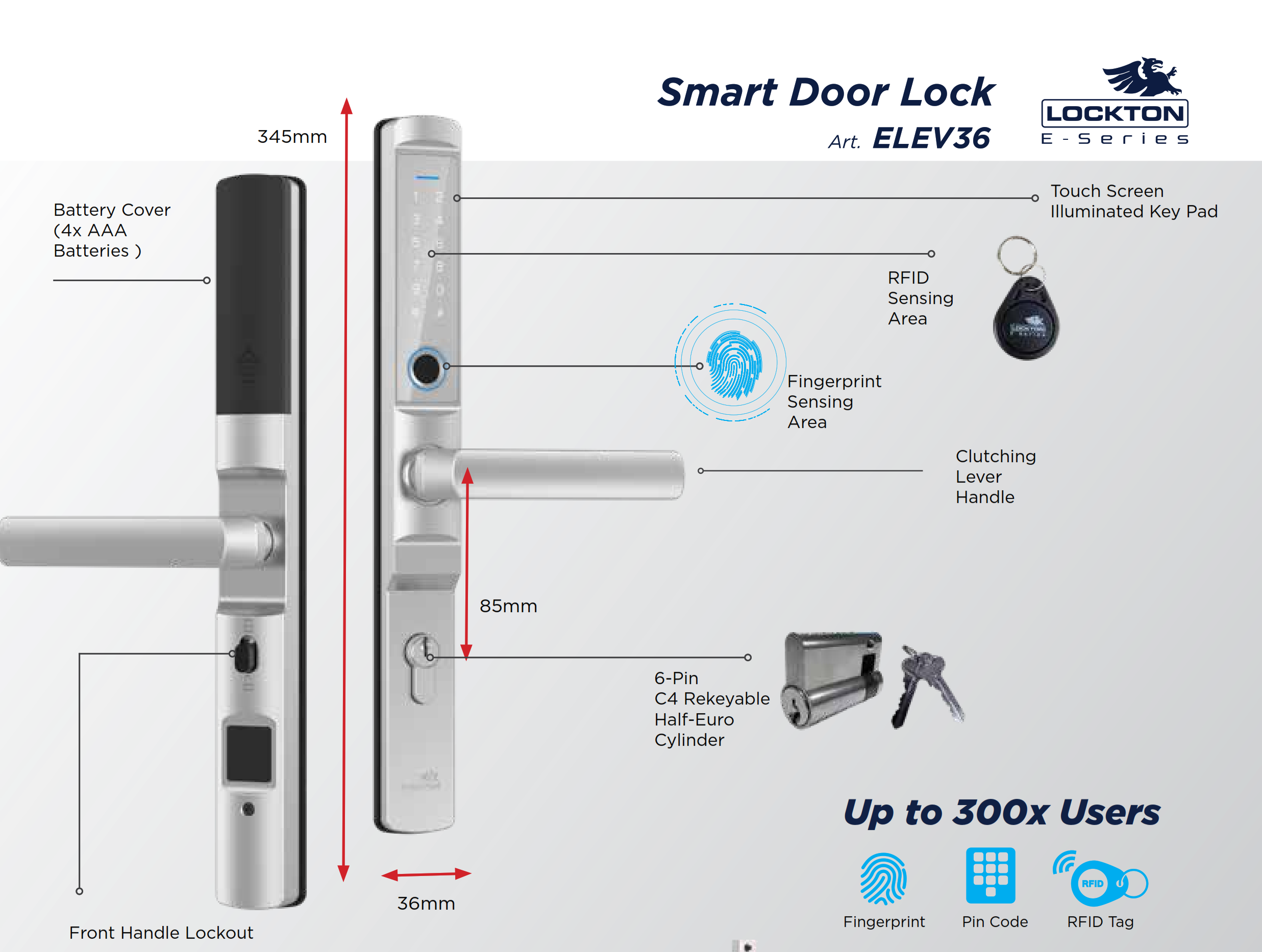
- Clutching lever/knob handle: The handle is mechanically decoupled from the lock until a valid credential is presented.
- Front handle lockout: The external handle can be locked out entirely from the inside, so no credential presented outside will operate it (Lockton ELEV36 brochure, page 3).
- Retrofits existing sliding door euro mortice locks: Compatible with standard 85mm pitch, 8mm spindle sliding door preparations. Backsets available: 20, 28, 35, and 45mm. See Chapter 02 — Backset before ordering.
- 300-user capacity: Up to 300 credentials across fingerprint, PIN, and RFID.
- 6-pin C4 rekeyable half-euro cylinder: Key override convertible to a restricted key profile. Replacement cylinders and barrels and keys and key blanks are stocked separately.
- Gateway-ready: Compatible with G2-GATE (WiFi bridge) for full remote management — see the full gateways and bridges range.
Access Methods
 Handle Options — Lever or Turn Knob


 What's in the Box
- 1 x Front handle assembly (with touchscreen keypad, fingerprint sensor, RFID sensing area)
- 1 x Front rubber gasket
- 1 x 6-pin C4 rekeyable half-euro cylinder
- 2 x C4 keys
- 1 x Cylinder retaining screw
- 1 x Battery cover
- 1 x Rear handle
- 1 x Rear rubber gasket
- 2 x Lever handles (interchangeable with turn knobs)
- 2 x Turn knobs (most customers use these on sliding doors; interchangeable with lever handles)
- 2 x RFID key fobs (13.56 MHz, ISO/IEC 14443-A)
- 4 x Screw-spindle packs (graded by door thickness: 32–38mm with a 50mm spindle, 39–45mm with 55mm, 46–52mm with 65mm, >53mm with 90mm, each with its connecting pillars and M5 screws)
- 4 x AAA Alkaline batteries (do not substitute Lithium)
- 1 x Instruction manual
- 2 x Sliding door installation templates
- 2 x Hinged door installation templates
 Suitable Uses


If your door has a narrow frame or tight stile, you may want to explore our range of slim profile smart locks designed specifically for aluminium and narrow-frame doors. These options can suit different door types, backsets, and handle styles.
View all slim-style smart locks for narrow frame doors
 Available Finish Options
 Matt Black
STK ELEV36-S (BLK range) Silver
STK ELEV36-S (SIL range)
Finish selection does not affect functionality, compliance, or performance. Specify your preferred finish (Black or Silver) and backset when ordering — see the Item Code Family table below.
 ELEV36 Item Code Family — Sliding Door
Four backset options are available for the sliding door variant. The ELEV36-H (hinged door) offers additional backsets from 25–70mm and is listed separately. The Black and Silver ordering tables for both variants are printed in the ELEV36 brochure, pages 4 and 5.
Body widths are taken from the Lockton sliding mortice dimension sheet. A matching 270 x 25mm sliding face plate (SMLFP270-25-SLD) is available if a previous installation has left a wider cut-out to cover.
 Full Specifications
Dimensions

 Battery & Power

 TTLock App
The ELEV36-S operates on the TTLock platform, available for iOS and Android . Through the app you can enrol fingerprints, PIN codes, and RFID credentials; issue eKeys to other users; review unlock history; and manage Passage Mode. If you already use TTLock for another lock, the ELEV36-S can be added to the same account without any new setup. See the TTLock Platform Guide (Ch 14) for a full feature walkthrough, Ch 15 — Smart Lock App Platforms for a cross-brand comparison, and the TTLock App User Manual for the full 56-page app reference.
 Frequently Asked Questions
Most customers choose the turn knobs for sliding doors. They sit closer to the door face, project less, and clear narrow aluminium stiles more easily — see Chapter 02 — Stile Width. The lever handles are better suited to wider frames or where a longer grip is preferred for comfort or DDA reasons. Both handle types are in the box and are interchangeable — try the knobs first. Replacement or additional sets are sold separately: ELEV36-SLHD-SIL | ELEV36-SLHD-BLK.
Measure from the edge of the sliding door to the centre of the existing spindle hole. The ELEV36-S is available in 20, 28, 35, and 45mm. The 20mm and 28mm options cover the majority of Australian aluminium sliding door frames. If you are replacing an existing lock, the backset is usually stamped on the lock body faceplate. See Measuring Your Lock Backset and Chapter 02 — Measuring Your Door. Getting it wrong is the second of the three most common DIY installation mistakes.
The ELEV36-S is designed to replace the lock in a sliding door euro mortice preparation. Security screen doors fitted with a euro mortice body may be compatible, but confirm the backset and pitch (85mm) before ordering. For dual-lock unlock behaviour across a screen and main door, see the Door Type Matching guide (Ch 04 — Screen Doors), the Dual Unlock explainer and the Check Screen Door Clearance blog before purchasing.

Yes. Any 13.56 MHz ISO/IEC 14443-A MIFARE-compatible card or fob can be enrolled through the TTLock app. The RFID-FOB-BLK key fob is available separately for additional users, and the wider RFID fobs, tags and cards range covers other formats.

The external panel carries an IP66 rating — dust-tight and protected against powerful water jets. This makes it suitable for covered external positions and typical Queensland weather. It is not rated for direct sustained immersion. For fully exposed marine or coastal environments, contact us for a pre-purchase assessment — Terry's team can advise based on your specific installation, and The Realities of Electronic Door Locks is an honest read on what coastal air actually does to a lock.
 Additional Information


 Warranty
Lockton products carry tiered manufacturer warranties - up to 10 years on mechanical locks, 3 years on smart locks and PVD/chrome finishes, and 1 year on electronic door closers, mechanical digital locks, and key accessories. Batteries carry no warranty. Proof of purchase required for all claims. Returns & Warranty | Lockton Warranty Statement
 Download PDF Resources
Six-page brochure covering the whole ELEV36 range: the six ways to unlock, IP66 external handle, the 6-pin C4 rekeyable half-euro cylinder, panel dimensions and part call-outs, and the full Black and Silver ordering tables for both the hinged (H25–H70) and sliding (S20–S45) kits.
Twelve-page booklet: box contents a–n, the four screw and spindle packs by door thickness, the mortice pack contents, the fifteen-step installation sequence, latch and handle handing, TTLock quick start, and the G2 and G3 gateway specifications.
A3 fold-on-backset drilling template for the sliding hook-bolt mortice bodies, with fold lines for the 20, 28, 35 and 45mm backsets on both door faces. Print at 100% and check the scale before drilling.
Dimensioned drawings of all four sliding hook-bolt bodies — SML-S20, S28, S35 and S45 — each with the 270 x 22mm faceplate, 85mm centres, and its own overall body width.
The full 56-page TTLock app reference that governs this lock: registration and login, adding a lock, eKey management, all six passcode types and their validity windows, IC card and fingerprint management, Bluetooth unlocking, attendance records, and gateway setup.
Lockton ELEV36 Sliding Door — FAQ, Setup and Owner's Guide
The questions below are the ones our counter and install teams actually get asked about the sliding ELEV36. For the wider category, see Chapter 13 — Smart Lock FAQ and the Ultimate Smart Lock Buyer's Guide.
Door Fit and Compatibility

The mortice body, and only the mortice body. Both variants use the same external panel, the same keypad and fingerprint reader, the same TTLock platform and the same six access methods. The ELEV36-S carries a hook-bolt body that catches the strike as the door slides shut; the ELEV36-H carries a swing body for a hinged door. They are not interchangeable after purchase, and the sliding kit offers four backsets (20, 28, 35, 45mm) against the hinged kit's ten (25–70mm).

Measure the backset, then match it to a body. The four sliding bodies are SML-S20 (34mm overall body width), SML-S28 (42mm), SML-S35 (49mm) and SML-S45 (59mm), all on a 270 x 22mm faceplate with 85mm centres. The dimensions are drawn out in the sliding mortice dimension sheet, and Measuring Your Lock Backset shows where to put the tape.

The listed range for this lock is 28–50mm, so a 55mm leaf is outside it — talk to us before ordering. The box does carry a spindle and screw pack graded for doors over 53mm, but the panel and gasket fit is what decides it, not the spindle alone. Chapter 02 — Door Thickness shows how to measure the leaf properly, and our team can confirm against your actual door.

Usually yes — the panel is 36mm wide and 345mm tall, which is what makes this a narrow-stile lock rather than a standard escutcheon set. Measure the flat face of the stile before ordering: if it is tighter than the panel plus a fixing margin, nothing in this range will sit flat. Chapter 02 — Stile Width sets out the thresholds, and the narrow frame category lists every slim-line option we stock.
Yes — use the E-Series 270 x 25mm sliding face plate (SMLFP270-25-SLD). It is 3mm wider than the standard 270 x 22mm faceplate, universally handed, and covers the full 20–45mm sliding backset span. It is a retrofit and refresh part as much as a new-fit one.
Access and Credentials
Up to 300 users, across fingerprints, PIN codes and RFID credentials. eKeys issued through the app are unlimited. In practice most households use two or three fingerprints, a permanent PIN and a fob or two, and keep the rest of the pool for guests and trades. Ch 14 — The Six Passcode Types covers how each credential type behaves.
It lets you type random digits either side of your real PIN so anyone watching cannot read the code off your finger positions, and it stops a pattern of worn or smudged keys forming on the touchpad. The lock accepts the entry as long as your genuine 4–8 digit code appears somewhere in the string. It costs nothing to use and is worth the habit on a door that faces a street or a shared courtyard. See Ch 03 — PIN and Keypad.

Almost always the 24-hour activation rule. A new permanent TTLock passcode must be used once at the keypad within 24 hours of being created, or the lock deactivates it — the code was never wrong, it simply expired before anyone tried it. Each passcode type has its own window; the full table is at activation windows by passcode type, and the fix is at how to stop codes expiring.
If they are 13.56 MHz ISO/IEC 14443-A (MIFARE-compatible), yes — enrol them through the TTLock app like any other credential. Plenty of building and gym fobs are the right frequency; plenty are not, and a 125 kHz fob will never read. Bring one in and we will check it, or start clean with the Lockton E-Series RFID fob. Background at Ch 03 — RFID Card and Key Fob.
The override is a 6-pin C4 rekeyable half-euro cylinder inside the handle assembly, and two keys come in the box. Because it is rekeyable, a locksmith can re-cut it to an existing key or convert it to a restricted profile — which is the usual answer when a customer wants one key for the front door and the slider. Terry's can do either as part of the install. Where is the keyhole? covers the general case.
Yes — the ELEV36 carries a front handle lockout, so the external handle can be disabled from the inside and no credential presented outside will operate it (ELEV36 brochure, page 3). It is the right setting for a holiday house or a slider you never use in winter; it is the wrong setting on a door anyone needs to come in through, because the lockout does not care that the code is correct.
Remote Access and the Gateway
Bluetooth is enough if you only ever manage the lock while you are standing near it. Everything else — unlocking from the office, issuing a code to a guest who is already at the door, watching the access log live — needs the G2-GATE Wi-Fi bridge, which is sold separately and plugs in inside the house within Bluetooth range of the lock. Ch 08 — What a Gateway Does is the plain-English version.
Nine times out of ten it is band steering. The G2 is a 2.4GHz-only device and most modern routers publish 2.4GHz and 5GHz under one network name, so the gateway is handed a band it cannot join. Split the bands into two names, or move to a dual-band gateway. The tell is that the lock still works perfectly at the door — only the remote half is dead. Read Band Steering: The Most Common Culprit and the two ways to fix it.
Lockton documents a G3-GATE Ethernet bridge (RJ45, IEEE 802.3) alongside the Wi-Fi G2 in the ELEV36 User Manual, page 11. We do not currently list the G3 as a stocked line, so ask us before you plan an install around it. The G2 vs G3 vs G4 vs G5 comparison sets out where each generation earns its place.

Yes. The lock records unlock events itself; the gateway is what pushes them to the app in real time. With the internet down, PIN, fingerprint, fob, Bluetooth and key all keep working at the door and the log syncs when the connection returns. Ch 08 — What Happens When the Internet Goes Down covers the whole picture.
Power and Batteries
Because the firmware is calibrated for the voltage curve of alkaline cells, and the manual says so plainly (ELEV36 User Manual, page 7). A lithium cell holds a higher voltage for most of its life and then falls off a cliff, so the lock's low-battery warning arrives far too late to be useful. Use four AAA alkaline cells from a brand you recognise and replace the set together.
You use the key. The 6-pin C4 override cylinder is entirely mechanical, so it opens the door with no power at all — then you change the batteries from inside and nothing is lost: fingerprints, codes and fob enrolments all survive the change. The practical lesson is to keep the override key somewhere outside the house, not in the kitchen drawer behind the door it opens. See What to Do When the Battery Dies.
It depends entirely on traffic, which is why the figure is quoted in operations rather than months. A back patio slider used twice a day is a very different lock to a side entry used twenty times a day. Cold snaps, a stiff door and a misaligned strike all shorten it, because the motor works harder on every cycle. Battery Life — The Truth, Not the Marketing Version is the honest treatment.
Installation and Setup
Use the sliding template only — the box carries both sliding and hinged sheets, and the hinged one carries backsets this lock does not have. The template folds on the line for your chosen backset, registers to the door face and handle bottom, and then gives you the hole positions. Print the sliding installation template at 100% if you need a spare, and check the printed scale against a ruler before any drill touches the door.
Two on the face and one in the edge. The manual's steps 7 to 12 call for 8 x 12mm holes through the door face and a 14 x 19mm edge bore taken 25mm deeper than the backset, with the faceplate cut in flush (ELEV36 User Manual, page 5). Metal doors take the supplied fixing tabs; timber doors take two 4.2 x 20mm screws. On an aluminium slider, drill slowly and deburr — a rough edge under the gasket is where water finds its way in.

No. The latch handing is reversed in the field without taking the faceplate off, and the handle is handed separately in the same sequence (ELEV36 User Manual, page 6). Do it on the bench before the body goes into the door, not after. If you are unsure which hand you have, Understanding Door Handing in Australia settles it.
A confident DIYer with a sound existing mortice preparation and the right backset can fit it. A hook bolt is less forgiving than a spring latch, because it has to enter the strike and pull up into it, so strike alignment is the step that separates a lock that works for ten years from one that grinds. If the door is out of square, the cut-out is wrong, or the stile is tight, get it done properly — see Ch 12 — When DIY Is Appropriate or book advice and installation with our team.
Living With It and Troubleshooting
The strike, the rollers and the track — in that order. A slider drops on its rollers over time, and a hook bolt that used to drop cleanly into the strike starts catching on its lip. It shows up as a stiffer close long before it shows up as a failure. Re-set the rollers, clean the track, and re-check the strike height. Door Alignment — The Most Underestimated Factor explains why this matters more than any spec on the page.
Re-enrol that finger, and enrol it from three angles rather than one — straight on, rolled slightly left, rolled slightly right. Dry, worn or cold fingers read worse, and an outdoor slider sees all three. Enrol a second finger as a backup and give that person a PIN as well. The method is set out at the three-angle enrolment technique.
That pattern usually means the lock's internal clock has drifted, so a time-limited code is being judged against the wrong time. It is a five-minute fix: calibrate the clock from the app. On a Bluetooth-only install the clock has nothing to sync to, so it drifts faster than on a gateway install. See symptoms that point to clock drift and calibrating without a gateway.
IP66 means dust-tight and protected against powerful water jets, which covers driving rain on an exposed slider. It is not an immersion rating and it is not a corrosion rating — salt air is a separate problem from water ingress, and no IP figure speaks to it. If the door is beachfront, talk to us before ordering rather than after. Ch 11 — Australian Standards and IP Ratings explains what the two digits mean.
Three years, under Lockton's smart lock tier — batteries are excluded, as they are on every brand. Keep your proof of purchase. If you bought it from us, contact us first and we will run the claim with the distributor rather than sending you off to do it yourself. The full tier table is in the Warranty section of the main description, and the terms are at the Lockton warranty statement and our returns and warranty page.
Related products, guides and chapters
The rest of the Lockton E-Series: ELEV36-H hinged door · ELEV64 fingerprint and PIN leverset · Cadell52 fire rated, 60mm mortice · Cadell52 fire rated, 95mm mortice · the whole Lockton range.
Parts and accessories for this lock: G2-GATE Wi-Fi bridge · E-Series RFID key fob · turn knob set, Silver · turn knob set, Black · 270 x 25mm sliding face plate · sliding mortice bodies SML-S20, SML-S28, SML-S35, SML-S45.
Other sliding door options: the sliding, security screen and glass door category · the narrow frame / slim-line category · the McGrath A231 with hook bolt, the other TTLock-platform hook-bolt slider we stock · all smart locks.
Buyer's Guide chapters: Ch 02 — Measuring Your Door · Ch 03 — Access Methods · Ch 04 — Door Type Matching · Ch 08 — Gateway Comparison · Ch 11 — Australian Standards · Ch 12 — Installation and Troubleshooting · Ch 13 — Smart Lock FAQ · Ch 14 — TTLock Platform Guide · Ch 15 — App Platforms.
Blogs worth reading before you fit it: Measuring Your Lock Backset · TTLock Tips and Tricks · TTLock App User Manual · G2 vs G3 vs G4 vs G5 Gateways Compared · Why Smart Locks Drop Off Wi-Fi · Mechanical Key Override on Smart Locks · The Realities of Electronic Door Locks · How Long Do Digital Door Locks Last? · Using TTLock for Airbnb in Australia · What Is Dual Unlock? · Check Screen Door Clearance · TTLock vs Tuya · Which Smart Lock Platform Is Right for You? · Understanding Door Handing in Australia.
What's in the Box - Lockton ELEV36 (Sliding Door)
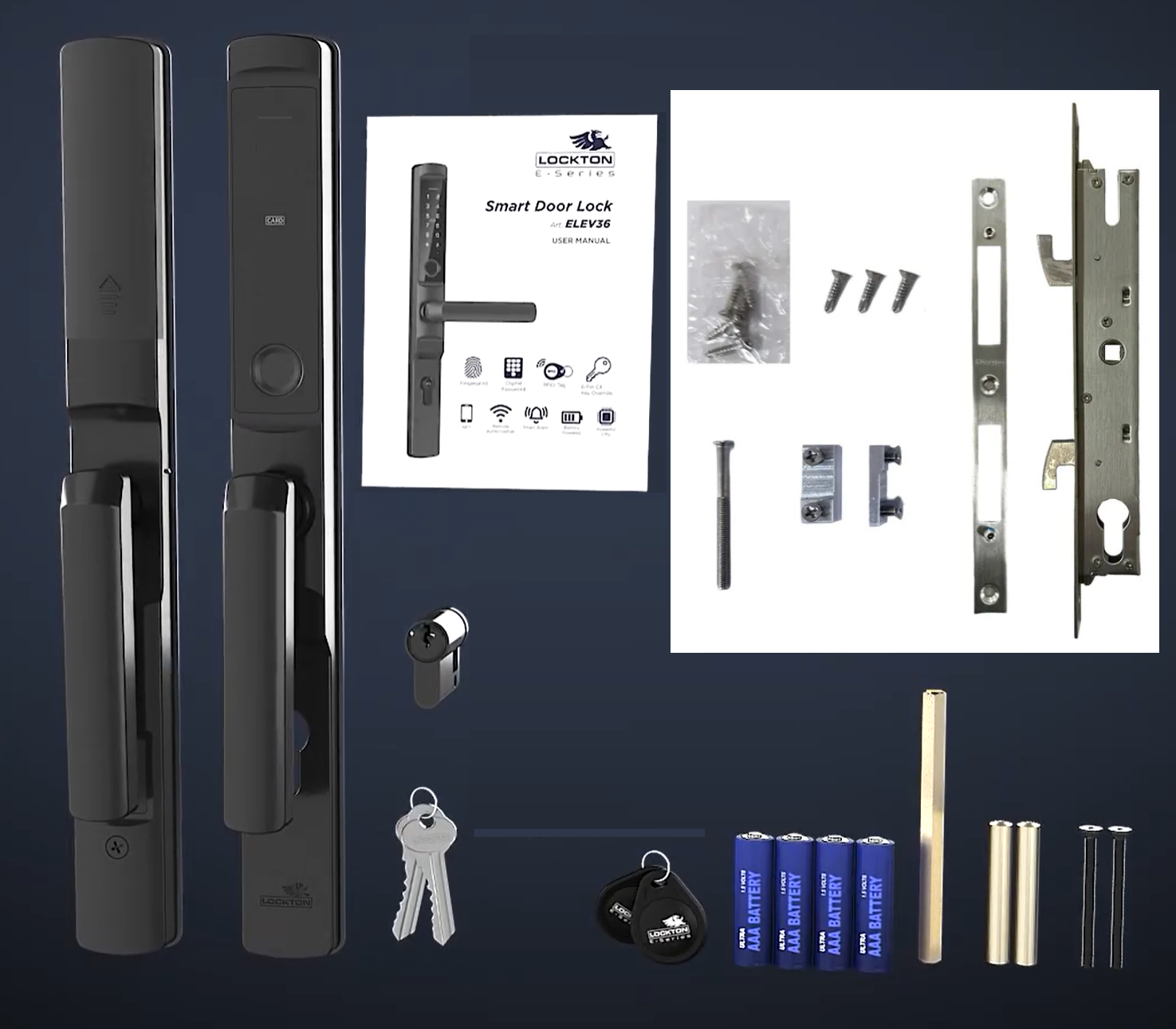
- 1 x Front handle assembly (touchscreen keypad, fingerprint sensor, RFID sensing area)
- 1 x Front rubber gasket
- 1 x 6-pin C4 rekeyable half-euro cylinder
- 2 x C4 keys
- 1 x Cylinder retaining screw
- 1 x Battery cover
- 1 x Rear handle
- 1 x Rear rubber gasket
- 2 x Lever handles (interchangeable with turn knobs)
- 2 x Turn knobs (recommended for most sliding door installations)
- 2 x RFID key fobs
- 4 x Screw-spindle packs (32–38mm / 39–45mm / 46–52mm / >53mm door thickness)
- 4 x AAA Alkaline batteries
- 1 x Instruction manual
- 2 x Sliding door installation templates
- 2 x Hinged door installation templates
Screw and Spindle Packs by Door Thickness
Lockton ELEV36 (Sliding Door) - Real Installations

Fitting one of these on the Gold Coast? Terry's supplies and installs the whole ELEV36 range — see advice and installation.
Lockton ELEV36 - Dimensions
Lockton ELEV36 E-Series Smart Door Lock - Product Brochure


Prefer the file? Download the ELEV36 Product Brochure (PDF).
PDF Files - Lockton ELEV36 (Sliding Door)
Six-page brochure covering the whole ELEV36 range: the six ways to unlock, IP66 external handle, the 6-pin C4 rekeyable half-euro cylinder, panel dimensions and part call-outs, and the full Black and Silver ordering tables for both the hinged (H25–H70) and sliding (S20–S45) kits.
Twelve-page booklet: box contents a–n, the four screw and spindle packs by door thickness, the mortice pack contents, the fifteen-step installation sequence, latch and handle handing, TTLock quick start, and the G2 and G3 gateway specifications.
A3 fold-on-backset drilling template for the sliding hook-bolt mortice bodies, with fold lines for the 20, 28, 35 and 45mm backsets on both door faces. Print at 100% and check the scale before drilling.
Dimensioned drawings of all four sliding hook-bolt bodies — SML-S20, S28, S35 and S45 — each with the 270 x 22mm faceplate, 85mm centres, and its own overall body width.
The full 56-page TTLock app reference that governs this lock: registration and login, adding a lock, eKey management, all six passcode types and their validity windows, IC card and fingerprint management, Bluetooth unlocking, attendance records, and gateway setup.
Lockton Warranty
Lockton Security products are designed and manufactured to high standards of quality, durability, and performance. All Lockton branded products come with guarantees in accordance with the Australian Consumer Law, and additional warranties are offered as detailed below.
Warranty Summary
Warranty periods run from the date of purchase. Proof of purchase is required for all claims.
How to Make a Claim
Lockton products are sold exclusively through trade channels. End-users who have received a Lockton product via an installer or trade supplier should contact their installer in the first instance - the trade supplier will liaise with Lockton Security to process the claim on your behalf.
To lodge a warranty claim through Terry's Tradies Pty Ltd and its associated websites, trading names, and subsidiaries (including Gold Coast Smart Locks), please follow these steps:
- Contact us with details of the defect and, where possible, installation images.
- Supply your proof of purchase (invoice number or receipt).
- Provide contact details for claim updates.
- A Goods Return Number (GRN) will be obtained from Lockton Security on your behalf.
- Package the product securely, include the GRN, and return it as directed. Products returned without a GRN may not be accepted.
Once a correctly submitted claim is assessed by Lockton Security and approved, they will at their own cost and discretion either: repair and return the product; provide a replacement or similar product; supply refurbished goods of equivalent type and quality (covered under the remaining warranty period); or refund the purchase price. If the claim is not approved, Lockton Security will advise in writing and the product will be returned at the customer's expense, or recycled upon request.
Exclusions
The Lockton warranty does not cover:
- Damage caused by improper use or incorrect product selection
- Improper installation
- Fair wear and tear
- Environmental conditions outside product specifications (e.g. coastal air, high humidity, or exposure to corrosive substances)
- Products that have been modified, repaired, or altered
- Use of non-genuine replacement parts or accessories
- Batteries (no warranty applies)
Our goods come with guarantees that cannot be excluded under the Australian Consumer Law. You are entitled to a replacement or refund for a major failure and compensation for any other reasonably foreseeable loss or damage. You are also entitled to have the goods repaired or replaced if the goods fail to be of acceptable quality and the failure does not amount to a major failure. The Lockton manufacturer warranty is offered in addition to, and does not limit, these statutory rights.
1 Review Hide Reviews Show Reviews
-
Very Happy
Fantastic lock and great, fast service from Terry’s. Highly recommend!

Confused? Overwhelmed? We get it.
Choosing the right smart lock can be genuinely tricky - door types, backsets, app platforms, compatibility with your existing hardware... there is a lot to consider. We have decades of experience fitting locks of all types, including smart locks, and we are happy to help.
Our expert recommendation service is free. Upload a few photos of your door and describe what you need, and one of our qualified locksmiths will give you a personalised recommendation.
Get Your Free Recommendation →How it works - three easy steps:
1. Upload photos
A few clear shots of your door, lock and frame - inside and out.
2. We assess
Our locksmith reviews your setup and requirements - door type, weather exposure, how you want to use it.
3. You get a recommendation
A personalised recommendation tailored to your door, budget and needs. No pressure, no upsell.
Also useful while you are deciding:


