ASSA ABLOY SMARTair i-Reader R4N Slim Wall Reader - MIFARE, Update-on-Card
At A Glance
 At A Glance
 MIFARE Card / Tag
  PIN Code
Not Available
 Openow Phone Key
Upgrade Option
 Remote Opening
Not Available
 Fingerprint
Not Available
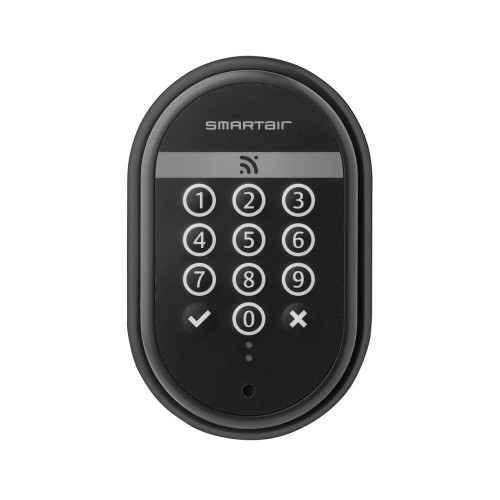
The ASSA ABLOY SMARTair i-Reader R4N Slim (S4BR2Slim2) is a wired SMARTair wall reader for openings that are locked or blocked electrically - automated doors, turnstiles, barriers, gates and lifts (i-Reader Datasheet). It checks the user's credential and tells its control/relay board to release the electric strike, electromagnetic lock or door operator wired to it.
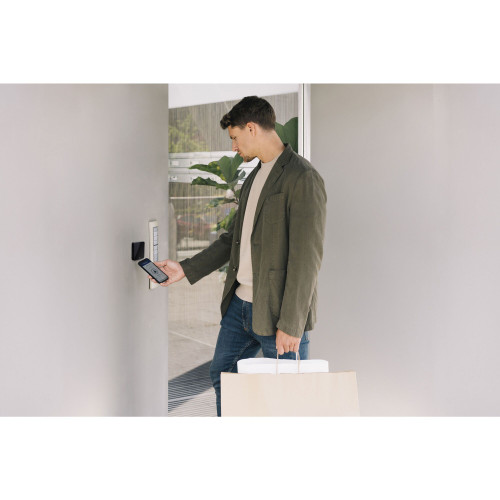
This listing reads MIFARE cards and tags and runs in the SMARTair Update-on-Card tier: access rights travel on users' cards and events are collected as they use the site, with no hubs to install (SMARTair System Information Guide). Openow phone keys can be switched on later with Openow activation cards - no extra hardware - and Wireless Online added with an RF module on the relay board (i-Reader Datasheet).
The Slim reader is ASSA ABLOY's narrow-profile "i-reader Design" model (i-Reader Brochure) - 40 mm wide and compatible with standard electrical boxes (i-Reader Datasheet) - for narrow frames, mullions and anywhere a discreet reader suits. It is one of seven i-Reader R4N wall readers we list, in two widths and four tiers - see the item code family - and the keypad wall readers (SNAR3KUSSB, SNZR3KUSSB) cover PIN entry. For the whole platform, see the SMARTair Wireless Access Control Overview.

The i-Reader checks the credential; the lock is a separate electric strike, electromagnetic lock or door operator wired to the control/relay board, whose one output relay (NO, C, NC) commands it - the relay switches the lock but does not power it (i-Reader Datasheet). The site also needs a 12-24 VAC/VDC power supply and Class 6 UTP (or higher) cable between the reader and the board; neither is included. On a door without electric locking, a battery-powered SMARTair i-max Update-on-Card escutcheon or Update-on-Card knob cylinder locks the door by itself. They read HID iCLASS, so neither cards nor phone keys cross.
 Key Features
- Wired SMARTair RFID wall reader for automated doors, turnstiles, barriers, gates and lifts - any opening whose locking or blocking element is electrically operated.
- Slim format - ASSA ABLOY's narrow i-reader Design, 40 mm wide, for narrow frames, mullions and discreet installations.
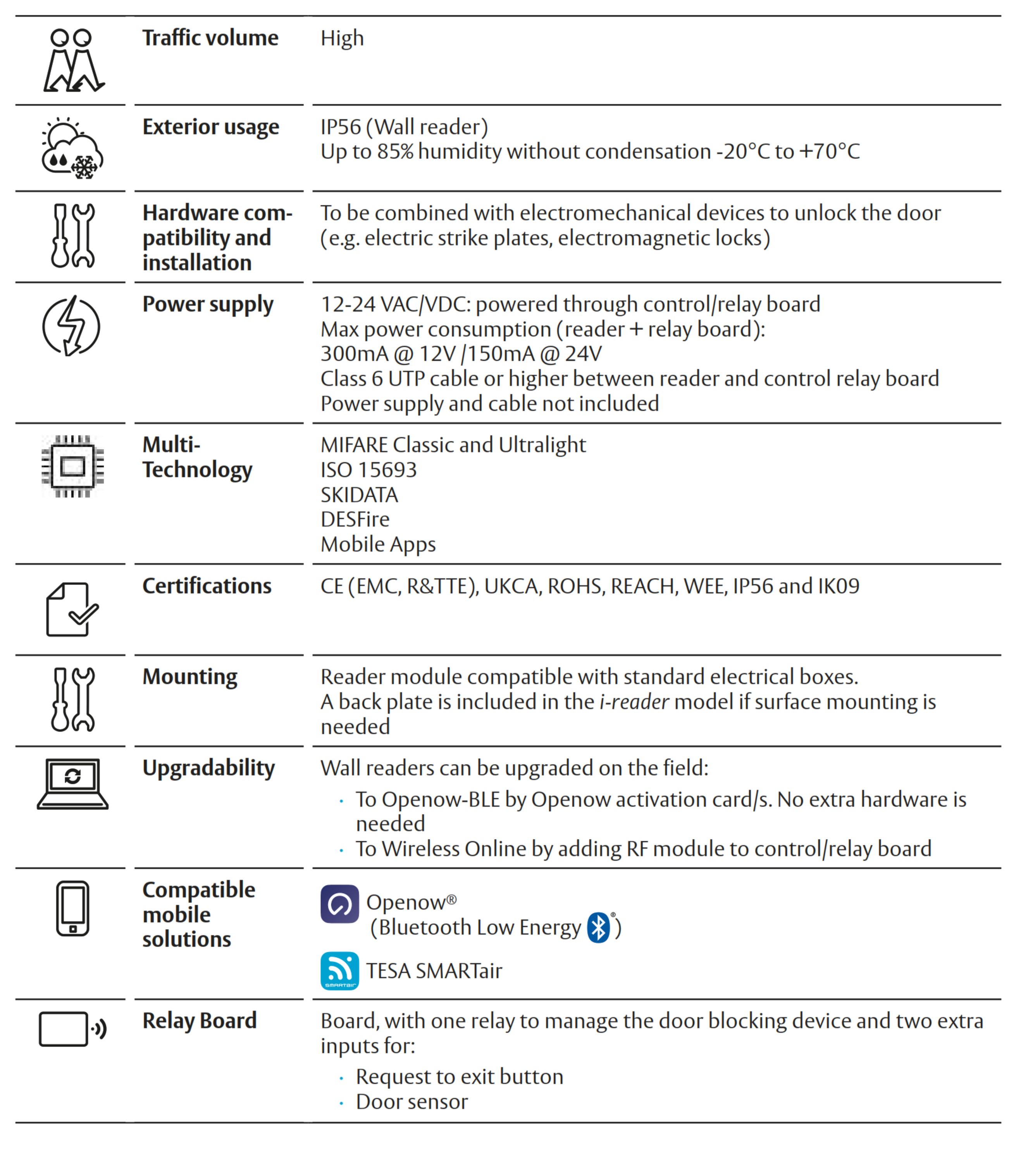
- Reads MIFARE Classic and Ultralight 13.56 MHz cards, tags, fobs, bracelets and badges at 2-4 cm; its multi-technology reader also lists ISO 15693, SKIDATA and DESFire.
- Openow-ready - Bluetooth is built in, so Openow phone keys can be switched on in the field with Openow activation cards, with no extra hardware.
- SMARTair Update-on-Card management - access rights travel on users' cards, so there are no hubs to install; Wireless Online can be added later with an RF module on the relay board.
- Control/relay board with one output relay (NO, C, NC) and inputs for a request-to-exit button and a door sensor; the relay is physically separate from the reader and the link between them is encrypted, protecting against unauthorised access.
- IP56 for outdoor mounting and IK09 impact rated, from -20 to +70 degrees C - see Environmental Performance.
- Configurable green, red and blue LED and buzzer for access granted and denied, with adjustable LED lighting and sound volume.
- Up to 3,000 users and the last 1,200 events; 6,500 users in extended mode, or unlimited users in 48 groups on a high-traffic door.
- Operating modes: standard (open time 1-240 seconds), passage, double user and first user, plus a people-with-disabilities mode with double opening time.
- Firmware upgradeable, including in response to new threats, and works fully offline.
- Up to 70 percent lower energy use in standby and open modes than ASSA ABLOY's previous readers.
 Technical Overview - SMARTair i-Reader
Access Methods
How users get through the opening this reader controls, and what it does not do. Chapter 03 compares every method side by side.
Browse other card and fob access products.
 What's In The Box
- SMARTair i-Reader module - the narrow "i-reader Design" (Slim) housing, black
- Control/relay board in its surface-mount box - one output relay (NO, C, NC), inputs for a request-to-exit button and a door sensor, and a connector for the Wireless RF module (item codes with relay output - see Variants)
Not included: the 12-24 VAC/VDC power supply, the Class 6 UTP cable between the reader and the board, the electric strike, electromagnetic lock or door operator, the door sensor and the exit button, RFID credentials, the encoder, the portable programmer, the Openow licence, the TS1000 software licence and the updater an Update-on-Card site uses.
 Suitable Uses
ASSA ABLOY designed SMARTair wall readers for automated doors, turnstiles, barriers, lifts and any access whose locking or blocking element is automated (i-Reader Datasheet). Typical installations:
- Automated entrance doors with an electric strike, electromagnetic lock or door operator.
- Turnstiles and pedestrian barriers.
- Car park barriers and gates - once Openow is enabled, the reader approves Openow users up to 5 metres away.
- Lift access control and perimeter access points.
- Healthcare, education, commercial and multi-residential buildings - anywhere an opening can't take a cylinder, escutcheon or security lock but its locking is automated.
- Retrofits - the reader fits a standard electrical box, and the narrow profile suits mullions and narrow frames.
- Mixed SMARTair sites - readers sit alongside escutcheons, knob cylinders and i-gate padlocks in one TS1000 system, and management tiers can be combined on one site (system architecture).

- Doors without electric locking - a SMARTair i-max Update-on-Card escutcheon or Update-on-Card knob cylinder locks the door by itself on battery power.
- PIN entry or card + PIN - the i-Reader has no keypad; see the keypad wall readers SNAR3KUSSB and SNZR3KUSSB.
- Sites running HID iCLASS cards - this reader reads MIFARE and the other listed technologies, not iCLASS; the iCLASS wall readers are SNAR3KUSSB and SNZR3KUSSB.
- Openings without a 12-24 VAC/VDC supply and a cable run to the relay board - the reader is wired and has no battery.
- Mounting the relay board outside - the IP56 rating is for the wall reader; the relay board goes on the secure side.
- Sites that need changes to reach the door straight away - choose Wireless Online, such as the S4ZR2DSlim (Wireless Online + Openow).

Designed for professional access control environments including offices, education campuses, healthcare facilities and commercial buildings.
 Available Finish Options
 Black
Black
(This Product)
STK S4BR2Slim2
Finish selection does not affect functionality, compliance, or performance.
We list the i-Reader in black. ASSA ABLOY describes the design as clean lines with a glossy finish and a top-mounted LED (i-Reader Brochure).
 Item Code Family - SMARTair i-Reader R4N Wall Readers
The seven i-Reader R4N listings share the same reader electronics and MIFARE reader, and differ by width and by SMARTair management tier. Choose the width for the mounting position and the tier for how you want to run the site.

Both are secure 13.56 MHz RFID credential technologies used in commercial access control. MIFARE is widely used in commercial access systems, universities, transport cards and multi-application credentials. HID iCLASS is HID's own credential platform, used in many enterprise security systems. The reader technology must match the credentials used in the building's access control system - the i-Reader R4N readers read MIFARE, and the MURAL keypad readers we list are the HID iCLASS versions. If you're not sure which your site uses, send us a sample card and we will check it before you order.
Variants
This listing covers these item codes:
- S4CR2D0 - Update-on-Card reader without relay output.
- S4CR2D1 - Update-on-Card reader with single relay output.
Tell us which version your installation needs when you order - the single-relay version drives the lock itself, while the no-relay version passes the credential to another access controller.

SMARTair wall readers are available in versions with or without relay outputs.
- No Relay - the reader only identifies credentials and sends data to another access controller.
- 1 Relay - the reader can directly activate an electric strike, magnetic lock or automated door.
System Integration
- Managed in SMARTair TS1000 - Windows client/server software with its own database, which sets up the installation and initialises devices with the portable programmer; Web Manager then gives browser-based management of users, doors, time zones, access rights and events (Product Overview).
- Update-on-Card management: access rights travel on users' credentials, which carry access-plan updates around the lock network, and events are collected when users revalidate their credential at an updater (Information Guide).
- Equipment for this tier: the TS1000 software licence, a card encoder, the portable programmer (or PC-TO-LOCK) and an updater (devices you need; management devices).
- The yearly calendar is updated once a year with the portable programmer, and daylight saving changes are automatic (i-Reader Datasheet).
- Upgrade path: add the RF module to the control/relay board for Wireless Online, and switch Openow on with activation cards (i-Reader Datasheet).
- Works alongside the rest of SMARTair. MIFARE devices for the same Update-on-Card site are the i-MAX R4N sliding door kits (S4B42SL2V6480I-SB, S4B46SL2V6480I-SB) and the i-gate padlock SNBBP2XI, so the same MIFARE cards cross. The Update-on-Card i-max escutcheons (SNCB43SL1S008DI, SNCB43SL2V648DI, SNCB43SL2V908DI, SNCB47SL1S008DI, SNCB47SL2V648DI, SNCB47SL2V908DI) and knob cylinders (SNCB43X030E10MI black, SNCW43X030E10MI white) read HID iCLASS, and none of them runs Openow, so neither cards nor phone keys cross.
SMARTair is the electronic access control platform that manages locks, readers, users, credentials and access permissions across a building.
Openow is the mobile credential technology within SMARTair that lets smartphones act as digital keys over Bluetooth Low Energy.
- SMARTair = access control system.
- Openow = smartphone credential technology.
- Mobile credentials are issued and managed through SMARTair software.
Update-on-Card (UOC) is a SMARTair system architecture where access permissions are carried by the user's RFID credential.
- User permissions are written to the card using SMARTair software.
- When the card is presented to a reader, updates are transferred to the lock.
- Events can also be collected through update points.
This architecture lets access control systems operate without constant network connectivity.
Update-on-Card needs no hubs: changes reach the reader on users' updated cards, and events come back when users revalidate at an updater (Information Guide). If you want live monitoring, instant changes and remote opening instead, the Wireless Online + Openow version in this width is S4ZR2DSlim.
Which i-Reader Tier?
The i-Reader R4N listings come in four SMARTair management tiers. The reader is the same; the tier decides how changes reach it, how events come back and whether phone keys are switched on. This listing's column is in bold.
SMARTair supports multiple system architectures depending on the level of control required.
- Update-on-Card - access permissions travel with the RFID card and update locks when presented.
- Wireless Online - locks and readers communicate with the SMARTair server through wireless hubs for real-time updates and monitoring.
System Capacity
The control unit runs in one of three memory modes (i-Reader Datasheet):
- Normal mode: 3,000 users and 1,200 events.
- Extended mode: 6,500 users and 1,200 events.
- High-traffic door: unlimited users, filtered into 48 groups (permissions).
- Non-volatile memory - users and events are kept through a power cut.
- Configurable door open time from 1 to 240 seconds in standard mode.
 Time Scheduling and Automation
- 30 time zones with 5 time periods each (weekdays and holidays selectable).
- 365-day calendar for defining holidays.
- State tables - up to 20 changes of operating mode per door per day, such as passage mode during business hours.
- Yearly calendar updated once a year with the portable programmer.
- Automatic daylight saving change, updated with the calendar.
- Clock and calendar maintained for approx. 8 hours without power.
Power Supply and Electrical Requirements
- Operating voltage: 12-24 VAC/VDC, powered through the control/relay board (i-Reader Datasheet).
- Maximum power consumption (reader + relay board): approx. 300 mA @ 12 V or 150 mA @ 24 V.
- Reader-to-board wiring: Class 6 (Cat6) UTP or higher, up to approx. 20 m; power supply and cable not included.
- Relay/control board: one output relay (NO, C, NC) to command the electric or electromechanical door device - the relay does not power the door device.
- Inputs for a door position sensor (sensor not included - intrusion or door left open is reported) and a request-to-exit push button (not included).
- Connector for the Wireless RF module; the board is supplied in a box for surface mounting, 120.5 x 105.5 x 36 mm.
- The relay is physically separate from the reader, and the reader-to-board link is encrypted, protecting against unauthorised access.
- No internal battery to replace - the reader runs from the wired supply, and holds its clock and calendar for about 8 hours without power (i-Reader Datasheet).
- No mechanical override key on the reader - any key backup is on the lock hardware it controls.
Power cuts are worth planning for - see what actually happens to electronic locks in a power outage. The reader's clock holds for about 8 hours without power.
 Environmental Performance
- Exterior protection rating: IP56 (wall reader) - ASSA ABLOY rates the i-Reader for outdoor installation (i-Reader Brochure).
- Impact protection rating: IK09.
- Operating temperature: -20 to +70 degrees C.
- Humidity tolerance up to 85 percent, without condensation.
- Traffic volume: high.
- Certifications: CE (EMC, R&TTE), UKCA, RoHS, REACH, WEEE, IP56 and IK09 (i-Reader Datasheet).
SMARTair hardware designed for outdoor use is engineered for demanding environments and may carry environmental protection ratings such as IP56 or IP68. The i-Reader's IP56 rating covers the wall reader; its control/relay board belongs on the secure side of the opening.
- Always follow manufacturer installation orientation requirements.
- Ensure weather seals are correctly installed.
- Avoid leaving devices open or exposed unnecessarily.
 Reader Operation and Installation
From the i-Reader Datasheet and i-Reader Brochure:
- Read/write distance approx. 2-4 cm for standard RFID credentials; once Openow is enabled, barriers and gates open for a valid phone key up to 5 m away.
- Multi-technology reading: MIFARE Classic and Ultralight, ISO 15693, SKIDATA and DESFire, plus mobile apps (Openow over Bluetooth 5.1; ASSA ABLOY also lists the TESA SMARTair app).
- Configurable LED (green / red / blue) and buzzer for access-authorised / denied signalling, with adjustable lighting and volume; 3-pin connection for the portable programmer or PC-TO-LOCK adapter.
- Operating modes: Standard (closed until a valid credential, then open for 1-240 seconds), Passage (open, set by time zone or by an authorised user after double badging), Double user (two valid credentials) and First user (standard until the first valid user enters, then passage).
- People with disabilities (PWD) mode: standard operation with double opening time - see DDA and accessibility.
- Field-upgradeable: Openow can be enabled with Openow activation cards (no extra hardware), and Wireless Online is added with an RF module on the control/relay board, which auto-links to SMARTair hubs.
- Mounting: the narrow-profile "i-reader Design" housing is compatible with standard electrical boxes, and its 40 mm width suits narrow frames and mullions.
- Pair with a locking device - electric strike, electromagnetic lock or automated gate or barrier controller.
Full Specifications
Technical data from the i-Reader Datasheet, which covers both i-Reader widths, and the i-Reader Brochure.
 Dimensions
Related SMARTair Products and Guides
- Other i-Reader R4N options. This is the Slim Update-on-Card reader. Slim (narrow) listings: Update-on-Card (this listing), Update-on-Card + Openow, Wireless Online, Wireless Online + Openow. Wide listings: Base - Update-on-Card or Wireless Online, Update-on-Card + Openow, Wireless Online + Openow. The differences are laid out in the item code family and tier comparison.
- Keypad wall readers. Where a PIN keypad is needed at the reader, see the Standalone Wall Reader (PIN and RFID) and the Wireless Wall Reader with Keypad - both read HID iCLASS rather than MIFARE.
- Other SMARTair formats. For door-mounted electronic hardware use a SMARTair i-max Update-on-Card escutcheon or Update-on-Card knob cylinder; for gates and padlockable points, the MIFARE SMARTair i-gate padlock is SNBBP2XI (Update-on-Card + Openow). The full list of devices for the same site is under System Integration.
- Managing and commissioning. Credentials are written with the SMARTair USB encoder, the reader is commissioned with the SMARTair portable programmer, and Openow is switched on with Openow activation cards and an Openow mobile access licence. An Update-on-Card site also needs an updater, which we quote with the job.
- Selecting and specifying. Compare access methods and management tiers in our access methods chapter and gateway comparison chapter, check door and opening suitability with the door type guide, and read about mobile keys in our app platforms chapter. Also useful: Australian standards, installation and troubleshooting, site survey and installation, the realities of electronic door locks, and the Smart Lock Buyer's Guide.
 Frequently Asked Questions
An electric strike, electromagnetic lock or door operator for the relay to switch, a 12-24 VAC/VDC power supply and Class 6 UTP cable to the control/relay board - none of which is included - plus the SMARTair system around it: TS1000, the encoder and credentials. See What's In The Box.
Only if they're MIFARE (Classic or Ultralight) or one of the other technologies it lists - ISO 15693, SKIDATA or DESFire. It won't read HID iCLASS; for iCLASS the wall readers are SNAR3KUSSB and SNZR3KUSSB. Not sure what your cards are? Send us a sample and we'll check it.

No. On Update-on-Card, changes reach the reader on users' updated cards, so no hubs are needed (Information Guide). For live monitoring, instant changes and remote opening, choose the Wireless Online + Openow S4ZR2DSlim.
Not as listed, but the reader has Bluetooth built in: Openow is switched on in the field with Openow activation cards, with no extra hardware, plus the Openow mobile access licence (i-Reader Datasheet).
Yes - the wall reader is IP56 and IK09 rated for -20 to +70 degrees C and up to 85 percent humidity. Its control/relay board is not the weather-rated part and goes on the secure side of the opening. See Environmental Performance.
 Additional Information
- Lead time. This reader is a special order - the lead time is shown with the price. Order the credentials, the encoder and the portable programmer at the same time so the opening can be commissioned in one visit.
- Plan the power and cabling. The reader runs from a 12-24 VAC/VDC supply through its relay board, and the relay switches the lock without powering it, so the strike or magnetic lock needs its own supply. Choose a fail-safe or fail-secure locking device to suit the opening, and wire it to the relay's NO or NC contact to match. It is a job for an experienced access control installer - see advice and installation.
- Plan the updater. On Update-on-Card, users pick up changes when they present their credential at an updater, so place one where users pass every day (devices you need).
- Match the credential first. This listing reads MIFARE (and ISO 15693, SKIDATA and DESFire), not HID iCLASS. If the site already has cards, send us a sample before ordering.
- Data and support. TS1000 keeps the site database on your own server, and once Openow is enabled, keys reach phones through TS1000's cloud connection over HTTPS 443 (Product Overview). For where access platforms keep data, see platforms hosted outside China.
 Warranty
ASSA ABLOY branded products purchased new in Australia from authorised resellers are covered against defects in materials and workmanship for:
- Mechanical components: 10 years
- Electrical and electronic components: 5 years (excluding batteries)
- Cylinders and keys: 3 years
 Download PDF Resources
ASSA ABLOY's May 2024 technical information for the i-reader (wide) and i-reader Design (narrow) - technical data, the reader module and control unit, operating modes, the control/relay board, the Wireless RF module and Openow, and the dimension and installation drawings.
The May 2024 i-reader brochure - the design, IP56 and IK09, parking mode for Openow users up to 5 metres, the relay board, management-system compatibility and the openings the reader suits.
The May 2023 technical overview - the four management systems and the equipment each needs, the feature comparison, system architecture, TS1000 and Web Manager, credentials, and the wall reader in the other-devices table on page 10.
The May 2022 benefits guide - the management levels with decision guidance on page 4 (Pro Wireless Online with the hub coverage note, Openow and Update-on-Card), Openow virtual keys and the wall reader device page.
SMARTair i-Reader R4N Slim (S4BR2Slim2) - FAQ, Set-Up and Owner's Guide
Everything below is here to help you choose, install and run this reader. For general smart lock questions see our Smart Lock FAQ (Chapter 13), and for the wider picture start with the Buyer's Guide.
Choosing This Reader

It is the Slim Update-on-Card version of ASSA ABLOY's SMARTair i-Reader R4N: a wired MIFARE wall reader with a control/relay board, for openings locked or blocked electrically - automated doors, turnstiles, barriers, gates and lifts. It needs no hubs, and Openow and Wireless Online can be added later.
By width and by management tier. Slim (narrow): S4BR2Slim2, S4BR2Slim1, S4BR2Slim3, S4ZR2DSlim. Wide: S4BR2Wide2, S4BR2Wide1, S4ZR2PWide. The reader electronics and MIFARE reader are the same - see the Item Code Family table.
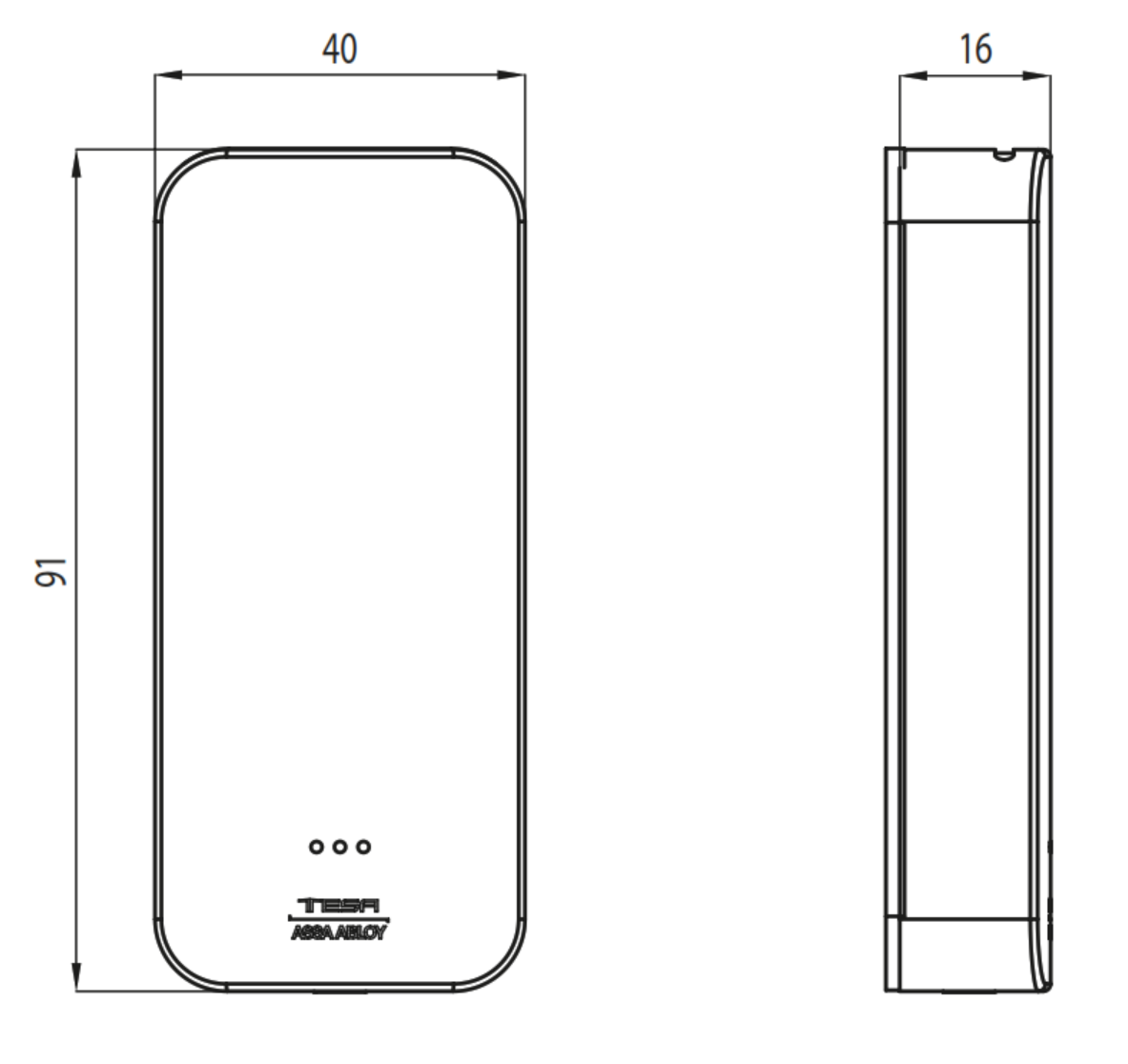
The Slim reader (ASSA ABLOY's "i-reader Design") is 40 mm wide and 91 mm high, and the Wide reader (the standard i-reader) is 82 x 82 mm with a back plate included for surface mounting; both are compatible with standard electrical boxes and share the same electronics (i-Reader Datasheet). The Slim suits narrow frames, mullions and discreet installations, while the Wide covers an existing backbox or the space left by an older reader.
An i-Reader if users open with cards, tags or phone keys and your site runs MIFARE. A keypad wall reader - the Standalone SNAR3KUSSB or the Wireless Online + Openow SNZR3KUSSB - if you want PIN entry or card + PIN at the door, but note that those two read HID iCLASS.
No. It checks the credential and switches a relay; the lock is a separate electric strike, electromagnetic lock or door operator wired to the relay board (i-Reader Datasheet). On a door without electric locking, a battery-powered SMARTair i-max Update-on-Card escutcheon or Update-on-Card knob cylinder locks the door by itself.
Choose Wireless Online when changes must reach the door straight away and you want live events, email alerts and remote opening - and you can place hubs within range. Choose Update-on-Card when the reader can refresh as users present their cards and you'd rather not install hubs (Information Guide). The i-Reader tiers are compared in the Which i-Reader Tier? table.

The S4BR2Slim1 is the Update-on-Card + Openow version in the same width. It costs more, and in return Openow phone keys are enabled.
The S4BR2Slim3 is the Wireless Online version in the same width. It costs more, and in return changes and events travel in real time through SMARTair hubs.
Cards, Tags and Credentials
MIFARE Classic and Ultralight 13.56 MHz credentials, encoded for your site with the SMARTair USB encoder; the multi-technology reader also lists ISO 15693, SKIDATA and DESFire (i-Reader Datasheet). It does not read HID iCLASS. Browse RFID cards, fobs and tags.
Cards, fobs, bracelets, badges and smartphones - ASSA ABLOY lists all five for the i-Reader (i-Reader Brochure).
Only if they are MIFARE Classic or Ultralight, or one of the other technologies the reader lists. An existing card of the right type can often carry SMARTair data too, because SMARTair uses the credential's free memory alongside other services (Product Overview) - send us a sample card and we will check it.
2-4 cm for standard RFID credentials (i-Reader Datasheet). Openow phone keys work further out - up to 5 metres at barriers and gates. See how RFID credentials work.
Cancel it in TS1000. On Update-on-Card the cancellation travels round the lock network on other users' updated credentials (Information Guide). Automatic cancellation of lost cards is a feature of every tier except Standalone (feature comparison).
Yes. The reader holds 30 time zones with five periods each and a calendar for holidays (i-Reader Datasheet), and credentials can carry activation and expiry dates (Product Overview).
There is no keypad. What the i-Reader does offer is a double-user mode, where two valid credentials are needed to open the door (i-Reader Datasheet). For PIN or card + PIN, see the keypad wall readers SNAR3KUSSB and SNZR3KUSSB.
Openow Phone Keys
ASSA ABLOY's mobile credential: a virtual key in the Openow app, used over Bluetooth. Keys are sent, revoked and updated over the air, are end-to-end encrypted, and a cancelled key vanishes from the phone (Information Guide).
Yes. The i-Reader has Bluetooth built in, and Openow is switched on in the field with Openow activation cards - no extra hardware is needed (i-Reader Datasheet). The site also needs the Openow mobile access licence.
The Openow mobile access licence enabled in TS1000, users with the Openow app on their phones, and TS1000's cloud connection, which carries keys to phones over HTTPS 443 (system architecture).
They open the Openow app, press the padlock and hold the phone to the reader. Green means opened, orange means the phone could not connect (try again) and red means no access - no rights, a blocked door or outside the time schedule (Openow User Guide; February 2019, so screens may differ from today's app).
Once Openow is enabled, the i-Reader approves opening at a car park barrier or gate for a valid Openow phone key up to 5 metres away, so drivers don't have to reach out of the window (i-Reader Brochure).
A second mobile option that ASSA ABLOY lists as compatible with the i-Reader, alongside Openow (i-Reader Datasheet). Ask us whether it suits your site before planning around it.
Update-on-Card and Updaters
On users' credentials. Access-plan updates are written to cards at an updater and carried round the lock network as users present them, and events are collected when users revalidate their credential at an updater (Information Guide).
An updater is the SMARTair device where users refresh their credentials, and it is part of the Update-on-Card equipment set alongside TS1000, a card encoder and the portable programmer (devices you need; management devices). We quote it with the job.

The reader stores the last 1,200 events, and they come back to TS1000 when users revalidate at an updater (Information Guide). For live events, choose the Wireless Online + Openow S4ZR2DSlim.
Once a year, with the portable programmer; daylight saving changes are automatic (i-Reader Datasheet).
Yes - Wireless Online is added in the field by fitting an RF module to the control/relay board, which then auto-links to SMARTair hubs (i-Reader Datasheet). If real-time control is likely from the start, the Wireless Online + Openow S4ZR2DSlim may be the simpler choice.

The TS1000 Lockdown Upgrade adds emergency lockdown to Wireless Online sites, not to Update-on-Card. If lockdown matters, choose Wireless Online.
Wiring, Power and Installation
A 12-24 VAC/VDC supply, connected through the control/relay board. Maximum consumption for the reader and relay board together is 300 mA at 12 V or 150 mA at 24 V (i-Reader Datasheet). The power supply is not included.
Class 6 UTP or higher, and ASSA ABLOY's installation drawing shows up to approx. 20 m between them. The cable is not included (i-Reader Datasheet).

No. The control/relay board has one output relay (NO, C, NC) that commands the electric or electromechanical door device, but the relay does not power it - the lock needs its own supply (i-Reader Datasheet).
It depends on the opening. A fail-safe lock releases when power is lost and a fail-secure lock stays locked, so the choice follows the opening's exit and security needs, and the relay's NO or NC contact is wired to match. We will help you pick the strike or magnetic lock when we quote.

Yes. The control/relay board has inputs for a door position sensor - so intrusion or a door left open is reported - and a request-to-exit push button. The sensor and button are not included (i-Reader Datasheet).
On the secure side of the opening, away from the weather - the IP56 rating covers the wall reader. It comes in a box for surface mounting (i-Reader Datasheet).
On a standard electrical box (i-Reader Datasheet). The narrow-profile "i-reader Design" (i-Reader Brochure) is 40 mm wide, so it suits narrow frames and mullions.

The relay is physically separate from the reader, on the secure side, and the reader-to-board link is encrypted to protect against unauthorised access (i-Reader Datasheet).
The reader and relay board stop until power returns, while users and events stay in non-volatile memory and the clock is held for about 8 hours (i-Reader Datasheet). What the door does depends on the lock - see what actually happens in a power outage.
An experienced access control installer - it is a wired job with a power supply, a relay board and an electric lock to set up, and the reader then has to be initialised and commissioned in SMARTair. See when DIY makes sense, our advice and installation and professional installation.
Operating Modes and Settings

Standard (closed until a valid credential is presented); Passage (always open, set by time zone or by an authorised user after double badging); Double user (two valid credentials needed); and First user (standard until the first valid user enters, then passage) (i-Reader Datasheet).
In standard mode the opening time is configurable from 1 to 240 seconds (i-Reader Datasheet).

Yes - the people with disabilities (PWD) mode is standard operation with double opening time (i-Reader Datasheet). See DDA and accessibility.

Yes. The reader has a configurable green, red and blue LED and a buzzer for access granted, denied and other signals, and ASSA ABLOY lists customisable LED lighting and sound volume (i-Reader Datasheet; i-Reader Brochure).
Yes - state tables can change the operating mode up to 20 times per door per day, for example passage mode during business hours (i-Reader Datasheet).
Outdoor Use and Environment
Yes - ASSA ABLOY rates the i-Reader IP56 for outdoor installation (i-Reader Brochure), for -20 to +70 degrees C and up to 85 percent humidity without condensation (i-Reader Datasheet). The control/relay board is not the weather-rated part. See IP ratings explained.
The reader is IK09 impact rated and ASSA ABLOY rates it for high traffic volume (i-Reader Datasheet).

The IP rating covers water and dust, not salt air, and ASSA ABLOY doesn't quote a salt spray figure for the reader. Its warranty excludes corrosion, so on the coast choose a sheltered position and check the reader regularly - see coastal environments and what coastal Queensland does to locks.
Software and System Management
TS1000 - Windows client/server software with its own database - sets up the installation and initialises devices with the portable programmer; Web Manager then gives browser-based management of users, doors, time zones, access rights and events, with the server needing a public IP (Product Overview).
The readers and door devices, the TS1000 software licence, the encoder for cards, the portable programmer (or PC-TO-LOCK) for initialising devices, an updater, and the Openow licence for phone keys (devices you need).
Yes. SMARTair management systems can be combined on one site (system architecture), so a building can run different tiers where they suit. MIFARE devices for the same Update-on-Card site are the i-MAX R4N sliding door kits (S4B42SL2V6480I-SB, S4B46SL2V6480I-SB) and the i-gate padlock SNBBP2XI, so the same MIFARE cards cross. The Update-on-Card i-max escutcheons (SNCB43SL1S008DI, SNCB43SL2V648DI, SNCB43SL2V908DI, SNCB47SL1S008DI, SNCB47SL2V648DI, SNCB47SL2V908DI) and knob cylinders (SNCB43X030E10MI black, SNCW43X030E10MI white) read HID iCLASS, and none of them runs Openow, so neither cards nor phone keys cross.
3,000 users and 1,200 events in normal mode, 6,500 users in extended mode, or unlimited users filtered into 48 groups on a high-traffic door (i-Reader Datasheet).
Yes - the reader module and control unit both have upgradeable firmware, and ASSA ABLOY updates it in response to new threats (i-Reader Datasheet; i-Reader Brochure).
TS1000 keeps the site database on your own server, and once Openow is enabled, it uses TS1000's cloud connection to reach phones (Product Overview). For how access platforms compare on data hosting, see platforms hosted outside China and security and data sovereignty.
Compliance, Warranty and Ordering

CE (EMC, R&TTE), UKCA, RoHS, REACH, WEEE, IP56 and IK09 (i-Reader Datasheet).
This listing covers the item codes S4CR2D0 and S4CR2D1 - see Variants. Tell us which version your installation needs when you order: the single-relay version drives the lock itself.
ASSA ABLOY's Australian warranty - 10 years on mechanical components and 5 years on electrical and electronic components, batteries excluded. The full terms are in the Warranty section.

This reader is a special order - the lead time is shown with the price. Order the credentials, licences and programmer at the same time so the opening can be commissioned in one visit.
Related Products, Guides and Chapters
The other i-Reader R4N listings: S4BR2Slim1 (Slim, Update-on-Card + Openow) · S4BR2Slim3 (Slim, Wireless Online) · S4ZR2DSlim (Slim, Wireless Online + Openow) · S4BR2Wide2 (Wide, base) · S4BR2Wide1 (Wide, Update-on-Card + Openow) · S4ZR2PWide (Wide, Wireless Online + Openow)
Keypad wall readers: SNAR3KUSSB (Standalone keypad reader, HID iCLASS) · SNZR3KUSSB (Wireless Online + Openow keypad reader, HID iCLASS)
Devices for the same site: S4B42SL2V6480I-SB · S4B46SL2V6480I-SB · SNBBP2XI
Update-on-Card devices that read HID iCLASS (no shared credential): SNCB43SL1S008DI · SNCB43SL2V648DI · SNCB43SL2V908DI · SNCB47SL1S008DI · SNCB47SL2V648DI · SNCB47SL2V908DI · SNCB43X030E10MI · SNCW43X030E10MI
System components: Encoder - USB RFID Credential Programmer STCED3 · Portable Programmer STCPCC · Mobile Access Licence - Openow SNCCLICMOBILE
Categories: Fob / Card / RFID · RFID / Fobs / Tags / Cards
Buyer's Guide chapters: Ch 03 Access Methods · Ch 04 Door Types · Ch 08 Gateways · Ch 09 Accessibility · Ch 10 Brand Profiles · Ch 11 Standards and IP Ratings · Ch 12 Troubleshooting · Ch 13 FAQ · Ch 15 App Platforms
Helpful blog reading: Power Outages and Electronic Locks · The Realities of Electronic Door Locks · How Long Do Digital Door Locks Last? · Which Platform for Commercial Sites? · Your Data and China · Site Survey and Installation
What's in the Box - S4BR2Slim2
- SMARTair i-Reader module - the narrow "i-reader Design" (Slim) housing, black
- Control/relay board in its surface-mount box - one output relay (NO, C, NC), inputs for a request-to-exit button and a door sensor, and a connector for the Wireless RF module (item codes with relay output - see Variants)
ASSA ABLOY SMARTair i-Reader R4N Slim - Dimensions
PDF Files - S4BR2Slim2
ASSA ABLOY's May 2024 technical information for the i-reader (wide) and i-reader Design (narrow) - technical data, the reader module and control unit, operating modes, the control/relay board, the Wireless RF module and Openow, and the dimension and installation drawings.
The May 2024 i-reader brochure - the design, IP56 and IK09, parking mode for Openow users up to 5 metres, the relay board, management-system compatibility and the openings the reader suits.
The May 2023 technical overview - the four management systems and the equipment each needs, the feature comparison, system architecture, TS1000 and Web Manager, credentials, and the wall reader in the other-devices table on page 10.
The May 2022 benefits guide - the management levels with decision guidance on page 4 (Pro Wireless Online with the hub coverage note, Openow and Update-on-Card), Openow virtual keys and the wall reader device page.
ASSA ABLOY Warranty Overview
ASSA ABLOY branded products sold in Australia are covered by manufacturer warranties issued by ASSA ABLOY Australia Pty Ltd. Warranty coverage varies depending on mechanical components, electronic components, cylinders and finish categories.
This overview summarises the structure of ASSA ABLOY warranty coverage. Full terms, exclusions and claim procedures are set out in the official ASSA ABLOY Warranty document.
 Warranty Periods Summary
Finish & Material Notes
- Stainless steel does not mean stain-free. Tea staining is not covered where cleaning and maintenance guidelines have not been followed.
- Cosmetic, decorative and appearance damage is not covered.
- Battery failure or battery leakage damage is not covered.
What the Warranty Covers
- Defects in material and workmanship within the applicable period.
- Assessment by ASSA ABLOY to determine repair, replacement with the same or closest equivalent product, or refund of purchase price.
- Remedy determined at ASSA ABLOY’s discretion.
 Common Exclusions
- Normal wear and tear.
- Misuse, abuse or installation outside published technical specifications.
- Improper maintenance or neglect.
- Unauthorised modification or repair.
- Use of non-genuine ASSA ABLOY parts or substitute components.
- Exposure to corrosive environments including coastal air, salt spray, chemicals, contamination or high humidity.
- Removal, refitment, freight or labour charges.
- Second-hand or imported products not sold through authorised Australian channels.
Warranty Claim Process
- Retain proof of original purchase.
- Return the product to the original authorised retailer where applicable.
- If claiming directly, obtain a case number before returning goods.
- Securely package returned goods and clearly reference the case number.
- Warranty assessment determines repair, replacement or refund.
 Australian Consumer Law
ASSA ABLOY warranties operate in addition to rights available under the Australian Consumer Law. Goods come with guarantees that cannot be excluded. Customers may be entitled to a replacement or refund for a major failure and compensation for reasonably foreseeable loss or damage.
Where a product fails to meet acceptable quality standards and the failure does not amount to a major failure, the customer is entitled to repair or replacement.
Official Warranty Documents

Confused? Overwhelmed? We get it.
Choosing the right smart lock can be genuinely tricky - door types, backsets, app platforms, compatibility with your existing hardware... there is a lot to consider. We have decades of experience fitting locks of all types, including smart locks, and we are happy to help.
Our expert recommendation service is free. Upload a few photos of your door and describe what you need, and one of our qualified locksmiths will give you a personalised recommendation.
Get Your Free Recommendation →How it works - three easy steps:
1. Upload photos
A few clear shots of your door, lock and frame - inside and out.
2. We assess
Our locksmith reviews your setup and requirements - door type, weather exposure, how you want to use it.
3. You get a recommendation
A personalised recommendation tailored to your door, budget and needs. No pressure, no upsell.
Also useful while you are deciding: