


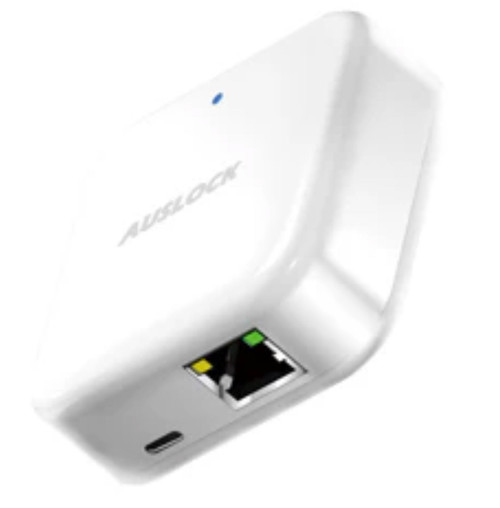


Auslock Gateway G3 - Wired Ethernet Remote Access for Auslock Bluetooth Smart Locks
The Auslock Gateway G3 is a wired bridge between your Auslock Bluetooth smart locks and the internet. It does the same job as the Auslock Gateway G2 - it gives locks that only speak Bluetooth and Zigbee a route to the outside world - but it reaches the network through an Ethernet cable rather than over Wi-Fi.
That makes it the right choice wherever wireless is the weak link. Offices and managed buildings often keep devices like this off the wireless network entirely. Larger homes with structured cabling already have a network point near the front door. And any site where the router merges its 2.4 GHz and 5 GHz bands under one name can find a Wi-Fi gateway frustrating to commission. Plug the G3 into a network port and the whole class of problem disappears.
The G3 can draw its power from the same Ethernet cable through Power over Ethernet, or from a Type-C USB supply where the network port has no PoE behind it. It is not a lock and adds no security of its own. It pairs with the same Auslock locks and is managed from the same Auslock App account as the G2.

Usually ships same day if ordered before 11am AEST (excludes weekends and Queensland public holidays).

The Auslock Gateway G3 is a network bridge, not a lock. It has no keypad, no fingerprint reader, no bolt and no locking function of its own, and it will not secure a door on its own. It exists to give an Auslock Bluetooth lock you already own a connection to the internet so the Auslock App can reach it from anywhere. If you have not bought a lock yet, start with the smart lock you want first - browse the full Auslock and smart lock range - then add a gateway to it.
 Key Features
- Connects Auslock Bluetooth locks to the internet over a wired Ethernet connection, removing Wi-Fi from the setup entirely.
- Powered either by Power over Ethernet or by a Type-C USB supply, so it works on ordinary network ports as well as PoE ones.
- RJ45 port running at 10M / 100M to the IEEE 802.3 standard.
- Talks to the locks over Zigbee and Bluetooth V4.2, the same as the G2, with the same lock compatibility.
- Unlocks remote passcode creation and deletion, live unlock notifications, unlock-record retrieval and remote clock calibration in the app.
- Works with Google Assistant and Amazon Alexa for voice control once linked.
- No batteries and no band-steering problems; once cabled it stays where you put it.
- White, and compact enough to sit on a shelf, a comms cabinet or a wall bracket near the door.
 How It Works
An Auslock lock speaks Bluetooth and Zigbee. Those radios were chosen so a lock can run for months on batteries, and the price of that efficiency is range measured in metres, not suburbs. The gateway holds a permanent internet connection on one side and listens for the locks on the other, passing traffic between them. That is the entire job, and the G2 and G3 do it identically.
What the G3 changes is the network half. Instead of joining a Wi-Fi network it plugs into an Ethernet port, so it never negotiates a band, never gets steered onto 5 GHz, and never drops off because the router renamed a network. On a site with a patch point near the door it is simply a more reliable arrangement. Buyer's Guide Chapter 08 sets out what a gateway does and where it belongs.
The radio side still applies. The G3 has to be within range of the lock, not just plugged into the building somewhere. Auslock publishes about 12 metres of open space and up to five locks per gateway; walls, steel and tiled surfaces all reduce that. Plan the cable run to land the gateway near the door it serves, and check the placement guidance before you pull cable.

The gateway only carries remote traffic. Every credential programmed into the lock itself - PIN code, fingerprint, card, mechanical key and Bluetooth from a phone standing at the door - continues to work exactly as before if the internet drops, the power goes out or the gateway is unplugged. What you lose is remote access, live notifications and the ability to issue a code to someone while you are away. Buyer's Guide Chapter 08 covers this in what happens when the internet goes down.
 Setup and Pairing
Setup runs through the Auslock App with the gateway cabled and powered. Add your locks to the app first; the gateway discovers them afterwards.
- Open the Auslock App and tap the menu icon at the top left.
- Select Gateway, then select G3.
- Connect the network cable to the gateway. If the port supplies Power over Ethernet the gateway powers up from the cable. If it does not, connect a Type-C USB power supply as well.
- Wait for the status light to flash red and blue alternately, which means the gateway is in standby and ready to pair, then tap Next step.
- Tap the + sign to add the gateway.
- Give it a minute or two and the locks within range appear in the app on their own, ready to be bound to the gateway.
 Reading the Status Light

The manufacturer sheet is explicit: where a Power over Ethernet supply is not available, the gateway runs from a Type-C USB power supply instead, using the network port purely for data. A plain Ethernet port and a phone charger will commission this gateway. If pairing times out, power it off and start again.
 Compatible Auslock Locks
The G3 pairs with every Auslock Bluetooth smart lock stocked by Terry's. Each lock below is managed through the same Auslock App account once the gateway is added.
- H06 Glory Series Smart Mortice Lock
- H05 Handy Series Smart Mortice Lock
- S3B Super Slim Smart Mortice Lock
- H11A Handy Series Smart Latch Lock
- H11B Handy Series Smart Latch Lock with Fingerprint
- H13 Smart Lever Handle Lock
- N25 Novo Smart Lever Lock
- T13B Smart Deadbolt
- S31B Ultra Slim - Hinged Door
- S31B Ultra Slim - Sliding Door

The Space Alloy A519 runs on the USmart Go app rather than the Auslock App, and has its own built-in Wi-Fi. It does not pair with the G3 or with any other Auslock gateway, and it does not need one.
 What's in the Box
- Auslock Gateway G3 unit x1
 Suitable Uses
- Commercial and managed buildings - where IT policy keeps devices off the wireless network, or where the wireless is reserved for staff and guests.
- Homes with structured cabling - where a data point already exists near the entry door and a wired link is simply more dependable.
- Sites where a Wi-Fi gateway has already been tried and has not held - band-steered routers, congested 2.4 GHz environments and thick-walled buildings are all easier solved with a cable. The dropout guide covers when to stop fighting the Wi-Fi and change the hardware.
- Short-stay and holiday rentals with a comms cabinet - issue and revoke guest codes remotely with a connection that does not depend on a guest-facing Wi-Fi network.
- Tenanted and multi-unit properties - add and remove credentials between tenancies without a site visit.
 Auslock Gateway Range
Auslock makes two gateways. They do the same job for the same locks through the same app; the difference is how each one reaches your network.
 Full Specifications

 Auslock App
The gateway is managed entirely from the Auslock App, which is free and available for iOS from the App Store and for Android from Google Play. One account holds every lock and gateway on the property. Buyer's Guide Chapter 15 covers how to weigh up a lock platform before you commit to it.
With the G3 added, the app gains remote unlocking, remote passcode creation and deletion, live unlock notifications, the unlock record read back from the lock, and remote clock calibration. Voice control through Google Assistant and Amazon Alexa is set up separately once the gateway is running - the Google Home and Alexa linking guides are in the PDF downloads below.


 Available Finish Options
 White(This Product)STK AUS - G3
White is the only finish Auslock publishes for the gateway range.
 Frequently Asked Questions
No. Power over Ethernet is one of two power options. The manufacturer sheet states plainly that where a PoE supply is not available, a Type-C USB power supply is used instead and the network cable carries data only. An ordinary Ethernet port and a USB charger will run this gateway.
Because the network half is more reliable when it is wired. No band to negotiate, no 5 GHz steering, no re-pairing after a router change. If a data point exists near the door, or the site's Wi-Fi has already given trouble, the G3 is the better answer. If there is no cabling and the Wi-Fi is sound, the G2 is simpler and does the same job.
Yes - every Auslock Bluetooth lock we stock, listed above, up to five per gateway. The one exception across both gateways is the Space Alloy A519, which runs on a different app and has its own Wi-Fi built in.
The locks keep working normally at the door on every credential they hold. You lose remote access and notifications until the link returns. Chapter 08 covers what a gateway outage does and does not affect.
Standard Ethernet distance limits apply to the cable itself, which is far more generous than any radio link. The constraint to plan around is the other side: the gateway still needs to be within about 12 metres of the lock. Run the cable to the door, not to the nearest convenient cupboard.
Additional Information
Going wired removes every Wi-Fi problem and none of the radio ones. The gateway still has to hear the lock. A G3 in a comms rack at the far end of the building will perform worse than a G2 on a power point beside the door. Plan the termination point around the lock, not around the patch panel.
Neither gateway makes a lock harder to defeat. What they add is reach - remote unlocking, passcodes on demand, notifications and the activity log. Choose the lock on its own merits and add the gateway for what it actually does.

On managed sites the deciding factor is often policy rather than performance: an unmanaged device joining the corporate wireless is a conversation nobody wants to have. A wired gateway on a dedicated port sidesteps it.
Google Home and Alexa are linked after the gateway is running, each in its own app, using the guides in the downloads below. Voice unlocking requires a security code set in the Auslock App.
The gateway is a plug-in device. The lock it serves usually is not - door preparation, mortice selection and backset all matter. Our locksmiths can quote the installation if the door needs work.
 Warranty
This Auslock product is backed by a 12-month limited manufacturer's warranty covering defects in materials and internal electronic components under normal residential use. All warranty claims are handled by Terry's Tradies Pty Ltd and its associated websites, trading names, and subsidiaries - contact us in the first instance and we'll take care of it from there. Proof of purchase required for all claims. Returns & Warranty
 Download PDF Resources
Single-sheet hardware guide for the G3: dimensions, RJ45 network port, power options, status lights and the app pairing sequence.
The full 24-page Auslock range catalogue. Page 23 is the gateway page and carries the published G2 and G3 specification table.
The 55-page app manual covering registration, passcodes, eKeys, cards, fingerprints, unlock records and, at section 10, gateway management.
Five-page walkthrough for linking an Auslock account to Google Home so the lock can be operated by voice once a gateway is running.
Step-by-step guide to linking an Auslock account to Amazon Alexa for voice control through a gateway.
Auslock Gateway G3 - Questions Answered in Full
Power and cabling
Is Power over Ethernet required?
No. The manufacturer hardware sheet lists the power interface as Type-C USB or PoE, and its pairing instructions state directly that where a PoE supply is unavailable the Type-C USB power supply is used instead. This is worth stating plainly because the previous version of this page said a PoE switch was mandatory, and it is not.
What power does it actually draw?
The manufacturer sheet gives 500 mA. The 2026 catalogue quotes 5 VDC / 1.0 A across both gateways; we follow the product-specific sheet for the G3. Either way it is a trivial load that any USB charger or PoE port will supply.
Can I use a PoE injector instead of a PoE switch?
Yes, if you want to power it over the cable and your switch has no PoE. But it is no longer the only option - a Type-C supply at the gateway end does the same thing with ordinary cabling.
Network
What sort of network port does it need?
An ordinary RJ45 Ethernet port. The gateway runs at 10M / 100M to IEEE 802.3, so any switch, router port or wall plate made in the last twenty years is more than adequate.
Does the G3 also have Wi-Fi?
The manufacturer hardware sheet documents the wired Ethernet connection and does not mention Wi-Fi. The 2026 catalogue publishes one shared specification table across both gateways which lists Wi-Fi 2.4 GHz alongside Zigbee and Bluetooth, with Power over Ethernet marked as G3-only. Because the two sources do not agree, we describe the wired path the G3 sheet documents and make no claim either way about Wi-Fi on this model. If you need a wireless gateway, the G2 is the model to buy.
Will it work behind a firewall or on a VLAN?
Auslock publishes no port or protocol detail, so on a tightly controlled network this is a question for whoever manages it. On an ordinary small-business or home network with standard outbound access it works without configuration.
Using it day to day
What does the gateway add to the app?
Remote unlocking, remote creation and cancellation of passcodes, live unlock notifications, retrieval of the unlock record from the lock, and remote clock calibration. Without a gateway all of those require standing at the door with a phone.
How many locks can one G3 carry?
Up to five, within about 12 metres of open space. Two locks at opposite ends of a building generally want two gateways rather than one well-placed gateway.
Does it work with voice assistants?
Yes, Google Assistant and Amazon Alexa, linked after the gateway is running using the guides in the downloads on this page. Voice unlocking requires a security code, so a visitor cannot open the door by talking to a speaker.
Model numbering
Why does the manual say G3P when the product is the G3?
The manufacturer hardware sheet is headed GATEWAY G3P and its specification row reads Model: G3P. The product is sold, catalogued and stocked as the Auslock Gateway G3, and the sheet is the document supplied with it. We have noted the designation rather than quietly correcting it.
Is the Auslock G3 the same as the G3 gateway sold with other smart locks?
No. Several brands number their gateways G2, G3, G4 and G5. Those are different products on a different platform and they do not cross over. An Auslock gateway pairs with Auslock locks through the Auslock App.
PDF Files - STK AUS - G3
Single-sheet hardware guide for the G3: dimensions, RJ45 network port, power options, status lights and the app pairing sequence.
The full 24-page Auslock range catalogue. Page 23 is the gateway page and carries the published G2 and G3 specification table.
The 55-page app manual covering registration, passcodes, eKeys, cards, fingerprints, unlock records and, at section 10, gateway management.
Five-page walkthrough for linking an Auslock account to Google Home so the lock can be operated by voice once a gateway is running.
Step-by-step guide to linking an Auslock account to Amazon Alexa for voice control through a gateway.
Auslock Warranty
All Auslock products purchased through Terry's Tradies Pty Ltd and its associated websites, trading names, and subsidiaries are backed by a 12-month limited manufacturer's warranty. If something isn't right, contact us first - we manage all warranty assessments on your behalf and will work with you to get it resolved.
Warranty Summary
How to Make a Claim
- Contact Terry's Tradies Pty Ltd at your original place of purchase with a description of the fault.
- Have your proof of purchase ready (receipt or order confirmation).
- Provide clear photos and/or video of the defect - this is required before any assessment can begin.
- We may ask you to complete troubleshooting steps or a technical support form before the item is returned. Do not send the product back without our written approval.
- If the claim is approved, we will arrange the next steps with you directly - including return freight where applicable.
 What the Warranty Doesn't Cover
The following are not covered under the Auslock manufacturer's warranty:
- Incorrect or improper installation
- Door or frame misalignment
- Incorrect mortise, latch, or backset selection
- Installation on doors outside the product's specifications
- Environmental exposure beyond the product's stated IP rating
- Water ingress not consistent with the product's IP rating
- Power surge, fire, flood, lightning, or other natural disaster
- Cosmetic damage or normal wear and tear
- Battery misuse or leakage
- Forced entry, vandalism, or tampering
- Unauthorised modification
- Use of non-Auslock components
- Commercial or high-traffic use (unless approved in writing)
Rechargeable battery products (Models A01, A02, A03, A519, A619): Battery-related damage is excluded where a non-certified charger, fast charger, incorrect voltage (outside 5.2V / 2A), third-party battery, or unsuitable charging environment has been used.
Change-of-Mind Returns
Change-of-mind returns are accepted at our discretion and subject to the manufacturer's return conditions. If you've changed your mind, contact us within 14 days of receiving your order and we'll let you know if a return is possible and what applies.
To be eligible, products must be:
- Unused and uninstalled
- Not powered on, activated, paired, programmed, or configured in any way
- In original, fully sealed condition with all packaging, accessories, and components
Where a return is approved, a 20% restocking fee applies and return shipping is at your cost. Products that have been installed, powered on, or had any credentials registered are not eligible for return.
Our goods come with guarantees that cannot be excluded under the Australian Consumer Law (ACL). You are entitled to a replacement or refund for a major failure and compensation for any other reasonably foreseeable loss or damage. You are also entitled to have goods repaired or replaced if they fail to be of acceptable quality and the failure does not amount to a major failure. Nothing in this policy limits or excludes your rights under the ACL.

Confused? Overwhelmed? We get it.
Choosing the right smart lock can be genuinely tricky - door types, backsets, app platforms, compatibility with your existing hardware... there is a lot to consider. We have decades of experience fitting locks of all types, including smart locks, and we are happy to help.
Our expert recommendation service is free. Upload a few photos of your door and describe what you need, and one of our qualified locksmiths will give you a personalised recommendation.
Get Your Free Recommendation →How it works - three easy steps:
1. Upload photos
A few clear shots of your door, lock and frame - inside and out.
2. We assess
Our locksmith reviews your setup and requirements - door type, weather exposure, how you want to use it.
3. You get a recommendation
A personalised recommendation tailored to your door, budget and needs. No pressure, no upsell.
Also useful while you are deciding:


