G2 vs G3 vs G4 vs G5 Smart Lock Gateways Compared
Posted by Jim Noort on 12th Sep 2024
G2 vs G3 vs G4 vs G5: Smart Lock Gateways Compared
Four gateway types. Multiple brands. One platform. Here’s exactly which gateway suits your property — and why choosing the wrong one is the most common smart lock setup mistake.
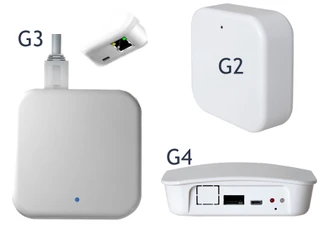
A smart lock that uses Bluetooth is secure and reliable locally. But Bluetooth alone does not give you remote access — the ability to lock, unlock, issue codes, and view access logs from anywhere in the world. For that, you need a gateway: a small device that bridges your Bluetooth smart lock to the internet via your network connection.
The TTLock platform — used by McGrath, Lockton, Auslock, Vault, and several other Australian smart lock brands — supports four gateway generations, each with a different connectivity method suited to a different type of installation. The gateway type determines how reliably your lock stays connected, not which brand badge is on the box.
This guide covers:
- What each gateway generation does and which connectivity method it uses
- Which brands offer each gateway type
- The key note on cross-brand interchangeability
- A clear decision framework for choosing the right gateway for your property
For the broader connectivity picture including other platforms, see Chapter 08 — Smart Lock Gateway Comparison in the Smart Lock Buyer’s Guide. For troubleshooting WiFi connectivity issues once installed, see Why Smart Locks Sometimes Drop Off WiFi.
This guide was reviewed and updated in May 2026.
 Do You Actually Need a Gateway?
Not always. Smart locks on the TTLock platform operate fully without a gateway for PIN code, RFID, fingerprint, and Bluetooth access. A gateway is only required if you need one or more of the following:
Control the lock from anywhere via the TTLock app, not just Bluetooth range.
Issue, change, or revoke PINs and access without being on-site.
See who accessed the door in real time, not just when you next connect via Bluetooth.
Automate guest code generation from platforms like Hospitable, Uplisting, or RemoteLock for Airbnb and short-stay.
 One gateway per network segment, not one per lock. A single gateway can manage multiple locks within its Bluetooth range (typically 8–10 metres per lock for G5; similar for other generations). For large or multi-floor installations, multiple gateways are placed strategically to cover the space.
 Cross-Brand Interchangeability
The G2, G3, G4, and G5 designations describe gateway generations on the TTLock platform, not brand-exclusive hardware. Multiple brands — including McGrath, Lockton, Auslock, and Vault — manufacture gateways to the same specifications within each generation.

 Always confirm TTLock platform compatibility before assuming interchangeability. Not all locks marketed under these brands use TTLock. If in doubt, check the lock’s product page or ask our team before ordering a gateway.
 G2 Gateway — 2.4 GHz Wi-Fi
Note: The original McGrath G2 has been discontinued. Equivalent G2 gateways from Lockton and Auslock are available and cross-compatible with TTLock-platform locks.
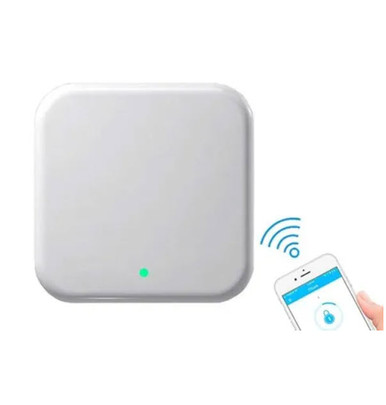
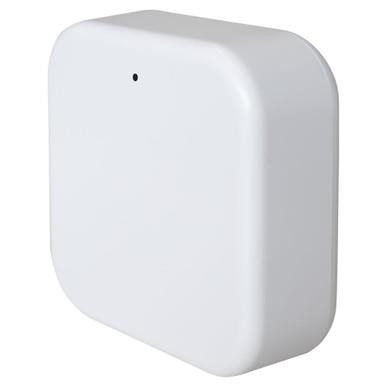
The G2 is the entry point for remote access on TTLock smart locks. It connects your Bluetooth lock to the internet using your existing 2.4 GHz Wi-Fi network. Once paired via the TTLock app, you can lock, unlock, manage codes, and view access logs from anywhere.
2.4 GHz only. The G2 will not connect to a 5 GHz network or a dual-band router that uses band steering (where 2.4 and 5 GHz share the same SSID). If your router does this and you cannot separate the bands, the G5 is a better choice. See Why Smart Locks Sometimes Drop Off WiFi for more detail on this common issue. G3 Gateway — Power over Ethernet (PoE)

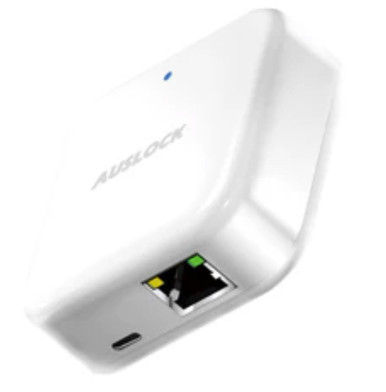
The G3 uses Power over Ethernet exclusively — no Wi-Fi at all. A single RJ45 cable provides both data and power, which makes it the most stable and predictable gateway for commercial installations. It is the correct choice wherever Wi-Fi is restricted, unreliable, or managed by IT policy.
PoE infrastructure required. The G3 needs a PoE-capable network switch or a PoE injector at the installation point. If your site has structured cabling already in place, this is straightforward. If you are running cable for the first time, factor this into your installation cost. G4 Gateway — Wi-Fi + 4G SIM Fallback

- 2.4 GHz Wi-Fi primary connection
- 4G SIM card slot for automatic failover
- Supports up to 100 smart locks
- Compact: 70 × 70 × 26 mm
- USB Type-C powered
- Mesh-capable for multi-gateway sites
The G4 is built for locations where internet reliability cannot be guaranteed. It connects via 2.4 GHz Wi-Fi as its primary connection and automatically fails over to a 4G mobile network via a SIM card if the broadband drops out. Access management continues uninterrupted.
Ideal use cases for the G4
Holiday homes with NBN reliability issues, remote rural properties, construction sites where temporary internet is used, and any access point where a dropout during a critical access window is unacceptable.
4G SIM is not included and has an ongoing data cost. You will need a compatible Australian SIM on a data plan. The data consumption is low (the gateway only sends small control packets), but you need an active SIM for the failover to work. Factor this into your ongoing running cost. G5 Gateway — Dual-Band Wi-Fi (2.4 GHz + 5 GHz)

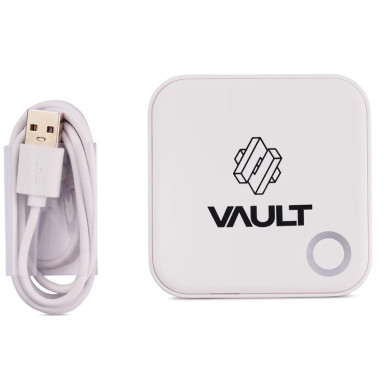
The G5 is the most capable Wi-Fi gateway in the range. Its dual-band support means it can connect to either 2.4 GHz or 5 GHz networks, solving the band-steering problem that causes G2 dropouts on modern mesh routers. It is the recommended choice for sites with three or more locks and for any installation where network performance is a priority.
Why dual-band matters: Many modern routers — particularly mesh systems — use band steering: they broadcast a single network name for both 2.4 and 5 GHz and dynamically assign devices to whichever band the router prefers. A G2 gateway can get assigned to 5 GHz and fail to connect. The G5 handles both bands and avoids this issue entirely. Quick Comparison
| Generation | Connectivity | Brands available | Best for |
|---|---|---|---|
| G2 | 2.4 GHz Wi-Fi | Lockton, Auslock | Homes, Airbnb, small offices with stable 2.4 GHz Wi-Fi |
| G3 | Ethernet / PoE only | McGrath, Auslock | Commercial, enterprise, IT-managed networks |
| G4 | 2.4 GHz Wi-Fi + 4G SIM | McGrath | Remote/holiday properties, sites with unreliable internet |
| G5 | 2.4 GHz + 5 GHz Wi-Fi | McGrath, Vault | Modern homes, hotels, large deployments, mesh router environments |

Not Sure Which Gateway Your Site Needs?
Tell us about your property — number of locks, network setup, and use case — and we’ll confirm the right gateway and how many you need before you order.
Ask an ExpertVisit Australia’s leading Smart Lock showroom and workshop:
Gold Coast Smart Locks
9/2 Prosper Crescent
Burleigh Heads, QLD
See working gateway configurations and get specification advice before you commit.