The Perils of the Internal Snib on Smart Locks (Secure Lock Explained)
Posted by Mat Steele on 17th Feb 2026
The Perils of the Internal Snib on Smart Locks
Secure Lock explained — what it blocks, what it doesn’t, and why it’s one of the most common causes of an unexpected lockout.
Smart locks are sold on convenience — PIN codes, fingerprints, RFID cards, app unlocks, and remote access via Wi-Fi. But there’s one feature that regularly catches people out because it behaves like an old-school mechanical lock feature, not a smart function:
Secure Lock (also called the internal snib or privacy snib).
This guide explains what Secure Lock is, what it completely disables, what it does not disable, and why misunderstanding it is one of the easiest ways to create an unexpected lockout — especially at a rental property. It covers:
- What Secure Lock actually does at the hardware level
- Every credential type it blocks
- Why the mechanical key still works
- Why admin app override does not work
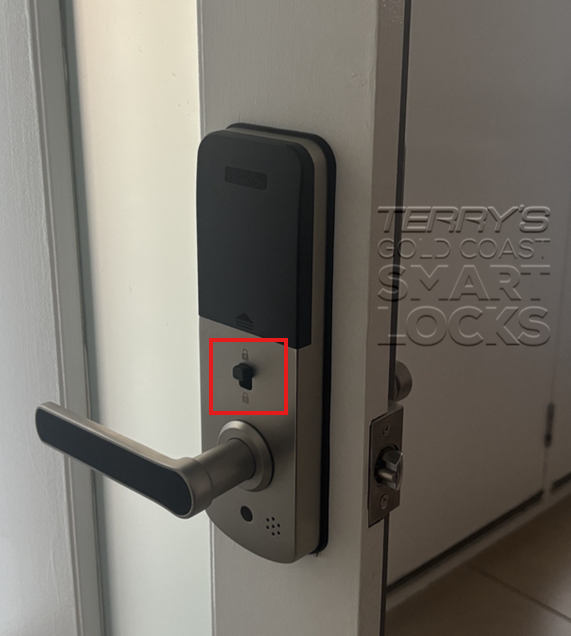
- How to tell if it’s currently engaged
- The specific risk for Airbnb and short-stay rental hosts
If your lock has suddenly stopped accepting all credentials, Secure Lock is the first thing to rule out. See also: Smart Lock Not Locking? 3 Common DIY Mistakes.
This guide was reviewed and updated in May 2026.

What Is Secure Lock (Internal Snib)?
Secure Lock is a physical privacy function activated from the inside of the door. It is designed to prevent people outside from gaining entry using any smart credential.
Think of it as a “do not disturb” mode for your front door — except it is implemented at the lock hardware level, not in software. When you turn the snib to the locked position, the lock’s credential-reading electronics are physically isolated from the latch mechanism.

What Secure Lock Disables
When Secure Lock is engaged, it locks out every digital access method without exception:
- PIN codes (all users, all code types)
- Fingerprint access
- RFID cards and fobs
- Bluetooth eKey unlocks
- App unlock commands (local Bluetooth)
- Remote unlocks via Wi-Fi bridge or gateway
- Voice assistant commands
Simple rule: If it is a digital credential, Secure Lock will block it — including credentials held by an administrator or property owner.

What Secure Lock Does Not Disable

This is intentional. The mechanical key override is the last-resort layer of the four-layer authentication stack — the fallback that remains available for flat batteries, phone issues, Wi-Fi dropouts, and emergencies. The hardware snib cannot physically prevent a key from turning the cylinder — these are two entirely separate mechanisms within the lock body. For the full picture on how the mechanical override works, where the keyhole is hidden on different lock formats, and how to store the key safely outside the property, see our Mechanical Key Override guide.

Can the Admin Override Secure Lock in the App?
This is the most common question: “If someone turns on Secure Lock from inside, can the admin just override it in the app?”
In practice, no. And the reason is important to understand.
Admins can manage users: add or remove PINs, issue or revoke eKeys, view logs. But if Secure Lock has been physically engaged at the lock, those credentials will be refused until someone physically disengages the snib from inside the door. The lock treats the snib as local-hardware priority — the physical action takes precedence over all app commands.

How to Tell If Secure Lock Is Engaged
Secure Lock can only be checked and disengaged from inside the door. There is no way to determine its status or change it from outside — which is exactly the problem when a lockout occurs.
Indicators that Secure Lock is engaged:
- Visual: The snib dial or lever is visibly turned to the locked position — often marked with a padlock icon or the word LOCK. Compare to the unlocked position to confirm.
- App indicator: Some lock models display a Secure Lock status in the app when connected via Bluetooth or gateway — look for a lock-within-a-lock icon or "Secure" label.
- LED or audio: Some models beep or flash differently when an unlock is attempted while Secure Lock is active, rather than the normal unlock feedback.
- Symptom: If every credential is simultaneously rejected — PIN, app, RFID, fingerprint — and the lock was working correctly before, Secure Lock is the first thing to check from inside.


The Real-World Perils of Secure Lock
“My codes all stopped working”
The most common call we receive is a lock that suddenly won’t accept any credential — no PIN, no RFID, no fingerprint, no app. Secure Lock is very often the cause. See: Smart Lock Not Locking?
Remote access becomes irrelevant
Even with a Wi-Fi bridge or gateway fitted, Secure Lock will block remote unlock commands. The app shows the lock as reachable. The lock sends a confirmation. But the door will not open. The app and gateway are working perfectly — the problem is hardware-level.
Accidental household lockouts
A family member can engage the snib without understanding what it does. Once they leave, nobody outside can enter using any smart credential. Only someone physically inside can disengage it — or the mechanical key can override.
False security assumptions
Homeowners sometimes use Secure Lock as an extra layer of overnight security, assuming it means nobody can enter at all. It doesn’t — anyone with a correctly cut mechanical key can still open the door regardless.
The Airbnb & Rental Property Risk
For short-stay rental hosts, Secure Lock is one of the most operationally damaging scenarios possible — and it happens more than people expect.
The scenario:
- A departing guest notices the snib on the inside of the door and turns it — perhaps thinking they’re being helpful, or accidentally while grabbing their bags
- They leave. The door closes and is now in Secure Lock mode from outside
- The next guest arrives and enters their PIN or taps their RFID card — nothing works
- The host tries a remote unlock from the app — the gateway confirms the command sent, but the door still won’t open
- The only resolution: a locksmith with a mechanical key, or a property manager who can physically access the inside of the property
For the broader picture on managing smart lock access at short-stay properties, see Using TTLock / McGrath for Airbnb in Australia and Using Igloohome for Airbnb in Australia.

Best Practice — Avoiding the Headaches
- Teach the household what the snib does and how to disengage it. Label it if needed. A piece of tape over the snib mechanism is a crude but effective reminder not to touch it.
- Keep mechanical key control tight. If keys are out there, Secure Lock provides no protection against the person holding one. Know exactly who has mechanical keys.
- Don’t rely on remote unlock as your only recovery plan if Secure Lock is likely to be used. Remote unlock will not work when the snib is engaged.
- Use Secure Lock intentionally — as a deliberate privacy or lockout mode — not as an everyday locking habit or alternative to simply locking the door normally.
- Rental properties: Include a snib check in your cleaner’s turnover checklist and maintain a local mechanical key contact for recovery.
- Ask at installation whether the snib on your specific lock model can be physically disabled if it’s not needed at your property. Some models allow this.

Frequently Asked Questions
Does Secure Lock stop fingerprints, RFID, and app unlock?
Yes. Secure Lock blocks all digital credentials including fingerprint, RFID, PIN codes, Bluetooth eKeys, and app or remote unlock commands. Every digital access method is blocked simultaneously.
Does Secure Lock stop the mechanical key?
No. A correctly cut mechanical key can still unlock the door when Secure Lock is engaged. The key cylinder and the snib mechanism operate independently inside the lock body.
Can an admin override Secure Lock remotely?
No. Secure Lock is a hardware-level physical state, not a software setting. No app command — including administrator commands — can override a physical hardware block. The snib must be disengaged locally from inside the door.
What should I do if I’m locked out?
Use the mechanical key if one is held locally — see our guide on where to store the override key so it’s accessible when you need it. Alternatively, have someone inside disengage the snib. If neither is possible, a locksmith will be required. See our professional installation and support services.
Related Guides
If all credentials are failing, Secure Lock is the first thing to rule out. This guide covers the next most likely causes.
Gateway automation, PMS integration, and operational risks for short-stay hosts — including the snib lockout scenario.
The offline-first Igloohome approach for hosts — and how it handles access reliability differently from gateway-dependent systems.
Where the keyhole is hidden on common lock formats, how to get in when the battery is dead, which locks don’t have an override, and how to store the backup key safely outside the home.
Another commonly misunderstood smart lock feature — what tamper alert actually does and why it triggers falsely on most modern locks.
Full breakdown of every credential type — PIN, fingerprint, RFID, Bluetooth, WiFi — including behaviour when blocked by privacy modes.
Step-by-step troubleshooting for smart lock issues — from credential failures to connectivity problems.
Not Sure Which Lock You Have or How Its Snib Behaves?
If you’re unsure whether your lock model has a Secure Lock snib, how to disable it, or what your options are after a lockout, our team can advise before you buy or modify anything.
Ask an ExpertVisit Australia’s leading Smart Lock showroom and workshop:
Gold Coast Smart Locks
9/2 Prosper Crescent
Burleigh Heads, QLD
See working lock models, understand their features, and get real advice before you commit.