Using Igloohome for Airbnb in Australia: algoPIN Explained
Posted by Mat Steele on 20th Feb 2026
Using Igloohome for Airbnb in Australia: A Practical Guide
How algoPIN really works, what Airbnb Connect does, and which Igloohome product fits which type of host.
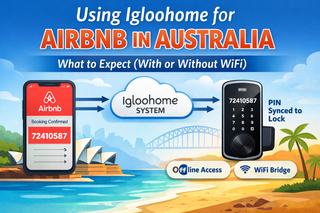
Igloohome is often marketed as the “no WiFi required” smart lock for Airbnb hosts. That headline is accurate — but it deserves a deeper explanation than the marketing usually provides.
This guide covers:
- How algoPIN actually works under the hood
- How Airbnb Connect connects bookings to PIN delivery
- What Igloohome can and cannot do without WiFi at the property
- Which Igloohome product suits which type of host
- Wi-Fi Bridge range considerations for properties with multiple locks
- A quick-reference setup checklist
For the foundational comparison with the TTLock platform, start with Airbnb Smart Locks in Australia: Do You Really Need WiFi? For the canonical Buyer’s Guide reference, see Chapter 07 — Airbnb & Short-Stay Rentals.
How Igloohome Airbnb Connect Actually Works
Airbnb Connect is built into the igloohome app. It’s not a third-party service or PMS — it’s a native integration between Igloohome and Airbnb’s host platform.
The connection flow:
- Log into Airbnb from within the igloohome app under Account Settings
- Airbnb authorises booking data access via OAuth
- Igloohome reads check-in and check-out times for each confirmed reservation
- You link each Igloohome lock to a specific Airbnb listing
- For every confirmed booking, the system generates a unique PIN and emails it to the guest
The PIN delivery timing is configurable: anywhere between 1 and 48 hours before check-in. Once delivered, the PIN is valid only between the check-in and check-out times set on the Airbnb listing. No manual code creation, no manual revocation. You can change check-in/check-out times on future reservations from inside the igloohome app, but once an access email has been sent for a specific booking, that PIN’s validity window is locked.
For the comparison between Igloohome’s native Airbnb Connect and the TTLock/PMS-dependent approach, see Chapter 07 — Airbnb & Short-Stay Rentals in the Smart Lock Buyer’s Guide.
algoPIN — How the Lock Validates a Code Without Internet
This is the part most explanations skip. Understanding it helps you trust the system and explain it to skeptical co-owners.
algoPIN is Igloohome’s proprietary cryptographic PIN system. At a high level, the PIN itself is calculated using three inputs:
- The lock’s unique factory ID — baked in during manufacture, unique to your specific unit
- The booking time window — the check-in and check-out times for that reservation
- A cryptographic algorithm — the same algorithm runs on Igloohome’s servers (which generate the PIN) and on the lock itself (which validates it)
When a guest enters the PIN, the lock runs the same algorithm using its internal clock as the reference time. If the algorithm produces a match within the valid window, the lock accepts the code. If the current time falls outside the booking window, the same PIN is rejected.
This is why no WiFi is needed at the lock: the lock isn’t looking up the code in a database. It’s independently verifying that the code was generated for this specific lock, by an authorised party, for the current time window.
Because the cryptographic validation needs enough entropy to be genuinely secure offline. A 4-digit code has only 10,000 combinations — trivially brute-forceable. Igloohome guest PINs typically run longer to maintain real cryptographic security. Some guests may comment on the length; the entry process itself is still simple — type the code, press unlock.
The lock’s clock matters for this to work. It’s set during initial pairing and updated whenever the app connects via Bluetooth. If a lock’s clock drifts substantially (rare, but possible after very long periods without app connection), the simplest fix is to open the app within Bluetooth range to resync.
For the non-technical overview comparing algoPIN with TTLock’s offline code approach, see Chapter 07 — Airbnb & Short-Stay Rentals in the Smart Lock Buyer’s Guide.
What Works Without WiFi at the Property
This is what genuinely runs offline, with no WiFi or internet connection at the lock’s location:
- Booking-generated PIN entry by guests
- Airbnb Connect PIN generation (your phone needs internet; the lock does not)
- Manual PIN creation (one-time, permanent, duration, recurring)
- Bluetooth unlock when you’re within range
- Master PIN, RFID, fingerprint (where supported), and physical key access
- All onboard alarms (tamper, intrusion, fire detection)
- Instant remote PIN revocation (you can flag it, but the lock learns when next in BT range)
- Real-time access logs from anywhere
- Live battery monitoring
- Remote unlock
- Real-time entry notifications
- Alexa integration
For single-property hosts who check on the property regularly, these limitations are usually acceptable. For multi-property hosts managing remotely, a Bridge becomes valuable.
Adding the Igloohome Wi-Fi Bridge — What Changes
The Wi-Fi Bridge is a small, USB-C-powered Bluetooth-to-WiFi bridge that sits in the property and connects the lock to the internet. Once installed, you unlock:
- Real-time entry notifications (cleaner arrived, guest checked in)
- Remote access log viewing
- Live battery status from anywhere
- Instant PIN revocation
- Remote unlock (for emergencies or trades arriving early)
- Alexa voice control integration
- 2.4GHz WiFi only. The Bridge does not support 5GHz networks. If your router uses band steering (auto-merging 2.4 and 5GHz into one SSID), this is the most common setup failure cause. Either disable band steering for the Bridge or set a dedicated 2.4GHz SSID.
- One Bridge supports up to 5 igloohome devices. For properties with multiple locks, one Bridge can typically cover them all — but range from the Bridge to each lock matters (see the next section).
For the broader gateway comparison across smart lock ecosystems, see Chapter 08 — Smart Lock Gateway Comparison in the Buyer’s Guide.
Bridge Range — How Far It Can Be From Each Lock
The Bridge connects to locks via Bluetooth, and Bluetooth range varies by product. Plan Bridge placement before purchase if you have more than one lock or a larger property.
| Igloohome Product | Approximate Bridge Range |
|---|---|
| Retrofit Lock | Less than 7m |
| Smart Mortice Lock V2 | Less than 10m |
| Smart Mortice Lock V2 + Fingerprint | Less than 10m |
| Smart Keybox 3 | Less than 4m |
| Smart Bluetooth Padlock 2 | Less than 10m |
These are line-of-sight or near-line-of-sight ranges. Walls, doors and metal frames reduce effective range. For a Keybox 3 mounted outdoors at 4m from the inside of the property, expect real-world reliability to depend on what’s between the Bridge and the box. If in doubt, choose a Bridge position closer to the device than the rated maximum.
Igloohome Products for Airbnb — Which One Fits Your Property
Each Igloohome product is designed for a specific application. Choose by door type and host scenario, not by feature count alone.
Smart Keybox 3
For: occasional hosts, holiday homes, properties where the existing lock stays in place.
Heavy-duty key safe with PIN access. Stores keys, cards or small remotes. Native Airbnb Connect. IP66 rated for outdoor wall or fence mounting. AAA-powered with USB-C emergency power. No door changes required — the simplest way to add smart access to an existing setup.
Smart Deadbolt Go
For: standard residential timber doors (35-45mm thick) with existing or new deadbolt installations.
Fingerprint, PIN, Bluetooth and key access. Stores up to 20 fingerprints and 250 PINs. 60mm or 70mm backset auto-calibration. ANSI/BHMA A156.40 BB rated for commercial-grade durability. USB-C emergency power port. The right choice for hosts replacing an existing deadbolt with a multi-credential smart lock.
Smart Mortice Lock V2
For: properties with timber swing doors (40-70mm thick) using a 70mm mortice format, where PIN/Bluetooth/RFID access is enough and fingerprint isn’t required.
Up to 250 active PINs, unlimited Bluetooth keys, up to 100 RFID tags plus 100 RFID stickers. 8 x AA batteries with up to 18 months life. IP64 rated. 9V emergency jumpstart. Child/pet safety handle. Full Airbnb Connect support.
Smart Mortice Lock V2 + Fingerprint
For: the same door range as the V2, where fingerprint biometric access is required.
Identical to the V2 plus up to 100 stored fingerprints. The fingerprint reader sits on the outer face and flips open when tapped. Particularly useful for owner-occupied properties also let out periodically — family members use fingerprints, guests use PINs.
Retrofit Lock
For: Euro-cylinder-fitted doors where the existing hardware stays in place and no drilling is wanted.
Indoor-mounted unit that turns the Euro cylinder from inside the door. Bluetooth, existing key, and PIN access via a remote Igloohome Keypad (sold separately, up to 30m range from the Retrofit Lock — uniquely supports up to 2 keypads). The right answer for properties with existing pull handles, ornate hardware, or any installation where drilling the door isn’t an option. See our Retrofit Lock case study for a real install.
Smart Bluetooth Padlock 2
For: gates, sheds, beach houses, holiday-park bollards, and any application requiring a padlock-format smart lock.
PIN and Bluetooth access. No mechanical key (so no keys to manage). Rechargeable lithium battery via USB-C with up to 9 months of life per charge. IPX7 water-resistant and MIL-STD 810H rated. Native Airbnb Connect. Useful for properties where guests need access to multiple gated areas.
For an independent platform-level assessment of Igloohome — including security architecture and acknowledged limitations compared with TTLock — see Chapter 15 — Smart Lock App Platforms in the Buyer’s Guide.
Three Real Host Scenarios
Scenario 1 — Single beach-house host, no WiFi at the property
The Keybox 3 mounted near the entry is often the right starting point. Existing locks stay in place. PINs are auto-generated per booking via Airbnb Connect. If WiFi gets added later, a Bridge can be added without changing anything else.
Scenario 2 — Owner-occupied home let out 6 weeks a year
The Smart Mortice Lock V2 + Fingerprint on the front door. Family members enrol fingerprints for daily use. Guest PINs auto-generate via Airbnb Connect during let periods. Existing physical keys still work as backup. Add a Bridge if remote notifications during guest stays are wanted.
Scenario 3 — Modern apartment with Euro cylinder and pull handles
The Retrofit Lock plus a remote Igloohome Keypad mounted beside the door. No drilling, existing hardware preserved, PIN access for guests via the wall-mounted keypad. This is the install pattern documented in our Retrofit Lock case study.
Airbnb Connect Setup — Quick Reference
The full workflow from installing a new lock to delivering your first auto-generated guest PIN:
- Install the lock on the door (or mount the Keybox 3).
- Download the igloohome app and create an account.
- Within Bluetooth range, pair the lock to your account.
- Customise the master PIN (factory PIN is 1234567890 before pairing).
- Under Account Settings, tap Connect with Airbnb.
- Authorise booking data access when prompted.
- Under Reservations, tap Add and select the Airbnb listing to link to this lock.
- Set the PIN delivery window (1-48 hours before check-in).
- Confirm check-in and check-out times match the Airbnb listing.
From this point, every confirmed Airbnb reservation triggers an automatic PIN generation and delivery email. No further action is required.
Related Guides in This Series
The decision framework comparing Igloohome and TTLock/McGrath for Australian Airbnb hosts.
How TTLock-based locks scale via PMS integrations — the alternative path for multi-property operators.
A real Airbnb install with existing pull handles, completed before guests arrived — 1,500km from the client.
The canonical reference covering algoPIN, Airbnb Connect, WiFi-drop scenarios, and product fit by host type.
Wi-Fi Bridge versus McGrath G-series gateways — band steering, range, and which fits which property.
The six measurements that determine which Igloohome product will actually fit your specific door.
Need Help Choosing the Right Smart Lock for Airbnb?
Whether you’re running one property or scaling multiple short-stay listings, we can help you choose the right lock, gateway and automation setup.
Ask an ExpertVisit Australia’s leading Smart Lock showroom and workshop:
Gold Coast Smart Locks
9/2 Prosper Crescent
Burleigh Heads, QLD
See working models, compare gateways, and get real advice before you commit.