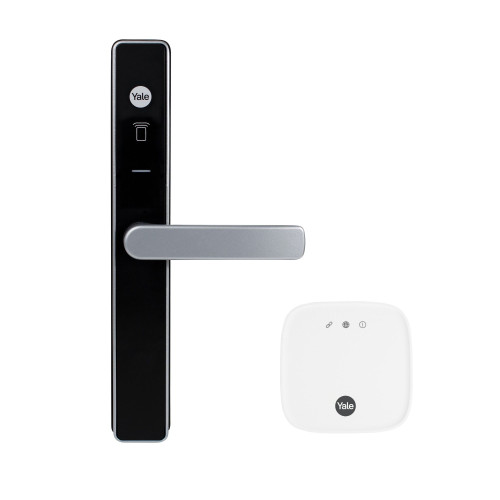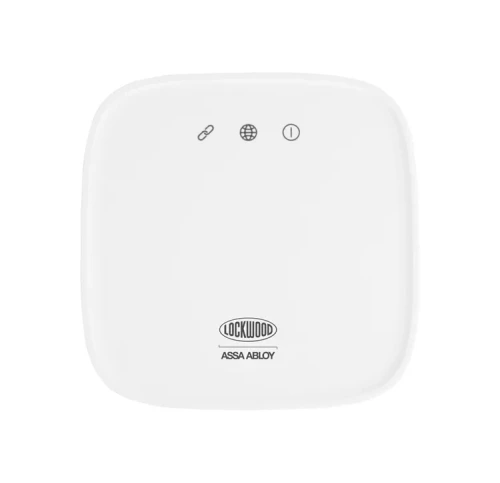


Lockwood Home Hub - Wi-Fi, Zigbee & Bluetooth Smart Home Gateway - White
The Lockwood Home Hub (LWA/HUB) is the central connection point for your smart home. It keeps your Lockwood and Yale smart devices seamlessly integrated while freeing up your power points, supporting up to 16 Lockwood and Yale Bluetooth smart devices and 30 Zigbee actuators, including Lockwood Smart Aeris Window Actuators and Yale Aeron Smart Window Actuators, for even the most connected homes.
With the Home Hub in place, you can access and manage your Lockwood and Yale smart devices remotely, giving you control from anywhere. It also enables integration with smart home ecosystems, so you can create automations such as turning on lights when your door unlocks or playing your favourite music as you walk in.
It is the accessory that adds remote access and voice assistant control to compatible Lockwood smart locks such as the Lockwood Lume interior smart lever. Communication is over Wi-Fi 2.4GHz, Zigbee, and Bluetooth, with a simple app-driven set-up.

Usually ships same day if ordered before 11am AEST (excludes weekends and Queensland public holidays).
 Key Features
- Central hub for Lockwood and Yale smart home devices
- Supports up to 16 Bluetooth smart devices and 30 Zigbee actuators
- Remote access and management of your locks and devices from anywhere
- Enables smart home connectivity and automations
- Expands Lockwood Home capabilities, including SyncPath Technology
- Wi-Fi 2.4GHz, Zigbee, and Bluetooth communication
- Simple app-driven set-up process
- USB-C powered, with an included power adaptor


 Lockwood Home App
The Home Hub is set up and managed through the Lockwood Home App, which is also compatible with the Yale Home App so users can control their devices through either app. Both are available on iOS and Android. Once the hub is connected, remote access, automations, and voice assistant integration become available across your paired Lockwood and Yale devices. For a comparison of the major smart lock app ecosystems, see Chapter 15 - Smart Lock App Platforms.
 What's in the Box
- Lockwood Home Hub unit
- USB-C power adaptor (5 VDC / 1.0A, I plug)
- Quick start guide
 Suitable Uses
- Adding remote access and voice control to a compatible Lockwood or Yale smart lock
- Homes running several Lockwood or Yale Bluetooth and Zigbee devices that need a central hub
- Creating smart home automations linked to door events
- Managing access and monitoring devices while away from home
 Available Finish Options
 White
White
(This Product)
STK LWA/HUB
Finish selection does not affect functionality, compliance, or performance.
 Full Specifications
 Dimensions

 Works With
The Home Hub adds remote access and voice assistant control to compatible Lockwood and Yale smart devices. Products that pair with it include the Lockwood Lume Interior Smart Lever and the Lockwood 001Touch Plus Smart Deadlatch, both of which run on the Lockwood Home App and gain remote control once paired with the hub. To understand what a gateway does and how the options compare, see Chapter 08 - Gateway Comparison.
The Lockwood Latitude Slim Smart Lock also pairs with the hub, which is what gives that lock remote locking, remote PIN changes and voice assistant control. All four products share the one Lockwood Home and Yale Home platform, so a single hub can serve the lot.

ASSA ABLOY Australia has issued a Cyber Security Declaration (Cyber-AU-00035) for the Home Hub, confirming it is manufactured in line with Australian Cyber Security requirements for Internet of Things consumer products, with a stated product support period of 3 years. The full declaration is available in the PDF Files below. It was confirmed on 3 February 2026 and covers hardware Rev 1 running firmware V2.3.7, with the Lockwood Home and Yale Home apps named as the associated software on both iOS and Android.
 Frequently Asked Questions
It is the central connection point that lets you control and manage your compatible Lockwood and Yale smart devices remotely, and enables automations and voice assistant integration. Without a hub, those devices still work locally over Bluetooth. Chapter 08 explains what a gateway does.
The hub connects over Wi-Fi 2.4GHz, and also communicates with devices via Zigbee and Bluetooth V4.2. If you have connection trouble, see Why Smart Locks Sometimes Drop Off WiFi. Chapter 13 answers the same question for smart locks generally.
Up to 16 Lockwood and Yale Bluetooth smart devices and 30 Zigbee actuators. Larger homes may need additional coverage devices depending on layout and building materials. Chapter 08 covers gateway placement.

No. Compatible locks such as the Lockwood Lume work locally over Bluetooth without a hub. The Home Hub adds remote access, automations, and voice assistant control on top of that. Chapter 01 draws the smart versus connected distinction.

No - the Home Hub is an indoor-use-only device. It is rated for 0 to 60 degrees Celsius and 10 to 90% non-condensing humidity, and its power adaptor only to 40 degrees Celsius, so an unconditioned garage or an outdoor enclosure can take it outside those limits. Mount it inside the house, as central to the devices it serves as the power points allow.
Additional Information
The Lockwood Home Hub is an indoor-use accessory that plugs in over USB-C and stays powered from a spare outlet or USB source. It is designed to grow with your setup: start with one smart lock and add more Lockwood and Yale devices over time, all managed from the one app. SyncPath Technology, which pairs the Yale Unity Screen Door and your Lockwood smart lock through the hub, is one of the features it unlocks.
Lockwood is an ASSA ABLOY brand and one of Australia's most recognised locking names, backed by the Lockwood 25 Year Mechanical Warranty. For background on the brand, see Chapter 10 - Brand Profiles. For how gateways fit into a smart lock setup, see Chapter 08 - Gateway Comparison. If you would rather we set it up on site, our advice and installation team covers the Gold Coast and surrounds.
 Warranty
Lockwood products bought new in Australia through authorised channels are covered against defects in materials and workmanship: 25 years on mechanical components, 3 years on electrical and electronic parts (PADDE and electric mortice locks 5 years; batteries excluded), 12 months on keys, and finish cover that varies by finish type (up to 25 years on Everbrass). Proof of purchase required for all claims.
 Download PDF Resources
One-page ASSA ABLOY declaration for model LWA/HUB - declaration number Cyber-AU-00035, hardware Rev 1, firmware V2.3.7, bar code 9340116171210, three-year support period, confirmed 3 February 2026, with Yale Home and Lockwood Home listed as the associated software.
Lockwood's Australian residential smart lock catalogue - the Home Hub accessory page alongside the 001Touch Plus Smart Deadlatch, the Latitude Slim, the Lume Interior Smart Lever and the shared Lockwood Home App, with the Lockwood 25 Year Mechanical Warranty on the back cover.
Lockwood Home Hub - FAQ, Setup and Owner's Guide
The questions below are the ones we actually get asked about the Home Hub, on the phone and at the counter. For questions about smart locks generally, see Chapter 13 - Smart Lock FAQ; for how gateways work and how the options compare, see Chapter 08 - Gateway Comparison in the Smart Lock Buyer's Guide.
What the Home Hub Is and What It Does
No. It is a gateway - a small mains-powered box that sits inside the house and bridges your Lockwood and Yale smart devices to the internet. It has no keypad, no cylinder and no locking function of its own. The locking happens at the lock; the hub is what lets you reach that lock when you are not standing next to it. Browse the wider modules and Wi-Fi gateways category to see how it sits beside the other brands' equivalents.
Four things: lock, unlock and check status from anywhere rather than only within Bluetooth range; change and issue PIN codes remotely; receive activity notifications while you are out; and run voice assistant commands and smart home automations. Everything else - entering a code at the keypad, unlocking over Bluetooth when you are at the door - works with or without the hub. Chapter 01 calls this the difference between smart and connected.
SyncPath links a Yale Unity Security Screen Door Lock and a Lockwood smart lock through the same Home Hub, so the screen door in front of your front door behaves as one entry rather than two separate locks. Both locks have to be paired to the hub for it to work. The dual unlock explainer covers the same idea across brands.
Which Locks and Devices It Works With
The three Lockwood smart locks we range that run on the Lockwood Home App: the Lume Interior Smart Lever, the 001Touch Plus Smart Deadlatch and the Latitude Slim Smart Lock. All three are Bluetooth at the lock and gain their remote features from the hub. One hub covers the lot, up to the 16-device limit.
Two separate pools. Up to 16 Lockwood and Yale Bluetooth smart devices - locks, in most homes - and separately up to 30 Zigbee actuators, which is the window actuator range (Lockwood Smart Aeris and Yale Aeron). A household with three smart locks is using three of sixteen, so the limit is not the constraint for a normal home; radio coverage usually is. See the full specifications for the radio detail.
Yes. The Lockwood Home App and the Yale Home App are two front ends on the same platform, so a household running a Lockwood lock and a Yale device can manage both from whichever of the two apps it prefers. Both are on iOS and Android.
Chapter 15 describes it as one platform with two apps.
Yes - voice assistant integration is one of the things the hub unlocks, and it is not available on a Bluetooth-only lock without one. Set the lock up in the app first, then link the app to the assistant. Treat voice unlocking with the same care you would a spare key: anyone within earshot of the speaker can use it unless you require a spoken PIN.
Network, Placement and Set-Up
The hub joins 2.4GHz Wi-Fi only. On a dual-band router that broadcasts both bands under one network name, band steering can hand the hub a 5GHz connection it cannot use, and pairing fails or drops later. The fix is the same one every 2.4GHz gateway needs: split the bands into separate network names, or temporarily disable the 5GHz radio while you pair. Our band-steering write-up walks through it, and Chapter 08 covers the same ground.

It is app-driven. Plug the hub in over USB-C, open the Lockwood Home App or the Yale Home App, add the hub as a device, and put it into pairing mode with the WiFi Pair button on the side. The app then walks you through joining your 2.4GHz network and adding your locks. The Reset pinhole next to the pair button is what you use if you ever need to start again - see the dimension drawing for where those two controls sit.
Bluetooth range between the hub and the lock is the deciding factor, not Wi-Fi strength - a hub with five bars of Wi-Fi at the far end of the house is still useless if it cannot hear the lock. Put it on a power point roughly between the locks it serves, and expect brick, rendered walls, tiled floors and steel framing to cut the range. Larger homes may need more than one coverage device. Chapter 08 goes into gateway placement.
The locks keep working. PIN codes at the keypad and Bluetooth unlocking from your phone at the door are local functions that never touch the hub. What you lose while the connection is out is the remote half - unlocking from work, issuing a code to a visitor, live notifications - and it comes back on its own when the connection does. Chapter 08 says the same in more detail.
Power, Placement Limits and Everyday Running

Mains only, through the supplied 5 VDC / 1.0A USB-C adaptor with an I plug. There is no battery and no battery backup, so a power cut takes the hub offline until power returns - the locks themselves keep running on their own batteries throughout. Because the connection is USB-C, the hub will also run from a powered USB port or a UPS-backed USB source if you want it to ride out short outages.
No. It is specified for indoor use only. The hub itself is rated 0 to 60 degrees Celsius and the power adaptor only to 40, at 10 to 90% non-condensing humidity - and an uninsulated garage or a north-facing meter box on the Gold Coast will exceed the adaptor's ceiling on a summer afternoon. Keep it inside the conditioned part of the house.
The hub body is 80h x 79w x 28d mm - roughly the footprint of a coaster and about as deep as two stacked coins. It is not a plug-in wall wart: it sits on a shelf or a bench with a USB-C lead running to the adaptor, so a double socket stays usable. The dimension drawing shows the outline and where the ports sit.
Security, Compliance and Data
On two counts. It carries the Regulatory Compliance Mark for Australia and New Zealand, and ASSA ABLOY Australia has issued it a Cyber Security Declaration - Cyber-AU-00035, confirmed 3 February 2026, covering hardware Rev 1 on firmware V2.3.7 with a three-year product support commitment. Chapter 11 explains what the new Australian IoT cyber rules require, and most competing gateways have nothing equivalent to show.
Adding a gateway is the point at which a local Bluetooth lock becomes a cloud-connected one, so it is a fair question to ask. This is an ASSA ABLOY platform rather than a white-labelled one, which is the distinction our data and hosting write-up draws, and Chapter 15 compares the platforms side by side. If data sovereignty matters to you, read both before you commit to any ecosystem - the platform outlasts the lock.
It is covered under the Lockwood Australia warranty, which runs tiered terms by component type. Proof of purchase is required, and corrosion from coastal or corrosive environments is excluded - which matters less on an indoor hub than on a door lock, but is worth knowing if you are buying a Lockwood lock at the same time. Buy through us and we handle the claim.
Buying, Delivery and Installation
Usually the same day, if the order is in before 11am AEST - excluding weekends and Queensland public holidays.

Not for the hub itself - there is nothing to install. It plugs in and pairs through the app, and most people have it running in a few minutes. Where we do get called is the lock end: pairing a lock that will not hold a connection, or a home where one hub cannot cover the doors. Our advice and installation team can sort either, and Chapter 12 covers the usual troubleshooting first.
Either works - the lock is fully functional without it, so nothing is lost by waiting. Buy it up front if remote access, remote PIN changes or voice control were part of why you chose a smart lock; add it later if you want to live with the lock first and decide. The one case for buying together is a short-stay or rental property, where issuing and expiring codes remotely is the whole point. The Quick Start Guide frames it as a single decision.
Related products, guides and chapters
Lockwood smart locks this hub serves: Lockwood Lume Interior Smart Lever | Lockwood 001Touch Plus Smart Deadlatch - Chrome | Lockwood Latitude Slim Smart Lock
SyncPath partners: Yale Unity Security Screen Door Lock - Silver | Yale Unity Security Screen Door Lock - Matt Black
Browse the range: All Lockwood products | Modules and Wi-Fi Gateways / Bridges | Smart Lock Accessories | App Enabled Smart Locks | WiFi Smart Locks | Bluetooth Smart Locks
Buyer's Guide chapters: Ch 08 - What a Gateway Does | Ch 08 - Other Gateway Systems | Ch 15 - Yale Home / Lockwood Home | Ch 15 - Choosing a Platform | Ch 11 - Cyber Security | Ch 10 - Lockwood Brand Profile | Ch 13 - WiFi and Connectivity | Ch 03 - WiFi and Remote Access
Related reading: Why Smart Locks Drop Off WiFi - Band Steering | Improving Connection Stability | Do You Need a Gateway At All? | Your Data and China - The ASSA ABLOY Position | Dual Unlock Explained | Do You Really Need WiFi?
Lockwood Home Hub - What's In The Box
- Lockwood Home Hub unit
- USB-C power adaptor (5 VDC / 1.0A, I plug)
- Quick start guide
Lockwood Home Hub - Dimensions
Lockwood Home Hub - Product Brochure

PDF Files - Lockwood Home Hub (LWA/HUB)
One-page ASSA ABLOY declaration for model LWA/HUB - declaration number Cyber-AU-00035, hardware Rev 1, firmware V2.3.7, bar code 9340116171210, three-year support period, confirmed 3 February 2026, with Yale Home and Lockwood Home listed as the associated software.
Lockwood's Australian residential smart lock catalogue - the Home Hub accessory page alongside the 001Touch Plus Smart Deadlatch, the Latitude Slim, the Lume Interior Smart Lever and the shared Lockwood Home App, with the Lockwood 25 Year Mechanical Warranty on the back cover.
Lockwood Warranty
Lockwood branded products are covered by manufacturer warranties issued by ASSA ABLOY Australia Pty Ltd. Warranty periods vary by product type, with separate cover for mechanical components, electrical and electronic parts, keys, and finishes.
The summary below sets out the standard warranty structure. All warranty claims are handled by Terry's Tradies Pty Ltd and its associated websites, trading names, and subsidiaries. Full terms and exclusions are set out in the official Lockwood warranty document linked at the base of this page.
Warranty Summary
Finish Coverage Guide
- Everbrass finishes: up to 25 years against corrosion, tarnishing and discolouration.
- Stainless steel, polished stainless steel, chrome plating and anodised finishes: typically up to 10 years.
- PVD and VIVID finishes: typically up to 10 years.
- Symmetry range finishes: typically up to 5 years.
- Decorative finishes (Antique Copper, Architectural Bronze, Oil Rubbed Bronze, Aged Brass, Polished Brass, Satin Brass and related variants): typically up to 2 years against corrosion.
- Unlacquered brass finishes naturally age and change appearance over time. This is not considered a defect.
- Tea staining of stainless steel is not covered where the required cleaning and maintenance have not been followed.
How to Make a Claim
- Contact Terry's Tradies Pty Ltd and its associated websites, trading names, and subsidiaries with your proof of original purchase.
- Keep the product securely packed and clearly identified, ready for assessment.
- Where a claim is escalated to the manufacturer, ASSA ABLOY may issue a case number before goods are returned.
- ASSA ABLOY assesses the claim and determines repair, replacement with the same or closest equivalent product, or refund of the purchase price.
 Exclusions
- Normal wear and tear.
- Misuse, abuse, accidental damage or use outside published specifications.
- Improper maintenance or failure to follow care instructions.
- Unauthorised modification, repair or use of non-genuine parts.
- Exposure to corrosive environments including coastal air, salt spray, chemicals or pollution.
- Removal, refitment or associated labour charges.
- Products not originally sold in Australia through authorised channels.
These manufacturer warranties apply in addition to your rights under the Australian Consumer Law. Our goods come with guarantees that cannot be excluded under the ACL. You are entitled to a replacement or refund for a major failure and to compensation for any other reasonably foreseeable loss or damage. Where a failure does not amount to a major failure, you are entitled to have the goods repaired or replaced.

Confused? Overwhelmed? We get it.
Choosing the right smart lock can be genuinely tricky - door types, backsets, app platforms, compatibility with your existing hardware... there is a lot to consider. We have decades of experience fitting locks of all types, including smart locks, and we are happy to help.
Our expert recommendation service is free. Upload a few photos of your door and describe what you need, and one of our qualified locksmiths will give you a personalised recommendation.
Get Your Free Recommendation →How it works - three easy steps:
1. Upload photos
A few clear shots of your door, lock and frame - inside and out.
2. We assess
Our locksmith reviews your setup and requirements - door type, weather exposure, how you want to use it.
3. You get a recommendation
A personalised recommendation tailored to your door, budget and needs. No pressure, no upsell.
Also useful while you are deciding: