McGrath Albion Digital Smart Lock - Black (60/70mm Adjustable Tubular Latch)

McGrath Locks

MRRP $540.93
Terry's In-Store Price $494.56
Terry's Online Price $409.56
(You save $131.37 )
(No reviews yet) Write a Review
SKU:
STK MLALB
UPC:
9517094277016
Availability:
Usually same day dispatch (if ordered before 11am)
Type of Handle:
Lever
Back-Set:
60mm
Back-Set:
70mm
Type of Lock:
Mortice
Type of Lock:
Tubular Latch
Back-Set:
60/70mm Adjustable
atc-product:
/mcgrath-rfid-tag-fob/
By Type:
Disability Friendly
atc-product:
10612
atc-product:
10613
Access Method:
App Enabled
Access Method:
Bluetooth
Access Method:
WiFi
Access Method:
Pin Code
Access Method:
Fob/Card/RFID
Access Method:
Has Backup Key
Feature:
Disability Friendly
  • McGrath Locks G4 Gateway perspective
  • McGrath G2 Gateway
Adding to cart… The item has been added
McGrath Locks Logo

McGrath Albion Digital Smart Lock - 4-in-1 Access, 60/70mm Adjustable Tubular Latch

At A Glance

At A Glance
PIN codePIN Code RFID card or fobRFID Card / Fob McGrath Locks App over BluetoothMcGrath Locks App Mechanical keyMechanical Key Remote via gatewayRemote via Gateway Fingerprint not availableFingerprint
Not Available

The McGrath Albion is a compact, trade-grade digital smart lock designed for the Australian market and made for Australian residential and light commercial doors. It is the lever-handle model in the McGrath Locks range that gives you four ways in on one platform: a keypad PIN code, a Mifare RFID card or fob, a Bluetooth eKey in the McGrath Locks App, and a mechanical key override. Everyday control is over Bluetooth with no internet required; add an optional McGrath gateway and you can unlock, issue codes and check the activity log from anywhere. The Albion has no fingerprint, face or palm reader - if you want biometrics on the same standard-stile body, look at the McGrath NX1.

This listing is supplied with a 60/70mm adjustable backset tubular latch, so it drops onto a standard bored Australian door - check your backset and door thickness (35 - 54mm) before you order. The same body also fits most common Australian commercial mortice locks, including the dormakaba MS2602, or the McGrath 60mm low-spindle mortice for a mortice-latch door. It is a shared listing in Matt Black and Satin Nickel - choose the finish at checkout.

The Albion is the non-fire-rated member of McGrath's lever-handle cohort. For a fire door you want the McGrath Windsor - the same lock with a fire-assessed latch - and for accessible housing the Albion becomes DDA compliant once the optional DDA levers are fitted (see below). It runs on the McGrath-branded TTLock platform - read what TTLock is and why the McGrath build of it is locally supported - and is backed by McGrath's 24-month warranty.

Dispatch
Estimated Dispatch
Usually ships same day if ordered before 11am AEST (excludes weekends and Queensland public holidays).
Disability Act Compliance icon
Disability Act Compliance (DDA) - Achieved With the Optional DDA Levers
The standard Albion lever is not DDA compliant. Fitting the optional external DDA lever (with O-ring) and the matching internal DDA lever brings the Albion to AS 1428.1 accessibility, which is why the Albion is listed among the disability-access smart locks in Chapter 09. This is the difference between the Albion and the Stafford, Bardon and Hamilton, which ship with DDA levers already fitted. Terry's Locksmiths can pre-fit the DDA levers during a supply-and-install job, as correct fitment can be a little tricky; the levers can be added on this product page or in your cart at checkout. For the wider picture on accessible housing, see what AS 1428.1 compliance actually means, which DDA smart lock suits your project and NDIS assistive-technology funding.

Access Methods

Four ways to open the Albion, plus optional remote access. Every credential is created and managed in the McGrath Locks App - see how the access methods compare and browse all PIN code, fob and card, Bluetooth and backup-key smart locks we stock.

Method Available Details
Keypad PIN Code Yes Up to 250 codes, 4 - 9 digits (4-digit codes only when set in the app; codes set at the keypad are 6 - 9 digits). Permanent, timed, one-time, custom and recurring code types - see the six TTLock passcode types and the 24-hour activation rule. Anti-peep scrambling built in.
RFID Card / Fob Yes Up to 1,000 Mifare 13.56 MHz credentials - permanent, timed or recurring. Two tags in the box; extra cards, fobs, wristbands and stickers are in the RFID credentials range.
Bluetooth eKey (App) Yes Unlimited eKeys over Bluetooth 5.0 BLE via the McGrath Locks App (Android 4.3 / iOS 7.0 and above) - timed, permanent, one-time or recurring. Works with your phone in range, no internet needed: Bluetooth-only vs gateway.
Mechanical Key Override Yes Two keys supplied. Physical backup when the batteries die; keyed-alike and keyed-to-differ replacement cylinders and key blanks are stocked.
Wi-Fi Remote Access Optional No Wi-Fi is built into the lock. Add a G3 PoE, G4 4G or G5 dual-band gateway for remote unlock, remote code issue and live records - compare the gateways.
Fingerprint Not Available No fingerprint reader on the Albion. For fingerprint on a standard-stile McGrath body see the NX1 or NX5.
Face Recognition Not Available Not supported on the Albion.
Palm Recognition Not Available Not supported on the Albion.
App setup icon
Set the Albion up in the McGrath Locks App first - before you touch the keypad
McGrath's own Albion User Guide (PDF) is clear on this: if you program the lock manually through the keypad using the printed instructions, you cannot add a Bluetooth device afterwards. Download the McGrath Locks AppiOS App StoreAndroid Google Play (iOS and Android), register the lock, then create your administrator and users in the app - every keypad function stays available afterwards. If a freshly fitted Albion will not lock, McGrath's own checklist is: make sure it is not in demo mode, not in passage mode, and that the latch hub triangle is aligned as shown in the installation guide - the same three things behind most "smart lock will not lock" DIY calls. New to the platform? Start with the TTLock Platform Guide, the tips on adding and transferring a lock and the TTLock App User Manual.

Key Features

  • 4-in-1 access - keypad PIN code, RFID card or fob, Bluetooth eKey and mechanical key override, all on one authentication stack. No biometrics - that is a deliberate simplicity, not a gap.
  • Lever-handle lock on a tubular latch - the supplied 60/70mm adjustable tubular latch suits standard bored doors; a mortice latch configuration is available using the McGrath low-spindle mortice or most common Australian commercial mortice locks including the dormakaba MS2602.
  • Bluetooth operation without internet - Bluetooth 5.0 BLE to the McGrath Locks App when your phone is in range, so the lock keeps working with no Wi-Fi at all.
  • Optional worldwide remote access - pair a McGrath G3, G4 or G5 gateway to unlock, issue and revoke codes and view records from anywhere - browse the Wi-Fi capable and app-enabled ranges.
  • Flexible credentials - PIN codes can be permanent, timed, one-time, custom or recurring; RFID credentials permanent, timed or recurring; eKeys timed, permanent, one-time or recurring. A cyclic passcode for the weekly cleaner is a two-minute job.
  • Anti-peep PIN scrambling - type random digits before or after your real code and the door still opens, so anyone watching cannot tell which digits mattered.
  • Incorrect-attempt lockout - five wrong codes or cards locks the keypad for 35 seconds; during the lockout only the app can operate the lock.
  • Reset button disable - the reset function can be turned off so the lock cannot be factory-reset from the inside without the administrator's say-so.
  • Passage mode - enter a valid code then 123# within five seconds and the door stays unlocked for gardening, deliveries or business hours; unlock again with a code or card to end it. If you engage passage mode in the app, disengage it in the app. Read when passage mode is useful and why it is never used on a fire door.
  • Activity records in the app - every unlock is time-stamped against the credential that opened the door, a genuine audit trail for disputes. Records sync when a phone is in Bluetooth range, or live through a gateway.
  • Voice guidance you can switch off - the keypad talks you through programming; turn the voice on or off at the keypad (*30#) for a quiet entry.
  • Single administrator, clean handover - one admin controls all users; use the handover checklist before you sell or re-let.
  • Field-reversible handing - remove one screw, rotate the lever 180 degrees and refit for a left- or right-hand door; see field-reversible vs fixed handing.
  • Tempered glass keypad on an aluminium alloy body - trade-grade construction, tested to 300,000 cycles - full figures in the Albion Technical Datasheet (PDF).
  • Mechanical key override and USB-C emergency power - two keys in the box, and a USB-C port on the external module takes a power bank if the batteries are ever left to run flat (where the keyhole hides).
  • Australian-designed, locally supported - the McGrath Locks App is the McGrath-branded build of TTLock, managed and supported in Australia; see the McGrath brand profile and the supply chain behind every McGrath installation.
Weather rating icon
IP65 - External Module Only
The external (outside) module is IP65 rated: dust tight and protected against water jets, which covers showers and wind-blown rain on a normal front door. The internal module houses the battery compartment and electronics and is for interior use only. Suits a regular front door with one side facing the weather; for a fully exposed pedestrian gate look at the McGrath Ascot and the exposed-gate category. Direct sun matters as much as rain - read how heat shortens a lock's life.
Salt spray tested icon
Salt Spray Tested - 300 Hours Matt Black, 96 Hours Satin Nickel
McGrath salt-spray tests both finishes: the Matt Black finish is rated to 300 hours and the Satin Nickel to 96 hours. On beachfront and canal-front Gold Coast properties that difference is worth knowing - Matt Black is the finish we recommend within a few streets of the surf. Neither figure makes the lock marine grade. Read why coastal Queensland is not gentle on locks and what actually corrodes first.

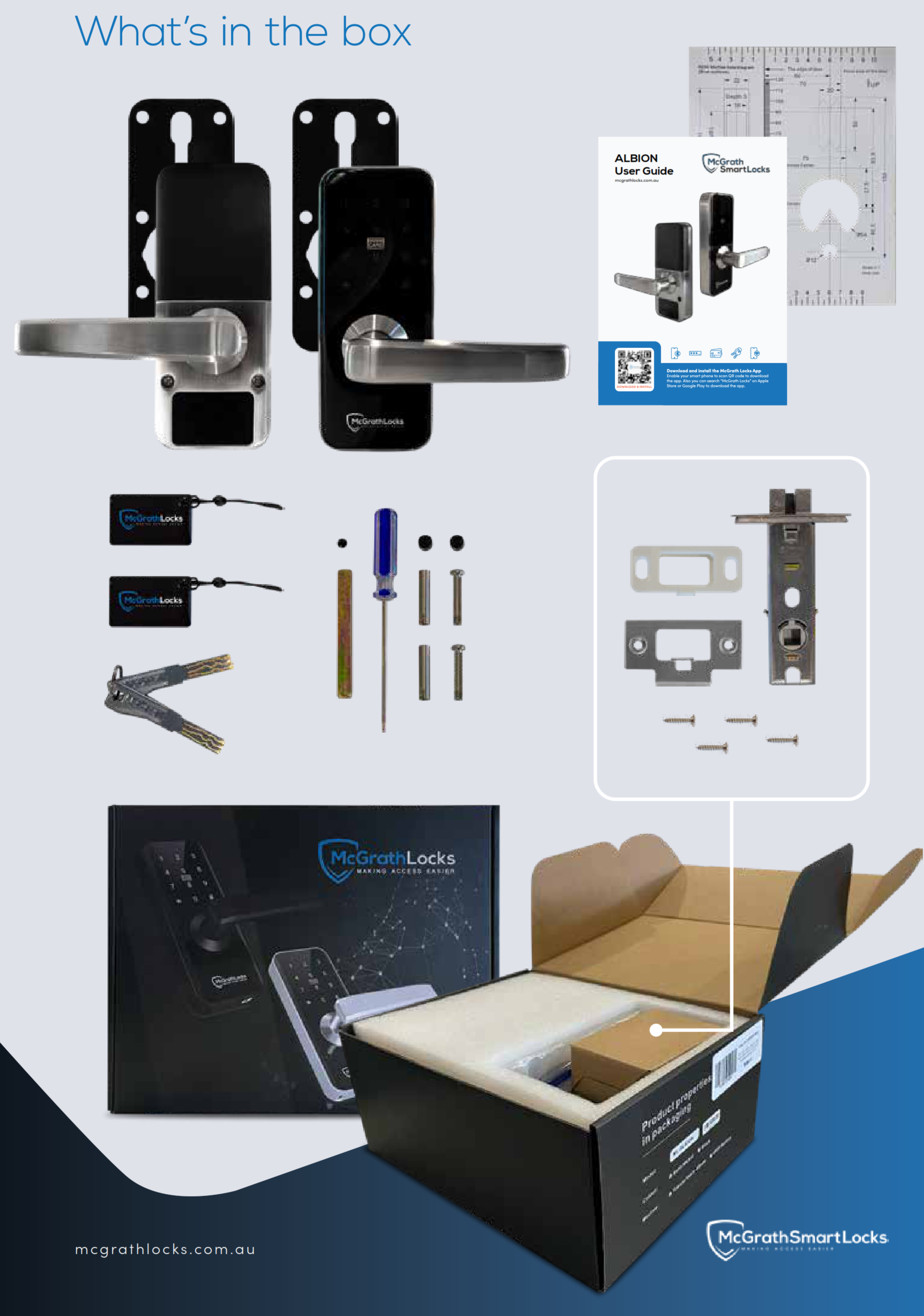
What's in the Box

McGrath Albion Digital Smart Lock (STK MLALB)
  • Exterior lock assembly (keypad, RFID reader, lever, key override cylinder)
  • Interior lock assembly (battery compartment, lever)
  • Mounting plate with rubber gasket
  • 60/70mm adjustable backset tubular latch with strike plate
  • 2 x mechanical override keys
  • 2 x McGrath RFID access tags
  • Mounting screws and fixings
  • Mini security screwdriver
  • Installation guide and drilling template
  • Albion User Guide (keypad programming card)

Note: 4 x AA alkaline batteries are not included. The DDA levers, gateways, replacement cylinders and mortice bodies listed under Accessories and Spares are sold separately.

Suitable Uses

Available Finish Options

  • Matt Black
    Matt Black
    STK MLALB
  • Satin Nickel
    Satin Nickel
    STK MLALB

Finish selection does not affect functionality, compliance, or performance. Both finishes are supplied under the one listing - select Matt Black or Satin Nickel at checkout. The salt-spray hours differ by finish (see Salt Spray Tested above); matching DDA levers and scar plates are available in both finishes.

McGrath Lever-Handle Smart Locks - Where the Albion Sits

The Albion is the entry point to McGrath's standard-stile lever-handle range. Every model below runs the same McGrath Locks App (the Albion Product Brochure (PDF) shows this lock in detail) and shares the 60/70mm adjustable latch platform; they differ in fire assessment, keypad style, biometrics and whether DDA levers come in the box. The McGrath brand profile explains the range logic.

Model Item Code Keypad Fingerprint Fire Assessed DDA Levers Supplied With
Albion (This Product) STK MLALB Tempered glass touch keypad No No Optional 60/70mm adjustable tubular latch
Windsor Fire Rated STK MLWIN Tempered glass touch keypad No Yes - up to 2 hours (Firecore / E-Core) Optional Fire-rated 60/70mm adjustable latch
Stafford STK MLSTA Raised buttons No Yes Included 60/70mm adjustable latch
Bardon STK MLBAR Raised buttons with Braille No Yes Included Lock only - mortice sold separately
Hamilton - Matt Black / Satin Nickel STK MLHAMBKT6070 / STK MLHAMSNT6070 Touch keypad Yes Yes Included Fire-rated 60/70mm adjustable latch
NX1 5-in-1 STK MLNX1 Touch keypad Yes No No 60/70mm adjustable latch or 60mm mortice
SJ8015 Basic Lever STK MLSJ8015 Keypad No No No 60/70mm tubular latch

This product (bold row) is the Albion. Choose the Windsor when the door is a fire door, the Stafford or Bardon when tactile buttons and DDA levers are needed out of the box, the Hamilton for fingerprint plus fire plus DDA, and the NX1 for fingerprint on a non-fire residential door. Every McGrath lock in this table is in our All Smart Locks catalogue.

Accessories and Spares

The Albion shares its spares with the Windsor - one cohort of levers, cylinders, blanks, scar plates, latches and mortice bodies fits both locks. Everything below is stocked and linked; the Smart Lock Accessories category holds the full range.

Group Accessory / Spare Item Code Purpose
DDA levers DDA External Lever with O-Ring - Matt Black MLSPDDAEXBLK Optional external lever that brings the Albion to AS 1428.1 accessibility. O-ring for a positive grip.
DDA levers DDA External Lever with O-Ring - Satin Nickel MLSPDDAEXSN Satin Nickel version of the external DDA lever.
DDA levers DDA Internal Lever - Matt Black MLSPDDAINBLK Matching internal DDA lever (no O-ring) so both sides of the door meet the standard.
DDA levers DDA Internal Lever - Satin Nickel MLSPDDAINSN Satin Nickel version of the internal DDA lever.
Latch 60/70mm Adjustable Tubular Latch - Satin Stainless Steel MLTL6070 The latch supplied with the Albion; replacement or a second door. More in the tubular latches category.
Latch Fire-Rated 60/70mm Adjustable Latch - Black / Satin Stainless MLATL6070BK / MLATL6070SS The fire-rated latch the Windsor ships with. Fitting it to an Albion does not make the Albion a fire-door lock - the assessment belongs to the Windsor doorset - but it is a heavier latch if you want one.
Mortice 60mm Mortice, 8mm Low Spindle - 147mm Faceplate / 180mm Faceplate MLM6050LSS147 / MLM6050LSS180 McGrath's own mortice body for an Albion or NX1 on a mortice-prepared door; pick the faceplate length that matches the existing cut-out (bored vs mortice door prep).
Mortice dormakaba MS2602 Primary Mortice Lock - 60mm Backset DKMS2602SSS The Australian commercial mortice McGrath names as compatible with the Albion - the usual choice on an office or shop door.
Mortice Rebate Kit to Suit 60/50 Mortice - 147mm Faceplate MLSPRK147 Rebate kit for the 147mm-faceplate McGrath mortice on a rebated (double) door; see also the rebate kits and strikes category.
Spindle 7.6mm Spindle Kit - 8mm to 7.6mm Step Down MLSP76SPKIT Steps the Albion's 8mm spindle down to 7.6mm for a mortice lock with a 7.6mm hub, 35 - 60mm doors.
Keys Keyed-Alike Override Cylinder with 2 Keys MLSPWINKACYL Replacement override cylinder keyed alike to your other Windsor / Albion locks - one key for every door. Browse all cylinders and barrels.
Keys Keyed-to-Differ Override Cylinder with 2 Keys MLSPWINKDCYL Replacement override cylinder on its own unique key.
Keys Key Blank - Suits Windsor and Albion MLSPWINKB Uncut override key blank; a locksmith cuts it to your existing key. See keys and key blanks.
Scar plates Scar Plates 210 x 90 x 1.5mm - Matt Black (Box of 2) MLWINSCARPLATMBLK Cover plates that hide the marks of a previous entrance set behind the Albion - brand-by-brand scar plate guide.
Scar plates Scar Plates 210 x 90 x 1.5mm - Satin Stainless Steel (Box of 2) MLWINSCARPLATSSS Satin Stainless version for the Satin Nickel lock. All plates are in the scar and adaptor plates category.
RFID credentials Mifare RFID Card / Fob / Wristband / Sticker MLCARD / MLFOB / MLWRIST / MLSTICKER Extra Mifare 13.56 MHz credentials in four formats - the wristband and sticker suit kids and cleaners. How RFID works.
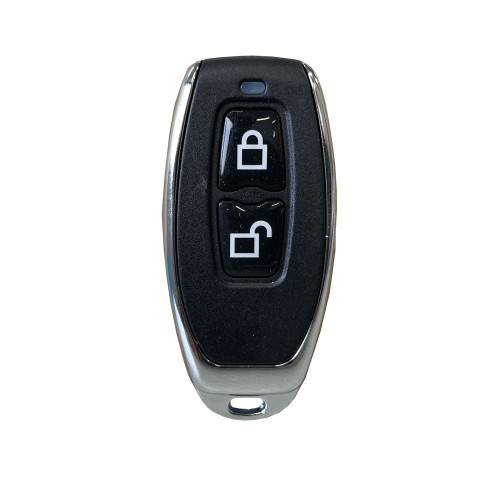
Remote McGrath Wireless Remote - Black with Silver Trim MLTTREMBKSL Bluetooth key-fob remote paired through the McGrath Locks App - for anyone who prefers a button to a phone.
Gateways G3 Ethernet Gateway - PoE / G4 Gateway - 4G SIM and Wi-Fi / G5 Gateway - Dual-Band Wi-Fi MLG3GWPOE / MLG4GW4G / MLG5GWUSB Optional bridge for remote access. G3 for wired sites, G4 where there is no fixed internet, G5 for homes with dual-band routers - choosing the right gateway; all in the gateways category.
Gateways 240V Wall Adaptor with Dual USB - Suits G3, G4 and G5 MLWA240USB Mains USB power supply for a G3, G4 or G5 gateway. See power accessories.

Batteries are not stocked as a lock accessory - the Albion takes four standard AA alkaline cells from any supermarket; do not mix old and new cells. Gateway placement affects Wi-Fi reliability - see gateway placement and the band-steering problem before you buy a G5 for a mesh network.

Battery, Power and Backup Access

  • 4 x AA alkaline batteries (not included) in the interior module. Fit four new cells of the same brand and never mix old and new - the guide is explicit on this, and mixed cells are the usual reason for a low-battery fault that reads wrong. Alkaline only; how to choose and monitor batteries.
  • Up to 18 months between changes at around ten operations a day. Heavier traffic, voice guidance left on and cold nights all shorten that - read the truth about smart lock battery life and the power and battery FAQ.
  • Low-battery warning - the lock sounds an alert each time you wake the keypad once the pack drops below 4.6 volts, and the McGrath Locks App shows the battery level whenever a phone connects. Change the batteries at the first warning; do not wait for the second.
  • USB-C emergency power - if the batteries are left to run flat, hold a charged power bank to the USB-C port on the external module and the keypad wakes long enough to enter your code. It is a jump-start, not a charger.
  • Mechanical key override - two keys in the box; the cylinder is a standard Windsor / Albion cylinder so it can be keyed alike to other doors. Keep the spare key somewhere outside the house - a McGrath Bluetooth key safe runs on the same app, or browse all key storage.
  • Codes, cards and eKeys survive a battery change - credentials live in the lock and the app, not in the batteries. If the clock drifts after a long flat spell, recalibrate it from the app (a gateway does this automatically).
  • Power outages do not affect the lock at all - it is battery powered and Bluetooth works with the internet down; only gateway remote access pauses. What actually happens in a blackout.

Wi-Fi Remote Access (Optional - Gateway Required)

The Albion has no Wi-Fi radio of its own. Out of the box it is a Bluetooth lock: your phone must be within a few metres to unlock, add users or download records - which is exactly what most households need, and it keeps the lock smart without being connected. Plug in a McGrath gateway and the picture changes: the gateway sits within Bluetooth range of the door and relays to your router, so you can unlock for a tradie from work, issue or delete a code while you are away, and watch entries arrive in real time.

Gateway icon
Which McGrath gateway?
G5 dual-band Wi-Fi for most homes - it handles 5GHz routers and avoids the band-steering trap that catches 2.4GHz-only gateways. G3 PoE where there is an Ethernet run and you want a wired, always-on link for a commercial door. G4 4G for a holiday house or site shed with no fixed internet - drop in a SIM. One gateway serves several McGrath locks within range. Full comparison: do you actually need a gateway? and the Chapter 08 gateway profiles. Power it from the McGrath 240V USB wall adaptor.

McGrath Albion - Technical Specifications

Brand McGrath Locks (distributed in Australia by LSC) - brand profile
Item Code STK MLALB (shared listing - Matt Black or Satin Nickel selected at checkout)
Model ALBION Digital Smart Lock, 60/70mm Adjustable Tubular Latch version
Product Type Lever-handle electronic smart lock, standard stile, non-biometric - what a smart lock changes
Application Residential and light commercial hinged doors; sheltered external use
Door Type Timber and aluminium doors
Door Thickness 35 - 54mm (how to measure)
Lock Type Supplied Adjustable tubular latch, 60 or 70mm backset (standard Australian backsets)
Mortice Compatibility Most common Australian commercial mortice locks including the dormakaba MS2602; McGrath 60mm low-spindle mortice (147 / 180mm faceplate)
Spindle 8mm square (7.6mm step-down kit available)
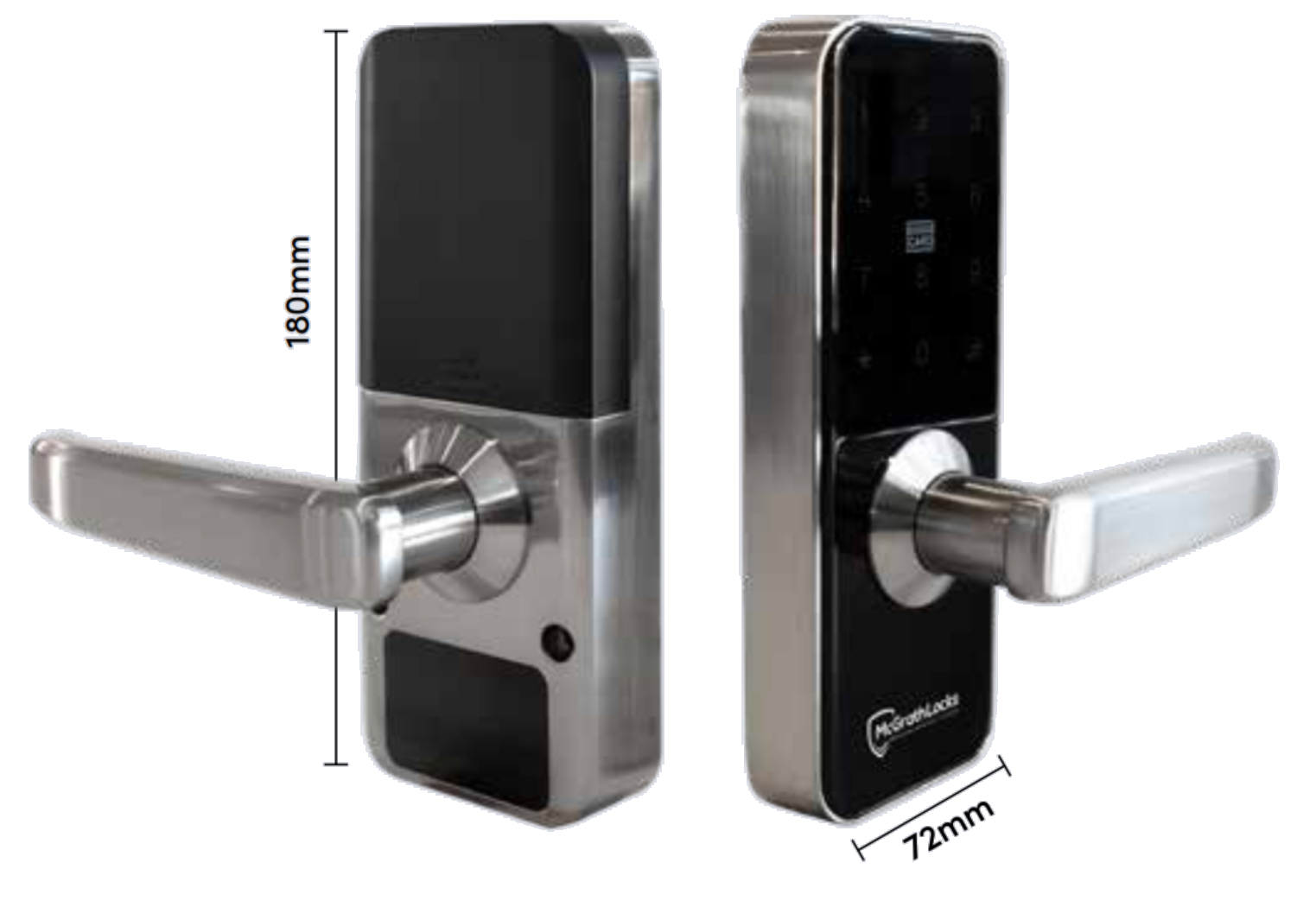
Lock Case Dimensions 180mm (H) x 72mm (W) x 25mm (D)
Handle Projection 70.6mm (73mm with the optional DDA lever fitted)
Handing Field reversible, left or right hand (how to determine handing)
Material Aluminium alloy body, tempered glass keypad screen
Finish Matt Black (300-hour salt spray) or Satin Nickel (96-hour salt spray)
Durability 300,000 cycles
Access Methods Keypad PIN, Mifare RFID credential, Bluetooth eKey (McGrath Locks App), mechanical key override; Wi-Fi remote via optional gateway
PIN Code Length 4 - 9 digits (4-digit codes when set in the app; 6 - 9 digits when set at the keypad)
PIN Code Capacity 250 codes (some exceptions may apply); one administrator
RFID Capacity 1,000 Mifare credentials, 13.56 MHz (some exceptions may apply)
Bluetooth eKey Capacity Unlimited
Communication Bluetooth 5.0 BLE and above
Remote Access Optional via G3 / G4 / G5 gateway; no Wi-Fi built in
App McGrath Locks App (McGrath-branded TTLock; TTLock and TTHotel platforms) - platform profile
Supported Devices Android 4.3 and above / iOS 7.0 and above
Passage Mode Yes - valid code then 123# within 5 seconds, or via the app
Security Features Anti-peep PIN scrambling; 5-attempt / 35-second lockout (app-only during lockout); reset button disable
Voice Guidance Yes - switchable on or off at the keypad
Power Supply 4 x AA alkaline batteries (not included)
Battery Life Up to 18 months at 10 operations per day
Battery Voltage Range 4.5 - 8.0 V
Low Battery Warning Below 4.6 V - audible alert on keypad wake
Standby Power Consumption Less than 30 mA
Motor Working Current Less than 200 mA
Unlock Time 1.5 seconds
Emergency Opening Mechanical key override; USB-C power bank input
Operating Temperature -20 degrees C to 70 degrees C
Operating Humidity 0% - 80% RH
Weather Rating IP65 (external / outside module only)
Salt Spray Test 300 hours (Matt Black); 96 hours (Satin Nickel)
DDA Compliance AS 1428.1 achievable with the optional external and internal DDA levers (sold separately)
Fire Rated No - see the McGrath Windsor for a fire-assessed version
Warranty 24 months (see Warranty)

Dimensions

McGrath Albion dimension drawing - lock body 180mm high by 72mm wide, 25mm case depth, 70.6mm handle projection
McGrath Albion dimension drawing. Lock body 180mm high x 72mm wide, 25mm case depth; lever projection 70.6mm (73mm with the DDA lever). Both modules share the 8mm spindle centre. Check backset, door thickness and existing hardware before ordering; the full-width drawing is in the Dimensions tab.

App Platform and Data Hosting

Australia icon
App Platform and Data Hosting
The McGrath Locks mobile app is a customised, McGrath-branded platform tailored specifically for the McGrath Locks product range. The app is managed, supported and distributed locally by McGrath Locks in Australia. Australian-based support staff handle warranty claims, app troubleshooting and platform queries - you are not dealing with an overseas vendor. The underlying cloud infrastructure is provided by TTLock, a globally deployed IoT platform. The app is available for both iOS and Android.iOS App StoreAndroid Google Play For how the platforms compare, see Chapter 15 - security and data sovereignty at a glance, why we recommend TTLock and five questions that decide the platform.
Long-Term Support and Confidence
McGrath smart locks are backed by long-established industry partners and supported locally: LSC, a century in the security trade, and Terry's Locksmiths, fifty years on the Gold Coast. Read why longevity matters more than features, the installer's perspective and what happens if a manufacturer drops its app.

Frequently Asked Questions

Does the Albion need Wi-Fi or the internet to work?
No. Everyday use - PIN, card, key and the McGrath Locks App over Bluetooth - needs no internet at all. Wi-Fi only comes into it if you want remote access, and then it is an optional G5, G3 or G4 gateway that connects, not the lock. See Bluetooth-only vs gateway.
Will it fit my door?
If the door is timber or aluminium, 35 - 54mm thick and bored for a standard 60 or 70mm backset latch, yes - the supplied latch adjusts to either. On a commercial door with a mortice lock already fitted, the Albion mounts over most common Australian mortice locks including the dormakaba MS2602. Measure with Chapter 02 or read how to measure your backset; if in doubt, book a free site survey.
Is the Albion DDA compliant?
With the optional DDA levers fitted, yes. The standard lever is not; adding the external and internal DDA levers brings it to AS 1428.1. If you want DDA levers in the box, the Stafford or Hamilton ship with them. Background: the Disability Discrimination Act and Premises Standards.
Can I put it on an outside door or a gate?
On a covered or sheltered external door, yes - the outside module is IP65. On a fully exposed pedestrian gate that takes direct rain and full sun, no; that is what the McGrath Ascot is built for, and for a no-battery gate lock look at the Borg BL3400 marine-grade gate lock or the gate section of Chapter 16. Near the surf, choose Matt Black for its 300-hour salt spray rating.
Can Terry's install it, and should I DIY?
Yes - Terry's Locksmiths supplies and installs the Albion across the Gold Coast and can pre-fit DDA levers and scar plates on the job; see Advice and Installation and our supply-and-install service. A handy owner can fit the tubular-latch version on a standard bored door; a mortice conversion is a locksmith job. Read when DIY is appropriate first.

Additional Information

Warranty

Warranty
McGrath Locks Warranty - 24 Months on the Albion
McGrath Locks covers its products against defects in materials and workmanship under normal use for 12 months from the date of purchase, extended to 24 months on the ALBION and the other named models (Ascot, Ashgrove, Bardon, Grange, Hamilton, Kedron, Manly, Sandgate, Stafford, Ultra Secua and Windsor). At McGrath Locks' discretion the remedy is repair, replacement with the same or an equivalent model, or a refund of the purchase price. Keep your receipt or tax invoice - proof of purchase is required and no registration is needed. Claims go through Terry's Tradies Pty Ltd as the place of purchase.
Not covered: normal wear and tear, cosmetic damage, disassembled products, damage from incorrect installation, misuse, modification or accident, installation by unlicensed persons, battery leakage or failure, exposure outside normal environmental use, labour to remove or refit, and work done before a claim is approved. Coastal salt air is exactly the kind of exposure to think about - see coastal environments and Queensland considerations. Why a 24-month warranty is a confidence signal.
Our goods come with guarantees that cannot be excluded under the Australian Consumer Law. This warranty is provided in addition to your rights and remedies under the Australian Consumer Law.

Download PDF Resources

ALBION Product Brochure (PDF)
McGrath's 6-page brochure - access types, security features, the dormakaba MS2602 compatibility note, salt spray results by finish, the full technical specification page and a what's-in-the-box photo.
ALBION Technical Datasheet (PDF)
Two-page A4 datasheet - every hardware, credential, power and environmental figure quoted on this page, from door thickness and cycle rating to battery voltage and IP class.
ALBION User and Installation Guide (PDF)
The in-box card - keypad programming sequences, low-battery, anti-peep, lockout and passage-mode behaviour, a troubleshooting checklist, plus the six-step installation guide with exploded diagram, handle reversal and the tubular-latch and mortice hub settings.
TT Lock App User Manual (PDF)
The 56-page platform manual behind the McGrath Locks App - registration, adding a lock, eKeys, the six passcode types, card management, gateways and records. Generic TTLock edition; screens in the McGrath-branded app are laid out the same way. Pair it with our TTLock tips and tricks.


McGrath Locks Logo

McGrath Albion Digital Smart Lock - FAQ, Setup and Owner's Guide

Everything below is written to help you choose, fit, set up and live with a McGrath Albion. For general smart-lock questions start with the Smart Lock FAQ (Chapter 13), for the platform read the TTLock Platform Guide (Chapter 14), and for measuring your door use the Buyer's Guide quick start.

Choosing the Albion

What is the difference between the McGrath Albion and the Windsor?
They are the same lever-handle smart lock - same keypad, same 4-in-1 access, same McGrath Locks App, same 60/70mm adjustable latch platform, same DDA lever cohort. The Windsor adds a fire assessment (up to two hours on Firecore and E-Core doors in approved doorset configurations) and ships with the fire-rated ATL6070 latch. If the door is a tagged fire door - most apartment entry doors are - you need the Windsor. If it is a house front door, an office or a store room, the Albion does the same job for less. Where fire doors are required in Queensland and the four strata checks settle the question quickly.
Why does the Albion have no fingerprint reader, and which McGrath lock has one?
The Albion is McGrath's deliberately simple 4-in-1 lock - PIN, RFID, Bluetooth eKey and key. Fingerprint adds a sensor that dislikes wet hands, sunscreen and direct sun, so on a coastal front door many buyers are happier without it. If you do want fingerprint on the same standard-stile body, the NX1 and the larger NX5 are 5-in-1 models, and the Hamilton adds fingerprint plus fire assessment plus DDA levers. Read how fingerprint readers behave and the enrolment tips before you decide. Browse every fingerprint smart lock we stock.
Albion, Stafford or Bardon - which one for a DDA or aged-care door?
All three end up AS 1428.1 compliant, but they get there differently. The Albion needs the optional external and internal DDA levers fitted; the Stafford and Bardon come with DDA levers and use raised physical buttons (the Bardon adds Braille) instead of the Albion's flat glass touch keypad, which suits low-vision users, and both are fire assessed. Specifiers working to NDIS or SDA briefs usually go Stafford or Bardon; a private accessible home on a budget is well served by an Albion plus levers. What smart locks solve in disability contexts, the full DDA range and which platform suits NDIS housing.
Is there a version of the Albion without an app at all?
Not from McGrath - every Albion runs the McGrath Locks App, although you never have to open it after setup if you only use PIN and cards. If you want a lever lock with PIN, RFID and key override and no app or platform to think about, the Carbine CEL2-3IN1 leverset is the closest thing we stock. If you want no batteries either, a mechanical digital lock such as the Lockwood 5572DX or the Carbine CDL7200 does PIN-only entry with no electronics at all - mechanical vs smart, which do you need? walks through the trade-off.
Is the Albion a good first smart lock?
Yes - it is one of the least complicated smart locks in the range. Four familiar ways in, a lever that works like the one it replaces, no biometrics to enrol, no Wi-Fi to configure unless you want it, and a local support line. Read three things to check before you buy and the quick-start decision on access methods. Compare the whole smart lock range if you are still weighing options.

Access, Codes and Credentials

How many users can the Albion hold, and what kinds of PIN code can I create?
Up to 250 PIN codes and 1,000 RFID credentials, with unlimited Bluetooth eKeys, under one administrator. In the app a PIN can be permanent, timed (a start and end date), one-time (self-deletes after use), custom (you choose the digits) or recurring (the same window every week - ideal for a cleaner or a gardener). The six TTLock passcode types explains each; the cyclic passcode walkthrough shows the weekly-cleaner setup.
Why can I set a 4-digit code in the app but not at the keypad?
Codes created at the keypad must be 6 to 9 digits; the app allows 4 to 9. That is a platform rule - the app already knows who is creating the code, so it permits a shorter one, while the keypad has no way of knowing. For a front door we suggest 6 digits either way, and lean on anti-peep scrambling (type a few random digits before or after the real code) rather than a shorter code. PIN and keypad access explained.
Why did my new permanent code not work straight away?
TTLock permanent codes created in the app activate within a 24-hour window, so a code made at 2pm may not open the door until later that day or overnight. Timed and one-time codes have their own activation behaviour. Full detail in the 24-hour activation rule and the activation window table. If a code that used to work has stopped, read how to stop codes expiring.
Which RFID cards and fobs work with the Albion, and can I use my existing card?
The reader is Mifare at 13.56 MHz. McGrath's own cards, fobs, wristbands and stickers all enrol in seconds; two tags come in the box. Many existing Mifare 1K building or gym cards will also enrol, but a 125 kHz EM-format card or a HID iClass card will not - if you are not sure what you hold, bring it in or read the RFID chapter. A card credential can be permanent, timed or recurring. All formats are in the RFID credentials category.
What is an eKey and do the people I share with need the McGrath Locks App?
An eKey is an app credential: you send it from your administrator account to another person's McGrath Locks App account and their phone becomes a Bluetooth key, valid permanently or for a window you set. Yes, they need the app installed and a free account - if that is a hurdle, give them a PIN or a fob instead. eKeys in Chapter 14 and two-factor unlocking if you want a PIN plus a phone for higher-security doors.
Where is the keyhole and what happens if I lose the keys?
The override cylinder is on the outside module below the keypad - where the keyhole hides on smart locks. Two keys are supplied. If you lose one, a locksmith can cut a Windsor / Albion key blank to the remaining key; if you lose both, fit a keyed-to-differ replacement cylinder (or a keyed-alike cylinder to match other McGrath doors). Keep the spare somewhere smarter than under the mat.
Can I have one key that opens my Albion and my Windsor?
Yes. Both locks share the same cylinder family, so a keyed-alike Windsor / Albion cylinder fitted to each lock puts them on one key. Ask at order time and Terry's can supply the cylinders keyed alike. The cylinders and barrels category has the full list.

Security Features

How does anti-peep PIN scrambling work?
Enter any random digits before or after your real code, then #, and the lock still opens - it looks for your code anywhere in the string. Someone watching from the footpath sees twelve digits and cannot tell which six mattered. It costs nothing in battery or convenience, so use it on any door that faces the street. Combine it with the app's activity records and you have a solid answer to the "are digital locks actually secure?" question - our take.
What happens after too many wrong codes?
Five incorrect PINs or cards in a row locks the keypad for 35 seconds. During those 35 seconds only the McGrath Locks App can operate the lock; the mechanical key still works because it bypasses the electronics. The counter resets after a correct entry. This is the genuine security alarm on a McGrath lock - the incorrect-PIN alarm, not a tamper sensor.
The app has a Tamper Alert toggle - should I turn it on?
No. McGrath locks including the Albion do not carry the hardware behind that TTLock menu item, and switching it on produces phantom alerts. Leave it off; if it has been turned on and you are getting alerts, follow the three-step disable procedure. Background: why McGrath locks do not support it and the Chapter 13 answer.
How do I put the Albion into passage mode, and how do I get it out again?
At the keypad: enter a valid code, then within five seconds press 123# - the door now stays unlocked. To end it, unlock again with any valid code or card. If you started passage mode from the McGrath Locks App you must end it from the app; the keypad will not clear an app-initiated passage mode. Use it for a party, a delivery day or trading hours, never as a permanent state on a street door, and never on a fire door. What passage mode is and doors in required exit paths.
Does the Albion keep a record of who opened the door?
Yes. Every unlock is logged against the credential used - a named PIN, a named card or a named eKey - with the time. Records sync to the app whenever a phone connects over Bluetooth, or continuously through a gateway. For a rental or a small business that is your audit trail for disputes. Records are only as good as your naming - give every code a person's name, not "Code 3".
What does "reset button disable" mean?
The Albion has a physical reset button on the interior module that restores factory settings and wipes every code, card and app user. McGrath lists reset-button disable among the Albion's security features: once the lock is set up the reset can be locked out so a tenant, guest or curious child cannot factory-reset it from inside. On a rental or shared door, turn it off once the lock is set up. If the lock is ever reset intentionally, re-add it in the app following transferring or re-adding a lock.

Remote Access and the App

Which gateway should I buy for the Albion - G3, G4 or G5?
For most homes the G5: dual-band Wi-Fi, so it copes with modern routers that merge 2.4 and 5GHz (band steering is the number one cause of gateway dropouts). The G3 runs on Ethernet with PoE - the choice for an office or body corporate where a wired, always-on link matters. The G4 takes a 4G SIM for a holiday house, rural property or site shed with no fixed internet. One gateway covers several McGrath locks within Bluetooth range. Can a McGrath gateway serve a Lockton or Austyle lock? - yes, they share the platform.
Do I need a gateway for a holiday let or Airbnb?
Almost certainly yes. Without one you must be within Bluetooth range to create or delete a guest code, so remote turnover is impossible. With a G5 or G4 the booking platform or a property management system can push codes to the door for each stay - PMS platforms that integrate with TTLock, Chapter 07 on PMS and scaling across multiple properties. Compare TTLock with the Igloohome approach in Chapter 14 and the Airbnb Wi-Fi guide.
What happens to the Albion if the internet or power goes down?
Nothing at the door. The lock runs on its own batteries and every credential works over Bluetooth, PIN, card or key. Only remote access through the gateway pauses until the router comes back, and the gateway reconnects itself. What happens when the internet goes down.
Is the McGrath Locks App the same as TTLock, and where is my data?
The McGrath Locks App is McGrath's branded build of the TTLock platform, distributed and supported in Australia by McGrath Locks; the cloud layer underneath is TTLock's global IoT platform. Your everyday unlock over Bluetooth happens locally between phone and lock; the cloud holds the account, eKeys and records. TTLock vs McGrath vs Lockton vs Austyle - what is the difference, local access vs the cloud layer and where each platform hosts its data give you the honest picture; Chapter 14's security section covers the published CVEs.
Does the Albion work with Alexa, Google Home or Apple HomeKit?
Not natively. The Albion is a TTLock-platform lock; voice-assistant and HomeKit integration are not features McGrath claims for it, and we do not promise them. If smart-home voice control is essential, compare the platforms in Chapter 15 at a glance and what TTLock does not do.
How do I add a second phone or hand the lock to a new owner?
Send the second person an eKey from your administrator account - they install the McGrath Locks App, create an account and accept it. To hand the whole lock over (sale, new tenant, new manager) use the app's transfer function so the lock moves to their account and every old eKey dies with the move; do not just give them your login. Step by step: transferring or re-adding a lock and before you hand over the property. The TTLock App User Manual covers every screen.

Power and Batteries

How long do the batteries last and what should I buy?
McGrath quotes up to 18 months from four AA alkaline cells at about ten operations a day. Buy a good-brand alkaline, fit four new cells together and never mix brands or old and new. Lithium AA cells are not what the guide specifies. Real-world factors - traffic, voice guidance, a door that binds - are covered in battery life, the truth not the marketing and battery management in TTLock.
How will I know the batteries are getting low?
Two ways: the lock plays a low-battery alert each time you wake the keypad once the pack drops below the warning voltage, and the McGrath Locks App shows a battery percentage whenever your phone connects. Change them at the first warning. If the app shows a sudden drop or an odd reading, read a low-battery fault correctly before assuming the lock is faulty - mixed or budget cells are the usual culprit.
The batteries are flat and I am locked out - what now?
Two options, both built in. Use the mechanical key in the override cylinder under the keypad, or hold a charged USB power bank to the USB-C port on the outside module - the keypad wakes for long enough to enter your code. Then fit four new batteries; your codes and cards are untouched. What to do when the battery dies.
Do I lose my codes when I change the batteries?
No. Codes, cards and eKeys are stored in the lock and mirrored in the app; batteries only power the motor and keypad. If the lock has been flat for a long time its clock may drift, which can make timed codes misbehave - open the app in Bluetooth range and it re-syncs, or follow calibrating the clock without a gateway.

Installation and Fit

What backset does the Albion need?
The supplied tubular latch adjusts between 60mm and 70mm, the two standard Australian backsets, so it drops into either existing hole pattern. Measure from the door edge to the centre of the existing latch hole - how to measure your backset, and what happens when the backset is wrong. A 127mm backset or a mortice-prepared door means a different path: talk to us, or see bored cylindrical vs mortice door prep.
My door is thicker than 54mm - can I still fit an Albion?
Not as supplied. McGrath rates the Albion for 35 to 54mm doors and the spindle and fixings are sized to that. For a heavy 60mm plus commercial door or a thick timber entrance, the Hamilton has a 100mm spindle kit, and for narrow aluminium stiles the A210 and A231 are the slimline answer - browse narrow-frame smart locks. Measure first with Chapter 02.
Which mortice locks does the Albion work with?
Most common Australian commercial mortice locks with an 8mm hub, and McGrath names the dormakaba MS2602 specifically. McGrath's own 60mm low-spindle mortice (147mm or 180mm faceplate) is the drop-in body for a mortice door, with a rebate kit for rebated double doors. An older mortice with a 7.6mm hub takes the step-down spindle kit. On a mortice conversion set the hub so the letter B points to the triangle (letter A for the tubular latch) - it is the single most common reason a converted lock will not throw. Mortice work is a locksmith job; the mortice locks for smart locks category shows every body we stock.
My door is left-handed - do I need to order a left-hand Albion?
No. One Albion suits either hand. Remove one screw, rotate the lever 180 degrees and refit - the guide shows it as step two of the installation - and the tubular latch hub has a left and right setting. What door handing is and field-reversible vs fixed.
I have fitted the Albion and it will not lock - what have I missed?
Work through McGrath's own checklist: (1) the lock is in demo mode - register an administrator and demo mode ends; (2) the lock is in passage mode - unlock with a valid code to clear it; (3) the latch hub triangle is not aligned - letter A to the triangle for a tubular latch, letter B for a mortice. Then check the connecting cable is not pinched between the mounting plate and the interior module, and that the door closes without binding. Mistake 1 - the handle still opens when locked, door misalignment and why alignment matters more than features.
Will the Albion cover the marks from my old lock?
The Albion's 180 x 72mm plates cover a standard bored-cylindrical prep, but not always the footprint of a large entrance set or an old mortice escutcheon. The 210 x 90mm Matt Black and Satin Stainless scar plates sit behind the lock and hide the old holes. What a scar plate is, why size matters and materials and finishes.
Can I fit the Albion myself?
On a standard timber door already bored for a 60 or 70mm latch, a competent DIYer can - the guide is six steps and the drilling template is in the box. Fit the latch first, reverse the lever if needed, set the hub, mount the exterior module with its cable through the top hole, then the plate and interior module, and only then fit batteries. Where it goes wrong is spindle position, backset and alignment - the three DIY mistakes. A mortice conversion, an aluminium door or a DDA lever fit is worth a site survey; installation quality is the most underestimated lifespan factor.

Weather, Coast and Durability

What does IP65 actually mean for the Albion?
The external module - the keypad side - is dust tight and withstands water jets, which covers wind-blown rain, garden hoses and a covered entry. The internal module holds the batteries and electronics and is not rated: it must be indoors. So the Albion suits a regular front door with one side facing the weather and an undercover patio door, but not a gate where both sides are outside. IP ratings explained.
Which finish should I choose near the beach?
Matt Black. McGrath salt-spray tests the Matt Black finish to 300 hours and the Satin Nickel to 96 hours, and on Gold Coast canal and beachfront homes that difference shows up as finish wear on the nickel first. Neither rating makes the Albion a marine-grade lock; for a truly exposed coastal gate see the Ascot or a Borg marine-grade gate lock. Coastal Queensland is not gentle on locks and what actually fails.
How long will an Albion last?
The mechanism is tested to 300,000 cycles - at ten operations a day that is over eighty years of latch travel, so the mechanics will outlive the finish and the electronics. Realistically a well-installed smart lock on a sheltered door gives many years; sun, salt and a door that binds are what shorten it. A realistic lifespan expectation, build quality as the ceiling and what happens in five years.

Ownership, Handover and Support

Can I turn off the voice prompts?
Yes. At the keypad enter *30#, your admin code#, then 0# to silence voice guidance or 1# to turn it back on. Owners usually leave it on for the first week while everyone learns the lock, then switch it off on a bedroom-side door.
Who do I call if something goes wrong?
Terry's Locksmiths first - we sold and, in many cases, installed the lock, and warranty claims run through us as the place of purchase. Behind us sit McGrath Locks' Australian support team for app and platform issues and LSC as national distributor. That local chain is the reason we back McGrath - the supply chain behind every installation and choosing a smart lock that will still be there. Not sure what you need yet? Ask for a recommendation.
I am a landlord - what should I set up before a tenant moves in?
Register the lock to your own McGrath Locks App account, disable the reset button, give the tenant a named PIN or eKey rather than the admin login, and consider a gateway so you can revoke access remotely at the end of the lease. The erase code and the handover checklist cover the rest; Chapter 07's setup checklist applies equally to long-term lets.

Related Products, Guides and Chapters

McGrath lever-handle range: Windsor Fire Rated - Stafford - Bardon - Hamilton Matt Black / Satin Nickel - NX1 - NX5 - SJ8015.

Other McGrath doors: X3 smart deadbolt (pairs with the Albion as a second lock, as in our Coolangatta install) - NX6 mortice lock - A210 slimline - Ascot gate lock - ULTRA-SECUA screen door lock - KEYSAFE Bluetooth key safe.

Albion accessories: DDA external lever Black / Satin Nickel - DDA internal lever Black / Satin Nickel - 60/70mm latch - 60mm low-spindle mortice - dormakaba MS2602 - keyed-alike cylinder - keyed-to-differ cylinder - key blank - scar plates Black / Satin Stainless - RFID card / fob / wristband / sticker - wireless remote - G3 / G4 / G5 gateways - 240V USB wall adaptor.

Buyer's Guide chapters: Ch 01 What Is a Smart Lock - Ch 02 Measuring Your Door - Ch 03 Access Methods - Ch 04 Door Types - Ch 05 Fire Doors - Ch 07 Airbnb and Short-Stay - Ch 08 Gateways - Ch 09 DDA and NDIS (Albion entry) - Ch 10 Brand Profiles - Ch 11 Standards and IP Ratings - Ch 12 Installation and Troubleshooting - Ch 13 Smart Lock FAQ - Ch 14 TTLock Platform Guide - Ch 15 App Platforms - Ch 16 Mechanical Digital Locks.

Blogs: TTLock tips and tricks - TTLock App User Manual - Terry's + LSC + McGrath long-term confidence - G2 to G5 gateways compared - why smart locks drop off Wi-Fi - DDA smart locks for NDIS housing - mechanical key override - smart lock not locking - door handing - measuring your backset - scar plates - how long digital locks last - the realities of electronic door locks - using TTLock for Airbnb - which platform is right for you - TTLock vs Tuya - your data and China - site survey and installation.

Categories: PIN code - fob and card - Bluetooth - backup key - Wi-Fi capable - app enabled - regular front door - internal office - fire door - all smart lock accessories - digital mechanical locks.

McGrath Locks Logo

What's in the Box - McGrath Albion Digital Smart Lock

  • Exterior lock assembly - tempered glass keypad, Mifare RFID reader, USB-C emergency power port, key override cylinder and lever
  • Interior lock assembly - battery compartment (4 x AA, not included), reset button and lever
  • Mounting plate with rubber gasket
  • 60/70mm adjustable backset tubular latch with strike plate
  • 2 x mechanical override keys (blanks and keyed-alike cylinders available)
  • 2 x McGrath RFID access tags (add cards, wristbands or stickers)
  • Mounting screws and fixings
  • Mini security screwdriver
  • Installation guide and drilling template
  • Albion User Guide - keypad programming card (also available as a PDF)
McGrath Albion box contents laid out - exterior and interior assemblies, mounting plates, adjustable tubular latch and strike plates, two keys, two RFID tags, screwdriver, screws, user guide and drilling template
Components supplied with the McGrath Albion, including the 60/70mm adjustable tubular latch and both strike plates.
Not in the box
Batteries (4 x AA alkaline), the optional DDA levers, any gateway, the mortice body for a mortice-door installation, and scar plates are all sold separately. The McGrath Locks App is a free download for iOS and AndroidiOS App StoreAndroid Google Play - set the lock up in the app before programming anything at the keypad.
McGrath Locks Logo

McGrath Albion Digital Smart Lock - Dimensions

McGrath Albion dimension drawing - lock body 180mm high by 72mm wide, 25mm case depth, 70.6mm handle projection
Lock body 180mm high x 72mm wide, 25mm case depth. Lever projection 70.6mm from the door face, or 73mm with the optional DDA lever. 8mm square spindle; suits 35 - 54mm doors on a 60 or 70mm backset (what backset is). The 210 x 90mm scar plate extends the footprint by 30mm in height and 18mm in width when covering an old prep. Measure with Chapter 02 before you order.
McGrath Locks Logo

McGrath Albion Digital Smart Lock - Product Brochure

McGrath's six-page Albion brochure, reproduced page by page. Download the brochure as a PDF or the two-page technical datasheet.

McGrath Albion product brochure page 1 - Cover
Page 1 - Cover: ALBION Sleek and Stylish Bluetooth Smart Lock - reliable, compact, trade-grade residential smart lock.
McGrath Albion product brochure page 2 - Access Just Got Smarter
Page 2 - Access Just Got Smarter: 4-in-1 access (PIN, RFID, Bluetooth eKey, key override), Wi-Fi via gateway, tubular latch or European mortice version, compatible with common Australian commercial mortice locks.
McGrath Albion product brochure page 3 - Features
Page 3 - Features: 180 x 72mm body, works with the McGrath Locks App, credential types, security features (anti-peep, incorrect-attempt lockout, reset button disable), dormakaba MS2602 compatibility, IP65, 300h / 96h salt spray, 18-month battery life.
McGrath Albion product brochure page 4 - Technical specifications
Page 4 - Technical specifications: hardware, enrolment and verification, lock features and functions, operating environment, 24-month warranty.
McGrath Albion product brochure page 5 - What is in the box
Page 5 - What is in the box: exterior and interior assemblies, mounting plate, tubular latch and strike plates, keys, RFID tags, screwdriver, screws, user guide and drilling template.
McGrath Albion product brochure page 6 - Back cover
Page 6 - Back cover: Made for Aussie Living, Aussie Style, Aussie Quality - McGrath Smart Locks Australia, app download QR code.
McGrath Locks Logo

PDF Files - STK MLALB McGrath Albion

ALBION Product Brochure (PDF)
Six-page McGrath brochure: access types and credential options, security features, MS2602 mortice compatibility, IP65 and salt spray results by finish, full technical specifications and a box-contents photo.
ALBION Technical Datasheet (PDF)
Two-page A4 spec sheet - hardware, enrolment and verification, lock features, power figures and operating environment; the source for every number in the Specifications table above.
ALBION User and Installation Guide (PDF)
Keypad programming (add and delete users, admin code, voice on and off, passage mode), low-battery and lockout behaviour, troubleshooting, plus the six-step installation guide with hub settings for tubular latch and mortice.
TT Lock App User Manual (PDF)
The 56-page platform manual for the app behind the McGrath Locks App - registration, adding a lock, eKeys, passcode types, cards, gateways and records; read alongside our TTLock Platform Guide.
McGrath Locks Logo

McGrath Locks Warranty

Warranty Summary

Standard Warranty Period12 months from date of purchase
Extended Warranty Period24 months - applies to: ALBION, ASCOT, ASHGROVE, BARDON, GRANGE, HAMILTON, KEDRON, MANLY, SANDGATE, STAFFORD, ULTRA SECUA, WINDSOR
Extended Warranty - Regional & Feature VariantsAlso 24 months: MANLY COMMON, SANDGATE COMMON, ASHGROVE EU/UK, BARDON EU/UK, STAFFORD EU/UK, WINDSOR EU/UK, BARDON US, HAMILTON US, STAFFORD US
What Is CoveredDefects in materials and workmanship under normal use and service
Available RemediesRepair, replacement with the same or equivalent model, or refund of the purchase price - at McGrath Locks' discretion
Proof of Purchase RequiredYes - original receipt or tax invoice
Registration RequiredNo
RegionAustralia

How to Make a Claim

For full returns and warranty claim procedures, visit our Returns & Warranty page - this is kept up to date and is the authoritative reference for current claim steps.
  1. Contact Terry's Tradies Pty Ltd and its associated websites, trading names, and subsidiaries (the place of purchase) within the applicable warranty period.
  2. Supply your proof of original purchase - a receipt or tax invoice is required.
  3. Provide a clear description of the fault and your contact details.
  4. You may be asked to return the product for assessment before a remedy is determined.
  5. McGrath Locks will, at their discretion, repair the product, replace it with the same or an equivalent model, or provide a refund of the purchase price.

Exclusions

This warranty does not cover:

  • Normal wear and tear
  • Products that have been disassembled
  • Damage caused by improper handling, incorrect installation, misuse, abuse, neglect, modification, or accident
  • Installation by unlicensed persons (including non-licensed locksmiths or technicians)
  • Products not used in accordance with the supplied instructions
  • Cosmetic damage that does not affect functionality
  • Labour or installation costs related to the removal or reinstallation of products
  • Exposure to conditions outside normal environmental use
  • Work completed before warranty approval
  • Damage caused by battery leakage, battery failure, or force majeure
Australian Consumer Law
Our goods come with guarantees that cannot be excluded under the Australian Consumer Law. You are entitled to a replacement or refund for a major failure and compensation for any other reasonably foreseeable loss or damage. You are also entitled to have the goods repaired or replaced if they fail to be of acceptable quality and the failure does not amount to a major failure. This warranty is provided in addition to your rights and remedies under the Australian Consumer Law.
Ask our expert locksmith - 30 years experience

Confused? Overwhelmed? We get it.

Choosing the right smart lock can be genuinely tricky - door types, backsets, app platforms, compatibility with your existing hardware... there is a lot to consider. We have decades of experience fitting locks of all types, including smart locks, and we are happy to help.

Our expert recommendation service is free. Upload a few photos of your door and describe what you need, and one of our qualified locksmiths will give you a personalised recommendation.

Get Your Free Recommendation →

How it works - three easy steps:

1. Upload photos

A few clear shots of your door, lock and frame - inside and out.

2. We assess

Our locksmith reviews your setup and requirements - door type, weather exposure, how you want to use it.

3. You get a recommendation

A personalised recommendation tailored to your door, budget and needs. No pressure, no upsell.

Also useful while you are deciding:

Videos Hide Videos Show Videos