McGrath X3 Digital Smart Deadbolt - 60/70mm Adjustable Backset
At A Glance
 At A Glance
 DISPATCHSame Day Before 11am


 PIN Code
  Fingerprint
  RFID Card / Fob
  Bluetooth eKey
  Mechanical Key
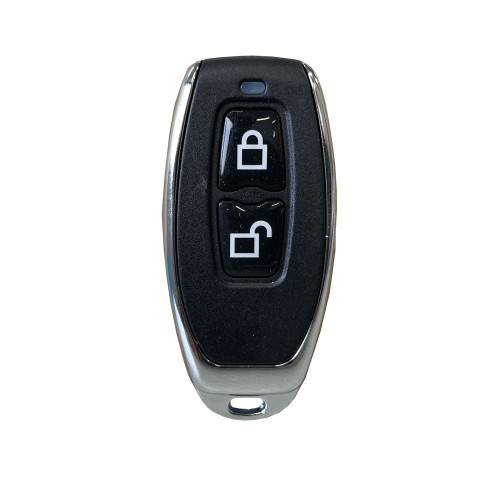
  Remote
(Optional Gateway)
 Face / Palm
Not Available
The McGrath X3 is a compact digital smart deadbolt that adds keyless entry to a hinged timber or aluminium door without touching the handle hardware already on it. It is a bolt-only lock: fit it as the primary deadbolt above a passage set, or as a second locking point alongside an existing entrance set. If you are weighing up a bolt against a latch, when a bolt lock is the better choice sets out the trade-offs.
The X3 is managed over Bluetooth through the McGrath Locks App and opens six ways: PIN code, fingerprint, RFID card or fob, Bluetooth eKey, a mechanical key override, and - once a McGrath gateway is added - remote access from anywhere. There is no Wi-Fi radio in the lock itself, which is why the batteries last: see what changes when a gateway is added.
It ships with an adjustable 60mm / 70mm bolt that covers both common Australian backsets and drops into a standard 54mm bore hole, so it replaces most existing keyed deadbolts without new door preparation. The X3 shares this bolt platform with the McGrath Ashgrove and McGrath Kedron smart deadbolts, and sits in the McGrath Locks range supported locally through LSC - read why that supply chain matters.
Usually ships same day if ordered before 11am AEST (excludes weekends and Queensland public holidays).
 Key Features
- Digital deadbolt-only smart lock - keeps the handle set already on the door. The motor replaces the thumb turn; the bolt and its physical security do not change.
- Adjustable 60mm / 70mm backset bolt and a standard 54mm bore fit - retrofits over most existing keyed deadbolts. Not sure which backset you have? Measure it in two minutes, and see what happens if the backset is wrong.
- Six ways in: keypad PIN, fingerprint, RFID card or fob, Bluetooth eKey, mechanical key, and optional Wi-Fi remote access via a gateway. How the layers back each other up is the authentication stack.
- Six passcode types through the McGrath Locks App - permanent, time-limited, one-time, cyclic (a weekly cleaner, for example), customised and erase - explained in Chapter 14. New permanent codes must be used within 24 hours of creation: the 24-hour activation rule.
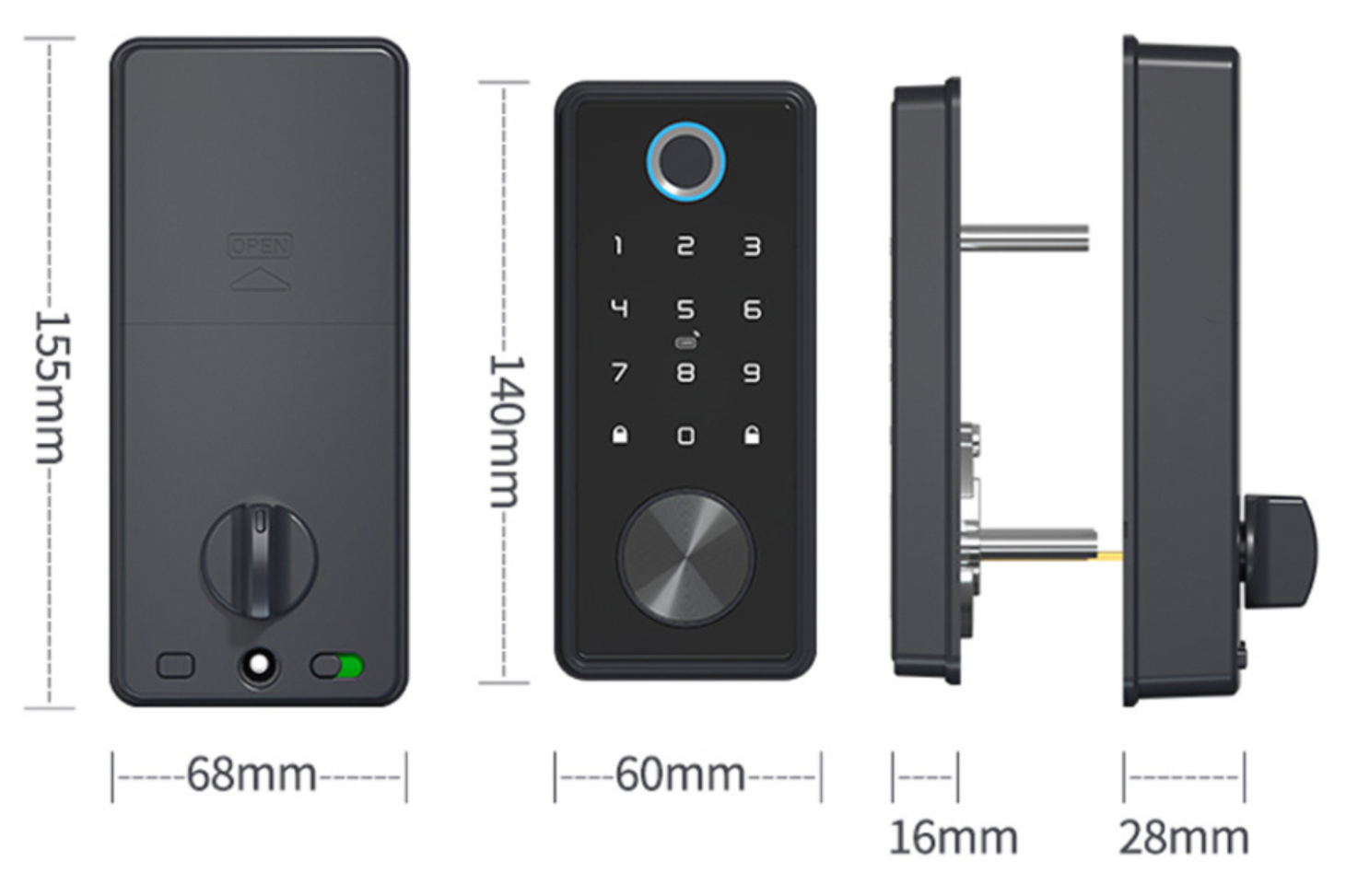
- Low-profile exterior body with a 16mm projection - see how it sits against your existing hardware.
- Electronic double lock (internal privacy switch) - flick the switch inside and every external credential is refused except the administrator's app key and the mechanical key. Useful at night or in a short-stay property between guests.
- Passage mode - the bolt stays retracted so the door works as a plain passage door while people are coming and going. How this differs from a mechanical lock's holdback is in Passage Mode vs Holdback Mode.
- Anti-peep PIN entry - type random digits before or after your real code so an onlooker cannot read it - plus an incorrect-attempt lockout. Anti-peep, and why it is not the same as a wrong-PIN alarm, is covered in the TTLock guide.
- Audit trail - every unlock (who, how, when) is logged in the app, and available remotely once a gateway is fitted. See audit trails for dispute resolution.
- Bluetooth eKeys - share a permanent or timed eKey to a family member's or tradesperson's phone with no code to remember; unlimited eKeys per lock. How eKeys work.
- Optional remote access, remote unlock and remote credential management when paired with a G3, G4 or G5 gateway - do you actually need one?
- USB-C emergency power on the exterior body - a phone power bank wakes the lock if the batteries are left to go flat, and the key gets you in regardless. What to do when the battery dies.
- Door position sensor supplied in the box so the app can report the door open or closed as well as locked or unlocked.
- IP65 rated external housing for sheltered entries. The interior unit houses the batteries and is for inside use only - see coastal environments before fitting one near the surf.
- 100,000-cycle durability test, -20 to 70 degrees C operating range. What cycle ratings actually tell you.
Access Methods
Every credential below is enrolled and managed in the McGrath Locks App over Bluetooth. What each method is good at, and where each one falls down, is set out in the side-by-side access method comparison in Chapter 03.
 Palm Recognition
 Wi-Fi Remote Access (Optional)
The X3 has no Wi-Fi radio of its own. On its own it is a Bluetooth lock - everything works when you are standing at the door, and a great deal can be done without a gateway at all: see what a McGrath lock does without Wi-Fi. Add a McGrath gateway and the lock becomes reachable from anywhere: remote unlock, remote code and eKey issue or revocation, live access records, and remote clock calibration. What a gateway actually does is in Chapter 08.
Three current gateways suit the X3: the G3 (wired PoE Ethernet - no Wi-Fi dependency, ideal where IT manages the network), the G4 (2.4GHz Wi-Fi plus a 4G SIM fallback for holiday homes and sites with unreliable internet) and the G5 (dual-band 2.4GHz and 5GHz, our default recommendation for a modern home router). All three are in the gateways and bridges category, and G2 vs G3 vs G4 vs G5 puts them side by side.
Two things trip people up. First, gateway placement: the gateway talks to the lock over Bluetooth, so it needs to sit within a few metres of the door - gateway placement guidance. Second, most modern routers steer devices between 2.4GHz and 5GHz, and a 2.4GHz-only gateway can be knocked offline by that: the band-steering problem and the hardware fix (the G5) are worth reading before you choose. If the internet drops, PIN, fingerprint, RFID and key all keep working.

 App Platform & Data Hosting
 (Android 4.3 / iOS 7.0 and above). The app is managed, supported and distributed locally by McGrath Locks in Australia - Australian-based staff handle warranty claims, app troubleshooting and platform queries, so you are not dealing with an overseas vendor. The underlying cloud infrastructure is provided by TTLock, a globally deployed IoT platform; the X3 also works with the TTRenting and TTHotel builds for landlords and accommodation operators. How McGrath, Lockton and Austyle each sit on the same platform is in Chapter 15; where the platform stands against the alternatives is in Which Smart Lock Platform Is Right for You?. New to the app? Start with TTLock Tips and Tricks and the TTLock App User Manual.
McGrath smart locks are distributed through LSC, a security wholesaler with a century-long history in Australia, and installed and supported locally by Terry's Locksmiths. That matters more than any single feature when you are choosing a lock you expect to be on the door in ten years - read why longevity matters more than features and what a realistic lifespan looks like.
 What's in the Box
- Exterior deadbolt assembly (keypad, fingerprint reader, RFID reader, key cylinder, USB-C port)
- Interior deadbolt assembly (thumb turn, battery compartment, privacy switch, handing toggle, reset button)
- Adjustable 60mm / 70mm deadbolt
- Door position sensor
- 2 x mechanical keys
- 2 x RFID access tags
- Mounting screws
- Drill positioning template
- Installation guide
Note: 4 x AA alkaline batteries are not included. No gateway is included - the G3, G4 and G5 are sold separately.
 Suitable Uses
- Adding keyless deadbolt security to an existing regular front door - timber, aluminium or hollow core, 35-50mm thick - without replacing the handle. Check the door type compatibility matrix and door thickness first.
- Retrofitting over a keyed deadbolt on a standard 54mm bore with a 60mm or 70mm backset - the most common Australian latch-and-bolt cylindrical door prep. Browse every smart lock with a backup key.
- Homes, granny flats and home offices where family, cleaners and tradespeople each need their own credential - and where you want a record of who came and went.
- Short-stay and rental properties: timed and one-time codes issued from the app, and remotely once a gateway is fitted. See what changes with a gateway and a PMS, PMS integration for hosts and the wider Airbnb and short-stay guide. Before you hand a property over, run the five-step handover checklist.
- Internal doors that need controlled access - a home-to-garage door, a study, a medication cupboard room - browse smart locks for internal doors.
- A second locking point on a door that already has a working entrance set, where you want deadbolt security with electronic convenience. Read why bolt projection matters.
- Sheltered external doorways only - a porch, patio or covered entry. The IP65 rating covers the external housing, not the interior unit, and the X3 is not intended for fully exposed positions or gates in driving rain; for a gate, look at the external gate range instead.
- Not for apartment fire doors. The X3 is not fire rated and a deadbolt is not a compliant secondary lock on a Queensland apartment fire door - see why deadbolts are not compliant on apartment fire doors and browse fire-door smart locks instead.
 Available Finish Options
 Matt Black
(This Product)
STK MLX3 Satin Nickel
(This Product)
STK MLX3
Both finishes are supplied under this single listing - select your finish at checkout. Finish selection does not affect functionality, compliance, or performance.
 McGrath 60/70mm Adjustable-Bolt Smart Deadbolts - Which One?
Four McGrath smart locks share the same adjustable 60/70mm bolt and the same app. They differ in the keypad, the credentials on the outside body and the door furniture they replace.
This product (bold row) is the X3. All four run on the McGrath Locks App and take the same MIFARE RFID credentials and gateways. Note the Ashgrove, Kedron and Grange use their own replacement bolt (MLSPAB6070); the X3 uses the MLAB6070SL listed in the table below. Other smart deadbolts we stock are in the deadbolt search results.
 Compatible Accessories & Spares
Everything below is stocked and confirmed for the X3. Spare parts keep an installed lock in service for years; credentials and gateways extend what it can do.
The Ashgrove, Kedron and Grange bolt (MLSPAB6070) does not fit the X3 - order the MLAB6070SL above. The full accessory range is under Smart Lock Accessories.
 Battery, Power & Backup Access
- Powered by 4 x AA alkaline batteries (not included). McGrath specifies alkaline cells only - Terry's Locksmiths recommends Duracell. Rechargeable and lithium AA cells sit at the wrong voltage and are not recommended: see monitoring and choosing batteries.
- Battery life is rated at 12 months at about 10 openings a day. Because the X3 has no Wi-Fi radio of its own, it avoids the drain built-in Wi-Fi locks suffer - the truth about battery life and how smart locks are powered.
- Low-battery warning sounds at the lock and shows in the app once the pack drops below 4.8V (operating range 4.5-8V). Remote functions through a gateway fail before local functions do, so a lock that stops answering the app but still opens at the keypad is usually a battery, not a network, problem: reading a low-battery fault correctly.
- USB-C emergency power on the underside of the exterior body - hold a phone power bank to it and the lock wakes long enough to take a PIN or fingerprint. Then change the batteries.
- Mechanical key override works with no power at all. Two keys are supplied; keep one outside the house, ideally in a key safe from our Key Storage range. The keyhole is the circular cylinder below the keypad.
- A door that binds in its frame makes the motor work harder and flattens batteries early - door alignment is the most underestimated factor. More in Chapter 13 - power and battery.

The external (outside) body is IP65 rated - sealed against dust and low-pressure water jets - and operates from -20 to 70 degrees C at 10-97 percent humidity. The internal unit houses the batteries and electronics and is for interior use only. Fit the X3 to a porch, patio or covered entry, not a fully exposed door or a gate in driving rain. The McGrath user manual also asks that it not be left in direct sun, which matters on a west-facing Queensland door - see Queensland-specific considerations and why sun and heat shorten a lock's life. Within a few hundred metres of the surf, read coastal Queensland is not gentle first. For a gate, see the McGrath Ascot.
The X3 is a residential smart deadbolt, tested to 100,000 cycles - roughly 27 years at 10 openings a day. It is the right fit for a home, granny flat, home office or holiday let. For a busy commercial door or a shared entry that sees hundreds of cycles a day, look at the battery-free Digital Mechanical Locks range or read heavy duty commercial mechanical digital locks.

The X3 is not fire rated and a deadbolt is not a permitted secondary lock on a Queensland apartment fire door - the one-penetration principle explains why, and which smart locks are certified for fire doors lists the compliant options, including the fire-assessed McGrath Windsor and McGrath Hamilton. It is also a hinged-door lock only - for a sliding door, choose from that category instead. Before drilling any older apartment door, read the asbestos regulations.
 McGrath X3 - Full Specifications
 Dimensions & Components

 Frequently Asked Questions
Not on its own. The X3 is a Bluetooth lock - it works at the door with your phone, PIN, fingerprint, RFID or key, and much of what people want (timed guest codes, an access log you read at the door) needs no internet at all - see smart vs connected. For remote unlocking and remote code management from anywhere, pair it with a G5, G4 or G3 gateway - choosing the right gateway.
Almost certainly, if your door is 35-50mm thick. The X3 uses a standard 54mm bore and its bolt adjusts between the two common Australian backsets, 60mm and 70mm. Measure the backset with this two-minute method; if you get 127mm you have an older commercial prep and should call us. Getting the backset wrong is the second most common DIY mistake.
Yes, two ways. The mechanical key opens the cylinder below the keypad with no power at all, and a phone power bank on the USB-C port wakes the lock long enough to enter a code. You will hear low-battery warnings well before that point. What to do when the battery dies; spare cylinders and key blanks are stocked.

It is McGrath's electronic double lock. With the switch on, every credential from outside - PIN, fingerprint, RFID, ordinary eKeys - is refused. Only the administrator's app key and the mechanical key still open the door. It is handy at night or between guests, but it also catches people out: a guest locked out because someone inside flicked the switch is a common support call. The same behaviour and its pitfalls are covered in The Perils of the Internal Snib, including the Airbnb risk.
Any 13.56MHz MIFARE credential - our McGrath card, fob, wristband and sticker are all enrolled at the lock in the app, and any one of them can be cancelled individually if lost. Two fobs come in the box. How RFID access works. Many more questions are answered in the FAQ tab above.
Additional Information
- Set it up with the app, not the keypad. On TTLock hardware, a lock programmed manually at the keypad may refuse to pair with a phone later without a factory reset. Add the lock in the McGrath Locks App first, then enrol codes and fingerprints from there. Adding a lock is on page 15 of the TTLock manual.
- Keep the clock right. A Bluetooth-only X3 keeps time from the phone that last connected to it; timed codes that "stop working" are usually clock drift. Open the lock in the app every few weeks, or fit a gateway and it calibrates itself. Clock calibration and the symptoms that point to it.
- Ignore the "tamper" toggle in the app. The X3 has no tamper sensor; the switch is a platform leftover that only generates phantom alerts. Leave it off - McGrath locks do not support Tamper Alert and how to turn it off in three steps.
- Handover a property properly. Selling, or changing tenants? Issue an erase code, delete the lock from your account, delete the gateway, collect the fobs - the five-step handover checklist. Transferring the lock to a new administrator is on page 48 of the TTLock manual.
- Not sure it suits your door? Terry's Locksmiths supplies and installs McGrath locks across the Gold Coast - book a free site survey or read our advice and installation page. If you are still weighing this against a latch-format or mortice smart lock, start with the realities of electronic door locks and five questions that decide the platform.

12-month warranty against defects in materials and workmanship (24-month on ALBION, ASCOT, ASHGROVE, BARDON, GRANGE, HAMILTON, KEDRON, MANLY, SANDGATE, STAFFORD, ULTRA SECUA and WINDSOR models). McGrath Locks will repair, replace, or refund at their discretion. Proof of purchase required for all claims. Returns & Warranty | McGrath Locks Warranty
 Download PDF Resources
One-page McGrath data sheet: the full ML-X3 specification table (capacities, power, environment, door fit), the six unlock methods and the dimensioned side-profile drawing.
Eight-page quick manual supplied with the X3: safety notes (alkaline batteries only, keep out of direct sun and rain), app download codes, and the condensed TTLock app walkthrough - registration, adding the lock, keys, passcodes, cards, fingerprints and gateways.
The full 56-page platform manual behind the McGrath Locks App: adding a lock, eKey types, the six passcode types, IC card management, fingerprints and gateway setup. Generic TTLock edition - screens are the plain TTLock skin, not McGrath branding.
McGrath X3 Digital Smart Deadbolt - FAQ, Setup and Owner's Guide
Everything owners, installers and buyers ask about the X3, grouped by topic. For the platform-wide answers see Chapter 13 - Smart Lock FAQ and the TTLock Platform Guide; for the whole buying journey start at the Smart Lock Buyer's Guide.
Door Fit and Installation

Both. The supplied bolt adjusts between 60mm and 70mm, which between them cover almost every hinged door drilled in Australia in the last forty years. What backset actually is, the standard Australian sizes and why smart locks are fussier about it are all in our backset guide. A replacement X3 bolt is stocked if yours is ever damaged.

35mm to 50mm as supplied, which covers standard hollow-core internal doors and most solid-core and aluminium entrance doors. McGrath does not list an extended fixing kit for the X3, so a door over 50mm is a call-us job. Measure at the lock edge, not the stile face - door thickness in Chapter 02. For thick or unusual doors the McGrath NX6 mortice lock (38-110mm) is the alternative on the same app.

Usually, yes. A standard keyed deadbolt sits in a 54mm cross bore with a 25mm edge bore at 60mm or 70mm backset - exactly what the X3 needs. Remove the old bolt and cylinder, fit the X3 bolt, mount the two bodies and connect the cable. If your door has never had a deadbolt, the drill template in the box marks both holes. The latch-and-bolt cylindrical prep diagram shows the measurement points, and bored cylindrical vs mortice door prep explains why a mortice door is a different job.

No - one lock suits both. There is an R/L toggle on the interior body that tells the motor which way to throw the bolt; set it during installation and test with the door open. If the bolt throws the wrong way the toggle is the first thing to check. How to determine your door's handing and field-reversible vs fixed handing.

A competent DIYer can, on a door that already has a correctly aligned deadbolt. Three things cause most call-backs: the door binding in its frame so the bolt cannot throw cleanly, the wrong backset setting on the bolt, and a cable pinched between the bodies. Read the three most common DIY mistakes, poor door preparation or fitment and when DIY is appropriate and when it is not. Terry's Locksmiths installs across the Gold Coast - professional supply and installation.

McGrath does not quote a bolt projection figure for the X3, so we do not either. What matters in practice is that the strike plate is fitted so the bolt throws fully into the frame with no pressure on it - a bolt that only half-engages is the most common reason a smart deadbolt jams and drains batteries. The two meanings of bolt throw and bolt throw in Chapter 02.
Access, Credentials and Codes
Six: permanent, time-limited (one hour to three years), one-time (valid six hours), cyclic (repeats on chosen days and hours - a Tuesday cleaner, for example), customised (you pick the digits) and an erase code that wipes every other code. Up to 300 live codes, each 4-9 digits. The six passcode types, the weekly cleaner example, and the activation window for each type.
Almost always the 24-hour rule: a new permanent code has to be used at the keypad within 24 hours of being created or it expires. Create it, walk to the door, use it once. If every code has stopped at once, an erase code has probably been used. How to stop codes expiring, why TTLock enforces the window and recovering after an erase code.
Reliable when enrolled well. Enrol each finger at three angles - flat, rolled left, rolled right - and enrol two fingers per person so a cut or a wet hand does not lock anyone out. The reader will struggle with very dry, worn or wet fingertips; that is true of every capacitive reader, and it is why the X3 also has a keypad. The three-angle enrolment technique and fingerprint failure modes. Fingerprint management is on page 34 of the TTLock manual.
An eKey is a digital key that lives in someone else's McGrath Locks App. You send it from your phone - permanent, timed or one-off - and they unlock the door from theirs when they are within Bluetooth range, about ten metres. There is no cap on the number of eKeys. Sending one needs internet on your phone; using one at the door does not. eKeys explained, eKey types in the manual. If you do not want the lock opening when a phone merely brushes it, turn off touch-to-unlock.

Yes. A MIFARE card or fob is enrolled per lock, so one card can be added to the X3 on the front door, a NX6 on the side door and an Ascot on the gate. Enrolment is done beside each lock over Bluetooth; with a gateway, cards can also be issued remotely. IC cards and other credentials and card management in the manual.
Anti-peep lets you bury your real code in random digits - type 5 3 your code 9 1 and the lock still opens - so anyone watching sees noise. Repeated wrong entries trigger a temporary keypad lockout; the app, fingerprint and key still work during it. The lockout is a genuine security feature, unlike the platform's Tamper Alert toggle, which the X3 has no hardware for - tamper alert vs incorrect PIN alarm.
Both. Extra keys are cut from the X3 key blank by any locksmith. To make old keys useless, swap in a keyed-to-differ cylinder - it comes with two new keys and takes minutes. Browse cylinders and barrels and keys and blanks for smart locks. Note the X3 cylinder is its own profile - it is not the LW5 blank used on the Hamilton.
Locking Behaviour and Security

The bolt stays retracted and the door behaves as though the X3 were not there - useful while you are unloading the car or hosting. Turn it off and the lock resumes normal behaviour. On a mechanical keypad lock the equivalent function is called passage or holdback; the difference is explained in Passage Mode vs Holdback Mode. Never leave passage mode on overnight on an external door.
No - that is exactly what the electronic double lock is for. With the interior switch on, the X3 refuses every outside credential except the administrator's app and the mechanical key. Flick it back off from inside and everything works again. The administrator can still get in from outside via the app, so it is not a lockout risk for the owner, but tell guests and family what the switch does. How to tell if secure lock is engaged, whether the admin can override it and the real-world perils.

Auto-lock is set in the app - choose a delay and the bolt throws automatically after the door closes. The door position sensor in the box is what tells the lock the door is actually shut, so fit it; without it the bolt can throw into an open frame and jam against the strike when the door swings closed. The sensor also lets the app show door open or closed, not just locked or unlocked. Practical use questions are in Chapter 13 - practical use.

Yes. Every unlock is recorded against the credential that opened it - which code, which fingerprint, which card, which eKey - with a timestamp. Without a gateway the log syncs to your phone when you next connect over Bluetooth; with a gateway it is live from anywhere. Records are searchable per key in the app. Audit trails for dispute resolution and the built-in attendance function for a small business door.
The bolt itself is the same steel deadbolt you have now; the motor replaces the thumb turn, not the security - what smart locks change and what they do not. On the software side, TTLock has had published CVEs, and we would rather you read them than not: the full CVE disclosure in Chapter 14, and which is more secure - latch or bolt. Where your data is hosted is covered in where each platform hosts its data; the McGrath Locks App is supported locally but the cloud layer is TTLock's - local access vs the cloud layer.
From 4 March 2026, connectable consumer devices sold in Australia - a Bluetooth lock counts - must meet three baseline requirements and come with a statement of compliance. McGrath has not published a per-model declaration for the X3 the way Yale and Lockwood have, so we do not claim one. What the law requires, who the rules cover and what to ask for in a statement of compliance.
Remote Access and Gateways
For a normal home with a modern dual-band router, the G5 - it joins either band and sidesteps the dropout problem that plagues 2.4GHz-only gateways. If the property has patchy or no fixed internet, the G4 adds a 4G SIM fallback. If IT manages the network or you want nothing on Wi-Fi at all, the G3 runs on a PoE Ethernet cable. The older G2 (2.4GHz only) still works with the X3 but we no longer recommend it for new installs. Side-by-side comparison, the gateways we supply and gateway selection for hosts.
Within Bluetooth range of the door - ideally in the same room, within a few metres, with no metal door between them. Plug it into a power point, join it to your Wi-Fi in the app, and it discovers nearby McGrath locks; one gateway can serve several locks in range, so a G5 near the hallway can cover an X3 on the front door and an NX6 on the garage door. Where to position the gateway, gateway placement in Chapter 08 and gateway setup in the TTLock manual.
Rarely. The usual cause is band steering - the router pushing a 2.4GHz-only gateway onto 5GHz, where it cannot follow. The tell is that local access at the door still works perfectly. Fixes, in order: split your Wi-Fi into separate 2.4GHz and 5GHz networks, or upgrade to the dual-band G5. If the lock still opens at the keypad but the app cannot reach it and the gateway is online, check the batteries before the network. Band steering - the most common culprit, how to improve stability and the Chapter 13 Wi-Fi dropout answer.
Nothing changes at the door. The lock runs on its own batteries and every local method - PIN, fingerprint, card, eKey, key - keeps working. Only the remote functions through the gateway pause until the connection returns, and any codes you issued remotely before the outage are already stored in the lock. What happens when the internet goes down and power outages - what actually happens.
Power and Batteries
The X3 wants 4.5-8V from its four cells and warns below 4.8V. Fresh alkalines give 6V; NiMH rechargeables sit at 4.8V from day one, so the lock reports low battery immediately and may cut out under motor load. Lithium AAs run high and flat then drop off a cliff with no warning. Use good-quality alkalines - Terry's recommends Duracell - and replace all four together. Monitoring and choosing batteries.
At around ten openings a day on a well-aligned door, yes. Because the X3 has no Wi-Fi radio of its own it does not suffer the constant drain that built-in-Wi-Fi locks do. The things that shorten it are a door that binds so the motor strains, a huge number of daily openings, and cheap or mixed batteries. Heat does not help either. Battery life - the truth, not the marketing version, what actually fails and battery management.
Outside the house. A key kept in the kitchen drawer is no use when the batteries are flat and you are standing on the porch. A wall-mounted key safe from our Key Storage range beside the door, or a trusted neighbour, are the two sensible answers. Storing the override key and key hiders that beat the doormat.
Rentals, Airbnb and Handover
For a host who is nearby or who fits a gateway, yes - timed codes per booking, an audit trail and no key handover. With a gateway and a property management system such as Hostaway or Guesty, codes can be issued automatically from bookings. Without any internet at the property, an Igloohome lock with algoPIN codes may serve a remote host better; we sell both and say so. PMS platforms that integrate with TTLock, Igloohome vs TTLock/McGrath, which setup suits you and the platform choice for short-stay.
Use an erase code to wipe every user code, delete the lock (and any gateway) from your account, collect the fobs, then let the new owner add the lock fresh as administrator - or transfer it to their account in the app. Do not just give them your login. The five-step handover checklist, transferring or re-adding a lock and lock transfer in the manual.
Yes - one account holds any number of locks and gateways, and locks can be grouped by property. For landlords the TTRenting build adds tenancy tools; for accommodation operators TTHotel does the same for rooms. Scaling across multiple properties and multi-property management in Chapter 07.
Suitability and Alternatives

If it is a fire door - and most Queensland apartment entry doors are - no. Fire doors permit one lock penetration, already used by the primary lock, and a deadbolt is not a compliant secondary device. Check the compliance tag on the hinge edge first. The compliant path is to upgrade the primary lock to a fire-assessed smart lock such as the McGrath Windsor or Hamilton. Finding your compliance tag, upgrading the primary lock instead, the four strata checks and the fire-door category.
No. IP65 on the external housing handles rain on a covered entry, but the interior body is not sealed at all and a gate leaves it exposed on both sides. For a pedestrian gate use the double-sided McGrath Ascot, or a battery-free keypad lock from the external gate category. IP ratings explained and coastal environments - Gold Coast specific.
All three share the bolt and the app. Choose the Ashgrove if someone in the house wants physical buttons with Braille, or simply dislikes touchscreens; it has no fingerprint reader. Choose the Kedron for a larger glass-fronted keypad that makes a design statement. Choose the X3 for the smallest footprint and the lowest projection of the three, with fingerprint included. If you also want to replace the pull handle, the Grange builds the same deadbolt into a full-height handle. For the accessibility angle see Chapter 09.
Cheaper and simpler: the Yale Libi Digital Deadbolt - PIN and key, no app at all. Same platform, more spec: the Vault Nexus Vision adds a video-to-phone intercom and face recognition. Other deadbolt-format smart locks we stock include the Zanda Stealth, the Austyle 59409 (also TTLock), the Bluetooth-only Carbine CEL2-BT and the Apple HomeKit Yale Assure Keyed. If you want a latch and handle in one unit rather than a bolt, the McGrath Albion is the same app on a 60/70mm tubular latch. Choosing the right platform and the brand profiles in Chapter 10.
A well-installed X3 on an aligned door in a covered position should give many years of service; 100,000 cycles is nearly three decades at ten openings a day, and the parts most likely to wear - the bolt and the cylinder - are stocked as spares. On the app question: the McGrath Locks App is a branded TTLock client, and TTLock is one of the largest smart-lock platforms in the world with millions of locks on it; McGrath is distributed through LSC, who have been in the Australian security trade for a century. What happens if the manufacturer discontinues the app, choosing a smart lock that will still be there and the question nobody asks - what happens in five years.
Troubleshooting

Nine times in ten the bolt is hitting the strike. Open the door and try again: if it throws cleanly with the door open, the door or strike is misaligned - adjust the strike or the hinges. If it will not throw even with the door open, check the R/L handing toggle and that the bolt is set to the right backset and the tailpiece is engaged. Door misalignment and the symptom-to-fix table in Chapter 12.
Turn Tamper Alert off in the app. The X3 has no tamper sensor; the toggle is a TTLock platform leftover and every alert it produces is a phantom. This is not a fault and does not need a warranty claim. Turn it off - step by step, if alerts continue after disabling, why enabling it causes phantom alerts and the Chapter 13 answer.
Clock drift. A Bluetooth-only lock keeps its own time and slowly drifts; timed and cyclic codes are checked against that clock, so a drifted clock rejects a code that is "valid" on your phone. Connect to the lock in the app and calibrate the clock - or fit a gateway, which does it automatically. Calibrating without a gateway, the symptoms that point to clock drift and time calibration in the manual.
It is still registered to the previous owner's account. A lock can only be added by one administrator; the previous owner must delete it from their account (or transfer it to yours), or the lock needs a factory reset with the reset button on the interior body followed by a fresh add. Transferring or re-adding a lock and adding a lock in the manual. Two things to note: manufacturer support cannot bypass another account's ownership, and this is one reason to buy from an authorised McGrath stockist.
Related Products, Guides and Chapters
- Spares and accessories for the X3: Adjustable 60/70mm Bolt (MLAB6070SL) · Keyed-to-Differ Cylinder (MLSPX3CYLKD) · Key Blank (MLSPX3KB) · RFID Card · RFID Fob · RFID Wristband · RFID Sticker · G3 Gateway · G4 Gateway · G5 Gateway
- McGrath range: All McGrath Locks · Ashgrove · Kedron · Grange · Albion · NX6 · Windsor (fire rated) · Hamilton (fire rated, DDA) · Ascot (gate)
- Categories: All Smart Locks · Fingerprint · PIN Code · Fob/Card/RFID · Bluetooth · App Enabled · Has Backup Key · Regular Front Door · Internal Doors · Smart Lock Accessories
- Buyer's Guide chapters: Quick Start Guide · Ch 01 What Is a Smart Lock · Ch 02 Measuring Your Door · Ch 03 Access Methods · Ch 04 Door Types · Ch 07 Airbnb · Ch 08 Gateways · Ch 11 Standards and IP Ratings · Ch 12 Installation · Ch 13 FAQ · Ch 14 TTLock Platform · Ch 15 App Platforms
- Blogs: TTLock Tips and Tricks · TTLock App User Manual · G2 vs G3 vs G4 vs G5 · Measuring Your Lock Backset · Mechanical Key Override · The Perils of the Internal Snib · Latch vs Bolt · What Is Bolt Throw · The Realities of Electronic Door Locks · Tamper Alert Explained · Using TTLock for Airbnb · TTLock vs Tuya · Terry's, LSC and McGrath · Site Survey and Installation Services
What's in the Box - McGrath X3 Digital Smart Deadbolt
- Exterior deadbolt assembly - touch keypad, fingerprint reader, RFID reader, mechanical key cylinder and USB-C emergency power port
- Interior deadbolt assembly - thumb turn, battery compartment (4 x AA, batteries not included), electronic double lock (privacy) switch, R/L handing toggle and reset button
- Adjustable 60mm / 70mm deadbolt with strike
- Door position sensor
- 2 x mechanical keys
- 2 x McGrath RFID access tags
- Mounting screws
- Drill positioning template
- Installation guide (the X3 User Manual)
McGrath X3 Digital Smart Deadbolt (Matt Black) - Real Installations
Every photo below is a McGrath X3 in Matt Black fitted by Terry's Locksmiths on a Gold Coast door. Want yours done the same way? Book a free site survey.


McGrath X3 Digital Smart Deadbolt (Satin Nickel) - Real Installations
McGrath X3 deadbolts in Satin Nickel on Gold Coast doors, most fitted by Terry's Locksmiths. Coastal home? Read coastal environments before choosing a finish and position.


McGrath X3 Digital Smart Deadbolt - Dimensions & Components
PDF Files - McGrath X3 Digital Smart Deadbolt (STK MLX3)
One-page McGrath data sheet - the complete ML-X3 specification table (300 codes, 100 fingerprints, 1,000 cards, 4 x AA, 12-month battery life, IP65 external housing, -20 to 70 degrees C, 35-50mm doors), the six unlock methods, and the dimensioned side-profile drawing.
The eight-page quick manual packed with the lock: safety notes (four alkaline AA cells only, keep the lock out of direct sun and rain, ten-second keypad timeout), app download codes, and a condensed TTLock app walkthrough covering registration, adding the lock, keys, the passcode types, cards, fingerprints, attendance and gateways. Image-based document - use the full manual below for searchable text.
The 56-page platform manual behind the McGrath Locks App. Jump straight to adding a lock (p15), time calibration (p17), eKey types (p19), passcode types (p24-29), IC cards (p32), fingerprints (p34), transferring a lock (p48) and gateway setup (p52-54). Generic 2019 TTLock edition - the screens are the plain TTLock skin, not McGrath branding, and the app has gained features since; see TTLock Tips and Tricks for the current behaviour.
McGrath Locks Warranty
Warranty Summary
How to Make a Claim
- Contact Terry's Tradies Pty Ltd and its associated websites, trading names, and subsidiaries (the place of purchase) within the applicable warranty period.
- Supply your proof of original purchase - a receipt or tax invoice is required.
- Provide a clear description of the fault and your contact details.
- You may be asked to return the product for assessment before a remedy is determined.
- McGrath Locks will, at their discretion, repair the product, replace it with the same or an equivalent model, or provide a refund of the purchase price.
 Exclusions
This warranty does not cover:
- Normal wear and tear
- Products that have been disassembled
- Damage caused by improper handling, incorrect installation, misuse, abuse, neglect, modification, or accident
- Installation by unlicensed persons (including non-licensed locksmiths or technicians)
- Products not used in accordance with the supplied instructions
- Cosmetic damage that does not affect functionality
- Labour or installation costs related to the removal or reinstallation of products
- Exposure to conditions outside normal environmental use
- Work completed before warranty approval
- Damage caused by battery leakage, battery failure, or force majeure
Our goods come with guarantees that cannot be excluded under the Australian Consumer Law. You are entitled to a replacement or refund for a major failure and compensation for any other reasonably foreseeable loss or damage. You are also entitled to have the goods repaired or replaced if they fail to be of acceptable quality and the failure does not amount to a major failure. This warranty is provided in addition to your rights and remedies under the Australian Consumer Law.
1 Review Hide Reviews Show Reviews
-
X3 Digital 60/70mm Adjustable Deadbolt
Found the product does all that is stated by many reviews. The significant issue found during the installation was the size (length) of the three 5mm screws that attach the “Back body” to the mounting plate. The screws provided are not long enough to perform the necessary action. I am not sure if others have found the same issue.

Confused? Overwhelmed? We get it.
Choosing the right smart lock can be genuinely tricky - door types, backsets, app platforms, compatibility with your existing hardware... there is a lot to consider. We have decades of experience fitting locks of all types, including smart locks, and we are happy to help.
Our expert recommendation service is free. Upload a few photos of your door and describe what you need, and one of our qualified locksmiths will give you a personalised recommendation.
Get Your Free Recommendation →How it works - three easy steps:
1. Upload photos
A few clear shots of your door, lock and frame - inside and out.
2. We assess
Our locksmith reviews your setup and requirements - door type, weather exposure, how you want to use it.
3. You get a recommendation
A personalised recommendation tailored to your door, budget and needs. No pressure, no upsell.
Also useful while you are deciding: