Yale Luna Elite+ Facial Recognition Smart Lock - Video Doorbell - Nova Graphite
At A Glance
 At A Glance
 DISPATCHSame Day Before 11am







 FaceScan
  PalmScan
  Fingerprint
  PIN Code
  Key Tag
  Yale Home App
  Mechanical Key
  Apple Home Key
Not Available

Demand for the Luna Elite+ has been strong and Australian stock is currently limited. Yale expects the next shipment to arrive in early December 2026. Contact our team to check current availability or to reserve a unit from the incoming shipment.
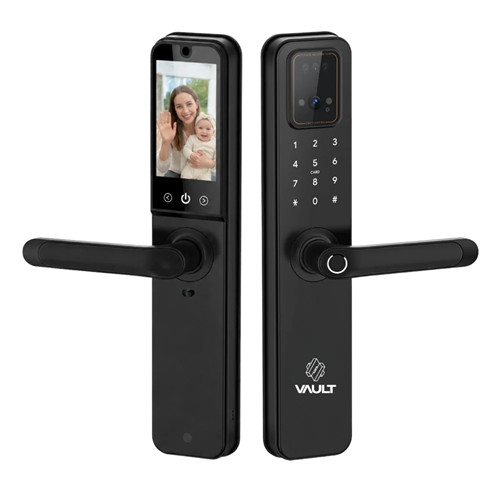
The Yale Luna Elite+ (YLNE/60/HK/NG) is a push/pull smart mortice lock in Nova Graphite for timber doors 35-100mm thick, built around a 60mm backset. It unlocks with face or palm vein recognition - Yale FaceScan uses 3D structured light and PalmScan reads the veins under your skin - as well as fingerprint, PIN code, contactless key tag, the Yale Home app and a mechanical key override. It sits above the Yale Luna Pro+ at the top of the Luna family.
The front of the lock carries an integrated video doorbell. When someone rings, you see them live and talk to them on the 4.7-inch touchscreen inside the door, or in the app when you are away. Yale Sentry Guard sends an alert and records video if someone lingers at your door, and keeps up to 20 motion-triggered clips on 8GB of rolling storage inside the lock. Face, palm and fingerprint templates stay on the lock too - they are not uploaded to the cloud (why local storage matters).
Wi-Fi and Bluetooth are built in, so there is no hub to buy for remote access through the Yale Home app, Amazon Alexa or Google Assistant. Two rechargeable lithium-ion batteries share the load for about 9-12 months between charges, with a USB-C emergency power port and the key override underneath if they ever run flat. A push/pull mortice lock is a locksmith fit - our advice and installation team can help.
Usually ships same day if ordered before 11am AEST (excludes weekends and Queensland public holidays).
Face or Palm - Yale FaceScan and PalmScan
FaceScan projects structured light onto your face to build a 3D map, so it reads depth rather than a flat picture - the key difference explained in 2D vs 3D facial recognition. It works in low light, reads you from 0.4 to 1.0m away and holds up to 100 faces.
PalmScan reads the vein pattern beneath the skin of your palm - Yale describes it as a pattern that cannot be duplicated. Hold your hand 9-20cm from the reader, like a high five, and the door opens without you touching anything. It holds up to 100 palms, so each person can use whichever suits them best.
Face, palm and fingerprint templates are stored on the lock and are not uploaded to the cloud. Want face recognition without palm or video? See the Yale Luna Pro+, or browse every palm or face recognition smart lock we stock.

The doorbell, camera and keypad are all in the front body, so there is no separate doorbell to wire or charge.
- See who is there: live video from the door, with instant alerts when someone approaches.
- Talk both ways: answer on the 4.7-inch touchscreen inside the door, or in the Yale Home app from anywhere.
- Yale Sentry Guard: if someone lingers at your doorstep, the lock sends a notification and records video.
- Clips stay on the lock: up to 20 motion-triggered recordings on 8GB of rolling storage, so the oldest make way for new ones.
- Welcome light and doorbell tones: the entrance light helps at night, and there are 20 doorbell tones to choose from.
 Key Features
- Two contactless biometrics on one lock: 3D FaceScan (up to 100 faces) and PalmScan palm vein recognition (up to 100 palms) - how facial recognition fits among the access methods.
- Integrated video doorbell with a 4.7-inch indoor touchscreen and two-way talk at the door or in the app.
- Yale Sentry Guard loiter alerts with video, and up to 20 motion clips on 8GB of rolling storage inside the lock.
- Built-in Wi-Fi and Bluetooth Low Energy - lock, unlock and check the door in the Yale Home app with no hub required (what a gateway normally does). Browse more Wi-Fi smart locks.
- Works with Amazon Alexa and Google Assistant.
- Six ways in besides the app: face, palm, fingerprint (up to 50), PIN code (up to 100) with a fake PIN option, contactless key tags (up to 100) and a mechanical key override.
- Smart Dual-Battery: two rechargeable lithium-ion batteries, each with its own USB Type-C charging port, lasting about 9-12 months per charge.
- USB-C emergency power port and key override on the underside of the front body - what happens when the battery dies.
- Automatic locking as the door closes, and anti-panic egress for a quick exit from inside.
- Genuine break-in, tamper and intrusion alarms (80dB) with a 3-minute lockout after 5 failed attempts - real hardware alarms, not the phantom tamper alerts some platforms report.
- Internal forced lock (privacy) and external forced lock modes - read what a privacy lock disables before you rely on it.
- Voice guide, silent mode, 20 doorbell tones and a welcome light over the entrance.
- IP52 on the external module, with RCM and R-NZ compliance marks for Australia and New Zealand.
- Push/pull format - compare the three ways to fit a smart lock to a push/pull door.
Access Methods
Compare credentials in Chapter 03 - access methods compared, or browse palm or face, fingerprint, PIN code, fob and card, Bluetooth, app-enabled and backup key smart locks.
 What's in the Box
- Yale Luna Elite+ smart lock - front (outside) body, main (inside) body and mortice lock
- 2 x contactless key tags
No hub is needed - Wi-Fi and Bluetooth are built into the lock, so the Yale Connect Plus Hub 2 is not required for remote access.
 Suitable Uses
- Timber front and entry doors 35-100mm thick that take a 60mm backset mortice lock - check your backset and door thickness first.
- Doors where a vertical push/pull handle suits the entrance - the five measurements to take for a push/pull door.
- Homes that want to see and speak with visitors at the front door without fitting a separate video doorbell.
- Households where people prefer different credentials - face, palm, fingerprint, PIN, key tag or the app all work on the one lock.
- Owners who want Wi-Fi remote access without adding a hub or gateway.
- Rentals and holiday homes that need app-issued guest access and an activity feed - read the privacy obligations for facial recognition and Yale for rentals first.

- Outdoor gates, or any door where the inside body is exposed to rain or sun - only the external module is rated IP52. See our external gate smart locks instead.
- Fire-rated doors - this lock carries no fire rating. See the Yale Unity Entrance Fire Rated and our fire door smart locks.
- Doors that need accessible (AS 1428.1) hardware - see the Yale Unity Entrance Fire Rated with DDA Lever.
- Narrow-stile aluminium or glass doors - it is a timber-door mortice lock. Browse slim-line smart locks for narrow frames.
 Available Finish Options
 Nova Graphite
(This Product)
STK YLNE/60/HK/NG
Finish selection does not affect functionality, compliance, or performance.
 Yale Push/Pull and Mortice Smart Lock Range
This product is the bold row. All four locks use the Yale Home app and a 60mm backset; the Luna Pro+, Kyra Pro and ByYou Pro connect over Bluetooth and reach Wi-Fi through the Connect Plus Hub 2, while the Luna Elite+ has Wi-Fi built in. The Luna Pro+ is the step down if you want 3D face recognition without palm or video.
 Full Specifications
 Lock Layout


The lock fits a mortice prepared for a 60mm backset in a timber door 35-100mm thick. Yale does not supply a drilling template for this model, so we recommend a locksmith fit.
- Measure before you order - push/pull hardware in Chapter 02 and what happens with the wrong backset.
- Keep the area around the proximity sensor clear - anything in front of it can stop face and palm recognition working properly.
- If the deadbolt drags or will not extend fully, adjust the striker plate, and never close the door hard with the bolt thrown - misalignment is the usual cause.
- Mount it where the inside body stays dry - it is not built for direct weather exposure.
- Not sure about DIY? Read when to DIY, or book installation across the Gold Coast through our advice and installation service.
 Battery, Power and Emergency Access
- Smart Dual-Battery: two rechargeable lithium-ion batteries, with power managed across both to prevent unexpected shutdowns.
- Battery life: about 9-12 months per charge, depending on how often the lock is used.
- Charging: each battery has its own USB Type-C charging port. Charge it in place, or swap in a charged battery. Allow about 6-8 hours on a 5V 2A charger - the LED shows red while charging and blue when full.
- Low battery: the lock says "replace the batteries" and the status bar turns red, with about 50 operations left. Power-saving mode then switches off FaceScan, PalmScan, video and intercom, so charge promptly.

If the batteries are too low to operate the lock, plug a USB Type-C cable from a power bank into the emergency port under the front body and unlock as normal. It powers the lock for emergency access only - it does not charge the batteries. The mechanical key override sits right beside it. See where the keyhole is and page 8 of the user guide.
More on power: what really affects battery life, the Yale battery-life note and power and battery FAQs.

 Yale Home App, Wi-Fi and Voice Control
Wi-Fi and Bluetooth Low Energy are built into the Luna Elite+, so it connects straight to your home network - no Connect Plus Hub 2 or other gateway to buy. Download the free Yale Home app on iOS and Android and set the lock up as a new device.
- Remote control: lock, unlock and check the door from anywhere.
- Activity feed: see how and when the door was locked and unlocked - useful for audit trails on a rental.
- Guest access: let visitors in and out when you are not home.
- Video and alerts: live view, two-way talk and Sentry Guard notifications in the same app.
- Voice control: works with Amazon Alexa and Google Assistant.
Set up the app first. Faces, palms, fingerprints, codes and tags added while the lock runs on its own are deleted when it is paired with the Yale Home app (user guide page 10), so pair it before you enrol the household.
Guides: the Yale Home platform, choosing a platform for a home, Yale app connectivity, keeping a smart lock on Wi-Fi and where Yale data lives. Step-by-step app help is in the Yale Home App Guide.
 Alarms, Privacy Lock and Safe Exit
- Tamper alarm: sounds if the front body is forced off the door.
- Intrusion alarm: sounds if the bolt is forced while the door is closed and locked.
- External forced lock alarm: once armed, sounds if the door is opened from inside - useful when the house should be empty.
- 3-minute lockout: 5 failed face, fingerprint, card or PIN attempts within 3 minutes locks the keypad for 3 minutes.
- Alarms sound at 80dB and stop after 3 minutes, or sooner with a valid code, card or fingerprint. These are genuine hardware alarms - tamper alarms versus lockout alarms explained.

Hold the lock button on the inside body for 3 seconds and the status bar turns blue. Face, fingerprint, card, user PIN codes and one-time PINs then stop working from outside until you release it with the admin code, the unlock button and touch sensor, or the manual thumbturn. Read what a privacy lock disables and why it catches out short-stay hosts.

Safe exit: anti-panic egress means getting out is simple - press the unlock button with your hand on the touch sensor, then push or pull the door. In an emergency, turn the manual thumbturn.

The external (outside) module is IP52 weather rated for everyday exposure at a covered entry. The internal module - which houses the batteries, screen and other electronics - is for interior use only and is not weather rated. Do not install the lock where it faces the weather directly. On the coast, read Yale coastal installations and Queensland considerations.
 Frequently Asked Questions
No. Wi-Fi and Bluetooth are built into the lock, so it connects to your home network directly and the Yale Home app works from anywhere. The Yale Connect Plus Hub 2 is only needed for Yale locks without built-in Wi-Fi, such as the Luna Pro+. What a gateway does is covered in Chapter 08.
You get plenty of warning: a voice reminder, a red status bar and about 50 more operations before it stops. If it does go flat, plug a USB Type-C power source into the emergency port under the front body to unlock, or use the mechanical key beside it. Keep one key outside the house - where to keep a spare key.

No. Face, palm and fingerprint templates are stored on the lock itself and are not uploaded to the cloud. Doorbell clips are kept on 8GB of storage inside the lock as well. Read local versus cloud data for why that matters.

It suits timber doors 35-100mm thick with a mortice prepared for a 60mm backset. The outside body is 105mm wide and 427mm tall, and the inside body is 76mm wide and 427mm tall. There is no drilling template for this model, so check your push/pull hardware and talk to our advice and installation team before you order.
Yes. The doorbell camera streams live to the Yale Home app with two-way talk, and Sentry Guard alerts you and records video if someone lingers. At home you can answer on the 4.7-inch screen inside the door instead.
 Additional Information
- Pair the app before you enrol users. Credentials added while the lock runs on its own are deleted when you pair it with the Yale Home app, so set up the app first and then add faces, palms, fingerprints, codes and tags - user guide page 10.
- Change the default admin code straight away. The factory admin code is 1234567890; set your own 4-10 digit code before anything else (user guide page 4).
- Power-saving mode: when the batteries get low, FaceScan, PalmScan, video and intercom switch off to save power. PIN, fingerprint, key tags and the mechanical key are not on that list, but charge promptly - the realities of battery life.
- Weather exposure: only the external module is rated IP52, and the lock is not for outdoor gates or doors that face the weather directly. A covered entry is the right home for it - see sunlight and heat and coastal environments.
- Privacy lock and short stays: the internal forced lock blocks every outside credential, including one-time PINs. Make sure guests know how it works - the real-world perils and best practice.
 Warranty
Genuine Yale products bought new in Australia from authorised retailers are covered against defects in materials and workmanship for:
- Mechanical parts: 10 years
- Electrical and electronic components: 3 years (batteries excluded)
- Keys: 12 months
 Download PDF Resources
Two-page Australian leaflet for YLNE/60/HK/NG - FaceScan, PalmScan, the video doorbell and Sentry Guard, with the specification table (dimensions, user capacities, 60mm backset, 35-100mm doors) on page 2.
Yale's user guide - parts list, admin code, adding face, palm, fingerprint, PIN and card users, settings, alarms, battery charging and pairing with the Yale Home app. An Asian-market edition that also covers two variants we don't sell.
Yale's Australian smart lock catalogue. This edition predates the Luna Elite+, so use it to compare the Luna Pro+, Kyra Pro, ByYou Pro and the rest of the range.
Walk-through of the Yale Home app - downloading, adding a device, inviting guests, access schedules and smart alerts. The lock-specific pages cover other Yale models.
One-page card for downloading the Yale Home app and starting setup.
Yale Luna Elite+ - FAQ, Setup and Owner's Guide
Everything here helps you choose, fit, set up and live with the Yale Luna Elite+. For general questions see our Smart Lock FAQ (Chapter 13), and for measuring and fitting start with the Buyer's Guide.
Face and Palm Recognition
FaceScan projects a pattern of structured light onto your face and reads it back as a 3D depth map, rather than comparing a flat photo. That depth is what separates 3D recognition from a basic 2D camera - 2D vs 3D face recognition explains the difference. It is designed to work in low light, so a dim porch at night is not a problem.
Stand 0.4-1.0m from the FaceScan camera and look at it until the lock plays its confirmation tone. It stores up to 100 faces. Enrolling a face is covered on page 5 of the user guide - pair the Yale Home app first (see below).
PalmScan reads the pattern of veins beneath the skin of your palm. Hold your open hand 9-20cm from the reader - a contactless high five - and the lock opens. It stores up to 100 palms and suits anyone who would rather not touch a keypad or finds fingerprints unreliable. Enrolment is on page 6 of the user guide.
Yes. The lock holds up to 100 faces and 100 palms at the same time, plus fingerprints, PIN codes and key tags, so each person can use whichever method suits them.
On the lock. Face, palm and fingerprint templates are stored on the device for authentication and are not uploaded to the cloud. For the wider picture on data hosting, see local versus cloud and the ASSA ABLOY advantage.
It can be, but read the Privacy Act obligations first - collecting biometrics from guests is different from using them for your own family. Guests can use a PIN code or app access instead. See Yale for rentals and audit trails for short stays.
Video Doorbell, Indoor Screen and Sentry Guard
The camera and doorbell button are built into the front body. When someone rings or approaches, you can see them live and talk to them - on the 4.7-inch touchscreen inside the door, or in the Yale Home app when you are out.
Sentry Guard watches for someone lingering at your door. If it detects one, the lock sends you a notification and records video footage of the visit.
Up to 20 motion-triggered recordings are kept on 8GB of rolling storage inside the lock. Rolling means the oldest clips make way for new ones, and the footage stays on the device.

Yale does not quote a camera resolution, field of view or night-vision range for the Luna Elite+, so we do not either. If camera specifications decide it for you, compare the video intercom locks in our range such as the Vault Fortress Vision, Vault Guardian Vision and Vault Nexus Vision.

Yes. There are 20 doorbell tones, and the volume can be set to high, low or mute. Both are in the system settings on page 6 of the user guide.
PIN, Fingerprint, Key Tags and Key
Touch the keypad with your palm to wake it, enter your code and press *. To stop anyone reading your code over your shoulder, add random digits before or after it - the lock still recognises the real code inside the string. It holds up to 100 PIN codes. Compare PIN access with the other methods in Chapter 03.
Up to 50 fingerprints and up to 100 key tags or cards. Two contactless key tags come in the box. More on fingerprint and RFID tag access in Chapter 03.

Yes - the lock reads RFID key tags and cards, up to 100 in total. Talk to us before buying spares so we can match the right credential to this lock.
The keyhole is on the underside of the front body, next to the USB-C emergency power port. It is there for emergencies such as a flat battery or a forgotten code. Keep at least one key outside the house - at work or with family. See where the keyhole is and safe key storage.
Silent mode unlocks without the voice prompts - handy late at night. Hold your palm on the keypad for 3 seconds, then use your PIN code, fingerprint or card as normal.
App, Wi-Fi and Voice Control
No. Wi-Fi and Bluetooth Low Energy are built in, so the lock joins your home network directly. The Connect Plus Hub 2 serves Yale locks without built-in Wi-Fi. What a gateway does is explained in Chapter 08.
The free Yale Home app, available on iOS and Android.
Downloading is covered on page 4 of the Yale Home App Guide, and adding the lock on page 6.
Yes. Anything enrolled while the lock runs on its own - faces, palms, fingerprints, codes and tags - is deleted when the lock is paired with the Yale Home app. Register the lock (admin code, then R, 7 and #) and choose "Set up a new device" in the app first, then enrol everyone. See page 10 of the user guide.
Yes. Unlock remotely from the app, or share access with guests. Inviting guests is on pages 9-10 of the Yale Home App Guide and access schedules on page 20.
Yale lists Amazon Alexa and Google Assistant for the Luna Elite+. Apple Home is not among them. If Apple Home matters to you, the Yale Luna Pro+ works with Apple HomeKit and the Yale ByYou Pro has Apple Home Key. Compare ecosystems in Chapter 15.
Everything at the door - face, palm, fingerprint, PIN, key tags and the key - works locally. Remote access, app alerts and video in the app pause until the connection returns. See how to keep a smart lock on Wi-Fi and connectivity FAQs.
Power and Batteries
Two rechargeable lithium-ion batteries (Smart Dual-Battery), with power managed across both to prevent unexpected shutdowns. Expect about 9-12 months per charge, depending on use.
Each battery has its own USB Type-C charging port. Open the inside cover and charge it in place, or swap in a fully charged battery. Allow about 6-8 hours on a 5V 2A charger - the LED shows red while charging and blue when full. See page 8 of the user guide.
The lock says "replace the batteries" and the status bar turns red. You have about 50 more operations, and power-saving mode switches off FaceScan, PalmScan, video and intercom until you charge.
Plug a USB Type-C power source into the emergency port under the front body and unlock as normal - it powers the lock for access only and does not charge it. The mechanical key is right beside it. Read what happens when the battery dies and power and battery FAQs.
Alarms, Privacy and Safe Exit
A tamper alarm if the front body is forced off, an intrusion alarm if the bolt is forced while locked, an external forced lock alarm, and a 3-minute lockout after 5 failed attempts. Alarms sound at 80dB. These are genuine Yale hardware alarms, not the phantom tamper alerts some app platforms produce.
Alarms stop by themselves after 3 minutes. To stop one sooner, enter the admin code or any user code and press *, scan a registered card or fingerprint, or hold the R, unlock or lock button inside for 5 seconds.
A privacy lock. Hold the lock button inside for 3 seconds and the status bar turns blue - face, fingerprint, card, user PIN codes and one-time PINs then stop working from outside. The admin code, the unlock button with the touch sensor, or the manual thumbturn releases it. Read admin override and the short-stay risk.
An away mode. Once it is enabled in the menu, hold 0 on the keypad within 3 seconds of the door closing and locking. The lock then alarms if the door is opened from inside.

Press the unlock button with your hand on the touch sensor, then push or pull the door. In an emergency, turn the manual thumbturn - no code or credential is needed from inside.
Five failed face, fingerprint, card or PIN attempts within 3 minutes locks the keypad for 3 minutes, and the backlight flashes. From inside you can clear it early with the R button, the thumbturn, or the lock button with the touch sensor.
Fit, Weather and Installation
It suits timber doors 35-100mm thick with a mortice for a 60mm backset. The outside body is 105 x 427 x 50mm and the inside body 76 x 427 x 70mm. Measure with door thickness and backset in Chapter 02, and see the five push/pull measurements.
We recommend a locksmith. It is a mortice lock, and there is no drilling template for this model. Read when to DIY and common installation mistakes, or book installation or a site survey through our advice and installation team.
No. Only the external module is rated IP52, and the lock should not be installed where it faces the weather directly. For gates, see our external gate smart locks. IP ratings are explained in Chapter 11.

Fit it at a covered entry and wipe it with a soft cloth - never spray water on it or use solvents. Yale's warranty excludes corrosion, including coastal air and salt spray. See Yale coastal installations and coastal lifespan.

No. For a fire-rated door, see the Yale Unity Entrance Fire Rated, the Unity Entrance Fire Rated with DDA Lever and our fire door smart locks.
Setup and Troubleshooting
1234567890. Change it to your own 4-10 digit code before anything else - it protects the menu and overrides the privacy lock. See page 4 of the user guide.
Press the system restart button under the front body with a small tool. See page 9 of the user guide and troubleshooting in Chapter 12.
Take off the inside battery cover and remove the battery, then hold the [RST] button with a small tool, refit the battery and let go when the lock says "Completed" (about 3 seconds later). The steps are on page 4 of the user guide. A factory reset takes the lock back to its factory state, so set a new admin code straight away.
The striker plate usually needs adjusting, especially if the door has moved. Do not slam the door with the bolt extended, as that can damage the mortice. See misalignment in Chapter 12.
Keep the proximity sensor area on the front body clear, stand 0.4-1.0m away for face or hold your palm 9-20cm from the reader, and wipe the front with a soft dry cloth. If the batteries are low, power-saving mode switches face and palm off - charge them.
Related Products, Guides and Chapters
The Luna family and its siblings: Yale Luna Pro+ - Nova Graphite · Yale Luna Pro+ - Champagne Gold · Yale Kyra Pro · Yale ByYou Pro
Other Yale smart locks: Yale Unity Entrance - Matt Black · Yale Unity Entrance - Silver · Unity Entrance Fire Rated · Unity Entrance Fire Rated with DDA Lever · Yale Unity Slim · Yale Assure Lock SL · Yale Assure Keyed Deadbolt
Other video, face and push/pull smart locks: Vault Fortress Vision · Vault Guardian Vision · Vault Nexus Vision · McGrath Grange Entrance Pull Handle
Browse by feature: Palm or face recognition · Vertical push/pull handle · Wi-Fi · Fingerprint · PIN code · Fob / card / RFID · Backup key · App enabled · Regular front doors · All smart locks
Buyer's Guide chapters: Ch 01 What Is a Smart Lock? · Ch 02 Measuring Your Door · Ch 03 Access Methods · Ch 06 Facial Recognition · Ch 08 Gateways · Ch 10 Brand Profiles · Ch 11 Standards and IP · Ch 12 Installation and Troubleshooting · Ch 13 Smart Lock FAQ · Ch 15 App Platforms
Helpful blog reading: Yale Smart Locks: An Honest Guide · Smart Locks on Push/Pull Doors · The Perils of the Internal Snib · Mechanical Key Override · The Realities of Electronic Door Locks · Why Smart Locks Drop Off Wi-Fi · Your Data and China · Which Smart Lock Platform? · How Long Do Digital Locks Last? · Site Survey and Installation
PDF Files - Yale Luna Elite+ (YLNE/60/HK/NG)
Two-page Australian leaflet for YLNE/60/HK/NG - FaceScan, PalmScan, the video doorbell and Sentry Guard, with the specification table (dimensions, user capacities, 60mm backset, 35-100mm doors) on page 2.
Yale's user guide - parts list, admin code, adding face, palm, fingerprint, PIN and card users, settings, alarms, battery charging and pairing with the Yale Home app. An Asian-market edition that also covers two variants we don't sell.
Yale's Australian smart lock catalogue. This edition predates the Luna Elite+, so use it to compare the Luna Pro+, Kyra Pro, ByYou Pro and the rest of the range.
Walk-through of the Yale Home app - downloading, adding a device, inviting guests, access schedules and smart alerts. The lock-specific pages cover other Yale models.
One-page card for downloading the Yale Home app and starting setup.
Yale Warranty
Yale branded products are manufactured and warranted in Australia by ASSA ABLOY Australia Pty Ltd. Coverage is tiered by component type - mechanical parts, electrical and electronic components, and keys each carry their own warranty period. The summary below sets out each period, what is excluded, and how to make a claim through Gold Coast Smart Locks.
This warranty applies to genuine Yale products purchased new in Australia from ASSA ABLOY or its authorised resellers. It operates in addition to your rights under the Australian Consumer Law.
Warranty Summary
How to Make a Claim
For full returns and warranty claim procedures, visit our Returns & Warranty page - this is kept up to date and is the authoritative reference for current claim steps.
- Keep your proof of original purchase (invoice or receipt).
- Contact Gold Coast Smart Locks - operated by Terry's Tradies Pty Ltd and its associated websites, trading names, and subsidiaries - as your authorised retailer, and follow the steps on our Returns & Warranty page.
- Return the product securely packed to protect it in transit, together with your proof of purchase and your name, address, email and phone number.
- ASSA ABLOY assesses the claim. Where the warranty applies, they will (at their option) repair the product, replace it with the same or closest equivalent Yale product, or refund the price you paid.
Claims made directly to ASSA ABLOY require a Case Number from their Customer Service Department before goods are returned - products sent back without a Case Number may not be accepted. Costs of returning a product are the customer's responsibility.
 What Is Not Covered
- Normal wear and tear.
- Misuse, abuse, accident, or use outside Yale's published technical specifications.
- Improper maintenance or neglect, or failure to follow ASSA ABLOY's care and maintenance recommendations.
- Use of batteries other than those specified; batteries themselves are not covered.
- Unauthorised alteration, modification or repair by anyone other than ASSA ABLOY authorised personnel.
- Custom orders made to components or specifications supplied by someone other than ASSA ABLOY.
- Goods that were not new when purchased, second-hand goods, or products not originally sold in Australia through ASSA ABLOY or an authorised reseller.
- Products with brands, marks, plates, numbers or other ASSA ABLOY information defaced or removed.
- Use of substitute, replacement or non-genuine ASSA ABLOY parts or cylinders.
- Corrosive exposure, including vapours, chemicals, abrasive compounds, contamination, pollution, coastal air, salt spray and high humidity.
- Removal, refitment or replacement of products, and any associated charges.
Important Notes
Batteries are consumable and are not covered. Cosmetic finishes and appearance are excluded. Stainless steel resists staining but is not stain-proof - tea staining is a natural process and is not covered where cleaning and maintenance guidelines have not been followed.
Damage from salt spray, coastal air, high humidity and other corrosives is excluded. In Gold Coast and coastal locations, choose a suitable finish and follow the care and maintenance guidance to protect your hardware and preserve your cover.
Your Rights Under the Australian Consumer Law
This manufacturer's warranty is in addition to other rights and remedies you may have under the law. Our goods come with guarantees that cannot be excluded under the Australian Consumer Law. You are entitled to a replacement or refund for a major failure and to compensation for any other reasonably foreseeable loss or damage. You are also entitled to have the goods repaired or replaced if they fail to be of acceptable quality and the failure does not amount to a major failure.
Further Information
Returns & Warranty - goldcoastsmartlocks.com.au
Download the Yale Warranty (PDF)
Official Yale warranty terms - yalehome.com.au
Manufacturer: ASSA ABLOY Australia Pty Ltd, 235 Huntingdale Road, Oakleigh VIC 3166. Tel: 1300WARRANTY. Email: 1300warranty@assaabloy.com

Confused? Overwhelmed? We get it.
Choosing the right smart lock can be genuinely tricky - door types, backsets, app platforms, compatibility with your existing hardware... there is a lot to consider. We have decades of experience fitting locks of all types, including smart locks, and we are happy to help.
Our expert recommendation service is free. Upload a few photos of your door and describe what you need, and one of our qualified locksmiths will give you a personalised recommendation.
Get Your Free Recommendation →How it works - three easy steps:
1. Upload photos
A few clear shots of your door, lock and frame - inside and out.
2. We assess
Our locksmith reviews your setup and requirements - door type, weather exposure, how you want to use it.
3. You get a recommendation
A personalised recommendation tailored to your door, budget and needs. No pressure, no upsell.
Also useful while you are deciding: