

McGrath Grange Entrance Pull Handle with Smart Lock - 5-in-1 Fingerprint, PIN, RFID, App and Key Access
At A Glance
 At A Glance
-
 DISPATCHUsually Same Day*
  LOCK TYPEPush-Pull Handle Smart Lock
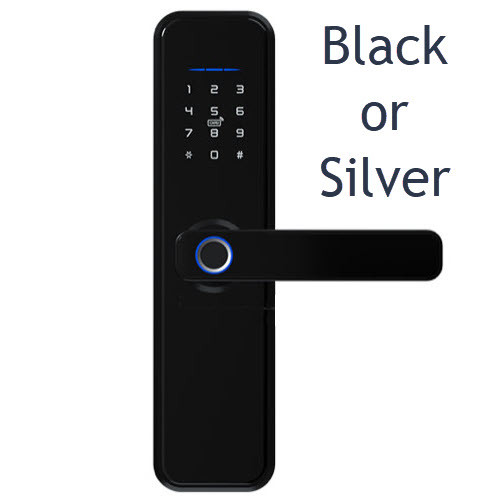
 FINISHMatt Black / Satin SS
 IN THE BOXHandle Set + Extras
 WARRANTY24 Months
 FINGERPRINTUp to 100
 PIN CODES250 Codes (4-9 digit)
 RFID1,000 MIFARE Cards/Fobs
 BLUETOOTH APPMcGrath Locks App
 KEY OVERRIDERekeyable Cylinder
 WI-FI REMOTEOptional Gateway
 APP SUPPORTManaged in Australia
 DOOR THICKNESS35-60mm (to 100mm)
 BACKSET60 or 70mm Adjustable
 MATERIAL304 Stainless Steel
 IP RATINGIP65 (External Panel)
 SALT SPRAY TESTED300h Black / 96h Satin
 BATTERY4 or 8 x AA (12-24 mo)
 CYCLE TESTED200,000 Cycles
 DOOR SENSORSupplied In The Box
 PRIVACY SWITCHAdmin and Key Only
 PASSAGE MODEFree Entry Available
 AUTO-LOCKRe-Secures On Its Own
 ACTIVITY LOGSee Who Came and Went
- EMERGENCY POWERUSB-C Power Bank
 HANDLE HEIGHT900mm Full-Height
 DOUBLE DOORSDummy Handle Available
- PUSH PULL RANGESee Push/Pull Smart Locks
 WANT CHEAPER?See Vault Alpha - Slimline
 WANT HIGHER SPECS?See Yale Luna Pro (Face)
FingerprintPIN CodeRFID CardBluetooth AppMechanical KeyWi-Fi (Gateway)FaceNot Available
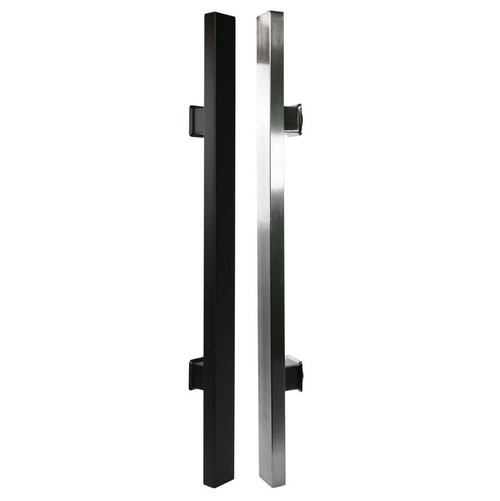
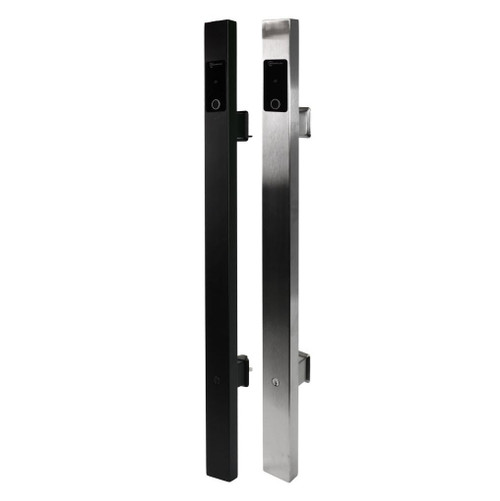
The McGrath Grange Entrance Pull Handle with Smart Lock is a residential smart entrance lock that builds a full-height architectural pull handle and a five-method electronic lock into a single unit. Authorised users open the door by fingerprint, PIN code, RFID credential, Bluetooth through the McGrath Locks app, or a mechanical key override, with optional Wi-Fi remote control when the lock is paired with a McGrath gateway.
Designed in Australia for the Australian market, the Grange suits contemporary timber and aluminium entry doors and drives an integrated electronic deadbolt on an adjustable 60mm or 70mm backset. Everything is managed from the McGrath Locks app, which handles user access, timed and one-time codes, and activity records. For a plain-English look at what changes when a gateway is added, see Chapter 14 - Bluetooth-only vs Gateway in our Buyer's Guide, or start at Chapter 1 - What is a Smart Lock if this is your first.
The exterior panel is built from 304 stainless steel with a tempered glass fingerprint and keypad face, is tested to 200,000 cycles, and is rated IP65 on the external lock housing for everyday outdoor exposure on a covered entry. It is available in Matt Black or Satin Stainless Steel, and can be paired with a matching dummy pull handle for French-style and double-door entrances. A door sensor is supplied in the box for in-app door-position monitoring.
Usually ships same day if ordered before 11am AEST (excludes weekends and Queensland public holidays).
Save on Door Hardware
The McGrath Grange combines the smart lock and the full-height entrance pull handle into a single unit, which makes it well suited to a fresh-fit installation on a new door.
Fitting a separate smart lock often means buying an additional architectural pull handle or push and pull furniture, which can add several hundred dollars to the door hardware cost. Our guide to the three pathways for a push and pull handle door sets out the alternatives side by side.
By building the lock and pull handle into one unit, the Grange keeps hardware costs down and simplifies installation. Pairing it with a roller bolt or roller catch holds the door closed when the deadbolt is unlocked, while the electronic deadbolt takes care of security.
 Key Features
- Full-height pull handle and smart lock in one unit - a single 900mm architectural entrance handle with the electronic lock built in, so there is no need to buy a separate pull handle. See our three pathways to a push and pull smart handle door, and browse the wider push and pull handle lock range.
- Five ways in - fingerprint, PIN code, RFID card or fob, Bluetooth through the McGrath Locks app, and a mechanical key override, with Wi-Fi remote access available as an optional gateway add-on.
- Managed from the McGrath Locks app - issue and revoke permanent, timed, one-time, custom or recurring access for family, guests and trades, and review who came and went. Chapter 14 explains each passcode type, and this worked example covers a recurring cleaner code.
- Adjustable electronic deadbolt - an SS304 anti-saw bolt on an adjustable 60mm or 70mm backset drives the lock from either the app or the keypad. Not sure which backset you have? Measuring your backset takes two minutes, and bolt throw explained covers why projection matters.
- Built to 200,000 cycles from 304 stainless steel with a tempered glass fingerprint and keypad face - see what a cycle rating actually tells you.
- Auto-lock re-secures the door on its own so it is never accidentally left unlocked, and a privacy switch on the inside handle lets the household lock out external credentials, leaving administrator and key access only. Worth understanding before you hand a code to a guest - the perils of the internal snib covers exactly what it disables.
- Passage (free-entry) mode holds the lock open for busy periods when you want people to come and go without a credential.
- Anti-peep PIN entry lets you pad the real code with random digits so an onlooker cannot read your PIN.
- Door sensor supplied in the box - fits into the door edge so the app knows whether the door is genuinely closed, with a door-ajar alarm settable from 0 to 40 seconds.
- Rated IP65 on the external panel and salt spray tested to 300 hours on the black finish and 96 hours on satin steel. Both are laboratory cabinet figures - how IP ratings are written explains what the number does and does not cover.
- USB-C emergency power and a rekeyable mechanical key give two independent backup ways in if the batteries ever run flat - see using the key override when the battery dies.
- Double-door ready - add a matching Grange dummy pull handle so both leaves of a French or double-door entrance carry identical hardware.
Access Methods
For help choosing between credential types, see Chapter 3 - Smart Lock Access Methods, or start with the Quick Start Guide.

 McGrath Locks App
The Grange is set up and managed through the McGrath Locks app, available free for iOS 7.0 and above and Android 4.3 and above. The app is the easiest way to add and remove fingerprints, codes and cards, issue timed or one-time access, and review the door's activity. It runs on the TT Lock platform (TTLock and TTHotel) - see what the TT Lock platform is, the full app user manual, and Chapter 15 - Smart Lock App Platforms for how it compares with the alternatives.
Two things worth reading before you set it up: the permanent passcode activation rule, which is the single most common reason a new code appears to stop working, and clock calibration, which keeps the activity log timestamps honest on a Bluetooth-only lock.
The McGrath Locks app is a customised, McGrath-branded version of the TT Lock platform, tailored specifically for the McGrath Locks product range. It is managed, supported and distributed locally by McGrath Locks in Australia, and Australian-based support staff handle warranty claims, app troubleshooting and platform queries. The underlying cloud infrastructure is provided by TT Lock, a globally deployed IoT platform. For the detail, see the platform security and data-residency table and TT Lock compared with Tuya.
What's in the Box
- McGrath Grange exterior pull handle with fingerprint reader, keypad and mechanical key cylinder
- McGrath Grange interior pull handle with turn knob and battery pack
- Electronic deadbolt supporting both backset sizes (60mm / 2-3/8 inch or 70mm / 2-3/4 inch), with strike plate and wood screws
- Roller bolt with strike plate - aids alignment and holds the door closed when the deadbolt is unlocked
- Door sensor with cable for in-app door-ajar monitoring
- 3 x MIFARE RFID access tags - add more from the RFID credential range
- 2 x mechanical override keys for the rekeyable cylinder
- Top and bottom mounting plates, bracket and fixing screws
- Hex (allen) key for the handle fixings
- Installation template and the Grange User and Installation Guide

 Typical Assembly and Exploded Parts Diagram
This is how the Grange goes together on the door, and what every supplied part is called. The letters below match the labels on the drawing and the exploded diagram in the Grange User and Installation Guide, so you can work from either.

Fitting sequence and hole positions are set out in Dimensions and in the supplied guide. If the door prep is not already there, or you would rather not drill a new door yourself, our advice and installation team can handle it - Chapter 12 covers when DIY is sensible and when it is not.
 Suitable Uses
- Contemporary residential front doors where a full-height vertical push and pull handle is part of the look - the Grange delivers that architectural handle and the smart lock together. It also sits in the wider regular front door range.
- New timber and aluminium entry doors from 35mm to 60mm thick as standard, extending to 100mm with the matching tail piece kits. Check yours against Chapter 2 - Measuring Your Door and the door-type compatibility matrix.
- French-style and double-door entrances, paired with a matching Grange dummy pull handle on the passive leaf so both doors look identical.
- Retrofits onto larger existing cut-outs - the Grange scar plates tidy over legacy hardware holes, including Gainsborough Omni conversions. When you actually need a scar plate is worth a read first.
- Homes and short-stay rentals that need timed, one-time or recurring access for guests, cleaners and trades, managed from the app - see the short-stay setup checklist and how booking-platform automation really works.
- Covered front entries and porches - the external panel is rated IP65 and stands up to showers and water jets. As with any battery smart lock, the IP65 rating covers the outside panel only, so the Grange is not intended for fully exposed pedestrian gates. If you need a gate lock, the McGrath Ascot is the purpose-built option.

New to smart locks? Start with Chapter 1 - What is a Smart Lock, work through the full Buyer's Guide, or browse the complete smart lock range.
Available Finish Options
-
 Matt Black
MLGRANGEBK -
 Satin Stainless Steel
MLGRANGESS
Both finishes are selected as an option on this listing. Finish selection does not affect functionality, compliance or performance - though note the black finish is salt spray tested to 300 hours and the satin steel to 96 hours. Those are laboratory cabinet figures rather than a service life, so near the water the black finish is the tougher pick; see the coastal notes.
Double Door and French Door Option
On a French-style or double-door entrance, only one leaf carries the working lock. To keep both doors looking identical, pair the Grange with the matching Grange Dummy Entrance Pull Handle - a passive, non-electronic pull handle for the fixed or second leaf. It mirrors the smart lock handle exactly, so the pair reads as one continuous piece of hardware across both doors, and it comes in both Matt Black and Satin Stainless Steel to match.
For a walk-through of the ways a smart lock can be fitted to a vertical push and pull handle door, including double-door setups, see our guide to smart locks on vertical push and pull handle doors. If you want to keep an existing handle instead of replacing it, pathway two covers the deadbolt-only route and points at locks like the McGrath X3 and the Kedron.
 Item Code Family - McGrath Grange Range
The Grange shares its adjustable 60/70mm bolt and its McGrath Locks app with two deadbolt-only siblings - the Kedron (tempered glass fingerprint) and the Ashgrove (raised Braille buttons). Both keep your existing door furniture where the Grange replaces it.
 Grange Accessories and Spare Parts
Browse more RFID cards, fobs and tags, Wi-Fi gateways and modules, scar and adaptor plates, roller bolts, keys and key blanks, cylinders and barrels, power accessories, or the full smart lock accessories range. To compare the gateway options, see G2, G3, G4 and G5 gateways compared and Chapter 8 - what a gateway does.
 Full Specifications
Comparing the Grange against another lock? The Quick Start Guide walks through the decisions in order, and the full Buyer's Guide covers each one in depth.
Dimensions
The Grange is supplied with a print-at-100% drilling template, and the scale 1:1 hole diagram is available as a separate download. Check your door against the figures below before you order.

Not sure how to take these measurements? Chapter 2 - Measuring Your Door covers backset, door thickness and stile width, and the push and pull handle section deals specifically with doors like this one.
Battery, Power and Backup Access
- Runs on AA alkaline batteries in the interior housing (not included). Fit 4 x AA for around 12 months, or fill the pack with 8 x AA for around 24 months, based on roughly 10 uses per day. Battery choice makes a real difference - see choosing batteries for a TT Lock smart lock.
- Low battery alerts are given at the keypad and in the McGrath Locks app once the pack drops below 4.8V. If the warning appears sooner than you expect, the low-battery diagnostic is the place to start.
- A USB-C emergency power input lets you hold a power bank against the base of the exterior handle to wake the lock and open it if the batteries are fully depleted. See what happens when the power runs out.
- A rekeyable mechanical key override is the second independent backup - see using the key override when the battery dies, where the keyhole is, and where to keep the spare.
- The battery cover screws take a Torx driver. A McGrath magnetic-tip Torx screwdriver is sold separately and is the tool the range is designed around.
- For a realistic view of how long a smart lock and its batteries last in Australian conditions, see how long digital door locks last and the honest version of battery life.
Door Sensor and Door-Ajar Alarm
A door sensor is supplied in the box and fits into a small bore in the door edge, with its cable running through to the exterior lock assembly. Once it is fitted and enabled, the McGrath Locks app knows whether the door is actually closed - not just whether the bolt has been thrown - which is what makes an honest door-ajar alert possible.
- The door-ajar alarm interval is adjustable from 0 to 40 seconds, where 0 switches the alarm off entirely. Set it to 30, for example, and the lock sounds once the door has been open for 30 seconds.
- Fitting the sensor is optional - the Grange locks and unlocks normally without it. It is worth the extra ten minutes at install if you want door-position monitoring in the app.
- The sensor is fitted at stage 3 of the installation sequence, before the exterior handle goes on. The User and Installation Guide sets out the order.

Privacy Switch and Reset
Two small holes sit on the inside handle just below the turn knob. The left button is the privacy switch; the right button is the reset. They do very different things and it is worth knowing which is which before you need either.

Wi-Fi Remote Access (Optional)
Out of the box, the Grange is controlled locally over Bluetooth when your phone is in range. Add a McGrath gateway and the same app gains full remote control - lock and unlock, issue and delete codes, and read the activity log from anywhere. For a plain-English explanation of the difference, see Bluetooth-only vs Gateway, what a gateway actually does, and whether you need one at all.
What changes when you add a gateway
A gateway covers roughly 10 metres to the lock with nothing solid in between, so it wants to be in the same part of the house as the door - gateway placement explains why. If your router mixes 2.4GHz and 5GHz on one name, read band steering and Wi-Fi dropouts first. Browse all gateways and modules, the 240V dual-USB wall adaptor that powers them, or the whole Wi-Fi enabled smart lock range.

McGrath Locks is distributed in Australia by LSC, a long-established national supplier to the locksmith trade, and Terry's is a local locksmith business you can actually reach. Between us, that means genuine local warranty support, spare parts and app help for years to come - not a disposable lock from an anonymous online seller. Read more about why we back McGrath for the long term, or see where McGrath sits against the other brands we stock in Chapter 10 - Brand Profiles.
 Frequently Asked Questions
No. The Grange is a full-height architectural pull handle with the smart lock built into it, so the handle and the lock arrive as one unit. That is the main reason it can work out cheaper than buying a smart lock and a separate pull handle. See pathway one for push and pull handle doors, or browse the full push and pull handle range.
By itself the Grange works over Bluetooth, so full control happens when your phone is near the door. Add an optional McGrath gateway and you get remote control from anywhere - unlock for a visitor, add a code, or check the log. See Bluetooth vs Gateway and browse app-enabled smart locks.
You get plenty of warning first - the lock alerts you at the keypad and in the app well before the batteries die. If you ignore it and they do run flat, hold a power bank on the USB-C emergency port to power the lock up, or use the mechanical key override. See using the key when the battery dies and the battery and power section above.
The Grange suits timber and aluminium entry doors from 35mm to 60mm thick as standard, and up to 100mm with a tail piece kit. It needs a 54mm cross-bore and works on a 60mm or 70mm backset. Check yours against Chapter 2 - Measuring Your Door and the dimension drawing before ordering.
Yes. Fit the Grange to the active leaf and pair it with a matching Grange dummy pull handle on the second leaf, so both doors carry identical hardware. See the double door option and the dummy handle fitting instructions.
More questions are answered in the FAQ tab above, and the general ones in Chapter 13 - Smart Lock FAQ.
 Additional Information
Warranty
12-month warranty against defects in materials and workmanship (24-month on ALBION, ASCOT, ASHGROVE, BARDON, GRANGE, HAMILTON, KEDRON, MANLY, SANDGATE, STAFFORD, ULTRA SECUA and WINDSOR models). McGrath Locks will repair, replace, or refund at their discretion. Proof of purchase required for all claims. Returns & Warranty | McGrath Locks Warranty
The Grange is on McGrath's 24-month named-model list, so this lock carries the 24-month term. Note that installation by an unlicensed person and damage caused by battery leakage are both excluded - two good reasons to use fresh alkaline cells and, if you are unsure of the door prep, to have it professionally installed.
 Download PDF Resources
Two-page datasheet carrying the full hardware, enrolment, lock-function and operating-environment tables - the source for every figure in the specifications above.
Six-page consumer brochure covering the five access methods, the security features, both finishes, the salt spray figures and battery life.
The seven-stage fitting sequence with an exploded diagram, plus keypad programming, gateway pairing, the door-sensor alarm setting, and the privacy and reset buttons.
Scale 1:1 deadbolt hole diagram showing the 54mm bore, the 60mm and 70mm backset centres, the door sensor bore and the roller bolt cut-out.
Print-at-100% drilling template for marking the door before you cut. Check your printer is not scaling to fit before you use it.
Fitting instructions for the matching dummy pull handle on the second leaf of a double or French door.
The full 56-page app manual behind the McGrath Locks app - registration, adding a lock, eKeys, all six passcode types, card and fingerprint management, and gateway setup. Also readable in-page as the online TT Lock user manual.
McGrath Grange - FAQ, Setup and Owner's Guide
Everything owners and installers ask about the Grange pull handle smart lock, in plain English. For general smart lock questions see Chapter 13 - Smart Lock FAQ, or start the full Buyer's Guide from Chapter 1. If you are still narrowing down a shortlist, the Quick Start Guide walks the decisions in order.
Access and Credentials
Up to 100 fingerprints, 250 PIN codes of 4 to 9 digits (a minimum of 4 when set in the app), and 1,000 RFID credentials, plus unlimited Bluetooth eKeys. That is more than enough for a family home, a holiday rental or a small office. Compare the fingerprint range, read how fingerprint readers work, and if reads are inconsistent try the three-angle enrolment technique.
The Grange reads 13.56MHz MIFARE credentials. It ships with three tags, and you can add more in card, fob, sticker or wristband form - the MIFARE card, key fob, adhesive sticker and wristband. Browse all RFID credentials, the whole card and fob access range, or read how cards are managed on this platform.
Yes. From the McGrath Locks app you can issue permanent, timed, one-time, custom or recurring PINs and eKeys - a cleaner code that only works Tuesday mornings, or a one-time code for a tradesperson. See the six passcode types explained and a worked cleaner example. This makes the Grange well suited to short-stay rentals, and it can be driven from a booking platform - see how the automation really works.
Almost always this is the activation rule rather than a fault. A newly issued passcode has to be used at the door within a set window or it lapses, and a permanent code that has never been entered can expire before it is ever used. The permanent passcode rule and how to stop codes expiring cover the fix in a couple of minutes.
Yes. Anti-peep entry lets you pad the real PIN with random digits before or after it, so an onlooker cannot pick the code out of what you typed. Repeated wrong attempts also lock the keypad out for a short period. See how PIN entry is protected, and browse the PIN code lock range.
No. The Grange is a five-method lock - fingerprint, PIN, RFID, Bluetooth and mechanical key, with Wi-Fi as the optional gateway add-on. If facial recognition is a must, the Yale Luna Pro+ in Champagne Gold or Nova Graphite is the step up, and the slimline Vault Alpha is the lower-cost route. Read 2D versus 3D face recognition first, and browse the palm and face recognition category.
Remote Access, App and Gateway
Only if you want remote control. Without a gateway the Grange works over Bluetooth in range of the door. Add a G3 (PoE), G4 (4G) or G5 (dual-band) for access from anywhere. See the four generations compared, Chapter 8, and how to choose between them. The with-and-without table on the main description shows exactly what changes.
On a McGrath gateway the usual culprit is a router that broadcasts 2.4GHz and 5GHz under one network name and steers devices between them. The gateway needs 2.4GHz. Band steering and real fixes explains the settings to change, Chapter 8 covers the same ground, and the gateway choice notes cover which unit copes best with a difficult network.
The lock itself is battery powered and completely independent of your network - fingerprints, PINs, cards and the mechanical key all keep working. Only the remote functions stop until the gateway is back online. Chapter 8 covers what a gateway outage actually costs you.
The Grange uses the McGrath Locks app (iOS 7.0 and above, Android 4.3 and above), a McGrath-branded build of the TT Lock platform. It is managed and supported locally in Australia by McGrath Locks, with the underlying cloud infrastructure provided by TT Lock. For the background, see the TT Lock platform profile, the security and data-residency table, the platform's disclosed vulnerabilities, and TT Lock compared with Tuya. If you are weighing platforms rather than locks, which platform suits a family home is the place to start.
Yes. The McGrath Wireless Remote is a single-channel Bluetooth fob that opens the door from a few metres away. Each remote learns to one lock, and a lock can hold up to 15 remotes - handy at a reception desk, or for someone who would rather press a button than open an app.

Yes - a Bluetooth-only lock keeps its own clock and can drift over months, which puts the wrong times against entries and can make timed codes activate early or late. Connecting over Bluetooth from the app resets it. See the symptoms of clock drift and how to calibrate the clock manually.
Power and Batteries
The Grange battery pack takes up to 8 AA alkaline batteries. Fit 4 for around 12 months, or fill all 8 for around 24 months, based on 10 uses per day. Batteries are not included. See how long the batteries really last, battery management on this platform, and the general power and battery FAQ.
Two independent backups: hold a power bank on the USB-C emergency port to power the electronics, or use the rekeyable mechanical key. The lock also warns you long before the batteries die. See where the keyhole is, what happens in a power outage, and browse locks that keep a backup key.
The Grange cylinder is rekeyable, so a locksmith can key it to an existing house key or to a restricted system. Two keys are supplied. Spare blanks and replacement cylinders for the McGrath range live under keys and key blanks and cylinders and barrels. Talk to our advice and installation team before you order if keying alike matters to you.
Door Fit, Finishes and Installation
Timber and aluminium entry doors, 35mm to 60mm thick as standard, extending to 100mm with the 52 to 75mm or 75 to 100mm tail piece kits. It needs a 54mm bore and a 60mm or 70mm backset. Measure yours with Chapter 2, check the door type against the compatibility matrix in Chapter 4, and see the full dimension drawing.
Measure from the door edge to the centre of the existing bore. The Grange deadbolt adjusts between the two, but the hole has to be drilled to the right centre in the first place - if you fit the 70mm deadbolt, use the 70mm centre on the template. Measuring your lock backset takes two minutes, and getting it wrong is an expensive mistake on a new door.
Often, yes. The 900 x 75mm and 556 x 64mm Grange scar plates tidy over legacy hardware cut-outs, and the longer plate suits Gainsborough Omni conversions. When you actually need a scar plate and the brand-by-brand guide are both worth a read. Browse all scar and adaptor plates.
Both finishes are 304 stainless. For salt-air locations the Matt Black finish is the tougher pick - salt spray tested to 300 hours versus 96 hours for Satin Stainless Steel. Those are cabinet test figures, so treat them as a comparison rather than a service life, and wipe external hardware down with fresh water periodically. See the coastal notes and realistic lifespan expectations.
Fit the Grange to the working leaf and add the passive Grange dummy pull handle to the fixed leaf. The dummy has no electronics but mirrors the lock handle exactly, and comes with its own fitting instructions. See our guide to push and pull handle doors and the double door option on the main description.
The roller bolt holds the door closed when the deadbolt is not thrown - without it a pull handle door has nothing to keep it shut, because there is no latch in a deadbolt-only lock. It also helps the door pull up to the frame squarely. It is supplied in the box and needs a 24mm x 57mm cut-out, 43mm deep. Browse the wider roller bolt range if you need a spare or a second one.
A competent DIYer with a drill guide can, on a door that is already prepared correctly. The template is print-at-100% and the guide walks the seven stages in order. That said, the Grange is a 900mm handle set on a new door - a mis-drilled bore is not recoverable, so if the door is expensive or the prep is not already there, get it fitted. Read when DIY is sensible and when it is not, or book our installation service.
Everyday Use and Security Features
Hold the left button on the inside handle for about three seconds and the lock confirms secure lock is on. External fingerprints, PINs and cards stop working and only administrator access and the mechanical key will open the door. Press again to release it. It is excellent overnight and a genuine trap on a rental - a guest whose code has "stopped working" has usually met a privacy switch someone left engaged. Read the real-world perils of the internal snib and the short-stay risk in particular, and see Privacy and Reset on the main description.
Yes - passage mode (also called free entry) holds the lock released so people can come and go without a credential. It is set from the app or at the keypad, and released the same way. It is worth turning it back off deliberately rather than assuming it lapses. Our TT Lock tips guide covers the app-side controls.
It is a small sensor that fits into the door edge so the app knows whether the door is genuinely closed, not just whether the bolt has thrown. Once fitted you can set a door-ajar alarm anywhere from 0 to 40 seconds, where 0 turns it off. It is optional - the lock works normally without it - but it is ten minutes well spent at install. See the door sensor section.
Yes. The app keeps an activity record against each credential, so you can see which code or fingerprint opened the door and when. Without a gateway the log syncs the next time you are at the door over Bluetooth; with a gateway it uploads in real time. See how audit trails are used in short-stay.
Troubleshooting
Nearly always it is the setup, not a fault. Confirm the lock is not still in demo mode, check it is not in passage mode, and make sure the inside snib and the cylinder bar are the right way round per the installation guide. Our walk-through of the three most common install mistakes covers it, and Chapter 12 is the broader reference.
On locks running the TT Lock platform an app-side alarm toggle can produce false alerts from ordinary door movement, even where the hardware is not designed to use it. It is not a fault with your Grange. Our guides explain why these phantom alerts happen and how to turn the setting off in three steps. Chapter 13 answers the same question, and the tips guide covers which models it applies to.
Use fresh AA alkaline batteries and never mix old and new, make sure the ribbon cable between the panels is not pinched, and keep the lock firmware up to date in the app. Enrol each finger several times at slightly different angles for reliable reads - the three-angle technique is the trick. If the door is stiff or the bolt is binding, the motor works harder and battery life drops - see why door alignment matters more than people expect and what actually fails on these locks. For anything you cannot resolve, our advice and installation team can help.
Transfer the lock to the new owner in the app rather than factory resetting it. Transfer moves administrator rights cleanly and keeps the hardware paired; a reset wipes every credential and leaves the new owner to start from scratch. See transferring a lock, what to do before handover, and the erase code that clears every passcode at once.
How the Grange Compares

All three share the same McGrath Locks app and the same adjustable 60/70mm bolt. The Grange is the full-height pull handle lock for a statement entrance; the Kedron is a fingerprint deadbolt that keeps your existing door furniture; and the Ashgrove uses raised buttons with Braille for easier tactile use. All three take the same replacement bolt. Side-by-side spec comparisons sit at the Kedron's item code family table.
Then a deadbolt-only lock is the better answer - it replaces the keyed deadbolt and leaves your door furniture alone. The McGrath X3 and the Kedron both do this. Pathway two of our push and pull guide sets out exactly this scenario, and Chapter 1 explains the deadbolt format.
For a lower-cost slimline lock, look at the Vault Alpha. If you specifically want facial recognition, which the Grange does not have, the higher-spec Yale Luna Pro+ is the step up - see Chapter 6 - Facial Recognition. For everything in between, browse all smart locks.
No. The Grange carries no fire rating and should not be fitted to a fire-rated doorset. The McGrath fire-rated range is the place to look instead - the Stafford, the Hamilton in Matt Black or Satin Nickel, the Windsor, or the Braille-keypad Bardon. Read what fire door core types mean and browse the fire door category.
Because someone answers the phone in three years' time. McGrath is distributed nationally through LSC and sold and supported here by Terry's, which is what makes warranty claims, spare parts and app help actually happen. See why longevity matters on a lock and the McGrath brand profile. For a wider view of what separates a good digital lock from a bad one, what to check before you buy is a useful five minutes.
Related products, guides and chapters
Grange range and spares: Dummy Pull Handle · Adjustable Bolt 60/70mm · Tail Piece 52-75mm · Tail Piece 75-100mm · Scar Plate 900x75 · Scar Plate 556x64 · Battery Cover Torx Screwdriver.
Add-ons: G3 Gateway · G4 Gateway · G5 Gateway · 240V Gateway Wall Adaptor · Wireless Remote · RFID Card / Fob / Sticker / Wristband.
Similar and alternative locks: McGrath Kedron · McGrath Ashgrove · McGrath X3 · McGrath Albion · McGrath Ascot · Vault Alpha · Yale Luna Pro+.
Fire-rated alternatives: McGrath Stafford · McGrath Hamilton · McGrath Windsor · McGrath Bardon.
Browse by type: Push/Pull Handle Locks · Fingerprint · PIN Code · Card / Fob · Bluetooth · Wi-Fi · Has Backup Key · App Enabled · Regular Front Door · All Smart Locks.
Accessories by type: All Smart Lock Accessories · Gateways and Modules · RFID Cards, Fobs and Tags · Scar and Adaptor Plates · Roller Bolts · Keys and Key Blanks · Cylinders and Barrels · Power Accessories · Other Accessories.
Buyer's Guide: All Chapters · Quick Start Guide · Ch 1 What is a Smart Lock · Ch 2 Measuring · Ch 3 Access Methods · Ch 4 Door Types · Ch 5 Fire Doors · Ch 6 Facial Recognition · Ch 7 Short-Stay · Ch 8 Gateways · Ch 10 Brand Profiles · Ch 11 Standards and IP Ratings · Ch 12 Installation · Ch 13 FAQ · Ch 14 TT Lock Platform · Ch 15 App Platforms.
Useful reading: Smart locks on push/pull handle doors · Measuring your lock backset · What is bolt throw · Scar plates explained · Mechanical key override · The perils of the internal snib · TT Lock tips and tricks · TT Lock user manual · Gateways compared · Wi-Fi dropouts · How long digital locks last · The realities of electronic locks · Terry's, LSC and McGrath.
What's in the Box - McGrath Grange
- McGrath Grange exterior pull handle with fingerprint reader, keypad and mechanical key cylinder
- McGrath Grange interior pull handle with turn knob and battery pack
- Electronic deadbolt supporting both backset sizes (60mm / 2-3/8 inch or 70mm / 2-3/4 inch), with strike plate and wood screws
- Roller bolt with strike plate - aids alignment and holds the door closed when the deadbolt is unlocked (see the roller bolt range for spares)
- Door sensor with cable for in-app door-ajar monitoring - see how the door sensor works
- 3 x MIFARE RFID access tags - add more from the RFID credential range
- 2 x mechanical override keys for the rekeyable cylinder
- Top and bottom mounting plates, bracket and fixing screws
- Hex (allen) key for the handle fixings
- Installation template and the User and Installation Guide
McGrath Grange - Dimensions
Print the installation template at 100% scale before marking the door, and use the scale 1:1 hole diagram to confirm the bore centres. If you are checking an existing door rather than a new one, Chapter 2 - Measuring Your Door and our backset how-to are the two to read first.
McGrath Grange - Technical Specifications
Every figure below comes from McGrath's own Grange datasheet, grouped the way the datasheet groups them.
Hardware
Enrolment and Verification
Lock Features and Functions
Operating Environment and Warranty
Two notes worth reading alongside these figures: the IP65 rating scopes to the external lock housing only (how IP ratings are written), and the salt spray hours are a laboratory cabinet result rather than a service-life guarantee (what salt air actually does over time).
McGrath Grange - Product Brochure
The full six-page McGrath brochure, page by page. The same document is available as a downloadable PDF.


PDF Files - STK MLGRANGE
Two-page datasheet carrying the full hardware, enrolment, lock-function and operating-environment tables - the source for every figure on this page.
Six-page consumer brochure covering the five access methods, the security features, both finishes, the salt spray figures and battery life. Also viewable page by page in the Brochure tab.
The seven-stage fitting sequence with an exploded diagram, plus keypad programming, gateway pairing, the door-sensor alarm setting, and the privacy and reset buttons.
Scale 1:1 deadbolt hole diagram showing the 54mm bore, the 60mm and 70mm backset centres, the door sensor bore and the roller bolt cut-out.
Print-at-100% drilling template for marking the door before you cut. Check your printer is not scaling to fit before you use it.
Fitting instructions for the matching dummy pull handle on the second leaf of a double or French door.
The full 56-page app manual behind the McGrath Locks app - registration, adding a lock, eKeys, all six passcode types, card and fingerprint management, and gateway setup. Also readable as the online TT Lock user manual.
McGrath Locks Warranty
Warranty Summary
How to Make a Claim
- Contact Terry's Tradies Pty Ltd and its associated websites, trading names, and subsidiaries (the place of purchase) within the applicable warranty period.
- Supply your proof of original purchase - a receipt or tax invoice is required.
- Provide a clear description of the fault and your contact details.
- You may be asked to return the product for assessment before a remedy is determined.
- McGrath Locks will, at their discretion, repair the product, replace it with the same or an equivalent model, or provide a refund of the purchase price.
 Exclusions
This warranty does not cover:
- Normal wear and tear
- Products that have been disassembled
- Damage caused by improper handling, incorrect installation, misuse, abuse, neglect, modification, or accident
- Installation by unlicensed persons (including non-licensed locksmiths or technicians)
- Products not used in accordance with the supplied instructions
- Cosmetic damage that does not affect functionality
- Labour or installation costs related to the removal or reinstallation of products
- Exposure to conditions outside normal environmental use
- Work completed before warranty approval
- Damage caused by battery leakage, battery failure, or force majeure
Our goods come with guarantees that cannot be excluded under the Australian Consumer Law. You are entitled to a replacement or refund for a major failure and compensation for any other reasonably foreseeable loss or damage. You are also entitled to have the goods repaired or replaced if they fail to be of acceptable quality and the failure does not amount to a major failure. This warranty is provided in addition to your rights and remedies under the Australian Consumer Law.

Confused? Overwhelmed? We get it.
Choosing the right smart lock can be genuinely tricky - door types, backsets, app platforms, compatibility with your existing hardware... there is a lot to consider. We have decades of experience fitting locks of all types, including smart locks, and we are happy to help.
Our expert recommendation service is free. Upload a few photos of your door and describe what you need, and one of our qualified locksmiths will give you a personalised recommendation.
Get Your Free Recommendation →How it works - three easy steps:
1. Upload photos
A few clear shots of your door, lock and frame - inside and out.
2. We assess
Our locksmith reviews your setup and requirements - door type, weather exposure, how you want to use it.
3. You get a recommendation
A personalised recommendation tailored to your door, budget and needs. No pressure, no upsell.
Also useful while you are deciding: