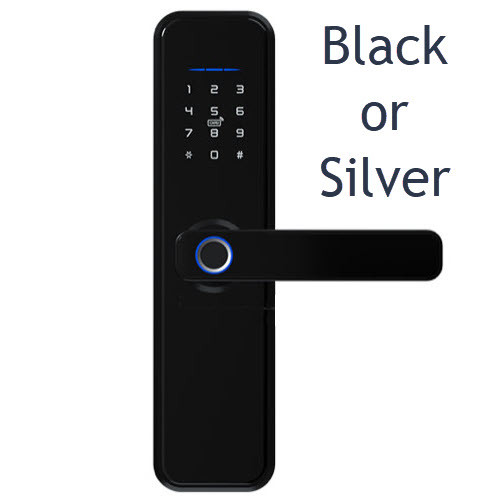
McGrath A210 Slimline Digital Smart Lock - 43mm Narrow Stile, 5-in-1 Access, Euro 85 Mortice
At A Glance
 At A Glance
 DISPATCHSame Day Before 11am




 Fingerprint
  PIN Code
  RFID Card / Tag
  McGrath Locks App
  Mechanical Key
  Remote (Optional Gateway)
  Face / Palm
Not Available
The McGrath A210 Slimline Digital Smart Lock is a 43mm-wide, five-in-one smart lock built for the narrow stiles of aluminium-framed hinged glass doors - shopfronts, office suites, clinics, gyms and the aluminium or timber entry doors of modern homes where a standard-width smart lock simply will not fit. It is the McGrath Locks slimline model that carries a fingerprint reader as well as a keypad, and it is supplied complete with a McGrath Euro 85 Series mortice lock, so the door gets a genuine latch-and-deadbolt mortice rather than a spring latch alone. Before you order, confirm your door with Chapter 02 - stile width and the door type compatibility matrix in Chapter 04.
Five ways in from the outside: fingerprint (up to 100), PIN code (up to 250, with anti-peep entry), RFID card or tag (up to 1,000 MIFARE credentials), Bluetooth eKey through the McGrath Locks App, and a mechanical key override through the Euro cylinder. The inside carries a passive lever and thumb-turn. Wi-Fi remote access is optional - add a McGrath G5, G4 or G3 gateway and you can manage the lock from anywhere; without one it works fully over Bluetooth at the door, which is exactly what a TTLock lock can do without Wi-Fi. For a side-by-side of every access method, see the Chapter 03 comparison.
The A210 runs on the TTLock platform through the McGrath-branded McGrath Locks App - the same app as every other McGrath, Lockton and Austyle lock we sell, so one household or one business can run several doors from one login. It is distributed in Australia by LSC and supported locally, which is why we back it for the long haul - read why Terry's, LSC and McGrath give long-term confidence, and the McGrath brand profile in Chapter 10. Choosing between platforms? Which platform suits commercial, office and retail doors and Chapter 15 on TTLock will settle it.
Usually ships same day if ordered before 11am AEST (excludes weekends and Queensland public holidays).
This listing is the single-sided A210 - electronic keypad and fingerprint reader outside, passive lever and thumb-turn inside. The McGrath A210DB Double-Sided Smart Lock carries a full keypad and fingerprint reader on both faces of the door - the answer for a gate-side entry, an internal office partition or any door where people need a credential to leave as well as to enter. The same buyer logic is explained for gates in why double-sided locks suit gates.

The A210 is the confirmed main-door partner for the McGrath ULTRA-SECUA Dual Unlock Screen Door Smart Lock. Paired over Bluetooth as a Remote in the McGrath Locks App, one credential at the screen door opens both doors - no second PIN or scan at the A210. It is one of the few dual-unlock pairings sold in Australia, and the McGrath approach differs from Yale's. Because the A210 handle projects 80mm from the door face, check the clearance to the screen frame first. See how the ULTRA-SECUA is unlocked and why it must be set up in the app first.

The A210 sits in the middle of the McGrath slimline range - the A231 is the 31mm ultra-slim option and the A236 the 36mm option - and we also stock narrow-stile locks from Lockton, Yale, Lockwood, Auslock and Vault. Measure the stile width and backset first, then browse every slim-style smart lock for narrow frame doors.
 Key Features
- Five-in-one exterior access - fingerprint, keypad PIN, RFID card or tag, Bluetooth eKey and a mechanical backup key - from one narrow lock body. How the layers stack up is explained in Chapter 01 - the authentication stack.
- Slim 43mm body engineered for narrow stile aluminium door profiles - the most common reason a standard smart lock is rejected on a glass shopfront or alfresco door. Confirm the stile with Chapter 02 - stile width; the blog on measuring a narrow stile shows the technique on a gate post, and it is the same measurement on a door.
- Supplied with a McGrath Euro 85 Series mortice lock - 85mm centres, SS304 latch and deadbolt, 500,000-cycle rated and BHMA Level 2 and 3 tested. Locking on the latch is automatic; lift the lever to throw the deadbolt for full mortice deadbolt security. The full mortice range is in the mortice locks for smart locks category.
- 304 stainless steel body with an acrylic screen, rated to 100,000 operating cycles - what a cycle rating actually tells you about lifespan.
- Up to 100 fingerprints, 250 PIN codes (4-9 digits, minimum 4 when set in the app) and 1,000 RFID credentials, plus unlimited Bluetooth eKeys - capacities that comfortably cover a busy office, gym or clinic. Get fingerprints enrolling reliably with the three-angle enrolment technique.
- Permanent, timed and one-time PIN codes issued from the McGrath Locks App - the TTLock passcode types - with eKeys for phone users and cyclic passcodes for a weekly cleaner or trainer. Note the 24-hour activation rule on permanent codes.
- Access audit trail - every entry event is logged against the credential that opened the door and read back in the app, which is why audit trails settle disputes in rentals and shared premises alike.
- Anti-peep PIN entry (add random digits before or after your code) and a five-attempt lockout against guessed codes.
- Passage mode holds the door unlocked for trading hours, deliveries or an open-house, then locks again on command.
- Bluetooth control at the door with no internet required. Add a McGrath G5, G4 or G3 gateway (sold separately) for remote lock, unlock, user management and live log from anywhere - Bluetooth-only vs gateway and what a gateway does are covered in the guides.
- McGrath Locks App on Android 4.4 and iOS 7.0 and above, on the TTLock, TTRenting and TTHotel platforms

 - the TTRenting and TTHotel layers are what short-stay and accommodation operators use for PMS integration; see which PMS platforms integrate.
 - USB-C emergency power input - hold a power bank to the port and the lock wakes long enough to get you in when the batteries are flat, and the Euro cylinder key override is there as the second fallback. Read what to do when the battery dies.
- 4 x AAA alkaline batteries (not included) with a rated life of 18 months at around 10 uses a day - the longest in the McGrath slimline family. Terry's recommends Duracell; choosing and monitoring batteries explains why brand matters.
- IP65 rated external module for a sheltered outdoor position. The internal module houses the battery compartment and electronics and is for interior use only - it is not weather rated. Coastal buyers should read coastal environments - Gold Coast specific.
- Field-reversible handing - the same lock suits a left or right hand door (batteries must be installed to change handing). Work out yours with how to determine your door's handing.
- 1.5-second unlock time and a motor draw under 200mA - quick, quiet operation on a busy door.
- Available in Black or Silver on one listing, with a double-sided sibling (A210DB) for two-sided control and a confirmed Dual Unlock pairing with the ULTRA-SECUA Dual Unlock screen door lock.
- Supported in Australia by McGrath Locks and its distributor LSC, with Terry's as your installer and first call - the McGrath range in context and warranty as a confidence signal.
Access Methods
Every method below is managed from the McGrath Locks App. For how each one works and when to use it, see Chapter 03 - Smart Lock Access Methods; for how TTLock handles fingerprints, IC cards and other credentials, see Chapter 14. Browse the whole range by method: app-enabled, fingerprint, PIN code, fob, card and RFID, Bluetooth, Wi-Fi and backup key.
 Palm Recognition
 What's in the Box
- Exterior lock assembly - keypad and fingerprint reader side
- Interior lock assembly - passive lever and thumb-turn
- McGrath Euro 85 Series mortice lock (85mm centres, 30mm backset) with strike plate
- Drill positioning template - the same A210 installation and drilling template (PDF) is downloadable if the printed one goes missing (print at 100 percent scale)
- 2 x mechanical keys
- 2 x RFID access tags
- Mounting screws
- Mini security screwdriver for the battery cover
- Installation guide
Note: a gateway for Wi-Fi remote access is not included - the G5, G4 and G3 are sold separately. Batteries (4 x AAA alkaline) are not included. Extra RFID cards and fobs are in the RFID credentials range.
 Suitable Uses
- Narrow stile aluminium hinged glass doors where a standard smart lock will not fit - the A210 exists for exactly this door. Check the aluminium-door row of the Chapter 04 compatibility matrix and the mortice-with-longplate hardware notes in Chapter 02, because that is the furniture style the A210 replaces.
- Commercial offices, retail shopfronts, gyms, clinics, allied-health rooms and professional suites accessed through aluminium glass doors - staff on fingerprint or PIN, contractors on timed codes, and an activity log for every entry. Why TTLock suits commercial, office and retail doors.
- Residential front and rear entry doors on aluminium or timber frames where a slimline profile is wanted and the outside module sits under some cover (IP65 external module). Alfresco and indoor-outdoor glass doors qualify when the outside face is sheltered.
- Airbnb, holiday lets and rooming houses on the TTLock platform - one-time and timed codes for guests and cleaners, remote issue and revoke with a gateway, PMS automation via TTRenting. Start with what TTLock can do without Wi-Fi, then what changes with a gateway and PMS and the Igloohome vs TTLock comparison in Chapter 07.
- New builds and fitouts where the smart lock is specified before the door stiles are ordered - 43mm body, 38-55mm door thickness, Euro 85 mortice prep. Installers can print the drilling template (PDF) at full scale from the door schedule stage.
- Main-door partner in a Dual Unlock pairing with the ULTRA-SECUA Dual Unlock screen door lock - one credential at the screen opens both doors.
- Applications needing biometric fingerprint entry from a narrow body - the 31mm A231 and 36mm A236 are slimmer still, so if your stile takes 43mm and you want the largest fingerprint reader in the slimline range, the A210 is the pick.
- Where single-sided control is enough. For a credential on both faces, see the A210DB Double-Sided.

Sliding doors - the A210 is a hinged-door lock. For a sliding glass or screen door, use the McGrath A231 with Hook Bolt. Fully exposed external gates and doors where rain reaches the inside module - the IP65 rating covers the outside module only; for a lock built for weather on both faces, see the external gate category. Fire doors - the A210 carries no fire rating; the fire door category lists the certified McGrath options. Doors with a security screen fitted close in front - the 80mm handle projection must clear the screen frame; measure the clearance first.
 Available Finish Options
 Black
Black
STK MLA210 Silver
STK MLA210
Finish selection does not affect functionality, compliance, or performance. Both finishes are selected on this one listing. Silver pairs naturally with anodised aluminium framing; Black suits powder-coated black or charcoal frames - the Installation Gallery tab shows both on real Gold Coast doors.
 McGrath Slimline Range - Which Model Fits Your Door?
This product (bold row) is the single-sided 43mm A210. All five run on the McGrath Locks App, so mixing models across a building keeps one app and one admin. Standard-stile doors are better served by the McGrath NX1 or NX5, and a deadbolt-only door by the X3. Beyond McGrath, the narrow-stile locks we stock include the Lockton ELEV36 narrow leverset (same TTLock platform, lower price), the Yale Unity Slim and Lockwood Latitude Slim multipoint locks, the Auslock S31B and S3B, and the Vault Eclipse and Vault Alpha - all in the slim-line category. The A210's own figures are on the A210 Technical Datasheet (PDF).
 Accessories and Spares for the A210
Every accessory and spare part we stock for the A210, grouped by what it does. Mortice bodies are in the mortice locks category, cylinders in cylinders and barrels, blanks in keys and key blanks, gateways in modules and Wi-Fi gateways, credentials in RFID, fobs, tags and cards, the wall adaptor in power accessories, and the remote and screwdriver in other smart lock accessories.
Pairing partner, not an accessory: the ULTRA-SECUA Dual Unlock screen door lock - see the Dual Unlock callout above. Every one of these parts is an in-stock smart lock accessory, and the TTLock side of setting up gateways and credentials is walked through in the TT Lock App User Manual (PDF).
 Exploded Parts and Assembly View
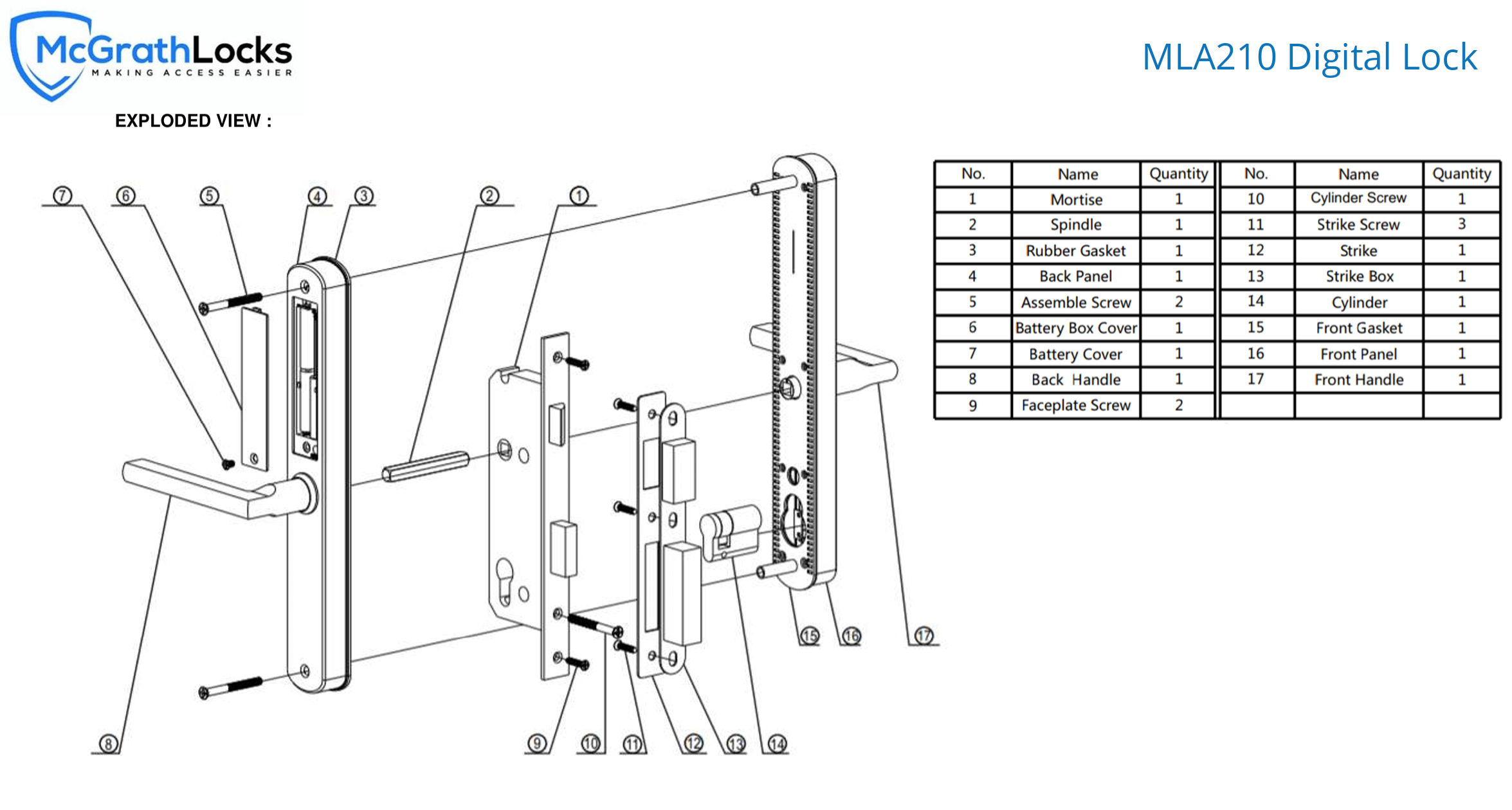

- Print the A210-85 drilling template (PDF) at 100 percent scale - it is an oversize sheet, so do not let the printer shrink it to A4. The frame-side prep it calls for is a strike box of 142 x 21mm, 24mm deep, and a strike-plate recess of 198.5 x 24.5mm, 2mm deep.
- Decide whether to DIY or use an installer first. Cutting a Euro mortice pocket into an aluminium stile is a locksmith's job on most doors; Terry's offers a site survey and installation across the Gold Coast.
- Confirm the door's handing before fitting. The A210 is field reversible, but the batteries must be installed before the handing is changed.
- Match the mortice backset to the door before cutting - the supplied body is 30mm, and the Euro 85 range runs from 28mm to 70mm. Wrong backset and wrong spindle position are two of the three most common DIY mistakes.
- Check the door closes and latches cleanly on the new mortice before the batteries go in - door misalignment is the most common reason a smart lock will not throw its bolt, and poor door preparation is the fix nobody wants to make twice.
- Hinged doors only - see the suitability notes; the sliding-door answer in this family is the A231 with hook bolt.
 McGrath A210 - Technical Specifications
IP rating note: the IP65 rating applies to the external handle and keypad module only. The internal module and battery compartment are not IP rated and must not be exposed to water or moisture. Install where the internal assembly is protected from rain - the door types that suit are in the regular front door (one side facing weather) category. Every figure above is from McGrath's current A210 Technical Datasheet (PDF).
 Dimensions
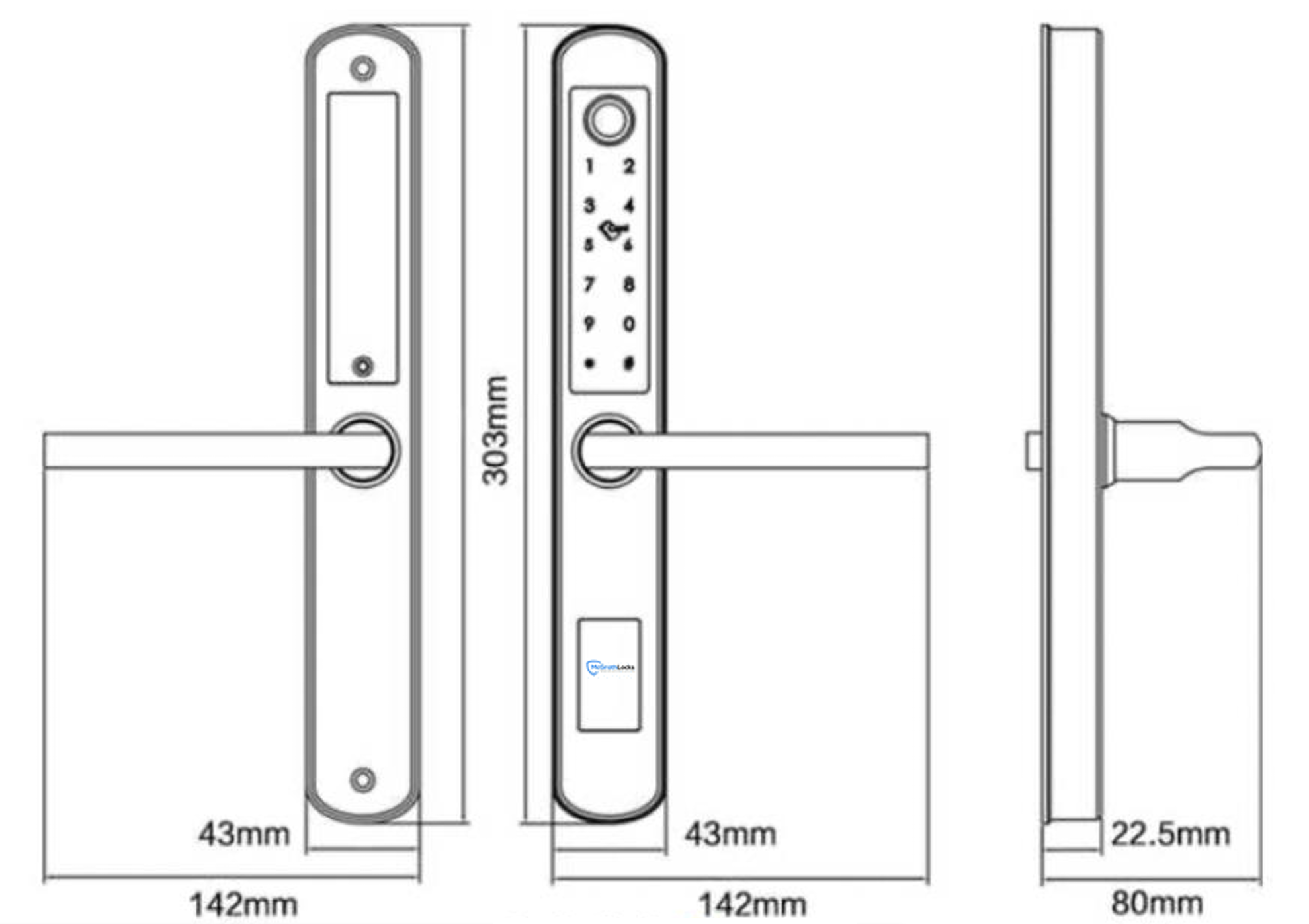

 Battery, Power and Backup Access
- Powered by 4 x AAA alkaline batteries (not included) - a smaller cell than the AA batteries in the McGrath NX range, which is part of how the body stays 43mm wide. Terry's recommends Duracell; choosing and monitoring batteries explains why cheaper cells cost you in the long run, and Chapter 01 covers how smart locks are powered.
- Rated life 18 months at around 10 uses a day. A busy shopfront or gym door will use them faster - the truth about battery life, not the marketing version.
- Battery voltage range 4.5V-9V. The low battery alert triggers below 4.8V - audible at the lock and as a notification in the McGrath Locks App - and battery management in TTLock shows where to read the level. Change all four at once; a low-battery fault can masquerade as something else.
- USB-C emergency power - hold a USB-C power bank to the port on the exterior unit and the lock wakes long enough to take a fingerprint, PIN or card when the batteries are completely flat.
- Mechanical key override through the Euro cylinder works in every condition - two keys supplied, with blanks and replacement cylinders available. Keep the spare key outside the house, in a key safe rather than under the mat.
- The battery cover is secured with a security screw - the mini screwdriver is in the box and the McGrath magnetic-tip screwdriver is the spare. Batteries must be installed before the door handing is changed.
- A mains power outage does not affect the lock - it is battery powered at the door; only the optional gateway goes offline, and Bluetooth access at the door continues. More in the power and battery FAQs.
Wi-Fi Remote Access (Optional - Gateway Required)
The A210 has no Wi-Fi of its own. At the door it works over Bluetooth with the McGrath Locks App, and that is all most households need - do you actually need a gateway? is worth five minutes before you buy one. Remote access - locking, unlocking, issuing and revoking codes, and reading the activity log from anywhere - needs a McGrath gateway installed nearby. The gateway pairs with the lock over Bluetooth and bridges it to your network; what a gateway does and Bluetooth-only versus gateway are explained in the guides.
Which gateway? The G5 (2.4GHz and 5GHz Wi-Fi) is the default for a home or office router; the G4 adds a 4G SIM for sites with no Wi-Fi or unreliable Wi-Fi; the G3 is hard-wired Ethernet with PoE for commercial fitouts. All three are powered from the McGrath 240V dual-USB wall adaptor. Compare them in the G2 to G5 quick comparison, choosing the right gateway in Chapter 14, and which G-series gateway a host should choose.
Getting it right: if your router merges 2.4GHz and 5GHz under one name, read about band steering and the two ways to fix it - it is the most common cause of a gateway dropping off Wi-Fi. Put the gateway within Bluetooth range of the lock - placement tips - and know that when the internet goes down the door still opens on fingerprint, PIN, card and Bluetooth. A gateway also keeps the lock's clock synced, which matters for timed codes - clock calibration explains why. Gateway set-up steps are on pages 52 to 54 of the TT Lock App User Manual (PDF). Browse all modules and Wi-Fi gateways.
 Frequently Asked Questions

Three checks. The stile - the vertical frame member the lock sits in - needs to be at least 50mm wide to take the 43mm body comfortably; measure it as Chapter 02 shows. The door must be 38-55mm thick. And the door needs a Euro 85 Series mortice pocket - the 30mm backset body is in the box, and other backsets from 28mm to 70mm are available if the door is already cut for one; how to measure backset. If any of the three is marginal, send us a photo or book a site survey.
No. Fingerprint, PIN, RFID and the mechanical key work with no network at all, and the McGrath Locks App talks to the lock directly over Bluetooth when you are at the door - what a TTLock lock does without Wi-Fi. A gateway is only needed if you want to lock, unlock, issue codes or read the log while you are away from the property - add a G5, G4 or G3 later if you find you want it. Do you actually need one?
You get warned first - the lock beeps at low battery and the app shows a notification, well before the four AAA cells give out. If they do go completely flat, hold a USB-C power bank to the port on the outside unit and the lock wakes long enough to read a fingerprint or PIN, or use one of the two mechanical keys in the Euro cylinder. Read what to do when the battery dies and where to keep the spare key.
Start with the stile. If it will take a 43mm body, the A210 gives you the largest fingerprint reader in the range and a single-sided keypad; the A210DB is the same lock with a keypad and reader on both faces. If the stile is tighter, step down to the 36mm A236 or the 31mm A231. A sliding door needs the A231 with hook bolt - the A210 is hinged-door only. The full comparison is in the slimline range table above.

For a front door with the outside face under an eave or porch, yes - the outside module is IP65 rated against dust and low-pressure water jets. It is not a gate lock: the inside module, which holds the batteries, is not weather rated and must stay dry, so a door where rain reaches both faces is out. For that job look at the external gate category. What IP65 means and how coastal Queensland treats electronics are worth reading if the door faces the beach.
Additional Information
Stile width (50mm minimum recommended for the 43mm body), door thickness (38-55mm), existing backset, and the frame-side strike prep (142 x 21mm box, 24mm deep; 198.5 x 24.5mm recess, 2mm deep, from the drilling template). If the door already has a mortice lock, identify it with Chapter 02 - existing hardware; a Euro 85 body with the same backset drops straight in. The Quick Start Guide door-type decision is a two-minute sanity check.
The IP65 rating covers the outside handle and keypad module. The inside module and battery compartment are not IP rated and must not be exposed to water. On the Gold Coast that also means salt air: the 304 stainless body helps, but coastal environments and Queensland-specific considerations are worth a read before fitting one beachfront.
The A210 handle projects 80mm from the door face. If a security screen door is fitted in front, measure the gap between the main door face and the screen frame with the main door closed - the handle must not foul the screen when the door swings. Even experienced locksmiths make this mistake; the measurement that matters takes thirty seconds. If the screen door is itself getting a smart lock, the ULTRA-SECUA Dual Unlock pairs with the A210 - see Dual Unlock.

The A210 suits left or right hand doors and is reversed in the field, but the batteries must be installed before the handing is changed - fit them first, then reverse. Work out your handing from the secure side before you start, and note the Australian convention differs from the American one used in some app screens.
The A210 is a McGrath Locks product on the TTLock platform, distributed in Australia by LSC. For an independent view of where McGrath sits against the other brands we stock, see the McGrath brand card in Chapter 10 and the residential and commercial specialists section. For the platform decision, what TTLock is, how it compares with Tuya and choosing the right platform cover it, and what happens if a manufacturer discontinues its app is the question to ask of any smart lock.

The McGrath Locks mobile app is a customised, McGrath-branded version of the TT Lock platform, tailored specifically for the McGrath Locks product range. The app is managed, supported, and distributed locally by McGrath Locks in Australia. Australian-based support staff handle warranty claims, app troubleshooting, and platform queries - you're not dealing with an overseas vendor. Cloud infrastructure is provided by TT Lock, a globally deployed IoT platform.

McGrath smart locks are backed by long-established industry partners and supported locally in Australia - LSC has a century in the security industry and Terry's fifty years on the front line. Read why Terry's, LSC and McGrath Locks give long-term confidence and how to choose a smart lock that will still be supported in five years.

12-month warranty against defects in materials and workmanship (24-month on ALBION, ASCOT, ASHGROVE, BARDON, GRANGE, HAMILTON, KEDRON, MANLY, SANDGATE, STAFFORD, ULTRA SECUA and WINDSOR models). McGrath Locks will repair, replace, or refund at their discretion. Proof of purchase required for all claims. Returns & Warranty | McGrath Locks Warranty
 Download PDF Resources
McGrath's current two-page datasheet - cover and the full Technical Specifications table (hardware, enrolment and verification, lock features and functions, operating environment, warranty) plus the what's-in-the-box photo. Every figure on this page is drawn from it.
Full-scale door-face drilling template for the A210 with the Euro 85 mortice (A210-85), plus the frame-side strike box and strike-plate recess dimensions. Print at 100 percent - it is larger than A4. Pair it with the three most common installation mistakes.
Two-page spec sheet for the supplied mortice and its six sibling backsets (28 to 70mm) - SS304 construction, 500,000-cycle rating, BHMA Level 2 and 3, part numbers, accessories and a dimension drawing for every backset. The whole family is in the mortice locks category.
The 56-page platform manual behind the McGrath Locks App - registration, adding a lock (page 15), eKeys (page 19), the passcode types (pages 24 to 31), IC cards (page 32), fingerprints (page 34), Bluetooth unlocking (page 35), lock transfer at handover (page 48) and gateway set-up (pages 52 to 54). It is the generic TTLock edition, so screens carry TT Lock branding rather than McGrath's. Our TTLock Platform Guide (Chapter 14) is the plain-English companion.
McGrath A210 Slimline - FAQ, Setup and Owner's Guide
Everything below is here to help you choose, fit, set up and live with a McGrath A210 on a narrow-stile door. For general smart lock questions see our Smart Lock FAQ (Chapter 13), for the platform see the TTLock Platform Guide (Chapter 14), and for measuring see Chapter 02 - Measuring Your Door. The whole Smart Lock Buyer's Guide is indexed in one place.
Fit and Door Suitability
The stile is the vertical frame member on the lock edge of the door. On an aluminium-framed glass door it is often only 50-70mm wide, which is why most smart locks - built for a 65mm-plus timber door - overhang the glass or cannot take the mortice pocket. The A210 body is 43mm wide, so a 50mm stile carries it comfortably. Measure the flat face of the stile from the glass bead to the door edge; Chapter 02 - stile width shows exactly where to put the tape, and the narrow-stile measuring technique in the gate blog is the same on a door. Every narrow-frame option we stock is in the slim-line category.
Yes - the A210 is rated for 38-55mm doors. Below 38mm the spindle and fixing screws will not seat correctly and the furniture can rock; above 55mm the standard spindle will not reach. Measure with the door open using a tape across the top edge, not across a rebate - how to measure door thickness. Most aluminium commercial doors are 40-45mm and most timber entry doors 40mm, so the range covers the typical door; if yours is outside it, ask us before ordering rather than after.

The mortice in the box is the McGrath Euro 85 Series in a 30mm backset - the distance from the door edge to the centre of the spindle. If your door is already prepared for a different backset, order the matching Euro 85 body instead of re-cutting: 28, 35, 45 and 50mm are on the multi-backset Euro 85 listing, with 60mm and 70mm listed separately. Every one shares the 85mm centres and 240 x 22mm faceplate, so the A210 furniture fits unchanged. How to measure backset, the standard Australian sizes and what goes wrong when the backset is wrong are all in the backset guide.
Very often, yes. Aluminium commercial and residential doors are commonly fitted with a Euro-profile mortice and longplate furniture, which is exactly the format the A210 uses - mortice with longplate furniture in Chapter 02 shows how to recognise it. Match the backset (see above) and the 85mm centres, and the new Euro 85 body drops into the existing pocket. Where the old furniture was wider than 43mm, expect some exposed holes or a paint shadow on the stile - scar plates on gates and aluminium explains the options. Check the existing hardware guide first, and if the door is a strata or shopfront door, run the four strata checks.
No. The A210 is a hinged-door lock with a swing-bolt mortice - the latch and deadbolt throw sideways into a jamb strike. A sliding door needs a hook bolt that drops behind the strike, which is what the McGrath A231 with Hook Bolt is built around - see its sliding door options. Other sliding-door smart locks are in the glass sliding door category. If your door is a frameless glass panel, look at the frameless glass door category instead - the A210 needs a framed stile to mortice into.
No - one A210 suits both. The handing is reversed in the field, with one condition from McGrath: the batteries must be installed before you change it. Work out the handing from the secure (outside) side of the door before you start - how to determine your door's handing - and be aware that the American convention used in some app screens is the reverse of ours. Field-reversible versus fixed handing explains why this matters more on some products than others.
Access and Credentials
Reliable when enrolled well. The most common cause of a rejected finger is a print captured from one angle only - enrol each finger three times at slightly different angles so the sensor has a fuller map; the three-angle enrolment technique walks through it, and getting fingerprints right covers dry, worn and wet fingers. Enrol two fingers per person so a cut or a plaster does not lock anyone out. Up to 100 fingerprints are stored on the lock itself, managed from the McGrath Locks App - fingerprint management is on page 34 of the TT Lock manual. How the technology works is in Chapter 03 - fingerprint; all our fingerprint locks are in one category.
Codes are 4 to 9 digits (a minimum of 4 when set in the app), up to 250 of them. From the McGrath Locks App you can issue permanent codes, timed codes that work between two dates, and one-time codes that expire after one use - the six TTLock passcode types explains each, and pages 24 to 31 of the TT Lock manual show the screens. Two TTLock behaviours catch people out: a permanent code must be used once within 24 hours or it expires, and each code type has its own activation window. Anti-peep means you can type random digits before and after your real code - the lock finds the valid sequence inside the string - so a bystander cannot learn the code by watching. After five wrong attempts the keypad locks out for a short period.
Yes - that is a cyclic (recurring) passcode, set in the app with the days and the time window it is valid. It is the right tool for a cleaner, a trainer, a bookkeeper or a contractor who comes at the same time each week, because it needs no re-issuing and stops working outside its window. The weekly cleaner example and other recurring patterns show the set-up. Cyclic codes rely on the lock's clock being right, so if the lock has no gateway, calibrate the clock from your phone now and then.

The reader is 13.56MHz MIFARE, and up to 1,000 credentials can be enrolled. Two tags come in the box; extras are the McGrath ISO card, keyring fob, wristband for gyms and pools, and the adhesive sticker that turns a phone case or an existing card into a credential. An existing building swipe card will only work if it is a MIFARE card; many office cards are 125kHz proximity cards and will not read - how the McGrath card works and Chapter 03 - RFID explain the difference. Cards are enrolled in the app (page 32 of the TT Lock manual) and each one can be revoked individually. The whole range is in RFID, fobs, tags and cards.
An eKey is a Bluetooth credential sent from your McGrath Locks App to another person's app - they install the app, accept the eKey and can then unlock the door from their phone when they are within Bluetooth range. You can send a permanent eKey to family, a timed one to a tradesperson, or a one-time eKey, and revoke any of them from your phone; capacity is unlimited. eKeys in Chapter 14 and page 19 of the TT Lock manual cover the detail. Two related settings are worth knowing: touch-to-unlock, which opens the door when a phone with an eKey touches the keypad, and two-factor unlocking for a door that should need a fingerprint and a code together.
The key override is a standard Euro cylinder in the mortice, below the handle on the outside face - why smart lock keyholes are often hard to spot. Two keys are supplied. For more, buy the A210 key blank and have a locksmith cut it to your cylinder, or fit a new keyed-to-differ cylinder with two fresh keys if the originals are lost. Running several A210 or A236 doors on one master key is done with the keyed-alike cylinder. Store the spare outside the house in a key safe - smarter than under the doormat. The backup key category lists every lock we stock with an override.

Yes - that is passage mode. Switch it on in the McGrath Locks App and the door stays unlocked so customers, patients or members walk straight in; switch it off at close and the lock secures again. It is standard on shopfronts, clinics and gyms. Do not confuse it with the lock's timed codes - passage mode holds the door open for everyone, while a timed code opens it for one person. If the building has a fire or egress requirement, check the security FAQs in Chapter 13 before relying on any hold-open function.
Remote Access and Gateway
Start with whether you need one - if everyone who uses the door is at the door, you do not. If you want remote control, the G5 suits almost every home and office because it joins either a 2.4GHz or 5GHz network; the G4 adds a 4G SIM slot for a site with no fixed internet; the G3 is Ethernet with PoE for a commercial fitout with structured cabling. One gateway can serve several McGrath locks within Bluetooth range - see each gateway's compatible locks list. Chapter 08 on the G5, the quick comparison and G2 vs G5 gateway choice go deeper.
Without a gateway everything happens within Bluetooth range: unlock, add and remove users, send eKeys, and download the activity log when you are at the door. With a gateway you can do all of that from anywhere - unlock for a courier while you are at work, issue a code to a guest arriving tonight, revoke a lost card, and see entries as they happen. The gateway also keeps the lock's clock synchronised so timed and cyclic codes stay accurate. What actually changes with a gateway, Bluetooth-only versus gateway and Wi-Fi remote access in Chapter 03 set it out.
Through the TTLock platform, yes. The McGrath Locks App can issue one-time and timed codes for each booking, and with a gateway plus the TTRenting layer, property management systems can create and expire guest codes automatically. Read which PMS platforms integrate with TTLock, PMS integration in Chapter 14, and the honest comparison of when TTLock is the right answer and when Igloohome serves better. Our Airbnb setup checklist and the platform guide for short-stay round it out. For multi-door portfolios, scaling across properties.
Nine times out of ten it is band steering: the router merges 2.4GHz and 5GHz under one network name and shuffles the gateway between them. The G5 tolerates this far better than a 2.4GHz-only gateway, and the fixes are in the band-steering explainer, improving stability and the hardware fix. Also check where the gateway is positioned. The lock itself is unaffected by a gateway dropout - fingerprint, PIN, card and Bluetooth keep working at the door; Chapter 13 Q11 has the short answer.
Power and Batteries
The AAA cell is what allows a 43mm-wide body - four AA cells would not fit side by side in a narrow-stile escutcheon. McGrath rates the A210 at 18 months on four alkaline AAAs at around 10 uses a day, which is longer than the 12 months quoted for the AA-powered NX1 and NX5, so the smaller cell is not costing you runtime on a normal door. A high-traffic commercial door will shorten it; budget on the usage, not the headline. Use good alkaline cells and change all four together - choosing and monitoring batteries and what really affects battery life explain the why.
Hold any USB-C power bank to the USB-C port on the outside module. The lock powers up from the bank and you present a fingerprint, code or card as normal - the electronics still authenticate you, so power alone does not open the door. Then replace the batteries. The port cannot charge the lock; it only runs it while the bank is connected. The mechanical key is the other fallback and needs no power at all. What to do when the battery dies has the full sequence, and reading a low-battery fault correctly stops you replacing a lock that only needed cells.
Installation and Setup
On a timber door already cut for a Euro mortice with a matching backset - possibly, if you are handy. On an aluminium stile that has never had a mortice, no: cutting a clean pocket in a thin-wall aluminium extrusion without distorting it is specialist work, and a mortice fitted a few millimetres out will never latch cleanly. When DIY is appropriate and when it is not is honest about it, and the three most common DIY mistakes are all avoidable. Terry's fits A210s across the Gold Coast - the site survey service is the place to start, and installation quality is the most underestimated lifespan factor.
The frame side takes a strike box 142mm high by 21mm wide, cut 24mm deep, with a shallower recess of 198.5mm by 24.5mm, 2mm deep, for the strike plate to sit flush. Both figures are printed on the A210-85 drilling template, which also carries the full-scale door-face hole pattern - print it at 100 percent, never fit-to-page. The Euro 85 mortice ships with its strike plate and a strike plate pocket (dust box) as standard. Mortice door prep in Chapter 02 shows what a mortice pocket and strike prep look like.

Fit the batteries, download the McGrath Locks App and add the lock to your account - page 15 of the TT Lock manual shows the adding-a-lock screens, and transferring or re-adding a lock covers a lock that was set up by an installer first. Then enrol fingerprints and cards, set your admin code, and test every credential with the door open before you shut it. If you bought the lock for a property you are handing over, read before you hand over the property and page 48 of the manual on transferring the lock to the new owner's account.
Troubleshooting
Almost always the door, not the lock. If the mortice bolt cannot reach the strike because the door has dropped, swelled or was never aligned, the motor turns and nothing happens. Check the door closes and the latch enters the strike freely with the lock unpowered; handle still opens when locked, wrong hardware or backset and poor door preparation cover the three usual culprits, and door alignment explains why it is the most underestimated factor. The symptom-to-fix table in Chapter 12 is the next stop; still stuck? tells you when to call us.
That is clock drift. A lock with no gateway keeps its own time and slowly drifts; timed, one-time and cyclic codes then activate early or late, or not at all. Open the McGrath Locks App at the door and calibrate the clock - page 17 of the TT Lock manual shows where. The symptoms that point to clock drift and how to stop codes expiring help you tell it apart from a code that was never activated. A gateway syncs the clock automatically and makes the problem go away.
The TTLock app carries a legacy alert toggle that McGrath locks do not have the hardware to support; when it is switched on it produces phantom alerts from door vibration, and it should be left off. Why you are getting phantom alerts explains the background, the three-step disable procedure stops them, and TTLock tips and Chapter 13 Q9 give the short version. The A210's real security notifications - wrong-code lockout, low battery and the activity log - are unaffected.
Not that code - the erase (clear) code deletes the passcodes on the lock by design, which is what makes it useful at a tenant change or property handover. Re-issue fresh codes from the app; eKeys, fingerprints and cards are managed separately. The erase code, if an erase code has already been used and safe use at a handover cover it.
Range, Alternatives and Buying
When people need a credential to get out as well as in. A single-sided A210 lets anyone inside turn the lever and leave, which is what you want on a shopfront, a home or a clinic waiting room. The A210DB puts a keypad and fingerprint reader on both faces, for a gate-side courtyard door, a staff-only partition or a residence where exit control matters - the A210DB suitable uses lists them, and its gate warning is worth reading before putting either lock on a gate. Be careful with double-sided locks on any door that is a fire or emergency exit path - exit paths explains the limits.
Both are narrow-stile TTLock locks for aluminium hinged doors, so they run on the same platform and take the same gateways. The Lockton ELEV36 is the lower-cost option; the A210 is the McGrath-supported, LSC-distributed option with the larger fingerprint reader, the 304 stainless body and the A210DB double-sided sibling. If budget is the deciding factor the ELEV36 is a sound lock; if long-term parts and local support carry the day, the installer's perspective is why we lean McGrath. Both brands are compared in TTLock vs McGrath vs Lockton vs Austyle, and the Lockton range is a click away.
For a multipoint aluminium door with shoot bolts, the Yale Unity Slim and Lockwood Latitude Slim (the same lock under two badges) replace the multipoint mechanism rather than a single mortice - see is Yale right for you. The Auslock S31B and S3B run on Auslock's own app. The Vault Eclipse and Vault Alpha (3D face recognition) suit hinged or sliding doors - the Vault Eclipse and Vault Alpha in our Vault range guide, and 2D vs 3D face recognition if that appeals. Within McGrath, the A231 and A236 go slimmer. Use the platform-at-a-glance table to compare the apps, and browse the whole slim-line category.
The ULTRA-SECUA Dual Unlock on the screen door is paired to the A210 as a Bluetooth Remote in the McGrath Locks App. When a valid credential opens the screen door, it sends the unlock to the A210 behind it, so one action opens both - how entry actually works. It is one-directional: the screen lock triggers the A210, not the other way round, and what dual unlock does not do is as important as what it does. The pairing has to be done in the app before any manual keypad programming on the screen lock - why app setup comes first. Who it is best for and whether it is always on answer the usual follow-ups.
The body is rated to 100,000 cycles - roughly 27 years at 10 uses a day, so the mechanism will outlive the electronics and the finish on most doors; realistic lifespan expectations puts numbers on it. The bigger risk with any smart lock is the app being discontinued, which is why we weight platform and distributor so heavily: TTLock is one of the two global platforms with millions of locks on it, and McGrath is distributed by LSC, so parts and support have a long tail - the question nobody asks: what happens in five years? and why longevity matters more than features. Buying from a specialist also matters - here is why.
Related Products, Guides and Chapters
The McGrath slimline family: A210DB Double-Sided · A231 Hinged (31mm) · A231 Sliding with Hook Bolt · A236 (36mm) · standard-stile: NX1 · NX5 · X3 Deadbolt · the whole McGrath Locks range.
Mortice bodies, cylinders and keys: Euro 85 Series 28-50mm · Euro 85 60mm · Euro 85 70mm · KTD cylinder - A210 · KTD cylinder - A210 and A236 · KA cylinder · A210 key blank.
Gateways, credentials and tools: G5 Wi-Fi Gateway · G4 4G Gateway · G3 PoE Gateway · 240V dual-USB wall adaptor · RFID card · RFID fob · RFID wristband · RFID sticker · wireless remote · battery-cover screwdriver · Dual Unlock partner: ULTRA-SECUA Dual Unlock.
Categories: Narrow frame / slim line · Fingerprint · PIN code · Fob, card and RFID · Bluetooth · Wi-Fi · Backup key · App enabled · Regular front door · Internal office doors · All smart locks · Smart lock accessories.
Buyer's Guide chapters: Ch 01 What Is a Smart Lock · Ch 02 Measuring Your Door · Ch 03 Access Methods · Ch 04 Door Type Compatibility · Ch 07 Airbnb and Short-Stay · Ch 08 Gateway Comparison · Ch 10 Brand Profiles - McGrath · Ch 11 Standards and IP Ratings · Ch 12 Installation and Troubleshooting · Ch 13 Smart Lock FAQ · Ch 14 TTLock Platform Guide · Ch 15 App Platforms.
Helpful blog reading: TTLock Tips, Tricks and Hidden Features · G2 vs G3 vs G4 vs G5 Gateways · Measuring Your Lock Backset · Mechanical Key Override · Dual Unlock Explained · Check Screen Door Clearance · Understanding Door Handing · Terry's, LSC and McGrath · Which Smart Lock Platform Is Right for You · TTLock vs Tuya · The Realities of Electronic Door Locks · How Long Do Digital Door Locks Last · Site Survey and Installation Services.
What's in the Box - McGrath A210 Slimline Digital Smart Lock
- Exterior lock assembly - keypad and fingerprint reader side (Black or Silver as selected)
- Interior lock assembly - passive lever and thumb-turn
- McGrath Euro 85 Series swing mortice lock, 30mm backset, 85mm centres (part number ML-SP-M-30/85-SWING) with strike plate - other backsets from 28mm to 70mm are sold separately in the mortice locks category
- Drill positioning template - also downloadable as the A210-85 installation and drilling template (PDF), print at 100 percent
- 2 x mechanical keys for the Euro cylinder - spare blanks available
- 2 x RFID access tags (13.56MHz MIFARE) - extra fobs, cards, wristbands and stickers available
- Mounting screws
- Mini security screwdriver for the battery cover - the McGrath magnetic-tip screwdriver is the spare
- Installation guide
- set-up is on page 15 of the TT Lock App User Manual (PDF).
McGrath A210 Slimline Digital Smart Lock - Real Installations
Real installations across the Gold Coast by Terry's, showing the A210 in both Black and Silver on aluminium glass shopfronts, timber entry doors, gyms, clinics, offices and homes. Every one of these doors was measured first - stile width, door thickness and backset. Want yours done the same way? Book a Terry's installation.


McGrath A210 Slimline Digital Smart Lock - Dimensions
McGrath A210 Slimline Digital Smart Lock - Product Brochure


The same document is downloadable as the A210 Technical Datasheet (PDF). For the wider range see the McGrath brand profile and the McGrath Locks brand page.
PDF Files - McGrath A210 Slimline Digital Smart Lock
McGrath's current two-page datasheet (April 2025) - the full Technical Specifications table covering hardware, enrolment and verification, lock features, operating environment and warranty, plus the what's-in-the-box photo. The authoritative source for every figure on this page; compare it with the Chapter 03 access-method comparison.
Full-scale door-face drilling template for the A210 with the Euro 85 mortice (marked A210-85), with the frame-side strike box (142 x 21mm, 24mm deep) and strike-plate recess (198.5 x 24.5mm, 2mm deep). Oversize sheet - print at 100 percent scale. Read when DIY is appropriate first.
Two-page spec sheet for the supplied mortice and its siblings - seven backsets from 28 to 70mm, 85mm centres, 240 x 22 x 3mm faceplate, SS304 latch and deadbolt, 500,000-cycle rating, BHMA Level 2 and 3, part numbers, accessories and a dimension drawing for each backset. Applies equally to the A231, A236 and NX5.
The 56-page platform manual behind the McGrath Locks App - adding a lock (page 15), time calibration (page 17), eKeys (page 19), passcode types (pages 24 to 31), IC cards (page 32), fingerprints (page 34), Bluetooth unlocking (pages 35 to 36), lock transfer (page 48) and gateway set-up (pages 52 to 54). Generic TTLock edition - screens carry TT Lock branding. Companion reading: what TTLock is and TTLock tips and tricks.
McGrath Locks Warranty
Warranty Summary
How to Make a Claim
- Contact Terry's Tradies Pty Ltd and its associated websites, trading names, and subsidiaries (the place of purchase) within the applicable warranty period.
- Supply your proof of original purchase - a receipt or tax invoice is required.
- Provide a clear description of the fault and your contact details.
- You may be asked to return the product for assessment before a remedy is determined.
- McGrath Locks will, at their discretion, repair the product, replace it with the same or an equivalent model, or provide a refund of the purchase price.
 Exclusions
This warranty does not cover:
- Normal wear and tear
- Products that have been disassembled
- Damage caused by improper handling, incorrect installation, misuse, abuse, neglect, modification, or accident
- Installation by unlicensed persons (including non-licensed locksmiths or technicians)
- Products not used in accordance with the supplied instructions
- Cosmetic damage that does not affect functionality
- Labour or installation costs related to the removal or reinstallation of products
- Exposure to conditions outside normal environmental use
- Work completed before warranty approval
- Damage caused by battery leakage, battery failure, or force majeure
Our goods come with guarantees that cannot be excluded under the Australian Consumer Law. You are entitled to a replacement or refund for a major failure and compensation for any other reasonably foreseeable loss or damage. You are also entitled to have the goods repaired or replaced if they fail to be of acceptable quality and the failure does not amount to a major failure. This warranty is provided in addition to your rights and remedies under the Australian Consumer Law.

Confused? Overwhelmed? We get it.
Choosing the right smart lock can be genuinely tricky - door types, backsets, app platforms, compatibility with your existing hardware... there is a lot to consider. We have decades of experience fitting locks of all types, including smart locks, and we are happy to help.
Our expert recommendation service is free. Upload a few photos of your door and describe what you need, and one of our qualified locksmiths will give you a personalised recommendation.
Get Your Free Recommendation →How it works - three easy steps:
1. Upload photos
A few clear shots of your door, lock and frame - inside and out.
2. We assess
Our locksmith reviews your setup and requirements - door type, weather exposure, how you want to use it.
3. You get a recommendation
A personalised recommendation tailored to your door, budget and needs. No pressure, no upsell.
Also useful while you are deciding: