


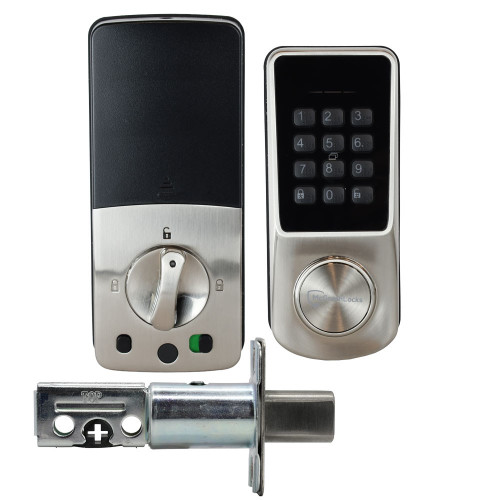


McGrath Ashgrove Smart Deadbolt - Raised Buttons with Braille, 60/70mm Adjustable Bolt
At A Glance
 At A Glance
 DISPATCHSame Day Before 11am


 PIN Code
  RFID Credential
  App eKey
  Mechanical Key
  Remote (Add Gateway)
  Fingerprint
Not Available
The McGrath Ashgrove is a smart digital deadbolt designed and developed for the Australian market by McGrath Locks. It pairs a tempered glass screen with raised physical buttons carrying integrated Braille markings, which makes the keypad easier to find and operate by touch alone - useful for vision-impaired occupants, in poor light, and for anyone who prefers a button that gives back a definite press. The door keeps its existing handle or latch; the Ashgrove replaces the deadbolt only.
Access is managed through the McGrath Locks App over Bluetooth 5.0 as standard, and the lock opens by PIN code, RFID credential, Bluetooth eKey, or mechanical key override. Adding a compatible McGrath Wi-Fi gateway (sold separately) unlocks remote lock and unlock, remote credential management and a real-time access log. A door position sensor is supplied in the box for door-ajar monitoring and closed-door auto-locking.
The Ashgrove sits on the McGrath 60/70mm adjustable-bolt platform it shares with the McGrath Kedron and the McGrath Grange, so all three take the same replacement bolt. It carries Australian Registered Design No. 202513992 and is supplied in Matt Black or Satin Nickel under the one listing. If you want the same bolt platform with a fingerprint reader instead of Braille buttons, the Kedron is the direct sister; if you need a Braille keypad on a fire door with a certified DDA lever, see the McGrath Bardon instead.
Usually ships same day if ordered before 11am AEST (excludes weekends and Queensland public holidays).
 Key Features
- Raised keypad buttons with integrated Braille markings on a tempered glass screen - the reason most buyers choose this lock over the flat touch keypad on the Kedron. See the accessibility note below for what this does and does not mean in compliance terms.
- Deadbolt only - it retains the door's existing handle or latch rather than replacing the whole lockset. Chapter 01 explains how a tubular deadbolt differs from a latch and why an external door needs one.
- Supplied with a 304 stainless steel anti-saw bolt with an adjustable 60mm or 70mm backset, so it drops into either of the two common Australian door preparations without a new bolt.
- 200,000-cycle durability rating - McGrath's own test figure, and the same rating carried by the Grange. Chapter 11 covers what durability grading actually measures.
- Body in aluminium alloy with fire resistant materials and a tempered glass screen. This is a materials statement from McGrath's datasheet, not a fire rating - the Ashgrove carries no FRL and is not tested to AS 1905.1. For a genuinely fire-rated McGrath lock see the Stafford or the Bardon.
- Up to 250 PIN codes at 4 to 9 digits, in permanent, timed, one-time, custom and recurring forms. The 4-digit minimum only applies to codes set through the app; codes entered at the keypad take a longer minimum. Chapter 14 lists all six passcode types and how each behaves.
- Up to 1,000 RFID credentials at 13.56 MHz Mifare, issued as permanent, timed or recurring - individually revocable from the app, which is what makes them the practical choice for shared and strata buildings.
- Unlimited Bluetooth eKeys in timed, permanent, one-time and recurring forms - handed out and withdrawn from the phone, with no key cutting. Useful for short-stay and rental turnover.
- Auto-lock so the door secures behind you without a thought, and passage mode to hold the bolt back while you are moving furniture or working in and out of the house.
- Internal privacy switch - engaging it locks out every external credential except the Administrator and the mechanical key. Read the perils of the internal snib before you rely on it in a rental.
- Anti-peep PIN entry - pad random digits either side of your real code and the lock still opens, so a bystander cannot read your PIN off the keypad.
- Incorrect-attempt lockout after repeated wrong entries, which stops a casual attempt at guessing codes at the door.
- Door position sensor supplied in the box - not a paid extra. It drives door-ajar alerts and the closed-door auto-lock logic in the app.
- USB-C emergency power input - a standard power bank gets you in if the batteries are neglected, alongside the rekeyable mechanical key override.
- Bluetooth 5.0 BLE at the lock, with Wi-Fi remote access available when a McGrath G3, G4 or G5 gateway is added.
- IP65-rated external housing for sheltered entrances. The rating covers the outside panel only - the interior unit holds the batteries and is not weather sealed. See the suitable uses note below.
- Salt spray tested to 300 hours in Matt Black and 96 hours in Satin Nickel - a real difference worth knowing about near the coast, covered under available finishes.
- Buttons tested to industry-standard tape pull cross-cut testing - McGrath's own durability check on the printed legends. On a Braille and raised-button lock this matters more than usual, because the markings are the interface.
- Runs on 4 x AA alkaline batteries (not supplied) for roughly 12 months at ten uses a day. What actually affects battery life is worth two minutes of reading before you buy.
 Accessibility - Braille and Raised Buttons

The Ashgrove's keys are raised physical buttons with Braille markings, so the keypad can be found and used entirely by touch. That is a genuine day-to-day improvement for vision-impaired occupants and in low light, and it is the whole reason this model exists alongside the flat-glass Kedron.
It is also, honestly, a usability feature rather than a compliance one. The Ashgrove is not certified as DDA or AS 1428.1 compliant, and McGrath make no such claim for it. If your project needs certified accessible hardware - an NDIS or SDA build, a specified aged-care fit-out, or anything where a certifier will ask for paperwork - read the Disability Discrimination Act requirements in Chapter 09, the AS 1428.1 compliance guide, and which lock suits your project before you specify this one.
Three McGrath locks carry certified AS 1428.1 DDA levers, and two of them also carry a Braille raised-button keypad like this one. The McGrath Bardon pairs Braille raised buttons with a DDA lever and a fire assessment; the McGrath Stafford does the same on an adjustable 60/70mm tubular latch; and the McGrath Albion is the non-fire-rated DDA option. Chapter 09 profiles the Albion and Hamilton side by side, and explains how NDIS assistive technology funding works if the lock is being claimed.
Access Methods
Four credential types work at the door out of the box, with a fifth - remote unlocking from anywhere - added by a gateway. Chapter 03 explains how the methods compare and where each one fails.
 Face Recognition
 McGrath Locks App
The Ashgrove runs on the TTLock platform under McGrath's own branded app, and also supports TTHotel for managed and short-stay properties. The app is available for iOS and Android. Minimum supported versions are Android 4.3 and iOS 7.0. Chapter 15 compares TTLock against the other platforms sold in Australia, and the TTLock tips and tricks guide covers the things owners usually learn the hard way.
 What's in the Box
- Exterior lock assembly - tempered glass screen with raised Braille buttons
- Interior lock assembly with turn knob
- SS304 adjustable anti-saw deadbolt, 60mm or 70mm backset
- Strike plate and strike box
- Door position sensor with connecting cable
- Mechanical keys for the rekeyable cylinder override
- RFID access tags
- Tailbar, rubber plug and mounting screws
- Screwdriver
- Drill positioning template
- Installation and user guide
Note: batteries are not included - the Ashgrove takes 4 x AA alkaline. A Wi-Fi gateway is also not included and is only needed if you want remote access. Additional RFID credentials are sold separately and are listed under accessories.
 Suitable Uses
- Residential and light-commercial hinged doors where keyless deadbolt access is wanted alongside the existing handle hardware - the door type compatibility matrix confirms the fit before you order.
- Homes where tactile, Braille-marked entry makes daily use easier - vision-impaired occupants, elderly residents, or any entrance that is dark at the times people actually use it.
- Timber and aluminium doors of standard stile, 35mm to 60mm thick, extending to 100mm with an additional tailbar. Chapter 02 shows how to measure door thickness properly.
- Retrofit onto doors already prepared for a 60mm or 70mm backset deadbolt - the adjustable bolt covers both without a second part.
- Sheltered entrances and undercover porches - the external panel is IP65 rated against dust and low-pressure water.
- Short-stay and rental properties where codes and eKeys are issued and withdrawn remotely - see the Airbnb and short-stay guide and how TTLock automation actually works with booking platforms.
- Second entrances, garage-to-house doors and studio doors where a deadbolt upgrade is wanted without touching the handle set. Browse every smart lock with a backup key if a physical override is non-negotiable.

The Ashgrove is a hinged-door deadbolt. The IP65 rating covers the external panel only - the interior unit houses the battery compartment and is not weather sealed, so this lock does not belong on an exposed pedestrian gate or anywhere both faces catch the weather. For a double-sided lock built for that job, see the external gate category. For sliding doors, the sliding door range is the right starting point.
 Available Finish Options
 Matt Black
STK MLASH Satin Nickel
STK MLASH
Both finishes are supplied under this one listing - select the finish at checkout. Finish does not affect functionality or compliance, but it does affect corrosion resistance: see the note below.

McGrath salt spray test the Ashgrove to 300 hours in Matt Black and 96 hours in Satin Nickel. That is a substantial gap, and on the Gold Coast it is a real consideration rather than a technicality. Within a few streets of open surf, Matt Black is the finish we would fit. Either way, read what coastal air really does to a digital lock and the honest version of coastal expectations before deciding.
 McGrath 60/70mm Adjustable-Bolt Range
The Ashgrove, Kedron and Grange all take the same MLSPAB6070 replacement bolt. The X3 does not - it uses its own bolt, and mixing the two up is the single most common ordering mistake across this range. The whole McGrath line-up sits on the McGrath brand page, and Chapter 10 carries an independent profile of the brand, weaknesses included.
 Accessories and Spare Parts
Everything below is confirmed to suit the Ashgrove. Nothing here is required for the lock to work - the Ashgrove is complete out of the box apart from batteries.
No Ashgrove-specific key blank or replacement cylinder is catalogued - the supplied cylinder is rekeyable, so a locksmith rekeys it to your existing system rather than swapping it. More options across the range sit in smart lock accessories, RFID credentials, gateways and modules and other accessories. If you would rather we fitted it, our advice and installation service covers the Gold Coast.
 Battery, Power and Backup Access
- Powered by 4 x AA alkaline batteries, which are not supplied - fit fresh ones at installation rather than whatever is in the drawer.
- Around 12 months of life at ten uses a day. Heavy traffic, very cold mornings and cheap batteries all shorten that; the honest version of battery life is worth reading before you judge the figure.
- Operating voltage 4.5V to 9V, with the low-battery warning below 4.8V. You get an audible alert at the lock each time the screen wakes, plus a notification in the app.
- Stand-by draw is under 66mA and the motor pulls under 200mA while turning, with an unlock time of about 1.5 seconds.
- USB-C emergency power input - any ordinary power bank brings the lock back to life long enough to enter a code if the batteries are flat.
- Rekeyable mechanical key override as the final backstop. A locksmith can key it alike to the rest of the house so it is one key, not another one on the ring.
- Terry's recommends Duracell. Not brand loyalty - alkaline quality genuinely shows up in how gracefully a lock behaves at the end of its charge.
- Do not mix old and new batteries, or brands, or chemistries. Replace all four together.
A flat battery on the Ashgrove is an inconvenience, not a lockout. Plug a power bank into the USB-C port under the external panel, or use the mechanical key. For where the keyhole actually sits and what happens as a battery dies, see mechanical key override on smart locks and the power and battery FAQs in Chapter 13. The McGrath Torx screwdriver is the right tool for the battery cover if you would rather not chew the screw heads.
App Platform and Data Hosting

The Ashgrove runs on the customised McGrath-branded TT Lock platform, which is managed, supported and distributed locally here in Australia. Australian-based staff handle warranty, troubleshooting and product queries. The underlying cloud infrastructure is provided by TT Lock, a globally deployed IoT platform. The McGrath Locks App is available for iOS and Android.
If you want to understand the platform before committing to it, Chapter 14 is the full TT Lock platform guide, including what the platform does not do and the published security disclosures in full. Chapter 15 sets it against every other app ecosystem sold here, and TTLock versus Tuya covers the two global platforms most locks sit on.

A smart lock is a ten-year decision, and the platform behind it matters as much as the hardware. McGrath is distributed in Australia by LSC, one of the longest-standing wholesalers in the trade, and supported locally rather than through an overseas help desk. That is why we back the brand for the long haul - the reasoning is set out in why Terry's, LSC and McGrath give long-term confidence, along with the supply chain behind it.
Wi-Fi Remote Access (Optional)
The Ashgrove has no built-in Wi-Fi. Out of the box it is a Bluetooth lock, which for most homes is genuinely all it needs to be - Chapter 01 explains the difference between smart and connected and why one does not require the other.
A gateway is a small plug-in bridge that sits inside the house within Bluetooth range of the lock - placement matters more than most people expect. Three suit the Ashgrove: the G3 for wired and PoE sites, the G4 where the internet is unreliable and 4G fallback earns its keep, and the G5 for dual-band homes. Compare them in G2 vs G3 vs G4 vs G5 or Chapter 08. If your router pushes everything onto 5GHz, read why smart locks drop off Wi-Fi first - that one problem accounts for most gateway complaints.
 McGrath Ashgrove - Full Specifications
 Dimensions
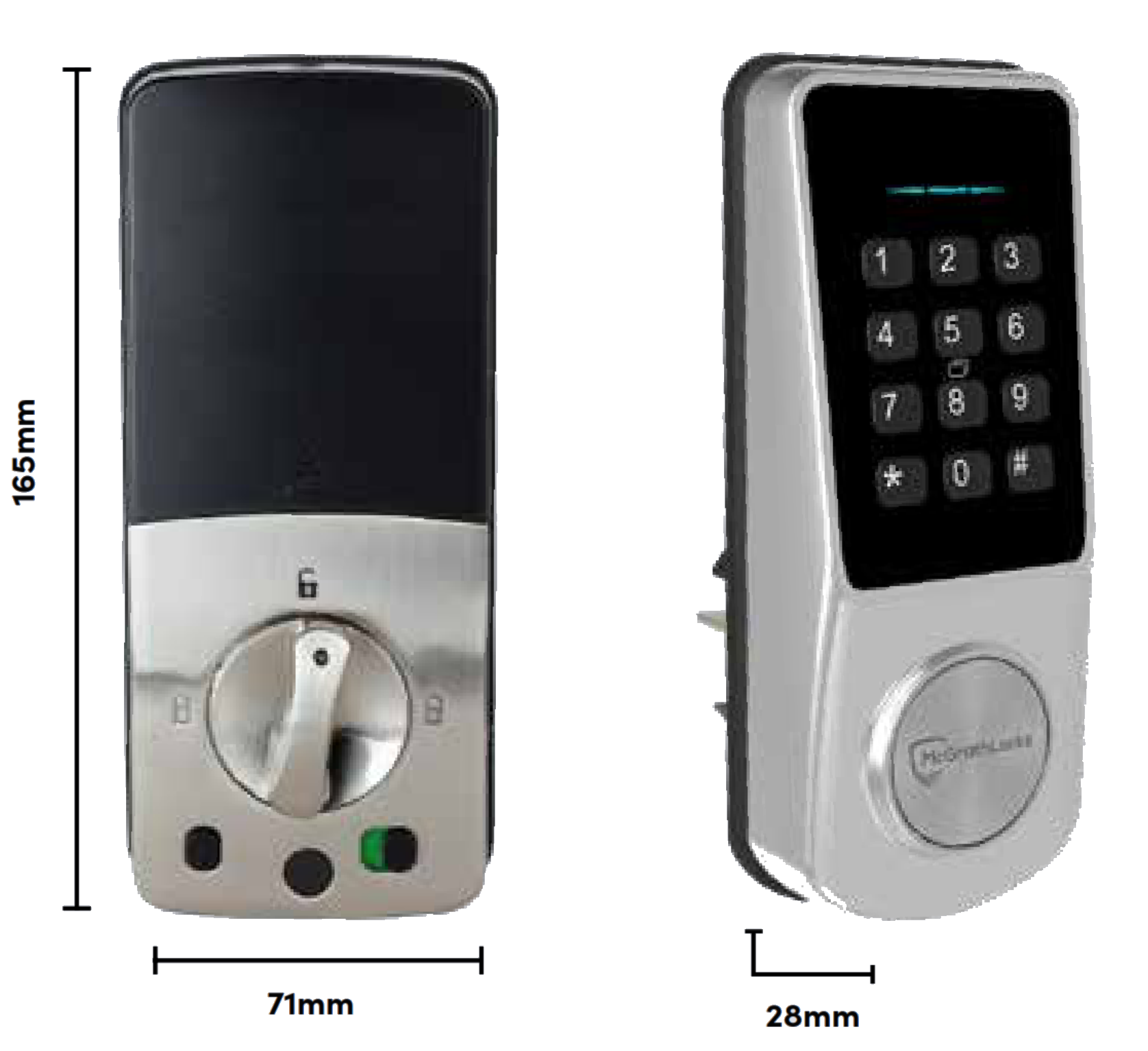
All dimensions in millimetres. Exterior lock case 165 (H) x 71 (W) x 28 (D); interior lock case 166.5 (H) x 73.5 (W) x 38.7 (D) including the turn knob. Bolt backset adjusts between 60mm and 70mm. Before ordering, measure the door as Chapter 02 sets out - backset and door thickness are the two that decide whether this lock fits.
 Frequently Asked Questions

Just the deadbolt. It replaces the existing deadbolt and leaves your handle or latch alone, which is why it retrofits so cleanly. If you want a lock that replaces the whole handle set, look at the McGrath Albion or the Stafford instead.
No, and we would rather say so plainly. The raised buttons and Braille markings genuinely help - you can operate the keypad by touch alone - but the Ashgrove is not certified as DDA or AS 1428.1 compliant and McGrath do not claim it is. If a certifier will be asking for paperwork, specify the McGrath Bardon or read Chapter 09 on DDA requirements first.

Almost certainly, if the door already has a deadbolt. The supplied bolt adjusts between the two standard Australian backsets, 60mm and 70mm, so you do not need to know which one you have before ordering. Door thickness is the figure to actually check: 35mm to 60mm as supplied, up to 100mm with an additional tailbar. How to measure your backset takes about a minute.
Only with a gateway added. On its own the Ashgrove is a Bluetooth lock, so the phone has to be at the door. Add a G5, G4 or G3 and you get remote unlocking, remote code management and a live access log. The comparison table above spells out exactly what changes.
Matt Black. McGrath salt spray test it to 300 hours against 96 hours for Satin Nickel, and within a few streets of open surf that difference shows up in the life of the finish. What coastal air does to a digital lock covers the rest, including the maintenance that actually helps.
 Additional Information
- The cylinder is rekeyable, so make it one key. A locksmith can key the Ashgrove alike to your existing doors, which turns the override key from a nuisance into the same key you already carry. There is no separate Ashgrove cylinder or key blank catalogued because rekeying is the intended path.
- Order the spare bolt by the right code. The Ashgrove, Kedron and Grange share the MLSPAB6070 bolt. The X3 uses a different one that looks similar and will not fit. This is the most common ordering mistake on the McGrath deadbolt range.
- Thick doors need a tailbar, not a different lock. Anything over 60mm takes an additional tailbar to reach through the door. Confirm the thickness before ordering - Chapter 02 shows where to measure - and tell us the figure so the right part goes in the box.
- The door sensor is worth fitting, not skipping. It comes in the box and takes a few extra minutes at installation, but it is what makes auto-lock behave sensibly - the lock will not throw the bolt into an open door frame, and you get a door-ajar alert instead. Most call-outs about a lock "locking at the wrong time" trace back to a sensor that was never wired in. If you would rather not do it yourself, our advice and installation service covers the Gold Coast, and a site survey is the sensible first step on anything unusual.
- Set the lock up in the app first. Registering an administrator through the McGrath Locks App before you start adding codes at the keypad saves a lot of grief later, and it is how the lock is designed to be commissioned. If a smart lock is new to you, the three common DIY installation mistakes are worth five minutes, and an electronic lock is not set-and-forget.
 Warranty
12-month warranty against defects in materials and workmanship (24-month on ALBION, ASCOT, ASHGROVE, BARDON, GRANGE, HAMILTON, KEDRON, MANLY, SANDGATE, STAFFORD, ULTRA SECUA and WINDSOR models). McGrath Locks will repair, replace, or refund at their discretion. Proof of purchase required for all claims. Returns & Warranty | McGrath Locks Warranty
The Ashgrove is one of the named 24-month models. Installation by an unlicensed person and damage from leaking batteries are both excluded, which is the practical argument for fitting good alkaline cells and replacing all four together.
 Download PDF Resources
Two-page McGrath datasheet - the authoritative source for every figure on this page, covering hardware, capacities, electrical draw, environmental limits, IP class, salt spray by finish and the 24-month warranty.
Six-page consumer brochure - product overview, the full credential-type lists for PIN, RFID and eKeys, security features, dimensions, salt spray by finish, the technical specification page and a What's in the Box photograph.
Two-page guide - exploded diagrams of both lock halves, the seven-stage installation sequence, keypad programming, door sensor and voice settings, gateway pairing, and the troubleshooting FAQ.
Fifty-six page platform manual covering the app the Ashgrove runs on - registration, adding a lock, all six passcode types from page 24, card management from page 32 and gateway setup from page 52.
McGrath Ashgrove - FAQ, Setup and Owner's Guide
Everything we get asked about the Ashgrove, in the order people usually ask it. For questions about smart locks generally rather than this model, Chapter 13 is the smart lock FAQ, and the Smart Lock Buyer's Guide starts from first principles.
The Braille Keypad and Accessibility
The keys are raised physical buttons rather than a flat touch surface, and each carries a Braille marking. You can find the keypad, locate the right digit and feel the press without looking at it. On a flat capacitive keypad like the one on the Kedron, none of that is possible. That is the whole design intent, and it is why the two models exist side by side on the same bolt platform.
Not as certified accessible hardware, no. The Ashgrove is not DDA or AS 1428.1 certified. Its Braille buttons are a usability feature, and a good one, but a certifier asking for compliance documentation will not accept it. For funded and specified work use the Bardon, the Stafford or the Albion. Chapter 09 covers SDA hardware requirements and how NDIS assistive technology funding is claimed; the DDA practical guide explains why the hardware choice matters more than it looks.

McGrath test the buttons to industry-standard tape pull cross-cut testing, which is the accepted check for whether a printed or applied surface stays put. On a lock whose whole point is a tactile, readable keypad, that test matters more than it would on an ordinary product. The buttons are raised rather than printed flush, so the tactile element does not depend on the marking surviving at all.
Fit, Backset and Door Preparation
No, and that is deliberate. The supplied bolt adjusts between 60mm and 70mm, which covers effectively every Australian residential deadbolt preparation. If you are curious anyway, what backset means and the standard sizes explain it in a minute. Chapter 02 covers backset measurement alongside the other five figures that decide fit.

Yes, up to 100mm, with an additional tailbar to reach through the door. Tell us the thickness when you order so the correct part goes in the box rather than arriving as a second delivery. Chapter 02 shows where to measure - it is the door leaf itself, not the frame or the architrave.

No. A deadbolt throws straight into the frame, so it is not handed the way a lever or latch is. If you are also replacing handle hardware on the same door, that part may well be handed - how to determine handing is worth reading before you order it, because getting it wrong is an avoidable return.

No to both. It is a hinged-door deadbolt. For sliding doors the sliding door and glass range is the right category. For a gate, the interior half of the Ashgrove is not weather sealed and would not survive - the exposed external gate category lists what is actually built for that job, and Chapter 04's door type compatibility matrix is the quick sanity check for any door.

No, and the distinction matters. McGrath's datasheet describes the materials the lock is built from as fire resistant. That is not a fire rating: the Ashgrove carries no FRL, has not been tested to AS 1905.1, and must not go on a fire door. If the door has a tag on the top edge, you need a genuinely fire-rated lock - the Stafford and Bardon are the McGrath options, and the whole fire door category is worth browsing. In an apartment, read what is actually compliant and the asbestos warning about drilling fire doors before anyone picks up a hole saw.
Access, Codes and Credentials
Up to 250 codes of 4 to 9 digits, in five types: permanent, timed, one-time, custom and recurring. A recurring code that only works Tuesday mornings is how you give a cleaner access without giving them access. Chapter 14 describes all six passcode types on the platform and the cyclic passcode walkthrough shows the cleaner example in practice.
Because the two have different minimums. Codes created in the McGrath Locks App can be as short as four digits; codes programmed directly at the keypad require more. It is not a fault. Set codes through the app wherever you can - it is also the only way to give them expiry dates. The permanent passcode rule is the one piece of platform behaviour most new owners trip over.
Less than you would think. The Ashgrove supports anti-peep entry: pad random digits before and after your real code and the lock still opens, so what an onlooker sees is not the code. Type twenty digits if you like. Combine that with an incorrect-attempt lockout and casual code-watching stops being a realistic attack. Chapter 13's security questions cover the rest.
Any McGrath 13.56 MHz Mifare credential, up to 1,000 of them. We stock four formats: the ISO card for wallets, the keyring fob for everyday use, the wristband for kids and swimmers, and the adhesive sticker that turns a phone case into a key. Each is individually revocable in the app, which is what makes cards workable in a shared building - see how RFID works and the full RFID credentials range.
Yes - the McGrath Kedron is the same lock on the same bolt with 100 fingerprints and a flat glass keypad. You are choosing between a fingerprint reader and a tactile Braille keypad; you cannot have both in this range. If fingerprint is the priority, browse the whole fingerprint smart lock category, and read where fingerprint readers fail first - wet hands and worn prints are real limitations.
Locking Behaviour, Privacy and Safety

Through the door position sensor supplied in the box. Without it fitted, auto-lock works on a timer alone and can throw the bolt while the door is still open, which is how a bolt gets bent against a strike plate. With the sensor wired in, the lock waits for the door to actually close. Fit it - it takes a few minutes and prevents the single most common complaint on any auto-locking deadbolt.

Yes - that is passage mode. It holds the bolt retracted so the door swings freely, then you take it out of passage mode when you are done. Useful on moving day, during a delivery, or while you are working in and out of the house. Do not leave it engaged and forget about it; the lock is not locked while it is on.

It disables every external credential except the Administrator account and the mechanical key. Nobody with a PIN, a card or an eKey gets in while it is engaged. That is genuinely useful overnight in an occupied house - and genuinely dangerous in a rental or short-stay property, where a guest can engage it and lock the owner out of their own management access. The perils of the internal snib is the honest write-up, including the Airbnb risk specifically.
Yes. The cylinder is rekeyable, so a locksmith can key it alike to your existing system rather than adding another key to the ring. That is the reason no separate Ashgrove cylinder or key blank is catalogued - rekeying is the intended route. Where to keep the override key is worth a thought too; a key that lives in the house it opens is not a backup. Our key storage range covers the sensible options.
Power and Batteries
You get warned first - an audible alert at the lock every time the screen wakes, plus an app notification, from about 4.8V. If you ignore all of that, two backups remain: a USB-C power bank plugged into the port under the external panel, or the mechanical key. Nobody is sleeping in the car. What actually happens when a battery dies walks through it.
The 12-month figure assumes ten uses a day on fresh alkaline cells. A busy family door might see forty. Cold mornings, a stiff door that makes the motor work harder, a bolt binding against a misaligned strike, and cheap or mismatched batteries all take their share. A binding bolt is the one worth chasing - it shortens battery life and wears the motor. What really affects battery life and why door alignment matters are both short reads.
Use good alkaline. Rechargeable NiMH cells sit at a lower nominal voltage, so the lock reads them as nearly flat almost immediately and you lose the low-battery warning entirely. Battery leakage damage is also a warranty exclusion, which is a further argument for quality cells and for replacing all four together rather than one at a time.
Remote Access and Gateways
Most homes do not. If you are at the door when you use the lock, Bluetooth does everything. A gateway earns its money when you need to let someone in while you are elsewhere, cancel a code remotely, or see a live access log - so, mainly rentals, holiday houses and shared properties. Chapter 08 opens with what a gateway does and whether you need one at all is the honest version.
The G5 is the default for a modern home because it handles both 2.4GHz and 5GHz and sidesteps the band-steering trouble most routers cause. The G4 adds a 4G SIM fallback, which is the answer for a holiday house on unreliable internet. The G3 is wired Ethernet and PoE for commercial and IT-managed sites. All three need mains power - the 240V dual-USB wall adaptor is the tidy way to do it. Full comparison in Chapter 08 and the gateway comparison blog.
Nine times out of ten it is band steering - the router advertising 2.4GHz and 5GHz under one network name and pushing the gateway onto a band it cannot use. Splitting the bands into two named networks usually fixes it permanently, or a dual-band G5 removes the problem at the hardware end. Why smart locks drop off Wi-Fi has the fixes, and Chapter 08 covers the band-steering problem and what happens when the internet goes down. Also check Chapter 13's dropout FAQ.
Rentals, Short-Stay and Shared Properties

It works, with a gateway fitted so codes can be issued and cancelled without a site visit. Two cautions specific to this model: it is a deadbolt only, so the door still needs a latch that holds it closed; and the internal privacy switch can lock a guest in control of the door, which is a real short-stay hazard. Read Chapter 07 on short-stay rentals, how TTLock automates with booking platforms, and whether you really need Wi-Fi before committing.
Yes, with a gateway. The log records which credential opened the door and when, and uploads in real time. Without a gateway the lock still records events, but you have to be at the door with the app to collect them. Chapter 07 explains why audit trails matter for short-stay, and Chapter 14 covers exactly what changes when a gateway is added.
Transfer the lock to the new owner's account rather than just handing over a code - that removes your access and gives them full administrator rights cleanly. Do it after the final handover, not before. The lock transfer procedure and the before-handover checklist cover the steps, and the TT Lock manual from page 48 has the screens.
Installation, Setup and Troubleshooting
If the door already has a deadbolt in the same backset, it is a straightforward swap with the supplied template and screwdriver. If the door needs boring, or it is aluminium, or it is a fire door, get a locksmith - a hole in the wrong place is not recoverable. Our advice and installation service covers the Gold Coast, and a site survey is the sensible first move on anything out of the ordinary. Chapter 13 also covers the general installation questions.
Almost certainly not - it is in the factory demonstration state, which is how it ships so the showroom can operate it. Once you register an administrator through the McGrath Locks App, that state ends and only real credentials work. Set the lock up in the app first and you will never see this. It is the most common "the new lock is broken" call we take.
Work through it in order: check the lock is not in passage mode, check it is not still in the factory demonstration state, then check the bolt actually lines up with the strike. A bolt fouling the strike plate is the usual culprit and it will also eat batteries. The three common DIY installation mistakes covers each one, and Chapter 13's troubleshooting section is the wider net.
Batteries first, every time - check all four are seated correctly and replace them with fresh alkaline as a set. If the lock had been working normally and simply stopped, flat cells explain it in the great majority of cases. If new batteries do not bring it back, check the connecting cable between the two halves has not been pinched during installation, and check for a firmware update in the app.
That is clock drift. A Bluetooth-only lock has no internet connection to correct its clock against, so it wanders over months and timed codes start expiring early or late. Opening the lock in the app beside the door recalibrates it. Fitting a gateway keeps it right permanently. Clock drift symptoms and manual calibration cover it, and the TT Lock manual page 17 shows the procedure.
Coastal Conditions, Weather and Longevity
On a sheltered, undercover entrance it is fine well within the salt belt, provided you choose Matt Black - 300 hours of salt spray testing against 96 for Satin Nickel is not a rounding difference. What kills locks on this coast is direct salt spray on an unsheltered door plus no rinsing, not proximity itself. Coastal environment and lock lifespan and the realities of coastal installations are both worth reading before you buy for a beachfront property.

The external panel only. The interior half holds the battery compartment and is not weather sealed, which is standard across two-part smart locks and the reason none of them belong on a gate where both faces are exposed. On a normal front door with an eave or porch above it, IP65 on the outside is exactly what you need. Chapter 11 explains IP ratings and what the digits mean.
The mechanism is rated to 200,000 cycles, which on a normal front door is decades of use - the electronics, the batteries and the installation quality decide the real answer long before the mechanism does. A well-fitted lock on an aligned door outlives a poorly fitted one by years. Realistic lifespan expectations and why installation quality dominates are the two sections worth your time.
Alternatives and Comparisons
Within McGrath, the Kedron is the fingerprint alternative on the identical platform and the X3 is the more compact option. Across brands: the Zanda Stealth 1320 is another TTLock-platform deadbolt, the Carbine CEL2-BT is Bluetooth-only with no cloud at all, the Hafele DL4000 is a touchscreen deadbolt, the Igloohome Deadbolt Go runs offline algoPIN codes with no gateway ever needed, and the Yale Libi is a keypad deadbolt with no app at all. Chapter 10 profiles McGrath and Igloohome honestly, weaknesses included.
TTLock, under McGrath's own branded front end, with TTHotel available for managed properties. The platform outlives the lock, so it is worth understanding before you buy - Chapter 15 compares every ecosystem sold in Australia against the scenario you are in, Chapter 14 is the TTLock deep dive, and five questions that decide your platform is the fastest route to an answer. On data handling specifically, where smart lock data is hosted lays out the whole market.
Related Products, Guides and Chapters
Same platform, same bolt: McGrath Kedron · McGrath Grange · McGrath X3 · McGrath 818
Braille and DDA alternatives: McGrath Bardon · McGrath Stafford · McGrath Albion
Accessories and spares: 60/70mm bolt · RFID card · RFID fob · RFID wristband · RFID sticker · G3 gateway · G4 gateway · G5 gateway · 240V wall adaptor · Torx screwdriver
Buyer's Guide chapters: Ch 01 What Is a Smart Lock · Ch 02 Measuring Your Door · Ch 03 Access Methods · Ch 04 Door Type Compatibility · Ch 05 Fire Doors · Ch 07 Airbnb and Short-Stay · Ch 08 Gateways · Ch 09 NDIS, DDA and Accessibility · Ch 10 Brand Profiles · Ch 11 Australian Standards · Ch 13 Smart Lock FAQ · Ch 14 TT Lock Platform · Ch 15 App Platforms
Browse the range: All McGrath Locks · All smart locks · PIN code locks · Bluetooth locks · Card and fob access · Locks with a backup key · Front door locks · Smart lock accessories
What's In The Box - McGrath Ashgrove Smart Deadbolt
- Exterior lock assembly - tempered glass screen with raised Braille buttons
- Interior lock assembly with turn knob
- SS304 adjustable anti-saw deadbolt, 60mm or 70mm backset
- Strike plate and strike box
- Door position sensor with connecting cable
- Mechanical keys for the rekeyable cylinder override
- RFID access tags
- Tailbar, rubber plug and mounting screws
- Screwdriver
- Drill positioning template
- Installation and user guide
Batteries. The Ashgrove takes 4 x AA alkaline and none are supplied - have four good ones ready before you start, because the lock needs power to be commissioned. Also sold separately: a Wi-Fi gateway if you want remote access, extra RFID credentials, and an additional tailbar for doors over 60mm thick.

Specifications - McGrath Ashgrove Smart Deadbolt
Every figure below is taken from McGrath's own technical specifications sheet for this model. The full document is on the PDF Files tab.
Two figures McGrath do not state for this model, and which we therefore do not claim: any fire resistance level or AS 1905.1 test result, and any DDA or AS 1428.1 accessibility certification. See Chapter 05 and Chapter 09 if either applies to your project.
McGrath Ashgrove Smart Deadbolt - Dimensions
Before ordering, check the two measurements that decide fit: backset and door thickness. The adjustable bolt means backset is rarely a problem on this lock, so thickness is the one to confirm. Measuring your lock backset takes a minute if you want to be certain.
McGrath Ashgrove - Product Brochure
The current six-page McGrath brochure for the Ashgrove. Download it from the PDF Files tab.


PDF Files - McGrath Ashgrove Smart Deadbolt
Two-page McGrath datasheet. Page 2 carries the complete specification set in four groups - hardware, enrolment and verification, lock features and functions, and operating environment - plus the 24-month warranty and the Australian Registered Design number. This is the source document behind the specifications on this page.
Six-page consumer brochure - product overview and access method icons, a features page with dimension callouts and the full PIN, RFID and eKey credential type lists, security features, salt spray ratings by finish, the technical specifications page, and a What's in the Box photograph. Rendered page by page on the Brochure tab.
Two-page guide. Page 1 covers the exploded diagrams of both lock halves and the seven-stage installation sequence, including the optional door sensor and the optional top screw stud. Page 2 covers app setup, keypad programming, voice and door sensor settings, gateway pairing for the G2 to G5 range, and the troubleshooting FAQ.
Fifty-six page manual for the platform the McGrath Locks App is built on. Useful sections: adding a lock (page 15), clock calibration (page 17), eKey management (page 18), the six passcode types (page 24), card management (page 32), transferring the lock to a new owner (page 48) and gateway management (page 52).
McGrath Locks Warranty
Warranty Summary
 How to Make a Claim
- Contact Terry's Tradies Pty Ltd and its associated websites, trading names, and subsidiaries (the place of purchase) within the applicable warranty period.
- Supply your proof of original purchase - a receipt or tax invoice is required.
- Provide a clear description of the fault and your contact details.
- You may be asked to return the product for assessment before a remedy is determined.
- McGrath Locks will, at their discretion, repair the product, replace it with the same or an equivalent model, or provide a refund of the purchase price.
 Exclusions
This warranty does not cover:
- Normal wear and tear
- Products that have been disassembled
- Damage caused by improper handling, incorrect installation, misuse, abuse, neglect, modification, or accident
- Installation by unlicensed persons (including non-licensed locksmiths or technicians)
- Products not used in accordance with the supplied instructions
- Cosmetic damage that does not affect functionality
- Labour or installation costs related to the removal or reinstallation of products
- Exposure to conditions outside normal environmental use
- Work completed before warranty approval
- Damage caused by battery leakage, battery failure, or force majeure
Our goods come with guarantees that cannot be excluded under the Australian Consumer Law. You are entitled to a replacement or refund for a major failure and compensation for any other reasonably foreseeable loss or damage. You are also entitled to have the goods repaired or replaced if they fail to be of acceptable quality and the failure does not amount to a major failure. This warranty is provided in addition to your rights and remedies under the Australian Consumer Law.

Confused? Overwhelmed? We get it.
Choosing the right smart lock can be genuinely tricky - door types, backsets, app platforms, compatibility with your existing hardware... there is a lot to consider. We have decades of experience fitting locks of all types, including smart locks, and we are happy to help.
Our expert recommendation service is free. Upload a few photos of your door and describe what you need, and one of our qualified locksmiths will give you a personalised recommendation.
Get Your Free Recommendation →How it works - three easy steps:
1. Upload photos
A few clear shots of your door, lock and frame - inside and out.
2. We assess
Our locksmith reviews your setup and requirements - door type, weather exposure, how you want to use it.
3. You get a recommendation
A personalised recommendation tailored to your door, budget and needs. No pressure, no upsell.
Also useful while you are deciding:


