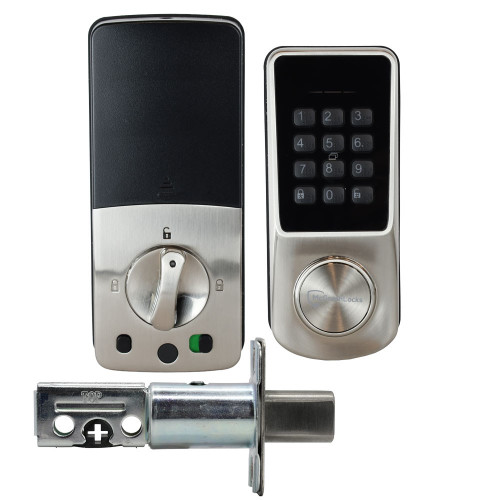
McGrath Kedron Smart Deadbolt - Tempered Glass, Fingerprint Reader, 60/70mm Adjustable Bolt
 At A Glance
-
 DISPATCHSame Day if Ordered Before 11am AEST
  LOCK TYPESmart Digital Deadbolt Only
-
 FINISHMatt Black + Satin Nickel
  IN THE BOXDoor Sensor + Keys + Hardware Included
 WARRANTY24 Months
 FINGERPRINTUp to 100
 PIN CODEUp to 250 Codes
 RFID / CARDUp to 1,000 Credentials
 BLUETOOTH / eKEYSUnlimited eKeys via App
 MECHANICAL KEYRekeyable PD Cylinder Override
 Wi-Fi REMOTEOptional Via Gateway
 PASSAGE MODEYes (App Control to Exit)
 PRIVACY SWITCHAdmin + Mechanical Key Only
 AUTO-LOCKConfigurable via App
 DOOR SENSORIncluded in the Box
 IP RATINGIP65 External Panel Only
 SALT SPRAY300h Black / 96h Satin Nickel
 DOOR THICKNESS35-60mm (100mm Optional)
 BACKSET60mm / 70mm Adjustable
 DURABILITY200,000 Cycles Tested
- DEAD BOLT FAMILYBrowse All Smart Deadbolts
 WANT CHEAPER?See Digital Deadbolt Set Black - Lower Specs
 WANT HIGHER SPECS?Vault Nexus Vision - Video + Face Recognition
 APP PLATFORMMcGrath Locks App
Fingerprint PIN Code RFID Card Bluetooth Mech. Key Wi-Fi(Optional)
FaceNot Available
 Palm
PalmNot Available
The McGrath Kedron is a smart digital deadbolt developed for the Australian residential and light-commercial market. It replaces an existing deadbolt - not the door handle - giving you fast, keyless access through a tempered glass touch keypad with an integrated fingerprint reader, while retaining the door's existing hardware. Fitted to most existing deadbolt preparations, it suits both timber and aluminium hinged doors from 35 mm to 60 mm thick (extendable to 100 mm with an additional tailbar).
Access is managed through the McGrath Locks App over Bluetooth, with entry by fingerprint, PIN code, RFID card or tag, Bluetooth eKey, or mechanical key override. The lock runs on a TTLock platform - the same cloud infrastructure behind all McGrath smart locks, managed and supported in Australia by McGrath Locks. Optional Wi-Fi remote access and real-time access logs are available when the lock is connected to a compatible McGrath Locks gateway. A door position sensor is included for optional open/close monitoring and auto-lock triggers.
The Kedron carries an IP65 rating on the external keypad panel, a 304 stainless steel anti-saw adjustable deadbolt, and salt spray testing of 300 hours for the Matt Black finish and 96 hours for Satin Nickel. It is an app-enabled smart lock with a 24-month warranty and Australian Registered Design No. 202513993. For an overview of the Kedron's access methods alongside other smart lock options, see Buyer's Guide Chapter 3 - Smart Lock Access Methods.
Usually ships same day if ordered before 11am AEST (excludes weekends and Queensland public holidays).
 Key Features
- Smart digital deadbolt only - retains the door's existing handle; does not replace the latch or lever. See the bolt throw explainer if you are comparing deadbolt-only vs full lockset formats.
- Tempered glass touch keypad with integrated capacitive fingerprint reader for fast, keyless entry - up to 100 fingerprints stored.
- Six access methods: fingerprint, PIN code, RFID card/tag, Bluetooth eKey, Wi-Fi remote (via gateway), and mechanical key - see Chapter 3 for how each method works in practice.
- 304 stainless steel anti-saw adjustable deadbolt, adjustable 60 mm / 70 mm backset. See how to measure your backset before ordering.
- Up to 250 PIN codes (permanent, timed, one-time, custom, or recurring - minimum 4 digits when set via app). Anti-peep scramble code hides the real PIN from observers.
- Up to 1,000 RFID credentials (Mifare 13.56 MHz; permanent, timed, or recurring types).
- Unlimited Bluetooth eKeys - timed, permanent, one-time, or recurring - shareable to family and visitors through the app. See Ch 14 eKeys guide.
- Auto-lock configurable via the McGrath Locks App so the door relocks itself after entry.
- Privacy switch (physical button on the interior panel) - when engaged, disables all external keypad and fingerprint access, allowing entry only via the Admin credential or mechanical key. Understand the privacy switch before using it: see the internal snib explained.
- Passage mode - locks open on a valid credential + 123# sequence, keeping the door unlocked for deliveries or tradesperson access. Deactivation is via the McGrath Locks App (not the keypad).
- Door position sensor included for optional open/close monitoring, door-ajar alerts, and auto-lock triggering when the door closes.
- Mechanical key override with rekeyable PD cylinder - emergency entry if the battery is flat. See Mechanical Key Override on Smart Locks.
- USB-C emergency power input - connect a power bank to the external panel to unlock when the battery is depleted.
- IP65 rated external panel for sheltered outdoor use. The interior battery unit is not weather-sealed. Not intended for exposed pedestrian gates - see Chapter 4 - Door Type Matching.
- Salt spray tested: 300 hours for Matt Black, 96 hours for Satin Nickel.
- Optional Wi-Fi remote access, remote unlocking, and access log viewing when paired with a compatible McGrath Locks gateway. The lock does not include built-in Wi-Fi.
- Incorrect attempt lockout - 5 wrong entries triggers a 35-second lockout; the app overrides the lockout remotely (gateway required).
- 200,000-cycle durability test; 12-month battery life (4 x AA Alkaline, based on 10 uses per day).
- 24-month manufacturer warranty - the Kedron is a named 24-month model per the McGrath Locks warranty schedule. See why the McGrath/LSC/Terry's partnership supports you long-term and how long digital door locks last.
- Australian Registered Design No. 202513993. Designed and developed for the Australian market.
Access Methods
Six ways in. Browse the full Smart Lock Access Methods guide to understand when each method is most useful, and Chapter 14 on TTLock passcode types for a detailed breakdown of PIN and eKey options.
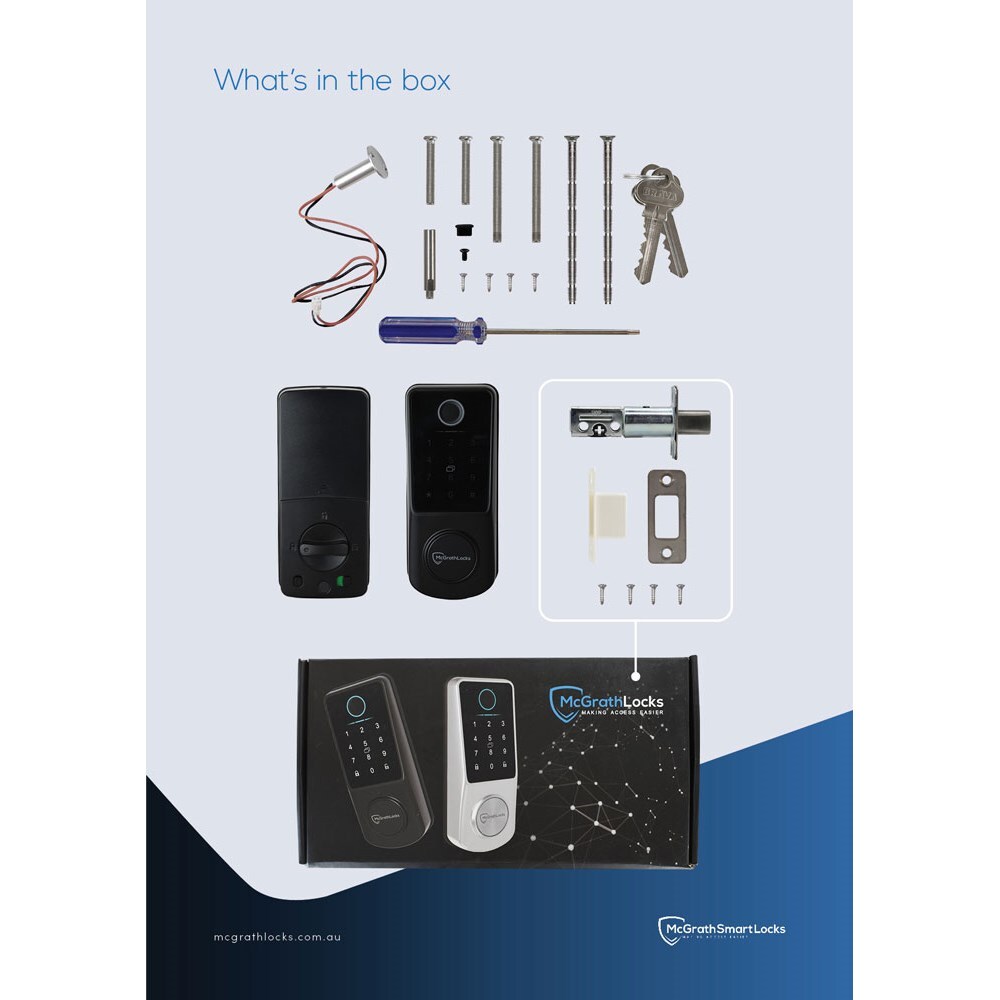
What's in the Box
- Exterior deadbolt assembly with tempered glass touch keypad and fingerprint reader
- Interior deadbolt assembly with thumb-turn knob
- SS304 adjustable anti-saw deadbolt - 60 mm / 70 mm backset
- Strike plate and strike box
- Door position sensor with connecting cable (for optional door open/close monitoring)
- Drill positioning template for installation
- Mechanical override keys (rekeyable PD cylinder)
- RFID access tags [CONFIRM - carried from legacy; image-only WITB in brochure PDF, not text-confirmed]
- Mounting screws and fixings
- User guide and installation manual

 Suitable Uses
- Retrofitting a smart deadbolt to an existing hinged timber or aluminium door while keeping the current handle or latch - fits most 60 mm / 70 mm deadbolt preparations. See Chapter 2 - Measuring Your Door before ordering.
- Homes and light-commercial entrances where fast biometric fingerprint entry is preferred for high-frequency daily use - fingerprint is the quickest credential for regular users.
- Front and rear entry doors in sheltered positions - under a porch, awning, or recessed entry - where the IP65-rated external panel is protected from direct rain and full weather exposure.
- Short-stay and rental properties where PIN codes and Bluetooth eKeys can be issued and revoked through the app. Add a gateway for full remote management and property management system integration - see Ch 14 PMS integration guide and do you really need Wi-Fi for Airbnb?
- Multi-user properties - with up to 100 fingerprints, 250 PIN codes and 1,000 RFID credentials, the Kedron handles large households, letting agencies, or light-commercial sites where many people need independent access.

The IP65 rating applies to the external panel only - the interior battery unit is not weather-sealed. The Kedron is not designed for exposed pedestrian gates where the entire lock assembly faces the elements. For gate applications see the External Gate Smart Locks range or check Chapter 4 - Door Type Matching.
Available Finish Options
 Matt Black
(This Product)
STK MLKED Satin Nickel
(This Product)
STK MLKED
Matt Black and Satin Nickel are options within this single listing. Finish selection does not affect functionality, compliance, or performance. Note: salt spray resistance differs by finish - Matt Black is tested to 300 hours, Satin Nickel to 96 hours.
 Item Code Family - 60/70mm Adjustable-Bolt Smart Deadbolts
All models in this family share the McGrath adjustable 60/70mm deadbolt platform and the same bolt (STK MLSPAB6070). The Kedron is the glass-keypad + fingerprint variant; the Ashgrove is the raised-button Braille-accessible variant. Compare the range with all smart deadbolts in the catalogue.
 Accessories & Spares
Choosing the right gateway? See G2 vs G3 vs G4 vs G5: Smart Lock Gateways Compared and the Bluetooth vs gateway guide in Chapter 14. The Kedron will function fully without a gateway - remote access and activity logs are the gateway-exclusive features.
 Battery, Power & Backup Access
- Powered by 4 x AA Alkaline batteries (not included). McGrath specifies Alkaline only - do not use rechargeable or lithium AA cells, and never mix old and new batteries. See choosing batteries for a TTLock lock.
- Battery life is rated at 12 months based on 10 uses per day. Heavy-use doors, frequent fingerprint enrolments and cold or hot exposure shorten that figure - see battery life - the truth, not the marketing version.
- Operating voltage 4.5 V to 9 V. The lock gives a low battery voice warning below 4.8 V at each wake, and the McGrath Locks App shows the battery level. Replace all four cells as a set when warned - see the low-battery diagnostic if the lock is behaving oddly.
- Standby draw is under 66 mA and motor current under 200 mA, with a 1.5 second unlock time.
- USB-C emergency power input on the underside of the external panel. Connect any USB-C power bank to wake the lock and unlock with your usual credential if the batteries are completely flat. See what to do when the battery dies.
- Mechanical key override through a rekeyable PD cylinder behind the external panel - works regardless of battery state and even when the privacy switch is engaged. Read where the keyhole is hidden and how to store the override key outside the house.
- The battery cover on the interior unit is secured with a recessed screw. The McGrath Torx screwdriver with magnetic tip (STK MLSPTXSD) is the matching tool if the supplied driver is lost.
- Power outages do not affect the lock - it runs on its own batteries. See what actually happens in a power outage. If you are using a gateway, the gateway itself does need mains power and internet to relay remote commands - the lock still works locally without it.
- Terry's Locksmiths strongly recommends Duracell batteries.
App Platform & Data Hosting

The McGrath Locks mobile app is a customised, McGrath-branded platform tailored specifically for the McGrath Locks product range. The app is managed, supported and distributed locally by McGrath Locks in Australia. Australian-based support staff handle warranty claims, app troubleshooting and platform queries - you are not dealing with an overseas vendor. The underlying cloud infrastructure is provided by TTLock, a globally deployed IoT platform.
The McGrath Locks App is available for iOS 7.0 and above and Android 4.3 and above . The Kedron also supports the TTHotel platform for short-stay and accommodation operators who need front-desk style code issuing. For an independent explanation of what the TTLock platform is and how it compares to other ecosystems, read Chapter 14 - What Is TTLock?, Chapter 15 - App Platforms, and Which Smart Lock Platform Is Right for You? If data hosting is a concern, Your Data and China - the hosting table sets out where each platform stores what.

McGrath smart locks are backed by long-established industry partners and supported locally. McGrath Locks is distributed in Australia by LSC, and Terry's Locksmiths handles installation, warranty and after-sales in Burleigh Heads. To learn more, read Why Terry's Locksmiths, LSC & McGrath Locks Give Long-Term Confidence, the McGrath brand profile in Chapter 10, and what happens if a manufacturer discontinues its app.
Wi-Fi Remote Access (Optional)
The Kedron does not include built-in Wi-Fi. Out of the box it is a Bluetooth lock - you manage it from your phone when standing within about 10 metres of the door. Remote access is added by pairing the lock with a McGrath Locks gateway, which sits inside the house within Bluetooth range of the lock and bridges it to your network.
Without a gateway you can still create PIN codes, issue eKeys and set permissions from the app while nearby, and the codes work at the door whether or not your phone is present. With a gateway you gain remote unlocking from anywhere, real-time access records, remote deletion of fingerprints, cards and PINs, and automatic clock synchronisation. Read do you actually need a gateway? and Chapter 8 - what a gateway does before deciding.
Compatible gateways: G3 (PoE / wired), G4 (4G SIM), and G5 (5 GHz and 2.4 GHz Wi-Fi). For a detailed comparison see G2 vs G3 vs G4 vs G5 - quick comparison. Place the gateway within 10 metres of the lock with no solid obstruction - see gateway placement. If your router aggressively band-steers, the G5's dual-band radio avoids the 2.4 GHz-only dropouts described in why smart locks drop off Wi-Fi. Gateways are powered from a USB supply - the McGrath 240 V dual-USB wall adaptor is the matching plug pack.
 Full Specifications
The external (outside) module is IP65 weather rated - it will shrug off rain and a hose-down. The internal module, which houses the battery compartment and other electronics, is for interior use only and is not weather rated. Fit the Kedron to a hinged entry door, ideally with some overhead cover; it is not suitable for fully exposed external pedestrian gates. Compare the door type compatibility matrix in Chapter 4.
McGrath salt spray tests each finish separately. The Matt Black finish is tested to 300 hours; Satin Nickel to 96 hours. If your door is within a few streets of the beach or a canal, the Black finish is the more durable choice. Either way, a wipe-down with fresh water every few months is cheap insurance - see coastal environments - Gold Coast specific and why coastal Queensland is not gentle on locks.
Dimensions
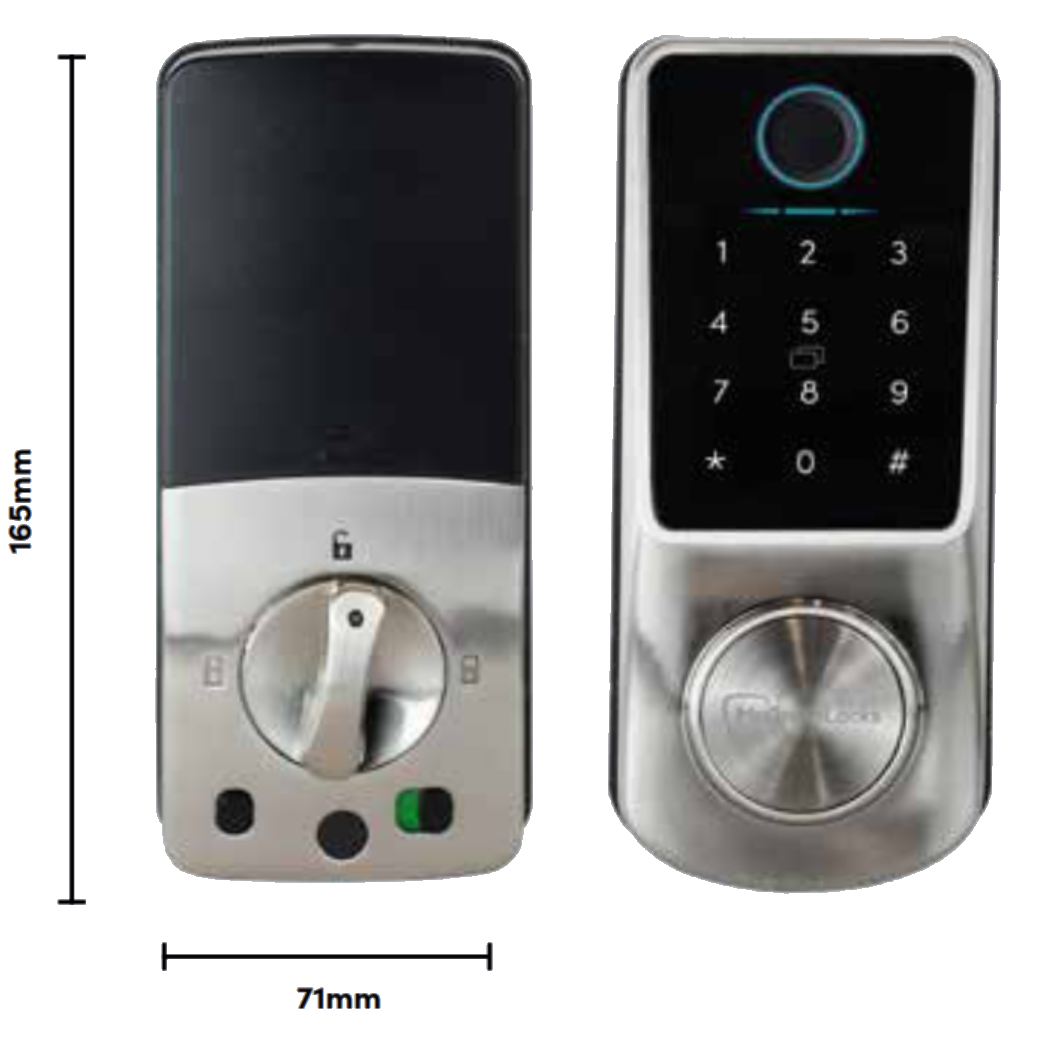
Before ordering, confirm your door's backset, thickness and existing hardware layout. A 60/70 mm adjustable deadbolt fits most Australian deadbolt preparations - see standard backset sizes in Australia.
 Frequently Asked Questions
Five quick answers below. The FAQ tab above carries the full owner's guide - setup, credentials, gateway, troubleshooting and more. For general smart lock questions see Buyer's Guide Chapter 13 - Smart Lock FAQ.
Deadbolt only. It replaces the deadbolt above or below your existing handle and does not replace the handle or latch. If your door has a single lever with an integrated lock and no separate deadbolt, look at a lever or mortice smart lock instead - the Chapter 1 deadbolt explainer walks through the difference.
No. The Kedron is Bluetooth at the lock. Remote unlocking, live access logs and remote credential deletion need a G5, G3 or G4 gateway. Everything else - PIN codes, fingerprints, eKeys, auto-lock - works without one. See Bluetooth vs gateway.
It suits hinged timber and aluminium doors 35 to 60 mm thick (up to 100 mm with an additional tailbar) with a 60 or 70 mm backset - the two standard Australian deadbolt backsets. Measure yours with the backset guide. If your door is aluminium with a narrow stile, check stile width first - the 71 mm wide exterior body needs a stile at least that wide.
Two ways in. Hold a USB-C power bank to the port under the external panel and the lock wakes long enough to unlock with your fingerprint or PIN, or use the mechanical override key. The lock warns you by voice at every wake once the batteries drop below 4.8 V, so a flat lock is avoidable. See what to do when the battery dies.
Almost always the interior privacy button has been pressed. When it is engaged, every outside credential is refused except the Admin credential and the mechanical key - a family member pressing it at night is the usual cause. Press it again from inside to release. Read how to tell if Secure Lock is engaged and the Airbnb risk if you rent the property.
Additional Information
- Set it up with the app first. McGrath strongly recommends registering the Admin through the McGrath Locks App rather than the keypad. Manual keypad programming works, but the app is where auto-lock, passage-mode release, eKey sharing and the door-sensor alarm timer actually live. The TTLock user manual walkthrough covers every screen.
- The lock ships in an open state. Until batteries are fitted and an Admin is registered, the Kedron is in demo mode and will open to any code, card or fingerprint. This is normal and explains the common "it will not lock after install" call - register an Admin and it switches to secure operation. If the door still will not throw, check strike alignment and the three common DIY mistakes.
- Fingerprint enrolment repays a little care. Enrol each finger from three angles, add a second finger per person, and enrol a PIN as a fallback for wet or cut fingers. The three-angle technique in TTLock Tips and Tricks is the method Terry's uses on every install.
- Timed and one-time PINs expire on a 24-hour activation rule. A code created in the app must be used at the door within its activation window or it silently lapses - the most common reason a guest code "did not work". Read the 24-hour activation rule and how to stop codes expiring. Buyers who want a keypad and glass finish but need accessible raised buttons and Braille should look at the sister McGrath Ashgrove.
- Unexpected "tamper" or vibration notifications in the app. If you see these, the setting has been switched on in the TTLock app menu and should be turned off - the Kedron does not have the hardware for it and the alerts are phantom. See why McGrath locks do not support it and the three-step disable procedure.
Warranty
The Kedron carries McGrath Locks' 24-month limited warranty from the date of purchase against defects in materials and workmanship under normal use and service. The 24-month tier applies to the ALBION, ASCOT, WINDSOR, ULTRA SECUA, HAMILTON, BARDON, STAFFORD, KEDRON, ASHGROVE, GRANGE, MANLY and SANDGATE models; other McGrath products carry 12 months. McGrath Locks will repair, replace, or refund at their discretion. Batteries and damage from incorrect installation or exposure beyond the stated IP rating are excluded. Proof of purchase is required for all claims, which Terry's Locksmiths handles locally alongside your rights under Australian Consumer Law. Returns & Warranty | McGrath Locks Warranty
 Download PDF Resources
Two-page spec sheet - hardware, enrolment and verification, lock functions, capacities, power figures, operating environment, salt spray by finish, warranty and registered design number.
Six-page brochure - product overview, access method types (permanent, timed, one-time, custom and recurring codes), security features, dimensions, full specification table and what is in the box.
Fold-out guide - exploded diagrams, seven installation steps, door sensor fitting, keypad programming codes, demo mode, passage mode, low battery alert, lockout behaviour, gateway setup and troubleshooting.
Platform manual for the app behind the McGrath Locks App - registration, adding a lock, eKeys, the six passcode types, card and fingerprint management, Bluetooth unlock, records and gateway management. Also available as a web walkthrough.
McGrath Kedron - FAQ, Setup and Owner's Guide
Everything a buyer, installer or owner asks about the Kedron, grouped by topic. Each answer stands on its own. For the wider picture, start with Buyer's Guide Chapter 13 - Smart Lock FAQ and the TTLock Platform Guide (Chapter 14).
Choosing the Kedron
Same bolt, same app, same 24-month warranty. The Kedron has a tempered glass touch keypad with a fingerprint reader; the Ashgrove has raised physical buttons with Braille markings and no fingerprint reader. Choose the Kedron for speed and a flush glass look; choose the Ashgrove for a household member with low vision, arthritis or a preference for tactile buttons. Both share the MLSPAB6070 replacement bolt.
The McGrath X3 is the compact keypad-only deadbolt on the same platform - no fingerprint reader, a smaller body, and a different replacement bolt (the MLAB6070SL, not the Kedron's MLSPAB6070 - a common purchase mix-up). If fingerprint entry is not important to you the X3 is the leaner choice; if it is, the Kedron is the one.
In the same deadbolt format Terry's stocks the Zanda Stealth 1320 (TTLock platform, IP66 external module), the Carbine CEL2-BT (Carbine Connect platform), the Hafele DL4000, the Igloohome Smart Deadbolt Go (offline algoPIN), the offline Yale Libi, and the Vault Nexus with 3D face recognition. Browse the whole set at smart deadbolts, and use Which Smart Lock Platform Is Right for You? to compare the apps behind them.
No - fingerprint, PIN, RFID, Bluetooth and key. If you want a deadbolt that recognises faces and streams video to your phone, the step-up is the Vault Nexus Vision. Chapter 6 explains what facial recognition locks do well and where they fall short.
Access and Credentials
Up to 100 fingerprints, 250 PIN codes and 1,000 RFID credentials, plus unlimited Bluetooth eKeys. Each is a separate pool - enrolling fingerprints does not eat into your PIN allowance. Enrolment is done in the app or with the *80# keypad sequence in the user guide. See Chapter 3 on fingerprint access.
Usually the enrolment. Enrol each finger from three angles (flat, rolled left, rolled right), keep the sensor clean, and enrol a second finger per person. Elderly, very dry or worn fingertips read less well - give those users a PIN as backup. Terry's uses the three-angle enrolment technique on every install; the full fingerprint tips section covers the rest.
PINs are 4 to 9 digits. The 4-digit minimum is only available when the code is created in the app; codes programmed directly at the keypad follow the 6-digit default (the factory Admin code is 123456). Longer is better on a front door - 6 to 8 digits is the sweet spot. The passcode types guide lists what each type does.
You can type random digits before and after your real PIN and the lock still opens, as long as the correct code appears somewhere in the string. Someone watching over your shoulder sees a long meaningless number. It is built in - nothing to enable. Chapter 3 covers PIN code access in more detail.
TTLock-platform codes have to be used at the door once within their activation window (generally 24 hours from the start time you set) or they lapse. A guest arriving late to a code set for "today" is the classic case. The fix is to set the code's start time to the arrival day, or use a permanent code and delete it afterwards. Read the 24-hour activation rule, the activation windows by passcode type, and how to stop codes expiring.
Any 13.56 MHz Mifare credential. Terry's stocks the McGrath ISO card, key fob, adjustable wristband and adhesive sticker - the sticker goes on the back of a phone case for tap-to-enter without opening the app. Each credential is enrolled individually and can be revoked individually. See the full RFID accessories category and Chapter 3 on RFID.
An eKey is a Bluetooth credential sent to another person's McGrath Locks App account - they unlock by tapping their phone screen while near the door. You set it as permanent, timed, one-time or recurring, and can revoke it any time. Sharing an eKey needs the recipient to install the app; sharing a PIN does not. See Chapter 14 - eKeys and Chapter 3 - Bluetooth access.
Yes. The Kedron uses a rekeyable PD cylinder, so Terry's can cut additional keys or rekey it to match other locks on the house. Keep one override key off-site or in a key safe rather than under the mat - see key hiders that are smarter than the doormat. Browse the smart locks with backup key category to see why a key override matters.
Locking Behaviour and Security
Yes, when auto-lock is enabled in the app with a delay of your choosing. Pair it with the supplied door sensor and the lock throws the bolt only once the door has actually closed - without the sensor it throws on the timer regardless, which can leave a bolt extended against an open frame. Chapter 13 covers day-to-day use questions like this.
It is a small magnetic sensor that fits in the door edge and tells the lock whether the door is open or closed. Fitting it is optional. With it, you get door-ajar alerts (adjustable 0 to 60 seconds), closed-door-triggered auto-lock, and an open/closed status in the app. Without it, the lock has no idea whether the door is shut. Terry's recommends fitting it on any door where auto-lock will be used.
Passage mode. Enter a valid PIN or present a valid card, then press 1 2 3 # within five seconds; the bolt stays retracted until you cancel. Cancelling is done in the app, not at the keypad - so keep your phone handy. Do not confuse it with the privacy switch, which does the opposite. More practical-use answers in Chapter 13.
When pressed from inside it refuses every outside credential - PIN, fingerprint, card and ordinary eKeys - leaving only the Admin's app credential and the mechanical key. So yes: a guest or tenant who presses it can lock the owner's normal PIN out, which is the Airbnb risk to plan for. Read what Secure Lock disables, whether the Admin can override it, and the best-practice rules.
Five consecutive wrong entries lock the keypad and card reader for 35 seconds. During the lockout only the app (via gateway) or the mechanical key gets you in. It resets on its own - no service call needed. Chapter 13's security section covers what lockouts do and do not protect against.

TTLock is one of the two largest smart lock platforms in the world and has had published vulnerabilities patched over the years like any platform of that size. The McGrath Locks App is a McGrath-branded build of it, supported in Australia by McGrath Locks; the cloud infrastructure is TTLock's globally deployed platform. For the honest, detailed version read Chapter 14 - TTLock security, the China question, and Australia's new IoT rules in Smart Locks and Cyber Security.
Remote Access and Gateway
For most homes the G5 - its dual-band radio sidesteps the 2.4 GHz band-steering dropouts that plague single-band gateways. Choose the G3 if you have Ethernet near the door and want a wired connection, or the G4 for a site with no internet where a 4G SIM is the only option. Compare them in G2 vs G3 vs G4 vs G5 and Chapter 14 - gateway selection. One gateway serves several locks within its Bluetooth range.
Inside the house, powered from a USB plug pack, within about 10 metres of the lock with no brick or steel between them - a hallway power point near the front door is ideal. Do not put it in a metal switchboard cabinet. See Chapter 8 - gateway placement and where to position the gateway. The McGrath dual-USB wall adaptor is the matching power supply.
Nine times out of ten it is your router's band steering shunting a 2.4 GHz device around, or the gateway sitting too far from the lock. Power-cycle the gateway first; if it recurs, split your Wi-Fi into named 2.4 GHz and 5 GHz networks or move to the dual-band G5. Work through what causes Wi-Fi dropouts, how to improve stability, and Chapter 13's Wi-Fi dropout FAQ. The lock itself keeps working at the door the whole time - only remote features pause.
Nothing at the door. Fingerprints, PINs, cards and eKeys are stored in the lock and keep working. You lose remote unlocking and live records until the connection returns, and any codes you create remotely queue until the gateway reconnects. See Chapter 8 - when the internet is down.

Yes - every unlock is logged against the credential that opened it. Without a gateway the log uploads to the app the next time your phone is in Bluetooth range; with a gateway it is live. The lock's clock is synchronised by the gateway; without one it can drift over months and stamp records or timed codes incorrectly - see clock drift symptoms and calibrating without a gateway. Chapter 7 on audit trails covers what hosts should keep.
Short-Stay, Airbnb and Rentals
It is a strong fit for hosts who want a deadbolt that keeps the existing handle. Issue a one-time or timed PIN per booking, revoke it at checkout, and the guest never needs the app. Add a gateway and it can be automated through channel managers such as Hospitable or Uplisting, or run through TTHotel for a front-desk workflow. Start with Buyer's Guide Chapter 7 - Airbnb and Short-Stay, then Using TTLock for Airbnb and Chapter 14 - PMS integration. If you would rather not run a gateway at all, Igloohome vs TTLock explains the offline alternative.
Transfer the lock in the app to the new owner's account, or as Admin delete every credential and re-register. Never just hand over the Admin login. The TTLock lock transfer and erase code at handover notes cover both routes; Chapter 7's setup checklist is worth printing for a managed property.
Power and Batteries
McGrath rates it at 12 months on 10 openings a day with four AA Alkalines. A busy family door doing 30 openings a day will land nearer 5 or 6 months; a rarely used rear door will go well past a year. Use branded Alkaline (Terry's recommends Duracell), not rechargeable or lithium AA - the voltage curve confuses the low-battery warning. See choosing batteries, battery management, and Chapter 13 - power and battery.
Almost certainly flat or badly seated batteries, or the interior connecting cable pinched during installation. Hold a USB-C power bank to the port under the external panel; if the keypad wakes, replace all four AAs. If it still does nothing on external power, check the ribbon cable at the interior unit. Run the low-battery diagnostic and Chapter 12 troubleshooting before calling.
Installation and Door Fit

If your door already has a 60 or 70 mm backset deadbolt, yes - it is a like-for-like swap using the supplied template, and the user guide's seven steps take a competent DIYer about an hour. If you are cutting a fresh deadbolt hole, aligning the strike to a bolt that must throw cleanly is where DIY installs go wrong. Read when to DIY and when not to, the common installation mistakes, and Terry's advice and installation service. Outside the Gold Coast, use the qualified locksmith recommendation page.

No. The supplied bolt is adjustable between 60 and 70 mm, so it suits either standard preparation. Set it before you fit the bolt - see what backset is, what happens when it is wrong, and the backset mistake in Chapter 12.
Yes, to 100 mm with an additional tailbar (the longer connecting bar between the two halves). Ask Terry's for the correct length when ordering rather than guessing. Chapter 2 explains how to measure door thickness.

Not for the Kedron - a deadbolt has no lever, so it fits left- or right-hand doors without adjustment. The only orientation rule is that the tail piece must be vertical before the exterior body goes on, and the knob's dot must point to the unlock symbol. If you are unsure what handing means for other locks you own, see Understanding Door Handing in Australia.
Three usual causes: the door is in demo mode (register an Admin), the strike opening is misaligned with the bolt, or the door sags so the bolt binds. Test the bolt by hand with the door open first - if it runs freely open but binds shut, it is alignment, not the lock. Chapter 12 covers misalignment; the door alignment section explains why it is the most underestimated cause of smart lock failure.

The 71 mm wide exterior body covers a standard 54 mm deadbolt bore comfortably. Larger or off-centre scars from an old rim lock may show; Terry's can advise on a cover plate - see Scar Plates for Smart Locks.
Weather, Location and Lifespan
Not a gate. The IP65 rating is for the external panel only - the interior unit with the batteries is not weather sealed, and on a gate both sides are outside. On a front door with no porch it will cope with rain on the outside face, but a bit of overhead cover extends its life. For exposed gates see the External Gate category and Chapter 13 - door types.
Matt Black. McGrath salt spray tests it to 300 hours against 96 hours for Satin Nickel. Neither is immune to Gold Coast salt air - rinse the external panel with fresh water every few months and keep the fingerprint sensor clean. See coastal environments, why coastal Queensland is hard on locks, and Chapter 11 on Australian standards and corrosion grades.
It is tested to 200,000 cycles - roughly 27 years at 20 openings a day - so the mechanism is not the limit. Realistically, sun, salt, door alignment and how the platform ages decide the lifespan. Read realistic lifespan expectations, why sunlight and heat matter, and the five-year question.

No to both. It is a residential deadbolt with no fire test and no accessibility certification. For an apartment fire door look at the fire door smart locks in Chapter 5; for NDIS or DDA housing see Chapter 9 - the Ashgrove's Braille keypad is an accessibility aid but is likewise not DDA certified.
Troubleshooting
It is in demo mode. Every Kedron ships that way and stays open until an Admin is registered through the app (recommended) or with the *12# keypad sequence. Register an Admin and it switches to secure operation immediately.
Switch the setting off in the app. The Kedron has no sensor for it, and when the toggle is on the platform generates phantom alerts. This is a platform quirk, not a fault. See why phantom alerts happen, the three-step disable procedure, and Chapter 13's tamper alert FAQ.
Hold the reset button inside the battery compartment until the lock announces "please input initialization passcode", then enter 0000#. Every PIN, card, fingerprint and eKey is wiped and the lock returns to demo mode. Delete the lock from the app first if you still have Admin access, or the platform will keep a ghost record. If an erase code was used first, see erase code recovery.
Related Products, Guides and Chapters
Same platform and family: McGrath Ashgrove (sister - Braille keypad) · McGrath X3 Deadbolt · McGrath 818 Deadbolt · McGrath Grange Entrance Pull Handle · All McGrath Locks
Accessories: Replacement 60/70mm bolt · RFID card · RFID fob · RFID wristband · RFID sticker · G3 gateway · G4 gateway · G5 gateway · Gateway wall adaptor · Battery cover Torx driver
Alternatives in the deadbolt format: Zanda Stealth 1320 · Carbine CEL2-BT · Hafele DL4000 · Igloohome Smart Deadbolt Go · Yale Libi · Austyle 59409 (lower cost) · Vault Nexus · Vault Nexus Vision (higher spec)
Buyer's Guide chapters: 01 What Is a Smart Lock · 02 Measuring Your Door · 03 Access Methods · 04 Door Types · 07 Airbnb and Short-Stay · 08 Gateways · 10 Brand Profiles - McGrath · 12 Installation and Troubleshooting · 13 Smart Lock FAQ · 14 TTLock Platform Guide · 15 App Platforms
Blogs: TTLock Tips and Tricks · TTLock User Manual · TTLock vs Tuya · Gateways Compared · Mechanical Key Override · The Perils of the Internal Snib · The Realities of Electronic Door Locks · How Long Do Digital Door Locks Last · Terry's, LSC and McGrath · Your Data and China
What's in the Box - McGrath Kedron (STK MLKED)
- Exterior deadbolt assembly - tempered glass touch keypad, fingerprint reader, RFID card region, key override cylinder cover and USB-C emergency power port
- Interior deadbolt assembly - battery cover, thumb-turn knob, lock/unlock button and privacy button
- SS304 adjustable anti-saw deadbolt, 60 mm / 70 mm backset
- Strike plate and strike box with fixing screws
- Door position sensor with connecting cable
- Optional top screw stud for the exterior plate (enhanced security fixing)
- Mounting through-bolts, screws and screw-hole rubber plugs
- Screwdriver
- Mechanical override keys (rekeyable PD cylinder)
- RFID access tags [CONFIRM]
- Drill positioning template
- User and installation guide (also downloadable from the PDF Files tab)
.
McGrath Kedron - Dimensions
Fitting an aluminium door? The exterior body is 71 mm wide, so the door stile needs to be at least that wide to carry it - see measuring stile width and the door type compatibility matrix.
PDF Files - McGrath Kedron (STK MLKED)
Two-page spec sheet - hardware, enrolment and verification, lock functions, capacities, power figures, operating environment, salt spray by finish, warranty and registered design number.
Six-page brochure - product overview, access method types (permanent, timed, one-time, custom and recurring codes), security features, dimensions, full specification table and what is in the box.
Fold-out guide - exploded diagrams, seven installation steps, door sensor fitting, keypad programming codes, demo mode, passage mode, low battery alert, lockout behaviour, gateway setup and troubleshooting.
Platform manual for the app behind the McGrath Locks App - registration, adding a lock, eKeys, the six passcode types, card and fingerprint management, Bluetooth unlock, records and gateway management. Also available as a web walkthrough.
McGrath Locks Warranty
Warranty Summary
How to Make a Claim
- Contact Terry's Tradies Pty Ltd and its associated websites, trading names, and subsidiaries (the place of purchase) within the applicable warranty period.
- Supply your proof of original purchase - a receipt or tax invoice is required.
- Provide a clear description of the fault and your contact details.
- You may be asked to return the product for assessment before a remedy is determined.
- McGrath Locks will, at their discretion, repair the product, replace it with the same or an equivalent model, or provide a refund of the purchase price.
 Exclusions
This warranty does not cover:
- Normal wear and tear
- Products that have been disassembled
- Damage caused by improper handling, incorrect installation, misuse, abuse, neglect, modification, or accident
- Installation by unlicensed persons (including non-licensed locksmiths or technicians)
- Products not used in accordance with the supplied instructions
- Cosmetic damage that does not affect functionality
- Labour or installation costs related to the removal or reinstallation of products
- Exposure to conditions outside normal environmental use
- Work completed before warranty approval
- Damage caused by battery leakage, battery failure, or force majeure
Our goods come with guarantees that cannot be excluded under the Australian Consumer Law. You are entitled to a replacement or refund for a major failure and compensation for any other reasonably foreseeable loss or damage. You are also entitled to have the goods repaired or replaced if they fail to be of acceptable quality and the failure does not amount to a major failure. This warranty is provided in addition to your rights and remedies under the Australian Consumer Law.
1 Review Hide Reviews Show Reviews
-
Highly recommend
Installs easy and works as expected. Highly recommend as it has a number of very useful features.

Confused? Overwhelmed? We get it.
Choosing the right smart lock can be genuinely tricky - door types, backsets, app platforms, compatibility with your existing hardware... there is a lot to consider. We have decades of experience fitting locks of all types, including smart locks, and we are happy to help.
Our expert recommendation service is free. Upload a few photos of your door and describe what you need, and one of our qualified locksmiths will give you a personalised recommendation.
Get Your Free Recommendation →How it works - three easy steps:
1. Upload photos
A few clear shots of your door, lock and frame - inside and out.
2. We assess
Our locksmith reviews your setup and requirements - door type, weather exposure, how you want to use it.
3. You get a recommendation
A personalised recommendation tailored to your door, budget and needs. No pressure, no upsell.
Also useful while you are deciding: