

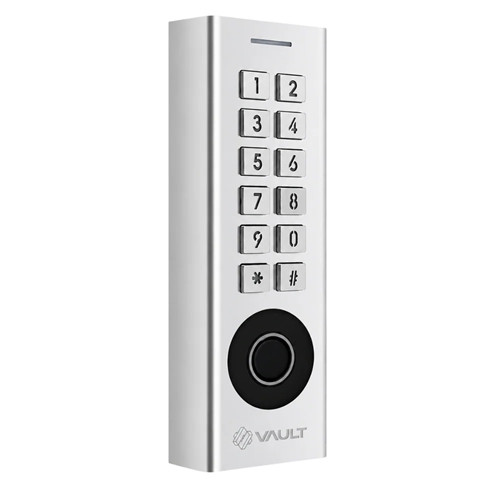


Vault Edge Smart Access Control for Electric Strike Doors
At A Glance
 At A Glance
 DISPATCH2 Business Days


 Fingerprint
  PIN Code
  RFID Card / Fob
  Bluetooth App
  Remote (Optional G5)
  Face Recognition
Not Available
 Mechanical Key
Not Available
The Vault Edge Smart Access Control (Vault_Edge) is a slimline, wired smart access controller for doors fitted with an electric strike or electric bolt. Rather than replacing the lock body, it mounts beside the door and releases a compatible strike when a valid credential is presented, which makes it suited to apartment entries, shared entrances, offices, and other doors that need managed access rather than a standalone smart lock - see the door-type compatibility matrix.
Entry is granted by fingerprint, PIN code, RFID card or fob, and Bluetooth through the Vault Smart Locks app. It is a hardwired 12V DC controller that operates locally over Bluetooth as standard, and adds remote access, credential management, and voice control when paired with the optional Vault G5 Wi-Fi Gateway.
The Edge is closely related to the Vault Arena, which offers the same wired electric-strike control, and to the Vault Pulse, which adds 3D facial recognition. The Edge itself does not include facial recognition. It is the lowest-priced controller in the Vault access-control trio - the Vault Smart Lock Range guide sets the three side by side.
Usually ships in 2 business days.

The Vault Edge is a hardwired 12V DC controller and should be installed by a licensed cabling technician. It requires a compatible electric strike or electric bolt, which is sold separately. Any 240V mains connection for the power supply must be completed by a licensed electrician.

The Edge is listed as IP67: completely dust-tight and protected against temporary immersion in water up to 1 metre deep, making it suited to outdoor and all-weather use. The power supply, strike, and any connected accessories must be housed and protected appropriately for their own location.
 Key Features
- Wired 12V DC smart access controller for doors using an electric strike or electric bolt.
- Supports fingerprint, PIN code, RFID card or fob, and Bluetooth app entry.
- Managed through the Vault Smart Locks app, with permanent, timed, one-time, custom, and recurring passcodes.
- Onboard relay with normally open and normally closed outputs to suit fail-secure or fail-safe hardware.
- Request-to-exit (REX) input for an internal exit button, plus doorbell contacts on the wiring loom.
- IP67 weather rated (as listed) for outdoor and all-weather installation.
- Optional remote access and voice control when paired with the Vault G5 Wi-Fi Gateway - browse the gateway and bridge accessories range.
- Slim surface-mounted format with keypad and fingerprint reader; facial recognition is not included.
Access Methods
 Palm Recognition
See Chapter 03 - Access Methods for a side-by-side comparison of how these credentials behave in practice.
 What's in the Box
- Vault Edge access controller
- Mounting plate
- Installation diagram
- Digital user manual

The Vault Edge switches a separate electric strike or electric bolt through its onboard relay. The strike is not supplied and must be selected to suit the door, frame, and application.
Installation and System Arrangement
The Edge is wired into a small system: a regulated 12V DC supply feeds the controller, which switches the electric strike or bolt through its relay contacts on a valid credential. An exit button on the secure side connects to the request-to-exit (REX) input, and a doorbell can be wired to the Doorbell A / B contacts on the loom. Where the controller and the strike share one power supply, the supplied 1N4004 diode is fitted across the strike to protect the unit. The controller surface-mounts on its mounting plate beside the door; the manual's installation pages are diagrams, and the box includes a printed installation diagram.
Vault publishes no wiring diagram or arrangement drawing for the Edge beyond the manual. See installation and troubleshooting guidance and the common installation mistakes.
Because the Edge is a wired 12V DC system driving door hardware, it should be installed by a licensed cabling technician. On the Gold Coast we offer a site survey and installation service - start at our Advice and Installation page. Weighing up doing it yourself? Read when DIY is reasonable first.
 Power, Wiring and Electrical Requirements
- Powered by a 12V DC regulated supply (a 12V DC / 3A supply is shown in the manual wiring diagram).
- Onboard relay provides normally open (NO), common (COM), and normally closed (NC) dry contacts for the strike or bolt.
- Request-to-exit (REX) input (OPEN) for an internal exit button.
- Doorbell contacts (Doorbell A / Doorbell B) are provided on the loom; per the manual these apply to keypad and face versions.
- A 1N4004 diode is supplied and must be fitted when the controller shares a common power supply with the strike, to protect the unit.
- This is a hardwired controller, not a battery-powered standalone smart lock - read what happens in a power outage and specify a battery-backed supply where the door must keep working.

 Vault Smart Locks App
The Edge is set up and managed through the Vault Smart Locks app, available on iOS and Android . From the app you can enrol fingerprints, add or revoke cards and fobs, issue eKeys, and generate permanent, timed, one-time, custom, or recurring passcodes to share access.
Remote management from outside Bluetooth range requires the Vault G5 Gateway. Vault runs its own Vault Smart Locks app platform. New to smart lock apps? Chapter 15 - Smart Lock App Platforms and the Which App Platform Is Right for You guide explain how app-managed access works.
 Suitable Uses
- Apartment and unit entry doors using electric strike systems - run the Buyer's Guide strata checks first
- Office, staff, and back-of-house access doors
- Shared residential entry points and common areas that benefit from an audit trail
- Commercial doors requiring managed, multi-credential entry
- Outdoor and exposed doorways where an IP67-rated controller is needed
- Doors where a wired access controller is preferred over a standalone smart lock - see the door-type compatibility matrix and the wider smart lock range
 Available Finish Options
 Silver
(This Product)
STK Vault_Edge
Finish selection does not affect functionality, compliance, or performance.
 Vault Access-Control Range
All three are wired 12V controllers on the Vault Smart Locks app with optional G5 remote access. The Vault range guide covers the access-control trio alongside the door locks.
 Full Specifications
Wi-Fi Remote Access (Optional)
The Edge operates over Bluetooth as standard. Remote access and internet-based management are available only when it is paired with a compatible Vault Wi-Fi gateway.
With a gateway connected, you can trigger entry remotely, manage credentials, review activity, and add voice control through compatible smart home platforms.
For remote functionality, see the Vault G5 Gateway. Chapter 08 - Gateway Comparison and the gateways compared guide explain how the G-series generations differ; what a gateway does, the note on band steering and whether you need a gateway at all are worth a read. Every Wi-Fi capable smart lock we stock is in one category.
 Frequently Asked Questions

No. The Edge is an access controller that switches a compatible electric strike or bolt. It does not replace the lock body the way a standalone smart mortice lock does. For the face-recognition version of this controller, see the Vault Pulse; for a lock that fits into the door itself, see the Vault smart lock range.
No. The strike or bolt is sold separately and must be selected to suit the door, frame, and whether you need fail-secure or fail-safe operation. The door-type compatibility matrix is the place to start.
Fingerprint, PIN code, RFID card or fob, and Bluetooth through the Vault app. It does not offer facial recognition. See fingerprint and RFID in Chapter 03 for how these credentials work.
Yes, but only when paired with the Vault G5 Wi-Fi Gateway. Without a gateway it operates locally over Bluetooth and onboard credentials - see Wi-Fi and remote access.
A licensed cabling technician. It is a hardwired 12V DC unit with relay outputs, a request-to-exit input, and a supplied 1N4004 diode for common power supplies. See Chapter 12 - Installation and Troubleshooting; Terry's offers a site survey and installation service - see Advice and Installation.
 Additional Information
The Edge is a wired access controller, not a battery-powered replacement lock body. It reads the credential and switches the strike or bolt; the door hardware does the locking.
Final performance depends on the electric strike or bolt, power supply, and door preparation used with it. Confirm power availability, cabling path, and strike compatibility before ordering. The Buyer's Guide strata checks are worth reading for apartment work.

Wire a fail-secure strike to the NO output and an electric bolt to the NC output; confirm which behaviour the opening requires. Fire performance relates to the complete door and strike system, not the Edge controller alone - see where fire-door rules apply and the strata checklist.
The factory default PIN is 123456. Change it during setup in the Vault app.

The Edge is part of the wider Vault line and the lowest-priced of its access-control trio - the Arena adds a backup-power input and published capacities, the Pulse adds 3D facial recognition. See Chapter 10 - Brand Profiles and Introducing the Vault Smart Lock Range for the full lineup.
 Warranty
Vault Smart Locks products purchased in Australia are covered against defects in materials and workmanship under normal residential or commercial use for:
- Standard range: 12 months from the date of purchase
- Select Signature Range models: 24 months (as stated on the product listing or packaging)
Returns & Warranty|View Vault Warranty Policy
This warranty operates in addition to your rights under the Australian Consumer Law.
 Download PDF Resources
Nine-page manual for the Edge: cover and contents, then image-based installation and wiring pages (12V DC supply, NO / COM / NC relay, REX input, Doorbell A / B, 1N4004 diode) and the Vault Smart Locks app walkthrough. The manual carries no specification table, and some app features shown (including facial recognition) are not available on the Edge.
Four-page manual for the optional G5 Wi-Fi gateway that adds remote access to this controller - app registration, connecting the controller to your phone, what the gateway does (remote unlock records, clock calibration and remote passcode changes) and the pairing panels.
Vault Edge Smart Access Control - FAQ, Setup and Owner's Guide
Everything below is here to help you specify, install, set up and live with the Vault Edge. For general smart-lock questions see our Smart Lock FAQ (Chapter 13), for the credential types see Chapter 03 - Access Methods, and for the whole Vault line-up the Vault range guide.
Access Control Basics
The Edge is a wall-mounted access controller: it reads a fingerprint, PIN, card or app credential and switches a relay that releases the electric strike or electric bolt fitted to the door. A smart lock such as the Vault Prime replaces the door's own lock body and runs on batteries; the Edge leaves the locking to the strike and runs on a wired 12V DC supply. Managed, shared and high-traffic openings usually suit the reader-and-strike format; a single front door usually suits a lockset. The door-type compatibility matrix walks through it.
The Edge's onboard relay provides normally open (NO), common (COM) and normally closed (NC) dry contacts. On a valid credential it changes state for the unlock period, which releases whatever it is wired to - a fail-secure electric strike is wired to the NO output, and an electric bolt is typically wired to the NC output. Your installer chooses the wiring for the hardware on the door.
A fail-secure strike stays locked when power is lost and releases on a valid credential; an electric bolt (or any fail-safe device) is held locked by power and releases when power is cut. Emergency egress rules, fire-door requirements and how the building should behave in an outage decide it, and the installer confirms it before ordering. For apartment and strata doors start with apartment fire-door compliance and the strata checklist.
Without 12V DC the controller stops reading credentials and the door does whatever the strike or bolt does unpowered - a fail-secure strike stays locked, a fail-safe device releases. Unlike the Arena, the Edge has no dedicated backup-power terminal, so where the door must keep working the installer specifies a battery-backed 12V DC supply upstream of the controller. Background: power outages and electronic locks.
No. The Edge has no keyway. Mechanical egress or a key override, where one is needed, is provided by the strike and door hardware. Read what a key override does and locks without a key override.
Credentials and Passcodes
Vault does not publish capacities for the Edge - its manual has no specification table. Its Arena and Pulse siblings are published at 100 fingerprints and 1000 cards; if a published capacity matters for your site, choose the Arena. Compare the credential types in Chapter 03 and browse compatible credentials in the RFID and fob category.
Permanent codes for regular users, timed codes that work between a start and end time, one-time codes for a single entry, custom codes you set yourself and recurring codes that repeat on chosen days - all created and revoked in the Vault Smart Locks app over Bluetooth. The factory default PIN is 123456; change it during setup.
An eKey is app access shared with another Vault Smart Locks user so they can unlock from their own phone over Bluetooth. eKeys can be permanent or time-limited and are revoked from the administrator's app.
No. The Edge has a keypad and fingerprint reader and no face reader. Its manual is the generic Vault Smart Locks app manual, so some app features it shows (including face recognition) do not apply to the Edge. For 3D face recognition in the same wall-mounted format, choose the Vault Pulse (100 faces).

Yes - unlock records are read in the Vault Smart Locks app over Bluetooth, and remotely with the G5 Gateway. For shared and short-stay buildings, why an audit trail matters.
Power, Wiring and Installation
A regulated 12V DC supply - the manual's wiring diagram shows a 12V DC / 3A supply. Size the supply for the controller plus the strike or bolt it drives, and have any 240V connection to the supply made by a licensed electrician.
Electric strikes and bolts are coils, and a coil releases a voltage spike when it switches off. When the controller and the strike share one power supply, the supplied 1N4004 diode is fitted across the strike so that spike is absorbed instead of reaching the controller. Fit it whenever the two share a supply; the installer wires it per the manual's diagram.

The request-to-exit (REX) input, marked OPEN, takes a normally open exit button on the secure side of the door so people can leave without a credential. The Doorbell A / Doorbell B contacts on the loom connect a doorbell circuit; per the manual these contacts apply to the keypad and face versions.
The power supply, the electric strike or bolt, an exit button for the secure side, cabling, and optionally a doorbell and a battery-backed supply. The Edge box holds the controller, its mounting plate, a printed installation diagram and a digital user manual; the diode is supplied.
A licensed cabling technician - it is a hardwired 12V DC system that drives door hardware, and any 240V work is an electrician's. Terry's offers a site survey and installation service on the Gold Coast; see Advice and Installation. If you are considering DIY, when DIY is reasonable and the common installation mistakes are worth reading first.
The Edge is listed as IP67 - dust-tight and protected against temporary immersion - which suits outdoor and exposed doorways. House the supply and strike for their own positions. IP ratings explained; coastal sites should read how salt air shortens lock life.
Remote Access and Gateway
Not to use the Edge - it works fully over Bluetooth when your phone is in range. The Vault G5 Gateway (sold separately) connects it to your Wi-Fi so you can trigger entry, manage credentials and review activity remotely, and add voice control through compatible smart-home platforms. Do you need a gateway at all? answers the question in general terms.
Home Wi-Fi within Bluetooth reach of the controller - the G5 sits between the two. Most smart-lock gateways work on the 2.4GHz band, so if your router merges its bands read about band steering before setup, and check the G5 page for its own network notes. Place it sensibly (placement tips); if it keeps dropping out, the real fixes.
Everything local: fingerprint, PIN, card and Bluetooth app unlocking keep working because the credentials are held in the controller. Only remote management through the gateway pauses - see internet-down behaviour.
Voice and smart-home integration for the Vault range runs through the G5 Gateway - see the G5 Gateway page for what it supports.
Suitability and Compliance

The controller can, because it mounts on the wall, not the door - what matters is the strike, which must be suitable for the fire door and fitted without compromising the door's rating. See where fire-door rules apply, certified smart locks for apartment fire doors and who has to approve it.
It is a common fit for shared entries and common-area doors, but strata approval and the building's fire and egress requirements come first. Run the Buyer's Guide strata checks and the strata checklist.
All three are wired 12V controllers on the same app with fingerprint, PIN, RFID and Bluetooth. The Edge is the lowest-priced and switches an electric strike or electric bolt through its NO / NC relay. The Arena adds a dedicated backup-power (UPS) input, a doorbell output and published capacities (100 fingerprints / 1000 cards). The Pulse adds 3D face recognition (100 faces). Compare them with the Vault Arena (same category) and the Vault Pulse (adds 3D facial recognition).
App and Management
The Vault Smart Locks app, free for iOS and Android
. Register an account, then add the controller over Bluetooth. Chapter 15 compares the app ecosystems.
Access is managed from the administrator's Vault Smart Locks account, which can share app eKeys and passcodes with other users. Keep the administrator account with whoever manages the building or business, and transfer it if that changes.
Warranty and Support
Vault's standard 12-month warranty against defects in materials and workmanship, for the original purchaser - the full terms are in the Warranty section above. Incorrect or unlicensed installation is excluded, which is another reason to use a licensed installer. Vault charges a refundable assessment holding fee on warranty assessments ($200 in metropolitan areas, $250 elsewhere), returned if the fault is covered - contact us first and we will guide the claim.

Yes, across the Gold Coast - book a site survey for access-control work so the strike, supply and cabling are specified before anything is ordered. Advice and Installation explains the service.
Related Products, Guides and Chapters
Vault access-control range: Vault Arena (backup-power input) · Vault Pulse (3D face recognition) · Vault G5 Gateway (remote access)
Vault door locks: Prime lever lock · Triton lever lock · Neo lever or knob lock · Guardian face-recognition lever lock · Fortress push-pull · Nexus deadbolt
Buyer's Guide chapters: Ch 03 Access Methods · Ch 04 Door Types · Ch 05 Fire Doors · Ch 07 Short-Stay · Ch 08 Gateways · Ch 10 Brand Profiles · Ch 11 Standards and IP · Ch 12 Installation · Ch 13 Smart Lock FAQ · Ch 15 App Platforms
Helpful blog reading: Introducing the Vault Smart Lock Range · Apartment Fire Doors - What Is Compliant · G2 vs G3 vs G4 vs G5 Gateways · Why Smart Locks Drop Off Wi-Fi · The Realities of Electronic Door Locks · Mechanical Key Override · Which Smart Lock Platform Is Right for You · Site Survey and Installation
Vault Edge - Product Brochure


PDF Files - Vault Edge Smart Access Control
Nine-page manual for the Edge: cover and contents, then image-based installation and wiring pages (12V DC supply, NO / COM / NC relay, REX input, Doorbell A / B, 1N4004 diode) and the Vault Smart Locks app walkthrough. The manual carries no specification table, and some app features shown (including facial recognition) are not available on the Edge.
Four-page manual for the optional G5 Wi-Fi gateway that adds remote access to this controller - app registration, connecting the controller to your phone, what the gateway does (remote unlock records, clock calibration and remote passcode changes) and the pairing panels.
Vault Warranty
Vault Smart Locks products are backed by a manufacturer's warranty against defects in materials and workmanship under normal residential or commercial use. All claims are handled locally by Terry's Tradies Pty Ltd and its associated websites, trading names, and subsidiaries - start with us and we'll manage the process with Vault on your behalf.
Warranty Summary
How to Make a Claim
- Contact Terry's Gold Coast Smart Locks through the Returns & Warranty page above, with your proof of purchase (invoice or receipt).
- Have your product model and serial number (if applicable) ready, along with a brief description of the fault and your installation address.
- We assess your claim with Vault and advise the outcome and next steps. You may be asked to return the product for inspection.
 What This Warranty Does Not Cover
- Normal wear and tear.
- Cosmetic damage that does not affect performance.
- Damage caused by incorrect installation, misuse, neglect, modification, or accident.
- Damage due to improper handling, or installation by an unlicensed technician.
- Products that have been disassembled, tampered with, or where the security seal or warranty label has been removed.
- Battery leakage or failure, or damage caused by incorrect battery usage.
- Environmental or weather damage caused by use outside recommended operating conditions.
- Labour, installation, or removal costs associated with replacing or reinstalling products.
- Work performed before warranty approval or assessment.
Important Notes
Where a Vault product carries an Ingress Protection (IP) rating, that rating is stated on the individual product listing, packaging or technical documentation. Unless stated otherwise in writing, the IP rating applies only to the external-facing side of the lock - not to the internal assembly, handle, battery compartment, electronics, cables or connectors. The internal side must be installed in a dry, sheltered position. An IP rating describes water resistance, not waterproofing: the lock must not be submerged, pressure washed, or exposed beyond its stated rating, and all seals, gaskets and covers must be correctly fitted and undamaged.
Vault's manufacturer policy applies a warranty assessment holding fee, which is refundable if the fault is found to be covered under warranty. If a product is assessed as outside warranty or damaged by an excluded cause, a discounted replacement may be offered. We will confirm any applicable fees and options with you before any assessment proceeds.
This warranty is provided in addition to your rights under the Australian Consumer Law (ACL). Our goods come with guarantees that cannot be excluded under the ACL. You are entitled to a replacement or refund for a major failure, and to have goods repaired or replaced if they fail to be of acceptable quality and the failure does not amount to a major failure.

Confused? Overwhelmed? We get it.
Choosing the right smart lock can be genuinely tricky - door types, backsets, app platforms, compatibility with your existing hardware... there is a lot to consider. We have decades of experience fitting locks of all types, including smart locks, and we are happy to help.
Our expert recommendation service is free. Upload a few photos of your door and describe what you need, and one of our qualified locksmiths will give you a personalised recommendation.
Get Your Free Recommendation →How it works - three easy steps:
1. Upload photos
A few clear shots of your door, lock and frame - inside and out.
2. We assess
Our locksmith reviews your setup and requirements - door type, weather exposure, how you want to use it.
3. You get a recommendation
A personalised recommendation tailored to your door, budget and needs. No pressure, no upsell.
Also useful while you are deciding:


