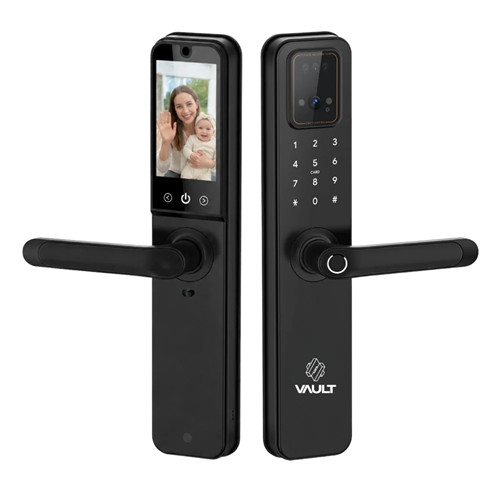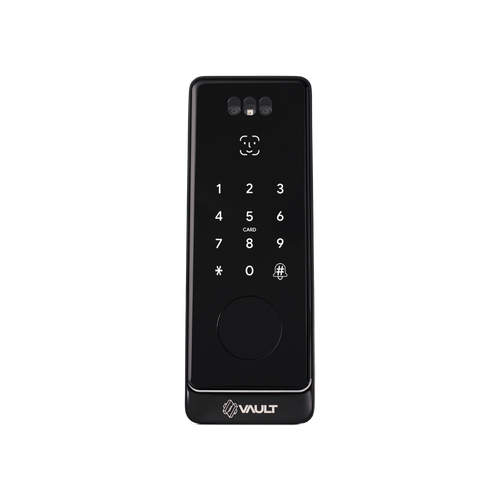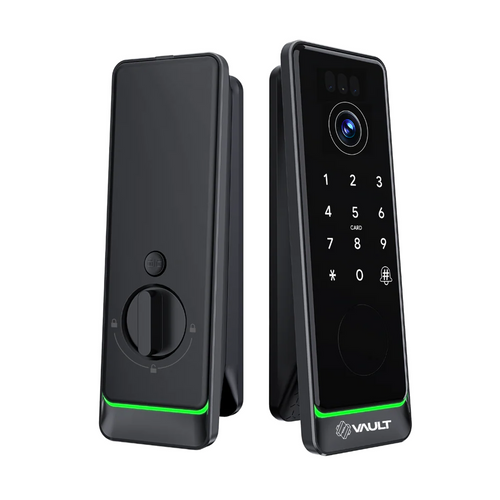


Vault Nexus Vision Smart Deadbolt with Video-To-Phone Intercom and Hands Free Face Recogniion
The Vault Nexus Vision is the Nexus smart deadbolt enhanced with a built-in camera and two-way video intercom plus integrated 2.4GHz Wi-Fi. See and speak with visitors and answer the door remotely through the Vault app, with real-time notifications - all without a separate gateway.
Part of Vault's premium Signature Range, the Nexus Vision supports 3D facial recognition, fingerprint, PIN code, Bluetooth, RFID card, mechanical key, and app control.
The Nexus Vision delivers its video intercom through the app - unlike the Guardian Vision and Fortress Vision, it does not include a separate indoor display screen. Its deadbolt configuration makes it mechanically different from Vault's mortice-lock models.

Usually ships in 3 business days.

Built-in Video Intercom & Wi-Fi
The Nexus Vision adds a built-in camera and two-way video intercom to the Nexus deadbolt. See and speak with visitors at your door directly from the Vault app.
With integrated 2.4GHz Wi-Fi, you receive real-time notifications and can answer the door remotely from anywhere - no separate gateway required. The video intercom is app-based; this model does not include an indoor display screen.

Wi-Fi is built into this lock, so remote unlocking, activity notifications and the video intercom all work over a 2.4GHz Wi-Fi network with nothing extra to add. There is no need to buy a separate Vault G5 Wi-Fi Gateway, so you save that added hardware cost and the extra setup step that a Bluetooth-only lock needs for remote access.
Note: The video below shows the base Vault Nexus model. The Nexus Vision variant adds a fish-eye video camera lens on the outside module for a two-way, app-based video intercom (there is no indoor display screen); all other hardware and functions are the same.
 Key Features
- Smart deadbolt with integrated push pull body design.
- 3D facial recognition, fingerprint, PIN code, RFID card, Bluetooth, and app control.
- Built-in 2.4GHz Wi-Fi for remote access, video intercom and smart-home integration - no separate gateway required.
- Two-way video intercom - see and speak with visitors from the Vault app (app-based; no indoor screen on this model).
- Real-time notifications and remote door answering from anywhere via the Vault app.
- Mechanical key backup included.
- IP55 weather-rated external module (outside unit) for entry-door use; the internal module is interior-use only.
 Facial Recognition Access
Nexus supports advanced 3D facial recognition for fast touch-free unlocking.
Facial recognition works alongside fingerprint, PIN, RFID card, Bluetooth app control, and backup key access.
Face-recognition setup and performance should be confirmed against the current product revision and installation environment.

The external (outside) module - which carries the fish-eye video camera - is IP55 weather rated for everyday outdoor exposure. The internal module, which houses the battery compartment and other electronics, is for interior use only and is not weather rated.
 What's In The Box

Nexus uses a deadbolt mechanism with bolt latch hardware. Confirm your door's existing bore and thickness before ordering.
 Battery, Power & Backup Access
- A rechargeable lithium battery is included. For realistic expectations on charge cycles and maintenance, see our guide to smart lock battery life.
- Mechanical key backup remains available in all power conditions.
- For best reliability, confirm battery condition and backup-key operation during setup.
 Suitable Uses
- Front doors
- Entry doors where a smart deadbolt is preferred over a mortice lock
- Homes wanting compact biometric access with slim depth
- Residential entry applications requiring multiple credential types
 Access Methods


 Dimensions

 Specifications
Wi-Fi Remote Access & Video Intercom
Unlike the standard Nexus, the Nexus Vision has built-in 2.4GHz Wi-Fi. Remote access, real-time notifications and the two-way video intercom all work without a separate gateway.
See and speak with visitors and answer the door from anywhere through the Vault app, and add Alexa or Google Home functionality on supported systems. The video intercom is delivered through the app - this model does not include a separate indoor display screen.
The lock also operates locally over Bluetooth, so face recognition, fingerprint, PIN, RFID and mechanical key entry keep working even if the internet is down.

Nexus includes a backup physical key for emergency access.
 Frequently Asked Questions

Nexus is a deadbolt smart lock rather than a mortice-lock model. It fits a bored deadbolt preparation rather than a mortice pocket.
Yes. It uses 3D facial recognition (50 face profiles per the supplied manual), alongside the other access methods.
No. Built-in 2.4GHz Wi-Fi means remote access, real-time notifications and the two-way video intercom all work without a separate gateway. See our guide to what a gateway does. The lock also works locally over Bluetooth if the internet is down.
No. The Nexus Vision's video intercom is app-only - you see and speak with visitors from the Vault app. If you want a lock with a built-in indoor screen, see the Guardian Vision or Fortress Vision.

No. Vault smart locks are not certified for fire-rated doors. For Queensland fire door compliance requirements, see Chapter 05 of our Buyer's Guide.
It includes a digital manual, backup mechanical key, installation template, RFID fobs (x2), bolt latch, and a rechargeable lithium battery.
Yes. Deadbolt fitment depends on your door's existing bore and thickness. See our installation guide and our guide to common mistakes.
 Additional Information
The Nexus Vision is the video-intercom variant of the standard Vault Nexus deadbolt, adding a fish-eye camera, app video intercom and built-in Wi-Fi. If you do not need the camera or remote features, the standard Nexus covers the same biometric access. See the Vault brand profile.
Nexus Vision is one of three Vision models. The lever Guardian Vision and the push-pull Fortress Vision both include an indoor display screen; the Nexus Vision's intercom is app-only. For the full lineup, see the Vault smart lock range overview.
Deploying facial recognition in a commercial, strata, or managed rental setting may trigger obligations under the Australian Privacy Act. Review these requirements before installation.
Deadbolt fitment depends on the existing bore and latch preparation, so compatibility should be checked before ordering. Choosing the wrong preparation is a common installation error - see our guide to common hardware and backset selection mistakes.
The Nexus Vision's IP55 rating applies to the external (outside) module only - the module carrying the fish-eye camera. The internal module (battery and electronics) is for interior use. Correct installation and maintenance still matter, particularly in coastal Queensland environments where salt air accelerates wear.
Powered by a rechargeable lithium battery, with a mechanical key backup for all power conditions. For charge-cycle expectations, see our guide to smart lock battery life.
The Nexus Vision is positioned as a residential front-door smart deadbolt. It is not suitable for fire-rated doors, high-cycle storeroom duty, or applications outside its residential design intent.

Vault Smart Locks products purchased in Australia are covered against defects in materials and workmanship under normal residential or commercial use for:
- Standard range: 12 months from the date of purchase
- Select Signature Range models: 24 months (as stated on the product listing or packaging)
Returns & Warranty|View Vault Warranty Policy
This warranty operates in addition to your rights under the Australian Consumer Law.

Vault Nexus User Manual
Please note: this manual is for the base Vault Nexus, not the Nexus Vision video-intercom variant. It does not cover the Vision's fish-eye camera or app video intercom; all other hardware, installation and specifications are shared.
Vault Nexus Vision - What's in the Box
Vault Nexus Vision - Dimensions
Vault Nexus Vision - Brochure


Vault Nexus User Manual
Please note: this manual is for the base Vault Nexus, not the Nexus Vision video-intercom variant. It does not cover the Vision's fish-eye camera or app video intercom; all other hardware, installation and specifications are shared.
Vault Warranty
Vault Smart Locks products are backed by a manufacturer’s warranty against defects in materials and workmanship under normal residential or commercial use. All claims are handled locally by Terry’s Tradies Pty Ltd and its associated websites, trading names, and subsidiaries – start with us and we’ll manage the process with Vault on your behalf.
Warranty Summary
 How to Make a Claim
- Contact Terry’s Gold Coast Smart Locks through the Returns & Warranty page above, with your proof of purchase (invoice or receipt).
- Have your product model and serial number (if applicable) ready, along with a brief description of the fault and your installation address.
- We assess your claim with Vault and advise the outcome and next steps. You may be asked to return the product for inspection.
What This Warranty Does Not Cover
- Normal wear and tear.
- Cosmetic damage that does not affect performance.
- Damage caused by incorrect installation, misuse, neglect, modification, or accident.
- Damage due to improper handling, or installation by an unlicensed technician.
- Products that have been disassembled, tampered with, or where the security seal or warranty label has been removed.
- Battery leakage or failure, or damage caused by incorrect battery usage.
- Environmental or weather damage caused by use outside recommended operating conditions.
- Labour, installation, or removal costs associated with replacing or reinstalling products.
- Work performed before warranty approval or assessment.
Important Notes
Where a Vault product carries an Ingress Protection (IP) rating, that rating is stated on the individual product listing, packaging or technical documentation. Unless stated otherwise in writing, the IP rating applies only to the external-facing side of the lock – not to the internal assembly, handle, battery compartment, electronics, cables or connectors. The internal side must be installed in a dry, sheltered position. An IP rating describes water resistance, not waterproofing: the lock must not be submerged, pressure washed, or exposed beyond its stated rating, and all seals, gaskets and covers must be correctly fitted and undamaged.
Vault’s manufacturer policy applies a warranty assessment holding fee, which is refundable if the fault is found to be covered under warranty. If a product is assessed as outside warranty or damaged by an excluded cause, a discounted replacement may be offered. We will confirm any applicable fees and options with you before any assessment proceeds.
Your Rights Under Australian Consumer Law
This warranty is provided in addition to your rights under the Australian Consumer Law (ACL). Our goods come with guarantees that cannot be excluded under the ACL. You are entitled to a replacement or refund for a major failure, and to have goods repaired or replaced if they fail to be of acceptable quality and the failure does not amount to a major failure.
It can be overwhelming with all the choices out there. We can help! We are experts with decades of experience in fitting locks of all types, not just Smart Locks. It is a free service we offer, and with just some photos and a few minutes of your time you can get expert advice and product recommendations tailored precisely to suit your needs.
Click on the image below to begin your expert Smart Lock consultation