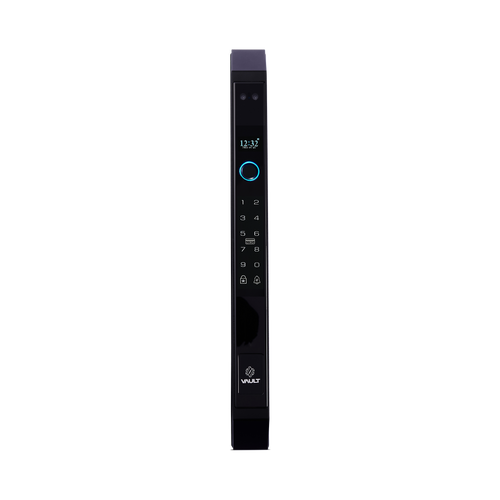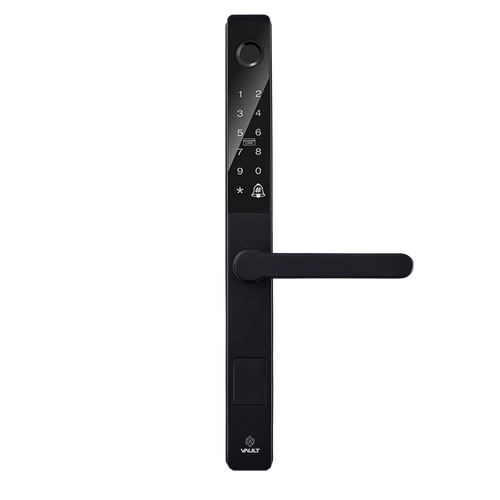


Vault Phantom Slimline Smart Lock - Lever or Knob - Black or Gold
At A Glance
 At A Glance
 DISPATCHShips in 3 Business Days


 Fingerprint
 PIN Code
 RFID Card
 Bluetooth App
 Mechanical Key
 Wi-Fi Remote
 Face
FaceNot Available
 Palm
PalmNot Available
The Vault Phantom (Vault_Phantom) is built for narrow aluminium and timber doors where space is tight but digital access control is still wanted. At 30mm wide it is the narrowest body in the Vault range, which makes it the answer on joinery that a larger escutcheon cannot fit or would look wrong on.
It opens by fingerprint, PIN code, RFID card or fob, Bluetooth from the Vault Smart Locks app, and a Euro-cylinder mechanical override key. It is offered in Black or Gold, with lever or knob handle options, and remote access is available when you add the optional Vault G5 Gateway. It suits residential and light commercial doors where both appearance and fitment matter.
If your door is a standard-width stile rather than a narrow one, the plain lever Vault Prime or the lever-or-knob Vault Neo may suit better, and both are cheaper per door than forcing a slimline lock onto a door that does not need one.
Usually ships in 3 business days from our warehouse (excludes weekends and Queensland public holidays).
 Key Features
- A 30mm body - the narrowest in the Vault range - for narrow aluminium and timber door stiles.
- Five credentials at the door: fingerprint, PIN code, RFID card or fob, Bluetooth app unlock and a mechanical override key.
- Available in Black or Gold, with lever or knob handle options across the range.
- Bluetooth-first control from the Vault Smart Locks app, with optional Wi-Fi remote access via the dual-band Vault G5 Gateway.
- IP65-rated external module for covered outdoor exposure.
- Euro-cylinder mortice fitment with broad hinged and sliding-door mortice compatibility at checkout.
- Mechanical key backup included for battery-out access.

The external (outside) module is IP65 weather rated for full dust protection and resistance to low-pressure water jets. The internal module, which houses the battery compartment and the rest of the electronics, is for interior use only and is not weather rated.
 Lock Layout

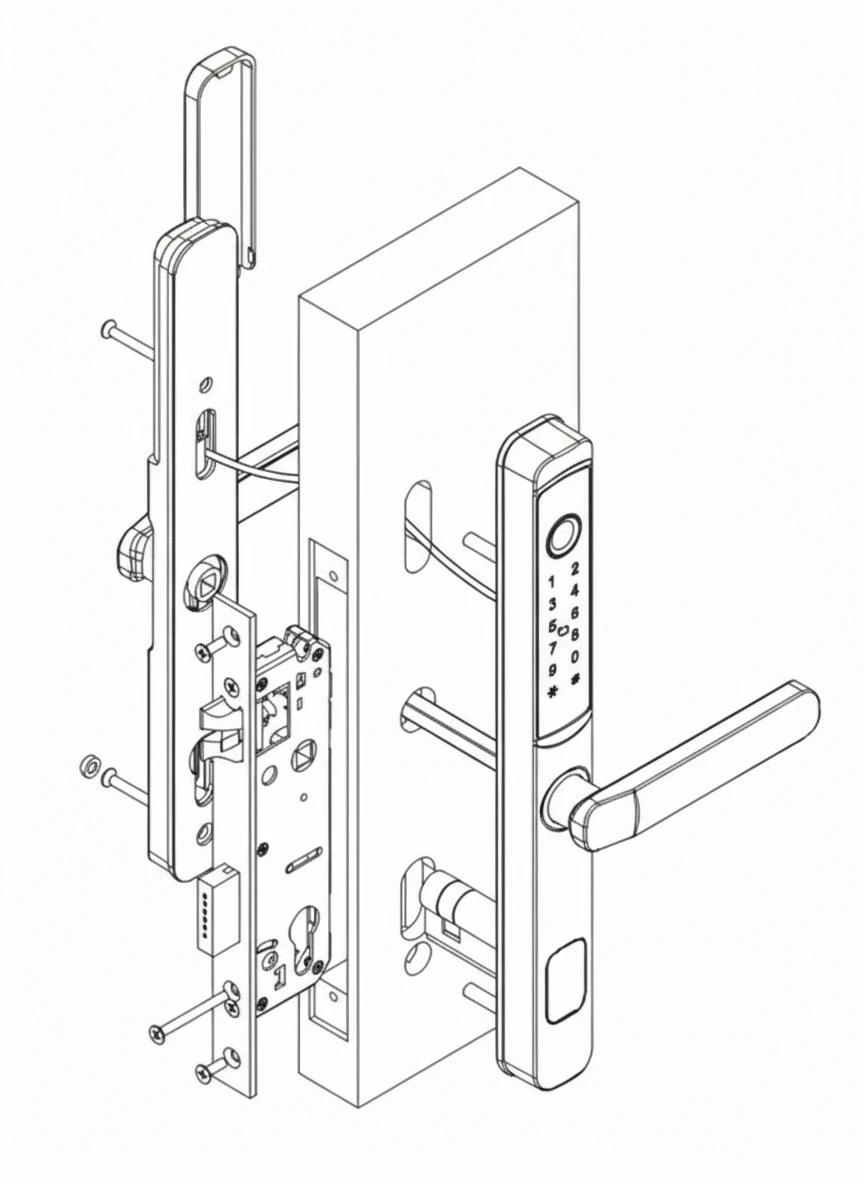
Assembly Overview

Access Methods
The Phantom carries five credentials at the door plus optional remote access. Compare credential types in the access methods comparison.
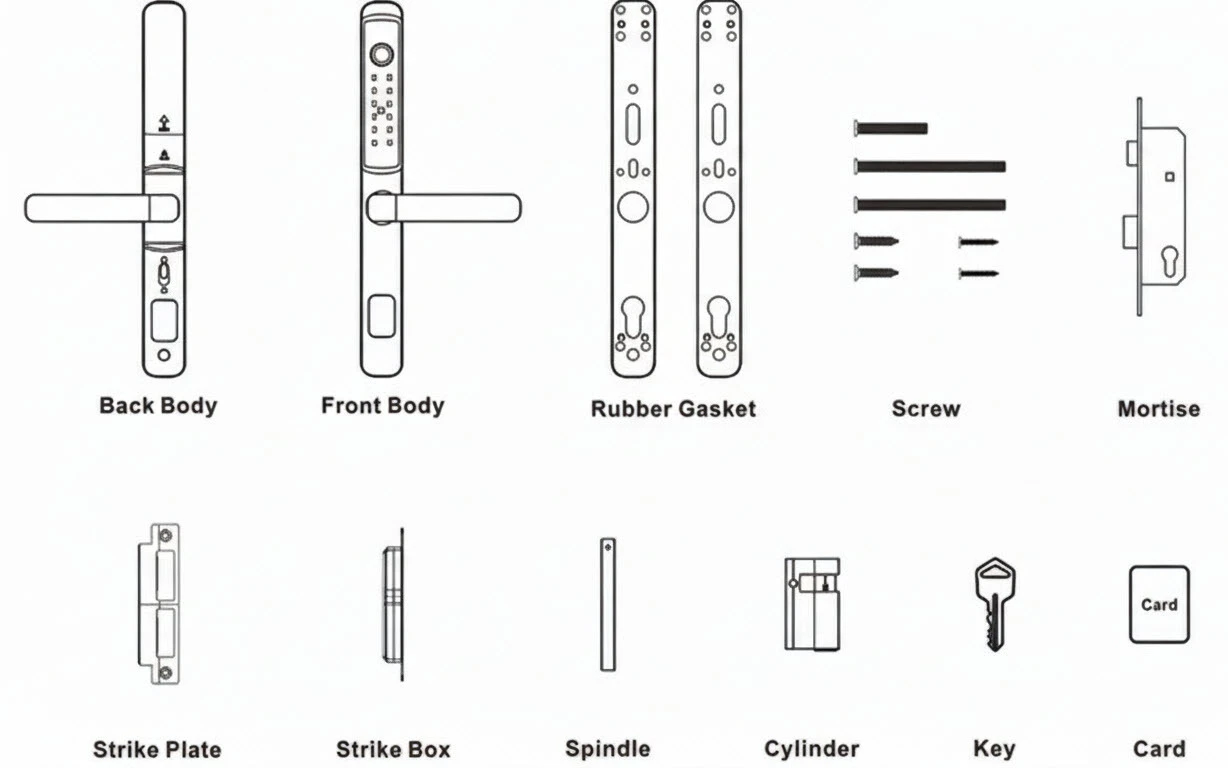
 What's in the Box

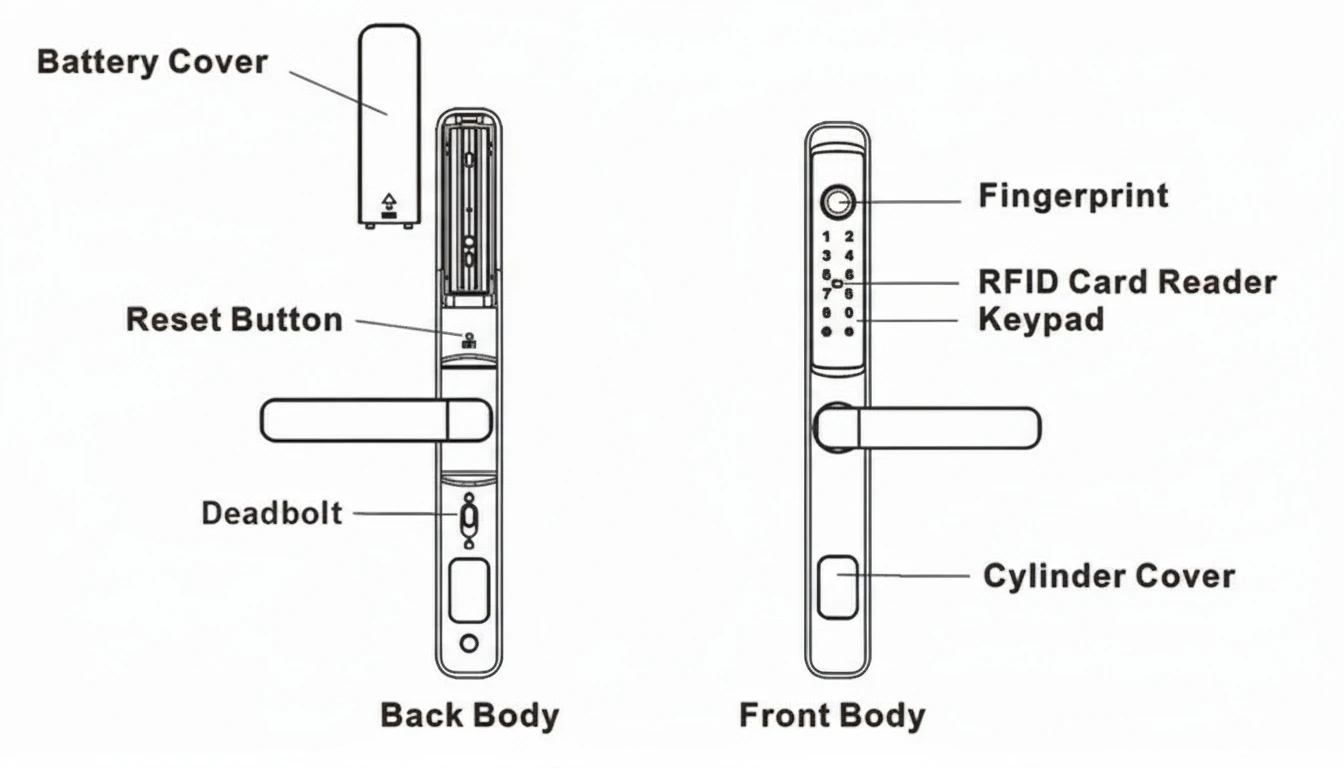
- Front (external) body with keypad, fingerprint reader and RFID reader
- Back (internal) body with battery compartment
- Rubber gaskets
- Mortice lock body
- Euro cylinder
- Spindle
- Strike plate and strike box
- Fixing screws
- Mechanical keys
- RFID card
- User manual

The Phantom takes four batteries, which are not supplied, and the optional Vault G5 Gateway is a separate purchase. Exact carton contents may vary between production runs - confirm on delivery.
 Mortice and Latch Options
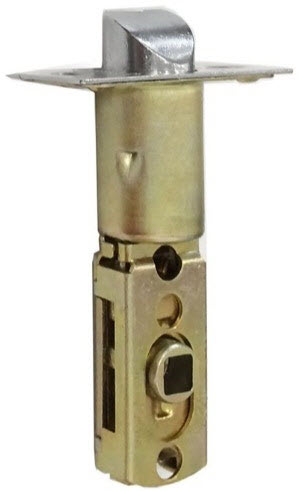
Phantom is supplied with a 60mm backset mortice for hinged and swinging doors as standard. Sliding doors need a hook bolt mortice instead. Confirm your door type and check your backset and door thickness before ordering.


Battery, Power and Backup Access
The Phantom is battery powered, with four batteries (not included) installed in the back body behind the battery cover as part of the standard setup. The manual specifies the count but not the cell type, so we do not state one - check the compartment marking when the lock arrives, or ask us and we will confirm before you order cells. Confirm battery installation and key access during initial setup.
The Phantom includes Euro-cylinder override keys for entry when the batteries are depleted or electronic access is unavailable. There is no USB rescue port on this model, so the key is the whole fallback. Keep a spare off-site rather than inside the door it opens - see where the keyhole is, storing the override key and what to do when the battery dies.
 Suitable Uses
- Narrow aluminium doors and screen-style entry doors with limited stile width.
- Narrow timber doors where a full-size smart lock body will not fit.
- Residential front, side and internal doors - including internal office and bedroom doors.
- Light commercial doors such as offices, studios and consulting rooms where managed access beats handing out keys.
- Hinged and swinging doors as standard; sliding doors with the correct hook bolt mortice.
- Covered or partly sheltered entries - the IP65 external module is better suited to those than to a fully exposed door.

Vault smart locks are not certified to AS 1905.1, so the Phantom must not be fitted to a fire door. Chapter 05 sets out where fire doors are required in Queensland and which locks are certified.
 Available Finish Options
 Black
Black
Lever or Knob
STK Vault_Phantom Gold
Gold
Lever only
STK Vault_Phantom
Black and Gold are variants of one product listing. Handle availability differs by finish: the lever is available in Black or Gold, and the knob is available in Black only. Confirm the required handle style and finish before ordering. Finish selection does not affect functionality, compliance, or performance.
 Vault Lever and Knob Smart Lock Range
The Phantom is the slimline member of the lever-and-knob family. The whole line-up is on the Vault range overview.
 Dimensions
Recommended clearance: 55mm.
 Full Specifications
The Phantom manual carries no specification table - lock structure and inclusions are shown as imagery. The figures above come from the manual's introduction badge and the product listing. Where a figure is not published we have left the row out rather than estimate it.
Wi-Fi Remote Access (Optional)
The Phantom is controlled over Bluetooth from the Vault Smart Locks app, available on iOS 
 and Android. Bluetooth control works when you are near the door and needs no internet connection. Vault runs its own app platform - it is not a TTLock product.
Adding the optional Vault G5 Gateway bridges the lock to your home Wi-Fi so you can unlock remotely, issue and revoke passcodes from anywhere, and view the unlock history. For how a gateway works and whether you need one, see what a gateway does and the note on 2.4GHz Wi-Fi and band steering, or the blog on whether you need a gateway at all. The wider range sits in modules and Wi-Fi gateways.
 Frequently Asked Questions
That is exactly what it is for. At 30mm it is the narrowest body Vault makes, and it suits aluminium and timber stiles where a larger lock would not fit or would look out of proportion. Allow the 55mm recommended clearance as well as the 30mm width.
Yes, when paired with a compatible sliding hook bolt mortice. The standard 60mm backset mortice is for hinged doors only, so a different body must be selected at checkout for a slider.
No. The Phantom uses fingerprint, PIN, RFID card, Bluetooth app control and a mechanical key. For 3D facial recognition on a lever lock, see the Vault Guardian; for a slimline body with face, the Alpha or Zenith.
Yes, with the optional Vault G5 Gateway. Without it the lock works locally over Bluetooth and onboard credentials, which is genuinely enough for most households - see what a gateway does.
Black or Gold. The lever is available in either; the knob is available in Black only. Confirm the handle style and finish before ordering - they are chosen at purchase and cannot be exchanged afterwards.
 Additional Information
The Phantom suits doors where stile width is limited. Measure carefully before ordering: stile width and door thickness both affect whether a slimline smart lock will fit, and a 30mm body still needs the 55mm clearance around it.
The external module is IP65 - full dust protection and resistance to low-pressure water jets. The previous version of this listing described it in one place as "IP55/IP65", which was an internal inconsistency rather than a dual rating; the Phantom manual states IP65 and that is the figure we carry. If the door is genuinely exposed rather than covered, the IP66-rated Vault Eclipse is the better slimline pick.
Fitment must be matched to the actual door and application. Selecting the wrong mortice type is one of the most common installation errors, covered in backset mistakes and spindle mistakes. On the Gold Coast we offer a measure and install service.

It is the slimline lever-or-knob lock for narrow stiles. For a standard-width lever see the Prime or Triton; for another slimline option the Eclipse, or the face-recognition Zenith. See the full Vault range guide and the Vault brand profile.

Vault charges a refundable assessment holding fee on warranty returns - $200 in metropolitan areas and $250 elsewhere - refunded when the claim is assessed as a genuine warranty fault. We manage the claim with Vault on your behalf.
 Warranty
Vault Smart Locks products purchased in Australia are covered against defects in materials and workmanship under normal residential or commercial use for:
- Standard range: 12 months from the date of purchase
- Select Signature Range models: 24 months (as stated on the product listing or packaging)
Returns & Warranty|View Vault Warranty Policy
This warranty operates in addition to your rights under the Australian Consumer Law.
 Download PDF Resources
Thirteen-page manual: lock structure and inclusions, the eight-step installation sequence covering the mortice, cylinder, spindle and clutch handing, front and back body fitting with the rubber gaskets and A and B connectors, battery fitting and the strike box, then app registration through to fingerprint enrolment and unlock records.
Setup guide for the optional Vault G5 Wi-Fi gateway that adds remote unlocking, remote passcodes and clock calibration to this lock.
Vault Phantom - FAQ, Setup and Owner's Guide
The questions below go further than the summary on the main page. For general smart lock questions see the Smart Lock FAQ, and for the wider decision the Ultimate Smart Lock Buyer's Guide.
Narrow Doors and Fitment

The body is 30mm wide, which is the narrowest Vault makes, and it needs a 55mm recommended clearance around it. That covers most narrow aluminium and timber stiles. Below about 50mm of usable stile you are into specialist territory - our stile width guidance sets out where the practical limits sit, and it is worth a call before ordering.
Four: stile width, door thickness, backset, and whether the door is hinged or sliding. Chapter 02 walks through each one, and examples of helpful photos shows what to send us if you would rather we checked.

A 60mm backset, on a Euro-cylinder body, for hinged and swinging doors. If your existing preparation is a different backset, the Vault Hinged/Swinging Mortice range covers 25mm through 70mm at 85mm centres.

No. The handle direction is set during installation using the clutch triangle marking on the spindle assembly, so one lock suits a left-hand or right-hand door. If handing is an unfamiliar term, see our handing guide.

Add the Vault Rebate Kit, which converts a mortice or tubular latch for an overlapping pair. Flush pairs and single doors do not need it.
Eight steps in the manual: mortice, cylinder, spindle and clutch with the triangle handing marking, front and back bodies with the rubber gaskets and the A and B connectors, four batteries, then the strike box. On a door already prepped for a comparable lock it is a competent DIY job; on a door that needs new preparation it is not. See when DIY is appropriate.
Finishes and Handle Choice
The lever comes in Black or Gold. The knob comes in Black only. There is no gold knob, so if you want gold you are choosing a lever by default.

It matters for accessibility and for wet hands. A lever is easier to operate with a full hand, an elbow or reduced grip strength; a knob is more compact and suits a tight reveal better. Neither variant is certified to AS 1428.1, so neither is a DDA compliance solution.

No - the finish and handle style are chosen at purchase and are not a field-swappable part. Confirm both before ordering.
Access and Credentials
Fingerprint, PIN code, RFID card or fob, Bluetooth unlock from the Vault Smart Locks app, and the Euro-cylinder mechanical key. The access methods comparison sets out how each one behaves and where each one fails.
Yes - permanent, timed and one-time PIN codes are all available from the app, so a cleaner can have a code that works only on their day and a one-off visitor gets one that expires after a single use. For short-stay use see our Airbnb and short-stay chapter.
One RFID card is supplied. More can be added through the app; a single card is enough to prove the reader works but not enough for a household, so plan on ordering extras if cards are going to be your main credential.

Yes - the unlock record reads in the app over Bluetooth, and remotely once a G5 gateway is paired.
No. Vault runs its own Vault Smart Locks app platform - it is not TTLock, does not use the TTLock app, and does not carry the TTLock feature set. Our app platforms chapter compares the ecosystems.
Power and Backup
Four cells, fitted in the back body behind the battery cover. The manual specifies the count but not the type, so we do not state one on the page rather than guess - check the compartment marking on arrival, or ask us and we will confirm before you buy cells.
The Euro-cylinder override key is the fallback, and on this model it is the only one - there is no USB rescue port. That makes two things worth doing: replace the cells at the first low-battery warning, and keep a key somewhere other than inside the door it opens. See storing the override key.

Vault does not publish a figure for the Phantom, so we do not quote one. As a rule of thumb across comparable slimline locks, expect months rather than weeks, with heavy fingerprint use and a cold, damp position both shortening it. Our battery life guide is honest about the gap between quoted and real figures.
Weather and Position
It can, but it is not the best choice for one. The external module is IP65, which covers dust and low-pressure water jets - fine for a covered or partly sheltered entry. For a fully exposed door the IP66-rated Eclipse is the better slimline pick. The internal module is not rated and stays inside on either lock.

An IP rating measures ingress, not corrosion, so it tells you nothing about a beachfront position. A covered entry, a periodic fresh-water rinse of the outside panel and realistic expectations are the practical answer - our notes on coastal environments are honest about what a Gold Coast beachfront door does to any lock.

Keep the fingerprint reader and card area clean with a dry cloth, and check a few times a year that the door still closes cleanly against the strike. Door misalignment is the most underestimated cause of motor strain and battery drain on any smart lock.
Choosing Between Vault Models
Almost the same lock in different clothes. The Phantom is 30mm and comes in Black or Gold; the Eclipse is 31mm, Silver only, carries the higher IP66 rating and publishes a much fuller specification set including a 12-month battery figure and a wide list of compatible mortice sizes. If your door is exposed, or you need a documented mortice match, the Eclipse. If you want black or gold hardware, the Phantom.
Then the Vault Alpha at 35mm or the Zenith at 35mm, both push-pull. A 3D face module needs depth and width the 30mm Phantom body does not have, which is the honest reason it is not offered here.
Twelve months from purchase on the standard range, 24 months on select Signature Range models where the listing or packaging says so. Batteries, consumables, cosmetic finishes, misuse and incorrect or unlicensed installation are excluded. Vault charges a refundable $200 metropolitan or $250 regional assessment holding fee on a warranty return, refunded when the fault is assessed as genuine. We manage the claim - see Returns and Warranty.
Related products, guides and chapters
Slimline siblings: Vault Eclipse · Vault Alpha · Vault Zenith · Vault Lumina.
Standard-width lever and knob locks: Vault Prime · Vault Neo · Vault Triton · Vault Guardian (3D face).
Accessories: Vault G5 Gateway · Hinged/Swinging Mortice · Sliding Hook Mortice · 6068 Mortice · Rebate Kit.
Buyer's Guide chapters: Ch 01 Mortice and Latch · Ch 02 Measuring Your Door · Ch 03 Access Methods · Ch 04 Door Types · Ch 08 Gateways · Ch 10 Vault brand profile · Ch 11 Standards · Ch 12 Installation · Ch 13 Smart Lock FAQ.
Blogs: Vault range overview · Measuring your lock backset · Mechanical key override · Gateways compared · The realities of electronic door locks · Examples of helpful photos · Site survey and installation.
What's in the Box - Vault Phantom
- 1 x Front (external) body with keypad, fingerprint reader and RFID reader
- 1 x Back (internal) body with battery compartment
- Rubber gaskets
- 1 x Mortice lock body
- 1 x Euro cylinder
- 1 x Spindle
- 1 x Strike plate and 1 x strike box
- Fixing screws
- Mechanical keys
- 1 x RFID card
- 1 x User manual
Batteries and the optional Vault G5 Gateway are not included. The mortice type and size is a checkout selection rather than a fixed carton item. Exact contents may vary between production runs; confirm on delivery.
Reference Diagrams
Vault Phantom - User Manual


PDF Files - Vault Phantom
Thirteen-page manual: lock structure and inclusions, the eight-step installation sequence covering the mortice, cylinder, spindle and clutch handing, front and back body fitting with the rubber gaskets and A and B connectors, battery fitting and the strike box, then app registration through to fingerprint enrolment and unlock records.
Setup guide for the optional Vault G5 Wi-Fi gateway that adds remote unlocking, remote passcodes and clock calibration to this lock.
Vault Warranty
Vault Smart Locks products are backed by a manufacturer's warranty against defects in materials and workmanship under normal residential or commercial use. All claims are handled locally by Terry's Tradies Pty Ltd and its associated websites, trading names, and subsidiaries - start with us and we'll manage the process with Vault on your behalf.
Warranty Summary
How to Make a Claim
- Contact Terry's Gold Coast Smart Locks through the Returns & Warranty page above, with your proof of purchase (invoice or receipt).
- Have your product model and serial number (if applicable) ready, along with a brief description of the fault and your installation address.
- We assess your claim with Vault and advise the outcome and next steps. You may be asked to return the product for inspection.
 What This Warranty Does Not Cover
- Normal wear and tear.
- Cosmetic damage that does not affect performance.
- Damage caused by incorrect installation, misuse, neglect, modification, or accident.
- Damage due to improper handling, or installation by an unlicensed technician.
- Products that have been disassembled, tampered with, or where the security seal or warranty label has been removed.
- Battery leakage or failure, or damage caused by incorrect battery usage.
- Environmental or weather damage caused by use outside recommended operating conditions.
- Labour, installation, or removal costs associated with replacing or reinstalling products.
- Work performed before warranty approval or assessment.
Important Notes
Where a Vault product carries an Ingress Protection (IP) rating, that rating is stated on the individual product listing, packaging or technical documentation. Unless stated otherwise in writing, the IP rating applies only to the external-facing side of the lock - not to the internal assembly, handle, battery compartment, electronics, cables or connectors. The internal side must be installed in a dry, sheltered position. An IP rating describes water resistance, not waterproofing: the lock must not be submerged, pressure washed, or exposed beyond its stated rating, and all seals, gaskets and covers must be correctly fitted and undamaged.
Vault's manufacturer policy applies a warranty assessment holding fee, which is refundable if the fault is found to be covered under warranty. If a product is assessed as outside warranty or damaged by an excluded cause, a discounted replacement may be offered. We will confirm any applicable fees and options with you before any assessment proceeds.
This warranty is provided in addition to your rights under the Australian Consumer Law (ACL). Our goods come with guarantees that cannot be excluded under the ACL. You are entitled to a replacement or refund for a major failure, and to have goods repaired or replaced if they fail to be of acceptable quality and the failure does not amount to a major failure.

Confused? Overwhelmed? We get it.
Choosing the right smart lock can be genuinely tricky - door types, backsets, app platforms, compatibility with your existing hardware... there is a lot to consider. We have decades of experience fitting locks of all types, including smart locks, and we are happy to help.
Our expert recommendation service is free. Upload a few photos of your door and describe what you need, and one of our qualified locksmiths will give you a personalised recommendation.
Get Your Free Recommendation →How it works - three easy steps:
1. Upload photos
A few clear shots of your door, lock and frame - inside and out.
2. We assess
Our locksmith reviews your setup and requirements - door type, weather exposure, how you want to use it.
3. You get a recommendation
A personalised recommendation tailored to your door, budget and needs. No pressure, no upsell.
Also useful while you are deciding: